1
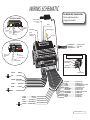
NEW FEATURE – SMARTSTART™ 5. When teamed up with a SmartStart module (ASMC100), remote start features can be accessed using a smartphone. These features include lock/unlock, engine start/stop, trunk release, panic and alarm notifications. For alarm notifications, the Xpresskit™ bypass option (D2D) must be enabled. ™ To use these features, connect the SmartStart™ module to the SmartStart™ port located at the back of the remote start module (see the wiring diagram). The SmartStart™ feature must be enabled using the programming options list found in this guide. TESTING Before putting the vehicle back together, it is recommended to check that the system operates properly. The following testing procedures should be used to verify proper installation and operation of the system. Before testing, make sure that all connections are soldered and that the unit is plugged in. Make sure the system properly enters and exits ready mode: Ready mode is a sequence of steps that must be followed in order to allow manual transmission vehicles to be remote started. To get into ready mode: If Ready Mode is enabled by remote If Ready Mode is enabled by handbrake 1. Ensure that all the doors, hood and trunk are closed. Make sure that the gear selector is in the neutral position. 2. With the engine already running, apply the 2. With the engine already running, apply the parking brake once and release the brake parking brake twice within 10 sec. pedal. Make sure to release the brake pedal. The parking lights will flash 3 times quickly and remain lit. Skip to step 4. 3. Within 20 sec. of engaging the parking brake, press and hold , or on the transmitter. The parking lights will flash 3 times quickly and remain lit. 4. Remove the key: the engine will continue running. 6. For approx. 1 second, press either: to lock the doors and shut down the engine; x to unlock the doors and shut down the engine; x to shut down the engine without affecting the doors. 7. The parking lights will flash twice to confirm ready mode activation. The system will exit ready mode if a door, the hood or the trunk is opened, if the brake pedal is pressed, if the parking brake is disengaged or if the ignition key is turned to the IGNITION ON (RUN) position. Remote-start the engine and listen for starter drag. If the starter cranks for too long, carry out another tach programming procedure. Hood switch shutdown. With the vehicle running under the remote car starter, open the hood; the vehicle should shut down. If it does not shut down, check the hood pin-switch and its connector. Brake shutdown circuit. With the vehicle running under the remote car starter, press and release the brake pedal. The engine should shut down immediately. If it continues to run, check the brake switch connection. P.6 http://www.prostart.org SETTING UP THE TACH VIRTUAL TACH ADJUSTMENT Warning: For automatic transmissions only. Virtual Tach System combines the latest microcontroller technology and a complex algorithm that took years to develop. VTS is able to effectively monitor the engine starting sequence and release the starter at the right time without physically connecting the tach wire to the remote starter. The VTS constantly monitors the data and readjusts itself automatically in order to maximize its capability to start the engine properly in any weather or deteriorating battery condition. OPTIONAL TIME DELAY ADJUSTMENT IN VIRTUAL TACH SYSTEM Follow these steps to program crank time adjustment, if needed: 1. In programming mode (page 3). Before the lights go out, press and hold the brake pedal and press the LOCK and UNLOCK buttons simultaneously the parking lights will flash 4 times. Do not release the brake pedal. 2. Press the LOCK button if you wish to increase the time delay or the UNLOCK button if you want to decrease it. The time delay will be increased or decreased by 50 ms and the parking lights will flash once every time the LOCK or UNLOCK button is pressed. 3. Press the TRUNK button to save the settings you have entered. 4. Release the brake pedal – the time delay programming is now complete. MULTI-SPEED TACH PROGRAMMING (IF INSTALLED) 1. In programming mode (page 3). 2. Before the lights go out, press and hold the brake pedal and press the LOCK and UNLOCK buttons simultaneously the parking lights will flash 4 times. At that point, release the brake pedal. 3. Start the engine and allow the vehicle to reach regular engine idle speed. 4. Once the engine is running at normal idle speed, press the brake pedal and keep it down until you hear the parking lights output click 5 times. 5. Release the brake pedal the tach programming is now complete. Caution! – Tach jumper settings: Some new vehicles have a higher TACH voltage threshold, which would fall out of the normal TACH trigger circuit of the remote car starter. Changing the jumper to TACH Threshold HIGH will allow the module to properly detect the TACH signal. BUT, if you are having trouble with the TACH, please call our tech support team. Problems requiring changing the TACH jumper settings are very rare. 5. Exit the vehicle and close all doors, hood and trunk. x 6. To save the new settings: press LOCK and UNLOCK simultaneously. If 3 chirps are returned, the new setting has been saved. You have 20 more seconds to select one of the sub-menus if needed. Quick Installation Guide TRANSPONDER PROGRAMMING This procedure is detailed in the full installation guide. To obtain a copy of the installation guide, please visit our website at www.prostart.org. RESETTING THE MODULE WARNING! By resetting the module, all programmed values are erased i.e.: tach, transmitter as well as programming options. The programming options are returned to their default values. 1. Enter programming Mode (page 3). 2. Once having reached the programming mode, quickly press and release the brake pedal until the parking lights flash 8 times. BYPASS Remote starters of this series have the ability to work in two way mode (D2D) with Xpresskit bypass modules. They also offer one way communication with Xpresskit, ADS and Fortin brand bypass modules. Note: For Hardware 5.0 and higher there can only be one bypass connected to the unit. Quick installation Guide http://www.prostart.org P.5