1
46/50 Integrated Mixer Amplifier
CLOUD ELECTRONICS LIMITED
6
Setup And Installation Guide
Microphone Inputs
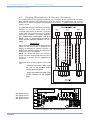
Two microphone inputs are provided each having electronically balanced, transformer-less circuitry
configured for optimum low noise performance. The input impedance is greater than 2kW and suitable for
microphones in the 200W to 600W range. Inputs are via 3-pin plug in screw terminal type connectors
(Phoenix type) located on the rear panel. A facility to provide 15V phantom power is included for each
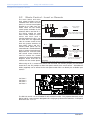
microphone that is activated by setting the relevant internal jumpers from the list below to the ‘ON'
position:
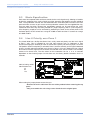
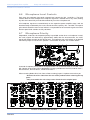
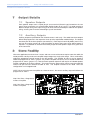
J1: Mic 1 Phantom Power
J2: Mic 2 Phantom Power
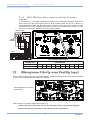
Location of Jumper J1 and J2
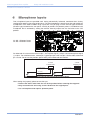
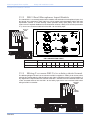
For balanced mics connect the screen to pin 1, the in-phase signal (+) to pin 3 and reverse phase signal
(-) to pin 2. For unbalanced mics, connect pin 1 (ground) to pin 2 then use pin 1 for the cable screen and
pin 3 as hot. Do not use the phantom power facility with unbalanced terminations.
BALANCED
UNBALANCED
MIC INPUT TERMINATION
3 POLE
CONNECTOR
3 POLE
CONNECTOR
1
2
1
3
GROUND (SCREEN)
2
3
GROUND (SCREEN)
REV-PHASE(-)
IN-PHASE (+)
Diagrams Show Balanced and Unbalanced Microphone Wiring
IN-PHASE (+)
When setting the jumper(s) please ensure that you:
• Remove the mains cable from the rear of the product before removing the top panel.
• Only reassemble the unit using screws identical to the original parts.
• Use a microphone that requires phantom power.
5
V6 070113