1
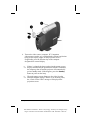
Connecting a Camcorder, Videocassette Recorder, or
DVD Player to the Compaq Multimedia Adapter
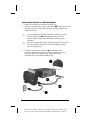
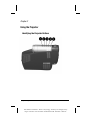
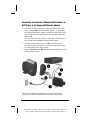
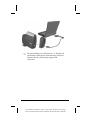
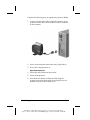
1. Use an RCA cable to connect a videocassette recorder to the
video connector ➊ on the Multimedia Adapter. To play audio
through the Multimedia Adapter, connect an audio cable to the
source audio-out jack and the audio-in jack on the Multimedia
Adapter ➋.
Use an S-video cable to connect a camcorder or DVD player to
the S-video connector ➌ on the Multimedia Adapter.
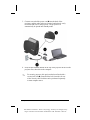
2. Connect one end of the power cord ➍ into the back of the
projector and the other end to an electrical outlet that is easily
accessible and close to the projector.
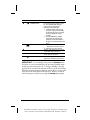
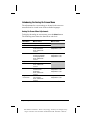
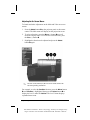
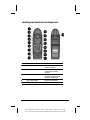
3. Press the Source button ➎ on the Multimedia Adapter to select
different input sources.
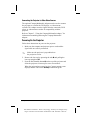
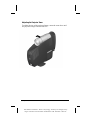
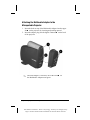
The Compaq Multimedia Adapter can remain attached to the
projector, or it can be removed and stored in the carrying case.
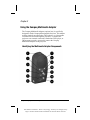
Using the Compaq Multimedia Adapter
Part Number: 216023-001 - Writer: Carey Gregg - Saved by: The Integrity Group
Pages: 7 Words: 904 Saved date: 09/22/0010:18 AM File Name: Ch03.doc
35