1
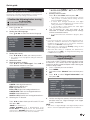
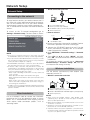
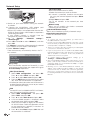
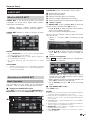
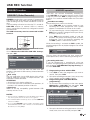
TINS-F640WJZZ
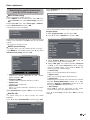
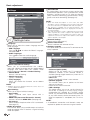
12P10-PL-NG
HRVATSKI
SRPSKI
SLOVENŠČINA
POLSKI
MAGYAR
ČESKY
SLOVENSKY
УКРАЇНСЬКА
EESTI
LATVISKI
LIETUVIŠKAI
ΕΛΛΗΝΙΚΑ
NET
®
TÜRKÇE
PRIRUČNIK ZA RUKOVANJE / UPUTSTVO ZA UPOTREBU / PRIROČNIK ZA UPORABO / INSTRUKCJA OBSŁUGI
/ KEZELÉSI ÚTMUTATÓ / NÁVOD K OBSLUZE / NÁVOD NA OBSLUHU / ІНСТРУКЦІЯ З ЕКСПЛУАТАЦІЇ /
PIN
KULLANMA KILAVUZU / MANUAL DE UTILIZARE / ДАПАМОЖНІК ПА ЭКСПЛУАТАЦЫІ / OPERATION MANUAL
Tiskano u Poljskoj
Štampano u Poljskoj
Tiskano v Poljska
Wydrukowano w Polsce
Készült Lengyelországban
Vytištěno v Polsku
Vytlačené v Poľsku
Надруковано в Польщі
Trükitud Poolas
Iespiests Polijā
Išspausdinta Lenkijoje
Τυπώθηκε στην Πολωνία
Polonya’da basılmıştır
Tipărit în Polonia
Надрукавана ў Польшча
Printed in Poland
F640WJZZ KASUTUSJUHEND / LIETOŠANAS ROKASGRĀMATA /NAUDOJIMO INSTRUKCIJA / ΕΓΧΕΙΡΙΔΙΟ ΛΕΙΤΟΥΡΓΙΑΣ /
Sharp Electronics Europe Ltd.
4 Furzeground Way, Stockley Park
Uxbridge, Middlesex, UB11 1EZ, UK
PRIRUČNIK ZA RUKOVANJE
UPUTSTVO ZA UPOTREBU
PRIROČNIK ZA UPORABO
INSTRUKCJA OBSŁUGI
KEZELÉSI ÚTMUTATÓ
NÁVOD K OBSLUZE
NÁVOD NA OBSLUHU
ІНСТРУКЦІЯ З ЕКСПЛУАТАЦІЇ
KASUTUSJUHEND
LIETOŠANAS ROKASGRĀMATA
NAUDOJIMO INSTRUKCIJA
ΕΓΧΕΙΡΙΔΙΟ ΛΕΙΤΟΥΡΓΙΑΣ
KULLANMA KILAVUZU
MANUAL DE UTILIZARE
ДАПАМОЖНІК ПА ЭКСПЛУАТАЦЫІ
OPERATION MANUAL
БЕЛАРУСЬ ROMÂNÂ
NET
http://www.sharp.eu
LCD TELEVIZOR U BOJI
LCD TELEVIZOR U BOJI
BARVNI LCD TELEVIZOR
TELEWIZOR KOLOROWY LCD
LCD SZÍNESTELEVÍZIÓ
TELEVIZOR S BAREVNOU LCD OBRAZOVKOU
TELEVÍZOR S FAREBNOU LCD OBRAZOVKOU
КОЛЬОРОВИЙ ТЕЛЕВІЗОР З
РІДКОКРИСТАЛІЧНИМ ДИСПЛЕЄМ
VÄRVILINE LCD-TELER
ŠĶIDRO KRISTĀLU EKRĀNA (LCD)
KRĀSU TELEVIZORS
SPALVINIS LCD TELEVIZORIUS
ΤΗΛΕΟΡΑΣΗ ΜΕ ΕΓΧΡΩΜΗ ΟΘΟΝΗ LCD
(ΥΓΡΩΝ ΚΡΥΣΤΑΛΛΩΝ)
LCD RENKLİ TELEVİZYON
TELEVIZOR COLOR LCD
ВАДКАКРЫСТАЛІЧНЫ КАЛЯРОВЫ ТЭЛЕВІЗАР
LCD COLOUR TELEVISION
NET
ENGLISH
LC-40LE730E /LC-46LE730E
LC-40LE732E /LC-46LE732E
SHARP CORPORATION
LC-40LE730E
LC-46LE730E
LC-40LE732E
LC-46LE732E
LC-40LE730E NET
LC-46LE730E NET
LC-40LE732E NET
LC-46LE732E NET
(111.4) [115.2]
DivX®
([40])
(947) [1081]
DivX Certified® to play DivX® video up to HD 1080p, including premium content.
ABOUT DIVX VIDEO: DivX® is a digital video format created by DivX, LLC, a subsidiary of Rovi Corporation. This
is an official DivX Certified® device that plays DivX video. Visit divx.com for more information and software tools to
convert your files into DivX videos.
(887) [1020.1]
SPECIAL NOTE FOR USERS IN THE U.K.
{70}
([18.8])
The mains lead of this product is fitted with a non-rewireable (moulded) plug incorporating a 13A fuse. Should
the fuse need to be replaced, a BSI or ASTA approved BS 1362 fuse marked
or )5) and of the same rating as
above, which is also indicated on the pin face of the plug, must be used.
Always refit the fuse cover after replacing the fuse. Never use the plug without the fuse cover fitted.
In the unlikely event of the socket outlet in your home not being compatible with the plug supplied, cut off the
mains plug and fit an appropriate type.
(350.5) [388.5]
(500) [574.5]
(560) [635]
Covered by one or more of the following U.S. Patents:
7,295,673; 7,460,668; 7,515,710; 7,519,274
(630) [705]
ABOUT DIVX VIDEO-ON-DEMAND: This DivX Certified® device must be registered in order to play purchased
DivX Video-on-Demand (VOD) movies. To obtain your registration code, locate the DivX VOD section in your device
setup menu. Go to vod.divx. com for more information on how to complete your registration.
DANGER:
The fuse from the cut-off plug should be removed and the cut-off plug destroyed immediately and disposed of in
a safe manner.
Under no circumstances should the cut-off plug be inserted elsewhere into a 13A socket outlet, as a serious
electric shock may occur.
To fit an appropriate plug to the mains lead, follow the instructions below:
(457) [484.6]
(242) [265]
([400])
([400])
The wires in the mains lead are coloured in accordance with the following code:
Blue: Neutral
Brown: Live
As the colours of the wires in the mains lead of this product may not correspond with the coloured markings
identifying the terminals in your plug, proceed as follows:
• The wire which is coloured blue must be connected to the plug terminal which is marked N or coloured black.
• The wire which is coloured brown must be connected to the plug terminal which is marked L or coloured red.
Ensure that neither the brown nor the blue wire is connected to the earth terminal in your three-pin plug.
Before replacing the plug cover make sure that:
• If the new fitted plug contains a fuse, its value is the same as that removed from the cut-off plug.
• The cord grip is clamped over the sheath of the mains lead, and not simply over the lead wires.
IF YOU HAVE ANY DOUBT, CONSULT A QUALIFIED ELECTRICIAN.
(196) [187.2]
IMPORTANT:
40”: ( )
46”: [ ]
40”/46”: ([ ])
OPERATION MANUAL
ENGLISH
• The illustrations and the OSD in this operation manual are for explanation purposes and may vary slightly from the actual
operations.
• The examples used throughout this manual are based on the LC-40LE730E NET model.
• The LC-40LE730E NET, LC-40LE732E NET, LC-46LE730E NET, and LC-46LE732E NET models are compatible with high
definition broadcasts, H.264 compressed (MPEG4 H.264, MPEG4 AVC, MPEG4 AVC/H.264).
Contents
1
2
Dear SHARP customer ................................................. 2
Important Safety Precautions ....................................... 2
Remote Control unit ..................................................... 3
TV (Front view) ............................................................. 4
TV (Side and rear view) ................................................. 4
Preparation ................................................................. 5
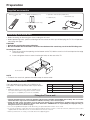
Supplied accessories ................................................... 5
Attaching the stand unit ............................................... 5
Optional accessory ....................................................... 5
Fixing the TV on a wall................................................... 5
Inserting the batteries ................................................... 6
Using the remote control unit ....................................... 6
Cautions regarding the remote control unit ................... 6
Quick guide ................................................................. 7
Initial installation overview ............................................. 7
Before turning on the power ......................................... 8
Inserting a CA Card ...................................................... 8
Initial auto installation .................................................... 9
Checking quality and signal strength ............................ 9
Watching TV ............................................................. 10
Daily operation ........................................................... 10
Switching on/off ......................................................... 10
Switching between analogue and digital broadcasts .. 10
Changing channels ..................................................... 10
Selecting an external video source .............................. 10
Selecting audio language ............................................ 10
Switching subtitle language ........................................ 10
EPG ........................................................................... 11
Selecting a programme using EPG ............................. 11
Teletext ...................................................................... 12
Using MHEG-5 application (UK only) .......................... 12
Connecting external devices ........................... 13
Introduction to connections ........................................ 13
HDMI connection ..................................................... 14
Component connection ........................................... 14
VIDEO connection ................................................... 14
SCART connection .................................................. 15
Speaker/amplifier connector .................................... 15
Connecting a PC .................................................... 16
HDMI (DVI) connection ................................................ 16
Analogue connection................................................... 16
Menu Operation ...................................................... 18
What is the menu? ..................................................... 18
Common operations ................................................ 18
Basic Adjustment .................................................. 19
Picture settings .......................................................... 19
Audio settings ............................................................ 20
Multimedia .................................................................. 20
Time settings .............................................................. 21
Lock settings............................................................... 21
Channel settings ........................................................ 22
Settings Menu ............................................................ 24
Sotware update via USB .......................................... 24
Channel list ................................................................ 25
Selecting the channel you want display ................... 25
Channel information display (DTV/CADTV only) ........ 25
Useful viewing functions .................................... 26
Selecting the picture format ........................................ 26
Selecting the picture format manually ...................... 26
Setting when using external devices ........................... 26
Source list ............................................................... 26
Connecting a USB device (Media Player) .................... 26
MEDIA PLAYER Function ....................................... 27
Picture mode .......................................................... 27
Music mode ........................................................... 27
Video mode ............................................................ 28
USB/HOME MEDIA device compatibility ..................... 28
Power save settings ................................................... 28
HDMI devices ............................................................ 29
Controlling HDMI devices using HDMI CEC ................. 29
HDMI CEC connection ................................................ 29
HDMI CEC menu ........................................................ 30
Operating a HDMI CEC device .................................... 30
Network setup .......................................................... 31
Connecting to the network ......................................... 31
What is AQUOS NET? ................................................. 33
Operations in AQUOS NET ......................................... 33
HbbTV ....................................................................... 34
USB REC function................................................... 35
USB REC function ...................................................... 35
Enjoying 3D Image Viewing .............................. 37
Enjoying 3D image viewing ........................................ 37
Viewing 3D images ..................................................... 37
Configuring the TV settings to enhance 3D image
viewing ....................................................................... 38
Display format for 3D and 2D images ......................... 38
Troubleshooting - 3D images ...................................... 39
Appendix .................................................................... 40
Abbreviation list .......................................................... 40
Information on the software license for this product .... 40
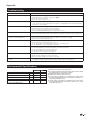
Troubleshooting .......................................................... 41
Environmental Specifications ...................................... 41
Specifications ............................................................. 42
Information about EU Eco-Label ................................. 43
End of life disposal ..................................................... 44
Trademarks ................................................................ 44
ENGLISH
Contents .......................................................................
Introduction ................................................................
11
Introduction
Dear SHARP customer
Thank you for your purchase of the SHARP LCD colour TV product. To ensure safety and many years of troublefree operation of your product, please read the Important Safety Precautions carefully before using this product.
Important Safety Precautions
• Cleaning—Unplug the AC cord from the AC outlet before cleaning the product. Use a damp cloth to clean the product. Do
not use liquid cleaners or aerosol cleaners.
• Use a soft damp cloth to gently wipe the panel when it is dirty. To protect the panel, do not use a chemical cloth to clean
it. Chemicals may cause damage or cracks in the cabinet of the TV.
• Water and moisture—Do not use the product near water, such as bathtub, washbasin, kitchen sink,
laundry tub, swimming pool and in a wet basement.
• Do not place vases or any other water-filled containers on this product. The water may spill onto the
product causing fire or electric shock.
• Stand—Do not place the product on an unstable cart, stand, tripod or table. Doing so can cause the
product to fall, resulting in serious personal injuries as well as damage to the product. Use only a cart,
stand, tripod, bracket or table recommended by the manufacturer or sold with the product. When
mounting the product on a wall, be sure to follow the manufacturer’s instructions. Use only the
mounting hardware recommended by the manufacturer.
• When relocating the product placed on a cart, it must be moved with utmost care. Sudden stops,
excessive force and uneven floor surface can cause the product to fall from the cart.
• Ventilation—The vents and other openings in the cabinet are designed for ventilation. Do not cover or
block these vents and openings since insufficient ventilation can cause overheating and/or shorten the
life of the product. Do not place the product on a bed, sofa, rug or other similar surface, since they can
block ventilation openings. This product is not designed for built-in installation; do not place the product in an enclosed
place such as a bookcase or rack, unless proper ventilation is provided or the manufacturer’s instructions are followed.
• The LCD panel used in this product is made of glass. Therefore, it can break when the product is dropped or impact
applied. If the LCD panel is broken, be careful not to be injured by broken glass.
• Heat sources—Keep the product away from heat sources such as radiators, heaters, stoves and other
heat-generating products (including amplifiers).
• Headphones—Do not set the volume at a high level. Hearing experts advise against extended listening at
high volume levels.
• To prevent fire, never place any type of candle or naked flames on the top or near the TV set.
• To prevent fire or shock hazard, do not place the AC cord under the TV set or other heavy items.
• Do not display a still picture for a long time, as this could damage the LCD screen.
• There is power consumption always if main plug is connected. Be aware that only way to disconnect
mains power from your TV is to unplug mains plug from the wall, it shall remain readily operable during
use of your product.
• Servicing—Do not attempt to service the product yourself. Removing covers can expose you to high
voltage and other dangerous conditions. Request a qualified person to perform servicing.
The LCD panel is a very high technology product, giving you fine picture details.
Due to the very large number of pixels, occasionally a few non-active pixels may appear on the screen as a fixed point of
blue, green or red. This is within product specifications and does not constitute a fault.
Precautions when transporting the TV
When transporting the TV, never carry it by holding onto the speakers. Be sure to always carry the TV by two people holding
it with two hands—one hand on each side of the TV.
Cautions regarding use in high and low temperature environments
• When the TV is used in a low temperature space (e.g. room, office), the picture may leave trails or appear slightly delayed. This
is not a malfunction, and the TV will recover when the temperature returns to normal.
• Do not leave the TV in a hot or cold location. Also, do not leave the TV in a location exposed to direct sunlight or near a heater,
as this may cause the cabinet to deform and the LCD panel to malfunction.
Storage temperature: -20 °C to e60 °C.
Caution : DANGEROUS VOLTAGE INSIDE !
TO PREVENT ELECTRIC SHOCK, DO NOT REMOVE COVER. NO-USER SERVICEABLE PARTS
INSIDE. REFER SERVICING TO QUALIFIED SERVICE PERSONAL.
2
Introduction
Remote control unit
1
2
3
4
5
6
7
8
9
0
Q
W
E
>a (Standby/On) (Page 10)
15
ATV
FAV
Access conventional analogue TV
1
16
mode.
2
DTV
Access digital TV mode.
3
USB REC
SAT
4
Access satellite mode.
5
RADIO
DTV/SAT: Switch between radio and
data mode.
• When only data broadcasting
(no radio broadcasting) is
6
transmitted by DVB, the radio
broadcasting will be skipped.
HDMI CEC/VOD buttons (Pages
29 and 30)
17
7
USB REC (Pages 11, 20, 34 and 35)
18
8
Record a programme you are
watching.
TIME SHIFT
9
19
Not used.
20
10
Alphanumeric buttons 0_9
11
Set the channel. Enter desired
numbers. Set the page in teletext
21
12
mode.
• When the five Nordic countries
(Sweden, Norway, Finland,
13
Denmark or Iceland) are selected
in the country setting from initial
22
14
auto installation (Page 9), DTV
services are four digits. When
23
another country is selected, DTV
24
services are three digits.
A (Flashback)
Return to the previously selected
channel or external input.
7 (Sound mode) (Page 20)
Select a sound multiplex mode.
f Picture format (Page 26)
Change between different picture
formats.
e (Mute)
TV sound on/off.
i+/- (Volume)
Increase/decrease TV volume.
@
ATV/DTV/SAT: Display “CH list” when
“Menu” screen on/off.
no other “Menu” screen is running.
3D (Page 36)
R>
Select between 3D and 2D image
ATV/DTV/SAT: Exit the “Menu”
viewing.
screen.
a/b/c/d (Cursor)
T NET
Select a desired item.
Access “Connected TV” mode.
USB REC/Media Player/Home Media:
(Page 31)
S/V
Y p Channel information (Page 25)
Rewind and fast forward.
Display the station information
T/L
(channel number, signal, etc.) on the
Rewind and forward in units of 5
screen.
minutes.
FAV
;
Shows the favourite channels list.
Execute a command.
U b Source List (Page 10)
Select an input source.
I # (Page 19)
Select audio/video settings.
ECO
On/Off (Page 28)
Select “Power save” setting.
O m Teletext (Page 12)
ATV: Display analogue teletext.
DTV/SAT: Select MHEG-5 or teletext
for DTV/SAT.
P :r/s
ATV/DTV/SAT: Select the TV
channel.
NET: Scrolls pages up/down.
A EPG (Page 11)
DTV/SAT: Display the EPG screen.
S 6 Return
ATV/DTV/SAT: Return to the previous
“Menu” screen.
NET: Return to the previous page
(This may not function for some
services).
D Buttons for useful operations
[ Subtitle (Pages 10, 12 and 24)
Switch subtitle languages on/off.
k Reveal hidden teletext
(Page 12)
1 Subpage (Page 12)
3 Freeze/Hold (Page 12)
Teletext: Stop updating teletext
pages automatically or release the
hold mode.
F R/G/Y/B Colour buttons
The coloured buttons are
correspondingly used to select the
coloured items on the screen (e.g.,
EPG, MHEG-5, teletext).
Important information:
Satellite services are only
available for the LE732 model
series.
3
Introduction
TV (Front view)
Illumination led*
Volume
buttons
3D infrared
emitter
Input
source
button
Programme (channel)
buttons
Menu
button
Remote
Control
Sensor
Power
button
*TV indicator status (Page 10)
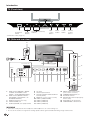
TV (Side and rear view)
16
ETHERNET
18
C.I.
SCART (AV/RGB/S-VIDEO)
15
HDMI 4
Pr
VIDEO
Pb
HDMI 1
(ARC)
L
HDMI 2
HDMI 3
HDMI / PC
ANALOG
AUDIO
INPUT
PC IN
DIGITAL
AUDIO
OUTPUT
USB
(WIFI)
AUDIO
SERVICE
Y
7
R
ANTENNA
17
(LE732 series)
13
9
19
5
10
11
12
14
6
8
4
SAT
3
USB
(HDD)
2
USB terminal (USB REC / MEDIA
PLAYER / SOFTWARE / HDD
READY / 3D GLASSES BATTERY)
USB terminal (MEDIA PLAYER /
SOFTWARE / HDD READY / 3D
GLASSES BATTERY)
USB terminal (Wi-Fi use only)
HEADPHONES jack
SCART (AV/RGB, Y/C Input) terminal
1
2
3
4
5
6
7
8
9
10
11
12
13
PC Input
Antenna input terminal
OPTICAL DIGITAL AUDIO OUTPUT
terminal (SPDIF)
SERVICE connector (jack 3.5 mm)
HDMI 1 (HDMI/DVI/ARC)
HDMI 2 (HDMI/DVI)
HDMI 3 (HDMI/DVI)
HDMI 4 (HDMI/DVI)
14 AUDIO input for DVI and PC
(Jack 3.5mm connector)
15 COMMON INTERFACE slot
16 AC INPUT terminal
17 SAT (Satellite antenna input) (Only
LE732 series)
18 ETHERNET (10/100) terminal
19 COMPONENTS / AV terminals
WARNING
• Excessive sound pressure from earphones and headphones can cause hearing loss.
• Do not set the volume at a high level. Hearing experts advise against extended listening at high volume levels.
4
1
Preparation
Supplied accessories
Remote control unit
(g1)
• “AAA” size battery (g2)
• Operation manual (This publication)
• Stand unit (x1)
• Cable tie (x1)
• Antenna adapter (40" only)
Attaching the stand unit
• Before attaching (or detaching) the stand, unplug the AC cord.
• Before performing work, spread cushioning over the surface on which you will be laying the TV. This will prevent it
from being damaged.
CAUTION
• Attach the stand in the correct direction.
• Be sure to follow the instructions. Incorrect installation of the stand may result in the TV falling over.
Inserting the stand
Insert the stand into the openings on the bottom of the TV (Hold the stand so it will not drop from the edge
of the base area).
Insert and tighten the four screws into the four holes on the rear of the TV.
Soft cushion
NOTE
• To detach the stand unit, perform the above steps in reverse order.
Optional accessory
The listed optional accessories are available for this
LCD colour TV. Please purchase them at your nearest
shop.
• Additional optional accessories may be available in the
near future. When purchasing, please read the newest
catalogue for compatibility and check the availability.
No.
Part name
Part number
1
Wall mount bracket
2
Wi-Fi adapter
AN-WUD630
AN-52AG4
3
3D glasses
AN-3DG20-B
Fixing the TV on a wall
• This TV should be fixed on a wall only with the wall fix bracket available from SHARP (above table). The use of other
wall fix brackets may result in an unstable installation and may cause serious injuries.
• Fixing the LCD colour TV requires special skills and should only be performed by qualified service personnel.
Customers should not attempt to do the work themselves. SHARP bears no responsibility for improper fixing or
fixing that results in accident or injury.
• You can ask qualified service personnel about using an optional bracket to fix the TV on a wall.
• To use this TV fixed on a wall, first remove the adhesive tape at the two locations on the rear of the TV, and then use the screws
supplied with the wall fix bracket to secure the bracket to the rear of the TV.
• When you fix the TV on a wall, you should attach the supporting post.
5
Preparation
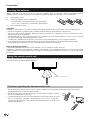
Inserting the batteries
Before using the TV for the first time, insert the two supplied “AAA” size batteries. When the batteries become
depleted and the remote control unit fails to operate, replace the batteries with new “AAA” size batteries.
1
Open battery cover.
2
Insert two supplied “AAA” size batteries.
• Place batteries with their terminals corresponding to
the (+) and (-) indications in the battery compartment.
3
Close the battery cover.
CAUTION
Improper use of batteries can result in chemical leakage or explosion. Be sure to follow the instructions below.
• Do not mix batteries of different types. Different types of batteries have different characteristics.
• Do not mix old and new batteries. Mixing old and new batteries can shorten the life of new batteries or cause
chemical leakage in old batteries.
• Remove batteries as soon as they have worn out. Chemicals that leak from batteries can cause a rash. If you find
any chemical leakage, wipe thoroughly with a cloth.
• The batteries supplied with this product may have a shorter life expectancy due to storage conditions.
• If you will not be using the remote control unit for an extended period of time, remove the batteries from it.
• When replacing the batteries, use zinc-carbon batteries instead of alkaline ones.
Note on disposing batteries:
The batteries provided contain no harmful materials such as cadmium, lead or mercury.
Regulations concerning used batteries stipulate that batteries may no longer be thrown out with the household
rubbish. Deposit any used batteries free of charge into the designated collection containers set up at commercial
businesses.
Using the remote control unit
Use the remote control unit by pointing it towards the remote control sensor. Objects between the remote control
unit and sensor may prevent proper operation.
o
o
Remote control sensor
Cautions regarding the remote control unit
• Do not expose the remote control unit to shock. In addition, do not expose the remote control unit to liquids,
and do not place in an area with high humidity.
• Do not install or place the remote control unit under direct sunlight. The heat
may cause deformation of the unit.
• The remote control unit may not work properly if the remote control sensor of
the TV is under direct sunlight or strong lighting. In such cases, change the
angle of the lighting or the TV, or operate the remote control unit closer to the
remote control sensor.
6
Quick guide
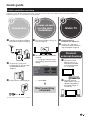
Initial installation overview
Follow the steps below one by one when using the TV for the first time. Some steps may not be necessary
depending on your TV installation and connection.
1
Preparation
Connect an antenna cable to
the antenna terminal (Page 8).
2
Power on and
run the auto
installation
3
Watch TV
Turn on the power using a on Congratulations!
Now you can watch TV.
the TV (Page 10).
If necessary, adjust the
antenna to attain maximum
signal reception (Page 9).
Run the initial auto installation
(Page 9).
If necessary, insert a CA
Language, country, tuner
type settings and TV Location
setting.
card into the CI slot to watch
scrambled broadcasts
(Page 8.)
Plug in the AC cord (Page 8).
Go to Next.
Start searching
channels
Connect
external devices
Connect external
devices such as a
DVD player/recorder
as instructed (Pages
13, 14 and 15).
Connect external
audio devices such as
speakers/amplifier as
instructed (Pages 13,
14 and 15).
Product shape varies in some countries.
7
Quick guide
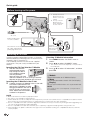
Before turning on the power
1
2
Carefully insert the CI
Module in the CI slot
with the contact side
forward.
The logo on the CI
Module must be
facing outward from
the rear of the TV.
AC cord
Product shape varies
in some countries.
Standard
DIN45325 plug
(IEC 169-2) 75q
coaxial cable.
Place the TV close to the
AC outlet, and keep the
power plug within reach.
Inserting a CA Card
In order to receive coded digital stations, a Common
Interface Module (CI Module) and a CA Card must be
inserted in the CI slot of the TV.
The CI Module and the CA Card are not supplied
accessories. They are usually available from your
dealers.
Inserting the CA Card into the CI Module
1
With the side with the
gold coloured contact
chip facing the side of
the CI Module marked
with the provider’s
logo, push the CA Card
into the CI Module as far as it will go. Note the
direction of the arrow printed on the CA Card.
Inserting the CI Module in the CI slot
2
Carefully insert the CI Module in the CI slot with
the contact side forward. The
logo on the CI Module must be
facing outward from the rear of
the TV. Do not use excessive
force. Make sure the module is
not bent in the process.
Checking CI Module information
1
2
Press MENU and the “PICTURE” menu is
shown.
Press c/d to select “CHANNEL” menu.
• The content of this menu depends on the provider of
the CI Module.
3
Press a/b to select “CI information”, and then
press OK.
● Module
General information on CI Module displays.
● Menu
Adjustment parameters of each CA Card displays.
● Enquiry
You can input numerical values such as passwords here.
NOTE
The content of each screen depends on the provider of
the CI Module.
NOTE
•
•
•
•
•
•
Make sure that the CI module is properly inserted.
This menu is only available for digital stations.
It takes about 30 seconds to certify the license key when you insert a CA card into the CI+ compatible CI module for the first
time. This process may fail when there is no antenna input or you have never run “Auto installation”.
The CI+ compatible CI module sometimes upgrades its firmware. You may not receive any TV images before upgrading. You
can only use the power button during upgrading.
The CI+ compatible CI module does not allow you to output any copy protected programmes using monitor out.
If the TV displays an update confirmation message for the CA card while receiving CI+ compatible broadcasts, follow the
screen prompts.
8
Quick guide
If you have chosen STORE by mistake, go to Settings
→ Restore Factory Default → OK, and the TV returns
to the initial screen.
Initial auto installation
When the TV is powered on for the first time after purchase,
the initial auto installation wizard appears. Follow the menus
and make the necessary settings one after another.
7
•
If you want to search for more broadcasts, execute
“DTV (or ATV, or CADTV) manual tuning” from the
menu “CHANNEL” (Page 22).
• To watch both analogue broadcasts and digital
broadcasts, you should perform the channel search
setting “DTV+ATV” or “CADTV+ATV”.
• Is not possible to search digital and cable digital
broadcasts at the same time.
Confirm the following before turning
on the power
E Is the antenna cable connected?
E Is the AC cord plugged in?
1
Press a on the TV.
• The initial auto installation wizard appears.
2
Starting channel search.
Press ▼ to select Next and then press OK.
8
Setting the OSD language.
Press a/b/c/d to select the desired language.
The TV searches for, sorts and stores all the
receivable TV stations according to their settings
and the connected antenna.
• To cancel the initial auto installation in progress, press
END.
NOTE
•
•
•
3
Setting the country.
Press ▲/▼/◄/► to select your country or area.
Checking quality and
signal strength
• This setting screen only appears during the initial auto
installation.
4
5
6
Select time zone.
Select broadcast settings.
Press ▲/▼ to select “Tuner type”. Press ◄/► to
select between differents tune type:
CADTV: Cable digital broadcasts.
ATV: Analogue broadcasts.
DTV: Digital broadcasts.
DTV + ATV: Digital and analogue broadcasts.
CADTV+ATV: Cable and analogue broadcasts.
SADTV: Satellite broadcasts.
SADTV + ATV: Satellite and analogue broadcasts.
Selecting the TV location.
Press ◄/► to select where you will use this TV, and
then press OK.
•HOME: For domestic use.
•STORE: DYNAMIC mode is predetermined. If the
Picture Mode is changed, the TV will automatically
switch back to DYNAMIC when there is no signal input
from the TV or remote control unit for 30 minutes.
If you turn the power on the TV after performing step 4,
initial auto installation wizard does not appear. The auto
installation function allows you to execute the installation
again from the Channel menu (Page 22).
When "France" is selected in the Country setting, the PIN
code setting cannot be skipped.
After initial Auto Tuning is completed, the default PIN is
automatically set to “3001”. To change the PIN setting, refer
to Lock menu on page 21.
If you install a DVB-T/T2/S/S2 antenna for the first time
of relocate it, you should adjust the alignment of the
antenna to receive a good reception while checking the
antenna setup screen.
1 Press a channel you want to check.
2 Press MENU.
3 Press ► to select “Channel” menu and then press
OK.
4 Press ▲/▼ to select "Signal Information" and
then press OK.
5
Position and align the antenna so that the maximum
possible values for “Signal Strength” and “Signal
Quality” are obtained.
NOTE
•
The values of “Signal Strength” and “Signal Quality” indicate
when to check the appropriate alignment of the antenna.
9
Watching TV
Daily operation
Selecting an external video source
Switching on/off
Turning on/off the power
Press a on the TV to switch it on.
Switch it off by pressing a on the TV.
NOTE
Once the connection is made,
press b to display the
“Source List” screen,
and then press a/b to
switch over to the appropriate
external source with OK.
• When turning off the power
using a on the TV, EPG
data will be lost.
• The terminal layout may differ
depending on the model.
Selecting audio language
E DTV/CADTV/SAT mode:
Each time you press 2 the audio language switches
between audio sources available.
Standby mode
E Switching to standby mode
If the TV is switched on (BLUE LED), you can switch
it to standby by pressing TVa on the remote control
unit.
E Switching on from standby
From standby (RED LED), press TVa on the remote
control unit.
FAV
LED indicator
Status
Off
Power off
Blue
Power on
Red
Standby
Violet
StandBy with USB REC programmed
NOTE
•
NOTE
•
•
The audio mode screen disappears in three seconds.
Selectable items vary depending on the received
broadcasts.
E ATV mode:
Each time you press 2, the mode switches as shown
in the following tables.
NICAM TV broadcasts selection
Selectable items
NICAM STEREO, MONO
NICAM CH A, NICAM CH B, NICAM CH AB, MONO
NICAM MONO, MONO
A2 TV broadcasts selection
Signal
Selectable items
Stereo
STEREO, MONO
Bilingual
CH A, CH B, CH AB
Monaural
MONO
Signal
Stereo
Bilingual
Monaural
TV indicator status
•
6
If you are not going to use this TV for a long period of time,
be sure to remove the AC cord from the AC outlet.
A small amount of electric power is still consumed even
when a is turned off.
Switching between digital, satellite
and analogue broadcasts
E Press “ATV”, “DTV”, "SAT" or "RADIO" to
change between modes.
NOTE
•
When no signal is received, the audio mode will display
“MONO”.
Switching subtitle languages
E DTV/CADTV/SAT mode:
Press SUBTITLES [ button to change between
different languages available, or to enabled/disabled
the subtitles.
6
FAV
USB REC
Changing channels
With Pr/s:
10
With 0–9:
E ATV mode:
The available subtitles according to the broadcasting
will be enabled or disabled by pressing the SUBTITLES
[ key.
Watching TV
EPG
EPG is a programme list that is displayed on the screen. With the EPG, you can check the schedule of digital
channels, view detailed information about it, tune to an event currently on-air and set a timer for future events.
Selecting a programme using EPG
Basic Operation
The illustrations on this page are explained using three digit services.
E Display/Close the EPG screen
Press EPG.
2
1
U
V
S
T
6
E Select a program
3
5
4
1 Select the time span
-Press c/d to select the time span you want to search, press OK.
• Continue to press d to display programs in the next time span.
2 Select the desired program
-Press a/b to select the desired program, press OK.
• If a or b are displayed on the left of the programs, continue to press a/b to display next or previous screen.
-Press END to exit of EPG.
Other EPG functions
3 Revise the program information
1 Press ▲/▼/◄/► to select the program you want to
revise.
2 Press “p.
Program information
5 ”Reminder list” function
1 Press the YELLOW key to visualize all programmed
reminders.
2 Press ▲/▼/◄/► to select a reminder and then
press the RED key to delete it.
3
Press p to return to EPG.
4 “Reminder” function
1 Select the broadcasting emitting the program
which you want to remember.
2 Press the BLUE key on the remote control.
3 With ▲/▼/◄/► select Mode, Hour, Minute, Day
and Month which you want the program to be
remembered. Press OK.
6 “Record” function
Press the USB REC key (Remote Control) to
setup the recording parameters. See “Recording
with timer” on page 34.
11
Watching TV
Buttons for teletext operations
Teletext
Buttons
What is Teletext?
Teletext broadcasts pages of information and
entertainment to specially equipped TV. Your TV
receives teletext signals broadcast by a TV network,
and decodes them into graphical format for viewing.
News, weather and sports information, stock exchange
prices and programme previews are among the many
services available.
Turning Teletext on/off
1
2
Select a TV channel or external source providing
a teletext programme.
Press m to display the Teletext.
• Many stations use the TOP operating system, while
some use FLOF (e.g. CNN). Your TV supports both
these systems. The pages are divided into topic groups
and topics. After switching on the teletext, up to 1.000
pages are stored for fast access.
• Each time you press m, the screen switches as shown
below.
• If you select a programme with no teletext signal, “No
Teletext available” displays.
• The same message displays during other modes if no
teletext signal is available.
Increase or decrease the page number.
Colour (R/G/
Y/B)
Select a group or block of pages
displayed in the coloured brackets at the
bottom of the screen by pressing the
corresponding Colour (R/G/Y/B) on the
remote control unit.
0–9
Directly select any page from 100 to 899
by using the 0–9 numeric buttons.
f (Top/
Bottom/Full)
Switch the teletext image to Top, Bottom
or Full.
k (Reveal
hidden
Teletext)
Reveal or hide hidden information such
as an answer to a quiz.
3 (Freeze/
Hold)
Stop updating teletext pages
automatically or release the hold mode.
[ (Subtitle
for Teletext)
Display the subtitle or exit the subtitle
screen.
• Subtitles will not be displayed when
the service does not contain subtitle
information.
1 (Subpage)
TXT mode: Reveal or hide subpages.
• ◄ button: Move to the previous
subpage.
• ► button: Move to the following
subpage.
• OK button: shows a menu with two
user controls (size and index).
• Yellow button: Pressing one time,
upper half of the screen is shown.
Pressing a second time, the bottom
half of the screen is shown. Pressing
a third time, page returns to normal
size.
• Blue button: shows the index page.
When OK button is pressed while
the menu is on the screen, it
disappears.
Note that with this menu on the
screen the linked pages cannot be
selected.
TV mode: Display the time.
Teletext
Teletext
NOTE
•
Description
Pr/s
Teletext will not work if the selected signal type is RGB.
Using the MHEG-5 application
(UK only)
Some services bring you programmes with the MHEG
application encoded, letting you experience DTV/
CADTV interactively.
When provided, the MHEG-5 application will start
when you press m.
NOTE
•
12
MHEG may not be displayed in 3D mode.
Connecting external devices
E Before connecting ...
• Be sure to turn off the TV and any devices before making any connections.
• Firmly connect a cable to a terminal or terminals.
• Carefully read the operation manual of each external device for possible connection types. This also helps you get
the best possible audiovisual quality to maximise the potential of the TV and the connected device.
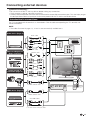
Introduction to connections
The TV is equipped with the terminals as shown below. Find the cable corresponding the TV’s terminal and
connect the device.
NOTE
• The cables illustrated in pages 13, 14 and 15 are commercially available items.
Audio device (Page 15)
Audio cable
Audio cable
SCART (AV/RGB/S-VIDEO)
HDMI 4
Pr
Audio cable
Video recording device
(Pages 14 and 15)
VIDEO
Pb
SERVICE
L
AUDIO
Y
R
SCART cable
Components cable
Game console or
camcorder (Page 14)
Audio cable
AV cable
HDMI-certified cable
HDMI 1
(ARC)
HDMI 2
HDMI 3
HDMI / PC
ANALOG
AUDIO
INPUT
PC IN
DIGITAL
AUDIO
OUTPUT
USB
(WIFI)
HDMI device (Page 14)
HDMI-certified cable
DVI/HDMI Cable
ø 3.5 mm stereo mini jack cable
13
Connecting external devices
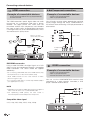
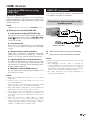
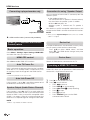
HDMI connection
Y
Example of connectable devices
● DVD player/recorder ● Blu-ray player/recorder
● Game console
The HDMI connections permit digital video and audio
transmission via a connection cable from a player/
recorder. The digital picture and sound data are
transmitted without data compression and therefore
lose none of their quality. Analogue/digital conversion
is no longer necessary in the connected devices, which
also would result in quality losses.
RCA / ø 3.5 mm
stereo mini jack cable
HDMI 1
(ARC)
HDMI 2
HDMI 3
HDMI / PC
ANALOG
AUDIO
INPUT
DVI/HDMI
cable
HDMI-certified
cable
PB
PR
(CB)
(CR)
Component connection
Example of connectable devices
● VCR ● DVD player/recorder
● Blu-ray player/recorder
You will enjoy accurate colour reproduction and high
quality images through the INPUT COMPONENTS /
AV terminal when connecting a DVD player/recorder or
other device.
L
AUDIO
R
Pr
Audio cable
Pb
Y
Components
cable
P
DVI/HDMI conversion
Using a cable DVI/HDMI, the digital signals of a DVD
video, can be also reproduced through a compatible
HDMI connection. The sound should be supplied
additionally.
• On connecting a DVI/HDMI cable to the HDMI terminal, may
be the picture does not become visualized clearly.
• Both HDMI and DVI use the same method of HDCP
protection against copy.
• For connecting a DVI cable, a commercially available adaptor
(not supplied) is necessary.
R
VIDEO connection
Example of connectable devices
● VCR ● DVD player/recorder
● Blu-ray player/recorder
● Game console ● Camcorder
You can use the COMPONENTS/AV terminal when
connecting to a game console, camcorder, a DVD
player / recorder or other device.
NOTE
•
Depending on the type of HDMI cable used, it may appear a
video noise. Be sure to use a certified HDMI cable.
•
On reproducing HDMI picture, the best format is
automatically detected and adjusted for the picture.
VIDEO
L
AUDIO
R
AV cable
Compatible video signal
576i, 576p, 480i, 480p, 1080i, 720p, 1080p
14
Connecting external devices
SCART connection
Example of connectable devices
● VCR ● Decoder
● DVD player/recorder
Speaker/amplifier connector
Example of connectable devices
● Connecting an amplifier with digital audio
input
SCART cable
Connect an amplifier with external speakers as shown
below.
Optical Audio cable
SCART (AV/RGB/S-VIDEO)
Decoder
NOTE
•
In cases when the decoder needs to receive a signal from
the TV, make sure to select the appropriate input terminal to
which the decoder is connected in “Source List” (Page 10).
DIGITAL
AUDIO
OUTPUT
Amplifier with optical
digital audio input
● After connecting
Digital audio output setting
After connecting an amplifier with optical digital
audio input as shown, you should set an audio
output format compatible with the programme you
are watching or the device connected.
Go to “MENU” > “Sound” > “SPDIF Mode” >
select “PCM” or “Dolby Digital”.
NOTE
• When you set this to “Dolby Digital”, and you
receive the Dolby Digital or Dolby Digital Plus audio
formats, Dolby Digital audio is output. Otherwise,
PCM audio is output.
When you set this to “PCM”, PCM audio is output
no matter what audio formats you receive.
15
Connecting a PC
DVI/VGA Conversion cable
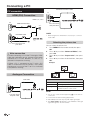
PC connection
PC
HDMI (DVI) Connection
HDMI 1, 2, 3 or 4
PC
HDMI 1
(ARC)
HDMI-certified cable
HDMI 2
HDMI 3
HDMI / PC
ANALOG
AUDIO
INPUT
PC IN
DIGITAL
AUDIO
OUTPUT
USB
(WIFI)
ø 3,5 mm stereo
mini jack cable
HDMI 4
HDMI
PC
NOTE
DVI/HDMI Cable
• When using the PC-IN terminal is necessary to connect a
audio cable.
HDMI 1
(ARC)
HDMI 2
HDMI 3
Selecting the picture size
HDMI / PC
ANALOG
AUDIO
INPUT
ø 3,5 mm stereo mini
jack cable
You can select the picture size.
1
2
● After connection
● If after connecting a PC to the TV through a HDMI
cable, the audio does not run, connect a mini stereo
connector of ø 3.5mm between TV and PC as
indicated in the previous drawing.
3
4
● When a PC is connected to the TV with a DVI
cable, it will be necessary to connect a mini stereo
connector of ø 3.5mm of the TV to PC as indicated
in the previous drawing.
Press MENU on the remote control,then press
OK.
Press ▼ key to select “Advanced Video”, then
press OK.
Press ▼ key to select “Aspect ratio”, then press
OK.
Press ▼ key to select the desired item, then press
OK.
Example
Analogue Connection
Normal
VGA cable
Item
PC
HDMI 1
(ARC)
HDMI 2
HDMI 3
Full
HDMI / PC
ANALOG
AUDIO
INPUT
PC IN
DIGITAL
AUDIO
OUTPUT
Auto
Picture size is adjusted automatically
Full
An image fully fills the screen
Dot by Dot
Displays an image with the same
number of pixels on the screen
USB
(WIFI)
NOTE
ø 3,5 mm stereo
mini jack cable
•
•
•
•
16
You can also select an item by pressing f on the remote
control unit.
Connect the PC before making adjustments.
Selectable picture size may vary with input signal type.
The “Aspect ratio” adjustment is only available for analogue
signals through the “PC IN” terminal.
Connecting a PC
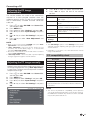
1Adjusting the PC image
1automatically
This function enables
adjusted to its best
analogue terminals of
with a commercially
cable, etc.
1.
2.
3.
4.
5.
6.
6.
7.
Press ▲/▼ to select the specific adjustment item.
Press ◄/► to adjust the item to the desired
position.
Item
the screen to be automatically
possible condition when the
the TV and PC are connected
available DVI/VGA conversion
Press b to select PC-RGB from Source List,
and then press OK.
Press MENU key.
Press ◄ key to select “Settings” and press OK.
Press ▼ key to select “Input Settings” and press
OK.
Press ▼ key to select “PC Settings” and press
OK.
Press ▼ key to select “Auto Adjustment” and
press OK.
H-Pos.
Centres the image by moving it to the
left or right.
V-Pos.
Centres the image by moving it up or
down.
Phase
Adjusts when characters have low
contrast or when the image flickers.
Clock
Adjusts when the image flickers with
vertical stripes
Auto
Adjustment
Adjusts automatically the image
Reset
Settings
Return to the original image.
NOTE
NOTE
•
•
The “PC Settings” options in the “Settings” menu can be
adjusted only when inputting analogue signals through the
“PC IN” terminal.
•
Depending of resolution, the vertical/horizontal manual
range can be different.
When connect a PC and select PC-RGB source, the “Auto
adjustment” is executed automatically.
“Auto adjustment” may fail if the PC image has low
resolution, has unclear (black) edges, or is moved while
executing “Auto adjustment”.
Be sure to connect the PC to the TV and switch it on before
starting “Auto adjustment”.
“Auto adjustment” can be executed only when inputting
analogue signals through the “PC IN” terminal.
•
•
•
PC compatibility chart
Resolution
Adjusting the PC image manually
Ordinarily you can easily adjust the picture as necessary
to change image position using “Auto Adjustment”.
In some cases, however, manual adjustment is needed
to optimise the image.
1.
2.
3.
4.
5.
Press b to select PC-RGB from Source List,
and then press OK.
Press MENU key.
Press ◄ key to select “Settings” and press OK.
Press ▼ key to select “Input Settings” and press
OK.
Press ▼ key to select “PC Settings” and press
OK.
VGA
VGA
Horizontal
Frequency
Vertical
Frequency
640 g 480
31,5 kHz
60 Hz
720 g 400
31,47 kHz
70 Hz
SVGA
800 g 600
37,9 kHz
60 Hz
XGA
1.024 g 768
48,4 kHz
60 Hz
WXGA
1.360 g 768
47,7 kHz
60 Hz
SXGA
1.280 g 1.024
64,0 kHz
60 Hz
SXGA+
1.400 g 1.050
65,3 kHz
60 Hz
UXGA
1.600 g 1.200
75,0 kHz
60 Hz
1080p
1.920 g 1.080
67,5 kHz
60 Hz
VGA, SVGA, XGA, WXGA, SXGA, SXGA+ and UXGA are
registered trademarks of International Business Machines
Corporation.
NOTE
•
This TV has only limited PC compatibility, correct operation
can only be guaranteed if the video card conforms exactly to
the VESA 60 Hz standard. Any variations from this standard
may result in picture distortions.
17
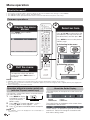
Menu operation
What is the menu?
• You need to call up the OSD to perform settings for the TV. The OSD for the settings is called "MENU".
• The "MENU" enables various settings and adjustments.
• The "MENU" can be operated with the remote control unit and with the TV panel control keys.
Common operations
1
FAV
A
Display the menu
screen
2
Select an item
USB REC
Press MENU and the “MENU”
screen displays.
Press a/b/c/d to select/adjust the
desired menu, and adjust the item to
the desired level, and then press OK.
Press MENU to return to the previous
"MENU" page.
E Selecting in the menu
E Selecting options
3
Exit the menu
screen
The operation will exit the "MENU"
screen if you press END before it is
completed.
NOTE
•
•
•
"MENU" options differ in the selected input modes, but the operating procedures are the same.
The screens in the operation manual are for explanation purposes (some are enlarged, others cropped) and may vary slightly from
the actual screens.
Items in darker grey cannot be selected.
Operation without a remote control unit
(with the TV panel control keys)
This function is useful when there is no remote control
unit within your reach.
1 Press MENU to display
initial MENU screen, or
to return to previous
MENU screen.
2 Press CHr/s instead of a/b or ik/l
instead of c/d to select the item.
3 Press b to open a new MENU level or accept the
setting
NOTE
•
The “MENU” screen will disappear if left unattended for
several seconds.
18
About the Guide Display
The Guide Display at the top of the screen shows the
menu bar.
1 Picture
2 Audio
3 Multimedia
4 Time
5 Lock
6 Channels
7 Settings
The Guide Display at the bottom of the screen shows
the operations with the OSD.
The bar above is an operational guide for the remote
control unit. The bar will change in accordance with
each menu setting screen.
Basic adjustment
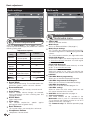
Picture settings
Selected
setting
Advanced
Video
Picture
Picture adjustments
◄ Button
► Button
Aspect Ratio
Changes between
different picture sizes
Colour
Temperature
Adjusts the colour
temperature to give the
best white image: cool,
normal, warm.
Noise
Reduction*
Improves picture quality
(choose among different
options)
Dynamic
backlight
Adjusts screen
brightness based on
image content.
Film mode
Automatically detects a
film-based source and
recreates each still frame
for high-definition picture
quality.
Fine Motion
Advanced
Reducing motion blur.
* This function may be not available in some types of input
When the Picture Mode is set to “User”, the picture
can be adjusted according to your preferences. See the
following setting table.
Adjustments options
Selected
setting
◄ Button
► Button
Brightness
Brightness goes
down
Brightness goes up
Contrast
Contrast goes down
Contrast goes up
Colour
Colour intensity
goes down
Colour intensity
goes up
Tint
Skin tones become
purplish
Skin tones become
greenish
Sharpness
Soften details
Emphasize details
Backlight
The screen dims
The screen
brightens
Advanced
Video
signal.
AV MODE
“AV MODE” gives you several viewing options to
choose from to best match the system environment,
which can vary due to factors like room-brightness,
type of programme watched or the type of image input
from external equipment.
1 Press AV MODE.
2 Every time AV MODE is pressed the TV changes
the mode as follows:
STANDARD → SPORTS → ECO → CINEMA → USER →
DYNAMIC 6
This TV provides various functions for
optimizing the picture quality.
See the following table.
19
Basic adjustment
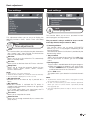
Audio settings
Multimedia
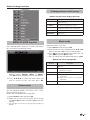
(*) The name of your home network will appear here once detected.
Multimedia
Multimedia menu
Sound
Sound adjustments
When the Sound Mode is set to “User”, the sound
can be adjusted according to your preferences. See the
following setting table.
Adjustments options
Selected
setting
Balance
◄ Button
► Button
Increase audio from Increase audio from
the left speaker
the right speaker
Treble
Reduce treble
Increase treble
Bass
Reduce bass
Increase bass
Surround
Sound
Off
On
Auto
Volume
Off
On
SPDIF
Mode
(PCM) Activates
digital audio output
Dolby Digital
Clear voice
Off
On
Bass
Enhancer
Off
On
● Sound Mode
Select your desired setting. The available options are:
STANDARD→MUSIC→MOVIE→SPORTS→USER6
● Surround Sound
This function allows you to enjoy surround sound.
● Auto Volume
Reduces sudden volume changes, for example,
during commercials or when switching from one
channel to another.
● SPDIF Mode
Digital audio output.
● Clear voice
This function emphasises speech against
background noise for greater clarity.
● Bass Enhancer
This function allows you to enjoy bass-enhancer.
● Headphones Volume
Headphones volume control.
20
● AQUOS NET
Access to Internet services.
● Media Player
Access to Multimedia Menu. (See page 27)
● Media Player Settings
This TV allows play video on demand (DivX® VOD).
You need to register the TV before playing the DivX®
content.
This is the function to confirm your registration code.
● DivX® VOD Register
To activate this option you need to register the code
at www.divx.com/vod, download the VOD log file
and reproduce it in TV.
● DivX® VOD Deregister
Displays the deactivation code necessary to write
off this TV at www.divx.com/vod.
● Video Preview
Setting this option to On, allows you preview the
video that you select in a little window in the screen.
● USB REC
● USB REC Manual programming
Allows you to schedule the program recorder.
● USB REC Programmed recording list
Allows you to visualize all scheduled recordings.
● USB REC Recorded list
Allows you to see the recorded program list.
● USB REC settings
Allows to select disk, disk setup, speed test and
disk space reserved for this function.
For USB REC detailed operation see page 35.
● Your home network
Your home network will be available in the
Multimedia menu in case it is connected to the
TV set through the Ethernet terminal or via Wi-Fi
(Optional Accessory, see page 5).
See "Network setup" for detailed operation (page
31).
Basic adjustment
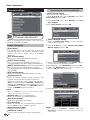
Time settings
Lock settings
Lock
Lock programs
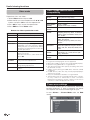
This adjustment allows you to set or to display the
following functions: Clock, Off/On Timer and Sleep
Timer.
Time
Time adjustments
● Clock
This function allows you to display the clock information
(day / month / year / hour/ minute). The time and the
date can’t be modified in this option.
● Off timer
Allows you to set a time when the TV automatically
enters in standby mode.
● On timer
Allows you to set the time when the TV must switch on.
● Sleep timer
Allows you to setup the automatic Switch Off for:
10min., 20min., 30min., 60min., 90min., 120min.,
180min. and 240min.
NOTE
• Select “Off” to cancel the sleep timer.
• When the time has been set, countdown starts automatically.
• The last minute is displayed second to second.
● No operation off
Switches the TV off when no key is pressed for 3
hours.
● No signal off
When this function is activated the TV enters in
standby mode automatically if there is no signal input
during 10 minutes.
In PC mode, when there is no signal input, the TV
goes into standby mode after 15 seconds.
● Time zone
Allows you to setup the time zone.
● Summer time
Allows you to change automatically to summer time
(auto, off, on.)
This function allows you to use a password to lock
certain programs and adjustments.
The password is always needed to access to this
menu (by default, the password is 3001.)
● Parental guidance
This function allows you to restrict DTV/CADTV/
SADTV (only LE732 model) programs depending on the
age classification.
The information about classification is provided by the
broadcasting station.
● Set password
Allows you to change the password. Press OK, enter
the new password. To confirm, go out from Lock
menu.
● Block program
The password is needed before locking one program.
1 Select the program or programs you want to lock
and press GREEN button. A padlock appears next
to the locked channel in the channel list.
2 Press End to exit.
This option enters your selection in a locked channels
list.
NOTE
• To prevent the channel search, when one program is locked,
the channel menu is locked too.
• To view a locked channel, you must enter the password.
When you select a locked channel a password prompt
message pops up.
• You must repeat the previous steps to unlock one locked
program.
21
Basic adjustment
Channel settings
Searching for cable broadcasts
● CADTV Auto Tuning
Allows you to add cable services.
1 With ▲/▼/◄/► keys select Channel, then select
Auto Tuning and press OK.
2 With ▲/▼/◄/► keys select Country and Tuner
type (CADTV).
3 Go to Start Search and press OK.
Channel
Channel adjustments
Allows to reconfigure the channels after initial auto
installation has been completed.
Install channels
● Auto tuning
This function allows you to select the country and
automatically adjusts the channels for digital, cable,
satellite (Only LE732 model series) or analogue
individually.
● DTV manual tuning
Allows you to tune digital channels manually.
● CADTV manual tuning
Allows you to add new cable services manually.
This setting appears after searching for cable broadcasts.
● SADTV manual tuning (Only LE732 model series)
Allows you to add new satellite services manually.
This setting appears after searching for satellite broadcasts.
See next page.
● ATV manual tuning
Allows you to tune in analogue channels manually.
● Programme edit
Allows you move channels, delete channels, skip
channels and to set up a favourite channels list.
Select the channel you want to reorganize and press
◄/►to change between Viewable, Skipped (to
ignore it) and Favorite (to add it to favorite list). Press
the RED button to delete it, the YELLOW button to
move it or GREEN button to rename it.
NOTE
•
● CADTV Manual Tuning
After the CADTV Auto tuning, you may add new
cable services manually.
1 With ▲/▼/◄/► keys select Channel and CADTV
Manual tuning and press OK.
2 Select manually Frequency and Symbol rate by
using numerical keys (Remote Control).
3 With ▲/▼ keys select Modulation and press OK.
4 Select the Modulation from the list, confirm by
pressing OK and press 6 to return.
5 With ▲/▼ keys select Start Search and press OK.
If you press FAV when you are not in any adjustment menu,
the favourite channel list will appear.
● Satellite edit (Only LE732 model series)
Allows you to adjust the satellite propierties.
● Signal information
Shows the signal power and quality.
● CI information
Allows to see the CA card information (Conditional
Access Module): name, supplier and OSD.
● Auto channel number
Automatic channel sorting.
● Additional search
Use this menu to add new services automatically.
22
NOTE
•
The value of "Frequency", "Symbol rate" and
"Modulation" should be set to the value specified by the
cable provider.
Basic adjustment
Searching for satellite broadcasts
(Only for LE732 model series)
Select Satellite Set. You can choose between the
following options:
● SADTV Auto tuning
Allows you to tune satellite services.
1 Press MENU on the remote control. With ◄/► keys
select Channel, then select Auto Tuning and press
OK.
2 With ▲/▼/◄/► keys select Tuner type → SADTV.
3 Go to Start Search and press OK.
The following screen will appear:
Consult your dealers before using a method other than
Single Satellite.
1 Select Single Satellite and then press OK.
2 Press ▼ to select "Satellite 1" and press OK.
Choose the setup applicable to your satellite device and
confirm your choice pressing OK button on the remote
control.
The automatic search will start.
● SADTV manual Tuning
This option allows you add satellite services manually.
Press MENU on the remote control. With ▼ key select
SADTV manual Tuning and press OK.
● Input Satellite
Choose the setting applicable to your satellite
device and press OK.
● Frequency (MHz)
Introduce the transponder frequency in MHz.
● Symbol rate
Introduce the symbol rate.
● Polarization
Allows to choose between horizontal or vertical
polarization.
Select Start Search and press OK to start searching.
● Satellite edit
This option allows you to adjust manually the satellite
properties.
Press ▼ to select "Satellite Edit" and then press OK.
3 Select Satellite Name and press OK. Enter the
satellite name using software keyboard.
4 Select LNB Type and choose between Universal
or User. If you choose Universal the other settings
remains disabled (grey). If you choose "User" the
following settings will be enabled:
● Low LO freq.
Allows you to change default low frequency.
● High LO freq.
Allows you to change default high frecuency.
● Polarization
Depending on the broadcaster characteristics choose
between Vertical&Horizontal (search for in both
polarities), Vertical or Horizontal (search for in one
polarity) or LNB OFF (LNB power off).
● 22K settings
Select ON to add the high band to the search
automatically process by applying 22KHz tone.
Press ▼ to select Save and then press OK to save the
settings.
23
Basic adjustment
Settings
● HbbTV Enable
This setting allows you to access to new services from
entertainment providers such as broadcasters, online
providers, including catch-up TV, video on demand
(VoD), interactive advertising, personalisation, voting,
games and social networking. (See page 34).
NOTE:
•
•
•
Settings
Settings menu
● Language
Allows you to select the screens language and the
audio language.
● OSD Language
Press a/b/c/d to select the "Menu" language,
then press OK.
● Audio Languages
Press a/b to select the audio language.
● Subtitle and Teletext Settings
Allows you to activate/deactivate the subtitles,
select the subtitles language and the subtitle teletext
language. Also allows select the subtitles mode
choosing between: Normal or Hard of Hearing.
● Subtitle Mode
Normal / Hard of Hearing.
● Subtitle Language
Primary / Secondary.
● TTX (Language)
Allows you choice the character set for teletext
language.
NOTE
•
Subtitles will not be displayed when the service does not
contain subtitle information.
● Input Settings
Allows you to adjust individual settings:
● Input Labels
Allows associate each input source with a
description.
● HDMI CEC (Consumer Electronics Control)
Activate / deactivate HDMI CEC. (See page 29)
● PC Settings
Allows to adjust the picture when a PC is connected.
(See page 16)
● Audio description
This function allows you to enable output of audio of
audio description if the TV receives a signal including
audio description.
24
When the "Audio description" is set to "On", the audio
description sound is superimposed on the main audio when
you select a broadcast compatible with audio description.
This function is available only for DTV broadcasts. This
“Audio description" menu is not displayed for the ATV or
the external inputs.
The audio description sound is superimposed on the main
audio only when the sound is output on the speaker sound
output, headphone sound output and sound for audio out
output. The sound is not output on the S/PDIF sound output
and the SCART sound output.
● Network Settings
Internet setup. (See page 31).
● Product information
Shows hardware and software version.
● Software upgrade
This option allows you to have the TV software version
always updated.
● Software Update (OAD)
Setting to ON this option the TV automatically
determines whether a new software version is
available (through digital broadcasts) when the TV
is in standby mode.
● OAD scan
Checks immediately if there is new software.
● Network upgrade
This function allows you to update to the latest
software via network.
Follow the on-screen instruction.
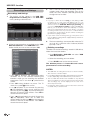
● USB->Settings
This option allows you to set up the channel list
and all the TV settings in an easy way by using a
configuration file supplied by a SHARP service
centre. This file needs to be stored in the root folder
of any USB memory device connected to the TV.
When the operation is completed, the TV will restart.
NOTE:
• A broadband connection and Network setup are
required to update the software using the internet.
Basic adjustment
Software update via USB
1 Add the binary file to USB memory root.
2 Insert the memory in any USB side TV set socket.
3 The next message appear:
Channel list
Selecting the channel
you want to watch
1 Press OK and the list of tuned channels will be
displayed.
2 Use ▲/▼ to select the channel you want to watch
and press OK.
4 Press ◄ to select Yes and press OK. The
software update will start
•The updated percentage appears.
5 When software update finishes, remove the USB
memory and press Ok to reset the TV.
6 Return to Settings < Product information
menu to check that the version has been updated
successfully.
● Restore factory default
Recover the configuration that the TV had when it left
the factory.
Channel information display
(DTV/CADTV only)
You can display the channel information that you are
watching at this moment by pressing p on the remote
control unit.
Information that appears on the screen:
Program number
Program name
Age classification
Audio
Available Services: Radio / Teletext /
Subtitles / Encripted
Information about the program which is
being broadcast
CLEARING THE PIN
If you lose or forget your PIN, you can clear the PIN
following these steps:
1 Go to «MENU»→«LOCK».
2 Enter “3001” to cancel out the current PIN.
The current PIN is reset to “3001”.
25
Useful viewing functions
Selecting the picture format
Selecting the picture
format manually
Setting when using external
devices
Source list
You can select the picture format. The selected picture
format varies depending on the type of signal received.
For selecting the input type of external equipment.
1 Press f on the remote control unit to change
between different kinds of pictures.
• If no (colour) image is displayed, try changing to
another signal type.
Sizes for SD Signal (Standard Definition)
• Check the operations manual of the external equipment
for the signal type.
Normal 4:3 : Keeps the original aspect ratio in a full
screen display.
Zoom 14:9 : For 14:9 letterbox pictures. A thin side
bar appears on each side, and you may also see
bars on the top and bottom with some programs.
Panorama: In this mode, picture is stretched toward
each side of the screen. The picture may appear
similar to “Full” depending on broadcast signals.
Full: For 16:9 squeeze pictures.
Cinema 16:9: For 16:9 letterbox pictures. Bars
may appear on the top and bottom with some
programs.
Cinema 14:9: For 14:9 letterbox pictures. Bars
may appear on the top and bottom with some
programs.
Auto: The TV selects the picture size automatically.
Connecting a USB device
(Media Player)
Connect an USB device to the TV as shown below.
• Depending on the USB device, the TV may not be
able to recognise the contained data.
• Use only alphanumeric characters for naming files.
Sizes for HD Signal (High Definition) HDMI
• File names over 80 characters (may vary depending
on character set) may not be displayed.
Full: Overscan image. Cuts out all sides of the
picture.
Underscan: Displays a high definition picture
adjusted perfectly. Picture noise may appear on
the sides of picture with some programs.
Underscan mode for 1080(i/p) video signals is
same as Dot by Dot mode.
Auto: this mode allows the TV to change between
different picture sizes automatically.
• Do not disconnect a USB device or memory card from
the TV while transferring files, using the slide show
function, when a screen is switching to another or
before you exit “MEDIA PLAYER” from the “Source
List” menu.
NOTE
•
Some items do not appear depending on the type of
received signal.
26
• Compatibility with USB hard disc connection.
• Do not connect and disconnect a USB device from
the TV repeatedly.
Useful viewing functions
Viewing pictures on full screen
Buttons for full screen display operation
Buttons
Go to the previous/next photo in the
same directory.
6 button
Go back to the previous screen.
Blue button
Zoom: ▲/▼/◄/► allow to move through
the pictures when zoom is activated.
Yellow button
Rotates 90º the photo on screen.
Red button
Slide show.
Music mode
MEDIA PLAYER function
After selecting Media Player, the TV loads USB device
files, and shows the following screen:
Description
▲/▼ Cursor
Reproduces MP3 music files.
1 Select Music mode and press OK.
2 Select the files you want to reproduce with ▲/▼ /◄/►
buttons and press OK to start the reproduction.
3 Press OK to stop the reproduction of MP3 files and
press END to exit the Music mode.
• You can stop/restart the reproduction pressing OK.
Buttons for music reproduction
Buttons
1 Pressing ◄/► buttons you can change between
different modes: Pictures, Music or Videos.
Press OK to select the option you want to reproduce.
2 Press ▲/▼/◄/► to select the folder where you
want to search the files and then press OK.
Description
▲/▼ Cursor
Go to the previous/next track in the same
directory.
◄/► Cursor
Backward / Fast forward ( on
reproduction mode)
END button
Go back to the previous screen.
RED button
(x1) Reproduce the selected file
indefinitely.
(x2) Reproduce all the files on the folder
indefinitely.
OK button
Play/Pause reproduction.
Picture mode
You can reproduce photos with JPEG (*.JPE, *.JPG),
and PNG format on your TV.
Several kinds of reproduction are possible.
1 Select Picture mode and press OK.
2 Select the file you want to display on full screen
with ▲/▼ /◄/► buttons and press OK to start the
viewing.
• You can go to the previous/next page pressing Pr/s
button.
27
Useful viewing functions
USB / HOME MEDIA device
compatibility
Video mode
Reproduces films and videos.
1 Select Video mode and press OK.
2 Select the files you want to reproduce with ▲/▼ /◄/►
buttons and press OK to start the reproduction.
3 Press OK to stop / restart the reproduction.
4 Press END to exit the Video mode.
Buttons for video reproduction mode
Buttons
Description
▲/▼ Cursor
Go to the previous/next chapter.
◄/► Cursor
Backward / Fast forward
END button
Go back to the previous screen.
RED button
Allows you to repeat a fragment of a film
indefinitely. The first keystroke defines
initial point, the second keystroke defines
final point. The third keystroke restarts the
normal reproduction.
BLUE button
Allows you to backward or forward until a
point in the movie.
Introduce “hh:mm:ss”, select "Seek" and
press OK.
USB 2.0
device
USB Memory, USB card reader, USB
HDD (Mass Storage class)
File system
USB REC: NTFS
USB Media Player: FAT / FAT32 / NTFS
Home Media
(DLNA)
DLNA 1.5 DMP
(Digital Media Player certified)
Photo file
format
JPEG, PNG
Music file
format
Mpeg 1 (Layer 1 & L2), MP3
Sampling frequency: 8Khz, 11.025 Khz,
12Khz, 16Khz, 22.050Khz, 32Khz, 44.1
Khz, 48 Khz
HEACC, AAC (MP4), WAV (PCM),
WMA, AC3, EAC3.
Sampling frequency:32Khz, 44.1 Khz,
48 Khz
Multimedia
Container
TS (Transport Stream), MOV, MP4,
MKV, MPG (MPEG2 Program Stream),
WMV, ASF, AVI, DivX, RM, RMVB, FLV,
VOB
Video file
format
MPEG1, MPEG2, MPEG4, DivX, XVid,
AVC/H.264, VC-1, AVS, Divx311 (SD
Only), RealVideo
Subtitle file
format
SRT (Unicode)
OK button
Play / Pause the reproduction.
NOTE
MENU button
Shows the menu to adjust the video
image during reproduction.
f button
Performs ZOOM operation in films and
videos.
•
•
•
•
•
•
•
•
Progressive format jpeg files are not supported.
Music files in USB 1.1 devices may not be played properly.
Operation using USB hubs is not guaranteed.
The external hard disc with capacity exceeding 1TB cannot
be detected correctly.
Cables used to prolong the USB device must be certified
as USB 2.0.
In USB devices, video files may not be played properly if
speed is not enough.
Play non-standard encoded files is not guaranteed.
The file extension does not uniquely specify a file's contents.
It’s very common for Internet files to have a mismatch
between the file extension and its contents; for this reason
some files could not be played in this TV set.
Power save settings
This function enables you to automatically reduce the
backlight brightness in order to decrease the power
consumption and increase the backlight life span.
In menu Picture → Picture Mode select the ECO
setting.
28
HDMI devices
Controlling HDMI devices using
HDMI CEC
E What is HDMI CEC?
HDMI CEC connection
First connect the speaker system or a player/recorder
that supports the HDMI CEC protocol.
Using the HDMI CEC protocol, you can interactively
operate compatible system devices (AV amplifier, DVD
player/recorder, Blu-ray player/recorder) using a single
remote control unit.
Connecting a player/recorder via the
speaker system
NOTE
• HDMI CEC does not work while using USB REC functions.
HDMI 4
E What you can do with HDMI CEC
HDMI 1
(ARC)
HDMI 2
HDMI 3
One touch recording (DTV/SAT only)
You do not have to search for the remote control unit
of your recording device. Press the REC E or REC
STOP H buttons to start/stop recording what you
see on the recorder.
DIGITAL
AUDIO
OUTPUT
One touch play
Player / Recorder
When the TV is in standby mode, it will automatically
turn on and play back the image from the HDMI
source.
Single remote control operation
HDMI CEC automatically recognises connected
HDMI devices and you can control the TV and the
devices as if using an universal remote control unit.
Operating title list of external devices
In addition to displaying the TV’s own timer list (Page
35), you can also call up the external player’s top
menu or player’s / recorder’s title list provided that the
devices support HDMI CEC.
HDMI-certified cable (commercially available)
Optical audio cable (commercially available)
NOTE
•
•
Multiple control of HDMI devices
You can select which HDMI device to operate using
the “Device List” menu.
Speaker
system
•
Refer to the operation manual of the device to be connected
for further details.
After unplugging connection cables or changing the
connection pattern, turn on the power of the TV after all
relevant devices power have been turned on. Change the
external input source by pressing b, select the appropriate
external source and verify the audiovisual output.
The cables illustrated in the following explanation are
commercially available items.
NOTE
•
•
•
•
•
•
When you use HDMI CEC, make sure to use a certified
HDMI cable.
Point the remote control unit toward the TV, not to the
connected HDMI device.
Video noise may occur depending on the type of HDMI
cable used. Make sure to use a certified HDMI cable.
Up to three HDMI recording devices, one AV amplifier and
three players can be connected using this system.
These operations affect the HDMI device selected as the
current external source. If the device does not operate, turn
on the device and select the appropriate external source
using b.
When you insert/remove HDMI cables or change
connections, turn on all connected HDMI devices before
turning on the TV. Confirm that picture and audio are
correctly displayed/output by selecting “HDMI 1”, “HDMI 2”,
“HDMI 3” or “HDMI 4” from the “INPUT” menu.
29
HDMI devices
Connecting a player/recorder only
HDMI 4
HDMI 1
(ARC)
HDMI 2
HDMI 3
Player/Recorder
HDMI-certified cable (commercially available)
HDMI CEC (Consumer Electronics
Control) menu
Basic operation
Go to Menu> Settings>Input Settings>HDMI CEC
and select the menu you want to set.
Connection for using “Speaker Output”
You can choose to listen to the TV sound only from the
speaker system.
1. Set to On and press 6.
The sound from the TV speaker is silenced and only
the sound from the speaker system is audible.
2. Set to Off and press 6.
Speaker system is silenced and TV speaker is
audible.
You need to use ARC-compatible cables/devices and
connect to the HDMI 1 terminal to activate this function.
NOTE
• When you use "Speaker Output" make sure to use a HDMI
cable 1.4 or upper.
Device List
If multiple HDMI devices are connected in a daisy chain,
you can specify which device to control here.
Press a/b to select “Model select”, and then
press OK. The HDMI device changes every time
you press OK.
Device Scan
HDMI CEC control
Set to On to enable HDMI CEC functions.
Auto TV Power On
If this is activated, the one touch play function is enabled.
While the TV is in standby mode, it automatically turns
on and plays back the image from the HDMI source.
Search all HDMI devices connected to the TV.
Operating a HDMI CEC device
HDMI CEC allows you to operate the HDMI-connected
device with a single remote control unit.
NOTE
• The factory default for this item is “Off”.
Auto Link Power Off
If this function is set to On, is possible to power off all
HDMI devices connected in a daisy chain.
Speaker Output (Audio Return Channel)
If this function is set to On, the TV can send audio data
for video content shown on the TV to a connected audio
device to HDMI 1 with just one ARC-compatible cable
(HDMI 1.4 or upper). Using this function eliminates the
need to use a separate digital or analogue audio cable.
NOTE
•
ARC is only available in HDMI 1 terminal.
30
USB REC
1
2
Press I to start playback of a title.
Press J to fast forward.
• Press G to reverse.
• Press REC E to start recording.
• Press REC STOP H to stop recording.
• Press H to stop.
• Press F to pause.
• Press SOURCE a to turn the HDMIconnected device on/off.
Network Setup
Network Setup
● Wired connection overview
Connecting to the network
To enjoy internet services, you need to connect the TV
to a router with a high speed connection to the internet.
You can also connect the TV to your Home network
server through a router or access point (see page 34).
The TV connection to the router can either be wired or
wireless.
To access to the TV internet configuration go to
Settings→Network setup. The next screen is shown:
PC (Home Media Server)
Router (commercially available)
ETHERNET cable (commercially available)
Network (Internet)
● How to connect
R o u te r
E T H E R N E T te r m in a l
LAN
NOTE
•
•
•
•
•
If you choose a wired connection to the router, you need
an ETHERNET cable (not included, commercially available).
If you do not have a broadband internet connection, consult
the store where you purchased your TV or ask your internet
service provider or telephone company.
An ETHERNET and wireless connection cannot be used at
the same time. Use only one of the connection types.
A wireless LAN connection and performance cannot be
guaranteed for all residential environments. In the following
cases, the wireless LAN signal may be poor or drop, or the
connection speed may become slower.
- When used in buildings made with concrete, reinforced
steel, or metal.
- When placed near objects that obstruct the signal.
- When used with other wireless devices that emit the same
frequency.
- When used in the vicinity of microwave ovens and other
devices that emit a magnetic field, electrostatic charge, or
electromagnetic interference.
A stable connection speed is required to play back streaming
content. Use an ETHERNET connection if the wireless LAN
speed is unstable.
Wired installation
Use an ETHERNET cable to connect the ETHERNET
terminal on the TV to your broadcast router as shown
below. This is recommended when enjoying services
which require stable connection speeds, such as
streaming media.
ETHERNET cable
1 Switch on the router (commercially available). Refer to
the router’s operation manual for switching on.
2 Connect the ETHERNET terminal on the TV to the
router (commercially available) with an ETHERNET
cable (commercially available).
3 Go to SETTINGS >”Network settings”> “Network
type”.
4 Press OK and ▲/▼ to select “Wired”, and then
press OK. The wired connection will be automatically
established.
To change the settings manually go to “Advanced
Network Setup”> IP Adress Setup> Off, now you
can introduce the settings manually.
Wireless installation
Use the SHARP (AN-WUD630) USB adapter (sold
separately) with the TV.
● Wireless connection overview
PC (Home Media Server)
Wireless LAN router/access point
Wireless AN-WUD630 LAN USB adapter (sold separately)
Network (Internet)
NOTE
•
•
•
•
When using the SHARP wireless LAN adapter (sold
separately), try to provide as much free space around the
device for best performance.
Make sure the firewalls in your network allows access to the
TV wireless connection.
Operations cannot be guaranteed when used with access
points that do not have Wi-Fi® certification.
A wireless LAN access point is required to connect the TV to
the Internet using a wireless LAN. See the operation manual
of your access point for setup.
31
Network Setup
● How to connect
1 Switch on your router before starting the network
installation.
2 Connect the AN-WUD630 USB adapter (sold
separately) to the USB Wi-Fi port on the TV.
• Do not use a wireless LAN adapter other than the ANWUD630 Sharp wireless LAN adapter, as operations
cannot be guaranteed.
• If your wireless network is secured, have the
encryption key ready to enter on screen.
3 Go
to
“Settings”
>”Network
settings”>
“Network type”.
4 Press OK and ▲/▼ to select “Wireless”, and then
press OK.
The "Wireless" connection will be automatically selected
if the TV detects only the wireless USB adapter.
5 Select "Wireless setup".
There are three ways to connect by wireless the TV
to a network:
• Assisted setup
Shows the network name list (SSID).
1 Select the network you want to connect.
2 If network is protected, introduce the encryption
key using the software keyboard and press Green
button.
3 Select Done and press OK.
The TV will connects to the network you have
selected.
• Manual setup
Allows you to establish the wireless connection
introducing all data manually.
• Advanced Network Setup
Allows you to introduce manually all network setup.
• Network Connection Test
Check the connection status.
NOTE
•
•
•
•
•
•
• Easy setup
WPS functionallity required on Router/AP, in case
of router/access point does not support WPS go to
Assisted Setup explanation.
• PBC (Push-Button)
1 Select WPS configuration and press OK.
Press ▼ to select "PBC" and press OK.
2 Press ▼ to select Start scan and press OK.
3 Press the WPS button on the router/access point
(AP). Wait until the connection is established.
• If connection failed, please be sure WPS feature is
enabled (See the operation manual of your router/
access point(AP) for setup.)
• PIN
If router/AP hasn't available the WPS Push-Button,
then PIN method should be selected.
1 Select WPS configuration and press OK.
Select "PIN" and press OK.
2 Press ▼ to select Start Scan and press OK.
3 A list of available networks is displayed, select
the desired name (SSID) and press OK.
4 Enter the PIN number (8 digits) on the Router/
AP WPS PIN box. Follow the operation manual
of the router/access point(AP) instructions to
introduce the PIN number.
5 Press ▼ to select Next and press OK. Wait until
the connection is stablished.
32
•
To connect your TV to the internet, you must have a
broadband internet connection.
If you do not have a broadband internet connection, consult
the store where you purchased your TV or ask your internet
service provider or telephone company.
There is no need to enter the security key for subsequent
connections to the wireless network.
If your access point is set to a stealth mode (Hidden SSID,
that prevents detection by other devices), you may not be
able to establish a connection. In this case, disable the
stealth mode on the access point.
To change wireless LAN connection settings, go to
“Settings” > “Network Settings”.
Any low bandwidth adapter (router, hub, wireless access
point,…) will show poor network connection and then, poor
streaming quality. It’s recommended 56 Mbps or higher
bandwidth for full feature.
Working close to other Wireless/Bluetooth network, can
appear some trouble using Wi-Fi adapter on the internet
conection TV. Due to wireless link cannot be guarantee,
please try to change Wi-Fi channel on Access Point (AP)
for avoiding interferences. Please refer to Access Point User
Manual.
Network Setup
AQUOS NET screen is organized in up to 5 areas:
AQUOS NET
What is AQUOS NET?
AQUOS NET is the feature that offers our Internet
connection set to play easily digital media contents
coming from the Network.
•
Internet services support (Internet browser,
YouTube, Facebook and such more) and HbbTV.
AQUOS NET provides a variety of services for each
country.
NOTES
•
•
•
Due to AQUOS NET is an online system, it can be modified
over time to better serve its purpose.
Some AQUOS NET services may be added, changed or
discontinued after some time.
You cannot download and save neither files nor install
plugins.
AQUOS NET title banner
Search and Sort utilities
Operator Favorites (Not User Favorites).
Services available (dependent of countries)
Advertisement banners or Maintenance applications
E Select a service
On AQUOS NET screen use▲/▼/◄/► to select the
desired service, and then press OK to start it.
• Use▲/▼/◄/► to select the arrows of the screen in
order to scroll pages right/left.
• Press 6 to return to the previous page.
You can also use "Search" utility to select the service
you want to see.
• Select "" and press OK. The following image
appear:
• Use▲/▼/◄/► to select a link you want to access.
Press OK, the favourites services available are
shown.
E Services arrangement
Select and press OK. When this tab becomes
white thisoption is selected.
DISCLAIMERS
• SHARP corporation bears no responsibility regarding
the content and quality of the content provided by the
content service provider.
Operations in AQUOS NET
Basic Operation
The illustrations on this page are for explanation
purposes. They are subject to change without notice.
E Display the AQUOS NET screen
Press NET on remote control or select AQUOS NET on
Multimedia menu to open AQUOS NET home page.
• Use▲/▼/◄/► to select a service you want to
arrange and press OK, direction arrows appear
around the service logo.
• Move selected service to the desired position and
press OK to confirm the new position.
• Go to Sorting and press OK to exit of arrange
mode.
E Exit AQUOS NET screen
Press END to exit.
NOTES
•
•
•
•
•
•
When connect TV to the Internet, a message which requests
a software update may display in some cases.
Some services can request to the user to Login or create a
personal account. In this case, please follow the indication
on the screen.
PREMIUM Video-on-Demand (VOD) services are availble in
some countries.
The illustrations on this page are for explanation purposes.
They are subject to change without notice.
AQUOS NET screen language is adapted to the TV set
language previously selected.
While AQUOS NET is active some TV menus or options
could be disabled.
33
Network Setup
Advance Operation
AQUOS NET uses alphanumerical characters inside
some services, which can be introduced using the
remote numerical keys, in a similar way people use on
mobiles. In order to make easier this task, the LE730
is ready to use an external USB keyboard (USB wired,
USB-to-Wireless or USB-to-Bluetooth ready) to work
only inside AQUOS NET.
When an external keyboard is installed on TV set
and the user select AQUOS NET, then the keyboard
mapping is:
1 (ENTER)/INTRO = OK (R/C). Used to enter inside
any service or to fix data once inside.
2 ◄/►/▲/▼ (U/O/I/K, or u/o/i/k for not extended
keyboard). Used to move between services or scroll
pages on Left/Right direction.
3 ESCape =6 (Return R/C). Return to previous page
on services.
4 (Backspace). Erase last character entered.
5 A..Z,a..z,0..9, and some US symbols (period or dot,
commercial at @, underscore, hyphen, exclamation,
question, colon, opening parenthesis, closing
parenthesis, number, slash, backslash, space).
Used for Login, Passwords, Date, and so.
You can use an external mouse connected to the USB
terminal of the TV in some AQUOS NET services (for
example "inter.net").
NOTES
•
•
•
•
The TV does not support hot plug connection of USB
devices like keyboard or mouse. If you wish to connect
any other devices, please do it when the TV is Power Off
or in Standby.
Inside AQUOS NET services, please use standard US
characters only (Not extended characters or Special
Country Language dependant), in order to avoid problems
with the applications.
Using external USB keyboard is not possible to exit from
AQUOS NET. In case necessary, use the END remote key.
Some type of keyboard or mouse could show
incompatibilities or try to use functions not supported by
the TV.
Home Network
This TV set can be connected to your home network
through the Ethernet terminal or via Wi-Fi.
• Media Streaming support for existing DLNA
servers on your Home Network. In fact, user can
play movies, listen to music or view pictures in the
easiest way, even from playlist files (Media Player).
E How to access to home network (DLNA Media
Server)
You can access to your home network using the TV
menu:
1 Press MENU on remote control and select
Multimedia menu. Press OK.
2 Press ▼ to select your home network (The name of
your home network will appear once detected) and
press OK.
3 Press ◄/► to select the desired content between:
Pictures, Music or Video. Press OK to select it.
4 After selecting the media folder, use ▲/▼ to select
the desired media file. Press OK to play it.
34
NOTES
•
•
•
•
Home Media (DLNA) requires external streaming media
software installed on a PC, inside the HOME Network, that
is not included with AQUOS NET.
Home Media (DLNA) server software as Windows Media
Player 11 (Windows Vista included) or Windows Media
Player 12 (Windows 7 included), TVersity (www.tversity.
com), Nero Media Home (www.nero.com), or Twonky Media
Manager (www.twonky.com) are preferred but other can be
used also. Visit the DLNA website (www.dlna.org) to see the
certified media server list. Follow the server software’s user
manual for setup, share and stream media contents.
Home Media (DLNA) (Video, Music and Photo) data is
organized in folders depending on the Server hierarchy;
options such as Artist, Genre, Composer, Ratings, Playlist
or Watch Folders may be present for sorting content, but
can be different depending of the selected Media Server.
The “Play To” function of some PC Media Players may result
in very compressed video quality. For best video quality,
please use the USB Media Player function of the TV.
HbbTV (Hybrid Broadcast Broadband TV)
Some broadcasters bring you access to new services
from entertainment providers such as broadcasters,
online providers, including catch-up TV, video on
demand (VoD), interactive advertising, personalization,
voting, games and social networking.
This function requires internet connection through the
ETHERNET or the Wi-Fi adapter AN-WUD630 (optional
accessory).
● HbbTV Enable
1 Press MENU → Settings and select "HbbTV
enable" setting.
2 Select On to enable this function by pressing OK.
3 When the selected program offers this service it will
be seen on screen. Just press the requested key to
activate.
4 Then, the picture/list of available services will appear.
5 Follow the broadcaster instructions.
6
To disable HbbTV function, press MENU →
Settings and select "HbbTV enable", then select
Off and press OK.
NOTE
•
When HbbTV is active some TV menus or options could
be disabled.
USB REC function
USB REC function
USB REC operation
USB REC (Video Recorder)
USB REC function allows you to record a TV programme
and watch it later. Also allows you to temporize one or
more recording and they will be available for a later on
view.
These recordings will not be lost when the TV is turned off.
USB REC requires an external USB 2.0 memory,
always connected and previously configured to record
the information.
The USB 2.0 memory must be connected in USB1
terminal.
ANTENNA
17
(LE732* series)
SAT
USB
(HDD)
2
USB
REC
1
USB REC can activate immediately recording by
using USB REC on the remote control, or with a timer
using data taken from EPG or programming an event
manually. To use either method follow the instructions
below:
● Immediate recording:
The recording starts when user decides:
1 Press USB REC on the remote control to start
recording the current programme. REC symbol
appears in the bottom left corner of the screen.
2 To stop recording the current programme, press
END twice, change TV programme or input source,
or switch- off the TV set.
3 Press END during playback mode to stop the
playback and return to recording mode of current
programme. The TV set continues recording and
the REC symbol is shown on the screen.
While the recording is activated the REC symbol, the
recording progress bar or playback progress bar will be
displayed.
The USB 2.0 memory must be formatted before
first use for USB REC function.
Go to Multimedia>USB REC>USB REC Settings,
then press OK:
The bar shows the recording start time, current time
and expected end, and the remaining recording time.
● Select disk
Only available in case that there are more than one
partition in the external USB memory (Choose between
C:, D:, etc.).
● Disk setup
You can choose the size of USB device which will be
used for USB REC function, in 1GByte fractions. The
USB device will be formatted.
ATTENTION:
• All the data in this device will be lost.
• In case that you have a USB device with partitions, all
the data in the selected partition will be lost.
● Speed test
Allows to see the compatibility grade between USB
memory and the TV set.
● Recording with timer
It can be programmed a recording by using two
methods. Using the programme guide (EPG) or manually
with the option “USB REC Manual programming” on
the menu USB REC.
1 Programming a timer with the EPG
1. Press EPG to select the programme you want to
record. Then press REC.
2. Set up the recording parameters (auto, once, every
day or weekly) and press OK to confirm.
2 Programming with “USB REC Manual
programming”.
1. To activate a timer recording use the menu option
Multimedia > USB REC and the option USB
REC Manual programming. Press OK.
NOTES:
•
•
•
The file system of USB device must be NTFS. If the device
has other system, the TV set does not recognize it.
The minimum USB 2.0 memory size to use with USB REC
function is 1GByte.
As a concept, USB REC can record up to 26 minutes on SD
DTV/CADTV broadcasts and 7 minutes on HD DTV/CADTV
broadcasts, for every GByte.
2. Set up the desired recording parameters (channel,
mode, date, start time and end) and press OK.
35
USB REC function
Recordings and timings
3.
● Recordings and timings
The timings will be stored in the USB REC
Programmed recording list in the USB REC
menu, pending to be executed.
1.
NOTES:
• If you try
•
4.
2. All the finished recordings are available on the “USB
REC Recorded list” in the USB REC menu.
Select the file you want to view and press OK
The TV set can start a timer recording while is in
standby mode. When the recording starts in this
mode, the status indicator (AQUOS pyramid) will
change from red to violet.
to switch off the TV (TVa on RC) during a USB
recording, an on screen menu will appear. Then you can
decide to switch off completely or continue with the recording
until the end of the USB REC Manual programming. In
case it is an Immediate recording (you pressed USB REC
button), you can decide to switch off completely or continue
with the recording during the time you decide, or stop the
recording. In both cases, if you choose to continue with the
recording, the TV will switch off, but continue showing the
pyramid icon lighting in purple.
If you switch off the TV through the a on the panel control
key, the USB recording will be stopped directly and the TV
will be switched off.
The timer recordings are not possible when the TV
set is off, this is when the status indicator (AQUOS
pyramid) is not lit.
● Deleting recordings
To delete non desired recordings stored in USB device,
follow the instructions below:
1. Go to Multimedia > USB REC and select "USB
REC Recorded list".
2. Select the recording you want delete.
3. Press BLUE button on the remote control.
The deletion process is irreversible and causes
permanent loss of the recording.
NOTES:
• The USB REC recording function does not work for Radio,
• Press OK to playback the programme being
recorded. The TV set continues recording the
broadcast while you are watching the recorded
programme. The TV set shows I symbol on the
screen.
• Press OK during playback to pause. The TV
shows the symbol F on the screen.
• Press V playback to fast forward. By pressing
V key repeatedly, allows you to select the fast
forward. By pressing L key the recording fast
forwards in intervals of five minutes. Press OK to
restore the normal speed.
• Press S during playback to rewind. By pressing
S key repeatedly, allows you to select the
rewind speed. By pressing T key the recording
rewinds in intervals of five minutes. Press OK to
restore the normal speed.
36
•
•
•
ATV channels or external inputs.
It can appear displaying troubles during rewind or fast forward
modes, depending on the USB memory characteristics.
The recorded data will be never available for any external
device (computer) or in other TV even if it is the same model.
The recordings only can be displayed in the same TV in
which they were made.
Programmes which require a PIN to watch them cannot be
recorded until you enter the PIN.
Enjoying 3D image viewing
Receiving a 3D image signal that
cannot be detected automatically
Enjoying 3D image viewing
You can enjoy 3D-supported images on the TV when
you wear 3D glasses (AN-3DG20-B), sold separately.
Confirm how to use the 3D glasses before watching
3D-supported images. These 3D glasses are only for
use with SHARP LCD TVs supporting 3D.
When the TV receives a 3D image signal that cannot be
detected automatically, you can select between 3D and
2D image viewing.
1 Select the 3D source (HDMI).
2 Press "3D" button on Remote Control.The
following screen appears.
Viewing 3D images
1
2
Select the 3D source (HDMI).
Press "3D" button on Remote Control.
3
NOTE
•
The TV screen may temporarily become black when the TV
is trying to detect a 3D image signal and when switching
from 3D to 2D mode.
E To view in 3D mode (Top-Bottom or Sideby-Side)
1 Press a/b to select the 3D signal type (“Side
by Side” or “Top and Bottom”), and then
press ;.
Receiving a 3D image signal that
can be detected automatically
• If you select the same system as that of the input
signal, 3D images are displayed.
The image signal may contain a 3D identification signal.
You can enable the TV to automatically detect the 3D
image type.
•
Press c/d to select “Top-Bottom” , “Side-bySide” or “Off(2D)”, and then press ;.
2 Turn on the 3D glasses switching them to
"3D" and then wear the 3D glasses.
• The LED lights in green.
After pressing 3D button a screen appears prompting
you to select between the following options.
E When “3D Display” is set to “ON (AUTO)”
The 3D display format is detected automatically and
the appropriate 3D image is displayed.
E To view in 2D mode
To view 2D mode without glasses:
1 Press a/b to select the "Off (2D)”, and then
press ;.
E When “3D Display” is set to “Off (2D)”
The image is displayed as 2D format.
To view 2D mode some of you at the same time than
other people are viewing 3D mode:
1 Follow up the step 1 of previously described
in "To view in 3D mode (Top-Bottom
or Side-by-Side)".
2 Turn on the 3D glasses switching to "2D" and
then wear the 3D glasses.
• The LED lights in green.
NOTE
•
•
After approximately 10 minutes without receiving 3D signal
the 3D glasses turn off automatically.
To power off the power of 3D glasses, switch them to Off.
The LED will also turn off.
37
Enjoying 3D image viewing
Recharging the 3D glasses battery
Configuring the TV settings to
enhance 3D image viewing
When the battery power is low, the LED light blinks one
time per second. If the 3D glasses battery runs out,
you can recharge the 3D glasses battery by connecting
the USB-mini USB cable, supplied with glasses, to any
of the TV set side USB terminals or any other proper
source.
When the LED light goes off, the recharge is complete.
You can adjust the brightness of the TV for 3D image
viewing.
1
2
Press 3D button while you are viewing 3D image.
Press b to select 3D Brightness and press OK.
3
To adjust de brightness press a/b to choose
between the options.
USB
(HDD)
High
Item
The screen brightens
Medium
Low
The screen dims
NOTE
•
•
The "Backlight" adjust is not available for 3D image.
In 3D mode some display settings may not be available.
Display format for 3D and 2D images
Image for input signals
Selectable mode
3D
3D mode
(using the 3D
glasses)
Description
• 3D images Auto mode.
Side by Side
• Creates 3D images from 3D images displayed side
by side. The image is split into a left and right image,
and then the images are stretched and displayed
sequentially to create a 3D image.
Top and Bottom
• Creates 3D images from 3D images displayed
on the top and bottom. The image is split into a
top and bottom image, and then the images are
stretched and displayed sequentially to create a 3D
image.
Side by Side s 2D
• Creates 2D images from 3D images displayed
side by side. Only the left image is stretched and
displayed. The image does not appear in 3D.
2D mode
(without using
the 3D glasses)
Top and Bottom s 2D
38
• Creates 2D images from 3D images displayed on
the top and bottom. Only the top image is stretched
and displayed. The image does not appear in 3D.
Enjoying 3D image viewing
3D glasses lenses
• Do not apply pressure to the lenses of the 3D glasses. Also, do not drop or bend the 3D glasses.
• Do not scratch the surface of the lenses of the 3D glasses with a pointed instrument or other object. Doing so may
damage the 3D glasses and reduce the quality of 3D images.
• Use only the cloth provided with the 3D glasses to clean the lenses.
3D glasses infrared receiver
• Do not allow the infrared receiver to become dirty, and do not attach stickers to or otherwise cover the infrared receiver.
Doing so may prevent the receiver from operating normally.
• If the 3D glasses are affected by other infrared data communication equipment, 3D images may not be displayed
correctly.
Caution during viewing
• Do not use devices that emit strong electromagnetic waves (such as cellular phones or wireless transceivers) near the
3D glasses. Doing so may cause the 3D glasses to malfunction.
• The 3D glasses cannot operate fully at extreme high or low temperatures. Use them within the specified usage
temperature range.
• If the 3D glasses are used in a room with fluorescent lighting (50/60 Hz), the light within the room may appear to flicker.
In this case, either darken or turn off the fluorescent lights when using the 3D glasses.
• Wear the 3D glasses correctly. 3D images will not be correctly visible if the 3D glasses are worn upside down or backto-front.
• Other displays (such as computer screens, digital clocks, and calculators) may appear dark and difficult to view while
wearing the 3D glasses. Do not wear the 3D glasses when watching anything other than 3D images.
• If you lie on your side while watching the TV with 3D glasses, the picture may look dark or may not be visible.
• Be sure to stay within the viewing angle and optimum TV viewing distance when watching 3D images. Otherwise, you
may not be able to enjoy the full 3D effect.
• The 3D glasses may not work properly if there is any other 3D product or electronic device turned on near the glasses
or TV. If this occurs, turn off the other 3D product or electronic device or keep the device as far away as possible from
the 3D glasses.
• Stop using this product in any of the following situations:
– When images consistently appear doubled while you are wearing the 3D glasses.
– When you have difficultly perceiving the 3D effect.
• If the 3D glasses are faulty or damaged, stop using them immediately. Continued use of the 3D glasses may cause eye
fatigue, headaches and illness.
• If you have any abnormal skin reaction, stop using the 3D glasses. In very rare instances, such reactions may be due to
an allergic reaction to the coating or materials used.
• If your nose or temples become red or you experience any pain or itchiness, stop using the 3D glasses. Pressure
caused by long periods of use may lead to such reactions and may result in skin irritation.
• You may not be able to use several menu items while you are watching the TV in 3D mode.
• You cannot use the 3D function in radio or data mode.
NOTE
•
These 3D glasses are only for use with SHARP LCD TVs supporting 3D.
Troubleshooting - 3D Images
Problem
Possible solution
• 3D images are not displayed.
• Is “3D auto change” set to “No”? Press 3D to switch to 3D mode.
• If “3D auto change” is set to “Yes” but no 3D images are displayed, check the display format of the
content being viewed. Some 3D image signals may not be recognized as 3D images automatically.
Press 3D to select the appropriate display format for the 3D image.
• Are the 3D glasses set to 3D mode?
• Is there an obstacle between the 3D glasses and the TV, or is something covering the infrared
receiver on the 3D glasses? The 3D glasses operate by receiving a signal from the TV. Do not place
anything between the 3D infrared emitter on the TV and the infrared receiver on the 3D glasses.
• The 3D glasses turn off
automatically.
• Is there an obstacle between the 3D glasses and the TV, or is something covering the infrared
receiver on the 3D glasses? The 3D glasses turn off automatically after three minutes if no signal
is received from the TV. Do not place anything between the 3D infrared emitter on the TV and the
infrared receiver on the 3D glasses.
• Switching the 3D glasses button to
2D or 3D does not cause the LED
light to green.
• Is the battery in the 3D glasses exhausted? If the LED light does not light after pressing the power
button for more than one second, the battery is exhausted. Recharge the battery via mini USB
connector.
39
Appendix
Abbreviation list
Abbreviated term
Stands for
ATV
Analogue TV
CEC
Consumer Electronics Control
DNR
Digital Noise Reduction
DTV
Digital TV
CADTV
Cable Digital TV
DVB-T
Digital Video Broadcasting-Terrestrial
DVB-C
Digital Video Broadcasting-Cable
DVI
Digital Visual Interface
EPG
Electronic Programme Guide
HDCP
High-bandwidth Digital Content Protection
HDMI
High-Definition Multimedia Interface
MHEG
Multimedia and Hypermedia Expert Group
OSD
On Screen Display
PCM
Pulse Code Modulation
USB
Universal Serial Bus
WSS
Wide Screen Signalling
DLNA
Digital Living Network Alliance
LNB
Low-Noise Block converter
Information on the software license for this product
Software composition
The software included in this product is comprised of various software components whose individual copyrights are held by
SHARP or by third parties.
Software developed by SHARP and/or third part
The copyrights for the software components and various relevant documents included with this product that were developed or
written by SHARP are owned by SHARP and are protected by the Copyright Act, international treaties, and other relevant laws.
This product also makes use of freely distributed software and software components whose copyrights are held by third parties.
DISCLAIMERS
• This Sharp device facilitates the access to content and services provided by third parties. The content and services accessible via this device
belong to and may be proprietary to third parties. Therefore, any use of such third party content and services must be in accordance with any
authorization or terms of use provided by such content or service provider. Sharp shall not be liable to you or any third party for your failure
to abide by such authorization or terms of use. Unless otherwise specifically authorized by the applicable content or service provider, all third
party content and services provided are for personal and non-comercial use; you may not modify, copy, distribute, transmit, display, perform,
reproduce, upload, publish, license, create derivative works from, transfer or sell in any manner or medium any content or services available via
this device.
• Sharp is not responsible, nor liable, for customer service-related issues related to the third party content or services. Any questions, comments
or service-related inquires relating to the third party content or service should be made directly to the applicable content or service provider.
• You may not be able to access content or services from the device for a variety of reasons which may be unrelated to the device itself, including,
but not limited to, power failure, other Internet connection, or failure to configure your device property. Sharp, its directors, officers, employees,
agents, contractors and affiliates shall not be liable to you or any third party with respect to such failures or maintenance outages, regardless of
cause or whether or not it could have been avoided.
• ALL THIRD PARTY CONTENT OR SERVICES ACCESSIBLE VIA THIS DEVICE IS PROVIDED TO YOU ON AN "AS-IS" AND "AS AVAILABLE" BASIS
AND SHARP AND ITS AFFILIATES MAKE NO WARRANTY OR REPRESENTATION OF ANY KIND TO YOU, EITHER EXPRESS OR IMPLIED,
INCLUDING, WITHOUT LIMITATION, ANY WARRANTIES OF MERCHANTABILITY, NON- INFRINGEMENT, FITNESS FOR A PARTICULAR
PURPOSE OR ANY WARRANTIES OF SUITABILITY, AVAILABILITY, ACCURACY, COMPLETENESS, SECURITY, TITLE, USEFULNESS, LACK
OF NEGLIGENCE OR ERROR·FREE OR UNINTERRUPTED OPERATION OR USE OF THE CONTENT OR SERVICES PROVIDED TO YOU OR
THAT THE CONTENT OR SERVICES WILL MEET YOUR REQUIREMENTS OR EXPECTATIONS.
• SHARP IS NOT AN AGENT OF AND ASSUMES NO RESPONSIBILITY FOR THE ACTS OR OMISSIONS OF THIRD PARTY CONTENT OR
SERVICE PROVIDERS, NOR ANY ASPECT OF THE CONTENT OR SERVICE RELATED TO SUCH THIRD PARTY PROVIDERS.
• IN NO EVENT WILL SHARP AND/OR ITS AFFILIATES BE LIABLE TO YOU OR ANY THIRD PARTY FOR ANY DIRECT, INDIRECT, SPECIAL,
INCIDENTAL, PUNITIVE, CONSEQUENTIAL OR OTHER DAMAGES. WHETHER THE THEORY OF LIABILITY IS BASED ON CONTRACT, TORT,
NEGLIGENCE, BREACH OF WARRANTY, STRICT LIABILITY OR OTHERWISE AND WHETHER OR NOT SHARP AND/OR ITS AFFILIATES
HAVE BEEN ADVISED OF THE POSSIBILITY OF SUCH DAMAGES.
40
Appendix
Troubleshooting
Problem
Possible Solution
• No power.
• Check if you pressed TVa on the remote control unit.
If the indicator on the TV lights up red, press TVa.
• Is the AC cord disconnected?
• Check if you pressed a on the TV.
• The TV cannot be operated.
• External influences such as lightning, static electricity, etc., may cause improper operation. In this
case, operate the TV after first turning off the power, or unplugging the AC cord and re-plugging
it in after one or two minutes.
• Remote control unit does not operate.
•
•
•
•
• Picture is cut off.
• Is the image position correct?
• Are screen mode adjustments (Picture format) such as picture size made correctly? (Page 26.)
• Strange colour, light colour, or dark
colour, or colour misalignment.
• Adjust the picture tone.
• Is the room too bright? The picture may look dark in a room that is too bright.
• Check the “Picture” setting (Page 19).
• Power is suddenly turned off.
• The TV’s internal temperature has increased.
Remove any objects blocking the vent or clean.
• Is the “Sleep Timer” set? Select “Off” from the “Time” menu (Page 21).
• Is “No Signal Off” or “No operation Off” activated?
• No picture.
•
•
•
•
•
• No sound.
• Is the volume too low?
• Make sure that headphones are not connected.
• Check if you pressed e on the remote control unit.
• The TV sometimes makes a cracking
sound.
• This is not a malfunction. This happens when the cabinet slightly expands and contracts
according to changes in temperature. This does not affect the TV’s performance.
Are batteries inserted with polarity (e, f) aligned?
Are batteries worn out? (Replace with new batteries.)
Are you using it under strong or fluorescent lighting?
Is a fluorescent light illuminating to the remote control sensor?
Are connections to external equipment correct? (Pages 13, 14 and 15)
Is the input signal type selected correctly after connection? (Page 10)
Is the correct input source selected? (Page 10)
Is the picture adjustment correct? (Pages 19)
Is the antenna connected properly? (Page 8)
Environmental Specifications
*1 On-Mode (W) (HOME MODE)
*2 Energy-Save-Mode (W)
ECO
*3 Standby-Mode (W)
40"
46"
48 W
60 W
39 W
55 W
0.21 W
0.21 W
*4 Off Mode (W)
0.16 W
0.16 W
*5 Annual Energy Consumption (kWh)
70 kWh
88 kWh
57 kWh
80 kWh
*6 Annual Energy Consumption
Energy-Save-Mode (kWh)
ECO
*1 Measured according to IEC 62087 Ed. 2.
*2 For further information about the Energy Save function, please
see related pages in this operation manual.
*3 Measured according to IEC 62301 Ed. 1.
*4 Measured according to IEC 62301 Ed. 1.
*5 Annual energy consumption is calculated on the basis of the
On-Mode (HOME MODE) power consumption, watching TV 4
hours a day, 365 days a year.
*6 Annual energy consumption is calculated on the basis of the
Energy-Save-Mode power consumption, watching TV 4 hours
a day, 365 days a year.
41
Appendix
Specifications
Item
40” LCD COLOUR TV, Models:
LCD Panel
LC-46LE730E NET, LC-46LE732E NET
40” BLACK TFT LCD LED TV
46” BLACK TFT LCD LED TV
Resolution
6.220.800 dots (1.920 x 1.080 pixels)
Video Colour System
PAL/SECAM/NTSC 3.58/NTSC 4.43/PAL 60
TV Standard
TV
Functions
Receiving Channel
Analogue
CCIR (B/G, I, D/K, L/L’)
Digital
DVB-T (2K/8K OFDM)(H.264), DVB-C, DVB-T2, DVB-S/S2 (LE732 only)
VHF/UHF
E2–E69 ch, F2–F10 ch, I21–I69 ch, IR A–IR J ch (Digital: IR A ch–E69 ch)
CATV
TV-Tuning System
STEREO / BILINGUAL
Viewing angles
Hyper-band, S1–S41 ch
Auto Preset 999 ch: non-Nordic / 9999 ch: Nordic (ATV: 99 ch), Auto Label, Auto Sort
NICAM/A2
H: 176°, V: 176°
Audio Amplifier
10 W + 5 W + 5 W
Speaker
Woofer Ø 70 mm, tweeter (Ø 11 mm) x 2
TV Antenna
Terminals
46” LCD COLOUR TV, Models:
LC-40LE730E NET, LC-40LE732E NET
UHF/VHF 75 Ω Din type (Analogue & Digital)
SERVICE
Ø 3.5 mm jack
SCART
SCART (AV input, RGB input, TV output, Y/C input)
PC INPUT
VGA (D-Sub 15pin), Ø 3.5 mm jack (shared with HDMI)
COMPONENTS
COMPONENT IN: Y/PB(CB)/PR(CR), RCA (AUDIO R/L)
HDMI1
HDMI, Ø 3.5 mm jack (shared with PC INPUT), ARC, 3D.
HDMI2
HDMI, Ø 3.5 mm jack (shared with PC INPUT), 3D.
HDMI3
HDMI, Ø 3.5 mm jack (shared with PC INPUT), 3D.
HDMI4 (Rear)
HDMI, Ø 3.5 mm jack (shared with PC INPUT), 3D.
USB 1 (USB REC / Media Player
/ HDD Ready / 3D Glasses
charge)
USB 2.0 HOST (A Type)
USB 2 (Media Player / HDD Ready
3D Glasses charge)
USB 2.0 HOST (A type)
USB 3 (WIFI)
USB 2.0 HOST (A type) (Wi-Fi use only)
ETHERNET (10/100)
Network connector
AV
RCA connector (AV input)
SPDIF OUT
Optical S/PDIF digital audio output.
C. I. (Common Interface)
EN50221, R206001, CI+ specification
Headphones
Ø 3.5 mm jack (Audio output)
OSD language
Czech, Danish, Dutch, English, Estonian, Finnish, French, German, Greek, Hungarian,
Italian, Latvian, Lithuanian, Norwegian, Polish, Portuguese, Russian, Slovak, Slovene,
Spanish, Swedish, Turkish, Ukrainian, Byelorussian, Romanian, Croatian, Serbian.
Power Requirement
AC 220–240 V, 50 Hz
Power Consumption (IEC62087 Method)
102W (0.21 W Standby)
124W (0.21 W Standby)
Weight
12.2 Kg (Without stand), 14.4 Kg (With stand)
16.7Kg (Without stand), 19.7 Kg (With stand)
Operating Temperature
0 °C to +40 °C
42
Appendix
Information on the EU Eco-label
Sharp LCD-TV with an EU Eco-label
This product has officially been awarded the Eco-label of the European Union, “The Flower” (for details
see EU Commission Decision 2009/300/EC - OJ L 82/3 dated 28.3.2009).
Sharp is the first company to achieve this Eco-label for TVs thus demonstrating its commitment to
improving our environment.
The Flower is granted only to the products that meet rigorous criteria and demonstrate positive
contributions towards a better environment. Further information can be found at:
http://www.ecolabel.eu
What makes this Sharp product ecologically outstanding?
This TV set uses a Liquid Crystal Display (LCD) instead of the classical Cathode Ray Tube (CRT). Some
of the advantages are:
• Design for high energy efficiency. This cuts energy consumption and saves money.
• Reduced energy consumption during use and stand-by. Energy savings in different modes are possible
(see Appendix in this operation manual.)
• The lifetime of the background light is approx. 2.5 times longer than that of a CRT.
• This TV complies with the chemical requirements of the EU Eco-label.
• A minimum of two year functionality are granted in all EU-states.
• Spare parts will be available after ceasing the production of this model for:
seven years, for electrical components
five years, for mechanical parts
four years, for decorative parts
• This product has been designed for easy disassembly, recovery and recycling and should not be
discarded with your ordinary household waste – for further details please refer to the “Information on
Proper Disposal” mentioned in this operation manual.
• Should repair become necessary, please contact your retailer. You can also contact your local Sharp
approved service centre (see Sharp local website).
What can you do to contribute towards helping to protect the environment?
• Please do not leave your TV in stand-by mode, unplug it when it is not used for a long time. There is
zero energy consumption if you unplug your TV or nearly zero watt if the TV has a hard-off-switch. The
location is described in this operation manual.
• The energy consumption in the on-mode can be reduced by lowering the brightness of the backlight
when the unit is in operation. This will reduce overall running costs.
43
End of life disposal
A. Information on Disposal for Users (private households)
1. In the European Union
Attention: If you want to dispose of this equipment, please do not use the ordinary dust bin!
Attention: Your product
is marked with this
symbol. It means that
used electrical and
electronic products
should not be mixed
with general household
waste. There is a
separate collection
system for these
products.
Used electrical and electronic equipment must be treated separately and in accordance with legislation that requires
proper treatment, recovery and recycling of used electrical and electronic equipment.
Following the implementation by member states, private households within the EU states may return their used
electrical and electronic equipment to designated collection facilities free of charge*. In some countries* your local
retailer may also take back your old product free of charge if you purchase a similar new one.
*) Please contact your local authority for further details.
If your used electrical or electronic equipment has batteries or accumulators, please dispose of these separately
beforehand according to local requirements.
By disposing of this product correctly you will help ensure that the waste undergoes the necessary treatment, recovery
and recycling and thus prevent potential negative effects on the environment and human health which could otherwise
arise due to inappropriate waste handling.
2. In other Countries outside the EU
If you wish to discard this product, please contact your local authorities and ask for the correct method of disposal.
For Switzerland: Used electrical or electronic equipment can be returned free of charge to the dealer, even if you don’t
purchase a new product. Further collection facilities are listed on the homepage of www.swico.ch or www.sens.ch.
B. Information on Disposal for Business Users
1. In the European Union
If the product is used for business purposes and you want to discard it:
Please contact your SHARP dealer who will inform you about the take-back of the product. You might be charged for
the costs arising from take-back and recycling. Small products (and small amounts) might be taken back by your local
collection facilities.
For Spain: Please contact the established collection system or your local authority for take-back of your used
products.
2. In other Countries outside the EU
If you wish to discard of this product, please contact your local authorities and ask for the correct method of disposal.
The battery supplied with this product contains traces of Lead.
For EU: The crossed-out wheeled bin implies that used batteries should not be put to the general household waste!
There is a separate collection system for used batteries, to allow proper treatment and recycling in accordance with
legislation. Please contact your local authority for details on the collection and recycling schemes.
For Switzerland: The used battery is to be returned to the selling point.
For other non-EU countries: Please contact your local authority for correct method of disposal of the used battery.
Trademarks
• “HDMI, the HDMI logo and High-Definition Multimedia Interface are trademarks or registered trademarks of HDMI Licensing LLC.”
• Manufactured under license from Dolby Laboratories.
• “Dolby” and the double-D symbol are trademarks of Dolby Laboratories.
• The “HD TV 1080p” Logo is trademark of DIGITALEUROPE.
• The DVB logo is the registered trademark of the Digital Video Broadcasting—DVB—project.
• DivX®, DivX Certified® and associated logos are trademarks of Rovi Corporation or its subsidiaries and are used under
license.
• The “CI Plus” Logo is a trademark of CI Plus LLP.
• DLNA®, the DLNA Logo and DLNA CERTIFIED™ are trademarks, service marks, or certification marks of the Digital Living
Network Alliance.
• All other company or product names are trademarks or registered trademarks of their respective companies.
44