1
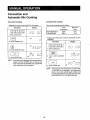
More or Less Time
Adjustment
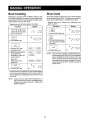
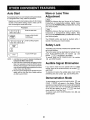
Auto Start
Ifyou wish to program your oven to begin cooking automatically
at a designated time of day, follow this procedure:
* Suppose you want to start cooking a stew for 20 minutes
on 50% at 4:30.. Before setting, check to make sure the
clock is showing the correct time of day.
Should you discover that you like any of the Popcorn,
CompuCook or CompuDefrost settings slightly more
done, touch the POWER LEVEL pad once after touching
your choice of pads.
Procedure
2 _
Should you discover that you like any of the Popcorn,
CompuCook or CompuDefrost settings slightly less
done, touch the POWER LEVEL pad twice after touching
your choice of pads.
Touch
CLOCK
AUTO
pad. START/
The POWER LEVEL pad must be touched within 1
second of touching your choice of pads.
3. ____
Enter cooking program_
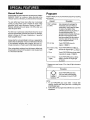
Safety Lock
4Lj ]
The Safety Lock prevents unwanted oven operation such
as by small children..
The control panel can be deactivated or locked. To set,
touch AUTO START/CLOCK, the number []
and
START _
will appear in the display.
To cancel, touch AUTO START/CLOCK, the number
[]
and STOP/CLEAR.
TouohSTART0a0
NOTE: 1_ Auto Start can be used for manual cooking and
CompuCook Micro and Convec
2. if the oven door is opened after programming Auto
Start, it is necessary to touch the START pad for
the time ef day to appear in the readout so that the
oven will automatically begin programmed cooking
at the chosen Auto Start time.
3. Be sure to choose foods that can be ]effin the oven
safely until the Auto Start time° Baked potatoes
are often a good choice
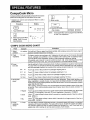
Audible Signal Elimination
If you wish to have the even operate with no audible
signals, touch AUTO START/CLOCK,
the number []
and START
To cancel and restore the audible signal, touch AUTO
START/CLOCK,
the number []
and STOP/CLEAR
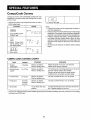
Demonstration
Mode
To demonstrate, touch AUTO START/CLOCK, [] and
START. _
will appear in the display° Cooking
operations and special features can now be demonstrated
with no power in the oven.. For example, touch MINUTE
PLUS and the display will show _
and count
down quickly to 0 and the "End'L
To cancel, touch AUTO START/CLOCK, then [] and
STOP/CLEARr
20