1
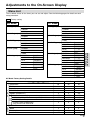
Adjustments to the On-Screen Display
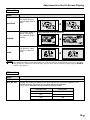
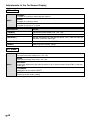
AV mode
Mode
SIDE BAR
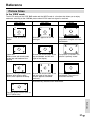
The screen shows
the regular display
(height:width ratio is
4:3).
Regular TV display
9:00
9:00
;;
;;
CINEMA
WIDE
➜
The screen shows a
movie size display
for (software-driven)
movies.
Display with bands at the top and bottom
Compressed to the
4:3 format, a video
image is shown full
size.
Display with subtitles at the bottom
➜
➜
Hello, How are you?
Note
;;
;;
Hello, How are you?
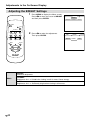
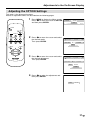
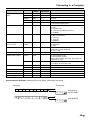
The SIDE BAR mode and the WIDE mode has an AUTO setting that automatically sets pictures with letter
box signals to a suitable size (for NTSC only). Please select “ON” in the AUTO setting using the '"\ |
buttons. See page 37.
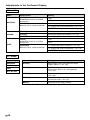
PC mode
Mode
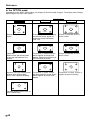
FULL
Widened picture to full-screen size
DOT BY DOT
Picking out the display mode of the input signal of the connected computer, this
function displays the picture in the center without enlargement.
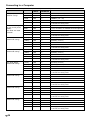
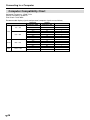
• This unit is compatible with the following display modes.
Horizontal dot
Vertical dot
640
480
800
600
1024
768
19
US