1
E5297
Eee PC
User Manual
Windows® XP Edition
Eee PC 1201 Series
15G06Q232000
Downloaded from LpManual.com Manuals
Table of Contents
About This User’s Manual.......................................................................................................iv
Notes for This Manual..............................................................................................................iv
Safety Precautions.....................................................................................................................v
Transportation Precautions....................................................................................vi
Charging Your Batteries..........................................................................................vii
Airplane Precautions................................................................................................vii
Chapter 1:
Knowing the Parts
Top Side.....................................................................................................................................1-2
Bottom Side..............................................................................................................................1-5
Front Side..................................................................................................................................1-6
Right Side..................................................................................................................................1-7
Left Side.....................................................................................................................................1-9
Keyboard Usage....................................................................................................................1-11
Special Function Keys..........................................................................................1-11
Touchpad Usage...................................................................................................................1-13
Multi-finger gesture input..................................................................................1-13
Chapter 2:
Getting Started
Powering on your Eee PC....................................................................................................2-2
First-time Startup...................................................................................................................2-3
Desktop......................................................................................................................................2-4
Network Connection.............................................................................................................2-5
Configuring a wireless network connection.................................................2-5
Local Area Network.................................................................................................2-6
Browsing web pages..............................................................................................2-9
Chapter 3:
Using the Eee PC
ASUS Update............................................................................................................................3-2
Updating the BIOS through the Internet........................................................3-2
Updating the BIOS through a BIOS file............................................................3-3
Bluetooth Connection(on selected models)................................................................3-4
Super Hybrid Engine.............................................................................................................3-6
Super Hybrid Engine Modes...............................................................................3-6
Microsoft® Office Trial............................................................................................................3-7
ii
Downloaded from LpManual.com Manuals
Table of Contents
Chapter 4:
Support DVD & System Recovery
Support DVD information...................................................................................................4-2
Running the support DVD....................................................................................4-2
Drivers menu.............................................................................................................4-3
Utilities menu............................................................................................................4-3
Contact........................................................................................................................4-3
Other information...................................................................................................4-3
System Recovery....................................................................................................................4-4
Using Recovery Partition......................................................................................4-4
Using the Support DVD.........................................................................................4-5
Boot Booster............................................................................................................................4-6
Appendix
Declarations and Safety Statements...............................................................................A-2
Federal Communications Commission Statement......................................A-2
FCC Radio Frequency (RF) Exposure Caution Statement..........................A-3
Declaration of Conformity(R&TTE directive 1999/5/EC)...........................A-4
CE Marking.................................................................................................................A-4
IC Radiation Exposure Statement for Canada...............................................A-5
Wireless Operation Channel for Different Domains...................................A-6
France Restricted Wireless Frequency Bands................................................A-6
UL Safety Notices.....................................................................................................A-7
REACH Notice............................................................................................................A-8
Power Safety Requirement..................................................................................A-8
Global Environmental Regulation Compliance and Declaration . ........A-9
Takeback Services...................................................................................................A-9
Nordic Lithium Cautions (for lithium-ion batteries)................................A-10
Copyright Information.......................................................................................................A-12
Limitation of Liability.........................................................................................................A-13
Service and Support...........................................................................................................A-13
ASUS Eee PC
Downloaded from LpManual.com Manuals
iii
About This User’s Manual
You are reading the Eee PC User’s Manual. This User’s Manual provides
information regarding the various components in the Eee PC and how to
use them. The following are major sections of this User’s Manual:
1.
Knowing the Parts
Provides information on the Eee PC’s components.
2.
Getting Started
Provides information on getting started with the Eee PC.
3.
Using the Eee PC
Provides information on using the Eee PC’s utilities.
4.
Support DVD and System Recovery
Gives you information on support DVD contents and system
recovery.
5.
Appendix
Gives you safety statements.
The actual bundled operating system and applications differ by
models and territories. There may be differences between your Eee
PC and the pictures shown in this manual. Please accept your Eee PC
as being correct.
Notes for This Manual
A few notes and warnings are used throughout this guide, allowing you
to complete certain tasks safely and effectively. These notes have different
degrees of importance as follows:
WARNING! Important information that must be followed for safe
operation.
IMPORTANT! Vital information that must be followed to prevent
damage to data, components, or persons.
TIP: Tips for completing tasks.
NOTE: Information for special situations.
iv
Downloaded from LpManual.com Manuals
Table of Contents
Safety Precautions
The following safety precautions will increase the life of the Eee PC. Follow
all precautions and instructions. Except as described in this manual, refer
all servicing to qualified personnel. Do not use damaged power cords,
accessories, or other peripherals. Do not use strong solvents such as
thinners, benzene, or other chemicals on or near the surface.
Disconnect the AC power before cleaning. Wipe the Eee PC using a
clean cellulose sponge or chamois cloth dampened with a solution
of nonabrasive detergent and a few drops of warm water and
remove any extra moisture with a dry cloth.
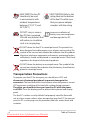
DO NOT place on uneven
or unstable work surfaces.
Seek servicing if the casing
has been damaged.
DO NOT place or drop objects
on top and do not shove any
foreign objects into the Eee
PC.
DO NOT expose to dirty or
dusty environments. DO
NOT operate during a gas
leak.
DO NOT expose to strong
magnetic or electrical fields.
DO NOT press or touch the
display panel. Do not place
together with small items
that may scratch or enter
the Eee PC.
DO NOT expose to or use near
liquids, rain, or moisture. DO
NOT use the modem during
electrical storms.
DO NOT leave the Eee PC
on your lap or any part
of the body to prevent
discomfort or injury from
heat exposure.
Battery safety warning: DO
NOT throw the battery in
fire. DO NOT short circuit the
contacts. DO NOT disassemble
the battery.
ASUS Eee PC
Downloaded from LpManual.com Manuals
SAFE TEMP: This Eee PC
should only be used
in environments with
ambient temperatures
between 5°C (41°F) and
35°C (95°F)
INPUT RATING: Refer to the
rating label on the bottom
of the Eee PC and be sure
that your power adapter
complies with the rating.
DO NOT carry or cover a
Eee PC that is powered
ON with any materials that
will reduce air circulation
such as a carrying bag.
Incorrect installation of
battery may cause explosion
and damage the Eee PC.
DO NOT throw the Eee PC in municipal waste. This product has
been designed to enable proper reuse of parts and recycling. The
symbol of the crossed out wheeled bin indicates that the product
(electrical, electronic equipment and mercury-containing button
cell battery) should not be placed in municipal waste. Check local
regulations for disposal of electronic products.
DO NOT throw the battery in municipal waste. The symbol of the
crossed out wheeled bin indicates that the battery should not be
placed in municipal waste.
Transportation Precautions
To prepare your Eee PC for transport, you should turn it OFF and
disconnect all external peripherals to prevent damage to the
connectors. The hard disk drive’s head retracts when the power is turned
OFF to prevent scratching of the hard disk surface during transport.
Therefore, you should not transport your Eee PC while the power
is still ON. Close the display panel to protect the keyboard and display
panel.
The Eee PC’s surface is easily dulled if not properly cared for. Be careful
not to rub or scrape surfaces when transporting your Eee PC. You can put
your Eee PC in a carrying case for protection from dirt, water, shock, and
scratches.
vi
Downloaded from LpManual.com Manuals
Table of Contents
Charging Your Batteries
If you intend to use battery power, be sure to fully charge your battery
pack before going on long trips. Remember that the power adapter
charges the battery pack as long as it is plugged into the computer and an
AC power source. Be aware that it takes much longer to charge the battery
pack when the Eee PC is in use.
Remember to fully charge the battery (8 hours or more) before first use
and whenever it is depleted to prolong battery life. The battery reaches its
maximmum capacity after a few full charging and discharging cycles.
Airplane Precautions
Contact your airline if you want to use the Eee PC on the airplane. Most
airlines have restrictions for using electronic devices. Most airlines allow
electronic use only between and not during takeoffs and landings.
There are three main types of airport security devices: X-ray
machines (used on items placed on conveyor belts), magnetic
detectors (used on people walking through security checks), and
magnetic wands (hand-held devices used on people or individual
items). You can send your Eee PC and diskettes through airport X-ray
machines. However, it is recommended that you do not send your
Eee PC or diskettes through airport magnetic detectors or expose
them to magnetic wands.
ASUS Eee PC
Downloaded from LpManual.com Manuals
vii
viii
Downloaded from LpManual.com Manuals
Table of Contents
Top Side
Bottom Side
Front Side
Right Side
Left Side
Keyboard Usage
Touchpad Usage
1
Chapter 1:
Knowing the Parts
Downloaded from LpManual.com Manuals
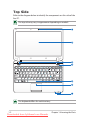
Top Side
Refer to the diagram below to identify the components on this side of the
Eee PC.
The top side may vary in appearance depending on models.
1
2
3
4
5
6
7
The keyboard differs for each territory.
1-2
Downloaded from LpManual.com Manuals
Chapter 1: Knowing the Parts
1
Built-in Camera
2
Display Panel
3
Touchpad key
Toggles the touchpad ON/OFF. You can also turn on/off the
function by pressing <Fn> + <F9>.
4
Power Switch
5
The power switch allows powering ON and OFF the Eee PC and
recovering from STR. Press the switch once to turn ON and hold
it to turn OFF the Eee PC. The power switch only works when the
display panel is opened.
Keyboard
The keyboard provides keys with comfortable travel (depth at
which the keys can be depressed) and palm rest for both hands.
The keyboard differs depending on models.
6
Touchpad and Buttons
The touchpad and its buttons comprises a pointing device that
provides the same functions as a desktop mouse.
7
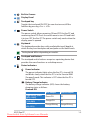
Status Indicators
Power Indicator
The power indicator lights when the Eee PC is turned ON
and blinks slowly when the Eee PC is in the Save-to-RAM
(Suspend) mode. This indicator is OFF when the Eee PC is
turned OFF.
Battery Charge Indicator
The battery charge indicator (LED) shows the battery
charging status as follows:
Powered ON
With Adapter
High battery power
Green ON
(95%–100%)
Medium battery power
Orange ON
(11%–94%)
Low battery power
Orange Blinking
(0%–10%)
ASUS Eee PC
Downloaded from LpManual.com Manuals
Without Adapter
Off
Off
Orange Blinking
1-3
Powered OFF / Standby mode
With Adapter
High battery power
Green ON
(95%–100%)
Medium battery power
Orange ON
(11%–94%)
Low battery power
Orange Blinking
(0%–10%)
Without Adapter
Off
Off
Off
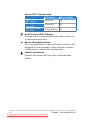
Hard Disk Drive (HDD) Indicator
The hard disk drive indicator blinks when data is written to
or read from the disk drive.
Wireless/Bluetooth Indicator
This is only applicable on models with built-in wireless LAN/
Bluetooth (on selected models). When the built-in wireless
LAN/Bluetooth is enabled, this indicator lights.
Capital Lock Indicator
Indicates that capital lock [Caps Lock] is activated when
lighted.
1-4
Downloaded from LpManual.com Manuals
Chapter 1: Knowing the Parts
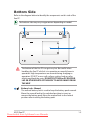
Bottom Side
Refer to the diagram below to identify the components on this side of the
Eee PC.
The bottom side may vary in appearance depending on model.
1
2
1
3
2
4
The bottom of the Eee PC can get very hot. Be careful when
handling the Eee PC while it is in operation or recently been in
operation. High temperatures are normal during charging or
operation. DO NOT use on soft surfaces such as beds or sofas,
which may block the vents. DO NOT PUT THE Eee PC ON YOUR
LAP OR OTHER PARTS OF THE BODY TO AVOID INJURY FROM
THE HEAT.
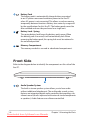
1
Battery Lock - Manual
The manual battery lock is used to keep the battery pack secured.
Move the manual lock to the unlocked position to insert or
remove the battery pack. Move the manual lock to the locked
position after inserting the battery pack.
ASUS Eee PC
Downloaded from LpManual.com Manuals
1-5
2
3
4
Battery Pack
The battery pack is automatically charged when connected
to an AC power source and maintains power to the Eee PC
when AC power is not connected. This allows use when moving
temporarily between locations. Battery time varies by usage and
by the specifications for this Eee PC. The battery pack cannot be
disassembled and must be purchased as a single unit.
Battery Lock - Spring
The spring battery lock keeps the battery pack secure. When
the battery pack is inserted, it will automatically lock. When
removing the battery pack, this spring lock must be retained in
the unlocked position.
Memory Compartment
The memory module is secured in a dedicated compartment.
Front Side
Refer to the diagram below to identify the components on this side of the
Eee PC.
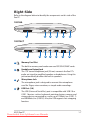
1
1
Audio Speaker System
The built-in stereo speaker system allows you to hear audio
without additional attachments. The multimedia sound system
features an integrated digital audio controller that produces rich,
vibrant sound (results improved with external stereo headphones
or speakers). Audio features are software controlled.
1-6
Downloaded from LpManual.com Manuals
Chapter 1: Knowing the Parts
Right Side
Refer to the diagram below to identify the components on this side of the
Eee PC.
1201HA
1
2
3
4
5
6
2
3
4
5
6
1201NL/T
1
1
4
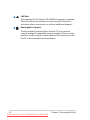
Memory Card Slot
The built-in memory card reader can read SD/SDHC/MMC cards.
Headphone Output Jack
2
The 1/8” stereo headphone jack (3.5mm) connects the Eee PC’s
audio out signal to amplified speakers or headphones. Using this
jack automatically disables the built-in speakers.
HDMI
3
Microphone Jack
The microphone jack is designed to connect the microphone
1 for Skype,
2
4
5
used
voice narrations,
or simple3audio recordings.
4
USB Port (2.0)
The USB (Universal Serial Bus) port is compatible with USB 2.0 or
USB 1.1 devices such as keyboards, pointing devices, cameras, and
storage devices, connected in a series up to 12Mbits/sec (USB 1.1)
and 480Mbits/sec (USB 2.0). Also, the USB supports hot-swapping
function.
1
ASUS Eee PC
2
4
Downloaded from LpManual.com Manuals
3
1-7
5
6
LAN Port
The eight-pin RJ-45 LAN port (10/100M bit) supports a standard
Ethernet cable for connection to a local network. The built-in
connector allows convenient use without additional adapters.
Kensington® Lock port
The Kensington® lock port allows the Eee PC to be secured
using Kensington® compatible security products. These security
products usually include a metal cable and lock that prevent the
Eee PC to be removed from a fixed object.
1-8
Downloaded from LpManual.com Manuals
Chapter 1: Knowing the Parts
Left Side
Refer to the diagram below to identify the components on this side of the
Eee PC.
1201HA
1
1
4
2
3
4
5
6
1
4
2
3
4
5
6
2
3
4
1201NL
HDMI
1
2
4
3
5
1
2
4
3
5
HDMI
1201T
1
1
2
4
3
Display
(Monitor)
Output4
1
2
3
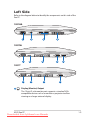
The 15-pin D-sub monitor port supports a standard VGAcompatible device such as a monitor or projector to allow
viewing on a larger external display.
ASUS Eee PC
Downloaded from LpManual.com Manuals
1-9
2
Power (DC) Input
The supplied power adapter converts AC power to DC power
for use with this jack. Power supplied through this jack supplies
power to the Eee PC and charges the internal battery pack. To
prevent damage to the Eee PC and battery pack, always use the
supplied power adapter.
THE ADAPTER MAY BECOME WARM TO HOT WHEN IN USE. BE
SURE NOT TO COVER THE ADAPTER AND KEEP IT AWAY FROM
YOUR BODY.
3
USB Port (2.0)
4 Air Vents
The air vents allow cool air to enter and warm air to exit the Eee
PC.
Ensure that paper, books, clothing, cables, or other objects do not
block any of the air vents or else overheating may occur.
5
HDMI
HDMI Port
HDMI (High-Definition Multimedia Interface) is an uncompressed
all-digital audio/video interface between any audio/video
source, such as a set-top box, DVD player, and A/V receiver and
an audio and/or video monitor, such as a digital television (DTV).
Supports standard, enhanced, or high-definition video, plus multichannel digital audio on a single cable. It transmits all ATSC HDTV
standards and supports 8-channel digital audio, with bandwidth
to spare to accommodate future enhancements or requirements.
1-10
Downloaded from LpManual.com Manuals
Chapter 1: Knowing the Parts
Keyboard Usage
Special Function Keys
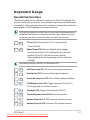
The following defines the colored hot keys on the Eee PC’s keyboard. The
colored commands can only be accessed by first pressing and holding the
function key while pressing a key with a colored command. Some function
icons appear in the Notification area after activation.
The Hot Key locations on the function keys may vary depending on
model but the functions should remain the same. Follow the icons
whenever your hot key locations do not match the manual.
Zz Icon (F1): Places the Eee PC in suspend mode
(Save-to-RAM).
Radio Tower (F2) (Wireless Models Only): Toggles
the internal wireless LAN or Bluetooth (on selected
models) ON or OFF with an on-screen-display.
When enabled, the corresponding wireless indicator
will light.
The default setting is WLAN ON / Bluetooth OFF.
Sun Down Icon (F5): Decreases the display brightness.
Sun Up Icon (F6): Increases the display brightness.
Crossed Screen Icon (F7): Turns off the display backlight.
LCD/Monitor Icons (F8): Toggles between the Eee PC’s LCD display and an external monitor.
Touchpad (F9): Toggles the touchpad ON/OFF.
Crossed Speaker Icon (F10): Mutes the speaker.
Volume Down Icon (F11): Decreases speaker volume.
Volume Up Icon (F12): Increases the speaker volume.
ASUS Eee PC
Downloaded from LpManual.com Manuals
1-11
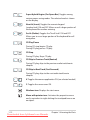
Super Hybrid Engine (Fn+Space Bar): Toggles among various power saving modes. The selected mode is shown on the display.
Num Lk (Insert): Toggles the numeric keypad
(number lock) ON and OFF. Allows use of a larger portion of
the keyboard for number entering.
Scr Lk (Delete): Toggles the “Scroll Lock” ON and OFF. Allows you to use a larger portion of the keyboard for cell navigation.
CD Play/Pause
During CD stop, begins CD play.
During CD play, pauses CD play.
CD Stop
During CD play: Stops CD play.
CD Skip to Previous Track (Rewind)
During CD play, skips to the previous audio track/movie
chapter.
CD Skip to Next Track (Fast Forward)
During CD play, skips to the next audio track/movie
chapter.
V: Toggles the camera applicaiotn ON. (on selected models)
C: Toggles the screensaver ON.
Windows icon: Displays the start menu.
Menu with pointer icon : Activates the properties menu and is equivalent to right-clicking the touchpad/mouse on an object.
1-12
Downloaded from LpManual.com Manuals
Chapter 1: Knowing the Parts
Touchpad Usage
Multi-finger gesture input
Finger gesture
Two-finger zooming in/out
Two-finger rotating
Two-finger scrolling up/down or
left/right
Applications
Adobe reader, Windows Photo Viewer
Adobe reader, Windows Photo Viewer
Three-finger page up/down
Adobe reader, MS Word, MS Excel
Adobe reader, MS Word, MS Excel
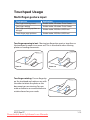
Two-finger zooming in/out - Moving two fingertips apart or together on
the touchpad to zoom in or zoom out. This is convenient when viewing
photos or reading documents.
Zoom in
Zoom out
Two-finger rotating- Fix one fingertip
on the touchpad and make an arc with
the other to rotate the photo or the
document you are viewing. You can
make a clockwise or counterclockwise
rotation based on your needs.
ASUS Eee PC
Downloaded from LpManual.com Manuals
1-13
Two-finger scrolling up/down or
left/right- Use two fingertips to slide
up/down or left/right on the touchpad
to scroll a window up/down or left/
right. If your display window includes
several sub-windows, move the
pointer on that pane before scrolling.
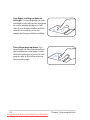
Three-finger page up/down- Use
three fingers to move horizontally on
the touchpad to swipe pages. Swipe
from left to the right to view the next
page or right to the left to return to
the previous pages.
1-14
Downloaded from LpManual.com Manuals
Chapter 1: Knowing the Parts
Powering on your Eee PC
First-time Startup
Desktop
Network Connection
2
Chapter 2:
Getting Started
Downloaded from LpManual.com Manuals
Powering on your Eee PC
These are only quick instructions for using your Eee PC.
1.
Install the battery pack
2.
3
2
1
3.
Connect the AC power
adapter
2
1
3
110
V-220V
Turn ON the Eee PC
Damage may occur if you use
a different adapter to power
the Eee PC. You may damage
both your battery pack(s) and
the Eee PC with a faulty ACDC adapter.
•
When you open the display panel, do not force it down to the table
or else the hinges may break! Never lift the Eee PC by the display
panel!
•
Only use battery packs and power adapters supplied with this
Eee PC or specifically approved by the manufacturer or retailer for
use with this model or else damage may occur to the Eee PC. The
output voltage of this adapter is +19Vdc, 2.1A.
•
Never attempt to remove the battery pack while the Eee PC is
turned ON, as this may result in the loss of working data.
Remember to fully charge the battery before first use and whenever
it is depleted to prolong battery life.
2-2
Downloaded from LpManual.com Manuals
Chapter 2: Getting Started
First-time Startup
For the first time you start your Eee PC, the Windows wizard will launch
automatically and lead you through setting up your preferences and some
basic information.
Follow the wizard instructions to finish the initialization:
1.
The Welcome message
appears. Click Next to
continue.
2.
Select your system settings
by specifying the region you
are in, the language you use
and the keyboard type you
use. Click Next to continue.
3.
Select the time zone you
are in and click Next to
continue.
4.
Read the end user license
agreement and click Yes,
I accept. Click Next to
continue.
ASUS Eee PC
Downloaded from LpManual.com Manuals
2-3
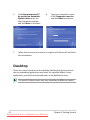
5.
Click Help protect my PC
by turning on Automatic
Updates now to get the
latest important updates
and click Next to continue.
7.
Follow the onscreen instructions to register with Microsoft and finish
the initialization.
6.
Type your computer’s name
in the Computer name box
and click Next to continue.
Desktop
There are several shortcuts on the desktop. Double-click them to launch
the corresponding applications and enter the specified folders. Some
applications would form minimized icons in the Notification area.
The actual Desktop screen may vary according to different models.
2-4
Downloaded from LpManual.com Manuals
Chapter 2: Getting Started
Network Connection
Configuring a wireless network connection
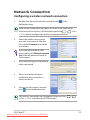
1.
Double-click the crossed wireless network icon
Notification area.
in the
If the wireless connection icon does not show in the Notification
+
area. Activate the wireless LAN function by pressing
(<Fn>
+ <F2>) before configuring a wireless network connection.
fn
2.
f1
f2
f3
f4
f5
f6
f7
Select the wireless access point
you want to connect to from the
list and click Connect to build the
connection.
If you cannot find the desired
access point, click Refresh network
list in the left pane and search in
the list again.
3.
When connecting, you may have to
enter a password.
4.
After a connection has been
established, the connection is
shown on the list.
5.
You can see the wireless network
icon
in the Notification area.
The wireless connection icon disappears when you Press
(<Fn> + <F2>) to disable the WLAN function.
ASUS Eee PC
Downloaded from LpManual.com Manuals
fn
+
f1
f2
f3
2-5
f4
f5
f6
Local Area Network
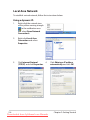
To establish a wired network, follow the instructions below:
Using a dynamic IP:
1.
Right-click the network icon
with a yellow warning triangle
in the notification area
and select Open Network
Connections.
2.
Right-click Local Area
Connection and select
Properties.
3.
Click Internet Protocol
(TCP/IP) and click Properties.
4.
2-6
Downloaded from LpManual.com Manuals
Click Obtain an IP address
automatically and click OK.
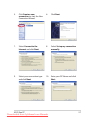
Chapter 2: Getting Started
5.
Click Create a new
connection to start the New
Connection Wizard.
6.
Click Next.
7.
Select Connect to the
Internet and click Next.
8.
Select Set up my connection
manually.
9.
Select your connection type
and click Next.
10. Enter your ISP Name and click
Next.
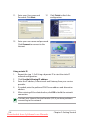
ASUS Eee PC
Downloaded from LpManual.com Manuals
2-7
11. Enter your User name and
Password. Click Next.
12
Click Finish to finish the
configuration.
13. Enter your user name and password.
Click Connect to connect to the
Internet.
Using a static IP:
1. Repeat the step 1–3 of Using a dynamic IP to start the static IP
network configuration.
2
Click Use the following IP address.
3. Enter the IP address, Subnet mask and Gateway from your service
provider.
4. If needed, enter the preferred DNS Server address and alternative
address.
5. After entering all the related values, click OK to build the network
connection.
Contact your Internet Service Provider (ISP) if you have problems
connecting to the network.
2-8
Downloaded from LpManual.com Manuals
Chapter 2: Getting Started
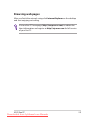
Browsing web pages
After you finish the network setup, click Internet Explorer on the desktop
and start enjoying net surfing.
Visit our Eee PC homepage (http://eeepc.asus.com) to obtain the
latest information and register at http://vip.asus.com for full service
of your Eee PC.
ASUS Eee PC
Downloaded from LpManual.com Manuals
2-9
2-10
Downloaded from LpManual.com Manuals
Chapter 2: Getting Started
ASUS Update
Bluetooth Connection
Super Hybrid Engine
Microsoft® Office Trial
3
Chapter 3:
Using the Eee PC
Downloaded from LpManual.com Manuals
ASUS Update
The ASUS Update is a utility that allows you to manage, save, and update
the Eee PC BIOS in Windows® environment. The ASUS Update utility allows
you to:
•
Save the current BIOS file
•
Download the latest BIOS file from the Internet
•
Update the BIOS from an updated BIOS file
•
Update the BIOS directly from the Internet, and
•
View the BIOS version information.
This utility is pre-loaded in your Eee PC and is also available in the support
DVD that comes with the Eee PC package.
ASUS Update requires an Internet connection either through a
network or an Internet Service Provider (ISP).
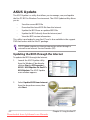
Updating the BIOS through the Internet
To update the BIOS through the Internet
1. Launch the ASUS Update utility
from the Windows® desktop by
clicking Start > All Programs >
ASUS > ASUSUpdate for Eee PC>
ASUSUpdate. The ASUS Update
main window appears.
2.
Select Update BIOS from Internet
from the drop‑down menu, then
click Next.
3-2
Downloaded from LpManual.com Manuals
Chapter 3: Using the Eee PC
3.
Select the ASUS FTP site nearest
you to avoid network traffic, or
click Auto Select. Click Next.
4.
From the FTP site, select the
desired BIOS version and click
Next.
5.
Follow the screen instructions to
complete the update process.
The ASUS Update utility is capable of updating itself through the
Internet. Always update the utility to avail all its features.
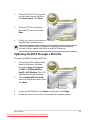
Updating the BIOS through a BIOS file
To update the BIOS through a BIOS file:
1.
2.
3.
4.
Launch the ASUS Update utility
from the Windows® desktop
by clicking Start > Programs
> ASUS > ASUSUpdate for
EeePC> ASUSUpdate. The ASUS
Update main window appears.
Select Update BIOS from file
from the drop‑down menu, then
click Next.
Locate the BIOS file from the Open window, then click Open.
Follow the screen instructions to complete the update process.
ASUS Eee PC
Downloaded from LpManual.com Manuals
3-3
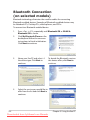
Bluetooth Connection
(on selected models)
Bluetooth technology eliminates the need for cables for connecting
Bluetooth-enabled devices. Examples of Bluetooth-enabled devices may
be Notebook PCs, Desktop PCs, mobile phones, and PDAs.
To connect to a Bluetooth-enabled device
1.
2.
Press <Fn> + <F2> repeatedly until Bluetooth ON or WLAN &
Bluetooth ON is shown.
Click My Bluetooth Places on the
desktop and follow the onscreen
instructions to finish initialization.
Click Next to continue.
3.
Name your Eee PC and select 4.
the device type. Click Next to
continue.
5.
Select the service you would like to
offer from the list and click Next to
continue.
3-4
Downloaded from LpManual.com Manuals
To decide the Bluetooth services
this device offers, click Next to
continue.
Chapter 3: Using the Eee PC
6.
Click Next to start setting up the
Bluetooth connection.
7.
Select a Bluetooth-enabled device
from the list and click Next.
8.
Enter the Bluetooth security code
and start pairing.
9.
After the paired relationship is
built, select the service you are
interested in from the list and click
Finish to use the selected service.
ASUS Eee PC
Downloaded from LpManual.com Manuals
3-5
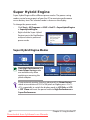
Super Hybrid Engine
Super Hybrid Engine offers different power modes. The power saving
modes control many aspects of your Eee PC to maximize performance
versus battery time. The selected mode is shown on the display.
To change the power mode
•
•
Click Start > All Programs > ASUS > EeePC > SuperHybridEngine
> SuperHybridEngine.
Right-click the Super Hybrid
Engine icon in the Notification
area, and select a preferred
power mode.
Super Hybrid Engine Modes
Auto High Performance and
Auto Power-Saving mode
are available only when
applying or removing the
power adapter.
If your external monitor functions abnormally in Power Saving
mode at a resolution of 1024 x 768 pixels or higher, press <Fn> +
<F5> repeatedly to switch the display mode to LCD Only or LCD
+ CRT Clone and reset the power mode to High Performance or
Super Performance.
3-6
Downloaded from LpManual.com Manuals
Chapter 3: Using the Eee PC
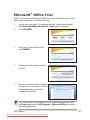
Microsoft® Office Trial
Eee PC users can enjoy Microsoft Office Suite free trial for 60 days. Do the
following instructions to start the free trial.
1.
2.
Ensure that your Eee PC is connected to the Internet and doubleclick Microsoft Office 60 Day Trial - Online on the desktop.
Click TRY NOW.
3.
Enter your E-mail address and
click SUBMIT.
4.
Copy your product key and click
the link.
5.
Enter your product key and follow
the onscreen instructions to finish
the activation process before
starting the free trial.
If you want to use other applications in the Microsoft Office Suite,
click start and point to All Programs > Microsoft Office to select a
desired application.
ASUS Eee PC
Downloaded from LpManual.com Manuals
3-7
3-8
Downloaded from LpManual.com Manuals
Chapter 3: Using the Eee PC
Support DVD information
System Recovery
Boot Booster
4
Chapter 4:
Support DVD &
System Recovery
Downloaded from LpManual.com Manuals
Support DVD information
The support DVD that comes with the Eee PC package contains the
drivers, software applications, and utilities that you can install to avail all
the features.
Running the support DVD
Insert the support DVD in the external optical drive. The DVD
automatically displays the Drivers menu if Autorun is enabled in your
computer.
Click an icon to display
support DVD/ Eee PC
information
Click an item to install
If Autorun is NOT enabled in your computer, browse the contents of
the support DVD to locate the file ASSETUP.EXE from the BIN folder.
Double-click the ASSETUP.EXE file to run the DVD.
The drivers and utilities bundled in the support DVD may vary by
models and are subject to change without notice.
4-2
Chapter 4: Support DVD & System Recovery
Downloaded from LpManual.com Manuals
Drivers menu
The Drivers menu shows available device drivers when the system detects
installed devices. Install the necessary drivers to activate the devices.
Utilities menu
The Utilities menu shows the applications that the Eee PC supports.
Contact
Click the Contact tab to display the ASUS contact information.
Other information
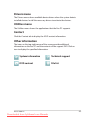
The icons on the top right corner of the screen provide additional
information on the Eee PC and the contents of the support DVD. Click an
icon to display the specified information.
System information
Technical support
DVD content
File list
ASUS Eee PC
Downloaded from LpManual.com Manuals
4-3
System Recovery
Using Recovery Partition
About the Recovery Partition
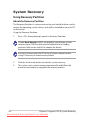
The Recovery Partition is a space reserved on your hard disk drive used to
restore the operating system, drivers, and utilities installed on your Eee PC
at the factory.
Using the Recovery Partition:
1.
Press <F9> during bootup (requires a Recovery Partition)
Disable Boot Booster in BIOS setup before you perform system
recovery from USB flash disk, external optical drive or hidden
partition. Refer to the end of this chapter for details.
Ensure to connect your Eee PC to the AC power adapter before
using F9 recovery to avoid recovery failure.
2.
3.
4-4
Click the check mark button to start the system recovery.
The system starts system recovery automatically and follow the
onscreen instructions to complete the recovery process.
Chapter 4: Support DVD & System Recovery
Downloaded from LpManual.com Manuals
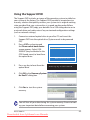
Using the Support DVD
The Support DVD includes an image of the operating system, installed on
your system at the factory. The Support DVD provides a comprehensive
recovery solution that quickly restores your system to its original working
state, provided that your system drive is in good working order. Before
using the Support DVD, copy your data files to a USB storage device or to
a network drive and make note of any customized configuration settings
(such as network settings).
1. 2. Connect an external optical drive to your Eee PC and insert the
Support DVD into the optical drive (System needs to be powered
ON).
Press <ESC> on bootup and
Please select boot device:
the Please select boot device
HDD:PM-ST9160310AS
screen appears. Select USB:
USB:XXXXXXXX
XXXXXX (may be labeled as the
ODD brand name) to boot from
the optical drive.
↑ and ↓ to move selection
ENTER to select boot device
3.
Press any key to boot from the
optical drive.
4.
Click OK in the Recovery System
for Eee PC dialog box.
5.
Click Yes to start the system
recovery.
Press any key to boot from CD...
You will lose all your data during the system recovery. Ensure to back
up your important data before recovering your system.
ASUS Eee PC
Downloaded from LpManual.com Manuals
4-5
6. After the system recovery is
completed, eject the the Support
DVD from the optical drive and
click OK to restart the Eee PC.
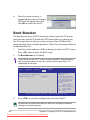
Boot Booster
The Boot Booster item in BIOS setup helps shorten your Eee PC bootup
time. However, you MUST disable this BIOS item before you change any
Eee PC components or perform system recovery (from USB flash disk,
external optical drive or hidden partition). Follow the instructions below to
disable Boot Booster:
1.
2.
Start the system and press <F2> on bootup to show the POST screen.
Press <F2> again to enter the BIOS setup.
Set Boot Booster to [Disabled].
If you fail to see the POST screen or enter the BIOS setup by doing
the instruction above, restart the system and try pressing <F2>
repeatedly on bootup.
Main
Advanced
Security
BIOS SETUP UTILITY
Boot
Exit
Specifies the Boot
Device Priority
sequence.
Boot Device Priority
Boot Settings Configuration
OnBoard LAN Boot ROM
[Enabled]
Boot Booster
[Disabled]
A virtual floppy disk
drive (Floppy Drive B:
) may appear when you
set the CD-ROM drive
as the first boot
device.
←→
↑↓
Enter
F1
F10
ESC
Select Screen
Select Item
Go to Sub Screen
General Help
Save and Exit
Exit
v02.58 (C)Copyright 1985-2005, American Megatrends, Inc.
3.
Press <F10> to save the configuration and restart Eee PC.
Remember to enable Boot Booster after you complete hardware
change or system recovery.
4-6
Chapter 4: Support DVD & System Recovery
Downloaded from LpManual.com Manuals
Declarations and Safety Statements
Copyright Information
Limitation of Liability
Service and Support
A
Appendix
Downloaded from LpManual.com Manuals
Declarations and Safety
Statements
Federal Communications Commission Statement
This device complies with FCC Rules Part 15. Operation is subject to the
following two conditions:
•
This device may not cause harmful interference, and
•
This device must accept any interference received, including
interference that may cause undesired operation.
This equipment has been tested and found to comply with the limits for a
class B digital device, pursuant to Part 15 of the Federal Communications
Commission (FCC) rules. These limits are designed to provide reasonable
protection against harmful interference in a residential installation. This
equipment generates, uses, and can radiate radio frequency energy
and, if not installed and used in accordance with the instructions, may
cause harmful interference to radio communications. However, there is
no guarantee that interference will not occur in a particular installation.
If this equipment does cause harmful interference to radio or television
reception, which can be determined by turning the equipment off and on,
the user is encouraged to try to correct the interference by one or more of
the following measures:
•
Reorient or relocate the receiving antenna.
•
Increase the separation between the equipment and receiver.
•
Connect the equipment into an outlet on a circuit different from that
to which the receiver is connected.
•
Consult the dealer or an experienced radio/TV technician for help.
The use of a shielded-type power cord is required in order to meet
FCC emission limits and to prevent interference to the nearby radio
and television reception. It is essential that only the supplied power
cord be used. Use only shielded cables to connect I/O devices to this
equipment. You are cautioned that changes or modifications not
expressly approved by the party responsible for compliance could
void your authority to operate the equipment.
A-2
Downloaded from LpManual.com Manuals
Appendix
(Reprinted from the Code of Federal Regulations #47, part 15.193, 1993.
Washington DC: Office of the Federal Register, National Archives and Records
Administration, U.S. Government Printing Office.)
FCC Radio Frequency (RF) Exposure Caution
Statement
Any changes or modifications not expressly approved by the party
responsible for compliance could void the user’s authority to
operate this equipment. “The manufacture declares that this device
is limited to Channels 1 through 11 in the 2.4GHz frequency by
specified firmware controlled in the USA.”
This equipment complies with FCC radiation exposure limits set forth
for an uncontrolled environment. To maintain compliance with FCC RF
exposure compliance requirements, please avoid direct contact to the
transmitting antenna during transmitting. End users must follow the
specific operating instructions for satisfying RF exposure compliance.
ASUS Eee PC
Downloaded from LpManual.com Manuals
A-3
Declaration of Conformity
(R&TTE directive 1999/5/EC)
The following items were completed and are considered relevant and
sufficient:
•
•
•
•
•
•
•
Essential requirements as in [Article 3]
Protection requirements for health and safety as in [Article 3.1a]
Testing for electric safety according to [EN 60950]
Protection requirements for electromagnetic compatibility in [Article
3.1b]
Testing for electromagnetic compatibility in [EN 301 489-1] & [EN
301 489-17]
Effective use of the radio spectrum as in [Article 3.2]
Radio test suites according to [EN 300 328-2]
CE Marking
CE marking for devices without wireless LAN/Bluetooth
The shipped version of this device complies with the requirements of the
EEC directives 2004/108/EC “Electromagnetic compatibility” and 2006/95/
EC “Low voltage directive”.
CE marking for devices with wireless LAN/ Bluetooth
This equipment complies with the requirements of Directive 1999/5/EC of
the European Parliament and Commission from 9 March, 1999 governing
Radio and Telecommunications Equipment and mutual recognition of
conformity.
A-4
Downloaded from LpManual.com Manuals
Appendix
IC Radiation Exposure Statement for Canada
This equipment complies with IC radiation exposure limits set forth for an
uncontrolled environment. To maintain compliance with IC RF exposure
compliance requirements, please avoid direct contact to the transmitting
antenna during transmitting. End users must follow the specific operating
instructions for satisfying RF exposure compliance.
Operation is subject to the following two conditions:
•
This device may not cause interference and
•
This device must accept any interference, including interference that
may cause undesired operation of the device.
To prevent radio interference to the licensed service (i.e. co-channel
Mobile Satellite systems) this device is intended to be operated indoors
and away from windows to provide maximum shielding. Equipment (or its
transmit antenna) that is installed outdoors is subject to licensing.
This device and its antenna(s) must not be co-located or operating in
conjunction with any other antenna or transmitter.
Country Code selection feature to be disabled for products marketed to
the US/CANADA.
This Class [B] digital apparatus complies with Canadian ICES-003.
Cet appareil numérique de la classe [B] est conforme à la norme NMB-003
du Canada
ASUS Eee PC
Downloaded from LpManual.com Manuals
A-5
Wireless Operation Channel for Different Domains
N. America
2.412-2.462 GHz
Ch01 through CH11
Japan
2.412-2.484 GHz
Ch01 through Ch14
Europe ETSI
2.412-2.472 GHz
Ch01 through Ch13
France Restricted Wireless Frequency Bands
Some areas of France have a restricted frequency band. The worst case
maximum authorized power indoors are:
•
10mW for the entire 2.4 GHz band (2400 MHz–2483.5 MHz)
•
100mW for frequencies between 2446.5 MHz and 2483.5 MHz
Channels 10 through 13 inclusive operate in the band 2446.6 MHz
to 2483.5 MHz.
There are few possibilities for outdoor use: On private property or on
the private property of public persons, use is subject to a preliminary
authorization procedure by the Ministry of Defense, with maximum
authorized power of 100mW in the 2446.5–2483.5 MHz band. Use
outdoors on public property is not permitted.
In the departments listed below, for the entire 2.4 GHz band:
•
Maximum authorized power indoors is 100mW
•
Maximum authorized power outdoors is 10mW
Departments in which the use of the 2400–2483.5 MHz band is permitted
with an EIRP of less than 100mW indoors and less than 10mW outdoors:
01
05
11
24
32
41
55
60
64
Ain
Hautes Alpes
Aude
Dordogne
Gers
Loir et Cher
Meuse
Oise
Pyrénées Atlantique
02
08
12
25
36
45
58
61
66
Aisne
03 Allier
Ardennes
09 Ariège
Aveyron
16 Charente
Doubs
26 Drôme
Indre
37 Indre et Loire
Loiret
50 Manche
Nièvre
59 Nord
Orne
63 Puy du Dôme
Pyrénées Orientales
A-6
Downloaded from LpManual.com Manuals
Appendix
67 Bas Rhin
68 Haut Rhin
70 Haute Saône
71 Saône et Loire
75 Paris
82 Tarn et Garonne
84 Vaucluse
88 Vosges
89 Yonne
90 Territoire de Belfort 94 Val de Marne
This requirement is likely to change over time, allowing you to use your
wireless LAN card in more areas within France. Please check with ART for
the latest information (www.art-telecom.fr)
Your WLAN Card transmits less than 100mW, but more than 10mW.
UL Safety Notices
Required for UL 1459 covering telecommunications (telephone) equipment
intended to be electrically connected to a telecommunication network
that has an operating voltage to ground that does not exceed 200V peak,
300V peak-to-peak, and 105V rms, and installed or used in accordance
with the National Electrical Code (NFPA 70).
When using the Eee PC modem, basic safety precautions should always
be followed to reduce the risk of fire, electric shock, and injury to persons,
including the following:
•
DO NOT use the Eee PC near water, for example, near a bath tub,
wash bowl, kitchen sink or laundry tub, in a wet basement or near a
swimming pool.
•
DO NOT use the Eee PC during an electrical storm. There may be a
remote risk of electric shock from lightning.
•
DO NOT use the Eee PC in the vicinity of a gas leak.
ASUS Eee PC
Downloaded from LpManual.com Manuals
A-7
Required for UL 1642 covering primary (nonrechargeable) and secondary
(rechargeable) lithium batteries for use as power sources in products.
These batteries contain metallic lithium, or a lithium alloy, or a lithium
ion, and may consist of a single electrochemical cell or two or more cells
connected in series, parallel, or both, that convert chemical energy into
electrical energy by an irreversible or reversible chemical reaction.
•
Do not dispose the Eee PC battery pack in a fire, as they may explode.
Check with local codes for possible special disposal instructions to
reduce the risk of injury to persons due to fire or explosion.
•
Do not use power adapters or batteries from other devices to reduce
the risk of injury to persons due to fire or explosion. Use only UL
certified power adapters or batteries supplied by the manufacturer or
authorized retailers.
Power Safety Requirement
Products with electrical current ratings up to 6A and weighing more than
3Kg must use approved power cords greater than or equal to: H05VV-F, 3G,
0.75mm2 or H05VV-F, 2G, 0.75mm2.
REACH Notice
Complying with the REACH (Registration, Evaluation, Authorisation,
and Restriction of Chemicals) regulatory framework, we published the
chemical substances in our products at ASUS REACH website at http://
green.asus.com/english/REACH.htm.
A-8
Downloaded from LpManual.com Manuals
Appendix
Global Environmental Regulation Compliance and
Declaration
ASUS follows the green design concept to design and manufacture our
products, and makes sure that each stage of the product life cycle of ASUS
product is in line with global environmental regulations. In addition, ASUS
disclose the relevant information based on regulation requirements.
Please refer to http://csr.asus.com/english/Compliance.htm for information
disclosure based on regulation requirements ASUS is complied with:
Japan JIS-C-0950 Material Declarations
EU REACH SVHC
Korea RoHS
Swiss Energy Laws
Takeback Services
ASUS recycling and takeback programs come from our commitment
to the highest standards for protecting our environment. We believe in
providing solutions for our customers to be able to responsibly recycle
our products, batteries and other components as well as the packaging
materials. Please go to http://csr.asus.com/english/Takeback.htm for detail
recycling information in different region.
ASUS Eee PC
Downloaded from LpManual.com Manuals
A-9
Nordic Lithium Cautions (for lithium-ion batteries)
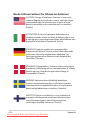
CAUTION! Danger of explosion if battery is incorrectly
replaced. Replace only with the same or equivalent type
recommended by the manufacturer. Dispose of used
batteries according to the manufacturer’s instructions. (English)
ATTENZIONE! Rischio di esplosione della batteria se
sostituita in modo errato. Sostituire la batteria con un una
di tipo uguale o equivalente consigliata dalla fabbrica. Non
disperdere le batterie nell’ambiente. (Italian)
VORSICHT! Explosionsgefahr bei unsachgemäßen
Austausch der Batterie. Ersatz nur durch denselben oder
einem vom Hersteller empfohlenem ähnlichen Typ.
Entsorgung gebrauchter Batterien nach Angaben des
Herstellers. (German)
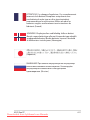
ADVARSELI! Lithiumbatteri - Eksplosionsfare ved fejlagtig
håndtering. Udskiftning må kun ske med batteri af samme
fabrikat og type. Levér det brugte batteri tilbage til
leverandøren. (Danish)
VARNING! Explosionsfara vid felaktigt batteribyte.
Använd samma batterityp eller en ekvivalent typ som
rekommenderas av apparattillverkaren. Kassera använt
batteri enligt fabrikantens instruktion. (Swedish)
VAROITUS! Paristo voi räjähtää, jos se on virheellisesti
asennettu. Vaihda paristo ainoastaan laitevalmistajan
sousittelemaan tyyppiin. Hävitä käytetty paristo
valmistagan ohjeiden mukaisesti. (Finnish)
A-10
Downloaded from LpManual.com Manuals
Appendix
ATTENTION! Il y a danger d’explosion s’il y a remplacement
incorrect de la batterie. Remplacer uniquement avec
une batterie du mêre type ou d’un type équivalent
recommandé par le constructeur. Mettre au rebut les
batteries usagées conformément aux instructions du
fabricant. (French)
ADVARSEL! Eksplosjonsfare ved feilaktig skifte av batteri.
Benytt samme batteritype eller en tilsvarende type anbefalt
av apparatfabrikanten. Brukte batterier kasseres i henhold
til fabrikantens instruksjoner. (Norwegian)
(Japanese)
ВНИМАНИЕ! При замене аккумулятора на аккумулятор
иного типа возможно его возгорание. Утилизируйте
аккумулятор в соответствии с инструкциями
производителя. (Russian)
ASUS Eee PC
Downloaded from LpManual.com Manuals
A-11
Copyright Information
No part of this manual, including the products and software described in
it, may be reproduced, transmitted, transcribed, stored in a retrieval system,
or translated into any language in any form or by any means, except
documentation kept by the purchaser for backup purposes, without the
express written permission of ASUSTeK COMPUTER INC. (“ASUS”).
ASUS PROVIDES THIS MANUAL “AS IS” WITHOUT WARRANTY OF ANY
KIND, EITHER EXPRESS OR IMPLIED, INCLUDING BUT NOT LIMITED TO THE
IMPLIED WARRANTIES OR CONDITIONS OF MERCHANTABILITY OR FITNESS
FOR A PARTICULAR PURPOSE. IN NO EVENT SHALL ASUS, ITS DIRECTORS,
OFFICERS, EMPLOYEES OR AGENTS BE LIABLE FOR ANY INDIRECT, SPECIAL,
INCIDENTAL, OR CONSEQUENTIAL DAMAGES (INCLUDING DAMAGES
FOR LOSS OF PROFITS, LOSS OF BUSINESS, LOSS OF USE OR DATA,
INTERRUPTION OF BUSINESS AND THE LIKE), EVEN IF ASUS HAS BEEN
ADVISED OF THE POSSIBILITY OF SUCH DAMAGES ARISING FROM ANY
DEFECT OR ERROR IN THIS MANUAL OR PRODUCT.
Products and corporate names appearing in this manual may or may not
be registered trademarks or copyrights of their respective companies, and
are used only for identification or explanation and to the owners’ benefit,
without intent to infringe.
SPECIFICATIONS AND INFORMATION CONTAINED IN THIS MANUAL
ARE FURNISHED FOR INFORMATIONAL USE ONLY, AND ARE SUBJECT
TO CHANGE AT ANY TIME WITHOUT NOTICE, AND SHOULD NOT
BE CONSTRUED AS A COMMITMENT BY ASUS. ASUS ASSUMES NO
RESPONSIBILITY OR LIABILITY FOR ANY ERRORS OR INACCURACIES
THAT MAY APPEAR IN THIS MANUAL, INCLUDING THE PRODUCTS AND
SOFTWARE DESCRIBED IN IT.
Copyright © 2009 ASUSTeK COMPUTER INC. All Rights Reserved.
A-12
Downloaded from LpManual.com Manuals
Appendix
Limitation of Liability
Circumstances may arise where because of a default on ASUS’ part or
other liability, you are entitled to recover damages from ASUS. In each
such instance, regardless of the basis on which you are entitled to claim
damages from ASUS, ASUS is liable for no more than damages for bodily
injury (including death) and damage to real property and tangible
personal property; or any other actual and direct damages resulted
from omission or failure of performing legal duties under this Warranty
Statement, up to the listed contract price of each product.
ASUS will only be responsible for or indemnify you for loss, damages
or claims based in contract, tort or infringement under this Warranty
Statement.
This limit also applies to ASUS’ suppliers and its reseller. It is the maximum
for which ASUS, its suppliers, and your reseller are collectively responsible.
UNDER NO CIRCUMSTANCES IS ASUS LIABLE FOR ANY OF THE FOLLOWING:
(1) THIRD-PARTY CLAIMS AGAINST YOU FOR DAMAGES; (2) LOSS OF, OR
DAMAGE TO, YOUR RECORDS OR DATA; OR (3) SPECIAL, INCIDENTAL, OR
INDIRECT DAMAGES OR FOR ANY ECONOMIC CONSEQUENTIAL DAMAGES
(INCLUDING LOST PROFITS OR SAVINGS), EVEN IF ASUS, ITS SUPPLIERS OR
YOUR RESELLER IS INFORMED OF THEIR POSSIBILITY.
Service and Support
Visit our multi-language web site at http://www.asus.com
Manufacturer
Address, City
Country
Authorized Representative
in Europe
Address, City
Country
ASUSTek COMPUTER INC.
No. 150, LI-TE RD., PEITOU, TAIPEI 112,
TAIWAN R.O.C
TAIWAN
ASUS COMPUTER GmbH
HARKORT STR. 21-23, 40880 RATINGEN
GERMANY
ASUS Eee PC
Downloaded from LpManual.com Manuals
A-13
A-14
Downloaded from LpManual.com Manuals
Appendix