1
5350 Monochrome Laser Printer
Operator Manual
ii
35PPM Laser Printer User Guide
Trademarks
The following are trademarks or registered trademarks of their respective owners. Other product names mentioned in
this manual may also be trademarks or registered trademarks of their respective owners. Registered trademarks are
registered in the United States Patent and Trademark Office; some trademarks may also be registered in other
countries. TallyGenicom is registered trademarks of the TallyGenicom AG. PostScript is a trademark of Adobe
Systems Incorporated for a page description language and may be registered in certain jurisdictions. Throughout this
manual, “PostScript 3” (PS-3) is used to refer to a set of capabilities defined by Adobe Systems for its PostScript
Level 3 page description language. Adobe, Adobe PhotoShop, Adobe PageMaker/Adobe Systems Incorporated.
Apple, AppleTalk, EtherTalk, LaserWriter, LocalTalk, Macintosh, TrueType/Apple Computer, Inc. Hewlett-Packard,
HP, PCL, HP-GL, HP-UX, LaserJet/Hewlett-Packard Co. IBM PC/International Business Machines Corporation.
Intel/Intel Corporation. Microsoft, MS-DOS, Windows/Microsoft Corporation. Novell and NetWare/Novell, Inc. The
ENERGY STAR logo/United States Environmental Protection Agency. The ENERGY STAR emblem does not
represent EPA endorsement of any product or service. UNIX/UNIX Systems Laboratories. Ethernet/Xerox
Corporation.
Copyright Notice
This manual is Copyrighted © 2005 by the manufacturer. All Rights Reserved. This manual may not be copied in
whole or in part, nor transferred to any other media or language, without the express written permission of the
manufacturer.
The specifications of your printer and the content of this publication are subject to change without prior notice.
Every attempt has been made to verify the accuracy of the content herein.
Important Information
Dependent on the country of purchase the printer supplied will have different build levels and options.
All printers have available as user installable options: hard drives, extended memory, additional trays, duplexer,
offset tray and rear trays.
Barcodes and real time clocks are factory installable options on all printers.
The NPS printer, which is the standard build level in the USA, has Adobe Postscript and PCL (with extended fonts).
This printer is also available in the rest of the world as a factory build.
There are also 2 other factory build levels available in the rest of the world. These are the N and the NL printers.
Both these printers support PCL only. The N versions has the same extended range of internals PCL fonts as
available in the NPS. The NL has a limited range of internal font support.
◆
◆
◆
Nov 06
Contents
Preface 1
Welcome 2
About this Manual 2
Scope 2
Overview 2
Printer Orientation 2
Conventions 2
Organization 3
Safety Notes 3
Preface 3
Chapter 1 Installing the Printer 3
Chapter 2 Daily Care 3
Chapter 3 Troubleshooting 3
Chapter 4 Paper Jams 3
Chapter 5 Consumables 3
Chapter 6 Optional Accessories 3
Chapter 7 Navigating the Control Panel Menus 3
Chapter 8 Optional Extended Features 3
Appendix A 3
Special Features of This Printer 4
Safety Notes 5
Nov 06
2
35PPM Laser Printer User Guide
Chapter 1
Installing the Printer 1-1
About this Chapter 1-2
Installation Location 1-2
Installation Environment 1-2
Unsuitable locations 1-3
When using an ultrasonic humidifier 1-3
Safety Precautions 1-3
Handling the Printer 1-3
Printer Location Requirements 1-4
Printer Weight and Dimensions 1-4
Installation Space 1-4
Checking the Package Contents 1-6
Carrying the Printer 1-7
Installation Procedure 1-8
Removing the Tape 1-8
Installing the Optional Accessories 1-8
Installing the Toner Cartridge 1-8
Loading Paper 1-11
Loading paper larger than A4 size in the paper tray 1-13
Connecting the Power Cord 1-17
Turning the Printer On 1-18
Selecting a Display Language 1-18
Installing Printer Drivers and Locating User Documentation 1-20
Installing Printer Drivers 1-20
TGNET Admin Administration Program 1-21
Locating User Documentation 1-21
Printing a Configuration Summary 1-21
Printing PCL and PostScript Font Lists 1-24
Turning the Printer Off 1-24
Chapter 2
Daily Care 2-1
Main Components and Their Function 2-2
Front view 2-2
Control panel 2-3
Back view 2-3
Internal view 2-4
About Paper 2-4
Usable Paper 2-4
Paper for 2 sided printing 2-9
Unusable Paper 2-9
Nov 06
35PPM Laser Printer User Guide
Storing Paper 2-10
Storing locations for paper 2-10
Caution for storing paper 2-10
Loading Paper 2-11
Loading Paper in Paper Tray 2-11
Loading Transparencies in the Paper Tray 2-13
Cleaning the Printer 2-17
Cleaning the exterior 2-17
Cleaning the interior 2-18
Cleaning the feed roll 2-18
When Not in Use for a Long Time 2-21
When Moving the Printer 2-22
Chapter 3
Troubleshooting 3-1
When Problems Occur 3-2
No Power 3-2
Cannot Print 3-2
Poor Print Quality 3-3
Paper Is Output Blank or All Black 3-3
Printout Is Faded, Stained, Missing, Wrinkled, or Blurred 3-4
Printing Is Not Clear 3-7
Paper Incorrectly Fed 3-9
Other Problems 3-10
Warning Messages and Error Messages 3-11
Warning Messages 3-12
Error Messages 3-13
Chapter 4
Clearing Paper Jams 4-1
Clearing Paper Jams 4-2
At the Paper Trays 4-3
At the Fuser Unit 4-5
At the Toner Cartridge 4-8
At the Duplex Module 4-10
At the paper exit 4-10
At the interior of the top cover 4-10
At the Offset Catch Tray 4-12
Nov 06
3
4
35PPM Laser Printer User Guide
Chapter 5
About Consumables 5-1
Available Consumables 5-2
Toner Cartridge 5-2
Regular replacement parts 5-3
Toner Cartridge 5-4
Cautions on Handling the Toner Cartridge 5-4
Replacing the Toner Cartridge 5-4
Fuser Unit 5-8
Caution on Handling the Fuser Unit 5-8
Replacing the Fuser Unit 5-8
Transfer Roll Cartridge 5-12
Caution on Handling the Transfer Roll Cartridge 5-12
Replacing the Transfer Roll Cartridge 5-12
Feed Roll 5-16
Caution on Handling the Feed Roll 5-16
Replacing the Feed Roll 5-17
Chapter 6
Optional Accessories 6-1
Available Optional Accessories 6-2
Tray module (A4/550 sheets) 6-2
Installing/Uninstalling the Tray Module 6-2
Checking the contents of the tray module package 6-3
Installing the Tray Module 6-4
Uninstalling the Tray Module 6-9
Paper trays 6-13
Installing/Uninstalling the Duplex Module 6-13
Installing the Duplex Module 6-14
Uninstalling the Duplex Module 6-15
Offset catch tray 6-17
Installing/Uninstalling the Offset Catch Tray 6-18
Installing the Offset Catch Tray 6-18
Uninstalling the Offset Catch Tray 6-21
Rear tray 6-23
Installing/Uninstalling the Rear Tray 6-24
Installing the Rear Tray 6-24
Uninstalling the Rear Tray 6-25
Nov 06
35PPM Laser Printer User Guide
Chapter 7
5
Understanding and Navigating the Control
Panel Menus 7-1
About this Chapter 7-2
Control Panel Features 7-2
LCD Display 7-2
LED Indicators 7-3
Pushbuttons 7-3
Navigating the Control Panel Menus 7-4
Menu Structure 7-6
Status Menu 7-7
Job Library 7-7
Job Library Errors 7-9
Job Accounting 7-9
Paper Menu 7-10
Interface Menu 7-12
PS Menu 7-15
PCL Menu 7-16
System Menu 7-19
Quality Menu 7-21
Date/Time Menu (optional) 7-22
Functions Menu 7-23
FLASH Menu 7-24
DISK Menu 7-25
Chapter 8
Optional Extended Features 8-1
About this Chapter 8-2
Installing DRAM Memory DIMMS 8-2
Installing the Hard Disk Option in the Printer 8-5
Using the Hard Disk Option and User Flash DIMM Module 8-10
Operator Panel MENU Structure 8-10
Using the Disk Menu 8-11
Using the Flash Menu 8-11
Using the FLASH SIMM or Hard Disk Option as a PostScript Device
8-12
PostScript Operators 8-12
Device Parameter Sets 8-13
Warmstart.ps and Sys/Start Files 8-13
Using the Power-On Files Feature 8-14
Power-on Files Defined 8-14
Nov 06
6
35PPM Laser Printer User Guide
Collating, Saved Jobs, and Job Accounting 8-15
Collating Feature 8-15
Saved Jobs Feature 8-18
Job Accounting Feature 8-24
Using the Custom Paper Size Feature 8-25
Operator Panel Access 8-25
Printer Driver Access 8-25
Custom Page size and Microsoft Word, Word 2000, and Word 2003
8-28
Resolution 8-28
Accessing the Printer Web Page 8-30
Printer Setup 8-35
Job Accounting 8-40
Appendix A
Consumables A-1
Specifications A-2
Printable area A-3
Expected life of Consumables A-3
Toner Cartridge A-3
Fuser unit, transfer roll cartridge and feed roll A-4
Nov 06
Preface
In this Chapter . . .
■
■
■
■
Nov 06
“Welcome” on page 2
“About this Manual” on page 2
“Organization” on page 3
“Special Features of This Printer” on page 4
2
35PPM Laser Printer User Guide
About this Manual
Welcome
Thank you for selecting the Laser Printer. This User Guide contains important information about
the operation and care of your printer. Please read this manual in its entirety and keep it at hand for
later reference.
About this Manual
Scope
This User Guide contains all of the information necessary to operate and care for your printer and
accessories. It is intended to be used with the pictorial unpacking instructions and the Quick Start
Guide, both included in the printer packaging. If you have not already unpacked and installed the
printer, please refer to these documents. This guide does not contain instructions for unpacking
and installing the printer.
Overview
This manual contains nine chapters and one appendix:
Printer Orientation
Throughout this guide, the four sides of the printer are referred to as front, rear, right, and left. The
front of the printer is the side near the control panel, and the rear of the printer is opposite the
front. The left and right sides of the printer are defined as the sides to the left and right, respectively, of a person who is facing the front of the printer.
Conventions
This following conventions are used throughout this manual to emphasize certain procedures or
information:
NOTE:
A note is a tip or extra information that may be helpful in installing or using the printer.
CAUTION: A caution message provides information that may help you avoid equipment damage, process failure, or inconvenience. Read all caution messages carefully.
WARNING! A warning message indicates the possibility of personal injury if a specific procedure
is not performed exactly as described in the guide. Pay close attention to these sections and read
them fully to prevent possible injury.
Nov 06
35PPM Laser Printer User Guide 3
About this Manual
Organization
The following is a summary of each chapter:
Safety Notes
This section explains the items of which to take note to ensure that you use this printer safely and
correctly. Be sure to read this section to prevent serious injuries and accidents.
Preface
The Preface contains information about this guide and about the features and available configurations of the printer.
Chapter 1 Installing the Printer
This chapter explains the procedures to decide on the installation location, check the package contents, and set up the printer at the installation location.
Chapter 2 Daily Care
This chapter explains the essential operations for using the printer on a daily basis such as replenishing paper and cleaning.
Chapter 3 Troubleshooting
This chapter explains the problems that may arise when using the printer and the way of handling
them. Do not consider the problems as a mechanical breakdown until you have read this chapter.
Chapter 4 Paper Jams
This chapter explains the ways to solve paper jams.
Chapter 5 Consumables
This chapter explains the essential consumables for this printer, cautions on using them, and the
way of replacing them.
Chapter 6 Optional Accessories
This chapter explains the optional accessories and how to install and uninstall them.
Chapter 7 Navigating the Control Panel Menus
This chapter explains the control panel and its functions, and also demonstrates how to navigate
throughout the various menus and submenus that allow you to view and change the printer settings.
Chapter 8 Optional Extended Features
This chapter describes the procedures for installation of DRAM Memory DIMMs and the Hard
Disk Option. Also describes how to use the extended features associated with these options.
Appendix A
This Appendix includes the printer specifications and expected life of the consumables.
Nov 06
4
35PPM Laser Printer User Guide
Special Features of This Printer
Special Features of This Printer
This printer has the following special features:
■
Quality printing at a high speed
This printer supports 600 and 1,200 dpi. Attains high-speed printing of 34 sheets per minute
when printing the same A4-sized document.
■
Flexible use of paper sources and delivery methods
A paper tray for various paper sizes, from A5 to Legal 14, can be used in the tray module.
Special media such as envelopes and labels can also be used.
Optional tray module (A4/550 sheets) is available. By adding two extra trays, the maximum
allowed, the printer can hold up to 1,800 sheets.
Enables 2 sided printing by attaching the optional duplex module.
■
Network-readiness
The printer includes an Ethernet Network Interface Card.
■
Easy operation
The easy-to-read control panel display clearly shows the status of printer operation. Control
panel pushbuttons allow you to access and view printer menus, submenus, and status messages.
The following diagram shows the printer with the 500 sheets exit as well as the two optional tray
modules (A4/550 sheets) installed.
Nov 06
35PPM Laser Printer User Guide 5
Special Features of This Printer
Safety Notes
For your own safety, please read this page carefully before using the machine.
■
■
Do not place the machine in a hot, humid, dusty, or poorly ventilated
environment. Prolonged exposure to these adverse conditions can cause fire or
electric shock.
Do not place the machine near heaters or volatile, flammable, or combustible
materials such as curtains that may catch fire.
■
◆
Nov 06
◆
◆
6
35PPM Laser Printer User Guide
Special Features of This Printer
Nov 06
Chapter 1
Installing the Printer
In this Chapter . . .
■
■
■
■
■
■
■
■
■
■
■
Nov 06
“Installation Location” on page 1-2
“Safety Precautions” on page 1-3
“Printer Location Requirements” on page 1-4
“Installation Space” on page 1-4
“Checking the Package Contents” on page 1-6
“Carrying the Printer” on page 1-7
“Installation Procedure” on page 1-8
“Selecting a Display Language” on page 1-18
“Installing Printer Drivers and Locating User Documentation” on page 1-20
“Printing a Configuration Summary” on page 1-21
“Printing PCL and PostScript Font Lists” on page 1-24
1-2
35PPM Laser Printer User Guide
Installation Location
About this Chapter
This chapter reviews the contents of the printer packaging, explains the parts of the printer, and
describes the space and environment requirements of the printer.
Installation Location
In order to make use of the printer safely and comfortably, choose an installation location with the
following considerations.
Installation Environment
Suitable locations
CAUTION: Place the machine on a level and sturdy surface that can withstand a weight of
20.6 kg. If tilted, the machine may fall over and cause injuries.
■
■
■
Level and stable location (not tilted more than 5°)
Well-ventilated location
Temperature range: 10 to 32 °C; humidity range: 15 to 85% (no condensation) Humidity
should be 70% or below at 32 °C, and temperature should be 28 °C or below at
85% humidity.
NOTE:
Sudden temperature fluctuations can affect print quality. Rapid heating of a cold room or
moving the printer from a location with low humidity/temperature to high humidity/
temperature can cause condensation inside the printer, directly interfering with image
transfer. When condensation occurs, leave the printer alone for at least 1 hour to acclimate
to the environment before using it.
Using a power outlet exclusively for the printer
Use one power outlet exclusively for this printer. If the printer draws power from the same circuit
as other large machines, such as copiers or air conditioners, the fluctuations in the current may
cause malfunctions or a loss of data. Also, electrical noise produced by machines located nearby
may interfere with the normal operation of the printer.
WARNING! Three power specifications are listed below. The specifications that apply to your
printer depend on its configuration. Connect the power plug only to a properly rated power outlet. Otherwise, it can cause fire or electric shocks. If in doubt, contact our Printer Support Desk.
Rated voltage: 100 V
Rated frequency: 50/60 Hz
Rated voltage: 110 V
Rated frequency: 60 Hz
Rated voltage: 220 – 240 V
Rated frequency: 50/60 Hz
Nov 06
35PPM Laser Printer User Guide 1-3
Safety Precautions
Unsuitable locations
■
Locations with direct exposure to sunlight
■
Locations close to cooling/heating appliances
■
Locations with direct exposure to drafts
■
Locations susceptible to vibrations
■
Dusty and dirty locations
■
Locations close to open flame
■
Damp locations
■
Locations exposed to magnetic forces
■
Locations susceptible to sudden changes in temperature or humidity
When using an ultrasonic humidifier
If tap water or well water is used in the ultrasonic humidifier, the impurities in the water will be
released to the atmosphere and adhere to the internal parts of the printer, and this may cause deterioration in the print quality. Use only water that does not contain any impurities in the ultrasonic
humidifier.
Safety Precautions
This printer is available in either of the following power specifications: 110V and 220V. The specifications that apply to your printer depend on your machine configuration. To prevent fire or shock
hazards, connect the power plug only to a properly rated power outlet.
Handling the Printer
Follow the guidelines below when lifting or moving the printer:
■
■
■
Nov 06
The printer is very heavy, and should always be lifted by two people. The weight of the
printer without paper tray, toner cartridge, and paper is about 51 lbs (23 kg). Never attempt
to lift the printer alone.
To lift the printer, have two individuals facing each other from the front and the rear of the
printer grasp the recessed areas on each side of the printer. Do not lift the printer by grasping
any area other than these recessed areas.
When lifting the printer, maintain proper lifting posture to prevent injuries.
1-4
35PPM Laser Printer User Guide
Printer Location Requirements
Printer Location Requirements
Printer Weight and Dimensions
This printer weighs approximately 51 lbs (23 kg) and should always be lifted by two people. The
dimensions of the printer are listed below.
■
■
■
Printer Height: 15.9 in (404 mm)
Printer Width (left to right): 16.6 in (422 mm)
Printer Depth (front to back): 18.3 in (465 mm)
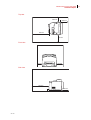
Installation Space
Ensure that the printer has enough installation space as shown in the diagrams.
CAUTION: The machine has ventilation holes on the rear and side panels. Ensure that the
machine is installed with a minimum clearance of 255 mm from the rear vent to the wall, 200 mm
from the left vent to the wall, and 300 mm from the right vent to the wall. A poorly ventilated
machine can cause excessive internal heat and fire. The accompanying diagram shows the minimum clearances required for normal operation, consumables replacement, and maintenance to
ensure your machine operates at peak performance.
Nov 06
35PPM Laser Printer User Guide 1-5
Installation Space
Top view
200 mm
255 mm
402 mm
300 mm
Front view
200 mm
300 mm
Side view
402 mm
255 mm
Nov 06
1-6
35PPM Laser Printer User Guide
Installation Space
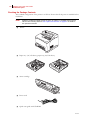
Checking the Package Contents
The standard configuration of the printer is as follows. Ensure that all the parts are available before
installation.
NOTE:
■
Retain the packaging material and box for future use if there is a possibility that the printer
will be moved over long distances. See “Optional Accessories” on page 6-1 for details on
the optional accessories.
Printer
■
Paper tray (A4/150 sheets) paper tray (A4/550 sheets)
■
Toner cartridge
■
Power cord
■
Quick start guide with CD-ROM
Nov 06
35PPM Laser Printer User Guide 1-7
Carrying the Printer
Carrying the Printer
When moving the printer to a place for installation, take note of the following points.
Hold the recessed areas on the left and right sides of the printer.
CAUTION: When lifting the printer, get a firm footing, bend your knees and use both your hands
to avoid possible falls of the printer and injuries to your back.
NOTE:
When lifting the printer, there should be 2 persons, one in front and one behind the printer,
to firmly grip the recessed areas provided on both sides of the printer. Never try to lift the
printer by gripping any other areas. Lifting the printer by gripping any other areas can
cause the printer to fall and result in injuries.
NOTE:
When lifting the printer, get a firm footing and bend your knees to avoid possible injuries to
your back.
Carry the printer without tilting it.
CAUTION: When moving the machine, do not tilt it more than 10 degrees. If tilted excessively,
the machine may fall over and cause injuries.
Do not tilt the printer more than 10 degrees to the front/back or right/left. This might lead to a
malfunction due to incidents such as consumables inside the printer spilling out.
NOTE:
Rear side of the printer is heavier than the front.
The rear side of this printer is heavier than the front. Take note of this difference in weight when
moving the printer.
Nov 06
1-8
35PPM Laser Printer User Guide
Installation Procedure
Installation Procedure
This section describes how to install the printer.
Removing the Tape
When the printer is first taken out of the packaging box, the covers of the printer are taped as
shown in the diagram. Remove the tapes.
Installing the Optional Accessories
If you have purchased any optional accessories, install them before installing the Toner Cartridge
and before loading paper. If there are no optional accessories to install, proceed to the next section,
Installing the Toner Cartridge.
Tray module (A4/550 sheets)
See “Installing the Tray Module” on page 6-4 for details.
Duplex module
See “Installing the Duplex Module” on page 6-14 for details.
Offset catch tray
See “Installing the Offset Catch Tray” on page 6-18 for details.
Rear tray
See “Installing the Rear Tray” on page 6-24 for details.
Installing the Toner Cartridge
When installing the Toner Cartridge, take note of the following points:
WARNING! Never throw an Toner Cartridge into an open flame. It can cause an explosion and
you can get burned.
■
■
Do not subject it to direct sunlight or strong light.
When installing the TONER cartridge, select a location not subject to strong light and try to
finish the installation within 5 minutes.
Nov 06
35PPM Laser Printer User Guide 1-9
Installation Procedure
■
■
■
■
Do not touch the surface of the photosensitive drum. Do not stand or place the Toner Cartridge upside down. The drum might get damaged.
A drum shutter protects the photosensitive drum from light. Do not open the drum shutter.
Although the toner is not harmful to the body, wash it off immediately if your hands or
clothes are stained with it.
To ensure reliable operation you should replace the Toner Cartridge within one year of
installing it
NOTE:
See “Replacing the Toner Cartridge” on page 5-4 for details when replacing the Toner
Cartridge.
1. Open the top cover.
NOTE:
Do not touch any parts inside the printer.
2. Take the Toner Cartridge out of the box and shake it 7 to 8 times as shown in the diagram.
Nov 06
1-10
35PPM Laser Printer User Guide
Installation Procedure
3. Place the Toner Cartridge on a flat surface and pull the seal out honnrizontally.
NOTE:
When pulling out the seal, pull it out horizontally. The tape might break if it is pulled out
diagonally. After the seal has been pulled out, do not shake or bump the Toner Cartridge.
4. Hold the Toner Cartridge by the grip and insert it into the slot inside the printer.
NOTE:
Do not touch any parts inside the printer. Ensure that the Toner Cartridge is firmly set.
5. Close the top cover securely.
Nov 06
35PPM Laser Printer User Guide 1-11
Installation Procedure
Loading Paper
Loading paper in the paper tray
See “About Paper” on page 2-4” for details on the type and size of paper that can be loaded in the
paper tray.
1. Place the paper tray on a flat surface.
2. Remove the lid of the tray.
3. If the base plate of the paper tray is raised, push it down.
Nov 06
1-12
35PPM Laser Printer User Guide
Installation Procedure
4. Squeeze the length guide and slide it to the desired paper size.
5. Squeeze the right width guide and slide it to the desired paper size.
6. Load the paper with the side to be printed facing up and with all 4 corners aligned. Make sure
that the right width guide is correctly aligned with the paper size. Do not place paper over the
right width guide.
NOTE:
Do not load paper exceeding the maximum fill line or the maximum capacity allowed.
Align the right width guide with the paper width correctly. If the right width guide is not in
place, the paper will not be properly fed and may cause a paper jam.
Nov 06
35PPM Laser Printer User Guide 1-13
Installation Procedure
7. Close the lid of the paper tray.
8. The lid of the tray must be firmly closed. If not, the paper might be misaligned.
Loading paper larger than A4 size in the paper tray
See “About Paper” on page 2-4 for details on the type and size of paper that can be loaded in the
paper tray.
1. Place the paper tray on a flat surface.
Nov 06
1-14
35PPM Laser Printer User Guide
Installation Procedure
2. Remove the lid of the tray.
3. Slide the right and left lock tabs in the paper tray outwards to unlock them.
4. Hold the grip of the paper tray and pull its extendable part to the front until it touches the
desired paper size.
NOTE:
The right and left lock tabs in the paper tray move inwards and lock automatically.
Nov 06
35PPM Laser Printer User Guide 1-15
Installation Procedure
5. Squeeze the length guide and slide it to the desired paper size.
6. Squeeze the right width guide and slide it to the desired paper size.
7. Load the paper with the side to be printed facing up and with all 4 corners aligned. Do not
place paper over the right width guide.
NOTE:
Nov 06
Do not load paper exceeding the maximum fill line or the maximum capacity allowed.
Align the right width guide with the paper width correctly. If the right width guide is not in
place, the paper will not be properly fed and may cause a paper jam.
1-16
35PPM Laser Printer User Guide
Installation Procedure
8. Close the lid of the paper tray.
NOTE:
The lid of the tray must be firmly closed. If not, the paper might be misaligned.
9. Push the paper tray completely into the printer.
Nov 06
35PPM Laser Printer User Guide 1-17
Installation Procedure
Connecting the Power Cord
WARNING! Three power specifications are listed below. The specifications that apply to your
printer depend on its configuration. Connect the power plug only to a properly rated power outlet. Otherwise, it can cause fire or electric shocks. If in doubt, contact our Printer Support Desk.
Rated voltage: 100 V
Rated frequency: 50/60 Hz
Rated voltage: 110 V
Rated frequency: 60 Hz
Rated voltage: 220 – 240 V
Rated frequency: 50/60 Hz
To prevent fire or electric shock, follow the instruction below based on your machine configuration. If in doubt, contact our Printer Support Desk.
If your machine is a 220 – 240 V model, there is no need to attach a separate earth line since
the earth connection is incorporated in the power line. Plug it into a properly rated outlet.
If your machine is a 100 or 110 V model, use the green earth wire bundled with the power cord,
located at the rear of the machine.
The earth wire must be connected to one of the following conductors:
– Earth terminal of the specified power outlet
– A piece of copper buried in the earth 650 mm or deeper
1. Connect the power cord to the power cord connector at the back of the printer.
2. Make sure that the power switch has been firmly pushed to the <{> position and then
insert the other end of the power cord to the power outlet. If the power cord has an earth
wire, connect it as well.
Nov 06
1-18
35PPM Laser Printer User Guide
Selecting a Display Language
Turning the Printer On
Switch on the power before operating the printer. When you have finished using the printer for the
day or you do not intend to use it for a long period of time, switch off the power.
1. Press the power switch to the <I> position the power on.
On the printer’s right side, press the side of the power switch marked <I> to turn the printer on.
NOTE:
The printer motors run for 2 or 3 minutes when you first turn the power on.
The top line of the LCD display reads:
Loading
followed by asterisks progressing across the bottom line:
**************
Following an LED self test, asterisks progress across both lines of the display, the alarm will also
sound for a few seconds.
**************
**************
and the Power On Self Test ends with the top line of the display reading:
Ready
NOTE:
While turned on, the printer will go into the standby state if it remains idle for a period of
time.
Selecting a Display Language
The default language for all LCD display messages and the Configuration Summary and Test Page
is English. You can change the language to Espanol, Italiano, Deutsch or Francais.
Nov 06
35PPM Laser Printer User Guide 1-19
Selecting a Display Language
NOTE:
The language that you select will be reflected on all LCD display messages, and also the
content of the Configuration Summary and Test Page.
To change the default language from English to one of the other four available selections:
1. From the Ready status, press MENU, if a hard disk has been added or flash is being used,
you will need to press the up arrow several times until the control panel display will read:
Menu
Paper
2. Press PREVIOUS or NEXT until the display reads:
Menu
System Menu
3. Press SELECT, the display will read:
System Menu
Factory Defaults
4. Press NEXT or PREVIOUS until the display reads:
System Menu
Display Language
5. Press SELECT, the display will read:
System Menu
English
6. Press NEXT or PREVIOUS until the desired default language appears on the bottom line
of the display.
7. Press SELECT. You have now changed the default language.
Nov 06
1-20
35PPM Laser Printer User Guide
Installing Printer Drivers and Locating User Documentation
Installing Printer Drivers and Locating User Documentation
Installing Printer Drivers
For a printer to be connected using TCP/IP printing, ensure the printer has been configured for a
valid IP address, subnet and gateway.
If this has been assigned by a DHCP server, ensure there is a reservation fo the printers mac
address, seen on the network Configuration test page against the reserved IP address in the DHCP
servers scope. See your company network manager if there is any doubt.
If the printer has not obtained an IP address subnet and gateway automatically refer to the Quick
Start Guide.
Ensure the printer is powered on and has been connected to the network.
You must be logged on to the computer as an administrator or equivalent in order to install the
printer drivers.
It is important that you now read the note headed important information on page ii of this manual
before proceeding.
1. Load the cd into the drive.
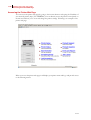
2. After it loads select I ACCEPT to the opening screen as shown.
3. Click MENU.
4. Choose your location: USA or Worldwide if this option is offered.
5. Select the correct driver based on the model of printer you have. Follow the instructions as
shown on the screen once you have clicked the correct driver button.
Once having completed the installation ensure that the correct paper size has been selected as
default. In the case of Windows XP/2000 and the PCL driver first select the printer. Right click it,
select Printing Preferences. Select the Paper tab and ensure the paper size is correct. If not select
the correct size and then press the Apply and then the OK buttons.
At the same time ensure you have added an options installed in the printer. In the case of Windows
XP/2000 and PCL: Select the printer, right click it, select Properties, select the Setup tab and add
any installed options.
Nov 06
35PPM Laser Printer User Guide 1-21
TGNET Admin Administration Program
TGNET Admin Administration Program
The printer is supported by the TGNet Admin administration program, available from our web
site. Network discovery, administration, remote monitoring and remote panel management
options are available to the administrator.
The TGNet Admin program includes a virtual control panel function that allows the user to
remotely manage the printer. The virtual control panel functions allow the administrator to
remotely control many printers without having to go to each printer to modify the printer settings.
Locating User Documentation
To locate other documentation that will assist you in operating and maintaining your printer, go to
the DOCUMENTATION folder on the Electronic Library CD-ROM. You can open and read
these manuals (in Adobe PDF format) directly from the CD-ROM, save the manuals to the hard
drive of your computer, or print the manuals.
Refer to the README.TXT file (Windows) or the Read Me First file (MacOS) for more information about the documentation.
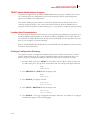
Printing a Configuration Summary
Your printer can print a configuration summary that lists the currently selected status of menu
options, media selections in trays, options installed and other relevant information about your
printer. To print a Configuration Summary either press the info key or follow these steps:
1. From the Ready status, press MENU, if a hard disk has been added or flash is being used,
you will need to press the up arrow several times until the control panel display will read:
Menu
Paper Menu
2. Press PREVIOUS or NEXT until the display reads:
Menu
Functions
3. Press SELECT, the display will read:
Functions
Reset Printer
4. Press NEXT or PREVIOUS until the display reads:
Functions
Print Summary
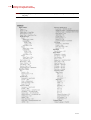
5. Press SELECT. A two page Configuration Summary will print. An example of a Configuration Summary appears on the following page.
Nov 06
1-22
35PPM Laser Printer User Guide
Printing a Configuration Summary
NOTE:
Depending upon the options installed and menu settings, your Configuration Summary
may vary.
Nov 06
35PPM Laser Printer User Guide 1-23
Printing a Configuration Summary
Nov 06
1-24
35PPM Laser Printer User Guide
Printing PCL and PostScript Font Lists
Printing PCL and PostScript Font Lists
Your printer has the capability of printing lists of all installed PCL or PostScript fonts. To print a
Font List, follow these steps:
1. From the Ready status, press MENU, the control panel display will read:
Menu
Paper Menu
2. Press PREVIOUS or NEXT until the display reads:
Menu
Functions
3. Press SELECT, the display will read:
Functions
Reset Printer
4. Press NEXT or PREVIOUS until the display reads:
Functions
Print Fonts
5. Press SELECT, the display will read:
Print Fonts
PCL Fonts
NOTE:
You may toggle between PCL Fonts and Postscript Fonts using the PREVIOUS or NEXT
push-buttons.
6. Press SELECT. One or several pages will print dependent on options you have enabled in
your printer.
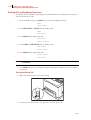
Turning the Printer Off
1. Make sure that the printer is not in processing.
2. Press the power switch to the <{> position to turn the power off.
Nov 06
35PPM Laser Printer User Guide 1-25
Printing PCL and PostScript Font Lists
Remember to turn off the printer at the end of day or when the printer will not be used for an
extended period of time.
NOTE:
When the printer is turned off, all print data still in memory will be erased.
◆
Nov 06
◆
◆
1-26
35PPM Laser Printer User Guide
Printing PCL and PostScript Font Lists
Nov 06
Chapter 2
Daily Care
In this Chapter . . .
■
■
■
■
■
■
■
Nov 06
“Main Components and Their Function” on page 2-2
“About Paper” on page 2-4
“Storing Paper” on page 2-10
“Loading Paper” on page 2-11
“Cleaning the Printer” on page 2-17
“When Not in Use for a Long Time” on page 2-21
“When Moving the Printer” on page 2-22
2-2
35PPM Laser Printer User Guide
Main Components and Their Function
Front view
1
2
8
7
3
6 5
No.
4
Name
Description
1
Center output tray
Print jobs are output with the printed side facing down.
2
Control panel
Consists of operation buttons, indicators, and the display.
3
Ventilation hole
Releases heat to prevent the interior of the printer from heating up.
4
Paper meter
Indicates the amount of paper remaining.
5
Paper tray A4/550 sheets)
Load paper here.
6
Paper tray A4/150 sheets)
Load paper here.
7
Power switch
Switches the power of the printer on and off. Pushing the switch to the <I>
side switches it on and pushing it to the <{> side switches it off.
8
Paper stopper
Raise this when printing on paper larger than A4 size.
Nov 06
35PPM Laser Printer User Guide 2-3
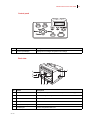
Control panel
No.
Name
Description
1
Control paneldisplay
Displays error messages and printer menu dialogs.
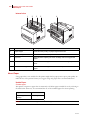
Back view
1
4
5
6
1
2 3
No.
Name
Description
1
Ventilation hole
Releases heat to prevent the interior of the printer from heating up.
2
Duplex module connector
Connect the optional duplex module here.
3
Power cord connector
Connect the power cord here.
4
USB port
Connect the USB cable here.
5
Ethernet 10/100 port
Connect the Ethernet cable here.
5
Parallel port
Connect the parallel cable here.
Nov 06
2-4
35PPM Laser Printer User Guide
About Paper
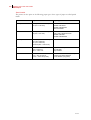
Internal view
1
2
3
5
4
No.
Name
Description
1
Paper stopper
Raise this when printing on paper larger than A4 size.
2
Toner Cartridge
Contains the toner and the photosensitive drum.
3
Top cover
Open this when replacing the Toner Cartridge and removing jammed
paper.
4
Fuser unit
Fixes the toner on the paper. Do not touch this when using the printer as it
is hot.
5
Transfer roll cartridge
Transfers the toner image on the surface of the photosensitive drum to the
paper.
About Paper
Using paper that is not suitable for this printer might lead to paper jams or poor print quality. To
make full use of the printer features, we suggest using only paper that is recommended here.
Usable Paper
Printable paper
This printer can print on paper that is commonly sold. Select paper suitable for use by referring to
the table below. However, we recommend the use of the standard paper for clearer printing.
Paper feed
G.S.M.
Paper tray (A4/550
sheets)
60 – 216 g/m2
NOTE:
G.S.M. indicates the weight of a 1 m2 sheet of paper.
Nov 06
35PPM Laser Printer User Guide 2-5
About Paper
Standard paper
The standard paper that can be used for this printer is as follows.
Nov 06
Paper type
Paper size
G.S.M.
Fuji Xerox P paper
A4
64 g/m2
4024
20 lb Letter
—
4200
20 lb Letter
—
RX 80 (3R 91720)
A4
—
2-6
35PPM Laser Printer User Guide
About Paper
Special media
The printer can also print on the following paper types. These types of paper are called special
media.
Paper size
Transparencies
Letter (215.9 × 279.4 mm)
A4 (210 × 297 mm)
Labels
Letter (215.9 × 279.4 mm)
A4 (210 × 297 mm)
Envelopes
Postcards
Card stock
Paper type
XEROX P/N 3R2780
XEROX P/N JE-001
XEROX P/N 3R91334
3M P/N CG3300
XEROX P/N 3R4469
Avery Laser Labels P/N 5160
XEROX P/N V860
XEROX P/N 3R97408
Com#10 (104.8 × 241.3 mm)
C5 (162 × 229 mm)
DL (110 × 220 mm)
Monarch (98.4 × 190.5 mm)
100 × 148 mm
105 × 148.5 mm
89.9 × 139.7 mm
Japanese official postcards
A6 postcards
US postcards
76.2 × 127 mm –
210 × 297 mm (A4) or
215.9 × 279.4 mm (Letter)
3" × 5" Oxford Index Card (40801)
Classic Crest Super Smooth
Cover 3R3254 (Long Gain)
Nov 06
35PPM Laser Printer User Guide 2-7
About Paper
Loadable paper and capacity
Paper that can be loaded in the paper trays (A4/150sheet) and (A4/550 sheets) is as follows:
■
Paper tray (A4/150 sheets), (A4/550 sheets)
The following paper types can be loaded in the paper trays:
Paper type
Nov 06
Maximum Capacity
Paper tray (A4/150
sheets)
Paper tray (A4/550
sheets)
Standard paper
150 sheets
550 sheets
Other paper
Up to a height of
17.5 mm
Up to a height of
59.4 mm
Japanese official postcards
55 sheets
200 sheets or MAX
49.4 mm
Envelopes
Columbian Com10
15 sheets
80 sheets or MAX
49.4 mm
Labels
100 sheets
350 sheets
Transparencies
100 sheets
100 sheets
Card stock
120 sheets
400 sheets
2-8
35PPM Laser Printer User Guide
About Paper
Available paper sizes
The following paper sizes can be loaded in the paper tray:
Loadable:
; Not loadable:
Paper size
×
Paper tray (A4/150 sheets)
Paper tray (A4/550 sheets)
Letter portrait
Legal 14 portrait
Legal 13 portrait
A4
B5 JIS portrait
B5 ISO portrait
A5 portrait
Executive portrait
1/3 A4 portrait
Statement portrait
US postcard portrait
Index portrait
×
A6 postcard portrait
Japanese official postcard
portrait
Envelope Monarch portrait
Envelope Com#10 portrait
Envelope C5 portrait
Envelope DL portrait
Free size
Nov 06
35PPM Laser Printer User Guide 2-9
About Paper
Paper for 2 sided printing
2 sided printing can be used by installing the optional duplex module.
The available paper types and sizes for 2 sided printing are as follows:
Paper type
Paper size
G.S.M.
Printable paper
Letter portrait
Legal 13 portrait
Legal 14 portrait
A4 portrait
B5 JIS portrait
B5 ISO portrait
A5 portrait
Executive portrait
1/3 A4 portrait
Statement portrait
60 – 216 g/m2
Postcards*
Japanese official postcard
A6 postcard
US postcard
Free size
Tray 1 and Tray 2 only
Width: 98 – 215 mm
Length: 147 – 355 mm
NOTE:
*Print quality is not guaranteed.
Unusable Paper
Using the following types of paper might cause paper jams, malfunctions or damage to the printer.
Do not use them.
■
■
■
■
■
■
■
■
■
■
■
■
■
■
■
Nov 06
FUJI XEROX full-color transparencies
Paper that is too thick or thin
Paper that has been printed on before (including color printing)
Wrinkled, folded, or torn paper
Wet paper
Curled paper
Paper with static electricity
Adhesive paper
Postcards with pictures
Paper with special coating on its surface
Treated colored paper
Paper using ink that will run at a temperature of 150 °C
Heat sensitive paper
Carbon paper
Paper with staples, paper clips, ribbons, or tape
2-10
35PPM Laser Printer User Guide
Storing Paper
■
■
■
■
Paper with rough surfaces such as pulp paper or fibrous paper
If acid paper is used, the characters might appear fuzzy. Replace it with alkaline paper.
Envelopes that are not flat or have metal fasteners
Labels which do not fully cover the adhesive backing
If background image suppression agent sticks to the feed roll when feeding postcards with pictures,
the postcards may not feed. When this happens, clean the feed roll by referring to “ Cleaning the
Printer”.
Storing Paper
Even for suitable papers, poor storage conditions may lead to a change in the paper quality, paper
jams, poor print quality and printer breakdown.
Storing locations for paper
■
Temperature: 10 – 30 °C
■
Relative humidity: 30 – 65%
Caution for storing paper
■
Store in a place with low humidity.
■
After opening a ream of paper, use the original cover sheets to wrap up the paper not used
and store it in a cabinet or a location with low humidity.
■
Do not let the paper stand but store it in a flat location.
■
Ensure that the paper is stored properly without being bent or curled.
■
Store the paper in a location not exposed to direct sunlight.
Nov 06
35PPM Laser Printer User Guide 2-11
Loading Paper
Loading Paper
This section explains how to load paper when the paper in the paper tray runs out.
Loading Paper in Paper Tray
See “About Paper” on page 2-4 for details on the type and size of paper that can be loaded in the
paper tray.
1. Place the paper tray on a flat surface.
2. Remove the lid of the tray.
3. If the base plate of the paper tray is raised, push it down.
Nov 06
2-12
35PPM Laser Printer User Guide
Loading Paper
4. Squeeze the length guide and slide it to the desired paper size.
5. Squeeze the right width guide and slide it to the desired paper size.
6. Load the paper with the side to be printed facing up and with all 4 corners aligned.
NOTE:
Do not place paper over the right width guide. Do not load paper exceeding the maximum
fill line or the maximum capacity allowed. Align the right width guide with the paper width
correctly. If the right width guide is not in place, the paper will not be properly fed and
cause paper jams. Load envelopes with the flaps closed.
Nov 06
35PPM Laser Printer User Guide 2-13
Loading Paper
7. Close the lid of the paper tray.
NOTE:
The lid of the tray must be firmly closed. If not, the paper might become misaligned.
8. Push the paper tray completely into the printer.
Loading Transparencies in the Paper Tray
NOTE:
Nov 06
Transparencies to be used in this printer should be tested before purchase. Using
unsuitable transparencies may lead to a printer malfunction.
If the output transparencies are allowed to stack up in the center output tray, paper jams
may occur due to static electricity. Remove the transparencies from the tray as soon as
they are output.
2-14
35PPM Laser Printer User Guide
Loading Paper
1. Place the paper tray on a flat surface.
2. Remove the lid of the tray.
3. If the base plate of the paper tray is raised, push it down.
Nov 06
35PPM Laser Printer User Guide 2-15
Loading Paper
4. Squeeze the length guide and slide it to the desired transparency size.
5. Squeeze the right width guide and slide it to the desired transparency size.
6. Fan the transparencies well in small amounts.
Nov 06
2-16
35PPM Laser Printer User Guide
Loading Paper
7. Load the transparencies with the side to be printed facing up and with all 4 corners aligned.
Do not place the transparencies over the right width guide.
NOTE:
Transparencies recommended for use with color printers may cause jams or fuser
malfunctions. Do not use them.
Do not load transparencies exceeding the maximum capacity allowed.
8. Close the lid of the paper tray.
NOTE:
The lid of the tray must be firmly closed. If not, the transparencies might become
misaligned.
9. Push the paper tray completely into the printer.
Nov 06
35PPM Laser Printer User Guide 2-17
Cleaning the Printer
Cleaning the Printer
This section describes how to clean the printer in order to maintain the printer in good condition
and print clean printouts all the time.
CAUTION: Be sure to switch off and unplug the machine before accessing the interior of the
machine for cleaning, maintenance, or fault clearance. Access to a live machine’s interior can
cause electric shock.
Cleaning the exterior
Clean the exterior of the printer about once a month. Wipe the surface with a damp, well-wrung
soft cloth. Then wipe with another dry soft cloth. For stubborn stains, moisten a soft cloth with a
small amount of neutral detergent, and gently wipe the stain off.
NOTE:
Nov 06
Do not spray the detergent directly on the printer. The liquid detergent may enter the
printer through a gap and cause problems. Never use cleaning agents other than neutral
detergent.
2-18
35PPM Laser Printer User Guide
Cleaning the Printer
Cleaning the interior
After clearing paper jams or replacing the Toner Cartridge, inspect the interior of the printer before
closing the top cover.
CAUTION: Never touch areas labeled as “High Voltage.” You can get an electric shock.
Never touch a labeled area found on or near the heat roller. You can get burned. If a sheet of
paper is wrapped around the heat roller, do not try to remove it by yourself to avoid injuries or
burns. Switch off the machine immediately, and contact our Printer Support Desk.
■
■
Remove any remaining pieces of paper.
Remove any dust or stains with a dry clean cloth.
Cleaning the feed roll
The paper feed roller can get contaminated when used with certain types of media. When paper
feeding fails, follow the procedure below to wipe the feed roll gently with a well-wrung soft cloth.
NOTE:
The following procedure explains how to clean the feed roll of the paper tray. Follow this
procedure when cleaning the feed rolls inside the printer or of the tray module.
1. Pull out the paper tray from the printer.
Nov 06
35PPM Laser Printer User Guide 2-19
Cleaning the Printer
2. While pushing down the shaft of the feed roll (1), widen the tab of the feed roll to loosen it
(2) and then slowly remove the feed roll from the shaft of the paper tray (3).
3. Wipe the rubber parts with a damp, well-wrung soft cloth.
4. Hold the tab of the feed roll as shown in the diagram and slowly push it onto the shaft of the
paper tray.
Tab
Nov 06
2-20
35PPM Laser Printer User Guide
Cleaning the Printer
5. By aligning the small tabs on the feed roll with the slots of the shaft, push the feed roll completely in so that the tab fits into the slot.
6. Push the paper tray completely into the printer.
Nov 06
35PPM Laser Printer User Guide 2-21
Cleaning the Printer
When Not in Use for a Long Time
Carry out the following procedure if you are not going to use the printer for a long period of time.
1. Press the power switch to the <{> position to turn the power off.
2. Remove all connection cords, such as the power cord and interface cables.
WARNING! Never touch a power cord with wet hands. Danger of electric shock exists. When
unplugging the machine, grasp the plug instead of the cord. Forcibly pulling on a cord can damage it and cause fire or electric shock.
3. Remove the paper from the paper tray and store it in a location free of humidity and dust.
NOTE:
Nov 06
See “About Paper” on page 2-4 for details on storing the paper.
2-22
35PPM Laser Printer User Guide
When Moving the Printer
When Moving the Printer
Carry out the following procedure when moving the printer.
CAUTION: When lifting the machine, get a firm footing and bend your knees to avoid possible
injuries to your back.
NOTE:
The weight of this printer, without the optional accessories, paper tray, consumables and
paper, is 21.0 kg. If the optional duplex module or tray module has been installed, uninstall
it before moving the printer. Otherwise, they may fall to the ground and cause injuries.
Refer to “Chapter 6 Optional Accessories” for details on uninstalling the optional
accessories.
NOTE:
When lifting the printer, there should be 2 persons, one in front and one behind the printer,
to firmly grip the recessed areas provided on both sides of the printer. Never try to lift the
printer by gripping any other areas. Lifting the printer by gripping any other areas can
cause the printer to fall and result in injuries.
1. Press the power switch to the <{> position to turn the power off.
Nov 06
35PPM Laser Printer User Guide 2-23
When Moving the Printer
2. Remove all connection cords, such as the power cord and interface cables.
WARNING! Never touch a power cord with wet hands. Danger of electric shock exists. When
unplugging the machine, grasp the plug instead of the cord. Forcibly pulling on a cord can damage it and cause fire or electric shock.
3. Remove any paper in the center output tray (1) and return the paper stopper to its original
position, if it’s extended (2).
4. Pull out the paper tray from the printer and remove any paper in the tray. Keep the paper
wrapped and away from humidity and dirt.
Nov 06
2-24
35PPM Laser Printer User Guide
When Moving the Printer
5. Open the top cover.
NOTE:
Do not touch any parts inside the printer.
6. Hold the Toner Cartridge by the grip to pull it out slowly.
NOTE:
It is necessary to remove the Toner Cartridge. If you move the printer with the Toner
Cartridge installed, the toner may spill in the interior of the printer.
NOTE:
Do not shake the Toner Cartridge after it has been removed from the printer. The toner will
spill.
NOTE:
After removing the Toner Cartridge, put it into its original aluminum bag or wrap it with a
thick cloth to prevent it from being exposed to strong light.
Nov 06
35PPM Laser Printer User Guide 2-25
When Moving the Printer
7. Close the top cover securely.
8. Lift the printer and move it gently. If the printer is to be moved over a long distance, pack it
inside a box.
◆
Nov 06
◆
◆
2-26
35PPM Laser Printer User Guide
When Moving the Printer
Nov 06
Chapter 3
Troubleshooting
In this Chapter . . .
■
■
■
■
■
■
■
Nov 06
“When Problems Occur” on page 3-2
“No Power” on page 3-2
“Cannot Print” on page 3-2
“Poor Print Quality” on page 3-3
“Paper Incorrectly Fed” on page 3-9
“Other Problems” on page 3-10
“Warning Messages and Error Messages” on page 3-11
3-2
35PPM Laser Printer User Guide
No Power
When Problems Occur
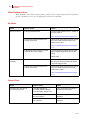
When problems occur while using the printer, search for the corresponding item from the following list of problems to carry out the appropriate action for the problem.
No Power
Status
Items to check
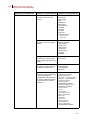
Action
There is no power.
Is the power switched off?
Press the printer switch to the <I> position to
turn the power on.
See “Turning the Printer On“on page 1-18.
Is the power cord disconnected or not
securely connected?
Switch off the power and connect the cord to
the power outlet and printer again. Then,
switch on the power.
See “Connecting the Power Cord“on page
1-17.
Is the power cord connected to a power
outlet with the correct voltage?
Connect the printer exclusively to an outlet
with a suitable voltage rating and current
rating.
Safety Notes
Power is interrupted
frequently.
Printer may have malfunctioned.
Switch off the power to the printer, remove
the plug from the power outlet and contact
our Printer Support Desk.
Is the power cord disconnected or not
securely connected?
Switch off the power and connect the cord to
the power outlet and printer again. Then,
switch on the power.
See “Connecting the Power Cord“on page
1-17.
Cannot Print
Status
Items to check
Action
Print instruction was sent but
processing did not start.
Is the fault indicator lit?
Is the fault indicator blinking?
Is the print-ready indicator off?
Carry out the action according to
the status of the indicator.
Is there any message displayed on
the control panel?
Check the message, then carry out
the action.
Is there any message displayed in
the computer?
Check the message, then carry out
the action.
Nov 06
35PPM Laser Printer User Guide 3-3
Poor Print Quality
Poor Print Quality
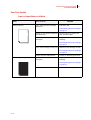
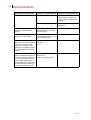
Paper Is Output Blank or All Black
Status
Items to check
Nothing is printed.
Is the seal of the Toner Cartridge
pulled out?
Action
Pull out the seal.
See “Replacing the Toner Cartridge“
on page 5-4.
Are two or more sheets of paper fed
simultaneously?
Remove and fan the papers well.
Then load them again.
Is the Toner Cartridge defective or
damaged?
Replace it with a new Toner
Cartridge.
See “Replacing the Toner Cartridge“
on page 5-4.
Is the Toner Cartridge correctly set?
Reset the Toner Cartridge correctly.
See “Replacing the Toner Cartridge“
on page 5-4.
The entire paper is printed black.
Printer may have malfunctioned.
Contact our Printer Support Desk.
Is the Toner Cartridge defective or
damaged?
Replace it with a new Toner
Cartridge.
See “Replacing the Toner Cartridge“
on page 5-4.
Printer may have malfunctioned.
Nov 06
Contact our Printer Support Desk.
3-4
35PPM Laser Printer User Guide
Poor Print Quality
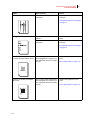
Printout Is Faded, Stained, Missing, Wrinkled, or Blurred
Status
Items to check
Action
Printing is faded and blurred.
Is the correct type of paper used?
Load the correct type of paper.
See “About Paper“ on page 2-4.
Is the paper damp?
Replace with paper from a new
ream.
See “Loading Paper“ on page 2-11.
Is the Toner Cartridge defective or
damaged?
Replace with a new Toner
Cartridge.
See “Replacing the Toner Cartridge“
on page 5-4.
Is it time to replace the Toner
Cartridge?
Replace with a new Toner
Cartridge.
See “Replacing the Toner Cartridge“
on page 5-4.
Black spots are printed.
Are the levers at both ends of the
fuser unit pushed up?
Push down the levers.
Is the correct type of paper used?
Load the correct type of paper.
See “About Paper“ on page 2-4.
Is the Toner Cartridge defective or
damaged?
Ensure that you are not printing
outside the non printable area. This
is within 4 mm of the paper edge
Replace it with a new Toner
Cartridge.
See “Replacing the Toner Cartridge“
on page 5-4.
Nov 06
35PPM Laser Printer User Guide 3-5
Poor Print Quality
Status
Items to check
Action
Black streaks are printed.
Is the Toner Cartridge defective or
damaged?
Replace it with a new Toner
Cartridge.
See “Replacing the Toner Cartridge“
on page 5-4.
Dirt appears at equal intervals.
The feed route of the paper may be
stained.
Print a few pages to remove the
stains.
Is the Toner Cartridge defective or
damaged?
Replace it with a new Toner
Cartridge.
See “Replacing the Toner Cartridge“
on page 5-4.
Hair-like streaks are printed inside
or outside the black halftone areas.
Shadows are printed around black
filled areas.
Nov 06
Are you using paper that has been
left unwrapped for a long period of
time (especially when the humidity
is low)?
Replace with paper from a new
ream.
Are you using paper that has been
left unwrapped for a long period of
time (especially when the humidity
is low)?
Replace with paper from a new
ream.
See “Loading Paper“ on page 2-11.
See “Loading Paper“ on page 2-11.
3-6
35PPM Laser Printer User Guide
Poor Print Quality
Status
Items to check
Action
White dots appear in black filled
areas.
Is the correct type of paper used?
Load the correct type of paper.
See “About Paper“ on page 2-4.
Is the Toner Cartridge defective or
damaged?
Replace it with a new Toner
Cartridge.
See “Replacing the Toner Cartridge“
on page 5-4.
Printed image smudges when
rubbed with your finger.
Is the paper damp?
Replace with paper from a new
ream.
See “Loading Paper“ on page 2-11.
Is the correct type of paper used?
Load the correct type of paper.
See “About Paper“ on page 2-4.
Printed image appears partially
blank.
Is the paper damp?
Replace with paper from a new
ream.
See “Loading Paper“ on page 2-11.
Is the correct type of paper used?
Load the correct type of paper.
See “About Paper“ on page 2-4.
Image is printed at an angle.
Image is printed at an unexpected
location.
Are the paper tray guides set in the
correct positions?
Set the length guide and width
guide in the correct positions.
See “Loading Paper“ on page 2-11.
Nov 06
35PPM Laser Printer User Guide 3-7
Poor Print Quality
Status
Items to check
Action
Vertical blanks appear.
Is the Toner Cartridge correctly set?
Reset the Toner Cartridge correctly.
See “Replacing the Toner Cartridge“
on page 5-4.
Is the Toner Cartridge defective or
damaged?
Replace it with a new Toner
Cartridge.
See “Replacing the Toner Cartridge“
on page 5-4.
Paper is wrinkled.
Is the correct type of paper used?
Load the correct type of paper.
See “About Paper“ on page 2-4.
Is the paper damp?
Replace with paper from a new
ream.
See “Loading Paper“ on page 2-11.
Is the paper correctly set?
Load the paper correctly.
“ Loading Paper”
Envelopes are wrinkled.
Envelopes may be wrinkled
depending on the type used.
Open the rear cover of the printer
and push up the levers at both ends
of the fuser unit. Wrinkles can be
reduced.
After printing the envelopes, you
must return the levers to their
original positions.
Text is blurred.
Is the paper damp?
Replace with paper from a new
ream.
See “Loading Paper“ on page 2-11.
Is the correct type of paper used?
Load the correct type of paper.
See “About Paper“ on page 2-4.
Printing Is Not Clear
Nov 06
3-8
35PPM Laser Printer User Guide
Poor Print Quality
Status
Items to check
Transparencies are not printed
clearly.
Are the correct type of
transparencies used?
Action
Load the correct type of
transparencies.
See “About Paper“ on page 2-4.
Are the transparencies correctly
loaded in the paper tray?
Load the transparencies correctly in
the paper tray.
See “Loading Transparencies in the
Paper Tray“ on page 2-13.
Postcards are not printed clearly.
Are the correct type of postcards
used?
Load the correct type of postcards.
See “About Paper“ on page 2-4.
Envelopes are not printed clearly.
Are the postcards correctly loaded
in the paper tray?
Load the postcards correctly in the
paper tray.
Are the correct type of envelopes
used?
Load the correct type of envelopes.
“About Paper” on page 2-4.
Are the envelopes correctly loaded
in the paper tray?
Load the envelopes correctly in the
paper tray.
Nov 06
35PPM Laser Printer User Guide 3-9
Paper Incorrectly Fed
Paper Incorrectly Fed
Status
Items to check
Action
Paper cannot be fed.
Paper jams occur.
Multiple sheets of paper are fed.
Paper is fed at an angle.
Is the paper correctly set?
Load the paper correctly. For
transparencies, postcards or
envelopes, fan them well first to
allow air to enter between each
sheet before loading.
See “Loading Paper“ on page 2-11.
Is the paper damp?
Replace with paper from a new
ream.
See “Loading Paper“ on page 2-11.
Is the correct type of paper used?
Load the correct type of paper.
See “About Paper“ on page 2-4.
Is the paper tray pushed in?
Push the paper tray completely into
the printer.
Is the paper jammed?
Remove the jammed paper.
See “Clearing Paper Jams“ on page
4-2.
Is the printer placed on a flat
location?
Place the printer on a stable
surface.
See “Installation Environment“on
page 1-2.
Are the paper tray guides set in the
correct positions?
Set the length guide and width
guide in the correct positions.
See “Loading Paper“ on page 2-11.
Did you print any picture postcards?
Clean the feed roll.
See “Cleaning the Printer“ on page
2-17.
Nov 06
3-10
35PPM Laser Printer User Guide
Other Problems
Other Problems
Status
Items to check
Action
Strange noise occurs.
Is the printer placed on a flat
location?
Shift the printer to a stable surface.
See “Installation Environment“on
page 1-2.
Is the top cover open?
Close the top cover tight.
Is the paper tray pushed in?
Push the paper tray completely into
the printer.
Are there foreign objects inside the
printer?
Switch off the power and remove
any foreign objects inside the
printer.
If the object cannot be removed
unless the printer is disassembled,
contact our Printer Support Desk.
Nov 06
35PPM Laser Printer User Guide 3-11
Warning Messages and Error Messages
Warning Messages and Error Messages
The control panel display shows a warning message or error message when there is a problem with
the printer. Some messages indicate routine status conditions such as an empty paper tray, while
others indicate that a sheet of paper has jammed in a specific area of the printer. Some messages
indicate more serious printer problems that may require the help of a service technician.
Warning messages use only the second line of the display and indicate conditions that do not prevent the printer from operating. For example, if Tray 1 is out of paper but the printer is currently
drawing paper from Tray 2, a warning message will appear on the second line of the display indicating that Tray 1 is out of paper—but the printer will continue to operate, drawing paper from Tray 2.
Error messages use both lines of the display and indicate conditions that prevent the printer from
operating. The first line of an error message contains the error code and type of error, while the
second line of the display contains information about the action required to recover from the error.
When the control panel displays a warning or error message, refer to the following tables and complete the actions recommended for the specific message that is shown.
Nov 06
3-12
35PPM Laser Printer User Guide
Warning Messages and Error Messages
Warning Messages
The following table lists warning messages, possible causes, and the actions required to correct
each cause.
Warning Message
Line 2 of display
Possible Cause
Action
Paper Out Tray 1
There is no paper in Tray 1.
Add paper to the tray.
Paper Out Tray 2
There is no paper in Tray 2.
Add paper to the tray.
Paper Out Tray 3
There is no paper in tray 3.
Add paper to the tray.
Paper Out Tray 4
There is no paper in tray 4.
Add paper to the tray.
Output Tray Full
The output tray is full.
Remove paper from the tray.
Offset Tray Full
The offset output tray is full.
Remove paper from the tray.
Toner Low
The toner is low.
Replace the toner cartridge
soon.
Maint Req
Maintenance is required.
Install User Maintenance Kit.
Nov 06
35PPM Laser Printer User Guide 3-13
Warning Messages and Error Messages
Error Messages
The table below lists error messages, the possible causes of each error, and the actions required to
recover from each error.
Error Message
Line 1
Error Message
Line 2
Possible Cause
Action
MISFEED JAM
E3 FUSER JAM
EXIT JAM
OFFSET TRAY JAM
E7 JAM DUPLEX
Remove Paper
There is a paper jam
inside the printer.
Remove the jammed paper from
the indicated location.
COVER OPEN
Close Top
Cover
The top cover is open.
Close the top or rear cover.
COVER OPEN
Close Rear
Cover
The rear cover is open.
Close the rear cover.
COVER OPEN
Close OCT
Cover
The offset tray cover is
open.
Close the offset tray cover.
TRAY 1 MISSING
Insert Tray
Tray 1 is not in the
printer.
Insert the tray.
TRAY 2 MISSING
Insert Tray
Tray 2 is not in the
optional feeder.
Insert the tray.
TRAY 3 MISSING
Insert Tray
Tray 3 is not in the
optional feeder.
Insert the tray.
TRAY 4MISSING
Insert Tray
Tray 4 is not in the
optional feeder.
Insert the tray.
LOAD PAPER TRAY1
Paper Size/
Paper Type
Tray 1 is empty.
Load paper into the tray.
LOAD PAPER TRAY2
Paper Size/
Paper Type
Tray 2 is empty.
Load paper into the tray.
LOAD PAPER TRAY3
Paper Size/
Paper Type
Tray 3 is empty.
Load paper into the tray.
LOAD PAPER TRAY4
Paper Size/
Paper Type
Tray 4 is empty.
Load paper into the tray.
PAPER SIZE ERROR
Paper Size/
Press Start
The paper size is not
supported by the
printer.
Check paper size specifications
and load paper that meets
specifications.
OUTPUT TRAY FULL
Remove Paper
The output tray is full.
Remove paper from the tray.
OFFSET TRAY FULL
Remove Paper
The offset output tray
is full.
Remove paper from the tray.
TONER MISSING
Install/Reset
The toner cartidge is
missing or not installed
correctly.
Install the toner cartridge or
reisntall the toner correctly.
Wrong toner cartridge
is installed.
Remove toner cartridge and
install the correct one.
ID MISMATCH
Nov 06
3-14
35PPM Laser Printer User Guide
Warning Messages and Error Messages
Error Message
Line 1
Error Message
Line 2
Possible Cause
Action
ROS FAILURE
Call Service
The ROS has failed.
FUSER FAILURE
Call Service
The fuser has failed.
OFFSET TRAY FAIL
Call Service
The offset tray was
removed or has failed.
Turn the printer off, then turn it
on. If the problem reoccurs,
contact an authorized service
provider.
OPTION TRAY FAIL
Call Service.
One of the optional
trays has failed.
DUPLEX FAILURE
Call Service
The duplexer was
removed or has failed.
MAIN MOTOR FAIL
Call Service
The main motor has
failed.
ENGINE NV FAIL
Call Service
The engine has failed.
FAN FAILURE
Call Service
The fan has failed.
MAINT REQ
Press Start
The printer needs
maintenance.
◆
◆
Install User Maintenance Kit.
◆
Nov 06
Chapter 4
Clearing Paper Jams
In this Chapter . . .
■
■
■
■
■
Nov 06
“Clearing Paper Jams” on page 4-2
“At the Fuser Unit” on page 4-5
“At the Toner Cartridge” on page 4-8
“At the Duplex Module” on page 4-10
“At the Offset Catch Tray” on page 4-12
4-2
35PPM Laser Printer User Guide
Clearing Paper Jams
Clearing Paper Jams
When there is a paper jam, refer to the following diagram and the description of the action to be
taken to remove the paper immediately.
NOTE:
The diagram below shows the printer with the two optional tray modules, duplex module,
and offset catch tray installed.
“At the Offset Catch
Tray”
“At the Fuser Unit”
“At the Toner
Cartridge”
“At the Duplex Module”
“At the Paper Trays”
CAUTION: Never touch areas labeled as “High Voltage.” You can get an electric shock.
Never touch a labeled area found on or near the heat roller. You can get burnt. If a sheet of
paper is wrapped around the heat roller, do not try to remove it by yourself to avoid injuries or
burns. Switch off the machine immediately, and contact our Printer Support Desk.
NOTE:
If the jammed paper is removed without opening the top cover, you still need to open and
close the top cover. Doing this will remove the error message.
NOTE:
Paper jams could be due to the printer installation environment and type of paper used. For
details on selecting the appropriate location to install the printer, refer to “Installation
Environment” on page 1-2. For details on selecting the correct type of paper, refer to
“About Paper” on page 2-4.
Nov 06
35PPM Laser Printer User Guide 4-3
Clearing Paper Jams
At the Paper Trays
1. Pull the paper tray out of the printer.
The paper tray must be pulled out completely. If the paper tray is pulled out halfway and
pushed in again, the paper may be damaged.
NOTE:
If the paper is jammed inside the printer and behind the first level paper tray, pull out both
the first and the second level paper trays.
NOTE:
If the paper is jammed inside the printer and behind the second level paper tray, pull out
only the second level paper tray.
2. Remove any wrinkled paper in the paper tray.
Nov 06
4-4
35PPM Laser Printer User Guide
Clearing Paper Jams
3. Remove any paper jammed inside the printer.
NOTE:
If the printer is installed with the two optional tray modules, examine the interior of all the
tray modules.
NOTE:
If the printer is installed with the two optional tray modules and the A5-sized paper (length
148.5 mm) of the short edge feed is jammed inside the feeder, use both hands to grip the
both ends of the paper to pull it out to the front.
4. Push the paper tray completely into the printer.
5. Open and close the top cover.
Nov 06
35PPM Laser Printer User Guide 4-5
At the Fuser Unit
At the Fuser Unit
1. Remove any paper from the center output tray.
NOTE:
If the duplex unit is installed, open the cover of the duplex unit first. See “At the Duplex
Module” on page 4-10.
2. Lift the second lever from the top left corner of the back of the printer.
3. Open the rear cover.
NOTE:
Nov 06
Do not touch any parts inside the printer.
4-6
35PPM Laser Printer User Guide
At the Fuser Unit
4. Open the cover of the fuser unit and remove any jammed paper. If paper is torn, check for
any remaining torn pieces of paper.
NOTE:
The fuser unit is hot. Be careful not to touch it as you can get burned.
Make sure that the levers at both ends of the fuser unit are returned to the positions they
were in before clearing the jam..
If you let go of the cover of the fuser unit, it will return to its original position.
5. Close the rear cover.
NOTE:
Make sure that the levers at the rear of the printer, as shown in the diagram, are returned
to the positions they were in before clearing the jam.
Nov 06
35PPM Laser Printer User Guide 4-7
At the Fuser Unit
6. Open and close the top cover.
Nov 06
4-8
35PPM Laser Printer User Guide
At the Toner Cartridge
At the Toner Cartridge
1. Remove any paper in the center output tray.
2. Open the top cover.
NOTE:
Do not touch any parts inside the printer.
3. Hold the Toner Cartridge by the grip and pull it out slowly. Then place it on a flat surface.
NOTE:
To prevent the toner from dirtying the surface, lay a piece of paper down and place the
Toner Cartridge on this.
Nov 06
35PPM Laser Printer User Guide 4-9
At the Toner Cartridge
4. Examine the interior from which the Toner Cartridge has been taken out and remove any
jammed paper. By rotating the rollers as shown in the diagram, the paper will be loosened
and can be removed easily. If paper is torn, check for any remaining torn pieces of paper.
5. Hold the Toner Cartridge by the grip and insert it into the slot inside the printer.
NOTE:
Do not touch any parts inside the printer. Ensure that the Toner Cartridge is correctly
installed.
6. Close the top cover securely.
Nov 06
4-10
35PPM Laser Printer User Guide
At the Duplex Module
At the Duplex Module
At the paper exit
1. Examine the paper exit and remove any jammed paper. If paper is torn, check for any
remaining torn pieces of paper.
NOTE:
If the paper is difficult to remove, carry out the operation in the following section, See “At
the interior of the top cover” on page 4-10.
2. Open and close the top cover.
At the interior of the top cover
1. Lift the lever at the top left hand side of the duplex module to unlock it and open the top
cover of the duplex module.
Nov 06
35PPM Laser Printer User Guide 4-11
At the Duplex Module
2. Examine the interior of the top cover and remove any jammed paper. If paper is torn, check
for any remaining torn pieces of paper.
3. Close the top cover of the duplex module.
Nov 06
4-12
35PPM Laser Printer User Guide
At the Offset Catch Tray
At the Offset Catch Tray
1. Open the offset catch tray cover by pulling the tab at the top left of the cover.
2. Remove any jammed paper.
3. Close the offset catch tray cover.
Nov 06
35PPM Laser Printer User Guide 4-13
At the Offset Catch Tray
4. Lift up the second lever from the top left corner of the back of the printer to open the rear
cover.
5. Remove any jammed paper. If paper is torn, check for any remaining torn pieces of paper.
NOTE:
The fuser unit is hot. Be careful not to touch it as you can get burned.Make sure that the
levers at both ends of the fuser unit are returned to the positions they were in before
clearing the jam.
NOTE:
If you let go of the cover of the fuser unit, it will return to its original position.
6. Close the rear cover.
Nov 06
4-14
35PPM Laser Printer User Guide
At the Offset Catch Tray
NOTE:
Make sure that the levers at the rear of the printer, as shown in the diagram, are returned
to the positions they were in before clearing the jam.
◆
◆
◆
Nov 06
Chapter 5
About Consumables
In this Chapter . . .
■
■
■
■
■
Nov 06
“Available Consumables“ on page 5-2
“Toner Cartridge“ on page 5-4
“Fuser Unit“ on page 5-8
“Transfer Roll Cartridge“ on page 5-12
“Feed Roll“ on page 5-16
5-2
35PPM Laser Printer User Guide
Available Consumables
The following consumables are available for this printer. To order these, contact our Printer Support Desk.
Toner Cartridge
The Toner Cartridge includes the toner and the photosensitive drum. If the toner in the Toner Cartridge is insufficient, the printout will become light and blurred. If it is time for replacement,
replace with a new Toner Cartridge.
The following Toner Cartridge is available:
■
17 Kpv: can print approximately 17,000 pages
NOTE:
The possible number of pages that can be printed is based on Letter size paper with a print
ratio of 5% and the default density setting using one Toner Cartridge. The number of pages
that can be actually printed varies according to the conditions of use.
IMPORTANT: Use of Toner Cartridges not recommended by our company may impair print quality or
printer performance. Use only Toner Cartridges recommended by our company on this
printer.
NOTE:
See “Toner Cartridge” on page 5-4 for details on how to replace the Toner Cartridge.
Nov 06
35PPM Laser Printer User Guide 5-3
Regular replacement parts
Regular replacement parts packaged together include the fuser unit, the transfer roll cartridge, and
the feed roll. About 200,000 pages for a fuser unit, a transfer roll cartridge and a feed roll can be
printed. The printer will display the warning message "Maintenance Reqd press start" when this
200,000 page limit is reached. If you press start you will be able to carry on printing. However, you
will need to order the maintenance kit and replace these part soon after. After installing the maintenance kit, you should go to the "System Menu" and select "Reset Maint Reqd" to reset the counter
and clear the warning message.
Fuser unit
Transfer roll cartridge
Feed roll
NOTE:
The possible number of pages that can be printed is based on Letter size paper with a print
ratio of 5% and the default density setting. The number of pages that can be actually
printed varies according to the conditions of use.
Refer to: “Fuser Unit“ on page 5-8 for details on how to replace the fuser unit.
“Transfer Roll Cartridge“ on page 5-12 for details on how to replace the transfer roll
cartridge.
“Feed Roll“ on page 5-16 for details on how to replace the feed roll.
Nov 06
5-4
35PPM Laser Printer User Guide
Toner Cartridge
Toner Cartridge
This section explains about the Toner Cartridge.
Cautions on Handling the Toner Cartridge
When handling the Toner Cartridge, take note of the following points:
WARNING! Never throw an Toner Cartridge into an open flame. It can cause an explosion and
you can get burned.
■
■
■
■
■
■
Do not subject it to direct sunlight or strong light.
When installing the Toner Cartridge, select a location not subject to strong light and try to
finish the installation within 5 minutes.
Do not touch the surface of the photosensitive drum. Do not let the Toner Cartridge stand
or place it upside down. The drum might get damaged.
A drum shutter protects the photosensitive drum from light. Do not open the drum shutter.
Although the toner is not harmful to the body, wash it off immediately if your hands or
clothes are stained with it.
To ensure reliable operation you should replace your Toner cartridge within one year of
installing it
Replacing the Toner Cartridge
1. Switch off the power of the printer.
Nov 06
35PPM Laser Printer User Guide 5-5
Toner Cartridge
2. Remove any paper in the center output tray.
3. Open the top cover.
NOTE:
Do not touch any parts inside the printer.
4. Hold the Toner Cartridge by the grip and pull it out slowly.
NOTE:
Nov 06
To prevent the toner from dirtying the floor, lay a piece of paper on the floor first before
putting the Toner Cartridge down.
5-6
35PPM Laser Printer User Guide
Toner Cartridge
5. Take the new Toner Cartridge out of the box and shake it 7 to 8 times as shown in the diagram.
IMPORTANT: If the toner is not evenly spread out, the print quality may drop. Also, if you did not shake
the cartridge well, there may be operating noise or the interior of the Toner Cartridge may
be damaged during operation.
Do not touch the surface of the photosensitive drum.
6. Place the Toner Cartridge on a flat surface and pull out the seal horizontally.
IMPORTANT: When pulling out the seal, pull it out horizontally. The tape might break if it is pulled out
diagonally.
After the seal has been pulled out, do not shake or dump the Toner Cartridge.
Nov 06
35PPM Laser Printer User Guide 5-7
Toner Cartridge
7. Hold the Toner Cartridge by the grip and insert it into the slot inside the printer.
IMPORTANT: Do not touch any parts inside the printer.
Ensure that the Toner Cartridge is firmly set.
8. Close the top cover securely.
9. Select "Reset Toner life" which is in the system menu.
Nov 06
5-8
35PPM Laser Printer User Guide
Fuser Unit
Fuser Unit
This section explains about the fuser unit.
Caution on Handling the Fuser Unit
The fuser unit is included as one of the regular replacement parts. Before replacing the fuser unit,
open the box of the regular replacement parts and get the new fuser unit ready.
When handling the fuser unit, take note of the following points:
CAUTION: Never touch a labeled area found on or near the heat roller. You can get burnt. If a
sheet of paper is wrapped around the heat roller, do not try to remove it by yourself to avoid injuries or burns. Switch off the machine immediately, and contact our Printer Support Desk.
Be sure to switch off and unplug the machine before accessing the interior of the machine for
cleaning, maintenance, or fault clearance. Access to a live machine’s interior can cause electric
shock.
Do not replace the fuser unit immediately after using the printer. You may get burned.
Replacing the Fuser Unit
1. Switch off the power of the printer and leave it for 30 minutes until the fuser unit cools
down.
Nov 06
35PPM Laser Printer User Guide 5-9
Fuser Unit
2. Remove any paper in the center output tray.
3. Lift the second lever from the top left corner of the back of the printer.
4. Open the rear cover.
IMPORTANT: Do not touch any parts inside the printer.
Nov 06
5-10
35PPM Laser Printer User Guide
Fuser Unit
5. Pull down the 2 levers at the bottom of the fuser unit.
6. Remove the fuser unit slowly.
7. Insert the new fuser unit slowly.
Nov 06
35PPM Laser Printer User Guide 5-11
Fuser Unit
8. Lift up the 2 levers at the bottom of the fuser unit and push down the levers at both ends of
the fuser unit to lock it.
9. Close the rear cover.
IMPORTANT: Do not close the rear cover if the fuser unit is not installed. Forcibly closing it may damage
the lever or the cover.
Nov 06
5-12
35PPM Laser Printer User Guide
Transfer Roll Cartridge
Transfer Roll Cartridge
This section explains about the transfer roll cartridge.
Caution on Handling the Transfer Roll Cartridge
The transfer roll cartridge is included as one of the regular replacement parts. Before replacing the
transfer roll cartridge, open the box of the regular replacement parts and get the new transfer roll
cartridge ready.
When handling the transfer roll cartridge, take note of the following points:
WARNING! Never throw an transfer roll cartridge into an open flame. It can cause an explosion
and you can get burned.
Do not remove and reinsert the transfer roll cartridge in use.
When the message to replace the transfer roll cartridge appears, replace the transfer roll cartridge
immediately. Otherwise, the printer will be forcibly stopped.
Replacing the Transfer Roll Cartridge
1. Switch off the power of the printer.
Nov 06
35PPM Laser Printer User Guide 5-13
Transfer Roll Cartridge
2. Remove any paper in the center output tray.
3. Open the top cover.
IMPORTANT: Do not touch any parts inside the printer.
4. Hold the Toner Cartridge by the grip to pull it out slowly.
NOTE:
Nov 06
To prevent the toner from dirtying the surface, lay a piece of paper down and place the
Toner Cartridge on this.
5-14
35PPM Laser Printer User Guide
Transfer Roll Cartridge
5. Pull the 2 levers on the upper part of the transfer roll cartridge, then squeeze the 2 levers on
the bottom of the transfer roll cartridge and pull it out slowly towards you.
6. Pick up the new transfer roll cartridge by the levers at both ends and slowly slot it in.
Nov 06
35PPM Laser Printer User Guide 5-15
Transfer Roll Cartridge
7. Hold the Toner Cartridge by the grip and insert it into the slot inside the printer.
IMPORTANT: Do not touch any parts inside the printer.
Ensure that the Toner Cartridge is orrectly installed.
8. Close the top cover.
Nov 06
5-16
35PPM Laser Printer User Guide
Feed Roll
Feed Roll
This section explains about the feed roll.
Caution on Handling the Feed Roll
The feed roll is included as one of the maintenance kit. Before replacing the feed roll, open the box
of the kit and get the new feed roll ready.
When handling the feed roll, take note of the following points:
CAUTION: Be sure to switch off and unplug the machine before accessing the interior of the
machine for cleaning, maintenance, or fault clearance. Access to a live machine’s interior can
cause electric shock.
There are feed rolls inside the interior of the printer (2 in 2 locations, 4 in total), tray module
(1 location) and paper tray (1 location).
Those rollers are periodic replacement parts. All feed rolls are recommended to be replaced.
Feed roll
Inside the printer (2 locations)
Tray module (1 location)
Paper tray (1 location)
Nov 06
35PPM Laser Printer User Guide 5-17
Feed Roll
Replacing the Feed Roll
NOTE:
The following procedure explains how to replace the feed roll of the paper tray. Follow the
procedure here for replacing the feed roll of the tray module as well.
Feed roll at the paper tray
1. Power the printer off.
2. Pull the paper tray out of the printer.
NOTE:
When replacing the feed roll of tray 2, pulled out both tray 1 and tray 2.
The feed roll on tray modules can be replaced without pulling out the paper tray.
3. While pushing down the shaft of the feed roll as shown in the diagram (1), widen the tab of
the feed roll to loosen it (2) and then slowly remove the feed roll from the shaft on the paper
tray (3).
Nov 06
5-18
35PPM Laser Printer User Guide
Feed Roll
4. Hold the tab on the new feed roll as shown in the diagram and slowly push it into the shaft
on the paper tray.
Tab
By aligning the small tabs on the feed roll with the slots of the shaft, push the feed roll completely in so that the tab fits into the slot.
5. Push the paper tray completely into the printer.
Nov 06
35PPM Laser Printer User Guide 5-19
Feed Roll
Feed roll inside the printer
1. Remove any paper in the center output tray.
2. Open the top cover.
IMPORTANT: Do not touch any parts inside the printer.
3. Hold the Toner Cartridge by the grip and pull it out slowly.
NOTE:
Nov 06
To prevent the toner from dirtying the floor, lay a piece of paper on the floor before putting
the Toner Cartridge down.
5-20
35PPM Laser Printer User Guide
Feed Roll
4. While pushing down the shaft of the feed roll as shown in the diagram, widen the tab on the
feed roll to loosen it (1) and then slowly remove the feed roll from the shaft of the paper tray
(2).
5. Hold the tab on the new feed roll as shown in the diagram and slowly push it into the shaft
on the paper tray.
Tab
By aligning the small tabs on the feed roll with the slots of the shaft, push the feed roll completely in so that the tab fits into the slot.
Nov 06
35PPM Laser Printer User Guide 5-21
Feed Roll
6. Hold the Toner Cartridge by the grip and insert it into the slot inside the printer.
IMPORTANT: Do not touch any parts inside the printer.
Ensure that the Toner Cartridge is firmly set.
Close the top cover securely.
◆
Nov 06
◆
◆
5-22
35PPM Laser Printer User Guide
Feed Roll
Nov 06
Chapter 6
Optional Accessories
In this Chapter . . .
■
■
■
■
Nov 06
“Available Optional Accessories” on page 6-2
“Tray module (A4/550 sheets)” on page 6-2
“Offset catch tray” on page 6-17
“Rear tray” on page 6-23
6-2
35PPM Laser Printer User Guide
Tray module (A4/550 sheets)
Available Optional Accessories
The following optional accessories are available for this printer.
Tray module (A4/550 sheets)
Install the tray module to the printer to use the paper tray (A4/550 sheets).
NOTE:
You can add up to two tray modules.
Installing/Uninstalling the Tray Module
The optional tray module (A4/550 sheets) is available for this printer.
You can add up to two tray modules.
CAUTION: Be sure to switch off the power and unplug the power cord from the outlet before carrying out the operations. If not, you might get an electric shock.
When lifting the machine, get a firm footing and bend your knees to avoid possible injuries to
your back.
The weight of this printer, without the optional accessories, paper trays, consumables and paper, is
21.0 kg. Before moving the printer, you must uninstall the optional accessories first.
When lifting the printer, there should be 2 persons, 1 in front and 1 behind the printer, to firmly
grip the recessed areas provided on both sides of the printer. Never try to lift the printer by gripping any other areas. Lifting the printer by gripping any other areas can cause the printer to fall and
result in injuries.
Nov 06
35PPM Laser Printer User Guide 6-3
Tray module (A4/550 sheets)
Checking the contents of the tray module package
Before installing the tray module to the printer, ensure that you have all of the following items.
■
Tray module (A4/550 sheets)
Tray module (A4/550 sheets)
Paper tray (A4/550 sheets)
Nov 06
Fasteners (four pieces)
6-4
35PPM Laser Printer User Guide
Tray module (A4/550 sheets)
Installing the Tray Module
1. Place the tray module to be installed at the lowest level on a flat location.
NOTE:
Proceed to Step 5 if you are installing only one tray module.
2. Lift up the tray module to be installed at the top level by holding the parts as shown in the
diagram.
3. Align the front and back corners of the top and bottom tray modules, and slowly lower the
top module so that the guide pins at the 4 corners of the bottom module fit into the holes at
the base plate of the top module.
Nov 06
35PPM Laser Printer User Guide 6-5
Tray module (A4/550 sheets)
IMPORTANT: The tray module must be lowered gently. Otherwise, the interior parts may be damaged.
4. Insert the fast eners provided into the 2 locations inside of the tray module and 2 locations at
the back of the tray module. Insert the fasteners securely.
5. Switch off the power to the printer.
Nov 06
6-6
35PPM Laser Printer User Guide
Tray module (A4/550 sheets)
6. Pull out the power cord from the power outlet and then the printer.
7. Remove any paper in the center output tray (1) and return the paper stopper to its original
position if it’s raised (2).
8. Pull the paper tray out of the printer.
Nov 06
35PPM Laser Printer User Guide 6-7
Tray module (A4/550 sheets)
9. Lift up the printer by holding the recessed areas as shown in the diagram.
10. Align the corners of the printer and the tray modules, and lower the printer gently so that the
guide pins at the 4 corners of the tray modules fit into the holes at the base plate of the
printer.
IMPORTANT: The printer must be lowered gently. Otherwise, the interior parts may be damaged.
Nov 06
6-8
35PPM Laser Printer User Guide
Tray module (A4/550 sheets)
11. Insert the fasteners provided into the 2 locations inside and 2 locations at the back of the
printer. Insert the fasteners securely.
12. Push the paper tray completely into the printer.
Refer to: See “Loading Paper” on page 1-11 for details on how to load paper into the paper tray.
Nov 06
35PPM Laser Printer User Guide 6-9
Tray module (A4/550 sheets)
Uninstalling the Tray Module
NOTE:
The procedure here explains the uninstallation of two tray modules as an example. You can
use the same procedure for uninstalling one tray module.
1. Switch off the power to the printer.
2. Pull out the power cord from the power outlet and then the printer.
3. Remove any paper in the center output tray (1) and return the paper stopper to its original
position if it’s raised (2).
Nov 06
6-10
35PPM Laser Printer User Guide
Tray module (A4/550 sheets)
4. Pull the paper tray out of the printer.
5. Remove the fasteners found at the 2 locations inside and at the 2 locations at the back of the
printer.
Nov 06
35PPM Laser Printer User Guide 6-11
Tray module (A4/550 sheets)
6. Lift up the printer by holding the recessed areas as shown in the diagram and then remove it
from the tray modules.
7. Remove the fasteners found at the 2 locations inside the tray modules and at the 2 locations
at the back of the tray modules.
Nov 06
6-12
35PPM Laser Printer User Guide
Tray module (A4/550 sheets)
8. Lift up the top tray module by holding the recessed areas as shown in the diagram and then
remove it from the bottom tray module.
Nov 06
35PPM Laser Printer User Guide 6-13
Tray module (A4/550 sheets)
Paper trays
The following paper tray is available:
Paper tray (A4/550 sheets)
This is the same as the paper tray of the standard tray module (A4/550 sheets) for printers with a
continuous print speed of 34 ppm. Use it in the standard tray module or the optional tray module
(A4/550 sheets).
150 sheets
550 sheets
Duplex module
Install this unit to the printer to enable 2 sided printing.
Installing/Uninstalling the Duplex Module
You can install an optional duplex module to this printer.
CAUTION: Be sure to switch off the power and unplug the power cord from the outlet before carrying out the operations. If not, you might get an electric shock.
Nov 06
6-14
35PPM Laser Printer User Guide
Tray module (A4/550 sheets)
Installing the Duplex Module
1. Switch off the power of the printer.
2. Pull out the power cord from the power outlet and then the printer.
3. Remove the rear cover of the printer after pushing the two tabs as shown in the diagram.
Next, remove the connector cover of the printer as shown in the diagram.
Nov 06
35PPM Laser Printer User Guide 6-15
Tray module (A4/550 sheets)
4. Insert the right and left tabs at the bottom of the duplex module into the holes at the back of
the printer and then align the top part of the duplex module with the printer. Ensure that the
connector of the duplex module is connected to the connector of the printer.
5. Tighten the screws at the both ends of the bottom of the duplex module.
Uninstalling the Duplex Module
1. Switch off the power to the printer.
Nov 06
6-16
35PPM Laser Printer User Guide
Tray module (A4/550 sheets)
2. Pull out the power cord from the power outlet and then the printer.
3. Loosen the screws at the both ends of the bottom of the duplex module.
4. While supporting the duplex module with your hand, lift the lever at the top left hand side of
the duplex module to unlock it and then tilt the top part of the duplex module away from the
printer.
NOTE:
You must support the duplex module with your hand as once it is unlocked. Otherwise, it
may fall.
Nov 06
35PPM Laser Printer User Guide 6-17
Offset catch tray
5. While holding up the duplex module, remove the right and left tabs of the duplex module
from the holes at the back of the printer.
6. Push in the cover and connector cover, which were removed during installation of the duplex
module, until it clicks into the back of the printer.
Offset catch tray
Install this tray to the printer to enable print jobs to be offset. Maximum capacity is 500 sheets of
the standard paper.
The offset catch tray can be installed on the 35PPM printer. It is recommended that this is used
together with the optional Hard drive.
Nov 06
6-18
35PPM Laser Printer User Guide
Offset catch tray
Installing/Uninstalling the Offset Catch Tray
You can install an optional offset catch tray to this printer.
CAUTION: Be sure to switch off the power and unplug the power cord from the outlet before carrying out the operations. If not, you might get an electric shock.
Installing the Offset Catch Tray
1. Switch off the power to the printer.
2. Pull out the power cord from the power outlet and then the printer.
Nov 06
35PPM Laser Printer User Guide 6-19
Offset catch tray
3. Lift the second lever from the top left corner of the back of the printer.
4. Open the rear cover.
NOTE:
Do not touch any parts inside the printer.
5. Untighten the right and left thumb screws as shown in the diagram to uninstall the top cover
of the paper exit.
Nov 06
6-20
35PPM Laser Printer User Guide
Offset catch tray
6. Insert the right and left tabs of the offset catch tray into the holes at the top of the printer (1)
and put it down to the top of the printer slowly (2).
7. Secure the screws at both ends of the bottom of the offset catch tray.
8. Pull out the extension tray.
Nov 06
35PPM Laser Printer User Guide 6-21
Offset catch tray
9. Flip the stopper when print a thicker paper.
10. Close the rear cover.
Uninstalling the Offset Catch Tray
1. Switch off the power to the printer.
2. Pull out the power cord from the power outlet and then the printer.
Nov 06
6-22
35PPM Laser Printer User Guide
Offset catch tray
3. Close the stopper and the extension tray of the offset catch tray.
4. Lift up the second lever (1) from the top left corner of the back of the printer to open the
rear cover (2).
5. Remove the screws on both sides of the offset catch tray (1), and while holding up the offset
catch tray, remove the right and left tabs from the holes at the top of the printer (2).
Nov 06
35PPM Laser Printer User Guide 6-23
Rear tray
6. Fasten the right and left thumb screws of the top cover of the paper exit, which was removed
during installation of the offset catch tray, into the holes at the top of the printer.
Rear tray
Install this tray to the printer to enable printouts to be output with the printed side up. Maximum
capacity is 70 sheets of the standard paper.
The rear tray can be installed in the 35PPM printer.
Nov 06
6-24
35PPM Laser Printer User Guide
Rear tray
Installing/Uninstalling the Rear Tray
You can install an optional rear tray to this printer.
CAUTION: Be sure to switch off the power and unplug the power cord from the outlet before carrying out the operations. If not, you might get an electric shock.
Installing the Rear Tray
1. Power off the printer.
2. Insert the right and left tabs of the rear tray into the holes at the back of the printer.
3. Push up the lever as shown in the diagram (1) and pull out the extension tray (2).
Nov 06
35PPM Laser Printer User Guide 6-25
Rear tray
Uninstalling the Rear Tray
1. Close the extension tray.
2. While holding up the rear tray, remove the right and left tabs from the holes at the back of
the printer.
3. Push down the lever as shown in the diagram.
◆
Nov 06
◆
◆
6-26
35PPM Laser Printer User Guide
Rear tray
Nov 06
Chapter 7
Understanding and
Navigating the Control
Panel Menus
In this Chapter . . .
■
■
■
■
■
■
■
■
■
■
■
■
■
■
■
■
Nov 06
“About this Chapter” on page 7-2
“Control Panel Features” on page 7-2
“Navigating the Control Panel Menus” on page 7-4
“Menu Structure” on page 7-6
“Job Library” on page 7-7
“Job Accounting” on page 7-9
“Paper Menu” on page 7-10
“Interface Menu” on page 7-12
“PS Menu” on page 7-15
“PCL Menu” on page 7-16
“System Menu” on page 7-19
“Quality Menu” on page 7-21
“Date/Time Menu (optional)” on page 7-22
“Functions Menu” on page 7-23
“FLASH Menu” on page 7-24
“DISK Menu” on page 7-25
7-2
35PPM Laser Printer User Guide
Control Panel Features
About this Chapter
This chapter explains the control panel and its functions, and also demonstrates how to navigate
through the control panel menus and submenus that allow you to view and change the printer settings. Web access to the printer is also discussed.
Control Panel Features
The control panel is located on the front of the printer, and contains the display, indicators, and
pushbuttons that allow you to view and change the printer settings.
The figure below shows the control panel features.
LCD Display
Figure 7-1: Control Panel.
LCD Display
The LCD display shows status and error messages that inform you of the current status of the
printer, and also displays menus, submenus, and printer settings when you are in the menu system.
The display contains two lines of text, each with a maximum of sixteen characters.
Nov 06
35PPM Laser Printer User Guide 7-3
Control Panel Features
LED Indicators
The LED indicators also indicate printer status. The three indicators can each be on, off, or blinking, indicating different phases of printer operation. The table below explains the LED indicators.
LED
COLOR
WHEN OFF
WHEN ON
WHEN BLINKING
Green
Printer is NOT
READY
Printer is READY
N/A
Green
Printer is IDLE
Printer is ACTIVE
(processing a job)
Printer is WAITING
(a partial job has
been printed, and
the printer is waiting
for additional job
data)
Red
Printer is not in error
mode
There is an error
that requires user
intervention, such as
a paper jam, a
service call
required, etc.
N/A
Pushbuttons
The control panel pushbuttons allow you to access and navigate menus, and also assist you in
recovering from printer errors. The table below explains the functions of the eight pushbuttons.
PUSHBUTTON
FUNCTION
START/STOP—Push this button to start or stop the printer, or to exit the menu
system.
MENU—Push this button to enter the menu system.
NEXT—Push this button to move to the next menu, submenu, or setting within the
same level of the menu structure.
SELECT—Push this button to select the menu or submenu that is shown
on the second line of the display or to choose and save the setting shown
on the second line of the display.
Nov 06
7-4
35PPM Laser Printer User Guide
Navigating the Control Panel Menus
PUSHBUTTON
FUNCTION
CANCEL—Push this button to cancel an action.
STATUS—Push this button to enter the Status Menu and view the current status of
the following items on the printer:
Tray 1: Media Size, Media Type, Level
Tray 2: Media Size, Media Type, Level
Tray 3: Media Size, Media Type, Level
Tray 4: Media Size, Media Type, Level
Facedown Tray
Toner
PREVIOUS—Push this button to return to the previous menu, submenu,
or option within the same level of the menu structure.
RETURN—Push this button to move up one level in the menu structure to
the menu shown on the first line of the display.
Navigating the Control Panel Menus
When you press the MENU button on the control panel, you enter the printer’s menu system. At
that point, the first line of the display contains the text “Menu”, indicating that you are in the menu
system. The second line of the display lists the active menu, which you can change by pressing the
NEXT or PREVIOUS button.
Menu
Paper Menu
If you press the NEXT button repeatedly, the second line of the display cycles through the main
menus in the following order:
NOTE:
■
■
■
■
■
■
■
■
■
■
Some menu entries shown in the following pages are dependent on the printer's build level
and options fitted.
Job Library Menu
Job Accounting Menu
Paper Menu
Interface Menu
PS Menu (Postscript)
PCL Menu
System Menu
Quality Menu
Functions Menu
Flash Menu
Nov 06
35PPM Laser Printer User Guide 7-5
Navigating the Control Panel Menus
NOTE:
Additional menus and submenus may appear in the printer menu system when other
options are installed.
The following figure shows the sequence of pushbuttons and display messages that would allow
you to change the number of copies printed. This example illustrates the basic relationship between
menus and submenus and demonstrates how the NEXT, PREVIOUS, SELECT, and
RETURN buttons help you to navigate through the menus.
Menu
Paper Menu
Menu
Interface Menu
Menu
Paper Menu
Copies
2
Copies
1
Paper Menu
Copies
Copies
3
Paper Menu
Copies
Menu
Paper Menu
Figure 7-2: Navigating the Paper Menu.
1. Press the MENU button on the control panel.
2. Press the NEXT button until the text Paper Menu is shown on the second line of the display.
3. Press the SELECT button to enter the paper menu.
4. Press the NEXT button until the text Copies is shown on the second line of the display.
5. Press the SELECT button to enter the copies submenu.
6. Press the NEXT or PREVIOUS button to increase or decrease the number of copies
printed.
7. Press the SELECT button to save this setting.
8. Press the START/STOP button to exit the menu system.
Nov 06
7-6
35PPM Laser Printer User Guide
Menu Structure
Menu Structure
The following figure shows the structure of the control panel main menus and submenus.
Job Library
Print
Delete
Job Accounting
Enabled
Print Info
Reset Info
Paper Menu
Copies
Duplex
Duplex Bind
Default Source
Output Tray
Media Size/Type
Tray 1
Tray 2
Tray 3 (optional)
Tray 4 (optional)
Tray Linking
Blank Pages
Output Linking
Auto Resize
Separator Page
Custom Size Unit
PS Menu
Print PS Errors
PCL Menu
Orientation
Font Source
Font Number
Pitch
Symbol Set
Macro Filter
Lines Per Page
CR Mode
LF Mode
FF Mode
Print Area
Parameter Values
System Menu
Factory Defaults
Display Language
Power Saver
Wait Timeout
Job Timeout
Jam Recovery
Hex Print
Toner Low
Power on files
Reset Toner Life
Page Compression
Intellifilter
Paper Source
Paper Size
Quality Menu
Resolution
Toner Saver
Print Density
Date/Time Menu
Month
Day
Year
Hour
Minute
Second
Offset from GMT
Functions
Reset Printer
Print Summary
Print Test
Print Fonts
Interface Menu
Port
Parallel
Network Card 1
USB
Parallel Setup
Interpreter
Format
Mode
Delay Out Close
Binary PS
Network 1Setup
Interpreter
Format
Network Address
IP Address
Subnet Mask
Default Router
LPD Banner
DHCP
Delay Out Close
Host Name
mDNS
Local Link
mDNS Host Name
mDNS Svc Name
Multi-Session
AppleTalk
Current Zone
Preferred Zone
Binary PS
Connection Speed
Spooling
USB Setup
Interpreter
Format
Delay Out Close
Binary PS
Flash
Print
Delete
Format Usr Flash
Flash Summary
Hours
Minutes
Figure 7-3: Printer Menu Structure.
Nov 06
35PPM Laser Printer User Guide 7-7
Job Library
NOTE:
Additional menus and submenus may appear in the printer menu system when other
options are installed.
Status Menu
In addition to the main menus listed above, the printer also provides a status menu that allows you
to view the current printer settings. Push the STATUS button to enter the Status Menu.
Status Menu
Tray 1
Media Size
Media Type
Level
Tray 2
Media Size
Media Type
Level
Tray 3 (Optional)
Media Size
Media Type
Level
Tray 4 (Optional)
Media Size
Media Type
Level
Face Down Tray
Offset Tray
Toner
Job Library
1. Press the MENU button on the control panel.
2. Press the NEXT button until the text Job Library Menu is shown on the second line of the
display.
3. Press the SELECT button to enter the Job Library menu.
4. Press the NEXT button to move through the submenus: Print or Delete.
5. Press the SELECT button to enter a submenu.
Nov 06
7-8
35PPM Laser Printer User Guide
Job Library
Use the procedures in the following table to access and change the Job Library settings.
Submenu
Default
Setting
Print
Print
User Folder 1
1. Press NEXT or PREVIOUS to scroll
through the User Folder Names.
2. Press SELECT to choose the desired
User Folder.
Print
Print
Job1
1. Press NEXT or PREVIOUS to scroll
through the Print Job Names.
2. Press SELECT to choose the desired
Print Job.
Job Name
PIN
Available Settings
This step is necessary
if the job is a PRIVATE
job.
Procedure for Changing Setting
1. Press NEXT or PREVIOUS to
increase or decrease each digit of the
four-digit number.
2. Press SELECT to set one digit and
move to the next digit.
3. Press SELECT after changing the last
digit to save this setting.
Print
Job Name
Copies –
Select 1-99
1. Press NEXT or PREVIOUS to
increase or decrease each digit of the
two-digit number.
2. Press SELECT set one digit and
move to the next digit.
3. Press SELECT after changing the last
digit to save this setting.
Print
Job Name
Copies
1. Press SELECT to print the job.
Print
Printing
Playback
1. The printer will display PRINTING
on Line 1 and PLAYBACK on Line 2
of the display while printing the job.
Delete
Delete
(To delete a
saved job)
1. Press NEXT or PREVIOUS to scroll
through Print or Delete options.
2. Press SELECT to choose Delete.
Delete
User Folder 1
1. Press NEXT or PREVIOUS to scroll
through the User Folder Names.
2. Press SELECT to choose the desired
User Folder.
Delete
Job1
1. Press NEXT or PREVIOUS to scroll
through the Print Job Names.
2. Press SELECT to choose the desired
Print Job to Delete.
Job Name
PIN
This step is necessary
if the job is a PRIVATE
job.
1. Press NEXT or PREVIOUS to
increase or decrease each digit of the
four-digit number.
2. Press SELECT to set one digit and
move to the next digit.
3. Press SELECT after changing the last
digit to save this setting.
Nov 06
35PPM Laser Printer User Guide 7-9
Job Accounting
Job Library Errors
When a Job Library error occurs, the following message will be displayed:
JOBLIB Error XX
Press Start
This is a continuable-fault, which means the START key must be pressed to allow operations to
continue. If the current job is aborted as a result of the error, the message"Canceling Job" may be
displayed after START is pressed. "XX" in the error display above is an error code. The error codes
for this message are:
■
■
■
■
■
01 – Data stream was missing a Job Name specification. (Job will be aborted.)
02 – Data stream was missing a User Name specification. (Job will be aborted.)
03 – Data stream was missing a PIN specification. (Job will be aborted.)
04 – Attempted to overwrite a PRIVATE job, but PIN did not match. (Job will be aborted.)
05 – Insufficient storage. (Job will be aborted only if it is a PRIVATE job.)
Job Accounting
The Job Accounting Menu provides access to functions and settings related to this feature. Use the
following procedure to enter the Job Accounting Menu to change the settings or access the functions:
1. Press the MENU button on the control panel.
2. Press the NEXT button until the text Job Accounting Menu is shown on the second line
of the display.
3. Press the SELECT button to enter the Job Accounting Menu.
4. Press the NEXT button to move through the submenus: Enable, Print Info, Reset Info.
5. Press the SELECT button to enter a submenu.
Use the procedures in the following table to access and change the Job Accounting settings.
Nov 06
SubMenu
Default
Settings
Available
Settings
Procedure for Changing Setting
Enabled
No
Yes
No
1. Press NEXT or PREVIOUS to scroll through
Yes or No options.
2. Press SELECT to choose Yes to turn on this
function.
Print Info
1. Press SELECT to begin printing the Job
Accounting Summary Report.
Reset Info
1. Press SELECT to reset the Job Accounting
Information. This will delete all stored
information related to jobs received by the
printer.
7-10
35PPM Laser Printer User Guide
Paper Menu
Paper Menu
The Paper Menu provides access to the printer settings for various paper-handling functions. Use
the following procedure to enter the paper menu:
1. Press the MENU button on the control panel.
2. Press the NEXT button until the text Paper Menu is shown on the second line of the display.
3. Press the SELECT button to enter the Paper Menu.
4. Press the NEXT button to move through the submenus.
Use the procedures in the following table to access and change the printer paper-handling settings:
Submenus
Default
Setting
Available Settings
Procedure for Changing Setting
Copies
This submenu allows
you to change the
number of copies
printed.
1
Numbers 1 – 999
1. Press NEXT or PREVIOUS to
increase or decrease the number of
copies printed.
2. Press SELECT to save this setting.
Duplex (optional)
This submenu allows
you to turn the duplex
on or off.
Off
On/Off
1. Press NEXT or PREVIOUS to
toggle between ON and OFF.
2. Press SELECT to save this setting.
Duplex Bind (optional)
This submenu allows
you to choose between
LEF (Long Edge Feed)
and SEF (Short Edge
Feed).
Long Edge
Long Edge/Short Edge
1. Press NEXT or PREVIOUS to
toggle between LEF and SEF.
2. Press SELECT to save this setting.
Default Source
This submenu allows
you to choose a default
paper source from a list
of all installed sources.
Tray 1
Tray 1
Tray 2
Tray 3 (optional)
Tray 4 (optional)
1. Press NEXT or PREVIOUS to scroll
through the list of available sources
of paper.
2. Press SELECT to set a source as the
default.
Output Tray (optional)
This submenu allows
you to select the paper
output locations.
Face down
tray
Face down tray
Offset tray
1. Press NEXT or PREVIOUS to
toggle between ON and OFF.
2. Press SELECT to save this setting.
Nov 06
35PPM Laser Printer User Guide 7-11
Paper Menu
Submenus
Default
Setting
Available Settings
Procedure for Changing Setting
Media Size/Type auto
sense
This submenu allows
you to set the media
size and type for all the
trays.
Auto sense when on
allows the printer to
detect the paper size
being used. However,
for some paper sizes
the engine cannot auto
detect the size and so
the auto sense needs to
be turned off in these
cases and the size
selected in the menu.
Tray 1/Tray 2
Size: A4
Type: Plain
Custom Size
Type: Plain
Tray 3
(optional)
Type: Plain
Tray 4
(optional)
Type: Plain
Size
MBF:
Letter, B5,
A5, A6,
Statement,
Executive,
C5 Envelope
DL Envelope,
Com10
Envelope,
Monarch
Envelope,
Legal,
Folio, A4
SEF, Letter
SEF
1. Press NEXT or PREVIOUS to scroll
through the list of available sources
of paper.
2. Press SELECT to choose a tray.
3. Press NEXT or PREVIOUS to toggle
between MEDIA SIZE and MEDIA
TYPE.
4. Press SELECT to choose either.
5. Press NEXT or PREVIOUS to scroll
through the available sizes or types.
6. Press SELECT to set a size or type.
Tray Linking
This submenu allows
you to turn the tray
linking function on or off.
On
On
Off
1. Press NEXT or PREVIOUS to toggle
between ON and OFF.
2. Press SELECT to save this setting.
Blank Pages
This submenu allows
you to choose to either
print or not print blank
pages of a document.
Print
Print
Do Not Print
1. Press NEXT or PREVIOUS to toggle
between PRINT and DO NOT
PRINT.
2. Press SELECT to save this setting.
Output Linking
(optional)
Off
On
Off
1. Press NEXT or PREVIOUS to toggle
between ON and OFF.
2. Press SELECT to save this setting.
Auto Resize
This menu will scale the
output of a PS job to the
size selected. It does
not scale a PCL job.
Off
On
Off
1. Press NEXT or PREVIOUS to toggle
between ON and OFF.
2. Press SELECT to save this setting.
Separator Page
Prints a blank page
between print jobs.
Off
On
Off
1. Press NEXT or PREVIOUS to
toggle between ON and OFF.
2. Press SELECT to save this setting.
Custom Size Unit
This menu is used to set
the unit of
measurement for the
Custom Paper Size
feature.
Inches
Inches
Millimitres
1. Press NEXT or PREVIOUS to
toggle between INCHES and
MILLIMITRES.
2. Press SELECT to save this setting.
Nov 06
Type
MBF: Plain,
Transparency,
Prepunched,
Letterhead,
Colored,
Preprinted,
Bond, Label,
Card Stock,
Postcard,
Envelope,
Other, Thick 1,
Thick 2,
7-12
35PPM Laser Printer User Guide
Interface Menu
Interface Menu
The Interface Menu provides access to the printer interface settings. Use the following procedure
to enter the interface menu:
1. Press the MENU button on the control panel.
2. Press the NEXT button until the text Interface Menu is shown on the second line of the
display.
3. Press the SELECT button to enter the interface menu.
4. Press the NEXT button to move through the submenus: Port, Parallel Setup, Network 1
Setup, Spooling, and USB Setup.
Use the procedures in the following table to access and change the printer interface settings:
Submenus
Default Setting
Available
Settings
Procedure for Changing Setting
Port
This submenu allows
you to enable the type
of interface.
Parallel:
On
Parallel:
On, Off
Network Card 1:
On
USB:
On
Network Card 1:
On, Off
USB:
On, Off
1. Press NEXT or PREVIOUS to
toggle between PARALLEL,
NETWORK CARD 1 and USB.
2. Press SELECT to save this setting.
Parallel Setup
This submenu allows
you to set up the
parallel interface.
Interpreter:
Auto Switch
Interpreter:
Auto Switch
PCL
PostScript 3
Format:
Raw
Mode:
Bidirectional
Delay Out Close:
Off
Binary PS:
Off
Format:
Raw
Normal
Binary
Mode:
Bidirectional
Standard
1. Press NEXT or PREVIOUS to
scroll through the INTERPRETER,
FORMAT, MODE, DELAY OUT
CLOSE, and BINARY PS
submenus.
2. Press SELECT to choose a
submenu.
3. Press NEXT or PREVIOUS to
scroll through the settings.
4. Press SELECT to choose and save a
setting.
Delay Out Close:
Off
On
Binary PS:
Off
On
Nov 06
35PPM Laser Printer User Guide 7-13
Interface Menu
Submenus
Default Setting
Available
Settings
Procedure for Changing Setting
Network 1 Setup
This submenu allows
you to set up the
Network interface.
Interpreter:
Auto Switch
Interpreter:
Auto Switch
PCL
PostScript 3
Format:
Raw
Normal
Binary
Network
Address:
1. Press NEXT or PREVIOUS to
move among the submenus.
2. Press SELECT to choose a
submenu.
3. Press NEXT or PREVIOUS to
scroll through the settings.
4. Press SELECT to save this setting.
Format:
Raw
Network
Address:
IP Address:
(user-specified)
Subnet Mask:
(user-specified)
Default
Gateway:
(user-specified)
LPD Banner:
On
DHCP:
Off
Delay Out Close:
Off
Host Name:
Character string
0-31 characters
mDNS:
On
Local Link:
0.0.0.0
mDNS Host
Name:
Product name
and last 3 hex
byte values of
Network Address
mDNS Svc
Name:
Product name
and last 3 hex
byte values of
Network Address
Mulit-Session:
On
AppleTalk:
Current Zone:
Binary PS:
Off
Connection
Speed:
Nov 06
IP Address:
(user-specified)
Subnet Mask:
(user-specified)
Default
Gateway:
(user-specified)
LPD Banner:
On, Off
DHCP:
Off, On
Delay Out Close:
Off, On
Host Name:
mDNS:
On, Off
Local Link:
mDNS Host
Name:
mDNS Svc
Name:
Mulit-Session:
On, Off
AppleTalk:
Current Zone:
Preferred Zone:
Binary PS:
Off, On
Factory defaults
Off, On
Connection
Speed:
7-14
35PPM Laser Printer User Guide
Interface Menu
Submenus
Default Setting
Spooling
The spool ing feature
allows print jobs to be
automatically spooled
to the Flash memory.
This is a diagnostic
tool.
As the flash memory
is limited in size under
some circumstances
the hard drive may be
required.
Start Spooling:
Spool and Print
Spool Only
Stop Spooling:
Disables spooling
Playback:
Used to read a
file from the user
Flash
Delete:
Use to delete a
spool file from the
User Flash.
Destination:
User Flash
Disk
USB Setup
This submenu allows
you to set up the USB
interface.
Interpreter:
Auto Switch
Interpreter:
Auto Switch
PCL
PostScript 3
Format:
Raw
Format:
Raw
Normal
Binary
Delay Out Close:
Off
Delay Out Close:
Off
On
Binary PS:
Off
On
Binary PS:
Off
Available
Settings
Procedure for Changing Setting
1. Press NEXT or PREVIOUS to
scroll through the SPOOLING
submenus.
2. Press SELECT to choose a
submenu.
3. Press NEXT or PREVIOUS to
scroll through the settings.
4. Press SELECT to save this setting.
1. Press NEXT or PREVIOUS to
scroll through the INTERPRETER,
FORMAT, DELAY OUT CLOSE,
and BINARY PS submenus.
2. Press SELECT to choose a
submenu.
3. Press NEXT or PREVIOUS to
scroll through the settings.
4. Press SELECT to save this setting.
Nov 06
35PPM Laser Printer User Guide 7-15
PS Menu
PS Menu
The PS Menu provides access to the PostScript settings. Use the following procedure to enter the
PS Menu:
1. Press the MENU button on the control panel.
2. Press the NEXT button until the text PS Menu is shown on the second line of the display.
3. Press the SELECT button to enter the PS menu.
4. Press the NEXT button to move through the submenus: Print PS Errors, and Manual
Feed TO.
5. Press the SELECT button to enter a submenu.
Use the procedures in the following table to access and change the PostScript settings:
Nov 06
Submenus
Default Setting
Available Settings
Procedure for Changing Settings
Print PS Errors
This submenu allows
you to choose to
either print or not
print PS errors.
Off
On
Off
1. Press NEXT or PREVIOUS to
toggle between ON (print) and OFF
(do not print).
2. Press SELECT to save this setting.
7-16
35PPM Laser Printer User Guide
PCL Menu
PCL Menu
The PCL Menu provides access to the PCL settings. Use the following procedure to enter the PCL
menu:
1. Press the MENU button on the control panel.
2. Press the NEXT button until the text PCL Menu is shown on the second line of the display.
3. Press the SELECT button to enter the PCL menu.
4. Press the NEXT button to move through the submenus: Orientation, Font Source, Font
Number, Pitch, Symbol Set, Macro Filter, Lines Per Page, CR Mode, LF Mode, FF
Mode, and Print Area.
5. Press the SELECT button to enter a submenu.
Use the procedures in the following table to access and change the PCL settings:
Submenus
Default Setting
Available Settings
Procedure for Changing
Setting
Orientation
This submenu
allows you to
choose the
orientation of the
page.
Portrait
Portrait
Landscape
1. Press NEXT or PREVIOUS to
toggle between PORTRAIT and
LANDSCAPE.
2. Press SELECT to choose and save
an orientation.
Font Source
This submenu
allows you to
choose a font
source.
Internal
Internal
Downloaded
1. Press NEXT or PREVIOUS to
scroll through the available font
sources.
2. Press SELECT to choose and set a
source.
Font Number
This submenu
allows you to set
the font number.
0
Dependent on model of printer and
options installed
1. Press NEXT or PREVIOUS to
increase or decrease the font
number.
2. Press SELECT to save this
setting.
Pitch
This submenu
allows you to
change the pitch of
text.
10.00
0.08 – 100.00
1. Press NEXT or PREVIOUS to
increase or decrease the pitch.
2. Press SELECT to save this
setting.
Nov 06
35PPM Laser Printer User Guide 7-17
PCL Menu
Submenus
Default Setting
Available Settings
Procedure for Changing
Setting
Symbol Set
This submenu
allows you to
choose a symbol
set.
10U:PC-8
CP437
10U:PC-8
CP437
11U:PC-8 D/N
12U:PC-850
17U:PC-852
9T:PC-Turkish
19U:WIN Latin1
9E:WIN Latin2
5T:WIN Latin5
7J:Desk Top
10J:PS Text
13J:Ventura Intl
14J:Ventura US
6J:Microsoft
Pub
8M:Math-8
PS:Math
6M:Ventura
Math
1. Press NEXT or PREVIOUS to
scroll through the available
symbol sets.
2. Press SELECT to choose and set a
symbol set.
Macro Filter
This submenu
allows you to turn
the macro filter on
or off.
Off
On
Off
1. Press NEXT or PREVIOUS to
toggle between ON and OFF.
2. Press SELECT to save this
setting.
Lines Per Page
This submenu
allows you to
change the number
of lines per page.
60
5 – 128
1. Press NEXT or PREVIOUS to
increase or decrease the lines per
page.
2. Press SELECT to save this
setting.
CR Mode
This submenu
allows you top
define the action
prompted by a
carriage return—a
carriage return
equals either a
carriage return
alone, or a carriage
return and a line
feed together.
CR = CR
CR = CR
CR = CR/LF
1. Press NEXT or PREVIOUS to
choose from CR=CR or
CR=CR/LF.
2. Press SELECT to save this
setting.
Nov 06
15U:Pi Font
1U: Legal
1E: ISO4 UK
0U:ISO6 ASCII
0S:ISO11
Swedish
0I:ISO15 Italian
2S:ISO17
Spanish
1G:ISO21
German
0D:ISO60
Norwegian
1F:ISO69 French
9U:WIN3.0
Latin1
8U:Roman 8
0N:ISO 8859-1
2N:ISO 8859-2
5N:ISO 8859-5
7-18
35PPM Laser Printer User Guide
PCL Menu
Submenus
Default Setting
Available Settings
Procedure for Changing
Setting
LF Mode
This submenu
allows you to define
the action
prompted by a line
feed—a line feed
equals either a line
feed alone or a
carriage return and
a line feed
together.
LF = LF
LF = LF
LF = CR/LF
1. Press NEXT or PREVIOUS to
choose from LF=LF or
LF=CR/LF.
2. Press SELECT to save this
setting.
FF Mode
This submenu
allows you to define
the action
prompted by a form
feed—a form feed
equals either a
form feed alone or
a carriage return
and a form feed
together.
FF = FF
FF = FF
FF = CR/FF
1. Press NEXT or PREVIOUS to
choose from FF=FF or
FF=CR/FF.
2. Press SELECT to save this
setting.
Print Area
This submenu
allows you to set
the print area.
Normal
Normal
Expanded
1. Press NEXT or PREVIOUS to
toggle between the NORMAL and
EXPANDED settings.
2. Press SELECT to save this
setting.
Parameter Values
Paper Source:
Paper Source:
Tray 1 (=0001)
Tray 2 (=0004 –
optional tray)
Tray 3 (=0005 –
optional tray)
Tray 4 (=0006 –
optional tray)
Auto-select
(=0007)
Paper Size:
Executive
Paper Size:
Executive
(=0001)
Letter (=0002)
Legal (=0003)
Statement
(=0004)
Folio (=0005)
A6 (=0024)
A5 (=0025)
A4 (=0026)
B5 (=0045)
Monarch
Envelope
(=0080)
Com10 Envelope
(=0081)
DL Envelope
(=0090)
CS Envelope
(=0091)
1. Press NEXT or PREVIOUS to
toggle between the PAPER
SOURCE and PAPER SIZE
submenus.
2. Press SELECT to choose a
submenu.
3. Press NEXT or PREVIOUS to
scroll through the settings.
4. Press SELECT to save this
setting.
Nov 06
35PPM Laser Printer User Guide 7-19
System Menu
System Menu
The system menu provides access to system settings. Use the following procedure to enter the system menu:
1. Press the MENU button on the control panel.
2. Press the NEXT button until the text System Menu is shown on the second line of the display.
3. Press the SELECT button to enter the system menu.
4. Press the NEXT button to move through the submenus: Factory Defaults, Display Language, Power Saver, Wait Timeout, Job Timeout, Jam Recovery, Hex Print, Toner
Low, Page Compression, and Intellifilter.
5. Press the SELECT button to enter a submenu.
Use the procedures in the following table to access and change the system settings:
Submenus
Default Setting
Available
Settings
Procedure for Changing Setting
Factory Defaults
This submenu allows you to reset
the printer to U.S. or Non-U.S.
factory defaults.
U.S.
U.S.
Non-U.S.
1. Press NEXT or PREVIOUS to toggle
between U.S. and NON-U.S.
2. Press SELECT to choose and set the
factory defaults.
Display Language
This submenu allows you to
change the language of the
display messages.
English
English
Francais (French)
Deutsch (German)
Italiano (Italian)
Espanol (Spanish)
1. Press NEXT or PREVIOUS to scroll
through the available languages:
English, French (Francais), German
(Deutsch), Italian (Italiano), or
Spanish (Espanol).
2. Press SELECT to choose and set the
language.
Power Saver
15
1 – 60
1. Press NEXT or PREVIOUS to
increase or decrease the digit.
2. Press SELECT to save this setting.
Wait Timeout
This submenu allows you to
increase or decrease the length
of time (in seconds) that the
printer will remain in the waiting
state—a job is being processed,
no end-of-file has been detected,
and there is no more data to
process. This setting applies to
both PCL and PostScript print
jobs.
00020
0 – 99999
1. Press NEXT or PREVIOUS to
increase or decrease each digit of the
five-digit number.
2. Press SELECT set one digit and move
to the next digit.
3. Press SELECT after changing the last
digit to save this setting.
Job Timeout
This submenu allows you to
increase or decrease the time
limit (in seconds) for PostScript
jobs. A 0 setting indicates no
timeout. This setting applies only
to PostScript jobs.
00000
0 – 99999
1. Press NEXT or PREVIOUS to
increase or decrease each digit of the
five-digit number.
2. Press SELECT set one digit and move
to the next digit.
3. Press SELECT after changing the last
digit to save this setting.
Nov 06
7-20
35PPM Laser Printer User Guide
System Menu
Submenus
Default Setting
Available
Settings
Procedure for Changing Setting
Jam Recovery
This submenu allows you to turn
jam recovery on or off.
On
On
Off
1. Press NEXT or PREVIOUS to toggle
between ON and OFF.
2. Press SELECT to save this setting.
Hex Print
This submenu allows you to print
hexadecimal characters.
Off
On
Off
1. Press NEXT or PREVIOUS to toggle
between ON and OFF.
2. Press SELECT to save this setting.
Toner Low
Stop
Stop
Continue
1. Press NEXT or PREVIOUS to toggle
between STOP and CONTINUE.
2. Press SELECT to save this setting.
Press select only to reset Toner life after
installing new Toner cartridge. If you do
not intend to reset the Toner life select
Return.
Reset Toner life
Page Compression
On
On
Off
1. Press NEXT or PREVIOUS to toggle
between ON and OFF.
2. Press SELECT to save this setting.
Factory Defaults
Dependent on
printer build
US
Non US
1. Press next or previous to select US or
Non US.
2. Press SELECT to save this setting.
Intellifilter
This submenu allows you to turn
the Intellifilter feature on or off.
On
On
Off
1. Press NEXT or PREVIOUS to toggle
between ON and OFF.
2. Press SELECT to save this setting.
Nov 06
35PPM Laser Printer User Guide 7-21
Quality Menu
Quality Menu
The Quality Menu provides access to the printer settings that are related to print quality. Use the
following procedure to enter the Quality Menu:
1. Press the MENU button on the control panel.
2. Press the NEXT button until the text Quality Menu is shown on the second line of the display.
3. Press the SELECT button to enter the system menu.
4. Press the NEXT button to move through the submenus: Resolution and Print Density.
Press the SELECT button to enter a submenu.
Use the procedures in the following table to access and change the quality menu settings:
Submenus
Default Setting
Available
Settings
Procedure for Changing Setting
Resolution
This submenu allows you to set
the resolution (dpi).
600 dpi
600 dpi
1200 dpi
1. Press NEXT or PREVIOUS to scroll
through the available resolutions.
2. Press SELECT to choose and set the dpi.
Toner Save
Off
Off
On
1. Press NEXT or PREVIOUS to toggle
between ON and OFF.
2. Press SELECT to save this setting.
Print Density
5
1–7
1. Press NEXT or PREVIOUS to increase
or decrease the digit.
2. Press SELECT to save this setting.
Nov 06
7-22
35PPM Laser Printer User Guide
Date/Time Menu (optional)
Date/Time Menu (optional)
The Date/Time Menu provides access to the printer settings that are related to print quality. Use
the following procedure to enter the Date/Time Menu:
1. Press the MENU button on the control panel.
2. Press the NEXT button until the text Date/Time Menu is shown on the second line of the
display.
3. Press the SELECT button to enter the menu.
4. Press the NEXT button to move through the submenus: Month, Day, Year, Hour,
Minute, Second, and Offset from GMT. Press the SELECT button to enter a submenu.
Use the procedures in the following table to access and change the Date/Time menu settings:
Submenus
Available Settings
Procedure for Changing Setting
Month
This submenu allows you to
set the current month.
January thru December
1. Press NEXT or PREVIOUS to scroll
through the months.
2. Press SELECT to choose and set the
month.
Day
This submenu allows you to
set the current day.
Monday – Sunday
1. Press NEXT or PREVIOUS to scroll
through the days.
2. Press SELECT to choose and set the
day.
Year
This submenu allows you to
set the current year.
2000 – 2099
1. Press NEXT or PREVIOUS to scroll
through the years.
2. Press SELECT to choose and set the
year.
Hour
This submenu allows you to
set the current hour.
1-12
1. Press NEXT or PREVIOUS to scroll
through the hours.
2. Press SELECT to choose and set the
hour.
Minute
This submenu allows you to
set the current minute.
1 – 59
1. Press NEXT or PREVIOUS to scroll
through the minutess.
2. Press SELECT to choose and set the
minute.
Second
This submenu allows you to
set the time in seconds.
1 – 59
1. Press NEXT or PREVIOUS to scroll
through the seconds.
2. Press SELECT to choose and set the
second.
Offset from GMT
This submenu allows you to
set time for a different time
zone in hours, minutes and
seconds.
-12 through + 12
1. Press NEXT or PREVIOUS to scroll
through the submenus.
2. Press SELECT to choose and set the
hours, minutes or seconds.
Nov 06
35PPM Laser Printer User Guide 7-23
Functions Menu
Functions Menu
The Functions Menu provides access to several printer functions that can supply you with information about the printer and its settings. Use the following procedure to enter the Functions Menu:
1. Press the MENU button on the control panel.
2. Press the NEXT button until the text Functions Menu is shown on the second line of the
display.
3. Press the SELECT button to enter the system menu.
4. Press the NEXT button to move through the available functions: Reset Printer, Print
Summary, Print Demo, and Print Fonts.
Use the procedures in the following table to execute the functions:
Nov 06
Functions
Procedure for Executing Function
Reset Printer
This function resets the printer.
Press SELECT to reset the printer.
Print Summary
This function prints a list of all printer
settings:
Press SELECT to print a summary of the printer
settings.
Print Test
This function allows you to print a demo
page.
Press SELECT to print either a single test page or
continous run of test pages.
Print Fonts
This function allows you to print Postscript or
PCL font lists.
1. Press NEXT or PREVIOUS to toggle between
POSTSCRIPT and PCL.
2. Press SELECT to select and print the specific fonts list.
7-24
35PPM Laser Printer User Guide
FLASH Menu
FLASH Menu
The FLASH Menu provides access to the printer settings that are related to the FLASH DIMM.
The printer is supplied with varying levels of Flash Simm dependent on the region. It is not possible to update the amount of flash memory. The minimum configuration of flash memory supports
2 MB. To increase the capacity to store and use files on the printer a hard disk has to be added. Use
the following procedure to enter the FLASH Menu:
1. Press the MENU button on the control panel.
2. Press the NEXT button until the text FLASH Menu is shown on the second line of the display.
3. Press the SELECT button to enter the system menu.
4. Press the NEXT button to move through the submenus: Print, Delete, Format FLASH,
and FLASH summary.
5. Press the SELECT button to enter a submenu.
Use the procedures in the following table to access and change the Flash menu settings:
Submenus
Procedure for Changing Setting
Print
This selection will read the selected file from
FLASH and print it as if it were being received
from one of the input ports.
1. Press NEXT or PREVIOUS to scroll through the files.
2. Press SELECT to choose and print the file.
Delete
This selection will delete the selected disk file or
directory from the FLASH DIMM. To delete an
entire directory, you must first delete all the files
within that directory.
1. Press NEXT or PREVIOUS to scroll through the files.
2. Press SELECT to choose and delete the file.
Format Flash
This selection will reformat the FLASH DIMM.
1. Press SELECT to reformat the FLASH DIMM.
Flash Summary
This selection will print a page containing
information about the installed FLASH DIMM
including a list of all the current existing files and
directories.
1. Press SELECT to print the FLASH summary.
.
WARNING! All files on the FLASH DIMM will be deleted if the Format FLASH function is
selected.
Nov 06
35PPM Laser Printer User Guide 7-25
DISK Menu
DISK Menu
NOTE:
This menu selection will only appear if an optional hard disk drive has been installed.
Consult other sections of this user manual for detailed installation and usage instructions.
The Disk Menu provides access to the printer settings that are related to the optional Hard Disk.
Use the following procedure to enter the Disk Menu:
1. Press the MENU button on the control panel.
2. Press the NEXT button until the text Disk Menu is shown on the second line of the display.
3. Press the SELECT button to enter the system menu.
4. Press the NEXT button to move through the submenus: Print, Delete, Format Disk, and
Disk Summary.
5. Press the SELECT button to enter a submenu.
Use the procedures in the following table to access and change the Disk menu settings:
Submenus
Procedure for Changing Setting
Print
This selection will read the selected file from
Disk and print it as if it were being received from
one of the input ports.
1. Press NEXT or PREVIOUS to scroll through the files.
2. Press SELECT to choose and print the file.
Delete
This selection will delete the selected disk file or
directory from the hard disk. To delete an entire
directory, you must first delete all the files within
that directory.
1. Press NEXT or PREVIOUS to scroll through the files.
2. Press SELECT to choose and delete the file.
Format Disk
This selection will reformat the hard disk.
1. Press SELECT to reformat the hard disk.
Disk Summary
This selection will print a page containing
information about the installed hard disk,
including a list of all the current existing files
and directories.
1. Press SELECT to print the Disk summary.
.
WARNING! All files on the hard disk will be deleted if the Format Disk function is selected
◆
Nov 06
◆
◆
7-26
35PPM Laser Printer User Guide
DISK Menu
Nov 06
Chapter 8
Optional Extended
Features
In this Chapter . . .
■
■
■
■
■
■
■
■
Nov 06
“About this Chapter” on page 8-2
“Installing DRAM Memory DIMMS” on page 8-2
“Installing the Hard Disk Option in the Printer” on page 8-5
“Using the Hard Disk Option and User Flash DIMM Module” on page 8-10
“Collating, Saved Jobs, and Job Accounting” on page 8-15
“Using the Custom Paper Size Feature” on page 8-25
“Custom Page size and Microsoft Word, Word 2000, and Word 2003” on page
8-28
“Accessing the Printer Web Page” on page 8-30
8-2
35PPM Laser Printer User Guide
Installing DRAM Memory DIMMS
About this Chapter
This chapter describes the procedures for installation of DRAM Memory DIMMs and the Hard
Disk Option. Also describes how to use the extended features associated with these options.
Installing DRAM Memory DIMMS
1. Ensure that the printer power switch is set to the OFF <O> position.
2. Disconnect the power cord from the wall outlet.
3. Remove side cover from printer.
4. Turn thumbscrews on controller assembly counterclockwise until loose and gently pull cover
towards you to remove from printer.
Nov 06
35PPM Laser Printer User Guide 8-3
Installing DRAM Memory DIMMS
5. Once the thumbscrews have been removed, pull the side panel away from the printer by the top edge
as show below.
Nov 06
8-4
35PPM Laser Printer User Guide
Installing DRAM Memory DIMMS
6. Carefully insert a DRAM DIMM which is compatible with your printer into DRAM DIMM slot as
shown below. When properly seated, gently push down on the DIMM until the side braces close onto
the ends of the DIMM.
7. Reinstall the side covers in reverse order as shown in Steps 3, 4, and 5.
8. Connect the power cord to the wall outlet.Turn the printer power switch to the ON <I> position.
Nov 06
35PPM Laser Printer User Guide 8-5
Installing the Hard Disk Option in the Printer
Installing the Hard Disk Option in the Printer
1. Carefully review the safety precautions in the front of this guide before starting this installation procedure.
2. Ensure that the printer power switch is set to the OFF <O> position.
3. Disconnect the power cord from the wall outlet.
4. Turn thumbscrews on controller assembly counterclockwise until loose and gently pull cover towards
you to remove from printer.
Nov 06
8-6
35PPM Laser Printer User Guide
Installing the Hard Disk Option in the Printer
5. Once the thumbscrews have been removed, pull the side panel away from the printer by the top edge
as show below.
Nov 06
35PPM Laser Printer User Guide 8-7
Installing the Hard Disk Option in the Printer
6. Locate the area of the controller identified as “Hard Disk”. Ensure that there is a plastic female
insert fitted into the board into which the supplied plastic rivet can be fitted in stage 9. Align the
hard disk within the designated area and gently move up to ensure the 44-pin male connector of the
hard disk is connected to the 44-pin female connector on the controller assembly.
7. Be sure to align the Hard Drive as depicted by the alignment drawing on the controller, making
sure that the two top pins to the left of the connector are free standing and not connected.
Nov 06
8-8
35PPM Laser Printer User Guide
Installing the Hard Disk Option in the Printer
8. If there is improper alignment, remove the Hard Drive and reinstall.
NOTE:
Improper alignment will damage the hard drive and possibly the controller board.
9. Insert the plastic rivet through the aligned hole.
Nov 06
35PPM Laser Printer User Guide 8-9
Installing the Hard Disk Option in the Printer
10. Reinstall the side covers in reverse order of steps 3, 4, and 5. Once firmly in place, push and hand
tighten the thumbscrews in a clockwise direction.
11. Connect the power cord to the wall outlet.Turn the printer power switch to the ON <I> position.
The installation of your Hard Disk option in your printer is now complete. Format the Hard Disk
as detailed in the next section.
Nov 06
8-10
35PPM Laser Printer User Guide
Using the Hard Disk Option and User Flash DIMM Module
Using the Hard Disk Option and User Flash DIMM Module
This section discusses the available control panel menus when the Hard Disk option is installed.
The user flash menus are always available. Power-on files and the storage of files on the Hard Disk
and User Flash option are also discussed.
Operator Panel MENU Structure
The printer control panel menu structure is enhanced as shown in the following table. The shaded
areas denote additional features and settings relevant to the Hard Disk or User Flash option.
Menu
Job Library
Job Accounting
Paper Menu
Interface Menu
PS Menu
PCL Menu
System Menu
Display Language
Alarm Control
Power Saver
Wait Timeout
Job Timeout
Jam Recovery
Hex Print
Intellifilter
Power-On Files
Playback
Delete
FILE01.POR
FILE02.POR
FILE03.POR
...
...
FILE01.POR
FILE02.POR
FILE03.POR
...
...
Quality Menu
Functions
Disk Menu
Print
Delete
Format Disk
Disk Summary
Flash Menu
Print
Delete
Format Disk
Disk Summary
Nov 06
35PPM Laser Printer User Guide 8-11
Using the Hard Disk Option and User Flash DIMM Module
NOTE:
1. The Flash Menu and Disk Menu will only appear when the respective FLASH SIMM and/
or Hard Disk option is installed.
2. Power-On Files menu will only appear if either a FLASH SIMM or a Hard Disk option is
installed and power-on files exist.
Using the Disk Menu
Manipulation of files stored on the hard disk option can be accomplished using the Disk Menu.
Disk Menu
Print
Delete
Format Disk
Disk Summary
Print
This selection will read the selected file from the Hard Disk and print it as if it were being received
from one of the input ports.
Delete
This selection will delete the selected disk file or directory from the hard drive. To delete an entire
directory, you must first delete all the files within that directory.
Format Disk
This selection will reformat the hard drive. All files on the hard drive will be deleted if this function
is selected.
Disk Summary
This selection will print a page containing information about the hard disk drive including a list of
all the current existing files and directories.
Using the Flash Menu
Manipulation of files stored in the FLASH SIMM can be accomplished using the Flash Menu.
Flash Menu
Print
Delete
Format Usr FLASH
Flash Summary
Print
This selection will read the selected file from the FLASH SIMM and print it as if it were being
received from one of the input ports.
Delete
This selection will delete the selected file or directory from the FLASH SIMM. To delete an entire
directory, you must first delete all the files within that directory.
Nov 06
8-12
35PPM Laser Printer User Guide
Using the Hard Disk Option and User Flash DIMM Module
Format Flash
This selection will reformat the FLASH SIMM. All files on the FLASH SIMM will be deleted if
this function is selected.
Flash Summary
This selection will print a page containing information about the FLASH SIMM including a list of
all the current existing files and directories.
Using the FLASH SIMM or Hard Disk Option as a PostScript Device
In order to allow PostScript programs to access the FLASH SIMM and/or hard disk options, a full
implementation of a PostScript storage device is provided. This section discusses an overview of
the PostScript operators and parameter sets that are included in the support.
For detailed information on using the operators/parameter sets, please refer to the following publications:
PostScript Language Reference Manual
Adobe PostScript 3 Version 3010 Product Supplement
Device Names and Priority
The device names assigned to the FLASH SIMM and hard disk options are as follows:
%flash%
device name for the FLASH SIMM
%disk0%
device name for the hard disk
If both devices are installed, both devices can be referenced uniquely by name. If no device name is
specified in the PostScript operation, the SearchOrder parameter in the device parameter set establishes the priority for file operations. When both devices are installed, the SearchOrder value for the
hard disk is set to 1, while the SearchOrder value for the FLASH SIMM is set to 2. This gives priority
to the hard disk.
PostScript Operators
All of the standard file-object related operators (file, read, write, etc.) are supported. In addition,
following is a list of device-related PostScript Compatibility operators that are supported for use
with the FLASH SIMM(%flash%) or hard disk (%disk0%) options:
- devdismount
- devforall
- devformat
- devmount
- devstatus
- diskonline
- diskstatus
- initializedisk
- dosysstart
- setdosysstart
Nov 06
35PPM Laser Printer User Guide 8-13
Using the Hard Disk Option and User Flash DIMM Module
Device Parameter Sets
When installed, a device parameter set will be supported for either or both FLASH SIMM and hard
disk options. The parameter sets can be referenced using the device names %flash% or %disk0%.
Each parameter set will include the following parameters:
- LogicalSize
- Writeable
- BlockSize
- Searchable
- SearchOrder
- Type
- Mounted
- HasNames
- PhysicalSize
- InitializeAction
- Free
- Removable
Warmstart.ps and Sys/Start Files
When either or both the FLASH SIMM or hard disk options are installed, there are two features
which provide support for automatic execution of a PostScript program during power-on initialization.
The first feature is the warmstart.ps file. Each time the printer is powered on, either or both optional
storage devices will be checked for a file named warmstart.ps. If this file is found, it will be read and
parsed by the PostScript interpreter. It is up to the PostScript programmer to create the content of
this file and get the file onto the storage device using the PostScript device and file operators.
The second feature is the Sys/Start file. If either or both of the optional storage devices are
installed, an additional parameter will be supported in the System Parameter set. This parameter is
an integer parameter called StartupMode and is set to 1 by default.
NOTE:
This parameter can be read or written using the dosysstart and setdosysstart operators.
Each time the printer is powered on, if the StartupMode parameter is set to 1, either or both the
optional storage devices will be searched for a file called Sys/Start, a file named Start in a path called
Sys. If this file is found, it will be read and parsed by the PostScript interpreter. Again, it is up to the
PostScript programmer to create the content of this file and get the file onto the storage device
using the PostScript device and file operators.
Nov 06
8-14
35PPM Laser Printer User Guide
Using the Hard Disk Option and User Flash DIMM Module
Using the Power-On Files Feature
Power-on Files Defined
If a FLASH DIMM or hard disk drive is installed in your printer, your printer has the capability of
storing additional power-on files which can be read and interpreted at power-on. Power-on files are
processed at power-on initialization only and not at the start of every print.
Power-on files can contain either PCL or PostScript language content. Examples of power-on files
include soft fonts, and macro/overlay definitions. The FLASH DIMM can store a minimum of
approximately 2MB of file storage, the hard disk drive storage depends on the size of the drive that
is installed in your printer.
Optional operator panel menu selections become available when either of these options are
installed and power-on files are detected.
Nov 06
35PPM Laser Printer User Guide 8-15
Using the Hard Disk Option and User Flash DIMM Module
Collating, Saved Jobs, and Job Accounting
The features discussed in this section are designed to work with the Hard Disk Option. However, if
no Hard Disk Option is installed, these features will utilize the User Flash Option. However, the
Flash memory may not be large enough to use with some jobs. In particluar it is recommended for
collation that a hard drive is installed. If both the Hard Disk Option and a User Flash are installed,
these features will default to the Hard Disk Option.
There are two new features available using the Hard Disk or User Flash Option; Collating and
Saved Jobs. The drivers that support these new features are as follows:
• PCL – Windows 2000 and Windows XP
• Microsoft Postscript driver – Windows 2000 and Windows XP
Collating Feature
When this feature is enabled, multiple copies of the entire document (all pages e.g. 1-3, 1-3, 1-3)
will be printed in sequential order rather than multiple copies of each individual page (111, 222,
333).
You access the collating feature through the drivers that support this feature. But, before these features can be used, the hard drive option has to be enabled in driver Device Settings. To access the
Collating feature on your desktop, go to the Start menu, left click on Settings, left click on Printers,
and then click on your printer driver icon, right click and follow the menu to the Properties menu.
Use the following procedure to enable collating. The example shown below is using the Poscript
driver.
1. Click on the Device Settings button. Scroll down and make sure a Hard Disk option or User Flash is
installed. Then click the OK button. A Hard Disk must be installed to use the Collating Feature.
Nov 06
8-16
35PPM Laser Printer User Guide
Using the Hard Disk Option and User Flash DIMM Module
2. Press the Printing Properties button printer icon.
3. Click on the Printing Preferences button.
4. Click on the Paper Quality button and then the Advanced button.
Nov 06
35PPM Laser Printer User Guide 8-17
Using the Hard Disk Option and User Flash DIMM Module
5. Click on the Copy Count button to enter the number of copies and make sure the Collate button is
checked.
6. Click to OK button and your printer driver is set to collate the number of copies specified.
Nov 06
8-18
35PPM Laser Printer User Guide
Using the Hard Disk Option and User Flash DIMM Module
Saved Jobs Feature
You can create saved jobs using the drivers that support this feature. The drivers that support this
feature are as follows:
• PCL – Windows 2000 and Windows XP
• Microsoft PostScript – Windows 2000 and Windows XP
There are three job types available, Normal, Saved, and Private. The descriptions of the job types
are as follows:
Normal
A normal print job. No print job data is saved.
Saved
The print job data is saved on the Hard Disk or User Flash Option. The job will be saved in the
“Job Library” folder. A sub-folder in the Job Library folder will be created, if necessary, for the
user, as specified by the user name. The print job will be stored in a file in this folder with a name
created by the user in the job name field of the printer driver.
Private
The print job data is saved on the Hard Disk or User Flash Option. The job will be saved in the
“Job Library” folder. A sub-folder will be created, or the by the user as specified by user name. The
print job will be stored in a file in this folder, with a name specified by user in the job name field of
the printer driver. “Private” print job files are secured by having an associated PIN which is entered
in the PIN field of the driver by the user. Any access to this file will require the PIN to be entered.
To access the Saved Jobs on your desktop, go to the Start menu, left click on Settings, left click on
Printers, and then click on your printer driver icon, right click and follow the menu to the Properties menu. The example shown below is using the Poscript driver.
Nov 06
35PPM Laser Printer User Guide 8-19
Using the Hard Disk Option and User Flash DIMM Module
1. You are now in the Printing Properties menu, click on the Printing Preference button.
2. Click on the Paper Quality button and then the Advanced button.
Nov 06
8-20
35PPM Laser Printer User Guide
Using the Hard Disk Option and User Flash DIMM Module
3. Now scroll down to the Job Type Section of the menu.
4. When you click on Job Type, three job types are available. Normal, Saved, and Private.
Nov 06
35PPM Laser Printer User Guide 8-21
Using the Hard Disk Option and User Flash DIMM Module
5. If you want to Save your print job, enter a name you want to save the job as and it will be saved under
User ID folder listed. You can change the User ID in this menu also.
6. If you want to make your job Private, you can enter a number in the PIN menu. You will only be able
to print this document if you know the PIN number.
Working with Saved Jobs
There are two ways to work with Saved Jobs. One is through the front panel menus, the other is
through the printer web pages.
Nov 06
8-22
35PPM Laser Printer User Guide
Using the Hard Disk Option and User Flash DIMM Module
Front Panel Access
The Job Library Menu provides access to the printer settings that are related to the optional Hard
Disk. Use the following procedure to enter the Job Library Menu to Print or Delete jobs that are
Saved in the Job Library, including jobs that have a PIN number:
1. Press the MENU button on the control panel.
2. Press the NEXT button until the text Job Library Menu is shown on the second line of the display.
3. Press the SELECT button to enter the Job Library Menu.
4. Press the NEXT button to move through the submenus: Print or Delete.
5. Press the SELECT button to enter a submenu.
Use the procedures in the following table to access and change the system settings.
Menu
Submenus
Procedure for Changing Setting
Job Library
(Saved Job)
Print
(To print a saved job)
1. Press NEXT or PREVIOUS to scroll through Print or
Delete options.
2. Press SELECT to choose Print.
Print
User Folder 1
1. Press NEXT or PREVIOUS to scroll through the User
Folder Names.
2. Press SELECT to choose the desired User Folder.
Print
Job1
1. Press NEXT or PREVIOUS to scroll through the Print Job
Names.
2. Press SELECT to choose the desired Print Job.
Job Name
Copies – Select 1-99
1. Press NEXT or PREVIOUS to increase or decrease each
digit of the two-digit number.
2. Press SELECT set one digit and move to the next digit.
3. Press SELECT after changing the last digit to save this
setting.
Job Name
Copies
1. Press SELECT to print the job.
Printing
Playback
1. The printer will display PRINTING on Line 1 and
PLAYBACK on Line 2 of the display while printing the
job.
Print
(To print a saved job with a PIN)
1. Press NEXT or PREVIOUS to scroll through Print or
Delete options.
2. Press SELECT to choose Print.
Print
User Folder 1
1. Press NEXT or PREVIOUS to scroll through the User
Folder Names.
2. Press SELECT to choose the desired User Folder.
Print
Job1
1. Press NEXT or PREVIOUS to scroll through the Print Job
Names.
2. Press SELECT to choose the desired Print Job.
Job Name
PIN
1. Press NEXT or PREVIOUS to increase or decrease each
digit of the four-digit number.
2. Press SELECT to set one digit and move to the next digit.
3. Press SELECT after changing the last digit to save this
setting.
Job Library
(Saved Job with
PIN)
Nov 06
35PPM Laser Printer User Guide 8-23
Using the Hard Disk Option and User Flash DIMM Module
Menu
Job Library
DELETE
Job Library
(Delete Saved
Job with PIN)
Nov 06
Submenus
Procedure for Changing Setting
Job Name
INCORRECT PIN
1. If an incorrect PIN is entered, press PREVIOUS to re-enter
the correct PIN.
Job Name
Copies – Select 1-99
1. Press NEXT or PREVIOUS to increase or decrease each
digit of the two-digit number.
2. Press SELECT to set one digit and move to the next digit.
3. Press SELECT after changing the last digit to save this
setting.
Job Name
Copies
1. Press SELECT to print the job.
Printing
Playback
The printer will display PRINTING on Line 1 and
PLAYBACK on Line 2 of the display while printing the
job.
Delete
(To delete a saved job)
1. Press NEXT or PREVIOUS to scroll through Print or
Delete options.
2. Press SELECT to choose Delete.
Delete
User Folder 1
1. Press NEXT or PREVIOUS to scroll through the User
Folder Names.
2. Press SELECT to choose the desired User Folder.
Delete
Job1
1. Press NEXT or PREVIOUS to scroll through the Print Job
Names.
2. Press SELECT to choose the desired Print Job to Delete.
Delete
(To delete a saved job with a PIN)
1. Press NEXT or PREVIOUS to scroll through Print or
Delete options.
2. Press SELECT to choose Delete.
Delete
User Folder 1
1. Press NEXT or PREVIOUS to scroll through the User
Folder Names.
2. Press SELECT to choose the desired User Folder.
Delete
Job1
1. Press NEXT or PREVIOUS to scroll through the Print Job
Names.
2. Press SELECT to choose the desired Print Job to Delete.
Job Name
PIN
1. Press NEXT or PREVIOUS to increase or decrease each
digit of the four-digit number.
2. Press SELECT to set one digit and move to the next digit.
3. Press SELECT after changing the last digit to save this
setting.
Job Name
INCORRECT PIN
1. If an incorrect PIN is entered, press PREVIOUS to re-enter
the correct PIN.
Job Name
1. Press SELECT to Delete the job.
8-24
35PPM Laser Printer User Guide
Using the Hard Disk Option and User Flash DIMM Module
Job Accounting Feature
The printer supports a job accounting feature which will store certain information about each print
job received by the printer. There are two ways to work with this feature. One is through the front
panel menu.
NOTE:
Please see “Accessing the Printer Web Page” on page 8-30 for more information on the
Job Accounting Feature.
Front Panel Access
The Job Accounting Menu provides access to functions and settings related to this feature. Use the
following procedure to enter the Job Accounting Menu to change the settings or access the functions:
1. Press the MENU button on the control panel.
2. Press the NEXT button until the text Job Accounting Menu is shown on the second line of the display.
3. Press the SELECT button to enter the Job Accounting Menu.
4. Press the NEXT button to move through the submenus: Enable, Print Info, Reset Info.
5. Press the SELECT button to enter a submenu.
Use the procedures in the following table to access and change the system settings.
SubMenu
Settings
Procedure for Changing Setting
ENABLED
Yes or No
1. Press NEXT or PREVIOUS to scroll through Yes or
No options.
2. Press SELECT to choose Yes to turn on this
function.
PRINT INFO
1. Press SELECT to begin printing the Job Accounting
Summary Report.
RESET INFO
1. Press SELECT to reset the Job Accounting
Information. This will delete all stored information
related to jobs received by the printer.
When you print a Job Accounting Summary the following information will print on your report:
Job Name
User
Name
Port
job2
jerry
parallel
job1
jerry
network1
NOTE:
Protocol
LPD
Pages
(sides)
Pages
(sheets)
Date/Time
Duration
4
4
March 30 2004
01:11:10 PM
00:00:08
4
4
March 30 2004
01:12:10 PM
00:00:04
Only products that have real time clock support will provide the Date/Time information.
Nov 06
35PPM Laser Printer User Guide 8-25
Using the Hard Disk Option and User Flash DIMM Module
Using the Custom Paper Size Feature
Operator Panel Access
The Paper Menu provides access to the Custom Paper Size settings. The range for setting a custom
paper size is:
Paper Width
3.5 inches (98 mm) minimum to 8.5 inches (215 mm) maximum
Paper Length
5.5 inches minimum to 35.43 inches maximum
Use the following procedure to enter the Paper Menu to set a Custom Paper Size:
1. Press the MENU button on the control panel.
2. Press the NEXT button until the text Paper Menu is shown on the second line of the display.
3. Press the SELECT button to enter the Paper Menu.
4. Press the NEXT button until the text Media Size/Type is shown on the second line of the display
and press the SELECT button.
5. Press the NEXT button until the text Tray 1 or Tray 2 is shown on the second line of the display.
6. Press the SELECT button.
7. Press the SELECT key and press the NEXT key until the second line says Off.
8. Press the SELECT key key until Auto-Sense is shown on the second line.
9. Press the SELECT key and press the NEXT key until the second line says Off.
10. Press the SELECT key.
11. Press the NEXT button until the text Custom Size is shown on the second line of the display.
12. Press the SELECT button to enter the Custom Size menu. Width is shown on the second line of the
display.
13. Press NEXT or PREVIOUS to increase or decrease each digit of the three-digit number to set the
width of your paper. When the width of paper is correct, press the SELECT button.
14. Next Length is shown on the second line of the display.
15. Press NEXT or PREVIOUS to increase or decrease each digit of the three-digit number to set the
length of your paper. When the length of paper is correct, press the SELECT button.
16. Press RETURN until you exit out of all the submenus and return to READY.
Printer Driver Access
To access the Custom Paper Size Feature through your printer driver, use the following procedure.
The example shown below is using the Poscript driver.
1. On your desktop, go to the Start menu, left click on Settings, left click on Printers, and then click on
your printer driver icon, right click and follow the menu to the Properties menu.
Nov 06
8-26
35PPM Laser Printer User Guide
Using the Hard Disk Option and User Flash DIMM Module
2. You are now in the Printing Properties menu, click on the Printing Preference button.
3. Click on the Paper Quality button and then the Advanced button.
Nov 06
35PPM Laser Printer User Guide 8-27
Using the Hard Disk Option and User Flash DIMM Module
4. Click on the Paper Size button.
5. Scroll downand click on PS Custom Page Size.
Nov 06
8-28
35PPM Laser Printer User Guide
Custom Page size and Microsoft Word, Word 2000, and Word 2003
6. Then enter the width and height of your custom paper size.
7. Click the OK button until you exit out of the driver menu. You are now ready to print your custom
sized document.
Custom Page size and Microsoft Word, Word 2000, and Word 2003
When you specify a PostScript custom page size in the Paper Size box in the advanced printer
properties for a supported printer, the custom size setting appears to be ignored if you have configured Microsoft Word to use the PostScript Custom Page Size setting. Word defaults to the default
size of 8.5 by 11 inches. Word is limited to a maximum length of 22 inches.
Resolution
If you want to use PostScript custom page sizes that are supported by a printer, the only way to
make them work correctly in Word is to add custom forms to Windows and then to choose those
form names in Word. By using this method, the PostScript Page Size setting in Word is ignored,
and the newly added forms are used instead.
Create a custom form for printing to a non-standard paper size in Microsoft Windows NT 4.0,
Windows 2000, and Windows XP.
To create a custom form, follow these steps:
Navigate to CONTROL PANEL, double click PRINTERS.
■
On the FILE menu, click SERVER PROPERTIES.
■
On the FORMS tab, select the CREATE A NEW FORM check box.
Enter the settings for the new form.
■
NOTE:
■
When you set up a custom form, the margins cannot go beyond the confines of the
specifications for the installed printer driver. Printable regions must be adhered to with
regard to margin limits for the printer and driver in use.
Click SAVE FORM or OK
To use the new form as the default form, follow these steps:
Nov 06
35PPM Laser Printer User Guide 8-29
Custom Page size and Microsoft Word, Word 2000, and Word 2003
WINDOWS NT
■
■
■
■
In CONTROL PANEL, double-click PRINTERS.
Right-click the printer you want to select, and then click DOCUMENT DEFAULTS.
In the PAPER SIZE box, click the new form.
Click OK.
WINDOWS 2000 AND XP
■
■
■
■
■
In CONTROL PANEL, double-click PRINTERS.
Right-click the printer you want to select and then click PROPERTIES.
On the GENERAL tab, click PREFERENCES.
On the PAPER QUALITY tab, click ADVANCED, and then in the PAPER SIZE drop
down menu, select the custom form size.
Click OK.
To use the new form from a program, follow these steps:
■
■
■
■
■
Nov 06
In the program, click PRINT.
In the PRINT dialog box, click PROPERTIES.
In the PAPER SIZE box, click the new form.
Click OK.
Click OK to print.
NOTE:
New forms are stored on the computer where they are created. When you create a new
form for use with a shared printer, create the form on the print server.
NOTE:
On a Windows 2000 and XP computer, occasionally the newly created form will not
appears in the drop down list under paper size. If you encounter this, you may need to
select an existing form under server properties, modify the settings, check box to create a
new form, change the form name and save the form. Once you save the form, it should
appear in the paper size drop down box.
8-30
35PPM Laser Printer User Guide
Accessing the Printer Web Page
Accessing the Printer Web Page
You can access the printer web page by going to the internet browser and typing the IP address of
your network printer (http://IP ADDRESS). You can directly access the printer control panel on
the web and it allows you to view and change the printer settings. Following is an example of the
printer web page:
When you access the printer web page it will display your printer name and logo and provide access
to the following menus:
Nov 06
35PPM Laser Printer User Guide 8-31
Accessing the Printer Web Page
Nov 06
Main Page of Printer Web Site
Submenu 1 of Printer Web Site
Submenu 2 of Printer Web Site
Printer Setup
You can view and change printer
configuration. With access to the
following menus:
Paper Menu
Provides access to the printer
settings for various
paper-handling functions:
Copies
Duplex
Duplex Bind
Default Source
Manual Feed
Output Tray
Media Size/Type
Tray Linking
Job Offset
Blank Pages
Auto Resize
Separator Page
Custom Size Unit
Interface Menu
Provides access to the printer
interface settings:
Port
Parallel
Network 1
USB
Parallel Setup
Interpreter
Format
Mode
Delay Out Close
Network 1Setup
Interpreter
Format
Network Address
IP Address
Subnet Mask
Default Router
LPD Banner
DHCP
Delay Out Close
Host Name
mDNS
Local Link
mDNS Host Name
mDNS Svc Name
Multi-Session
AppleTalk
Current Zone
Preferred Zone
Binary PS
Factory Defaults
Connection Speed
USB Setup
Interpreterr
Format
Delay Out Close
Binary PS
PS Menu
Provides access to the
PostScript settings:
Print PS Errors
Manual Feed TO
8-32
35PPM Laser Printer User Guide
Accessing the Printer Web Page
Main Page of Printer Web Site
Submenu 1 of Printer Web Site
Submenu 2 of Printer Web Site
PCL Menu
Provides access to the PCL
settings:
Orientation
Font Source
Font Number
Pitch
Symbol Set
Macro Filter
Lines Per Page
CR Mode
LF Mode
FF Mode
Print Area
Parameter Values
Paper Source
Paper Size
System Menu
Provides access to the system
settings:
Factory Defaults
Display Language
Alarm Control
Power Saver
Wait Timeout
Job Timeout
Jam Recovery
Hex Print
Intellifilter
Quality Menu
Provides access to the printer
settings that are related to print
quality:
Resolution
Toner Saver
Color Menu
Contains the settings related to
the quality of printed color:
Screening Mode
Rendering Intent
Color Matching
Alignment
Email Setup
Provides access to the following
settings which allow the
administrator to set parameters
for specific conditions and have
an email alert sent to specific
addresses.
Email Server Settings:
SMTP Server IP Address
Enable Authentication
User Name: (for Authentication)
Password: (for Authentication)
Printer Email Address
Reply-To-Address
Email Address Settings:
Example:jsmith@abc_co.com
Email Alert Conditions:
Re-send Interval
Off Line
Consumables
Toner Low/Toner Out
Paper Low/Paper Out
Paper Jam
Cover Open
Stacker Error
Mass Storage Error
Recoverable Error
Service Call Required
Email Signature Settings
Nov 06
35PPM Laser Printer User Guide 8-33
Accessing the Printer Web Page
Main Page of Printer Web Site
Printer Status
Displays printer option and
consumables status. You can
view the current settings for the
Input options on your printer and
the Output options installed.
Administration
Displays security and factory
defaults. Allows you to set up
support and supplies web links.
Submenu 1 of Printer Web Site
Submenu 2 of Printer Web Site
Input
Displays paper trays and the
paper size, type and capacity
levels of all installed trays and
options.
Output
Displays output paper trays and
capacity level.
Consumable Information
Displays all four toner cartridges
and percentage used. Also
displays the Color Page Count,
BTR Pages, Fuser Pages, and
Drum Time.
Other
Sheet Counter
Image Counter
Factory Defaults
Console Security
Refresh Rate
Support Link
Supplies Link
File Management
Allows you to access (print or
delete) files stored on your Hard
Disk or User Flash.
Only appears if User Flash is
installed.
Only appears if Hard Disk
Option is Installed.
Job Accounting
View, retrieve, or reset job
accounting information.
Nov 06
User Flash Files
You can view contents of folder,
retrieve files or delete print files.
Format User Flash
Allows you to format your User
Flash.
Print User Flash Summary
Prints a summary page of the
files stored in the User Flash.
Hard Disk Files
You can view contents of folder,
retrieve files or delete print files.
Format Hard Disk
Allows you to format your Hard
Disk.
Print Disk Summary
Prints a summary page of the
files stored on the Hard Disk.
Enable/Disable
Click Yes or No to Enable or
Disable Job Accounting
Retrieve Job Accounting File
Retrieve a job file and upload the
file information to a CSV file.
8-34
35PPM Laser Printer User Guide
Accessing the Printer Web Page
Main Page of Printer Web Site
Submenu 1 of Printer Web Site
Submenu 2 of Printer Web Site
Display Job Accounting Info
Displays all job information such
as job name, user name, port,
protocol, pages, date/time and
duration.
Reset All Job Accounting Info
Deletes all stored Job Accounting
information.
Product Support
Direct link to obtain technical
support
Takes you to the Product Support
Website where you can obtain
technical support.
Product Supplies
Direct link to order supplies
Takes you to the Product
Supplies Website where you can
order product supplies.
Fonts and Macros
Allows you to view the PostScript
Fonts and PCL Fonts, stored
internally on your printer. Also
allows you to view Macros stored
on your Hard Disk or User Flash
Options.
PS Fonts
PCL Fonts
Macros
Job Library
Takes you to the job library where
you can view all user folders and
print jobs. Also allows access to
print or delete all files stored in
your job library on your Hard Disk
or User Flash Option. Allows you
to save private jobs with a PIN.
View contents of user folder.
Retrieve files.
Delete or print selected files.
Nov 06
35PPM Laser Printer User Guide 8-35
Accessing the Printer Web Page
Printer Setup
Go to your web browser and type in your printer web address. The printer web page will appear.
1. Click on Printer Setup.
2. When you enter the Printer Setup Menu, you have access to the Paper Menu, Interface Menu, PS
Menu, PCL Menu, System Menu, Quality Menu and Email Setup.
Nov 06
8-36
35PPM Laser Printer User Guide
Accessing the Printer Web Page
3. The Paper Menu allows the user to access and change the paper menu settings.
4. The Interface Menu allows the user to access and change the interface settings.
Nov 06
35PPM Laser Printer User Guide 8-37
Accessing the Printer Web Page
5. The PS Menu allows the user to access and change the Post Script Menu settings.
6. The PCL Menu allows the user to access and change the PCL settings.
Nov 06
8-38
35PPM Laser Printer User Guide
Accessing the Printer Web Page
7. The System Menu allows the user to access and change the System Menu settings.
8. The Quality Menu allows the user to access and change the Quality Menu settings.
Nov 06
35PPM Laser Printer User Guide 8-39
Accessing the Printer Web Page
9. The Date/Time Menu allows the user to access and change the Date.
10. The Email Setup Menu allows you to configure the printer to send email messages when certain status
conditions occur.
Email Server Settings
1. SMTP Server IP Address : Enter the IP address for the SMTP server that the printer will use to transmitt the email messages.
2. Enable Authentication: Check this box if the SMTP server requires authentication.
3. User Name: (for Authentication) Enter the name of a user who is authorized to access the SMTP
server.
4. Password: (for Authentication) Enter the password for the user who is authorized to access the SMTP
server.
5. Printer Email Address: The character string configured here will be used in the “FROM” field of the
email message.
Nov 06
8-40
35PPM Laser Printer User Guide
Accessing the Printer Web Page
6. Reply-To-Address: The character string configured here will be used in the “REPLY TO” field of the
email message.
Email Address Settings/Email Alert Conditions
You can configure 1 – 5 destination email addresses. For each of these destination email addresses
you can configure which status conditions will cause an email to be sent. In addition, a resend interval can be set for each address, which determines if or how often the email message should be
resent, as long as the condition persists.
Email Signature Settings
These are text strings that are appended to the end of the email messages. They can be used to provide helpful hints/reminders to receprients of the status email messages.
Job Accounting
Web Page Access
Go to your web browser and type in your printer web address. The printer web page will appear.
Nov 06
35PPM Laser Printer User Guide 8-41
Accessing the Printer Web Page
1. Click on Job Accounting.
2. When you enter the Job Accounting field the following options appear:
Nov 06
8-42
35PPM Laser Printer User Guide
Accessing the Printer Web Page
3. When you click on Enable/Disable it will take you to the following screen. Click Yes or No to Enable
or Disable Job Accounting.
4. When you click on Retrieve Accounting Files it will upload the file information, which is stored in a
.CSV file.
Nov 06
35PPM Laser Printer User Guide 8-43
Accessing the Printer Web Page
5. When you click on Display Job Accounting Info it will bring you the following screen which displays
all your job information.
NOTE:
Only products that have real time clock support will provide the Date/Time information.
6. When you click on Reset All Job Accounting Info, all printer job information will be deleted.
Nov 06
8-44
35PPM Laser Printer User Guide
Accessing the Printer Web Page
File Management
Web Page Access
Using the printer web page, you can delete, print, or download any job files stored in the job library.
Go to your web browser and type in your printer web address. The printer web page will appear as
follows:
1. Click on Job Library.
2. Click on the folder icon or name to view the printer jobs in the user folders.
Nov 06
35PPM Laser Printer User Guide 8-45
Accessing the Printer Web Page
3. The printer job information will appear. If there is a PIN number associated with the file, you will be
required to enter the correct PIN number to access the print file.
◆
Nov 06
◆
◆
8-46
35PPM Laser Printer User Guide
Accessing the Printer Web Page
Nov 06
Appendix A
Consumables
In this Chapter . . .
■
■
Nov 06
“Specifications” on page A-2
“Expected life of Consumables” on page A-3
A-2
35PPM Laser Printer User Guide
Specifications
Machine type
Desktop
Printing system
Laser xerography
Printing speed
34 sheets/minute (for continuous printing of the same
A4-sized document)
Warm-up time
Maximum of 17 seconds from power on at 22° C
Resolution
1200 dots/25.4 mm and 600 dots/25.4 mm
Paper feed
Auto
Paper size
A4, A5, A6 1/3 A4, B5 JIS, B5 ISO, 8.5 × 11" (Letter), 8.5
× 13" (Legal 13), 8.5 × 14" (Legal 14), 7.5 × 11.5"
(Executive), 5.5 × 8.5" (Statement)
Paper type
Plain, Thick1, Thick2 paper (60-216 g/m2),
transparencies, envelopes*, labels*
*some envelopes and labels cannot be used due to the paper quality
and size
Paper supply
(standard paper)
Paper tray
(standard paper)
Paper tray (A4/150 sheets): 150 sheets
Paper tray (A4/550 sheets): 550 sheets
Paper tray
(optional)
Paper tray (A4/550 sheets): 550 sheets
Output tray capacity
500 sheets (64 g/m2)
Operating noise
53.6 db(A) or less during operation, 27 db(A) or less
during standby mode
Power
100 V ± 10%, 50/60 Hz ± 3 Hz
220 V ± 10%, 50/60 Hz ± 3 Hz
Maximum power consumption
995 W or less during operation
913 W or less during standby mode
Dimensions
422 (W) × 465 (D) × 404 (H) mm
*before installing paper tray and when paper tray is contracted
Weight
21.0 kg*
*before installing paper tray
Nov 06
35PPM Laser Printer User Guide A-3
Expected life of Consumables
Printable area
Printable area
Unprintable area
Expected life of Consumables
Toner Cartridge
Type of Toner Cartridge
Possible number of pages printed
17 Kpv
About 17,000 sheets
The possible number of pages that can be printed is based on Letter size paper with a print ratio of
5% and the default density setting. The number of pages that actually can be printed varies according to the conditions of use.
Nov 06
Paper size
Letter size
Paper feeding direction
Short edge feed
Paper
Standard paper
Print ratio
5%
Print density
Default setting values
A-4
35PPM Laser Printer User Guide
Expected life of Consumables
Fuser unit, transfer roll cartridge and feed roll
Regular replacement parts
Possible number of pages printed
Fuser unit
About 200,000 sheets
Transfer roll cartridge
Feed roll
The possible number of pages that can be printed is based on Letter size paper with a print ratio of
5% and the default density setting. The number of pages that actually can be printed varies according to the conditions of use.
◆
◆
◆
Nov 06
35PPM Laser Printer User Guide A-5
Expected life of Consumables
Nov 06