1
of
Re:control
M208
System Remote
Control
Dominating Entertainment.
Revox of Switzerland.
Version 1
M208
A
Re:control
General
A2
Remote control
MMC card
M208 Link
Synchronisation
A4
A5
A6
A7
Operation
M208 Base settings
A8
A 8 - 12
B
TUNER
Synchronising tuner stations
Operation
B1
B1
B2
C
DVD
C 1-2
D
TV
D 1-2
E
SERVER
Synchronising the music server
Operation
Music selection
Repeat
Shuffle
M37 - Original
E 3-5
E6
E6
E 7-8
F
SAT
F 1-4
G
VIDEO
H
AUDIO
I
LIGHT
J
SOUND
K
Appendix
Troubleshooting
Technical data
Guarantee, Disposal, Scope of delivery
E1
E2
G 1-2
H 1-2
I1
J 1-2
A-2
K1
K1
K2
K2
M208
A
Re:control
General
Chapter structure
The M208 Operation manual is
designed in a modular way in the
same as the M51. New functions
can be added to the M208 through
the software update option.
The new functions are described
in the following chapters, which
are delivered to accompany each
relevant software update from
Revox. Simply replace the cover
page containing the chapter
overview and the relevant chapter
in the manual. In this way, your
manual is always up to date. You
will find a version index number at
the bottom righthand corner of the
cover page.
The M208 System Remote
Control was developed based on
the knowledge gained through our
many years of experience and on
the requests and requirements of
our customers.
All current Revox products can be
operated with the M208, both in
the main room and in the
additional rooms of a Multiroom
system. As the commands are
identical for each room, you can
take your remote control with you
from the living room to the kitchen
and continue as normal.
But it’s not just this ability to use
the remote control in many
different locations that makes the
M208 an exceptional product.
Many hidden solution details, such
as the motion detector that
switches the M208 on
automatically when it is picked up
and moved, make using it a joy.
A-3
M208
Re:control
Batteries
Care
Because the M208 uses the latest
processor technology with very
low current requirements, you will
not have to change the batteries
very often. In the following
chapters, you will find out how
your settings affect the current
consumption and therefore the
working life of the batteries.
The remote control should be
cleaned using just a damp, soft
and clean cloth without any
cleaning agents.
If any liquid should get into the
remote control, the unit should be
returned to Revox. The Revox
Service Department cleans the
M208 and if necessary, will
replace the keypad mat. Never
open the remote control yourself
as you could damage sensitive
components through a discharge
of static electricity and nullify any
guarantee rights.
Open the battery compartment
cover on the underside of the
remote control, to insert new
batteries. Insert the four batteries
as shown on the bottom of the
battery compartment.
You should only use Alkaline LR
03/AAA batteries, also known as
Micro and they must be inserted
with correct polarity.
Revox does not recommend the
use of rechargeable batteries.
Because of the low voltage of 1.2V
as compared to 1.5V, as well as
the high levels of self-discharge by
rechargeables (particularly with
NIMH models), the battery
warning display appears
frequently and without justification.
Advice on the disposal of
batteries
Used batteries should be disposed
of at recognised battery collection
points or through the shop where
you bought them.
A-4
M208
Re:control
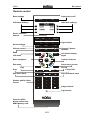
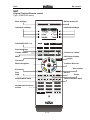
Remote control
A.. settings
Base
Switch device off
SETUP
OFF
Individual softkeys
Individual softkeys
Device selection
buttons
TUNER
DVD
TV
SERVER
SAT
VIDEO
AUDIO
LIGHT
Light control
Sound settings
SOUND
VOL +
CH +
MUTE
VOL -
CH -
Volume control
Mute
MENU
MORE
Call menu
Menu navigation
Call further display
pages
Confirm / Execute
OK
Exit menu
Select menu access
EXIT
ENTER
Play
Stop
REC
Skip next / back
Number pad for direct
access
Channel / Station
up/down
Record
Pause/ Still
Search forward / back
1
2
3
4
5
6
7
8
9
0
2-digit channel
Light sensor
Cover for USB /
M-Link socket and
MMC Memory card
A-5
M208
Re:control
MMC card
Advice on MMC card
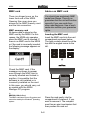
There is a hinged cover on the
lower front end of the M208.
Opening this cover gives you
access to the MMC memory card
and the link connection.
You should use exclusively MMC
cards from Revox. There is no
guarantee that the unit will function
correctly if you use cards from
other manufacturers. Use of such
cards also nullifies your guarantee
rights.
MMC memory card
All device data is stored on the
MMC card by the M208. For this
reason, the M208 only operates
when the MMC card is inserted. If
there is no MMC card in the M208
or if the card is incorrectly inserted,
the following message appears on
the display:
Inserting the MMC card
Insert the MMC card into the card
compartment as shown below.
The gold contacts should be at the
top with the angled corner to the
left.
4
5
6
8
9
0
MMC Card
Check the MMC card. If the
message continues to appear
even through the MMC card is
correctly inserted and locked in
position, it is possible that the
software is not installed or is
incorrectly installed on the card.
In this case, you should carry out
an update with the M208
Manager PC program.
MMC Card
L
MMC Multi Media Card
The MMC card has a Revox file system and
®
cannot be read by the Windows operating
system.
Press the card gently into the
compartment to release it, if you
want to remove it. The compartment has an eject mechanism that
then pushes the card out.
A-6
M208
Re:control
M208 Link
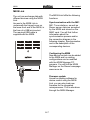
The M208 Link fulfils the following
functions:
The unit can exchange data with
different devices using the M208
Link.
Access to the M208 Link is
underneath the hinged cover on
the lower front end of the M208, in
the form of a USB mini socket.
The required USB cable is
supplied with the M208.
4
5
6
8
9
Synchronisation with the M51
M51 Tuner stations, as well as
Revox server data are accepted
by the M208 and stored on the
MMC card. You will find further
information about the
synchronisation process and/or
the connection diagram in the
following chapter, Synchronisation
and in the description of the
corresponding devices.
0
Configuring the M208
New device controls can be added
to the M208 and/ or existing
configurations can be modified
with the M208 Manager PC
program. You will find the M208
Manager on the Revox homepage
www.revox.de
Firmware update
As well as loading software for
device control using the M208
Link, you can also load new
firmware for the integrated
microprocessor. This is also done
through the M208 Manager.
A-7
M208
Re:control
Synchronisation
4
The M208 Remote control offers
the option of data exchange with
the M51. Here, all relevant
information is transferred to the
remote control, e.g. the M51
Tuner stations or from the Revox
music server.
6
8
9
0
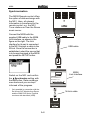
Connect the M208 with the
supplied USB cable to the M208
Link interface, as shown in the
figure on the right. The Link
interface for its part is connected
to the M51 through a cable to the
M Link. Once the connection is
established, select the source that
is to be synchronised at the M208
and press the SETUP button.
USB cable
M208-Link
Switch on the M51 and confirm
the Synchronize setting with
the OK button. Data exchange
now starts and you are kept
informed of the progress.
*
5
M208
Link Interface
1.552.200.00
Serialnumber
Re:connect M208 Link
Made in Germany by
REVOX GmbH, D-78048 VS-Villingen
IN
M-Link OUT
Only possible in connection with the
Re:source SAT Module from Revox
and the 5000 PVR Series Topfield
receivers with hard disk (HDD).
M-Link cable
M-Link
Re:system M51
A-8
M208
Re:control
Contrast
[Contrast]
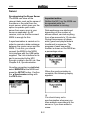
Operation
Basic settings
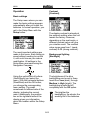
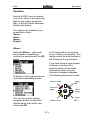
The Setup menu where you can
make the basic settings appears
automatically after you insert the
batteries. In normal operation, you
get to the Setup Menu with the
Setup button.
The display contrast is already at
the optimum setting when the unit
leaves the factory. However,
depending on the read angle, a
different contrast value can give
you a better result. The contrast
value range goes from 1 (weak
contrast) to 24 (strong contrast).
The most important settings are
made in this menu. Each setting is
saved without needing to confirm
it, until such time as you make a
modification. All settings in the
Setup Menu are made using the
Navigation Compass.
Background lighting
[Backlight]
OK
Using the vertical pair of buttons
(North/South) you select the
menu. With the horizontal buttons
(West/East) and the OK button,
you change the corresponding
menu setting. The small
arrowhead on lefthand side of the
display, indicates the current
menu. Additionally, the position
bar on the righthand side of the
display gives you information
about the location within the Setup
Menu.
The brightness of the blue
backlighting can be set in three
levels from Low (dark), through
Medium to High (bright). The
backlighting is switched off
completely with the Off option.
The brighter the
backlighting, the shorter the
working life of the batteries.
A-9
M208
Re:control
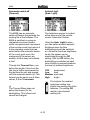
Automatic switch-off
[Timeout]
Ambient light
[Amb. Light]
The M208 has an automatic
switch-off feature that extends the
working life of the batteries. The
M208 is switched on using an
integrated movement sensor,
which recognises each movement
of the remote control and returns it
to the operating mode that was
active before the automatic switchoff. In a very quiet room, the
mechanics of the sensor are
audible, but this does not indicate
a fault.
The brightness sensor is located
at the lower end of the remote
control, below the 0 button.
Using the Amb. Light function,
you can define at which ambient
brightness level the blue
backlighting should be switched
on. As well as the three brightness
levels, the sensor can be
deactivated through the Off
setting. With the Off setting, the
backlighting is switched on each
time a button is pressed whatever
the level of ambient brightness.
Through the Timeout Menu, you
define the length of time from the
last time a button was pressed or
the last time the unit was moved,
until the automatic switch-off. This
timeout can be set to one of three
values, 3, 6 or 10 seconds.
OFF:
Low:
Medium:
High:
deactivated
dark
semi-dark
bright
The brighter the ambient
brightness setting, the
shorter the working life of the
batteries. The setting Off
results in the shortest
working life.
L
The Timeout Menu does not
define the timeout for the
backlighting. This is fixed and
cannot be changed.
A-10
M208
Re:control
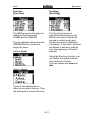
Font size
[Font Size]
Scrolling
[Scrolling]
The M208 gives you the option to
modify the font size for the
TUNER and the SERVER.
The Scrolling function is
activated automatically by the
M208 in the case of texts that
exceed a certain length and
therefore cannot be displayed
completely. In this case, the texts
are shown in sections, starting
from the beginning of the text
element.
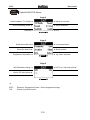
The two displays below show the
SERVER Menu in small and
large font sizes.:
Setting: Small
Using the Scrolling function, you
can define the speed at which
such texts are scrolled.
The two options are slow and
fast.
Setting: Large
The font size setting has no
effect on any other devices. They
are displayed in a small font size.
A-11
M208
Re:control
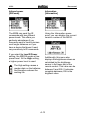
Infrared power
[IR-Power]
Information
[Information]
The M208 can send the IR
commands with two different
power levels. This offers you
particular advantages if you
frequently want to control devices
over longer distances or if you
have a device that doesn’t react
very sensitively to IR commands.
Using the Information menupoint, you can display the current
version number of the M208.
If you select the Low IR Power
setting, the MR208 sends at low
power level. At the High setting,
a higher power level is used.
Additionally, this menu also
displays the brightness values as
calculated by the brightness
sensor in the lower part of the
remote control. This value can be
between 0 and 255. 0 indicates
complete darkness; 255 is the
brightest value.
The High setting causes a
greater drain on the batteries
and therefore reduces the
working life.
A-12
M208
Re:control
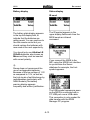
Battery display
Status display
IR send
The IR symbol appears in the
upper display fields each time the
M208 sends an infrared
command.
The battery state display appears
in the top left display field, to
indicate that the batteries are
getting weak. You can continue to
use the remote control but you
should replace the batteries with
new ones at the next opportunity.
Link
You should only use Alkaline LR
03/AAA batteries, also known as
Micro and they must be inserted
with correct polarity.
If you connect the M208 to the
M51 using the M208 Link interface
to synchronise the Server
database for example, the Link
symbol appears.
L
Revox does not recommend the
use of rechargeable batteries.
Because of the low voltage of 1.2V
as compared to 1.5V, as well as
the high levels of self-discharge by
rechargeables (particularly with
NIMH models), the battery
warning display appears
frequently and without justification.
USB
The USB symbol appears as soon
as the M208 is connected with a
PC USB port over a USB cable.
This connection is only needed for
data transfer with the M208
Manager PC program.
A-13
M208
B
Re:control
TUNER
Important advice
Neither the M51 nor the M208 can
be operated while the
synchronisation is running.
Synchronising tuner stations
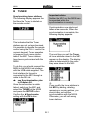
The following display appears the
first time the Tuner is started on
the remote control:
Synchronisation now starts and
takes a few seconds. When the
synchronisation is complete, the
following display appears:
This indicates that the Tuner
stations are not yet synchronised.
It is possible to operate the remote
control using the CH +/- and/or the
numeric keypad. Tuner operation
is however much more comfortable if the M51 Tuner stations
have been synchronised with the
M208.
The next time you call the Tuner,
all tuner stations stored in the M51
appear on the display. The display
order is determined by the order
they were stored in the M51.
To do this, you should connect the
M208 to the M208 Link interface
with the USB cable supplied. The
Link interface for its part is
connected to the M51 through a
cable to the M Link.
see Synchronisation plan
in Chapter A-8.
Once the connection is established, switch on the M51 and
select the TUNER at the M208
and press the SETUP button.
Confirm the Synchronize
setting with the OK button.
L
If you modify the tuner stations in
the M51 by adding, deleting,
renaming or moving entries, you
should carry out another
synchronisation with the M208.
Otherwise, you will call wrong
tuner stations.
B-1
M208
Re:control
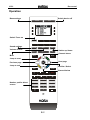
Operation
Base settings
Switch device off
SETUP
OFF
Switch Tuner on
TUNER
DVD
TV
SERVER
SAT
VIDEO
AUDIO
LIGHT
Sound settings
SOUND
VOL +
CH +
MUTE-
VOL -
CH -
Volume control
Mute
Station up/ down
Channel above
MENU
MORE
Jump to start
Previous page
Next page
OK
Jump to end
EXIT
ENTER
Confirm / Select
Channel below
REC
1
Number pad for direct
access
4
2
3
5
6
8
9
0
B-2
M208
Re:control
Operation
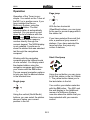
Page jump
Operation of the Tuner is very
simple. You switch on the Tuner at
the M51 or in another room, if you
have installed the Revox
Multiroom System, using the
ATUNERA button. The last
selected station is automatically
selected. You can scroll up and
down the list of stations with the
ACH+A and ACH-A buttons or you
can enter the station memory
number directly through the
numeric keypad. The M208 display
is not updated. It continues to
show the station that was selected
last through the navigations
compass.
OK
With the two horizontal
(West/East) buttons, you can jump
to the next or previous page within
the station list.
If you have selected the small font
size, a positional jump covers 5
stations. If you have selected the
large font size, the jump only
covers 3 stations.
Start / End jump
Working with the navigation
compass gives the highest levels
of user comfort. You simply select
the desired station using the
navigation compass and confirm
your choice with the OK button.
The are several navigation options
to help you find the desired station
in the shortest time:
OK
Using the red button you can jump
to the first station in the list, Station
1. The yellow button takes you to
the last station in the list.
Single jump
You confirm your station selection
with the OK button. The M51 and
the wall display in the Additional
rooms of a Multiroom System,
now also show the station that you
have selected with your remote
control.
OK
Using the vertical (North/South)
buttons, you can select the station
above or below your current
position in the list.
B-3
M208
C
Re:control
DVD
Base settings
Switch device off
SETUP
OFF
Change soundtrack
Change angle
Subtitles
Call setup
Switch CD/DVD on
TUNER
DVD
TV
SERVER
SAT
VIDEO
AUDIO
LIGHT
Sound settings
SOUND
VOL +
CH +
MUTE-
VOL -
CH -
Chapter / Title up/down
Volume control
Mute
MENU
MORE
Call the menu
Menu navigation
OK
Confirm / Execute
Exit menu
EXIT
ENTER
Play
Stop
REC
Pause/ Still
Skip next / back
Search forward / back
Number pad for direct
access
1
2
3
4
5
6
8
9
0
C-1
M208
Re:control
M208
Softkeys
Re:source M51 DVD
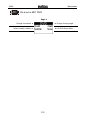
Page 1
Change soundtrack
Change viewing angle
Select/ modify subtitles
Call DVD Setup Menu
C-2
M208
D
Re:control
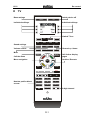
TV
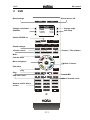
Base settings
Switch device off
SETUP
OFF
Individual softkeys
Individual softkeys
Switch TV on
Sound settings
TUNER
DVD
TV
SERVER
SAT
VIDEO
AUDIO
LIGHT
SOUND
VOL +
CH +
MUTE-
VOL -
CH -
Volume control
Channel up / down
Mute
MENU
MORE
Call the menu
Menu navigation
Confirm / Execute
OK
EXIT
Call further display
pages
ENTER
REC
1
Number pad for direct
access
4
2
3
5
6
8
9
0
D-1
2-digit channel
M208
Re:control
M208
Softkeys
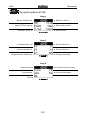
Re:ception plasma 42 HD
Page 1
Switch on with TV
Switch off Plasma
Select PC/DVI input
Videotext on/off
Select video source
MORE
Select format
Page 2
Function button 1
Function button 2
Function button 3
Function button 4
Programme list/ Videotext
MORE
Change soundtrack
Page 3
Picture-In-Picture function
Freeze frame
Auto zoom
Time
Channel information
MORE
D-2
M208
E
Re:control
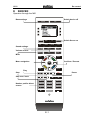
SERVER
Operation through the M51
Base settings
Switch device off
SETUP
OFF
TUNER
DVD
TV
SERVER
SAT
VIDEO
AUDIO
LIGHT
Switch Server on
Sound settings
SOUND
VOL +
CH +
MUTE-
VOL -
CH -
Volume control
Mute
MENU
Menu navigation
MORE
Confirrm / Execute
OK
EXIT
ENTER
Play
Stop
REC
Skip next / back
Number pad for direct
access
1
2
3
4
5
6
8
9
0
E-1
Pause
M208
Re:control
Server
Synchronising the Revox Server
The M208 can store all the
relevant data, such as the name of
the album or the artist from the
music server, which gives you the
option to operate your music
server from every room in your
house or apartment. An IR
receiver, such as the Re:connect
M204 is enough for this.
Important advice
Neither the M51 nor the M208 can
be operated while the
synchronisation is running.
Data exchange now starts and
depending on the number of
albums stored, can last anything
from a few seconds to 10 minutes.
During this process, all album,
artist, genre and playlist data is
transferred in sequence. The
progress of each sequential
transfer is shown on the M208 as
a percentage value:
A synchronisation is carried out in
order to execute a data exchange
between the music server and the
M208. To do this, you should
connect the M208 to the M208
Link interface with the USB cable
supplied. The Link interface for its
part is connected to the M51
through a cable to the M Link. See
Chapter A-8, Synchronisation.
Once the connection is established,
select SERVER at the M208 and
press the SETUP button. Confirm
the Synchronize setting with
the OK button.
When the synchronisation is
complete, the following display
appears:
L
You should carry out a
synchronisation whenever you
have added a new album to the
server or if you have edited a
name.
E-2
M208
Re:control
Operation
Using the M208, you can operate
your music server in the same way
that you are used to do with the
M51, or with the Revox Multiroom
System wall display.
Four options are available to you
as selection criteria:
Album…
Artist…
Genre…
Playlist…
Album…
An IR command is sent as soon
as you confirm your selection. The
remote control must be directed at
the IR receiver during this time.
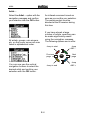
Select the Album… option with
the navigation compass and
confirm your selection with the OK
button.
If you have stored a large number
of albums, searching for a
particular album can be made
significantly easier using the
innovative navigation compass.
The following options are on offer:
All albums on the music server are
now listed in alphabetical order.
Jump
ABC -
Jump to start
Previous
page
You can now use the vertical
navigation buttons to select the
desired album and confirm your
choice with OK.
Jump to end
E-3
OK
Next
page
Jump
ABC +
M208
Re:control
Artist…
Select the Artist… option with the
navigation compass and confirm
your selection with the OK button.
An infrared command is sent as
soon as you confirm your selection.
The remote control must be
directed at the IR receiver during
this time.
If you have stored a large
number of artists, searching can
be made significantly easier
using the navigation compass.
The following options are on offer:
All artists, groups, solo singers,
etc. on the music server are now
listed in alphabetical order.
Jump to start
Previous
page
You can now use the vertical
navigation buttons to select the
desired artist and confirm your
selection with the OK button.
Jump to end
E-4
Jump
ABC -
OK
Next
page
Jump
ABC +
M208
Re:control
Genre…
Playlist…
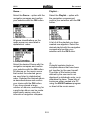
Select the Genre… option with the
navigation compass and confirm
your selection with the OK button.
Select the Playlist… option with
the navigation compass and
confirm your selection with the OK
button.
All genre classifications on the
music server are now listed in
alphabetical order:
A list of all the playlists you have
created now appears. Select the
desired playlist with the navigation
compass and confirm your
selection with the OK button.
L
A playlist contains tracks or
complete albums that have been
put together by the user himself.
The order of the tracks is also
defined by the user and is not
displayed in alphabetic order, as is
otherwise the case. These lists of
tracks are either created at a PC
using the XIVA Producer program
or direct at the music server.
Select the desired Genre with the
navigation compass and confirm
your selection with the OK button.
All albums on the music server
that match the selected genre
are now listed in alphabetical
order. Selected the desired album
as described above and confirm
your choice with the OK button.
If you have stored a large
number of albums, searching for
a particular album can be made
significantly easier using the
innovative navigation compass.
E-5
M208
Re:control
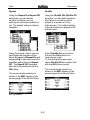
Repeat
Shuffle
Using the Repeat On/ Repeat Off
selections, you can decide
whether the album you are
listening to should be repeated or
not. The default setting is without
repetition.
Using the Shuffle ON/ Shuffle Off
selection, you can select whether
the tracks on an album will be
played in a random or in the
defined order. The default setting
is that the tracks are played in the
defined order.
Using the remote control, you can
now trigger the repetition of the
album by selecting Repeat On and
pressing OK or you can cancel the
repetition setting through Repeat
Off. The Repeat Off command
also has to be confirmed with the
OK button.
Select Shuffle On and confirm
this with the OK button for a
random play order.
To end the random play order,
select Shuffle Off and confirm this
with the OK button as well.
The current mode selection is
shown in the M51 display on the
second page of the Server Menu.
The current mode selection is
shown in the M51 display on the
second page of the Server Menu.
M51 Server Menu
M51 Server Menu
E-6
M208
Re:control
Server
Original M37 Remote control
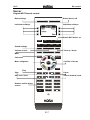
Base settings
Switch device off
SETUP
OFF
Individual softkeys
Individual softkeys
Switch M51 Server on
TUNER
DVD
TV
SERVER
SAT
VIDEO
AUDIO
LIGHT
Sound settings
SOUND
VOL +
CH +
MUTE-
VOL -
CH -
Track up / down
Volume control
Mute
Call menu
MENU
Menu navigation
MORE
Confirm / Execute
OK
ENTER
EXIT
Play
Stop
REC
Search forward / back
Skip next / back
Number pad for direct
access
Pause
1
2
3
4
5
6
8
9
0
E-7
M208
Re:control
M208
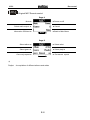
Softkeys
Original M37 Remote control
Page 1
Server on/off
Mute
Select audio output
Information /Edit text
Cancel
MORE
Back to Main Menu
Page 2
Select album
Select artist
Select genre
Select playlist
Once only repeat
MORE
L
Playlist: A compilation of different albums and artists
E-8
Permanent repeat
M208
F
Re:control
SAT
Operation through the M51
Base settings
Switch device off
SETUP
OFF
TV operation
Radio operation
TUNER
DVD
TV
SERVER
SAT
VIDEO
AUDIO
LIGHT
SAT operation on
Sound settings
SOUND
VOL +
CH +
MUTE-
VOL -
CH -
Volume control
Channel up / down
Mute
MENU
MORE
OK
Channel up / down
EXIT
ENTER
REC
Number pad for direct
access
1
2
3
4
5
6
8
9
0
F-1
M208
Re:control
F-2
M208
Re:control
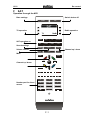
SAT
Original Topfield Remote control
Type : 5000-PVR series
Base settings
Switch device off
SETUP
OFF
Individual softkeys
Switch M51-SAT on
Individual softkeys
TUNER
DVD
TV
SERVER
SAT
VIDEO
AUDIO
LIGHT
Sound settings
SOUND
VOL +
CH +
MUTE-
VOL -
CH -
Channel up / down
Volume control
Mute
MENU
MORE
Call further display
pages
Call menu
Menu navigation
Confirm / Execute
OK
Slow motion
Exit menu
EXIT
ENTER
Record
Play
Stop
REC
Search forward / back
Skip forward / back
1
Number pad for direct
access
Pause
4
2
3
5
6
8
9
0
F-3
M208
Re:control
M208
Softkeys
Topfield 5000-PVR Series
Page 1
Switch on receiver
Switch between TV / Radio
Sound operating mode
Subtitles
Select videotext
MORE
EPG
Page 2
Live transmission
Show favourites list
Show film archive
Programme information
Sleep function
MORE
e.g. Menu selection
Page 3
SAT List / Sub-main picture
UHF Modulator setting
List for PIP sub-picture
MORE
L
EPG:
PIP:
Electronic Programme Guide – Online programm listings
Picture-in-picture function
F-4
M208
G
Re:control
VIDEO
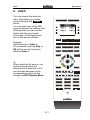
You can access the selection
menu that offers you 4 video
sources through the AVIDEOA
button.
You can select one of the M51
sources through the softkeys and
following that, you can use the
button with the grey border.
In this way, all commands are
sent to the source address.
SETUP
Example:
Selected source: Video 1
All commands, such as Play or
OK will be sent to the source
address Video 1.
OFF
TUNER
DVD
TV
SERVER
SAT
VIDEO
AUDIO
LIGHT
SOUND
VOL +
CH +
MUTE-
VOL -
CH -
MENU
MORE
OK
L
When selecting the source, you
should be aware that the
address that is selected, is the
one that was assigned to the
corresponding source button
through the M51 Remote Menu.
EXIT
ENTER
REC
1
2
3
4
5
6
8
9
0
G-1
M208
Re:control
G-2
M208
H
Re:control
AUDIO
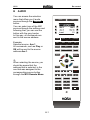
You can access the selection
menu that offers you 6 audio
sources through the AAUDIOA
button.
You can select one of the M51
sources through the softkeys and
following that, you can use the
button with the grey border.
In this way, all commands are
sent to the source address.
SETUP
Example:
Selected source: Aux 1
All commands, such as Play or
OK will be sent to the source
address Aux 1.
OFF
TUNER
DVD
TV
SERVER
SAT
VIDEO
AUDIO
LIGHT
SOUND
VOL +
CH +
MUTE-
VOL -
CH -
MENU
L
When selecting the source, you
should be aware that the
address that is selected, is the
one that was assigned to the
corresponding source button
through the M51 Remote Menu.
MORE
OK
EXIT
ENTER
REC
1
2
3
4
5
6
8
9
0
H-1
M208
M208
Softkeys
Re:control
AUDIO
Page 1
Analogue source Aux 1
Analogue source Aux 2
Analogue source Aux 3
Analogue source Rec-In
Local source - MR
MORE
H-2
Analogue source TV
M208
I
Re:control
LIGHT
I-1
M208
Re:control
I-2
M208
J
Re:control
Sound
Using the ASOUNDA button, you
can make the sound settings for
the M51 as well as for the
Multiroom amplifier.
SETUP
The buttons with the grey border
are active while defining the sound
settings through the softkeys. All
other buttons have no functions.
You will find an overview of the
softkeys on the next page.
Note:
The M51 softkeys (Page 1 of the
softkeys) and those of the
Multiroom amplifier (Page 2 of the
softkeys) send the same infrared
codes and can have an influence
on each other.
OFF
TUNER
DVD
TV
SERVER
SAT
VIDEO
AUDIO
LIGHT
SOUND
VOL +
CH +
MUTE-
VOL -
CH -
MENU
MORE
OK
L
EXIT
ENTER
MR: Multiroom
REC
1
4
2
3
5
6
8
9
0
J-1
M208
Re:control
M208
Softkeys
Sound
M51 Sound settings
Page 1
Center Speaker volume
Center Speaker volume
Rear Speaker volume
Subwoofer volume
Rear Speaker volume
MORE
Subwoofer volume
Multiroom amplifier sound settings
Page 2
MR amplifier “Balance”
MR amplifier “Balance”
MR amplifier “Treble”
MR amplifier “Bass”
MR amplifier “Treble”
MORE
MR amplifier “Bass”
M51 + MR amplifier sound settings
Page 3
Toggle M51 room sound
mode
MORE
L
MR: Multiroom
J-2
Restore MR amplifier base
settings
M208
K
Re:control
Appendix
Troubleshooting
Problem
No LCD display when
unit is touched
Possible remedy
Check the batteries and replace if necessary
Check that the batteries are in the right way round
Activate the movement sensor through the Setup Menu
Activate backlighting in the Setup Menu
Backlighting remains
dark
Backlight
Is the brightness sensor covered?
Is the ambient light too bright?
Setup Amb. Light
Display shows Card?
MMC memory card is not installed correctly or it is missing.
when a button is
See Chapter MMC Card. You are not using an original
pressed
MMC card from Revox.
Synchronisation with
the M51 cannot be
carried out
A mechanical noise can
be heard from the M208
The connection through the M208 Link interface is faulty.
See Chapter Synchronisation.
The M51 does not have the software that is needed to carry
out a synchronisation. See Technical Data.
There are two gold bearings in the M208’s movement
sensor that move against each other. This can be heard in a
very quiet environment and does not signify a fault.
With some M208 sources, not all buttons send infrared
codes. Please check in the Operating manual of the
corresponding device(s) to see whether the buttons send
The device to be
infrared codes (grey border). Additionally, the display
controlled does not
shows the symbol
respond to the infrared
sent.
command
The device cannot receive the infrared code because it is
top right, if an infrared code is being
too far away or because the transfer angle is too large. Try
again while standing nearer to the device and/ or hold the
remote control directly in front of the device.
K-1
M208
Re:control
Technical Data
Power supply:
4 Alkaline batteries
Battery type:
AAA / MICRO/ LR03 1.5 V – non-rechargeable
Weight:
260 g (including batteries)
Dimensions:
62 x 217 x 25 mm (W x H x D)
Display:
80 x 120 pixel matrix LCD
LCD lighting
Blue LED backlighting (adjustable)
System requirements:
Tuner module software: > Version 1.20
Server module software: > Version 0.81
> Version 1.11
Software M51 MK2
> Version 0.72
(FMT-1)
(M57-2) MK2
(M57-1) MK1
(M51+2)
Software M51 MK1
Software Display MK1
(M51-1) Supply
(DPL-1)
> Version 1.10
> Version 1.20
Disposal of your old device
Your product has been manufactured from high-quality materials and
components that can be recycled. If this symbol of a crossed-out, wheeled
rubbish container is on the product, this means that it is covered by the EU
Directive 2002/96/EG.
Please find the location of your nearest recycling point for electrical and electronic
devices. Please follow local regulations and do not dispose of the device with your
domestic refuse. The correct disposal of your old device helps to avoid negative
impacts on the environment and on personal health.
Guarantee
The guarantee period is 24 months. Your dealer should be your first contact if you need
service. If he can't give you the help you need, send the remote control carriage free and
without any accessories to your national Sales Office.
Please supply a complete description of the fault together with your address.
Scope of delivery
M208 Remote control
M208 Link Interface (only M series)
USB cable
M Link cable (only M series)
4 x AAA Batteries
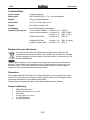
Operating manual
K-2