1
>
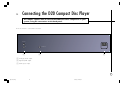
Connecting the D20 Compact Disc Player
POWER CONNECTION
Warning: Before connecting power check that the required supply voltage,
indicated on the back panel, corresponds to your local AC supply. If a
different voltage is stated on the type plate do not connect the compact disc
player to the mains power, and seek advice from your dealer.
Connect the mains power using the enclosed mains cable.
Note: Always disconnect the compact disc player from the mains power
before connecting or disconnecting any of the cables.
AUDIO OUTPUTS
The D20 provides alternative audio outputs.
Analogue output
The analogue output provides stereo phono connections for connection to a
conventional stereo preamplifier.
Digital output
The D20 Compact Disc Player provides an S/PDIF digital output for
connection to a digital preamplifier or digital surround processor, such as the
Primare P30 Processor.
12
§4 Connecting
12
7/12/00, 12:31 pm