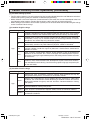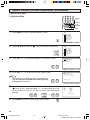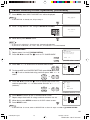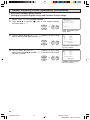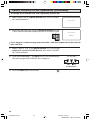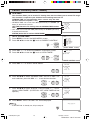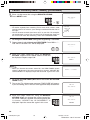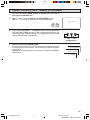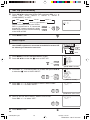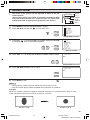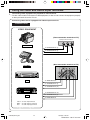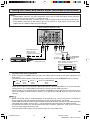
1
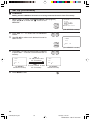
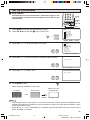
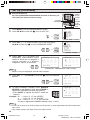
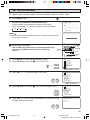
C133 WJ
COLOR TELEVISION
MODEL
27SF560
H OPERATION MANUAL H
Products that have earned the ENERGY STARb are designed to protect the
environment through superior energy efficiency.
CONTENTS
PAGE
• IMPORTANT INFORMATION/IMPORTANT
SAFEGUARDS .................................................... 2–4
• Trademarks ............................................................... 5
• Supplied Accessories ............................................... 5
• Before Operating Your Television .............................. 5
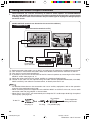
• Antenna Connections ........................................... 6–7
• Quick Reference Control Operation ..................... 8–9
• EZ SETUP during First Use ............................. 10–11
• Antenna Setup DIGITAL ................................... 11–12
• Accessing the MAIN MENU screen without
Remote Control ...................................................... 12
• Channel Call ........................................................... 12
• Changing Viewing Channel .................................... 13
• Language ............................................................... 14
• Sleep Timer ............................................................ 14
• Video Adjust ........................................................... 15
• Audio Select ..................................................... 16–17
MTS (Multichannel TV Sound) ............................ 16
SPEAKER (Internal Speaker Switch) ................. 16
FAO (Fixed Audio Output) ................................... 16
AUDIO ADJUST ................................................. 17
• Digital Audio ........................................................... 18
PAGE
• Closed Caption ................................................. 19–20
• Parent Control .................................................. 21–31
V-CHIP Operation ......................................... 21–28
VIEW TIMER ................................................ 29–31
• Energy Save ........................................................... 32
• Set Up .............................................................. 33–40
EZ Setup ....................................................... 33–34
Channel Setting ............................................ 34–36
Blue Screen ........................................................ 37
Personal Preference ..................................... 38–39
Universal Plus Function ................................ 39–40
• Auto Input ............................................................... 40
• CH/Input ID ....................................................... 41–42
• Screen Format ........................................................ 43
• Using the Video and Audio Input Terminals ...... 44–45
• Using the Audio Output Terminals .......................... 46
• Operation of Universal Remote Control ........... 47–50
• Before Calling for Service ....................................... 51
• Calling for Service .................................................. 51
• Warning message for Digital broadcasting ............. 52
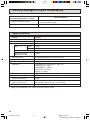
• Specifications ......................................................... 52
• Limited Warranty .................................................... 65
This operation manual includes basic operating
instructions in Spanish and French.
SPANISH is on page 53–58.
FRENCH is on page 59–64.
27SF560(01-04).p65
1
1
STANDARD DEFINITION TELEVISION
26/10/05, 6:23 PM
Dimension: 140mm x 215mm
Welcome to the SHARP Family. We are pleased that you are now the owner of a SHARP Color Television
– built for outstanding quality, reliability and performance.
Every SHARP Color Television set is tuned and adjusted for proper color and sound, and has passed
through the most stringent quality control tests at the factory. We have prepared this OPERATION MANUAL
so that you may adjust the picture and color to your personal viewing preference.
We sincerely hope that you receive the greatest satisfaction and enjoyment from your new SHARP Color
Television set for years to come.
Please read these instructions carefully, and keep them handy for your future reference.
IMPORTANT
To aid reporting in case of loss or theft, please record the TV’s
model and serial numbers in the space provided. The numbers
are located at the rear of the TV.
Model No.:
Serial No.:
IMPORTANT INFORMATION
There are two important reasons for prompt warranty registration of your new SHARP television set. Use
the REGISTRATION CARD packed in with the set.
FIRST – WARRANTY
This is to assure that you will immediately receive the full consumer benefit of the parts, service and labor
warranty applicable to your purchase.
SECOND – CONSUMER PRODUCT SAFETY ACT
To assure that you will promptly receive any safety notification on inspection, modification or recall that
SHARP may be required to give under the 1972 Consumer Product Safety Act. PLEASE READ
CAREFULLY THE IMPORTANT “LIMITED WARRANTY” CLAUSE ON THE LAST PAGE.
REDUCE THE RISK OF FIRE OR ELECTRIC SHOCK, DO NOT
WARNING: TO
EXPOSE THIS APPLIANCE TO WET LOCATIONS.
The lightning flash with
arrowhead within a triangle is
intended to tell the user that
parts inside the product are a
risk of electric shock to
persons.
CAUTION: TO REDUCE THE RISK OF
ELECTRIC SHOCK,
DO NOT REMOVE COVER (OR BACK).
NO USER-SERVICEABLE PARTS INSIDE.
REFER SERVICING TO QUALIFIED SERVICE
PERSONNEL.
The exclamation point within a
triangle is intended to tell the
user that important operating
and servicing instructions are
in the papers with the
appliance.
“Note to CATV system installer: This reminder is provided to call the CATV system installer’s attention
to Article 820-40 of the National Electrical Code that provides guidelines for proper grounding and, in
particular, specifies that the cable ground shall be connected to the grounding system of the building,
as close to the point of cable entry as practical.”
WARNING – FCC Regulations state that any unauthorized changes or modifications to this equipment not
expressly approved by the manufacturer could void the user’s authority to operate this
equipment.
PRODUCT DISPOSAL
This product utilizes a Cathode Ray Tube (CRT) containing lead and tin-lead solder.
Disposal of these materials may be regulated due to environment considerations. For disposal or
recycling information, please contact your local authorities or the Electronics Industries Alliance:
www.eiae.org
2
27SF560(01-04).p65
2
26/10/05, 5:32 PM
Dimension: 140mm x 215mm
IMPORTANT INFORMATION (Continued)
CAUTION:
• Do not place the AC power cord under the TV set or other heavy items.
• To prevent fire, never place any type of candle or naked flames on the top or near the TV set.
• To prevent fire or shock hazard, do not expose this products to dripping or splashing. No objects filled
with liquids, such as vases, should be placed on the product.
IMPORTANT SAFEGUARDS
CAUTION: Please read all of these instructions before you operate your television and save
these instructions for later use.
Electrical energy can perform many useful functions. This unit has been engineered and manufactured to assure
your personal safety. BUT IMPROPER USE CAN RESULT IN POTENTIAL ELECTRICAL SHOCK OR FIRE
HAZARDS. In order not to defeat the safeguards incorporated in this equipment, observe the following basic
rules for its installation, use and servicing.
1.
Unplug this television equipment from the wall outlet before cleaning.
2.
Do not use liquid cleaners or aerosol cleaners. Use a damp cloth for cleaning.
3.
Do not use attachments not recommended by the television equipment manufacturer as they may cause
hazards.
4.
Do not use this television equipment near water — for example, near a bath tub, washbowl, kitchen sink or
laundry tub, in a wet basement, or near a swimming pool, etc.
5.
Do not place this equipment on an unstable cart, stand, or table. The television equipment may fall, causing
serious injury to a child or an adult, and serious damage to the equipment. Use only with a cart or stand
recommended by the manufacturer or sold with the television equipment.
6.
Television equipment and cart combination should be moved with care. Quick stops,
excessive force, and uneven surfaces may cause the equipment and cart combination to
overturn.
7.
Wall or shelf mounting should follow the manufacturer’s instructions, and should use a
mounting kit approved by the manufacturer.
8.
Slots and openings in the cabinet and the back or bottom are provided for ventilation. To
insure reliable operation of the television equipment and to protect it from overheating, these openings must
not be blocked or covered. This television equipment should not be placed in a built-in insulation such as a
bookcase unless proper ventilation is provided.
9.
The openings should never be covered with a cloth or other material, and the bottom openings should not
be blocked by placing the television equipment on a bed, sofa, rug, or other similar surface. This television
equipment should never be placed near or over a radiator or heat register.
10. This television equipment should be operated only from the type of power source indicated on the marking
label. If you are not sure of the type of power supplied to your home, consult your television dealer or local
power company.
For television equipment designed to operate from battery power, refer to the operating instructions.
11. As a safety feature, television equipment is equipped with a 2-wire polarized plug (one plug blade bigger
than the other). The 2-wire polarized plug will fit only one way into the power outlet.
If the plug does not fit, ask your electrician to replace your obsolete outlet. Do not modify the plug and defeat
this safety feature.
12. Do not allow anything to rest on the power cord. Do not locate this television equipment where the cord will
be abused by persons walking on it.
3
27SF560(01-04).p65
3
26/10/05, 5:32 PM
Dimension: 140mm x 215mm
IMPORTANT SAFEGUARDS (Continued)
13. Follow all warnings and instructions marked on the television equipment.
14. If an outside antenna is connected to the television equipment, be sure the antenna system is grounded
so as to provide some protection against voltage surges and built-up static charges. Section 810 of the
National Electrical Code provides information with respect to proper grounding of the mast and
supporting structure, grounding of the lead-in wire to an antenna discharge unit, size of grounding
conductors, location of antenna-discharge unit, connection to grounding electrodes, and requirements
for the grounding electrode.
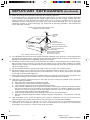
EXAMPLE OF ANTENNA GROUNDING AS PER
NATIONAL ELECTRICAL CODE
ANTENNA
LEAD IN
WIRE
GROUND
CLAMP
ELECTRIC
SERVICE
EQUIPMENT
NEC—NATIONAL ELECTRICAL CODE
ANTENNA
DISCHARGE UNIT
(NEC SECTION 810-20)
GROUNDING CONDUCTORS
(NEC SECTION 810-21)
GROUND CLAMPS
POWER SERVICE GROUNDING
ELECTRODE SYSTEM
(NEC ART 250, PART H)
15. For added protection for this television equipment during a lightning storm, or when it is left unattended and
unused for long periods of time, unplug it from the wall outlet and disconnect the antenna. This will prevent
damage to the equipment due to lightning and power-line surges.
16. An outside antenna system should not be located in the vicinity of overhead power lines or other electric
light or power circuits, or where it can fall into such power lines or circuits. When installing an outside
antenna system, extreme care should be taken to keep from touching such power lines or circuits as contact
with them might be fatal.
17. Do not overload wall outlets and extension cords as this can result in fire or electric shock.
18. Never push objects of any kind into this television equipment through cabinet slots as they may touch
dangerous voltage points or short out parts that could result in a fire or electric shock. Never spill liquid
of any kind on the television equipment.
19. Do not attempt to service this television equipment yourself as opening or removing covers may expose you
to dangerous voltage or other hazards. Refer all servicing to qualified service personnel.
20. Unplug this television equipment from the wall outlet and refer servicing to qualified service personnel
under the following conditions:
A. When the power cord or plug is damaged or frayed.
B. If liquid has been spilled into the television equipment.
C. If the television equipment has been exposed to rain or water.
D. If the television equipment does not operate normally by following the operating instructions. Adjust
only those controls that are covered by the operating instructions as improper adjustment of other
controls may result in damage and will often require extensive work by a qualified technician to
restore the television equipment to normal operation.
E. If the television equipment has been dropped or the cabinet has been damaged.
F. When the television equipment exhibits a distinct change in performance — this indicates a need for
service.
21. Upon completion of any service or repairs to this television equipment, ask the service technician to
perform routine safety checks to determine that the television is in safe operating condition.
22. When replacement parts are required, be sure the service technician has used replacement parts
specified by the manufacturer that have the same characteristics as the original part. Unauthorized
substitutions may result in fire, electric shock, or other hazards.
4
27SF560(01-04).p65
4
26/10/05, 5:32 PM
Dimension: 140mm x 215mm
Trademarks
Dolby and the double-D symbol are registered trademarks of Dolby Laboratories.
TV • CATV • VCR • DVD
CH/SKIP
STOP
PAUSE
FF
PLAY
REW
REC
TV
VCR
DVD
MUTE
CATV
VOL
+
D
C
CH
CH
B
VOL
—
A
MENU
9
PERSONAL PREFERENCE
6
ENTER
8
0
5
7
4
FLASHBACK
3
DVD
VCR
1
TV
POWER
DISPLAY
2
INPUT
Supplied Accessories
Size AA
Dry Batteries
Infrared Remote Control
RRMCGA447WJSA
Before Operating Your Television
Location
• For normal operation, your TV should be located in an area of the room where cool adequate ventilation
is provided. Do not place the back of the television set in a place where free airflow will be restricted.
• Any magnetic force may disturb the color picture. Make sure that magnets, electric clocks, toys using
magnets or any other magnetic substance, such as iron are kept well away from the TV set.
Power
Your TV operates on 120 Volts, 60 Hz (normal household current) and has a polarized plug. If you are
unable to insert the plug fully into the outlet, try reversing the plug. Should it fail to fit, contact an
electrician. Do not defeat the safety feature of the polarized plug.
Note:
• If the set is not going to be used for a long period, such as during a vacation, unplug the set from the
wall outlet to economize power. (If the TV set is plugged in, a slight current still flows, even with the
POWER BUTTON in the OFF position.)
• Lines and other noise may appear in TV broadcast images when an FM tuner or radio is located near
the TV and both radio and TV broadcasts are being received. Should such noise appear, turn off the
radio.
• If you are listening to an AM broadcast, turn the TV off. AM broadcast signals may not be received
due to interference from the TV.
•
Before using the television, prepare the Remote Control
To use the remote control, insert batteries first.
Inserting the batteries
Battery
Cover
Pull up
• With your thumbnail, pull up the slit as indicated by the arrow to remove the battery cover. Insert two
batteries (size “AA”). Be sure to match the battery m/, terminals with the m/, marks inside the
compartment.
5
27SF560(05-07).p65
5
26/10/05, 5:33 PM
Dimension: 140mm x 215mm
Antenna Connections
Antennas
• The antenna requirements for good color television reception are more important than those for black
& white television reception. For this reason, a good quality outdoor antenna is strongly recommended.
The following is a brief explanation of the type of connections that are provided with the various
antenna systems:
F-type connector
1. A 75-ohm system is generally a round cable with
F-type connector that can easily be attached to
a terminal without tools (not supplied).
75-ohm coaxial cable (round)
2. A 300-ohm system is a flat “twin-lead” cable that
can be attached to a 75-ohm terminal through a
300/75-ohm ADAPTOR (not supplied).
300-ohm twin-lead cable (flat)
OUTDOOR ANTENNA CONNECTION
• Refer to one of the following two diagrams when connecting to an outdoor antenna.
A: Using a VHF/UHF combination outdoor antenna.
B: Using separate VHF and/or UHF outdoor antenna.
• Connect an outdoor antenna cable lead-in to the ANT/CABLE terminal on the rear of the TV set.
A. Combination VHF/UHF Antennas
300/75-ohm
ADAPTOR
(Not supplied)
VHF/UHF
ANTENNA
or
B. Separate VHF/UHF Antenna
REAR OF TV
VHF/UHF ANTENNA
300-ohm
twin-lead
VHF
UHF
ANTENNA ANTENNA
300-ohm
twin-lead
COMBINER
300-ohm
twin-lead
75-ohm
coaxial
cable
(not supplied)
IN OUT
or
75-ohm coaxial
cable
REAR OF TV
6
27SF560(05-07).p65
6
26/10/05, 6:52 PM
Dimension: 140mm x 215mm
Antenna Connections (Continued)
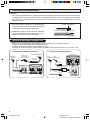
F-type connector should be finger-tightened only.
NOTICE
When connecting the RF cable to the TV set, do not
tighten F-type connector with tools.
If tools are used, it may cause damage to your TV
set.
(The breaking of internal circuit, etc.)
F-type connector
75-ohm coaxial cable
CABLE TV (CATV) CONNECTION
• A 75 ohm coaxial cable connector is built into the set for easy hookup. When connecting the 75 ohm
coaxial cable to the set, screw the 75 ohm cable to the COAXIAL CABLE CONNECTOR.
• Some cable TV companies offer “premium pay channels”. Since the signals of these premium pay
channels are scrambled, a cable TV converter/descrambler is generally provided to the subscriber by
the cable TV company. This converter/descrambler is necessary for normal viewing of the scrambled
channels. (Set your TV on channel 3 or 4. Typically one of these channels is used. If this is unknown,
consult your cable TV company.) For more specific instructions on installing cable TV, consult your
cable TV company. One possible method of utilizing the converter/descrambler provided by your
cable TV company is explained below.
Please note: RF switch equipped with position A/B (not provided) is required.
“A” position on the RF switch (not supplied) : You can view all unscrambled channels using the TV’s
channel keys.
“B” position on the RF switch (not supplied) : You can view the scrambled channels via the converter/
descrambler using the converter’s channel keys.
RF switch (not supplied)
A
OUT
IN
B
OUT
IN
Two-set
signal
splitter
(not
supplied)
Cable TV Line
Cable TV converter/
descrambler
(not supplied)
Note:
• Consult your SHARP Dealer or Service Center for the type of splitter, RF switch or combiner that
might be required.
7
27SF560(05-07).p65
7
26/10/05, 5:33 PM
Dimension: 140mm x 215mm
Quick Reference Control Operation
•
Part Names
Front Panel
INSIDE DOOR
POWER
Press → On.
Press again → Off.
VIDEO/AUDIO IN 2
TERMINALS
REMOTE CONTROL
SENSOR
MENU
Press → Accesses MAIN MENU.
Press again → Exits MAIN MENU.
VOLUME UP/DOWN
(k) Increases sound.
(l) Decreases sound.
CHANNEL UP/DOWN
(a) Selects next higher channel.
(s) Selects next lower channel.
To open the door
Using the projection located under the “PULL-OPEN” indication,
pull and lift the door open.
To close the door
Using the projection, lower the door until closed.
Caution:
• When opening or closing the door, do not insert your fingers into
the gap between the door and front panel. This may result in an
injury.
Rear Panel
ANTENNA/CABLE INPUT
TERMINAL
COMPONENT (VIDEO) TERMINALS
IN 1 S-VIDEO TERMINAL
IN 3 (VIDEO/AUDIO) TERMINALS
LINE OUT (AUDIO) TERMINALS
IN 1 (VIDEO/AUDIO) TERMINALS
Note:
• The TV set and remote control illustrations and the on-screen displays in this manual may differ from
their actual appearance.
8
27SF560(08-09).p65
8
26/10/05, 5:34 PM
Dimension: 140mm x 215mm
Quick Reference Control Operation (Continued)
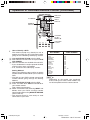
Basic Remote Control Functions
POWER
Press → On.
Press again → Off.
Infrared Transmitter Window
REMOTE KEYPAD (0 – 9)
Sets the channel.
DISPLAY
Press → Displays receiving channel
for 4 seconds.
Press again → Removes display.
• Temporarily displays receiving
channel when in Closed Caption
mode.
POWER
DVD
VCR
TV
FLASHBACK
Returns to previous channel.
• (DOT)
Sets the channel.
PERSONAL PREFERENCE
With the Personal Preference buttons,
you can program your favorite
programs by using the 4 categories A,
B, C and D. The channels can be
accessed quickly by using these
buttons. (See page 38, 39.)
DISPLAY
INPUT
1
2
3
4
5
6
7
8
9
INPUT
Press → Switches to external video
INPUT 1 mode.
Press twice → Switches to external
video INPUT 2 mode.
Press 3 times → Switches to external
video INPUT 3 mode or
COMPONENT mode.
Press 4 times → Switches back to
the original TV mode. See page 45.
ENTER
FLASHBACK
0
PERSONAL PREFERENCE
A
B
C
D
CH
VOL
—
VOL
+
CH
VOLUME UP/DOWN
(k) Increases sound.
(l) Decreases sound.
• Changes or selects the TV
adjustments on On-Screen Display.
MENU
MENU
Press → Accesses MAIN MENU.
Press again → Exits MAIN MENU.
CATV/DVD-TV/VCR MODE
SELECT SWITCH
In TV/VCR position, signals sent will
be for TV and VCR control.
In CATV/DVD position, signals sent
will be for cable TV converter and
DVD control.
MUTE
CATV
TV
DVD
VCR
REW
PLAY
FF
PAUSE
STOP
REC
CH/SKIP
TV • CATV • VCR • DVD
DVD/VCR CONTROL
See page 47.
ENTER
• Used to confirm the channel
selection and Personal Preference
channel.
• Used in some instances where a
Cable Converter Box requires an
“enter” command after selecting
channels, when using the REMOTE
KEYPAD button. See page 47.
CHANNEL UP/DOWN
(a) Selects next higher channel.
(s) Selects next lower channel.
• See pages 34–36 for Channel
Setting.
• Moves the “ E ” mark on the MENU
screens.
MUTE
Press → Mutes sound.
Press again → Restores sound.
• When sound is muted, CLOSED
CAPTION appears if available.
Note:
• The above shaded buttons on the Remote Control glow in the dark. To use the glow-in-the-dark
display on the remote control, place it under a fluorescent light or other lighting.
• The phosphorescent material contains no radioactive or toxic material, so it is safe to use.
• The degree of illumination will vary depending on the strength of lighting used.
• The degree of illumination will decrease with time and depending on the temperature.
• The time needed to charge the phosphorescent display will vary depending on the surrounding lighting.
• Sunlight and fluorescent lighting are the most effective when charging the display.
• The TV set and remote control illustrations and the on-screen displays in this manual may differ from
their actual appearance.
9
27SF560(08-09).p65
9
26/10/05, 5:34 PM
Dimension: 140mm x 215mm
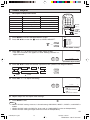
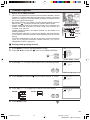
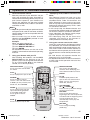
EZ SETUP during First Use
•
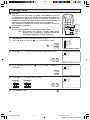
When you turn on the TV for the first time, it will automatically
memorize the broadcasting channels.
Please perform the following instructions before pressing the
POWER button.
(1) Insert the batteries into the remote control. (See page 5)
(2) Connect the antenna cable to the TV set. (See pages 6, 7)
(3) Plug in the AC POWER cord to the wall outlet.
POWER
TV
DVD
VCR
DISPLAY
INPUT
1
2
3
4
5
6
7
8
VOLUME
(k)/(l)
9
ENTER
FLASHBACK
0
PERSONAL PREFERENCE
A
B
C
D
CH
VOL
—
VOL
+
CH
MENU
1
Press the POWER button on the TV set or on the Remote Control
to turn on the TV. The SELECT LANGUAGE screen will be
displayed.
(On the Set)
POWER
MUTE
CHANNEL
UP (a)/
DOWN (s)
SEL ECT LANGUAGE
ENGL I SH
ESPA Ñ OL
FRANCA I S
(On the Remote Control)
POWER
SEL ECT : CH /
SE T
: VOL+ / –
TV
(SELECT LANGUAGE screen)
2
Press CH a/s to select “ENGLISH”, “ESPAÑOL (SPANISH)” or
“FRANCAIS (FRENCH)”.
SEL ECT LANGUAGE
ENGL I SH
ESPA Ñ OL
FRANCA I S
CH
CH
3
SEL ECT : CH /
SE T
: VOL+ / –
Press VOL k/l to access the EZ SETUP screen.
CONNECT ANTENNA OR CABL E.
START EZ SETUP?
VOL
—
STOP
VOL
+
START
(EZ SETUP screen)
4
(START)
Press VOL k.
The tuner will automatically search for the
VOL
+
broadcasting or cable TV channels for ANALOG.
(The CH No. will automatically increase when it
(STOP)
appears.)
Once tuning for analog broadcasting channel is
VOL
—
finished, tuning for digital channel will start.
If you want to stop the EZ SETUP process once it
has started, press VOL l and it will be canceled.
If you stop the EZ SETUP process before it finish
tunning analog channels, the tunning for digital
channels will started to process.
If you want to SET UP again, please refer to page
33, 34 on SET UP.
To cancel EZ SETUP
Press VOL l.
(Analog channel tunning)
PL EASE WA I T
AUTO PROGRAMM I NG
69
STOP
START
↓
(Digital channel tunning)
PL EASE WA I T
AUTO PROGRAMM I NG
D I G I TAL
69
STOP
START
10
27SF560(10-12).p65
10
26/10/05, 5:34 PM
Dimension: 140mm x 215mm
EZ SETUP during First Use (Continued)
5
Once EZ SETUP is complete, the lowest channel number
memorized will be displayed. (e.g. Channel 2)
2
Note:
• If EZ SETUP does not memorize all the channels in your region, please refer to pages 34–36 for
more information on manually memorizing the channels using CHANNEL SETTING.
• It may be difficult to PRESET when the broadcast signals are weak, the channel cycle frequency is
incorrect or frequency jamming is occurring around the area. Please refer to pages 34–36 for more
information on manually memorizing the channels using CHANNEL SETTING.
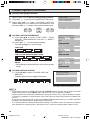
Antenna Setup DIGITAL
•
In order to receive digital air broadcasts, you need a digital broadcast antenna. You can set
the antenna configuration through the Antenna Setup Digital screen.
1
2
Press MENU to access the MAIN MENU screen.
Press CH a/s to move the “E” mark to “SET UP”.
MENU
→
SLEEP T I MER
V I DEO ADJ UST
AUD I O SEL ECT
D I G I T AL AUD I O
CC CLOSED CAPT I ON
PARENT CONTROL
ES ENERGY SAVE
SET UP
CH
CH
(MAIN MENU screen)
3
Press VOL k/l to access the SET UP screen, then press
CH a/s to move the “E” mark to “CH SETTING”.
VOL
—
VOL
+
→
CH
CH
SET UP
BLUE SCREEN
PERSONAL PREF.
UN I VERSAL PL US
L ANGUAGE
CH SET T I NG
AUTO I NPUT
CH / I NPUT I D
SCREEN FORMAT
(SET UP screen)
4
Press VOL k/l to access the CH SETTING screen, then press
CH a/s to move the “E” mark to select “ANTENNA SETUP
DIGITAL”.
Note:
• Antenna Setup Digital can only be select
during Digital Channel.
5
VOL
—
VOL
+
→
CH
CH SETT I NG
EZ SETUP
A I R / ANALOG CABL E
ANALOG CH SEARCH
D I G I TAL CH SEARCH
CH MEMORY
ANTENNA SETUP D I G I TAL
CH
(CH SETTING screen)
Press VOL k/l to access ANTENNA SETUP DIGITAL
screen.
ANTENNA SETUP DIGITAL
SIGNAL STRENGTH
CHANNEL STRENGTH
Adjust the antenna until
the level is 60 or higher
Signal Strength
VOL
—
VOL
+
Current
70
Max
80
(ANTENNA SETUP DIGITAL screen)
H SIGNAL STRENGTH
(i) Press CH a/s to select “SIGNAL STRENGTH”.
(ii) Adjust the direction of the antenna to obtain the signal
strength level 60 or higher.
ANTENNA SETUP DIGITAL
SIGNAL STRENGTH
CHANNEL STRENGTH
Adjust the antenna until
the level is 60 or higher
CH
Signal Strength
CH
Current
70
Max
80
11
27SF560(10-12).p65
11
26/10/05, 5:35 PM
Dimension: 140mm x 215mm
Antenna Setup DIGITAL (Continued)
H CHANNEL STRENGTH
Make sure the signal strength of each channel received is finely adjusted.
(i) Press CH a/s to select “CHANNEL STRENGTH”.
ANTENNA SETUP DIGITAL
(ii) Input channel number (2–69) using REMOTE KEYPAD
(0–9) button.
(iii) Adjust the direction of the antenna to obtain the signal
strength level 60 or higher.
1
2
3
CH
→
CH
4
7
5
6
8
9
SIGNAL STRENGTH
CHANNEL STRENGTH
Signal Test
Input channel number (2-69)
-
- CH
Signal Strength
Current
70
Max
80
0
Note:
• This function is available for DIGITAL channel only.
6
Press MENU to exit.
Accessing the MAIN MENU screen without Remote Control
(On the Set)
• If you misplaced your Remote Control you can still access most settings
via the MAIN MENU screen by pressing MENU on the TV set.
• Some features of your TV set are not accessible without the Remote
Control. If you lost your Remote Control, contact a Sharp Service Center
for a replacement.
MENU button
Channel Call
•
To display receiving channel information.
1
Press DISPLAY once. The display appears as shown on right.
• If the viewing channel is a digital channel, the information of channel number, audio service type,
broadcast station, program information and V-Chip rating will appear.
10
DIGITAL
10.1
ANALOG
I D0 1
TV - PG DL SV
4:3
AUDIO: ENGLISH
NBC
DISPLAY
STEREO
SAP
MONO
SPORTS
NONE
(while viewing digital channel)
2
ON A I R
ON A I R
(while viewing analog channel)
Press DISPLAY twice. The timer information screen will appear.
SLEEP T I MER
1 2 0M REMA I N
V I EWI NG T I ME
1 0H 0 0M REMA I N
DISPLAY
3
Press DISPLAY again to return to normal screen.
DISPLAY
12
27SF560(10-12).p65
12
26/10/05, 5:35 PM
Dimension: 140mm x 215mm
Changing Viewing Channel
•
Please note: your new Television is capable of receiving the full
range of AIR-TV channels available today, from the most advanced
digital channels, to the more traditional analog channels. As the
transition toward full digital TV continues, some AIR-TV systems
in the USA will have a mixture of analog and digital channels in
their lineups.
2
3
4
5
6
7
8
REMOTE
KEYPAD
9
FLASHBACK
ENTER
FLASHBACK
0
PERSONAL PREFERENCE
A
B
C
CHANNEL
UP (a)/
DOWN (s)
D
CH
VOL
—
H You can change channels in several ways.
Method 1
Using CH a/s on the remote
control unit or on the TV set.
1
VOL
+
CH
(On the Set)
10
ANALOG
I D0 1
TV - PG DL SV
4:3
DIGITAL
10.1
AUDIO: ENGLISH
CH
MENU
button
CH
STEREO
SAP
MONO
(while viewing
digital channel)
ON A I R
ON A I R
(while viewing analog channel)
Method 2
(i) Press FLASHBACK to switch to the previously tuned channel.
(ii) Press FLASHBACK again to switch back to the currently tuned channel.
FLASHBACK
Note:
• FLASHBACK will not work if no channel has been changed after TV is turned on.
Method 3
Using REMOTE KEYPAD buttons (0-9 and ENTER) to select up to 125 channels for VHF/UHF/
CATV.
To select a 1 or 2-digit analog channel number (e. g., Channel 5):
5
5
1
2
4
5
7
8
3
6
9
ENTER
0
Press 5 → ENTER
Note:
• When selecting a 1-digit channel number, it is not necessary to press 0 before the number.
• When you enter 0-9 only, channel selection will be made if there is no operation for a few seconds.
To select a 3-digit analog channel number (e. g., Channel 115):
1
11
115
Press 1 → 1 → 5 → ENTER
Note:
• When you enter 0-9 only, channel selection will be made if there is no operation for a few seconds.
• If you push “0” by itself, nothing will happen.
To select a digital channel number (e. g. Channel 10.1):
1
10
10.
10.1
DIGITAL
10.1
AUDIO: ENGLISH
Press 1 → 0 → • (DOT) → 1 → ENTER
Note:
• Complete the above steps within a few seconds.
• When you enter 0-9 and • (DOT), channel selection will be made if there is no operation for a few
seconds.
13
27SF560(13-15).p65
13
26/10/05, 6:55 PM
Dimension: 140 X 215 mm
Language
•
The language for the ON SCREEN DISPLAY can be set to ENGLISH, SPANISH or FRENCH.
1
Press MENU to access the MAIN MENU screen.
MENU
SLEEP T I MER
V I DEO ADJ UST
AUD I O SEL ECT
D I G I T AL AUD I O
CC CLOSED CAPT I ON
PARENT CONTROL
ES ENERGY SAVE
SET UP
(MAIN MENU screen)
2
Press CH a/s to move the “E” mark to “SET UP”.
MENU
SLEEP T I MER
V I DEO ADJ UST
AUD I O SEL ECT
D I G I T AL AUD I O
CC CLOSED CAPT I ON
PARENT CONTROL
ES ENERGY SAVE
SET UP
CH
CH
3
Press VOL k/l to access the SET UP screen, then press CH a/s
to move the “E” mark to “LANGUAGE”.
VOL
—
CH
→
VOL
+
CH
SET UP
BLUE SCREEN
PERSONAL PREF.
UN I VERSAL PL US
L ANGUAGE
CH SET T I NG
AUTO I NPUT
CH / I NPUT I D
SCREEN FORMAT
(SET UP screen)
4
Press VOL k/l to access the LANGUAGE select screen.
LANGUAGE
ENGL I SH
ESPA Ñ OL
FRANCA I S
VOL
—
VOL
+
(LANGUAGE select screen)
5
Press CH a/s to select “ENGLISH”, “ESPAÑOL (SPANISH)” or
“FRANCAIS (FRENCH)”.
CH
I D I OMA
ENGL I SH
ESPA Ñ OL
FRANCA I S
CH
6
Press MENU to exit.
Sleep Timer
•
You can preset your television to turn off automatically in increments of 30, 60, 90 or 120 minutes.
1
2
Press MENU to access the MAIN MENU screen.
Press VOL k/l to access the SLEEP TIMER screen.
MENU
→
3
4
VOL
—
VOL
+
Press VOL k/l to set a sleep time of 30, 60, 90 or 120 minutes.
Press MENU to exit.
VOL
—
VOL
+
SLEEP T I MER
V I DEO ADJ UST
AUD I O SEL ECT
D I G I T AL AUD I O
CC CLOSED CAPT I ON
PARENT CONTROL
ES ENERGY SAVE
SET UP
SLEEP T I MER
1 2 0M REMA I N
→
• To turn off the SLEEP TIMER, repeat the above SLEEP TIMER steps and
(SLEEP TIMER screen)
select “– – – M REMAIN” during step 3.
• While SLEEP TIMER is active, the time remaining will be briefly displayed on-screen at regular
intervals or when the Remote’s DISPLAY key is pressed twice. 5 minutes before the SLEEP TIMER
turns off the TV, the screen prompts the time remaining for 4 seconds. The SLEEP TIMER shows a
similar display for each remaining minute and a 10-second display right before shutting off the TV.
• If you turn the POWER OFF, the SLEEP TIMER will automatically reset.
14
27SF560(13-15).p65
14
26/10/05, 5:36 PM
Dimension: 140 X 215 mm
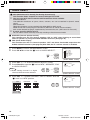
Video Adjust
•
Description of Adjustment Items
POWER
Selected item
DVD
VCR
TV
VOL k button
VOL l button
PICTURE
To increase contrast
To decrease contrast
1
2
3
TINT
To make skin tones greenish
To make skin tones purplish
4
5
6
COLOR
To increase color intensity
To decrease color intensity
7
8
BRIGHT
To increase brightness
To decrease brightness
SHARP
To increase sharpness
To decrease sharpness
COLOR TEMP.
To choose a LOW, ML, MH or HIGH color tone.
RESET
To return all adjustments to factory preset levels.
DISPLAY
INPUT
9
ENTER
FLASHBACK
0
VOLUME
(k)/(l)
PERSONAL PREFERENCE
A
B
C
D
CH
VOL
+
VOL
—
CH
MENU
MUTE
CATV
TV
DVD
VCR
CHANNEL
UP (a)/
DOWN (s)
MENU
1
2
Press MENU to access the MAIN MENU screen.
Press CH a/s to move the “E” mark to “VIDEO ADJUST”.
→
MENU
SLEEP T I MER
V I DEO ADJ UST
AUD I O SEL ECT
D I G I T AL AUD I O
CC CLOSED CAPT I ON
PARENT CONTROL
ES ENERGY SAVE
SET UP
CH
CH
(MAIN MENU screen)
3
Press VOL k/l to access the PICTURE adjust screen.
• The word “DIGITAL” will appear to show viewing channel is a
digital channel.
VOL
—
D I G I T AL
VOL
+
P I CTURE
50
(PICTURE adjust screen)
4
Press CH a/s to select the desired adjustment item. (Refer to the diagram below.)
PICTURE
TINT
COLOR
BRIGHT
CH
RESET
: CH a
5
COLOR TEMP.
SHARP
CH
: CH s
Press VOL k/l to adjust the setting.
D I G I T AL
VOL
—
VOL
+
P I CTURE
50
VOL k
increases contrast
VOL l
decreases contrast
6
Repeat steps 4 to 5 to adjust other settings.
7
Press MENU to exit.
Note:
• VIDEO ADJUST setting, once set, is shared among AIR/CABLE, INPUT 1, INPUT 2, and INPUT 3
modes.
• VIDEO ADJUST setting for INPUT 3 when used as COMPONENT can be set independently.
• VIDEO ADJUST setting for Digital Channel can be set independently.
15
27SF560(13-15).p65
15
26/10/05, 5:36 PM
Dimension: 140 X 215 mm
Audio Select
H MTS (Multichannel TV Sound) (For Analog Channel only)
This function allows reception of stereo or bilingual TV sound.
You can enjoy Hi-Fi stereo sound or SAP broadcasts where available.
Stereo broadcasts
Live television broadcasts of sports, shows, concerts, etc. can be received in dynamic stereo
sound.
SAP broadcasts
Television broadcast can be received with either MAIN or SAP sound.
MAIN sound: The normal program soundtrack. (Monaural or stereo where available.)
SAP sound: Second language, supplementary commentaries, etc. (SAP sound is monaural.)
If stereo sound is difficult to hear;
You can obtain clearer sound by manually switching to fixed monaural mode.
•
•
H SPEAKER (Internal Speaker Switch)
This function turns the TV’s internal speakers “ON” or “OFF” when listening to sound from
external speakers by using the AUDIO OUTPUT Terminals. (See page 46).
H FAO (Fixed Audio Output)
This function turns the TV’s internal speakers “OFF” and allows fixed audio output from the
AUDIO OUTPUT Terminals. (See page 46). With FAO, the TV’s volume control is disabled.
1
2
Press MENU to access the MAIN MENU screen.
Press CH a/s to move the “E” mark to “AUDIO SELECT”.
→
MENU
SLEEP T I MER
V I DEO ADJ UST
AUD I O SEL ECT
D I G I T AL AUD I O
CC CLOSED CAPT I ON
PARENT CONTROL
ES ENERGY SAVE
SET UP
CH
CH
(MAIN MENU screen)
3
4
Press VOL k/l to access the AUDIO SELECT screen.
Press CH a/s to move the “E” mark to “MTS”, “SPEAKER”, “FAO”
or “AUDIO ADJUST”.
Note:
• If the viewing channel is a digital
channel, MTS cannot be selected.
5
VOL
—
VOL
+
→
CH
CH
(AUDIO SELECT screen)
Press VOL k/l to select “STEREO”, “SAP” or “MONO” when the
“E” mark is at “MTS” position.
MTS
STEREO
SPEAKER
ON
FAO
ON
SAP
OFF
OFF
AUD I O SE L ECT
MTS
: STEREO
: ON
SPEAKER
: OFF
FAO
AUD I O A D J UST
VOL
—
AUD I O SE L ECT
MTS
: STEREO
: ON
SPEAKER
: OFF
FAO
AUD I O A D J UST
VOL
+
(AUDIO SELECT screen)
MONO
(For Analog
Channel only)
16
27SF560(16-18).p65
16
26/10/05, 5:39 PM
Dimension: 140 X 215 mm
Audio Select (Continued)
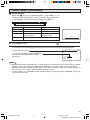
H AUDIO ADJUST
When the “E” mark is at “AUDIO ADJUST”, press VOL k/l to
access the AUDIO ADJUST screen. To access the desired item,
press CH a/s. To adjust the audio setting, press VOL k/l.
TREBLE
6
BASS
BALANCE
RESET
Selected item
VOL k button
VOL l button
TREBLE
To increase treble response.
To decrease treble response.
BASS
BALANCE
To increase bass response.
To emphasize the right
speaker’s volume.
To decrease bass response.
To emphasize the left
speaker’s volume.
RESET
To return all adjustments to factory preset levels.
TREBL E
0
Press MENU to exit.
An example screen displaying ON AIR Analog Channel when receiving stereo broadcasts
Current channel number
12
“← ON AIR” will appear next to STEREO or
SAP when receiving STEREO or SAP
broadcasts.
STEREO
SAP
MONO
ON A I R
ON A I R
(Analog CHANNEL call on screen)
Note:
• Once MONO mode is selected, the TV sound remains monaural even if the TV set receives a stereo
broadcast. You must switch the mode back to STEREO if you want to hear stereo sound again.
• Selecting MTS while receiving video signals from INPUT terminals does not change the type of
sound; in this case, sound is determined by the video source.
• If “FAO” mode is on, “SPEAKER” mode will automatically turn off. Changing “SPEAKER” setting will
not affect “FAO” mode.
17
27SF560(16-18).p65
17
26/10/05, 5:39 PM
Dimension: 140 X 215 mm
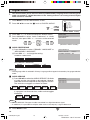
Digital Audio
•
This feature allows you to select the Primary and Secondary language and as well the type of
audio transmitted in a digital broadcast. If the viewing channel is an analog channel, Digital
Audio cannot be selected.
1
2
Press MENU to access MAIN MENU screen.
Press CH a/s to move the “E” mark to “DIGITAL AUDIO”.
→
MENU
CH
CH
SLEEP T I MER
V I DEO ADJ UST
AUD I O SEL ECT
D I G I T AL AUD I O
CC CLOSED CAPT I ON
PARENT CONTROL
ES ENERGY SAVE
SET UP
(MAIN MENU screen)
3
4
Press VOL k/l to access the DIGITAL AUDIO screen.
Press CH a/s to select “Audio Preference” or “Audio
Service”, then press VOL k/l to access to the selected
mode.
CH
VOL
—
→
VOL
+
CH
→
VOL
—
DIGITAL AUDIO
AUDIO PREFERENCE
AUDIO SERVICE
VOL
+
(DIGITAL AUDIO screen)
H AUDIO PREFERENCE
(i) Press CH a/s to select “PRIMARY LANGUAGE” or
“SECONDARY LANGUAGE”.
(ii) Press VOL k/l to change the setting.
AUDIO PREFERENCE
PRIMARY LANGUAGE
: ENGLISH
SECONDARY LANGUAGE : OFF
PRIMARY LANGUAGE
ENGLISH
FRANCAIS
ESPAÑOL
SECONDARY LANGUAGE
ENGLISH
FRANCAIS
ESPAÑOL
OFF
Note:
• The language which is selected in Primary Language will not appear in Secondary Language selection
mode.
H AUDIO SERVICE
(i) Press CH a/s to select the AUDIO SERVICE. Six kinds
of audio service are available to be selected. However,
selectable service are depands on the programs contains.
The services are toggles as shown on below:
AUDIO
SERVICE 1
AUDIO
SERVICE 2
AUDIO
SERVICE 3
AUDIO
SERVICE 4
AUDIO
SERVICE 5
AUDIO SERVICE
AUDIO SERVICE 1
AUDIO SERVICE 2
AUDIO SERVICE 3
AUDIO
SERVICE 6
If a program has three services, audio service toggles
like below:
AUDIO
SERVICE 1
AUDIO
SERVICE 2
AUDIO
SERVICE 3
Note:
• AUDIO SERVICE: The type of audio transmitted in a digital broadcast signal.
• In additional, it is possible for multiple audio tracks to accompany a signal video track.
5
Press MENU to exit.
18
27SF560(16-18).p65
18
26/10/05, 5:39 PM
Dimension: 140 X 215 mm
Closed Caption
•
How to set CLOSED CAPTION
• Your TV is equipped with an internal Closed Caption decoder. “Closed
Caption” is a system which allows conversations, narration, and sound
effects in TV programs and home videos to appear as captions on the
TV screen (see the illustration).
• Not all the programs and videos will offer closed captioning. Please
” symbol to ensure that captions will be shown.
look for the “
• Closed Caption broadcast for Analog Channel can be viewed in two
modes: CAPTION and TEXT. For each mode, two channels are
available, CH1 and CH2.
Closed Caption broadcast for Digital Channel can be viewed in 10
modes (maximum).
The CAPTION mode shows subscripts of dialogs and commentaries
of TV dramas and news programs while allowing clear view of the
picture.
The TEXT mode displays over the picture other various information
(such as TV program schedule, weather forecast, etc.) that is
independent of the TV programs.
VOLUME
(k)/(l)
PERSONAL PREFERENCE
A
B
C
D
CH
VOL
—
VOL
+
CH
MENU
MUTE
CATV
TV
DVD
VCR
CHANNEL
UP (a)/
DOWN (s)
MENU
H During viewing analog channel
1
2
Press MENU to access the MAIN MENU screen.
Press CH a/s to move the “E” mark to “CLOSED CAPTION”.
→
MENU
SLEEP T I MER
V I DEO ADJ UST
AUD I O SEL ECT
D I G I T AL AUD I O
CC CLOSED CAPT I ON
PARENT CONTROL
ES ENERGY SAVE
SET UP
CH
CH
(MAIN MENU screen)
3
Press VOL k/l to access the CLOSED CAPTION setting screen.
CC CLOSED
MODE
DATA
VOL
—
CAPT I ON
: CAPT I ON
: CH 1
VOL
+
(CLOSED CAPTION setting screen)
4
Press CH a/s to move the “E” mark to either “MODE” or “DATA”.
CC CLOSED
MODE
DATA
CAPT I ON
: CAPT I ON
: CH 1
CH
CH
5
Press VOL k/l to change the CLOSED CAPTION setting.
CC CLOSED
MODE:
MODE
DATA
CAPTION
DATA:
TEXT
CH 1
CH 2
VOL
—
CAPT I ON
: CAPT I ON
: CH 1
VOL
+
OFF
6
Press MENU to exit.
19
27SF560(19-23).p65
19
26/10/05, 5:37 PM
Dimension: 140 X 215 mm
Closed Caption (Continued)
H During viewing digital channel
1
2
3
Repeat steps 1 to 2 of During viewing analog channel.
Press VOL k/l to access the CLOSED CAPTION screen.
Press CH a/s to select “CLOSED CAPTION
PREFERENCES” or “CLOSED CAPTION SERVICE” and
then press VOL k/l to enter to the selected mode screen.
VOL
—
CH
→
VOL
+
CLOSED CAPTION
CLOSED CAPTION PREFERENCE
CLOSED CAPTION SERVICE
(CLOSED CAPTION screen)
→
VOL
—
VOL
+
CH
H CLOSED CAPTION PREFERENCE
CLOSED CAPTION PREFERENCE
(i) Press CH a/s to select “FONT SIZE”, “FONT
COLOR”, “BACKGROUND COLOR” or “RESET
DEFAULTS”.
(ii) Press VOL k/l to select desired setting.
The setting toggles as shown below:
FONT SIZE
FONT SIZE
: NORMAL
FONT COLOR
: DEFAULT
BACKGROUND COLOR : DEFAULT
RESET
ABC 123
CLOSED CAPTION PREFERENCE
Small
Large
Normal
FONT SIZE
: NORMAL
FONT COLOR
: DEFAULT
BACKGROUND COLOR : DEFAULT
RESET
FONT COLOR/BACKGROUND COLOR
Translucent
DEFAULT
Blue
White
Green
ABC 123
Black
Red
CLOSED CAPTION PREFERENCE
RESET
• For resetting all adjustment items to the factory preset
values.
FONT SIZE
: NORMAL
FONT COLOR
: DEFAULT
BACKGROUND COLOR : DEFAULT
RESET
ABC 123
H CLOSED CAPTION SERVICE
(i) Press CH a/s to select “CLOSED CAPTION
SERVICE”.
Closed caption services toggles like below:
CC 1
OFF
CC 2
DTV CC6
TEXT 1
DTV CC5
TEXT 2
DTV CC4
CLOSED CAPTION SERVICE
SELECT SERVICE : DTVCC1
DTV CC1
DTV CC3
DTV CC2
Good Morning! How are you today?
(CLOSED CAPTION SERVICE screen)
Note:
• If a broadcast contains CLOSED CAPTION and the MUTE button is pressed, the set enters CAPTION
mode automatically. Pressing MUTE again will return the set to its previous condition.
• Closed Caption may malfunction (white blocks, strange characters, etc.) if signal conditions are poor
or if there are problems at the broadcast source. This does not necessarily indicate a problem with
your TV.
• If any button is pressed to call up the ON SCREEN DISPLAY while viewing a CLOSED CAPTION
broadcast, the closed captions will disappear momentarily.
• If no TEXT broadcast is being received while viewing in the TEXT mode, the screen may become
dark and blank for some programs. Should this occur, switch the Closed Caption mode to “OFF”.
20
27SF560(19-23).p65
20
26/10/05, 5:37 PM
Dimension: 140 X 215 mm
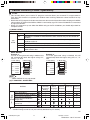
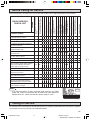
Parent Control (V-CHIP Operation)
H V-CHIP
• This function allows you to restrict TV programs and also allows you to control TV usage based on
FCC data. This function is to prevent your children from watching violence or sexual scenes that may
be harmful.
• Restriction of TV programs includes two characters that contain information about the program’s MPAA
rating and the TV Parental Guidelines. MPAA is restricted by age. TV Parental Guidelines are restricted
by age and contents.
• Since a TV program may use either the MPAA rating or the TV Guidelines you should adjust both for
complete control.
[1] MPAA RATING
RATING
G
PG
age
based
PG-13
R
NC-17
X
GENERAL AUDIENCES. All ages admitted.
PARENTAL GUIDANCE SUGGESTED. Some material may not be suitable for
children.
PARENTS STRONGLY CAUTIONED. Some material may be inappropriate for
children under 13.
RESTRICTED. Under 17 requires accompanying parent or adult guardian.
NO ONE 17 AND UNDER ADMITTED.
X Rating is an older rating that is unified with NC-17 but may be encoded on
older movie’s data.Note:
• MPAA RATING
Example 1:
“PG-13” in the age-based rating is blocked, this
will automatically block the higher ratings “R”,
“NC-17”, “X” also.
1. User setting
Example 2:
“R” in the age-based rating is blocked, this will
automatically block the higher rating “NC-17”, “X”
also.
2. Block table
G
–––––
G
PG
–––––
PG-13
BLOCK
R
BLOCK
age PG-13
based
R
NC-17
BLOCK
NC-17
X
BLOCK
X
PG
1. User setting
not to
block
not to
block
Select
block
autoblock
autoblock
autoblock
2. Block table
G
–––––
G
PG
–––––
PG-13
–––––
R
BLOCK
age PG-13
based
R
NC-17
BLOCK
NC-17
X
BLOCK
X
PG
not to
block
not to
block
not to
block
Select
block
autoblock
autoblock
Note:
• MPAA RATING is only age-based.
[2] TV PARENTAL GUIDELINES
content based
AGE
RATING
D
L
S
V
FV
(Sexually
(Adult
(Sexual (Violence) (Fantasy
Suggestive Language) Situation)
Violence)
Dialog)
TV-Y (All children)
V
–
–
–
–
TV-Y7 (Direct to Older Children)
V
–
–
–
–
V
TV-G (General Audience)
V
–
–
–
–
–
V
V
V
V
V
–
TV-14 (Parents Strongly
Cautioned)
V
V
V
V
V
–
TV-MA (Mature Audience Only)
V
–
V
V
V
–
age TV-PG (Parental Guidance
based Suggested)
–
: Content Rating can be set.
l : Content Rating cannot be set (not normally broadcast by TV station).
V
21
27SF560(19-23).p65
21
26/10/05, 5:37 PM
Dimension: 140 X 215 mm
Parent Control (V-CHIP Operation) (Continued)
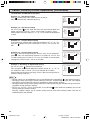
• TV PARENTAL GUIDELINES (Example)
Example 1.1 : Age Based setting
Clear V s (block) from each “AGE” box for all ratings.
This will automatically unblock everything.
TV–Y
TV–Y 7
TV–G
TV–PG
TV– 1 4
TV–MA
AG E D
–
–
–
L
–
–
–
S
–
–
–
–
V FV
– –
–
– –
–
–
–
: V I EW
V : B LOCK
MENU : RETURN
Example 1.2 : Age Based setting
For “TV-G” put a V in the “AGE” box. This will automatically block the
higher age ratings “TV-PG”, “TV-14” and “TV-MA” as well as “TV-G”.
Please note the content ratings “D”, “L”, “S”, “V” are automatically blocked
as well.
Example 2.1 : Content Based setting
If you choose to unblock every content-based items (“D”, “L”, “S”, “V”),
clear the V (block) from each “AGE” box of “TV-PG”, “TV-14” and “TVMA”.
TV–Y
TV–Y 7
TV–G
TV–PG
TV– 1 4
TV–MA
AG E D
–
–
V –
V V
V V
V –
L
–
–
–
V
V
V
S
–
–
–
V
V
V
V
–
–
–
V
V
V
FV
–
: V I EW
V : B LOCK
–
–
–
–
MENU : RETURN
TV–Y
TV–Y 7
TV–G
TV–PG
TV– 1 4
TV–MA
AG E D
–
–
–
L
–
–
–
S
–
–
–
–
V FV
– –
–
– –
–
–
–
: V I EW
V : B LOCK
MENU : RETURN
Example 2.2 : Content Based setting
Put a V in the box corresponding to “TV-PG” (row) and “V (Violence)”
(column). This will automatically block the “V” boxes for “TV-14” and
“TV-MA”. Setting only “TV-PG-V”, “TV-14-V” or “TV-MA-V” will not block
all programs rated “TV-PG”, “TV-14” or “TV-MA”.
Example 3 : Resetting an Age Based setting
For “TV-14”, put a V (block) in the “AGE” box.
This will again automatically block the content ratings “D”, “L”, “S”, “V”
for “TV-MA” as well as “TV-14” (“D” is not available for “TV-MA”).
Please note that the lower age rating “TV-PG” does not change from its
previous settings after this.
TV–Y
TV–Y 7
TV–G
TV–PG
TV– 1 4
TV–MA
AG E D
–
–
–
L
–
–
–
S
–
–
–
–
V
–
–
–
V
V
V
FV
–
–
–
–
–
: V I EW
V : B LOCK
MENU : RETURN
TV–Y
TV–Y 7
TV–G
TV–PG
TV– 1 4
TV–MA
AG E D
–
–
–
V
V
L
–
–
–
S
–
–
–
V FV
– –
–
– –
–
V V V V –
– V V V –
: V I EW
V : B LOCK
MENU : RETURN
Note:
• Content ratings can be modified but only in the combinations indicated by V in the table on page 21.
• Changing a lower age rating’s content setting to “BLOCK” automatically changes the same higher
age rating’s content setting to “BLOCK” regardless of their previous settings.
• Changing a lower rating’s “AGE” setting to “BLOCK” automatically changes all higher ratings to “BLOCK”
regardless of their previous settings.
• For “TV-Y7”, “TV-PG”, “TV-14” and “TV-MA”, if you clear the V in the “AGE” box (unblock) you can still
change settings based on content.
Clearing a higher rating’s age or content setting will not clear lower settings. Make sure that all
undesired boxes are blocked.
22
27SF560(19-23).p65
22
27/10/05, 11:09 AM
Dimension: 140 X 215 mm
Parent Control (V-CHIP Operation) (Continued)
[3] Canadian Rating Systems
• The TV rating systems in Canada are based on the Canadian Radio-Television and Telecommunications
Commission (CRTC) policy on violence in television programming.
• While violence is the most important content element to be rated, the structure developed takes into
consideration other program content like language, nudity, sexuality and mature themes.
• When setting the V-CHIP on the Canadian system you can choose either the Canadian English ratings
or the Canadian French ratings.
[i] Canadian English ratings
Rating
Age
Description
C
Children: Intended for younger children under the age of 8 years. Pays careful
attention to themes that could threaten their sense of security and well-being.
C8 +
Children over 8 years old: Contains no portrayal of violence as the preferred,
acceptable, or only way to resolve conflict; nor encourage children to imitate
dangerous acts which they may see on the screen.
G
General: Considered acceptable for all age groups. Appropriate viewing for the
entire family, contains very little violence, physical, verbal or emotional.
PG
Parental Guidance: Intended for a general audience, but may not be suitable for
younger children (under the age of 8) because it could contain controversial
themes or issues.
14 +
Over 14 Years: Could contain themes where violence is one of the dominant
elements of the storyline, but it must be integral to the development of plot or
character. Language usage could be profane and nudity present within the context
of the theme.
18 +
Adults: Intended for viewers 18 years and older and might contain depictions of
violence, which while related to the development of plot, character or themes,
are intended for adult viewing. Could contain graphic language and portrayals
of sex and nudity.
[ii] Canadian French ratings
Rating
Description
G
General: All ages and children, contains minimal direct violence, but may be
integrated into the plot in a humorous or unrealistic manner.
8ans +
General but inadvisable for young children: May be viewed by a wide public
audience, but could contain scenes disturbing to children under 8 who cannot
distinguish between imaginary and real situations. Recommended for viewing
with parent.
13ans +
Over 13 years: Could contain frequent violent scenes and therefore
recommended for viewing with parent.
16ans +
Over 16 years: Could contain frequent violent scenes and intense violence.
18ans +
Over 18 years: Only for adult viewing. Could contain frequent violent scenes
and extreme violence.
Age
23
27SF560(19-23).p65
23
26/10/05, 5:37 PM
Dimension: 140 X 215 mm
Parent Control (V-CHIP Operation) (Continued)
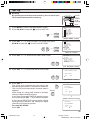
• How to set V-CHIP
[1] MPAA RATING
1
2
4
5
7
8
3
6
9
FLASHBACK
ENTER
VOLUME
(k)/(l)
0
PERSONAL PREFERENCE
A
B
C
D
CH
VOL
—
VOL
+
CH
MENU
CHANNEL
UP (a)/
DOWN (s)
MUTE
MENU
1
Press MENU to access the MAIN MENU screen.
MENU
SLEEP T I MER
V I DEO ADJ UST
AUD I O SEL ECT
D I G I T AL AUD I O
CC CLOSED CAPT I ON
PARENT CONTROL
ES ENERGY SAVE
SET UP
(MAIN MENU screen)
2
Press CH a/s to move the “E” mark to “PARENT CONTROL”.
MENU
SLEEP T I MER
V I DEO ADJ UST
AUD I O SEL ECT
D I G I T AL AUD I O
CC CLOSED CAPT I ON
PARENT CONTROL
ES ENERGY SAVE
SET UP
CH
CH
3
Press VOL k/l to access the PARENT CONTROL screen.
PARENT CONTROL
V–CH I P BLOCK
V I EW T I MER
VOL
—
VOL
+
(PARENT CONTROL screen)
4
Press VOL k/l to access the V-CHIP select screen.
Note:
• If SECRET No. is already set, enter the SECRET No.
(See To change the V-CHIP BLOCK after registering
a secret No. on page 28.).
MPAA
TV GU I DE L I NES
Cd n . E n g l i s h R a t i n g s
Cd n . F r e n c h Ra t i n g s
VOL
—
VOL
+
: OFF
STATUS
(V-CHIP select screen)
5
Press VOL k/l to select “MPAA”. Press CH a/s to move the
“E” mark to “PG”, then press VOL k/l to select BLOCK. If you
set “PG” to BLOCK, “PG-13”, “R”, “NC-17” and “X” are automatically
blocked.
VOL
—
VOL
+
→
CH
CH
6
→
G
PG
PG– 1 3
R
NC– 1 7
X
: –––––
: B LOCK
: B LOCK
: B LOCK
: B LOCK
: B LOCK
MENU : RETURN
VOL
—
VOL
+
Press MENU to return to the V-CHIP select screen.
24
27SF560(24-25).p65
24
26/10/05, 5:38 PM
Dimension: 140 X 215 mm
Parent Control (V-CHIP Operation) (Continued)
7
Press MENU, then “INPUT SECRET No.” will be displayed.
I NPUT SECRET No .
Note:
• If SECRET No. is already set, skip to step 9.
8
– – – –
Enter a 4-digit SECRET No. using the REMOTE KEYPAD.
1
2
3
I NPUT SECRET No .
4
5
6
1 2 3 4
7
8
9
ENTER
0
9
When done, press MENU to exit.
Note:
• If you set “G” to BLOCK , all ratings are automatically blocked.
• If you set “X” to BLOCK, “G”, “PG”, “PG-13”, “R” and “NC-17” are not blocked.
[2] TV GUIDELINES
1
2
MPAA
TV GU I DE L I NES
Cd n . E n g l i s h R a t i n g s
Cd n . F r e n c h Ra t i n g s
Repeat steps 1 to 4 of [1] MPAA RATING.
Press CH a/s to move the “E” mark to “TV GUIDELINES”.
CH
CH
3
4
(V-CHIP select screen)
Press VOL k/l to access the TV GUIDELINES screen.
VOL
—
VOL
+
To change AGE and CONTENT SETTING, press CH a/s to move
the “E” mark to the desired rating and then press VOL k/l to
select.
CH
→
VOL
—
: OFF
STATUS
TV–Y
TV–Y 7
TV–G
TV–PG
TV– 1 4
TV–MA
AG E D
–
–
–
L
–
–
–
S
–
–
–
–
V FV
– –
–
– –
–
–
–
: V I EW
V : B LOCK
MENU : RETURN
(TV GUIDELINES screen)
VOL
+
CH
5
Press CH a/s to move the “E” mark to the desired content item
and then press VOL k/l to select either “BLOCK” or “– – – – –”
(unblock).
CH
→
VOL
—
TV –Y7
AGE :
:
D
L
:
S
:
V
:
FV :
VOL
+
BLOCK
–––––
–––––
–––––
–––––
BLOCK
MENU : RETURN
CH
(CONTENT RATING screen)
6
7
8
9
Press MENU to return to the TV GUIDELINES screen.
Repeat steps 4 to 6 until all ratings and their contents are set.
When done, press MENU to return to V-CHIP select screen.
Press MENU to exit.
TV–Y
TV–Y 7
TV–G
TV–PG
TV– 1 4
TV–MA
AG E D
–
V –
V –
V V
V V
V –
L
–
–
–
V
V
V
S
–
–
–
V
V
V
V
–
–
–
V
V
V
FV
–
V
–
–
–
–
: V I EW
V : B LOCK
MENU : RETURN
Note:
• If SECRET No. is not set, enter a SECRET No. as show in steps 7 and 8 of [1] MPAA RATING.
25
27SF560(24-25).p65
25
26/10/05, 5:38 PM
Dimension: 140 X 215 mm
Parent Control (V-CHIP Operation) (Continued)
• How to set Canadian Rating System
Setting for Canadian English ratings and Canadian French ratings.
1
2
Repeat steps 1 to 4 of [1] MPAA RATING.
Press CH a/s to move the “E” mark to “Cdn. English Ratings”,
then press VOL k/l.
CH
→
VOL
—
VOL
+
MPAA
TV GU I DE L I NES
Cd n . E n g l i s h R a t i n g s
Cd n . F r e n c h Ra t i n g s
: ON
STATUS
CH
(After downloading the
rating data)
3
You can select “BLOCK” or “– – – – –” (unblock) for each rating
item by pressing CH a/s and VOL k/l.
CH
→
VOL
—
C
C8 +
G
PG
14+
18+
: –––––
: B LOCK
: –––––
: B LOCK
: –––––
: B LOCK
I ND I V I DUA L BL OCK
VOL
+
MENU : RETURN
CH
(ENGLISH INDIVIDUAL
BLOCK screen)
4
You can select “BLOCK” or “– – – – –” (unblock) for each rating
item by pressing CH a/s and VOL k/l if you select “Cdn. French
Ratings” in step 2.
CH
CH
→
VOL
—
VOL
+
G
8+
13+
16+
18+
: –––––
: B LOCK
: –––––
: B LOCK
: –––––
I ND I V I DUA L BL OCK
MENU : RETURN
(FRENCH INDIVIDUAL
BLOCK screen)
26
27SF560(26-28).p65
26
26/10/05, 5:40 PM
Dimension: 140 X 215 mm
Parent Control (V-CHIP Operation) (Continued)
• Activating the V-CHIP BLOCK
1
2
Repeat steps 1 to 4 of [1] MPAA RATING.
Press CH a/s to move the “E” mark to “STATUS”. Press VOL k/
l to activate the V-CHIP BLOCK. (If STATUS is OFF, V-CHIP
BLOCK will not operate.)
CH
→
VOL
—
VOL
+
CH
3
MPAA
TV GU I DE L I NES
Cd n . E n g l i s h R a t i n g s
Cd n . F r e n c h Ra t i n g s
(V-CHIP select screen)
Press MENU, then “INPUT SECRET No.” will be displayed.
Note:
• If SECRET No. is already set, skip to step 5.
4
: ON
STATUS
I NPUT SECRET No .
– – – –
Enter a 4-digit secret No. using the REMOTE KEYPAD.
1
2
3
I NPUT SECRET No .
4
5
6
1 2 3 4
7
8
9
ENTER
0
5
Press MENU and the secret No. will be registered.
• To temporarily cancel the V-CHIP BLOCK
1
“V-CHIP HAS BEEN ACTIVATED” appears if you view a program
with the same program rating data you configured.
Note:
• “V-CHIP HAS BEEN ACTIVATED” will not be displayed if STATUS is
not configured to “ON”.
2
22
V–CH I P HAS BEEN ACT I VATED
TV–Y 7
FV
Press MENU, then “INPUT SECRET No.” will be displayed.
I NPUT SECRET No .
– – – –
3
Enter the 4-digit secret No. using the REMOTE
KEYPAD, then V-CHIP BLOCK will be canceled
temporarily. If the wrong secret No. is chosen,
“SECRET No. IS INCORRECT” will be displayed.
Input the secret No. again in this case.
I NPUT SECRET No .
1
2
4
5
7
8
3
6
9
ENTER
0
Note:
• If you turn the power ON from OFF, the V-CHIP BLOCK will be activated again.
27
27SF560(26-28).p65
27
26/10/05, 5:40 PM
Dimension: 140 X 215 mm
Parent Control (V-CHIP Operation) (Continued)
• To change the V-CHIP BLOCK after registering a secret No.
1
Repeat steps 1 to 4 of [1] MPAA RATING, then “INPUT SECRET
No.” will be displayed.
I NPUT SECRET No .
– – – –
2
Enter the 4-digit secret No. using the REMOTE KEYPAD and the
V-CHIP select screen will be displayed. Set V-CHIP BLOCK again.
I NPUT SECRET No .
1
2
3
4
5
6
7
8
9
ENTER
0
• If you forget or need to change your secret No., clear the original secret No. and set
up a new one.
1
Repeat steps 1 to 4 of [1] MPAA RATING, or 1 to 2 of To
temporarily cancel the V-CHIP BLOCK, then “INPUT SECRET
No.” will be displayed.
2
Press and hold both VOL k and CH a on the TV set simultaneously
until the message “INPUT SECRET No.” disappears.
(On the Set)
VOL k and
CH a buttons
3
Press the MENU button twice to exit.
28
27SF560(26-28).p65
28
26/10/05, 5:40 PM
Dimension: 140 X 215 mm
Parent Control (VIEW TIMER)
H VIEW TIMER
This function allows you to restrict TV viewing time and also allows you to control TV usage.
This function is to prevent your children from watching too much TV.
VIEWING TIME (an accumulative timer: counts only the time
duration while the TV power is on.)
• VIEWING TIME can be set from 30M (30 minutes) to 10H00M (10
V I EW T I MER
hours) in 30 minutes intervals.
V I EWI NG T I ME
– –H – –M
OFF TIME (Restricts TV viewing after the VIEWING TIME reaches
OFF T I ME
– –H – –M
zero.)
STATUS : OFF
• OFF TIME can be set from 30M (30 minutes) to 10H00M (10 hours)
in 30 minutes intervals.
STATUS (Select ON to activate VIEW TIMER)
•
How to set VIEW TIMER
1
2
Press MENU to access the MAIN MENU screen.
Press CH a/s to move the “E” mark to “PARENT CONTROL”.
MENU
→
SLEEP T I MER
V I DEO ADJ UST
AUD I O SEL ECT
D I G I T AL AUD I O
CC CLOSED CAPT I ON
PARENT CONTROL
ES ENERGY SAVE
SET UP
CH
CH
3
4
(MAIN MENU screen)
Press VOL k/l to access the PARENT CONTROL screen.
Press CH a/s to move the “E” mark to “VIEW TIMER”.
VOL
—
VOL
+
→
PARENT CONTROL
V–CH I P BLOCK
V I EW T I MER
CH
CH
(PARENT CONTROL screen)
5
Press VOL k/l to access “VIEW TIMER”.
V I EW T I MER
VOL
—
6
V I EWI NG T I ME
– –H – –M
OFF T I ME
– –H – –M
STATUS : OFF
VOL
+
Press CH a/s to select “VIEWING TIME” and “OFF TIME”. For
each selection, press the VOL k/l to set the time duration.
CH
→
VOL
—
VOL
+
V I EW T I MER
V I EWI NG T I ME
2 H 0 0M
OFF T I ME
– –H – –M
STATUS : OFF
CH
7
Press CH a/s to select “STATUS”. Press the VOL k/l to turn
ON the “VIEW TIMER”. (If STATUS is OFF, VIEW TIMER will not
operate.)
CH
→
VOL
—
VOL
+
V I EW T I MER
V I EWI NG T I ME
2 H 0 0M
OFF T I ME
5 H 0 0M
STATUS : ON
CH
8
Press MENU. “INPUT SECRET No.” will be displayed.
Note:
• If SECRET No. is already set, skip to step 10.
I NPUT SECRET No .
– – – –
29
27SF560(29-32).p65
29
26/10/05, 5:41 PM
Dimension: 140 X 215 mm
Parent Control (VIEW TIMER) (Continued)
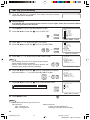
9 Enter a 4-digit secret No. using the REMOTE KEYPAD.
10 Press MENU to exit.
1
2
3
4
5
6
7
8
9
I NPUT SECRET No .
1 2 3 4
→
ENTER
0
Example:
• To restrict anybody from watching TV for more than 5 hours, after
watching the TV for 2 hours, your settings would look like the one on
the right.
• You can choose to watch the 2 hours of TV as you wish. For example,
you could watch 1 hour of TV, turn the TV off for 30 minutes, then turn
the TV on and watch the remaining 1 hour of the VIEWING TIME.
•
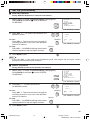
To change the VIEW TIMER setting after registering a secret No.
1
Repeat steps 1 to 4 of How to set VIEW TIMER. Press VOL k/l,
and “INPUT SECRET No.” will be displayed.
V I EW T I MER
V I EWI NG T I ME
2 H 0 0M
OFF T I ME
5 H 0 0M
STATUS : ON
I NPUT SECRET No .
– – – –
VOL
—
2
Enter the 4-digit secret No. using the REMOTE
KEYPAD, and the VIEW TIMER access screen will
be displayed. Repeat steps 5, 6.
VOL
+
1
2
3
4
5
6
7
8
I NPUT SECRET No .
9
ENTER
0
Note:
• When you choose the correct secret No., the VIEW TIMER access
screen is displayed. If the wrong secret No. is chosen, “SECRET No.
IS INCORRECT” is displayed. Input the secret No. again in this case.
•
To cancel the VIEW TIMER (While the TV set is OFF but the VIEW
TIMER is set.)
1
Turn on the TV; a blue screen message “TIME OVER” will appear.
If you do nothing, the TV will turn off in approximately 30 seconds.
SECRET No . I S I NCORRECT
T I ME OVER
I NPUT SECRET No .
– – – –
2
Enter the 4-digit secret No. using the REMOTE
KEYPAD. When you choose the correct secret No.,
the VIEW TIMER is canceled. If the wrong secret No.
is chosen, “SECRET No. IS INCORRECT” is
displayed. Input the secret No. again in this case.
T I ME OVER
1
2
3
4
5
6
7
8
I NPUT SECRET No .
9
ENTER
0
30
27SF560(29-32).p65
30
26/10/05, 5:41 PM
Dimension: 140 X 215 mm
Parent Control (VIEW TIMER) (Continued)
•
To cancel the VIEW TIMER setting or change the secret No. (If
you forget the SECRET No.)
1
Repeat steps 1 to 4 of How to set VIEW TIMER. Press
VOL k/l, and “INPUT SECRET No.” will be displayed.
I NPUT SECRET No .
– – – –
VOL
—
2
VOL
+
Press and hold both VOL k and CH a on the TV set simultaneously
until the VIEW TIMER access screen is displayed. Now you can
cancel the VIEW TIMER settings or change the secret No. while
“INPUT SECRET No.” is displayed.
(On the Set)
VOL k and
CH a buttons
•
Notice of Remaining VIEWING TIME
• For every 30 minute interval, the remaining time will be displayed for
4 seconds. For the last 5 minutes, the remaining time will be displayed
every minute.
• “0 REMAIN” will be displayed for 10 seconds just before the VIEWING
TIME expires.
VIEWING TIME
0H 30M REMAIN
VIEWING TIME
0H 05M REMAIN
VIEWING TIME
0 REMAIN
31
27SF560(29-32).p65
31
26/10/05, 5:41 PM
Dimension: 140 X 215 mm
Energy Save
H SCREEN
This feature lets you lower the power consumption of your TV
set which in turn saves you money and minimizes the impact on
the environment. When this feature is turned on, it reduces the
brightness of the TV to a level that consumes approximately 20
percent less energy than when the feature is turned off.
The reduction in brightness will be less noticeable under low
room lighting conditions.
H STANDBY
If set to OFF: No power save during standby mode.
ON: With power save during standby mode. When
change your TV channel to a digital channel will
take approximately 10 seconds to display.
1
2
Press MENU to access the MAIN MENU screen.
Press CH a/s to move the “E” mark to “ENERGY SAVE”.
→
POWER
DVD
VCR
TV
DISPLAY
INPUT
1
2
3
4
5
6
7
8
9
ENTER
FLASHBACK
0
VOLUME
(k)/(l)
PERSONAL PREFERENCE
A
B
C
D
CH
VOL
+
VOL
—
CH
MUTE
MENU
CATV
TV
DVD
VCR
CHANNEL
UP (a)/
DOWN (s)
MENU
MENU
SLEEP T I MER
V I DEO ADJ UST
AUD I O SEL ECT
D I G I T AL AUD I O
CC CLOSED CAPT I ON
PARENT CONTROL
ES ENERGY SAVE
SET UP
CH
CH
(MAIN MENU screen)
3
Press VOL k/l to access the ENERGY SAVE select screen.
ES ENERGY
SAVE
SCREEN : OFF
STANDBY : ON
VOL
—
VOL
+
(ENERGY SAVE select screen)
4
Press CH a/s to move the “E” mark to either “SCREEN” or
“STANDBY”.
ES ENERGY
SAVE
SCREEN : OFF
STANDBY : ON
CH
CH
5
Press VOL k/l to select “ON” or “OFF”.
SCREEN:
ES ENERGY
STANDBY:
ON
ON
OFF
OFF
VOL
—
6
SAVE
SCREEN : ON
STANDBY : OFF
VOL
+
Press MENU to exit.
32
27SF560(29-32).p65
32
26/10/05, 5:41 PM
Dimension: 140 X 215 mm
Set Up
H EZ Setup
By operating the channel preset functions, you can preset your
TV to the desired channels for viewing.
VOLUME
(k)/(l)
PERSONAL PREFERENCE
A
B
C
D
CH
VOL
—
VOL
+
CH
MENU
MUTE
CATV
TV
DVD
VCR
CHANNEL
UP (a)/
DOWN (s)
MENU
1
2
Press MENU to access the MAIN MENU screen.
Press CH a/s to move the “E” mark to “SET UP”.
MENU
→
SLEEP T I MER
V I DEO ADJ UST
AUD I O SEL ECT
D I G I T AL AUD I O
CC CLOSED CAPT I ON
PARENT CONTROL
ES ENERGY SAVE
SET UP
CH
CH
(MAIN MENU screen)
3
Press VOL k/l to access the SET UP screen, then press
CH a/s to move the “E” mark to “CH SETTING”.
VOL
—
VOL
+
→
SET UP
BLUE SCREEN
PERSONAL PREF.
UN I VERSAL PL US
L ANGUAGE
CH SET T I NG
AUTO I NPUT
CH / I NPUT I D
SCREEN FORMAT
CH
CH
(SET UP screen)
4
Press VOL k/l to access the CH SETTING screen.
CH SETT I NG
VOL
—
EZ SETUP
A I R / ANALOG CABL E
ANALOG CH SEARCH
D I G I TAL CH SEARCH
CH MEMORY
ANTENNA SETUP D I G I TAL
VOL
+
(CH SETTING screen)
5
Press VOL k/l to access the EZ SETUP screen.
CONNECT ANTENNA OR CABL E.
START EZ SETUP?
VOL
—
STOP
VOL
+
START
(EZ SETUP screen)
6
(START)
Press VOL k.
The tuner will automatically search for the
VOL
+
broadcasting and cable TV channels for ANALOG.
(The CH No. will automatically increase when it
appears.)
(STOP)
Once tuning for analog AIR channel is finished,
VOL
—
tuning for digital channel will start.
If you want to stop the EZ SETUP process once it
has started, press VOL l and it will be canceled.
If you stop the EZ SETUP process before it finish
tunning analog channels, the tunning for digital
channels will started to process.
To cancel EZ SETUP
Press VOL l.
(Analog channel tunning)
PL EASE WA I T
AUTO PROGRAMM I NG
69
STOP
START
↓
(Digital channel tunning)
PL EASE WA I T
AUTO PROGRAMM I NG
D I G I TAL
69
STOP
START
33
27SF560(33-34).p65
33
26/10/05, 5:43 PM
Dimension: 140 X 215 mm
Set Up (Continued)
7
Once EZ SETUP is complete, the lowest channel number
memorized will be displayed.
2
H Channel Setting
If EZ SETUP does not memorize all the channels in your region, follow the instructions below
to manually memorize the channel.
1
2
Press MENU to access the MAIN MENU screen.
Press CH a/s to move the “E” mark to “SET UP”.
MENU
→
SLEEP T I MER
V I DEO ADJ UST
AUD I O SEL ECT
D I G I T AL AUD I O
CC CLOSED CAPT I ON
PARENT CONTROL
ES ENERGY SAVE
SET UP
CH
CH
(MAIN MENU screen)
3
4
Press VOL k/l to access the SET UP screen.
Press CH a/s to move the “E” mark to “CH SETTING”.
VOL
—
VOL
+
→
SET UP
BLUE SCREEN
PERSONAL PREF.
UN I VERSAL PL US
L ANGUAGE
CH SET T I NG
AUTO I NPUT
CH / I NPUT I D
SCREEN FORMAT
CH
CH
(SET UP screen)
5
Press VOL k/l to access the CH SETTING screen.
Note:
• If the viewing channel is an analog channel, Antenna
Setup Digital cannot be selected.
• During Cable mode, Digital Channel Search and
Antenna Setup Digital cannot be selected.
6
CH SETT I NG
VOL
—
EZ SETUP
A I R / ANALOG CABL E
ANALOG CH SEARCH
D I G I TAL CH SEARCH
CH MEMORY
ANTENNA SETUP D I G I TAL
VOL
+
(CH SETTING screen)
Press CH a/s to move the “E” mark to “AIR/ANALOG CABLE”,
then press VOL k/l to access the AIR/CABLE screen.
CH
→
VOL
—
VOL
+
CH SETT I NG
EZ SETUP
A I R / ANALOG CABL E
ANALOG CH SEARCH
D I G I TAL CH SEARCH
CH MEMORY
ANTENNA SETUP D I G I TAL
CH
7
Press CH a/s to move the “E” mark to the desired mode.
AIR
CABLE STD
CABLE HRC
A I R / ANALOG CABL E
CABLE IRC
CH
A IR
CAB LE STD
CAB LE HRC
CAB LE I RC
CH
(AIR/CABLE screen)
8
Press MENU to exit.
Note:
• Receivable channels of your TV set are:
AIR channels:
VHF: 2 through 13.
UHF: 14 through 69.
CABLE channels:
1 (HRC and IRC mode only)
2 through 125 (STD, HRC and IRC)
34
27SF560(33-34).p65
34
26/10/05, 5:43 PM
Dimension: 140 X 215 mm
Set Up (Continued)
H ANALOG CH SEARCH
Saving ANALOG broadcast TV channels into memory
1
Repeat step 1 to step 5 of Channel Setting. (See page 34)
Press CH a/s to move the “E” mark to “ANALOG
CH SEARCH”.
CH SETT I NG
EZ SETUP
A I R / ANALOG CABL E
ANALOG CH SEARCH
D I G I TAL CH SEARCH
CH MEMORY
ANTENNA SETUP D I G I TAL
CH
CH
(CH SETTING screen)
2
Press VOL k/l to access the ANALOG CH
SEARCH screen.
VOL
—
VOL
+
CH SEARCH
AI R 10
(START)
To start:
Press VOL k. The tuner will search through all
available channels in your area and add them
into the TV memory.
STOP
START
(CH SEARCH screen)
(STOP)
To stop:
Press VOL l. CH SEARCH will stop at the current
channel and will not add any higher channels.
3
VOL
+
VOL
—
Press MENU to exit.
Note:
• If you press VOL k again while in the CH SEARCH mode, auto-program will start again, and the
previously memorized channels will be lost.
H DIGITAL CH SEARCH
Saving DIGITAL broadcast TV channels into memory
1
Repeat step 1 to step 5 of Channel Setting. (See page 34)
Press CH a/s to move the “E” mark to “DIGITAL
CH SEARCH”.
CH SETT I NG
EZ SETUP
A I R / ANALOG CABL E
ANALOG CH SEARCH
D I G I TAL CH SEARCH
CH MEMORY
ANTENNA SETUP D I G I TAL
CH
CH
(CH SETTING screen)
2
Press VOL k/l to access the DIGITAL
CH SEARCH screen.
VOL
—
CH SEARCH
(START)
To start:
Press VOL k. The tuner will search through all
available channels in your area and add them
into the TV memory.
D I G I T AL
10
STOP
START
VOL
+
(CH SEARCH screen)
(STOP)
To stop:
Press VOL l. CH SEARCH will stop at the current
channel and will not add any higher channels.
3
VOL
+
VOL
—
Press MENU to exit.
35
27SF560(35-36).p65
35
26/10/05, 5:44 PM
Dimension: 140 X 215 mm
Set Up (Continued)
H CH MEMORY
Adding weak or additional channels or erasing unwanted channels from TV memory
1
Repeat step 1 to step 5 of Channel Setting. (See page 34)
Press CH a/s to move the “E” mark to “CH
MEMORY”.
CH SETT I NG
EZ SETUP
A I R / ANALOG CABL E
ANALOG CH SEARCH
D I G I TAL CH SEARCH
CH MEMORY
ANTENNA SETUP D I G I TAL
CH
CH
(CH SETTING screen)
2
3
Press VOL k/l to access the CH MEMORY
screen.
Use CH a/s to select each desired channel to
add or erase.
VOL
—
VOL
+
CH MEMORY
AI R 10
CH
ERASE
ADD
CH
(CH MEMORY screen)
4
Press VOL k to add a channel to the TV memory
or press VOL l to erase a channel from the TV
memory.
VOL k
To add channel 10 to
the TV memory
CH MEMORY
A IR 10
ERASE
ADD
(CH MEMORY
unmemorized channel)
5
VOL
—
CH MEMORY
A IR 10
ERASE
VOL l
To erase channel 10 from
the TV memory
VOL
+
ADD
(CH MEMORY
memorized channel)
Press MENU to exit.
36
27SF560(35-36).p65
36
26/10/05, 5:44 PM
Dimension: 140 X 215 mm
Set Up (Continued)
H BLUE SCREEN
Automatically turns the screen blue if a broadcast signal is not
received. After 15 minutes of non-reception, the TV will turn off
automatically.
1
2
3
4
5
6
7
8
FLASHBACK
9
ENTER
VOLUME
(k)/(l)
0
PERSONAL PREFERENCE
A
B
C
D
CH
VOL
—
VOL
+
CH
MENU
CHANNEL
UP (a)/
DOWN (s)
MUTE
MENU
1
2
Press MENU to access the MAIN MENU screen.
Press CH a/s to move the “E” mark to “SET UP”.
MENU
→
SLEEP T I MER
V I DEO ADJ UST
AUD I O SEL ECT
D I G I T AL AUD I O
CC CLOSED CAPT I ON
PARENT CONTROL
ES ENERGY SAVE
SET UP
CH
CH
(MAIN MENU screen)
3
Press VOL k/l to access the SET UP screen.
SET UP
VOL
—
BLUE SCREEN
PERSONAL PREF.
UN I VERSAL PL US
L ANGUAGE
CH SET T I NG
AUTO I NPUT
CH / I NPUT I D
SCREEN FORMAT
VOL
+
(SET UP screen)
4
Press VOL k/l to access the BLUE SCREEN select screen.
BLUE SCREEN : OFF
VOL
—
VOL
+
(BLUE SCREEN select screen)
5
Press VOL k/l to select “ON”.
BLUE SCREEN : ON
VOL
—
6
VOL
+
Press MENU to exit.
When the BLUE SCREEN is set to “ON”
No signal
Blue screen
Power turns off
automatically
after 15
minutes Standby mode
Note:
• Poor reception due to weak signals, or too much noise might activate the BLUE SCREEN function
despite the presence of a broadcast signal. To continue watching TV under these conditions, switch
the BLUE SCREEN “OFF”.
• While INPUT 1, 2, or 3 (COMPONENT) is selected, the BLUE SCREEN will not be shown even if
BLUE SCREEN is turned on.
37
27SF560(37-39).p65
37
26/10/05, 5:44 PM
Dimension: 140 X 215 mm
Set Up (Continued)
H Personal Preference
By setting PERSONAL PREFERENCE channels in advance, you
can select your favorite channels easily.
1
2
3
4
5
6
7
8
REMOTE
KEYPAD
9
VOLUME
(k)/(l)
ENTER
FLASHBACK
0
PERSONAL
PREFERENCE
PERSONAL PREFERENCE
A
B
C
D
CHANNEL
UP (a)/
DOWN (s)
CH
VOL
—
VOL
+
CH
MENU
MUTE
MENU
1
2
Press MENU to access the MAIN MENU screen.
Press CH a/s to move the “E” mark to “SET UP”.
MENU
SLEEP T I MER
V I DEO ADJ UST
AUD I O SEL ECT
D I G I T AL AUD I O
CC CLOSED CAPT I ON
PARENT CONTROL
ES ENERGY SAVE
SET UP
CH
→
CH
(MAIN MENU screen)
3
Press VOL k/l to access the SET UP screen, then press
CH a/s to move the “E” mark to “PERSONAL PREF.”.
VOL
—
VOL
+
→
SET UP
BLUE SCREEN
PERSONAL PREF.
UN I VERSAL PL US
L ANGUAGE
CH SET T I NG
AUTO I NPUT
CH / I NPUT I D
SCREEN FORMAT
CH
CH
(SETUP screen)
4
Press VOL k/l to select the
PERSONAL PREFERENCE select
screen in which you can program 4
favorite channels, in 4 different
categories. (total of 16 channels)
VOL
—
VOL
+
(during viewing Analog/Digital channel)
PERSONAL PREF.
<A>
B
––––– –––––
––––– –––––
––––– –––––
––––– –––––
C
–––––
–––––
–––––
–––––
(during viewing cable channel)
PERSONAL
<A>
–––
–––
–––
–––
D
–––––
–––––
–––––
–––––
ENTER : CONF I RM
PREF.
B
–––
–––
–––
–––
C
–––
–––
–––
–––
D
–––
–––
–––
–––
ENTER : CONF I RM
(PERSONAL PREFERENCE select screen)
Note:
• Below is using Analog/Digital channel OSD to explain.
5
Press VOL k/l and CH a/s to move the “E” mark to the desired
position.
CH
VOL
—
VOL
+
and
CH
PERSONAL PREF.
<A>
B
––––– –––––
––––– –––––
––––– –––––
––––– –––––
C
–––––
–––––
–––––
–––––
D
–––––
–––––
–––––
–––––
C
–––––
–––––
–––––
–––––
D
–––––
–––––
–––––
–––––
ENTER : CONF I RM
6
To input CHANNEL Number, press REMOTE
KEYPAD on the Remote. Then press ENTER to
register the CHANNEL Number into memory.
1
2
3
• Press INPUT to register the INPUT mode into
4
5
6
memory.
7
8
9
0
Example: 25 — Press “2”, “5” and “ENTER”.
4
— Press “0”, “4” and “ENTER”.
22.5 — Press “2”, “2”, “•”, “5” and “ENTER”.
To reset a registered CHANNEL Number, input “•” twice.
ENTER
PERSONAL PREF.
<A>
B
25 –––––
4 –––––
22.5 –––––
––––– –––––
ENTER : CONF I RM
Note:
• “•” can not be enter as channel number but will function as reset registered Channel Number when
input twice.
• Only 3 digit numbers are allow to input for cable channel.
38
27SF560(37-39).p65
38
26/10/05, 5:44 PM
Dimension: 140 X 215 mm
Set Up (Continued)
7
Repeat steps 5 and 6 to register the next CHANNEL Number or INPUT mode.
8
Press MENU to exit.
To select the PERSONAL PREFERENCE channel.
PERSONAL PREF.
<A>
B
25 –––––
4 –––––
22.5 –––––
––––– –––––
If the channels are memorized as shown on the right,
press the Remote’s “A” button to select the channels below.
25
4
22.5
C
–––––
–––––
–––––
–––––
D
–––––
–––––
–––––
–––––
ENTER : CONF I RM
Note:
• If the channel number input does not exist, warning message as shown
on the right will appear.
Failed to received broadcast
A
B
C
D
CH
VOL
—
VOL
+
CH
VOLUME
(k)/(l)
MENU
MUTE
REW
1
2
CHANNEL
UP (a)/
DOWN (s)
PERSONAL PREFERENCE
H Universal Plus Function
VCR or DVD input mode will be selected automatically by
pressing the VCR/DVD PLAY button on the Remote
Control
Press MENU to access the MAIN MENU screen.
Press CH a/s to move the “E” mark to “SET UP”.
PLAY
CATV
TV
DVD
VCR
FF
MENU
DVD/VCR
PLAY
MENU
→
SLEEP T I MER
V I DEO ADJ UST
AUD I O SEL ECT
D I G I T AL AUD I O
CC CLOSED CAPT I ON
PARENT CONTROL
ES ENERGY SAVE
SET UP
CH
CH
(MAIN MENU screen)
3
Press VOL k/l to access the SET UP screen.
SET UP
VOL
—
BLUE SCREEN
PERSONAL PREF.
UN I VERSAL PL US
L ANGUAGE
CH SET T I NG
AUTO I NPUT
CH / I NPUT I D
SCREEN FORMAT
VOL
+
(SET UP screen)
4
Press CH a/s to move the “E” mark to “UNIVERSAL PLUS”.
SET UP
BLUE SCREEN
PERSONAL PREF.
UN I VERSAL PL US
L ANGUAGE
CH SET T I NG
AUTO I NPUT
CH / I NPUT I D
SCREEN FORMAT
CH
CH
5
Press VOL k/l to access the UNIVERSAL PLUS select screen
to select VCR or DVD mode.
VOL
—
UN I VERSAL PLUS
VCR
DVD
:OFF
:OFF
VOL
+
(UNIVERSAL PLUS select screen)
39
27SF560(37-39).p65
39
26/10/05, 5:44 PM
Dimension: 140 X 215 mm
Set Up (Continued)
6
Press CH a/s to select the VCR or DVD, and press VOL k/l to
select “CH3”, “CH4”, “INPUT 1”, “INPUT 2”, “INPUT 3
(COMPONENT)” or “OFF”.
CH3
CH4
INPUT 2
INPUT 1
UN I VERSAL PLUS
OFF
INPUT 3 (COMPONENT )
Switch to the input mode your VCR or
DVD is connected to. If connected
through RF (antenna terminal), select
either CH3 or CH4 to match the setting
of the VCR or DVD.
7
VCR
DVD
CH
→
VOL
—
: CH3
:OFF
VOL
+
CH
Press MENU to exit.
Auto Input
•
The unit is preset to switch to the INPUT 2 screen automatically
when VIDEO equipment is connected to the INPUT 2 terminal. Do
the following to switch this feature off:
VOLUME
(k)/(l)
PERSONAL PREFERENCE
A
B
C
D
CH
VOL
—
VOL
+
CH
MENU
MUTE
CATV
TV
DVD
VCR
CHANNEL
UP (a)/
DOWN (s)
MENU
1
2
Press MENU to access the MAIN MENU screen.
Press CH a/s to move the “E” mark to “SET UP”.
MENU
→
SLEEP T I MER
V I DEO ADJ UST
AUD I O SEL ECT
D I G I T AL AUD I O
CC CLOSED CAPT I ON
PARENT CONTROL
ES ENERGY SAVE
SET UP
CH
CH
(MAIN MENU screen)
3
Press VOL k/l to access the SET UP screen, then press CH a/s
to move the “E” mark to “AUTO INPUT”.
VOL
—
VOL
+
→
CH
CH
SET UP
BLUE SCREEN
PERSONAL PREF.
UN I VERSAL PL US
L ANGUAGE
CH SET T I NG
AUTO I NPUT
CH / I NPUT I D
SCREEN FORMAT
(SET UP screen)
4
Press VOL k/l to access the AUTO INPUT select screen.
Press VOL k/l to select “AUTO”.
VOL
—
AUTO I NPUT : AUTO
( I NPUT2 )
VOL
+
(AUTO INPUT select screen)
5
You may turn off “AUTO INPUT” when it is not in use.
Press VOL k/l to select “OFF”.
AUTO I NPUT : OFF
( I NPUT2 )
VOL
—
6
VOL
+
Press MENU to exit.
40
27SF560(40-42).p65
40
26/10/05, 5:45 PM
Dimension: 140 X 215 mm
CH/Input ID
•
•
You can assign an ID label to each Analog channel or input mode.
These ID labels can be 4 characters long maximum and will be
displayed along with the channel number/input mode when the
labeled channel is selected.
(Example: labeling air channel 10 “TV12”.)
During viewing Digital Channel, the CH/INPUT ID cannot be
selected.
1
2
3
4
5
6
7
8
9
ENTER
FLASHBACK
0
REMOTE
KEYPAD
VOLUME
(k)/(l)
PERSONAL PREFERENCE
A
B
C
D
CH
VOL
—
VOL
+
CH
MENU
MUTE
CHANNEL
UP (a)/
DOWN (s)
MENU
1
Press MENU to access the MAIN MENU screen.
MENU
SLEEP T I MER
V I DEO ADJ UST
AUD I O SEL ECT
D I G I T AL AUD I O
CC CLOSED CAPT I ON
PARENT CONTROL
ES ENERGY SAVE
SET UP
(MAIN MENU screen)
2
Press CH a/s to move the “E” mark to “SET UP”.
MENU
SLEEP T I MER
V I DEO ADJ UST
AUD I O SEL ECT
D I G I T AL AUD I O
CC CLOSED CAPT I ON
PARENT CONTROL
ES ENERGY SAVE
SET UP
CH
CH
3
Press VOL k/l to access the SET UP screen then press
CH a/s to move the “E” mark to “CH/INPUT ID” .
VOL
—
VOL
+
→
CH
CH
SET UP
BLUE SCREEN
PERSONAL PREF.
UN I VERSAL PL US
L ANGUAGE
CH SET T I NG
AUTO I NPUT
CH / I NPUT I D
SCREEN FORMAT
(SET UP screen)
Note:
• If you are viewing a digital channel, “CH/INPUT ID” cannot be set.
4
Press VOL k/l to access the CH/INPUT ID screen.
CH / I NPUT I D
A I R 10
VOL
—
VOL
+
I D : _ _ __
(CH/INPUT ID screen)
41
27SF560(40-42).p65
41
26/10/05, 5:45 PM
Dimension: 140 X 215 mm
CH/Input ID (Continued)
5
Use CH a/s or REMOTE KEYPAD to select each desired channel
to label.
Press INPUT on the Remote to label the INPUT mode.
CH
or
CH
1
2
3
4
5
6
7
8
9
ENTER
0
ID: Labeling the channel name
Press VOL k/l to select “ID” then press VOL k to select the
first character. Press CH a/s to enter a desired letter. Press
VOL k/l to enter the next desired letter. Press MENU to return
to the CH/INPUT ID screen.
VOL
—
VOL
+
→
MENU : RETURN
CH
→
VOL
+
I D : _ ___
RESET
CH
(ID Input screen)
Selectable characters:
Space: _
Alphabets: A-Z
Numbers: 0-9
Symbols: — . & ( ) / +
I D : TV 1 2
RESE T
MENU : RETURN
VOL
—
VOL
+
→
Example TV 12
RESET: Resetting the ID to “_ _ _ _”
Press CH a/s to move the “E” mark to “RESET”, then press
VOL k/l. The previously set ID will return to “_ _ _ _”.
CH
I D : TV 1 2
RESE T
MENU : RETURN
CH
I D : _ ___
RESET
VOL
—
6
VOL
+
MENU : RETURN
Press MENU to exit.
Note:
• The maximum number of ID labels available to register Analog channel names is 20 for AIR channels
and 40 for CABLE channels.
• If you wish to register a new ID when all the available ID labels are assigned, delete a registered ID
to make room.
42
27SF560(40-42).p65
42
26/10/05, 5:45 PM
Dimension: 140 X 215 mm
Screen Format
•
The format of the picture can be adjusted to either of the two
screen formats.
(This function allows you to view 16:9 pictures recorded on DVD
or by camcorders that are once saved using the 4:3 aspect ratio
to be played back in the original high-density 16:9 format.)
VOLUME
(k)/(l)
PERSONAL PREFERENCE
A
B
C
D
CH
VOL
—
VOL
+
CH
MUTE
MENU
CATV
TV
DVD
VCR
CHANNEL
UP (a)/
DOWN (s)
MENU
1
2
Press MENU to access the MAIN MENU screen.
Press CH a/s to move the “E” mark to “SET UP”.
MENU
→
SLEEP T I MER
V I DEO ADJ UST
AUD I O SEL ECT
D I G I T AL AUD I O
CC CLOSED CAPT I ON
PARENT CONTROL
ES ENERGY SAVE
SET UP
CH
CH
(MAIN MENU screen)
3
Press VOL k/l to access the SET UP screen, then press CH a/s
to move the “E” mark to “SCREEN FORMAT”.
VOL
—
VOL
+
→
SET UP
BLUE SCREEN
PERSONAL PREF.
UN I VERSAL PL US
L ANGUAGE
CH SET T I NG
AUTO I NPUT
CH / I NPUT I D
SCREEN FORMAT
CH
CH
(SET UP screen)
4
Press VOL k/l to access the SCREEN FORMAT select screen.
SCREEN FORMAT
4:3
16 : 9
VOL
—
VOL
+
(SCREEN FORMAT select screen)
5
Press CH a/s to select “4:3” or “16:9”.
SCREEN FORMAT
4:3
16 : 9
CH
CH
6
Press MENU to exit.
Note:
• During viewing a digital channel, please set this function to “4:3”.
• The 16:9 screen format will be cancelled when the power is turned off.
Example:
While in 4:3 mode, if the picture appears stretched vertically as in screen A below, switch to 16:9
mode. The picture will return to normal as shown in screen B.
Screen A (4:3)
Screen B (16:9)
43
27SF560(43-46).p65
43
26/10/05, 5:46 PM
Dimension: 140 X 215 mm
Using the Video and Audio Input Terminals
•
Connecting video equipment for playback of video material.
• To view video material from external video equipment, make sure to connect the equipment properly
to the input terminals on the TV set.
Connecting video device equipped with video output terminals
CONNECTIONS
VIDEO EQUIPMENT
(Front connection terminals of TV)
Pull open the front door
CAMCORDER
To AUDIO OUTPUT (L)
To AUDIO OUTPUT (L)
To AUDIO OUTPUT (R)
(Rear connection terminals of TV)
TV GAME
VCR
To VIDEO OUTPUT
To AUDIO OUTPUT (L)
To AUDIO OUTPUT (R)
To AUDIO OUTPUT (R)
To AUDIO OUTPUT (L)
DVD
To VIDEO OUTPUT
Yellow : To video input terminal
White : To audio input (L) terminal
Red : To audio input (R) terminal
44
27SF560(43-46).p65
44
26/10/05, 5:46 PM
Dimension: 140 X 215 mm
Using the Video and Audio Input Terminals (Continued)
Notes:
• COMPONENT terminals are DVD compatible, allows you to enjoy the highest quality playback
image than the image from IN 1 S-VIDEO terminal.
• The IN 1 S-VIDEO terminal is used to obtain a higher quality image by importing image signals.
• The S-VIDEO terminal is for the video image only. To receive an audio signal, connect the audio
cable to the IN 1 AUDIO terminals (left and right).
(Rear connection terminals of TV)
TO S-VIDEO OUTPUT
(When your video
equipment has an
S-VIDEO output terminal.)
VCR
To VIDEO OUTPUT
To AUDIO
OUTPUT (L/R)
To AUDIO OUTPUT (L)
To AUDIO OUTPUT (R)
•
To COMPONENT
VIDEO OUTPUT
Terminals
Video Equipment with Component
video (Component Color)
Output Terminals (Y, PB and PR)
To watch video material playback
• Press the Remote’s INPUT button to select the VIDEO INPUT mode for the video equipment you
wish to play.
• The external VIDEO INPUT mode will change as follows each time the INPUT button is pressed.
AIR
or
CABLE
INPUT 1
(IN 1)
Rear
INPUT 2
(IN 2)
Front
INPUT 3 (COMPONENT)
(IN 3)
Rear
• When the AV cables are connected to the VIDEO INPUT 3 and COMPONENT Y, PB and PR terminals
simultaneously, the COMPONENT terminal has priority over the VIDEO terminal.
• INPUT mode can be selected by pressing either the CH a on the TV remote control when the TV is
set to the highest channel stored in memory, or by pressing the CH s when it is set to the lowest
channel.
Note:
• When connecting video or audio equipment to the television, be sure that the power is turned off in
order to prevent damage to either the television or the equipment being connected.
• The S-Video terminal has priority over the VIDEO terminal (IN 1). When you wish to use video equipment
connected to the VIDEO terminal (IN 1), unplug equipment connected to the S-VIDEO terminal.
• For detailed information on the connection and use of auxiliary equipment, refer to the instruction
manuals of the equipment being used.
• The connection cables/cords can be obtained from your local video store.
45
27SF560(43-46).p65
45
26/10/05, 5:46 PM
Dimension: 140 X 215 mm
Using the Audio Output Terminals
•
These terminals are used for connecting an external audio amplifier. The STEREO/MONO/
SAP, VOLUME, MUTE and FAO functions can all be controlled via the television’s remote control
or directly on the TV itself. These terminals relay the audio signal of all programs being displayed
on the TV screen.
(AUDIO OUTPUT terminals are located on the rear of the cabinet.)
CONNECTIONS
(Rear connection terminals of TV)
To the audio
input terminals
Stereo Amplifier
Speaker System
(1)
(2)
(3)
(4)
Before connecting the cables, turn on the TV and adjust the TV volume for a moderate listening level.
Turn off the TV and connect the audio cables to the AUDIO LINE OUTPUT terminals on the TV.
Turn the TV set and stereo amplifier on.
If you desire, you can turn off the sound of the TV’s internal speakers by accessing the TV’s AUDIO
SELECT screen. See pages 16, 17.
(5) Adjust the volume control on the stereo amplifier to a moderate listening level.
(6) Control of the audio can be adjusted using the audio controls (STEREO/MONO/SAP, VOLUME,
MUTE and FAO), from either the remote control, or directly from the TV set.
Note:
• For detailed information on the connection and use of auxiliary equipment, refer to the operation
manuals of the equipment being used.
• When connecting monaural equipment to the AUDIO INPUT or OUTPUT of this set, use an audio
connection cord and plug adaptor as shown below.
• When FAO is set to “OFF”, we recommend you to keep the TV’s audio output level high for optimal
sound quality. (see page 16.)
Plug adapter
To the equipment
being connected
To the TV
Pin plug x 2
Pin Plug
Pin jack/Mini plug
46
27SF560(43-46).p65
46
26/10/05, 5:46 PM
Dimension: 140 X 215 mm
Operation of Universal Remote Control
• Universal Remote Control
• “Identifying”VCRs, cable TV converters and
DVDs
Your Remote Control has been set at the
factory to operate your TV and many remote
controlled VCRs, cable TV converters and
DVDs. However, in some cases an easy onetime set-up step may be necessary before the
Remote will operate accessory VCRs, cable
TV converters and DVDs.
• In this set-up step, the Remote locates and
memorizes the remote control transmitter code
for the VCR, cable TV converters and DVDs.
• Once “identified”, the Remote sends proper
signals to operate your accessory.
• This identifying step will not have to be
repeated until power to the Remote is
interrupted due to a battery failure.
With the purchase of your television set you
also have received the latest innovation in
remote control technology. With its easy-to-use
push button keyboard, your Remote can
control your television set and most infrared
remote controlled VCRs, cable TV converters
and DVDs as well.
Note:
• Depending on the model year produced, brand
and type of VCR, cable TV converter and DVD,
some models may not be compatible with the
remote control.
• Some brands may not enable channel
selection until the ENTER is pressed. In such
case, try the following.
Example:
When you select channel 24,
(1) Press REMOTE KEYPAD “2”.
(2) Press REMOTE KEYPAD “4”.
(3) Press ENTER.
For detailed information on the use of the
Cable TV converter Box refer to their operating
manuals.
•
•
Using your Remote with your TV
After installing the batteries, set the CATV/
DVD-TV/VCR on the Remote to the TV
position. (If you can change the channel of the
TV by pressing CH a/s on the Remote
Control, it is in the TV position.)
DVD/VCR POWER
Press to turn the VCR or DVD
on and off.
Using your remote control with a VCR
Once you make certain the Remote Control
has “identified” your remote controlled VCR or
DVD, the Remote is ready to operate your unit.
The various VCR or DVD function buttons on
the Remote will not operate your VCR or DVD
if those features are not already found on your
unit.
• All VCR buttons will operate whether the
Remote is in TV or VCR modes.
• For detailed information on the use of the VCR
or DVD, refer to the operation manual of the
VCR or DVD.
REMOTE KEYPAD
Use to enter two-digit code
numbers when identifying your
VCR, DVD and CATV converter.
POWER
DVD
VCR
TV
PLAY
Press to playback a tape or disc.
REWIND
Press to rewind a tape or
reverse a disc. For some VCRs
or DVDs you may need to press
STOP first, then REWIND.
DISPLAY
INPUT
1
2
3
ENTER
4
5
6
7
8
9
FF
Press to rapidly advance the
tape or disc. For some VCRs or
DVDs, you may need to press
STOP first, then FF.
ENTER
FLASHBACK
0
PERSONAL PREFERENCE
A
B
C
D
CH
VOL
—
VOL
+
CH
PAUSE
Press to temporarily stop the
tape or disc during playback
or recording (VCR only).
Press again to release
PAUSE.
MENU
MUTE
CATV
TV
DVD
VCR
REW
PLAY
FF
PAUSE
STOP
REC
CH/SKIP
STOP
Press to stop the tape or disc.
TV • CATV • VCR • DVD
VCR CHANNEL
UP ( ) / DOWN ( )
Press to scan up or down through
channels on the VCR.
DVD SKIP
Press to jump forward to the
beginning of the next chapter/track,
or backward to the beginning of the
current chapter/track, and
automatically start to play that
chapter/track.
RECORD
Press to begin recording.
(VCR only)
47
27SF560(47-50).p65
47
26/10/05, 5:47 PM
Dimension: 140 X 215 mm
Operation of Universal Remote Control (Continued)
DVD/VCR
POWER
POWER
DVD
VCR
TV
DISPLAY
INPUT
TV POWER
DISPLAY
REMOTE
KEYPAD
1
2
3
4
5
6
7
8
9
ENTER
FLASHBACK
0
PERSONAL PREFERENCE
A
B
C
D
CH
VOL
—
VOL
+
CHANNEL
UP (a)/
DOWN (s)
CH
MENU
•
(1)
(2)
(3)
•
•
•
(1)
(2)
(3)
•
MUTE
CATV
TV
DVD
VCR
CATV/DVDTV/VCR
How to identify a VCR
The remote control may already be set to
operate your VCR. Try this initial check before
going on to the following “identifying” section.
Slide CATV/DVD-TV/VCR switch to VCR.
Point the Remote towards VCR and press
POWER (DVD/VCR).
Does the Remote turn the VCR ON and OFF?
If yes, the Remote is ready to operate the VCR
and no further steps are needed.
If no, continue to the “identifying” section.
Setting Method
Refer to the following steps and list to quickly
find the remote control code for your accessory
VCR.
First look up your VCR’s remote control code
number before going through the Setting
Method.
Slide CATV/DVD-TV/VCR switch to VCR.
Press and hold down DISPLAY and CH s on
your remote control.
Then release both buttons.
Within 10 seconds after releasing DISPLAY
and CH s , enter your VCR’s two-digit remote
control code number using the REMOTE
KEYPAD (refer to the list ).
The remote control is now ready to send
commands to your VCR.
Some brands have more than one remote code
listed, due to changes in the remote codes
from early to later model years, or due to format
differences (VHS/BETA). In such cases, you
may have to try more than one code to find
the code your VCR accepts.
VCR BRAND
Akai
Audio Dynamics
Broksonic
Canon
Capehart
Craig
Curtis Mathis
Daewoo
DBX
Dynatech
Emerson
Fisher
Funai
GE
Goldstar
Hitachi
Instant Replay
JC Penney
JVC
Kenwood
Lloyds
Magnavox
Magnin
Marantz
Memorex
Minolta
Mitsubishi
Montgomery Ward
Multitech
NEC
Panasonic
Pentax
Philco
Philips
Quasar
RCA
Realistic
Samsung
Sanyo
Scott
Sears
Sharp
Shintom
Sony
Sound Design
Sylvania
Symphonic
Tatung
Teac
Teknika
Thomas
TMK
Toshiba
Video Concepts
Yamaha
Zenith
REMOTE CONTROL
CODE NUMBER
25, 26, 37
15, 22, 30
32
04
34
10, 31
04
34
15, 22, 30
29
21, 32, 35
09, 10, 11
28, 29
04
24
06
04
04, 06, 24, 30
15, 41, 42
14, 15
29
04, 05, 08
31
30
04, 10, 24, 29
06
17, 18, 39, 40
02, 43
29
15, 22, 30
04, 44, 45
05, 06
04, 05
04, 05, 08
04
06, 07, 33
01, 02, 10, 24
23, 31
14, 10
20
06, 11, 24
01, 02, 03
36
12, 13, 38
29
04, 05, 08
29
15
15, 29
27, 29
29
21
19, 20
30
15, 29, 30
16
Note:
Depending on the model, year produced,
brand, and type of VCR, some models may
not be compatible with the remote control.
48
27SF560(47-50).p65
48
26/10/05, 5:47 PM
Dimension: 140 X 215 mm
Operation of Universal Remote Control (Continued)
DVD/VCR
POWER
POWER
DVD
VCR
TV
DISPLAY
INPUT
TV POWER
INPUT
1
2
3
4
5
6
7
8
DISPLAY
REMOTE
KEYPAD
9
ENTER
FLASHBACK
0
PERSONAL PREFERENCE
A
B
C
D
CH
VOL
—
VOL
+
CH
MENU
•
(1)
(2)
(3)
•
•
•
(1)
(2)
(3)
•
MUTE
CATV
TV
DVD
VCR
REW
PLAY
FF
PAUSE
STOP
REC
How to identify a DVD
The remote control may already be set to
operate your DVD. Try this initial check before
going on to the following “identifying” section.
Slide CATV/DVD-TV/VCR switch to DVD.
Point Remote towards DVD and press DVD/
VCR POWER.
Does the Remote turn the DVD ON and OFF?
If yes, the Remote is ready to operate the DVD
and no further steps are needed.
If no, continue to the “identifying” section.
Setting Method.
Refer to the following steps and list to quickly
find the remote control code for your accessory
DVD.
First look up your DVD’s remote control code
number before going through the Setting
Method.
Slide CATV/DVD-TV/VCR switch to DVD.
Press and hold down INPUT and CH s on
your remote control.
Then release both buttons.
Within 10 seconds after releasing INPUT and
CH s, enter your DVDs two-digit remote
control code number using REMOTE KEYPAD
(refer to the list).
The remote control is now ready to send
commands to your DVD.
CHANNEL
UP (a)/
DOWN (s)
CATV/DVDTV/VCR
CH/SKIP
DVD BRAND
Denon
JVC
Magnavox
Marantz
Mitsubishi
Panasonic
Philips
Pioneer
Proscan
RCA
Samsung
Sharp
Sony
Toshiba
Yamaha
Zenith
REMOTE CONTROL
CODE NUMBER
02
09
04
04
06
02
04
08
03
03
07
01, 10
05
04
02
04
Note:
Depending on the model, year produced,
brand, and type of DVD, some models may
not be compatible with the remote control.
49
27SF560(47-50).p65
49
26/10/05, 5:47 PM
Dimension: 140 X 215 mm
Operation of Universal Remote Control (Continued)
DVD/VCR
POWER
POWER
DVD
VCR
TV
DISPLAY
INPUT
TV POWER
DISPLAY
REMOTE
KEYPAD
1
2
3
4
5
6
7
8
9
ENTER
FLASHBACK
0
PERSONAL PREFERENCE
A
B
C
D
CH
VOL
—
VOL
+
CH
MENU
•
MUTE
CATV
TV
DVD
VCR
REW
PLAY
FF
PAUSE
STOP
REC
CHANNEL
UP (a)/
DOWN (s)
CATV/DVDTV/VCR
CH/SKIP
How to identify a cable converter
•
(1)
(2)
(3)
•
•
Setting Method.
Refer to the following steps and list to quickly
find the remote control code for your cable TV
converter.
First look up your converter’s remote code
number before going through the Setting
Method below.
Slide CATV /DVD-TV/VCR switch to CATV.
Press and hold down DISPLAY and CH s on
your remote control.
Then release both buttons.
Within 10 seconds after releasing DISPLAY
and CH s, enter your converter’s two-digit
code number using REMOTE KEYPAD (refer
to the list).
The remote control is now ready to send
commands to your converter.
Some brands have more than one remote code
listed due to changes in the remote codes from
early to later model years. In such cases, you
may have to try more than one code to find
the code your converter accepts.
CATV CONVERTER
BRAND
Anvision
Cable Star
Eagle
General Instrument
Jerrold
Magnavox
Oak Sigma
Panasonic
Philips
Pioneer
Randtek
RCA
Scientific Atlanta
Sony
Viewstar
Zenith
REMOTE CONTROL
CODE NUMBER
07, 08
07, 08
08
04, 05, 15, 23, 24, 25,
30, 36
04, 05, 15, 23, 24, 25
30, 36
07, 08, 19, 25, 28, 29,
32, 33, 40, 41
18
27, 39
07, 08, 19, 26, 28, 29,
32, 33, 40, 41
18, 20
07, 08
27, 43
03, 22, 42
44
07, 08, 19, 26, 28, 29
32, 33, 40, 41
14
Note:
Depending on the model, year produced,
brand, and type of CATV converter, some
models may not be compatible with the remote
control.
50
27SF560(47-50).p65
50
26/10/05, 5:47 PM
Dimension: 140 X 215 mm
Before Calling for Service
PROBLEM
QUICK SERVICE
CHECK LIST
No Playback of VCR and Disc
Player
No Picture or Sound from
External Video/Audio Products
Remote Control Doesn’t Work
Bars on Screen
Picture Distorted
Picture Rolls Vertically
No Color
Poor Reception on Some
Channels
Weak Picture
Lines or Streaks in Picture
Ghosts in Picture
Picture Blurred
Sound OK, Picture Poor
Picture OK, Sound Poor
No Picture or Sound
Dark and Blank Picture
External Electrical Noise
Interfering with TV’s Operation
Color on Part of the Screen
Appears Distorted
Check these items and see if you can correct the trouble with a slight adjustment of the controls.
POSSIBLE REMEDY
Try a new channel, if OK, then there is
a possible station trouble.
X
X
X X X X X
X
X X X X X X X X
X
X
Is TV plugged in? Power at outlet?
X
X
X X X X X
X
X X X X X X X X
X
X
Is TV’s POWER button on?
X
X
X X X X X
X
X X X X X X X X
X
X
Is antenna connected to terminal on
the back of the set?
X
X
X X X X X
X
X X X X X X X X
X
X
If outside antenna is being used,
check for broken wire.
X
X
X X X X X
X
X X X X X X X X
X
X
Check for local interference or external
electrical noise.
X
X
X X X X X
X
X X X X X X X X
X
X
Turn off the POWER and then turn it
on after about a minute.
X
X
X X X X X
X
X X X X X X X X
X
X
Adjust COLOR control.
X
X
X X X X X
X
X X X X X X X X
X
X
Adjust PICTURE control.
X
X
X X X X X
X
X X X X X X X X
X
X
Check external Video/Audio products:
look for loose/broken connection
leads. (Refer to pages 44–46)
X
X
X X X X X
X
X X X X X X X X
X
X
Check batteries of Remote Control.
X
X
X X X X X
X
X X X X X X X X
X
X
Slide CATV/DVD-TV/VCR Select
Switch to TV position.
X
X
X X X X X
X
X X X X X X X X
X
X
Are audio cables connected firmly?
Check the volume level.
X
X
X X X X X
X
X X X X X X X
X
X
Is SPEAKER ON? See pages 16, 17.
X
X
X X X X X
X
X X X X X X X X
X
X
Change Closed Caption mode to
“OFF”/Energy Save mode to “OFF”.
X
X
X X X X X
X
X X X X X X X X
X
X
Unplug the TV and plug it in again
after 2 minutes or longer.
X
X
X X X X X
X
X X X X X X X X
X
X
Note:
• If no TEXT broadcast is being received while viewing in the TEXT
mode, the screen may become dark and blank for some programs.
Should this occur, switch the Closed Caption mode to “OFF”.
(Dark and Blank Picture)
Calling for Service
For location of the nearest Sharp Authorized Servicer, or to obtain product literature accessories, supplies,
or customer assistance, please call 1-800-BE-SHARP.
51
27SF560(51-52).p65
51
26/10/05, 5:48 PM
Dimension: 140mm x 215mm
Warning message for Digital broadcasting
H The warning message about reception of digital broadcast
The example of an warning
message displayed on a screen
Possible Solution
• Failed to receive broadcast.
• Check the antenna cable. Check that the antenna is
correctly antenna setup.
• No broadcast now.
• Check the broadcast time in the program guide.
Specifications
MODEL
27SF560
Receiving System
American TV standard ATSC/NTSC system
Stereo Broadcast
MTS/SAP
Reception Channels
AIR
VHF
2-13 ch
UHF
14-69 ch
CATV
1-125 ch
Digital Terrestrial
Broadcast (8 VSB)
2-69 ch
Channel Tuning
181-channel Reception PLL tuning system
Antenna Input Impedance
VHF/UHF 75 ohm Unbalanced
Screen Size
27˝ Diagonally Measured
Terminals
Audio/Video input x 3 (Front x 1, Rear x 2)
S-Video input x 1 (Rear)
COMPONENT x 1 (Rear)
Audio output x 1 (Rear)
Antenna x 1 (Rear)
Sound Output
5 W (RMS) x 2
Power Source
AC 120 V, 60 Hz
Power Consumption
XXX W
Dimensions
[(W) x (H) x (D)] mm
29 31/32˝ (W) × 23 9/16˝ (H) × 20 17/64˝ (D)
[761 mm (W) × 598.5 mm (H) × 515 mm (D)]
Weight (approx.)
92.6 lbs. (42 kg)
• Design and specifications are subject to change without notice.
52
27SF560(51-52).p65
52
26/10/05, 6:57 PM
Dimension: 140mm x 215mm
Limited Warranty
CONSUMER LIMITED WARRANTY
SHARP ELECTRONICS CORPORATION warrants to the first consumer purchaser that this Sharp
brand product (the “Product”), when shipped in its original container, will be free from defective
workmanship and materials, and agrees that it will, at its option, either repair the defect or replace the
defective Product or part thereof with a new or remanufactured equivalent at no charge to the purchaser
for parts or labor for the period(s) set forth below.
This warranty does not apply to any appearance items of the Product nor to the additional excluded
item(s) set forth below nor to any Product the exterior of which has been damaged or defaced, which
has been subjected to improper voltage or other misuse, abnormal service or handling, or which has
been altered or modified in design or construction.
In order to enforce the rights under this limited warranty, the purchaser should follow the steps set forth
below and provide proof of purchase to the servicer.
The limited warranty described herein is in addition to whatever implied warranties may be granted to
purchasers by law. ALL IMPLIED WARRANTIES INCLUDING THE WARRANTIES OF
MERCHANTABILITY AND FITNESS FOR USE ARE LIMITED TO THE PERIOD(S) FROM THE DATE
OF PURCHASE SET FORTH BELOW. Some states do not allow limitations on how long an implied
warranty lasts, so the above limitation may not apply to you.
Neither the sales personnel of the seller nor any other person is authorized to make any warranties
other than those described herein, or to extend the duration of any warranties beyond the time period
described herein on behalf of Sharp.
The warranties described herein shall be the sole and exclusive warranties granted by Sharp and shall
be the sole and exclusive remedy available to the purchaser. Correction of defects, in the manner and
for the period of time described herein, shall constitute complete fulfillment of all liabilities and
responsibilities of Sharp to the purchaser with respect to the Product, and shall constitute full satisfaction
of all claims, whether based on contract, negligence, strict liability or otherwise. In no event shall Sharp
be liable or in any way responsible, for any damages or defects in the Product which were caused by
repairs or attempted repairs performed by anyone other than an authorized servicer. Nor shall Sharp be
liable or in any way responsible for any incidental or consequential economic or property damage.
Some states do not allow the exclusion of incidental or consequential damages, so that above exclusion
may not apply to you.
THIS WARRANTY GIVES YOU SPECIFIC LEGAL RIGHTS. YOU MAY ALSO HAVE OTHER RIGHTS
WHICH VARY FROM STATE TO STATE.
Model Specific Section
Your Product Model Number & Description:
27SF560, 27 inch Color Television
(Be sure to have this information available when you
need service for your Product.)
Warranty Period for this Product:
One (1) year parts and labor. The warranty period
continues for an additional one (1) year, for a total
of two (2) years, with respect to the picture tube(s)
in the Product for parts only. Labor and service are
not provided free of charge for this additional period.
Additional Item(s) Excluded from
Warranty Coverage (if any):
Non-rechargeable batteries.
Where to Obtain Service:
From a Sharp Authorized Servicer located in the
United States. To find the location of the nearest
Sharp Authorized Servicer, call Sharp toll free at 1800-BE-SHARP.
What to Do to Obtain Service:
Contact your Sharp Authorized Servicer to obtain
in-home service for this Product. The Servicer will
come to your home and if it is necessary to remove
the Product, the Servicer will reinstall it. Be sure to
have Proof of Purchase available.
TO OBTAIN ACCESSORY OR PRODUCT INFORMATION, CALL 1-800-BE-SHARP OR VISIT www.sharpusa.com
65
27SF560(65-68).p65
65
26/10/05, 5:52 PM
Dimension: 140mm x 215mm