1
OPERATION
OPERATION
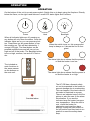
On the bottom of the unit is a main power switch. Switch this on to begin using the fireplace. Directly
below the flame, on the right hand side are 3 small LED status lights and 3 buttons.
Power
When all indicator lights are off, pressing on
any button will only show the status. Once the
indicator lights are on you can press any button. Press down on the power button to turn
the machine on. This will be indicated by 1
orange LED light. The Heat button can be
pressed multiple times and will turn on low,
high and off in that order. The Backlight button
turns on high, medium, low and off in that order.
Heat
Backlight
When the switch turns on, this orange pilot
lamp is always on. It shows the fire is energized.
The status light above shows that the power is
on and the heater is on low
The included remote functions in
the same manner
as the buttons on
the main unit.
The status light above shows that the power is
on and the heater is on high
Overheat alarm
The HF CBI has a thermal safety
cut-out incorporated in the heater to
prevent damage due to overheating.
This can happen if the heat outlet or
air intake is restricted in anyway.
There is an indicator lamp in the fire
picture to alert the user to the alarm
this situation. If you see the
indicator lamp the heater has gone
over temperature. Allow the unit to
cool, check the heater for
obstruction and reset the alarm
lamp by turning the main switch to
the off position and then back to on
position to reset the safety alarm
lamp.
9