1
VMware Server Virtual Machine Guide
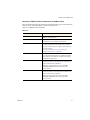
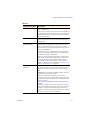
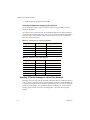
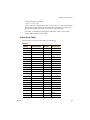
Table 3-3.
vmwtool Command
Definition
synctime [on|off]
Lets you enable or disable time synchronization between the guest operating system and the host operating system. By default, time synchronization is disabled. Use this command without any options to view the current time synchronization status.
You can synchronize the time in the guest operating system with time on the host operating system only when the time in the guest operating system is earlier than the time set in the host.
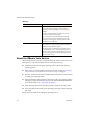
idle [on|off]
Lets you enable or disable the CPU idler. By default, the idler is turned on. The CPU idler program is included in VMware Tools for NetWare guests.
The idler program is needed because NetWare servers do not idle the processor when the operating system is idle. As a result, a virtual machine takes processor time from the host regardless of whether the NetWare server software is idle or busy. About the VMware Tools Service
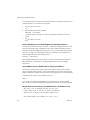
When you install VMware Tools in a virtual machine, the VMware Tools service is one of the primary components installed. The service does the following: !
Synchronizes the time of the guest operating system with the time in the host operating system.
!
Runs scripts in a virtual machine when the power state changes. See “Executing Scripts When the Virtual Machine’s Power State Changes” on page 55.
!
Executes commands in the virtual machine when you shut down or restart a Linux or Solaris guest operating system.
!
Sends a heartbeat to VMware Server so that it knows the guest operating system is running. A gauge for this heartbeat appears in the VMware Management Interface. For more information, see “Using the Status Monitor”.
!
Passes messages from the host operating system to the guest operating system.
!
Passes information between the guest operating system and a VMware Scripting API script.
The service starts when you boot the guest operating system. 68
VMware, Inc.