1
SmartStation
User Manual
For iFusion documentation in other languages and general support information, visit
http://www.thefusionphone.com
Copyright © 2011
All rights reserved. No part of this User’s Manual may be reproduced or copied by any
means without the consent of the manufacturer. The information and specification in this
document may change without prior notice.
Bluetooth trademarks are owned by Bluetooth SIG, Inc. and used under license.
FaceTime is a trademark of Apple, Inc.
Contents
Introduction . . . . . . . . . . . . . . . . . . . . . . . . . . . . . . . . . . . . . . . . . . . . . . . . . . 1
Front view . . . . . . . . . . . . . . . . . . . . . . . . . . . . . . . . . . . . . . . . . . . . . . . 1
Back view . . . . . . . . . . . . . . . . . . . . . . . . . . . . . . . . . . . . . . . . . . . . . . . 3
Setup
...................................................4
1. Choosing a Bluetooth mode . . . . . . . . . . . . . . . . . . . . . . . . . . . . . . . 4
2. Preparing the iPhone . . . . . . . . . . . . . . . . . . . . . . . . . . . . . . . . . . . . 5
3. Preparing the iFusion . . . . . . . . . . . . . . . . . . . . . . . . . . . . . . . . . . . . 6
4. Pairing the iPhone with the iFusion Station . . . . . . . . . . . . . . . . . . . 6
Making and answering calls . . . . . . . . . . . . . . . . . . . . . . . . . . . . . . . . . . . . . 7
Switching an iFusion call to the iPhone . . . . . . . . . . . . . . . . . . . . . . . . 7
Muting a call . . . . . . . . . . . . . . . . . . . . . . . . . . . . . . . . . . . . . . . . . . . . . 8
Adjusting the volume . . . . . . . . . . . . . . . . . . . . . . . . . . . . . . . . . . . . . . . . . . 8
Playing music . . . . . . . . . . . . . . . . . . . . . . . . . . . . . . . . . . . . . . . . . . . . . . . . 9
Synchronizing data . . . . . . . . . . . . . . . . . . . . . . . . . . . . . . . . . . . . . . . . . . . 10
Using iFusion with FaceTime . . . . . . . . . . . . . . . . . . . . . . . . . . . . . . . . . . . 11
Determining your Firmware version . . . . . . . . . . . . . . . . . . . . . . . . . . . . . . 11
Troubleshooting . . . . . . . . . . . . . . . . . . . . . . . . . . . . . . . . . . . . . . . . . . . . . 13
iFusion SmartStation User Manual
i
ii
iFusion SmartStation User Manual
Introduction
Congratulations on your purchase of iFusion.
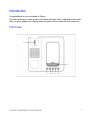
This manual shows you how to pair your iPhone with the iFusion, make and receive calls,
listen to music, charge your iPhone, and synchronize iPhone data with your computer.
Front view
iFusion SmartStation User Manual
1
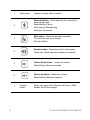
1
Handset on-hook, off-hook switch.
2
Bluetooth button – Touch and hold (for 5 seconds) to
enter pairing mode.
Rapid blinking: Pairing
Slow blinking: Reconnecting
Solid light: Connected
3
Mute button – Mutes the handset or speaker.
To unmute the call, touch it again.
Red light: Muted
4
Speaker button – Moves the audio to the speaker.
Green light: Hands-free mode (speaker is enabled)
5
Volume Down button – Lowers the volume.
Rapid blinking: Minimum reached
6
Volume Up button – Raises the volume.
Rapid blinking: Maximum reached
7
2
Hook switch
Docking
cradle
Where you connect the iPhone to the iFusion. While
docked, the iPhone charges.
iFusion SmartStation User Manual
Back view
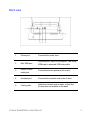
1
Power port
Connects the power cord.
2
Mini USB port
Connects the iFusion to a computer. Use a mini
USB male to standard USB male cable.
3
Stereo 3.5mm
audio jack
Connects external speakers (for music).
4
Handset port
Connects the handset cord to the iFusion.
5
Cable guide
Holds the handset cord in place, so that the
iFusion does not wobble on the desk.
iFusion SmartStation User Manual
3
Setup
You will need to pair your iPhone with the iFusion. iFusion is compatible with Bluetooth
2.1+EDR. The iFusion provides Bluetooth support for iPhones up to approximately 10
meters (33 feet) away. Direct line-of-sight provides a longer range.
After the devices have been paired, the iFusion saves the connection details in memory.
Multiple iPhones can be paired with the iFusion, but only one iPhone can be actively connected at a time.
For optimal Bluetooth performance with the iFusion Station:
•
Keep the iPhone docked in the iFusion cradle.
•
Position the iFusion away from radio frequency (RF) emission sources such as laptops or other electronic equipment, because such devices can interfere with Bluetooth communications.
Note: If more than one Bluetooth device is connected to the iPhone, it may take several
seconds for the iPhone to connect the voice path to the iFusion for incoming calls.
For this reason, we recommend that you disconnect all other bluetooth devices
from the iPhone.
1. Choosing a Bluetooth mode
Before you pair your iPhone with the iFusion Station, choose how you prefer it to work.
You can change between these work modes as needed, by re-pairing the devices.
•
Bluetooth Docked mode (recommended) – iFusion operates only when you dock
the iPhone in the iFusion cradle.
Start this mode by docking the iPhone in the iFusion cradle before you pair the
devices.
When you remove the iPhone from the cradle, the Bluetooth connection between
the devices will temporarily disconnect. To reconnect, return the iPhone to the cradle.
•
Bluetooth Undocked mode – iFusion operates whenever the iPhone enters the
iPhone’s Bluetooth range. In other words, the iPhone does not have to be docked in
the iFusion cradle in order to work.
4
iFusion SmartStation User Manual
Start this mode by leaving the iPhone out of the cradle while you pair the two
devices.
When you enter the iFusion Bluetooth range while on a voice call, the call’s audio
will remain on your iPhone (there may be a momentary interruption as the iPhone
attempts to push the call to the iFusion).
If you enter the Bluetooth range while listening to music or to a voicemail message,
the audio will automatically switch to the iFusion.
2. Preparing the iPhone
Place your iPhone in the cradle (for Bluetooth Docked mode).
On the iPhone, go to Settings > General > Bluetooth. Turn on Bluetooth. The iPhone is
now discoverable, and it searches for other Bluetooth devices nearby.
iFusion SmartStation User Manual
5
3. Preparing the iFusion
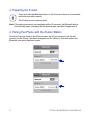
Touch and hold the Bluetooth button on the iFusion for three to five seconds,
until the button blinks rapidly.
The iFusion is now in pairing mode.
Note: If the pairing process is not completed within 60 seconds, the Bluetooth button
blinks slowly again, indicating that the process was cancelled. Repeat step 3.
4. Pairing the iPhone with the iFusion Station
Once the iFusion is listed on the iPhone screen, tap iFusion xxxxxx to pair the two
devices. On the iPhone, the status changes from Not Paired to Connected when the
Bluetooth connection has been made.
6
iFusion SmartStation User Manual
After the connection has been established, the Bluetooth button on the iFusion glows with
a steady blue light.
If the connection is lost, the button blinks slowly. When you re-dock or bring the iPhone
back into range, the light glows a steady blue again after it reconnects.
If you try to connect an iPhone to the iFusion while another iPhone is already connected,
the connection request is refused and you see an error message.
While the devices are paired and connected, all sounds will be played through the
iFusion, including key presses and sounds from iPhone applications. You can suppress
key clicks through your iPhone’s Settings > Sounds menu.
Making and answering calls
You can call a number from your iPhone’s Contacts list, Call log, dial pad, or Favorites list.
If the iPhone is docked when you make a call, the iFusion speaker automatically comes
on unless you pick up the handset.
When a call comes in, both the iPhone and the iFusion ring. To answer the call on the iFusion, either pick up the handset or touch the Speaker button on the iFusion.
To end a call, touch the Speaker button on the iFusion (if you were on speaker) or return
the handset to its cradle.
Switching an iFusion call to the iPhone
You can switch a call from the iFusion to the iPhone, and vice versa.
In Bluetooth Docked mode, just remove the iPhone from the cradle to switch the call to
the iPhone.
In Bluetooth Undocked mode, remove the iPhone from the cradle (if it is docked). Then
tap the iPhone audio source button and tap iPhone.
iFusion SmartStation User Manual
7
To switch a call back to the iFusion Station, just place the iPhone in the iFusion cradle.
Muting a call
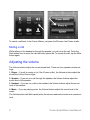
While talking on the handset or through the speaker, you can mute the call. Touch the
Mute button once to mute the call; the button glows red. To unmute the call, tap the Mute
button again.
Adjusting the volume
The Volume buttons adjust the current sound level. There are four separate volume settings:
1. Ringer – If a call is coming in (or if the iFusion is idle), the Volume buttons adjust the
sound level of the iFusion ringer.
2. Speaker – If you are on a call through the speaker, the Volume buttons adjust the
sound level of the speaker.
3. Handset – If you are on a call on the handset, the Volume buttons adjust the sound
level of the handset.
4. Music – If you are playing music, the Volume buttons adjust the sound level of the
music.
The Volume buttons will blink rapidly when the volume reaches the minimum or maximum
level.
8
iFusion SmartStation User Manual
If power to the iFusion is interrupted, all volume levels will return to their default settings.
To mute the ringer on the iFusion, touch the Volume Down button until it blinks rapidly.
(This will not mute the iPhone ringer.)
Pressing an iPhone Volume key will mute both the iPhone ringer and the iFusion ringer
for the current call.
Playing music
You can play music (or other stored audio) through the iFusion or through external speakers, if you have speakers connected. For best sound quality, we recommend that you use
amplified stereo speakers.
Just tap the iPod (on iOS4) or the Music (iOS5) icon on your iPhone to play music or
other stored audio through the iFusion speaker.
To play music or other stored audio through a set of external speakers, connect the
speaker cable to the audio jack in the back of the iFusion (external speakers are not used
for voice calls).
If a call comes in while you are playing music, the music automatically stops playing and
the iFusion rings. Once the call ends, the music resumes.
iFusion SmartStation User Manual
9
Note: While you are playing music or other audio, pressing the Speaker button has no
effect (although the button itself will glow).
Synchronizing data
You can synchronize data such as e-mail, calendar, contacts, music, photo, and other
media files between your iPhone and the computer, through iFusion.
1
Install the iPhone application software and driver on the computer.
2
Use a mini-USB to USB standard cable (not provided) to connect the computer and
the iFusion.
3
Plug your iPhone to the docking cradle. The computer acknowledges the iPhone.
4
To synchronize data between your iPhone and the computer, follow the instructions
provided with the iPhone application software.
Notes:
•
It will take slightly longer to charge the iPhone when the iFusion is connected to a
computer, because the charging power will come from the computer.
•
The USB cable is only for data synchronization; to power your iFusion, you must
connect and plug in the power cord.
10
iFusion SmartStation User Manual
Using iFusion with FaceTime
Placing your iPhone in the cradle of the iFusion puts it at a great angle for FaceTime
video chats. Here are some tips for using iFusion with FaceTime:
•
FaceTime is supported only on iPhone 4 and later
•
To use the iFusion handset on a video chat, you must upgrade the iPhone iOS to
version 4.2 or later
•
In your iPhone, go to Settings > Phone and make sure FaceTime is set to On
•
Make sure Wi-Fi is used on both ends
Determining your Firmware version
Some iFusion SmartStation Station features are only available on newer models. For
example, the Docked/Undocked Bluetooth mode described on page 4 is available only on
iFusion models with firmware version 17 or later.
To determine which firmware your iFusion has, follow these steps:
1
Turn your iFusion over and lift up the cover protecting the power cord and handset
cord.
2
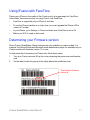
On the label, locate this group of four digits above the middle bar code:
This indicates firmware
version B
iFusion SmartStation User Manual
11
12
iFusion SmartStation User Manual
Troubleshooting
Here are solutions to some common problems that you may encounter when using the
iFusion. Also refer to the FAQ (Frequently Asked Questions) document on the Support
tab at www.thefusionphone.com.
Problem
It takes a few seconds for the iFusion to connect to an incoming call.
Possible Cause
Remedy
More than one Bluetooth device is connected to the iPhone.
If you connect more than one Bluetooth headset to the
iPhone, then the iPhone may take the several seconds to connect the voice path to the iFusion for an
incoming call.
For optimal performance, disconnect all other Bluetooth devices from the iPhone and leave the iPhone
docked in the iFusion cradle while in use.
Problem
I cannot hear the music.
Possible Cause
Remedy
The volume is set too
low.
While the music is playing, touch the Volume Up button to increase the sound level.
Check the external sound device volume setting; it
can override the iFusion setting. Be sure the device
has power.
Check the iPhone volume setting. It may be overriding
the iFusion setting.
iFusion SmartStation User Manual
13
The speaker is not connected.
Verify that the speaker cable is properly connected to
the 3.5mm stereo audio jack in the back of the iFusion. You can disconnect the cable to hear music
through the iFusion speaker.
Problem
The iPhone call is not going through the iFusion.
Possible Cause
Remedy
The iFusion may not be
connected to your
iPhone.
Check whether the Bluetooth button is blinking. A slow
blinking light means the iPhone is not connected to the
iFusion. Try to re-pair the devices.
Check that the audio source on the iPhone is set to
iFusion.
On the iPhone, check that iFusion shows as a device
under Settings > Bluetooth.
Problem
The computer does not recognize my iPhone when the iFusion is connected via a USB
cable.
Note: Before troubleshooting the iFusion USB connection, ensure that your iPhone works
correctly while it is directly connected to the computer.
Possible Cause
Remedy
The iPhone driver is not
installed on the computer.
Install the iPhone driver by following the instructions
in the iPhone User Manual.
14
iFusion SmartStation User Manual
The USB cable is not
properly connected.
The mini end of the USB cable plugs into the back of
the iFusion. The USB standard A end plugs into the
USB connector on the computer.
Try a different USB port on the computer; sometimes
front ports are not active.
The iPhone is not properly
connected to the cradle.
If your iPhone does not have a case, it may not
attach properly to the connector in the cradle of the
iFusion.
Insert the cushion (provided) in the bottom of the cradle so that the iPhone sits correctly.
If you need to remove the cushion when you put your
iPhone in a case, pull the cushion up by the notch on
its right side.
Problem
The iPhone does not charge.
Possible Cause
Remedy
The iPhone is not properly
connected.
If your iPhone does not have a case, it may not
attach properly to the connector in the cradle of the
iFusion.
Insert the cushion (provided) in the bottom of the
cradle so that the iPhone sits correctly.
If you need to remove the cushion when you put
your iPhone in a case, pull the cushion up by the
notch on its right side.
iFusion SmartStation User Manual
15
Problem
The iPhone cannot locate my iFusion.
Possible Cause
Remedy
The iPhone was set to forget
the iFusion.
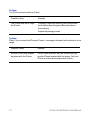
Choosing Forget this device on the iPhone Bluetooth tab removes the paired Bluetooth device
from memory.
Repeat the pairing process.
Problem
When I try to connect the iPhone to iFusion, a message indicates that the phone is not in
range.
Possible Cause
Remedy
Another iPhone may already
be paired with the iFusion.
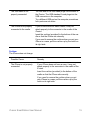
If the iFusion Bluetooth key has a solid blue light,
another iPhone is paired with the device. Only one
iPhone at a time can be paired with iFusion.
16
iFusion SmartStation User Manual
Problem
My iFusion plays music and other audio but will not play my phone calls.
Possible Cause
Remedy
The Bluetooth profile for
phone calls must be
restored.
The iFusion Bluetooth connection consists of two
profiles; one for music and sounds, another for
phone calls. To restore the iPhone-to-iFusion connection:
1. On your iPhone, choose Settings > General >
Bluetooth.
2. In the Bluetooth device list, tap the blue right
arrow beside iFusion xxxxxxx.
3. Tap Forget this Device.
4. Turn off your iPhone (hold the power button
down, then move the slider to the right).
5. Unplug the iFusion. Wait 10 seconds, and then
plug it back in.
7. Turn on your iPhone.
8. Pair your iPhone with the iFusion again.
FCC Notice
This device complies with part 15 of the FCC Rules. Operation is subject to
the following two conditions: (1) This device may not cause harmful interference, and (2) this device must accept any interference received, including interference that may cause undesired operation.
This device has been tested and found to comply with the limits for a Class B digital
device, pursuant to Part 15 of the FCC Rules. These limits are designed to provide
reasonable protection against harmful interference in a residential installation. This
device generates, uses and can radiated radio frequency energy and, if not installed and
used in accordance with the instructions, may cause harmful interference to radio
communications. However, there is no guarantee that interference will not occur in a
particular installation. If this device does cause harmful interference to radio or television
iFusion SmartStation User Manual
17
reception, which can be determined by turning the device off and on, the user is
encouraged to try to correct the interference by one or more of the following measures:
•
Reorient or relocate the receiving antenna.
•
Increase the separation between the device and the receiver.
•
Connect the device into an outlet on a circuit different from that to which the
receiver is connected.
•
Consult the dealer or an experienced radio/TV technician for help.
Users are not permitted to make changes or modify the device in any way. Changes or
modifications not expressly approved by the AltiGen will void the user's authority to operate the device.
Industry Canada
Operation is subject to the following two conditions: (1) This device may not cause interference, and (2) This device must accept any interference, including interference that
may cause undesired operation of the device. The term “IC:” before the certification/registration number only signifies that registration was performed based upon a Declaration
of Conformity indicating that Industry Canada technical specifications were met. It does
not imply that Industry Canada approved the device.
Ce dispositif est conforme à la norme CNR-210 d'Industrie Canada applicable aux appareils radio exempts de licence. Son fonctionnement est sujet aux deux conditions suivantes: (1) le dispositif ne doit pas produire de brouillage préjudiciable, et (2) ce dispositif
doit accepter tout brouillage reçu, y compris un brouillage susceptible de provoquer un
fonctionnement indésirable.
CE
This device is CE marked according to the provisions of the R & TTE Directive (99/5/EC).
Hereby, AltiGen Corporation declares that this device is in compliance with the essential
requirements and other relevant provisions of Directive 1999/5/EC.
Please note that this device uses radio frequency bands not harmonised within EU.
Within the EU this device is intended to be used in Austria, Belgium, Denmark, Finland,
18
iFusion SmartStation User Manual
France, Germany, Greece, Ireland, Italy, Luxembourg, The Netherlands, Portugal, Spain,
Sweden, United Kingdom and within EFTA in Iceland, Norway, and Switzerland.
Bluetooth
The Bluetooth® word mark and logos are owned by the Bluetooth SIG, Inc. and use of
such marks by AltiGen are under license. Other trademarks and trade names are those of
their respective owners.
WEEE Notice
The WEEE logo on the product or on its box indicates that this product
must not be disposed of or dumped with your other household waste. You
are liable to dispose of all your electronic or electrical waste equipment by
relocating over to the specified collection point for recycling of such
hazardous waste. Isolated collection and proper recovery of your
electronic and electrical waste equipment at the time of disposal will allow
us to help conserve natural resources. Moreover, proper recycling of the electronic and
electrical waste equipment will ensure safety of human health and environment. For more
information about electronic and electrical waste equipment disposal, recovery, and collection points, please contact your local city center, household waste disposal service,
shop from where you purchased the equipment, or manufacturer of the equipment.
RoHS Compliance
This product is in compliance with Directive 2002/95/EC of the European Parliament and
of the Council of 27 January 2003, on the restriction of the use of certain hazardous
substances in electrical and electronic equipment (RoHS) and its amendments.
iFusion End-user License Agreement
THE IFUSION SMARTSTATION PRODUCT (THE "PRODUCT") CONTAINS
CERTAIN COMPUTER PROGRAMS AND OTHER PROPRIETARY MATERIAL (THE "SOFTWARE"), THE USE OF WHICH IS SUBJECT TO THIS
END USER SOFTWARE LICENSE AGREEMENT ("EULA"). IF YOU ("END
iFusion SmartStation User Manual
19
USER") USE THE PRODUCT IN ANY MANNER, YOU ACCEPT THE
TERMS AND CONDITIONS SET FORTH IN THIS EULA IN THEIR
ENTIRETY.
1.LICENSE
Subject to the terms and conditions of this EULA, AltiGen Communications,
Inc. ("AltiGen") grants End User a limited, non-exclusive, non-transferable
(except as expressly permitted herein), non-sublicenseable license to execute
and use the Software in object code form solely on the Product ("License").
End User has no right to receive any source code or design documentation
relating to the Software.
2.RESTRICTIONS
AltiGen shall at all times retain title, all ownership rights, and all intellectual
property rights in and to the Software and any derivative works thereof.
Except as expressly set forth in the License above, all rights are reserved by
AltiGen. Without limiting the generality of the foregoing, End User shall not,
nor shall End User allow any third party to: (a) decompile, disassemble,
decrypt, extract, or otherwise reverse engineer or attempt to reconstruct, or
discover any source code or underlying ideas, algorithms, or file formats of, or
used in, the Software by any means whatsoever; (b) remove or conceal any
product identification, copyright or other notices contained in or on the Software or accompanying documents; (c) reproduce or modify the Software,
incorporate it into or with other software or create a derivative work of any part
of the Software or (d) allow for timesharing, service bureau, subscription service, or rental use of the Software. End User shall not publish or provide any
results of benchmark tests run on the Software to a third party without AltiGen's prior written consent.
The Software is AltiGen's confidential information and contains trade secrets.
It is protected by copyright and other intellectual property laws of the United
States and international treaties and other applicable law. The License is personal to End User. End User shall not assign, sublicense or transfer the
License or this EULA without AltiGen's prior written approval.
20
iFusion SmartStation User Manual
3.TERMINATION OF LICENSE
The License is effective until terminated. The License shall automatically terminate without notice if End User fails to comply with any term or condition set
forth in this EULA. Upon termination of the License, End User shall immediately cease all use of the Software. End User's obligations under this EULA
shall survive termination.
4.WARRANTY DISCLAIMER
TO THE MAXIMUM EXTENT PERMITTED BY LAW, THE SOFTWARE AND
THE ACCOMPANYING DOCUMENTATION ARE PROVIDED "AS IS" AND
"AS AVAILABLE," WITHOUT ANY WARRANTY, WHETHER EXPRESS,
IMPLIED, STATUTORY, OR OTHERWISE INCLUDING WITHOUT LIMITATION THE IMPLIED WARRANTIES OF MERCHANTABILITY, TITLE, NONINFRINGEMENT OF THIRD PARTY RIGHTS, AND FITNESS FOR A PARTICULAR PURPOSE.
5.LIMITATION OF LIABILITY
TO THE MAXIMUM EXTENT PERMITTED BY LAW, IN NO EVENT SHALL
ALTIGEN BE LIABLE FOR PERSONAL INJURY, OR ANY DIRECT, INCIDENTAL, SPECIAL, INDIRECT OR CONSEQUENTIAL DAMAGES WHATSOEVER, INCLUDING, WITHOUT LIMITATION, DAMAGES FOR LOST
PROFITS, LOSS OF DATA, BUSINESS INTERRUPTION OR ANY OTHER
COMMERCIAL DAMAGES OR LOSSES, ARISING OUT OF OR RELATED
TO YOUR USE OF OR INABILITY TO USE THE SOFTWARE OR ANY
THIRD PARTY SOFTWARE OR PRODUCTS IN CONJUNCTION WITH THE
SOFTWARE, HOWEVER CAUSED, REGARDLESS OF THE THEORY OF
LIABILITY (CONTRACT, TORT OR OTHERWISE) AND EVEN IF ALTIGEN
HAS BEEN ADVISED OF THE POSSIBILITY OF SUCH DAMAGES. SOME
JURISDICTIONS DO NOT ALLOW THE LIMITATION OF LIABILITY FOR
PERSONAL INJURY, OR OF INCIDENTAL OR CONSEQUENTIAL DAMAGES, SO THIS LIMITATION MAY NOT APPLY TO YOU. THE FOREGOING
LIMITATIONS APPLY EVEN IF THE ABOVE STATED REMEDY FAILS OF
ITS ESSENTIAL PURPOSE.
6.U.S. GOVERNMENT
The Software and any accompanying documentation constitute commercial
computer software and commercial computer software documentation devel-
iFusion SmartStation User Manual
21
oped exclusively at private expense, and are in all respects proprietary property belonging solely to AltiGen or its licensors. If End User is licensing the
Software and accompanying documentation on behalf of any part of the U.S.
Government, the following provisions apply: The Software and accompanying
documentation are deemed to be "commercial computer software" and "commercial computer software documentation", respectively, pursuant to DFAR
Section 227.7202 and FAR 12.212, as applicable. Any use, modification,
reproduction, release, performance, display or disclosure of the Software and/
or the accompanying documentation by the U.S. Government or any of its
agencies shall be governed solely by this EULA and shall be prohibited except
to the extent expressly permitted by this EULA. Manufacturer is: AltiGen
Communications, Inc., 410 East Plumeria Drive, San Jose, CA 95134. Except
as expressly licensed hereunder, all rights are reserved.
7.COMPLIANCE WITH LAWS
AltiGen's Software is subject to U.S. export control laws and may be subject to
export or import regulations in other countries. End User shall comply with all
applicable federal, state, local and foreign laws and ordinances including, but
not limited to all export and import laws, restrictions and regulations of the
Department of Commerce or other U.S. or foreign agency or authority.
8.GENERAL
Any notice, report, approval, or consent required or permitted by this EULA
shall be in writing. If any provision of this EULA shall be adjudged by any
court of competent jurisdiction to be unenforceable or invalid, that provision
shall be limited or eliminated to the minimum extent necessary so that the obligations of the parties shall remain in full force and effect and enforceable.
End User agrees that a material breach of this EULA by it would cause irreparable injury to AltiGen for which monetary damages would not be an adequate
remedy and that AltiGen shall be entitled to equitable relief in addition to any
remedies it may have hereunder or at law. Any amendments or waivers shall
be effective only if made in writing by non-preprinted agreements clearly
understood by both parties to be an amendment or waiver and signed by an
authorized representative of each party. This EULA is the final and complete
agreement between the parties relating to the license of the Software.
4290-0025 Rev D
22
iFusion SmartStation User Manual