1
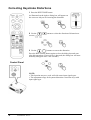
Correcting Keystroke Distortions
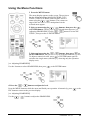
1 Press the KEYSTONE button
As illustrated on the right, a dialog box will appear on
the screen to aid you in correcting the distortion.
2 Use the
correct (
/
,
)
buttons to select the direction of distortion to
3 Use the
,
buttons to correct the distortion
Press the KEYSTONE button again to close the dialog box and complete this operation. (If no activity is detected, the dialog box will automatically disappear after a few seconds.)
Control Panel
NOTE:
• This function may not work well with some input signal types.
• The adjustment range for keystone distortion correction varys with
input signal type.
18
ViewSonic PJ751