1
Troubleshooting Checklist
Routine maintenance to this openGear product is not required. In the event of problems with your
MUX-6258-A series card, the following basic troubleshooting checklist may help identify the
source of the problem. If the frame still does not appear to be working properly after checking all
possible causes, please contact your openGear products distributor, or the Technical Support
department at the numbers listed under the “Contact Us” section.
1. Visual Review — Performing a quick visual check may reveal many problems, such as
connectors not properly seated or loose cables. Check the card, the frame, and any
associated peripheral equipment for signs of trouble.
2. Power Check — Check the power indicator LED on the distribution frame front panel
for the presence of power. If the power LED is not illuminated, verify that the power
cable is connected to a power source and that power is available at the power main.
Confirm that the power supplies are fully seated in their slots. If the power LED is still
not illuminated, replace the power supply with one that is verified to work.
3. Input Signal Status — Verify that source equipment is operating correctly and that a
valid signal is being supplied.
4. Output Signal Path — Verify that destination equipment is operating correctly and
receiving a valid signal.
5. Unit Exchange — Exchanging a suspect unit with a unit that is known to be working
correctly is an efficient method for localizing problems to individual units.
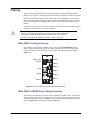
Bootload Button
In the unlikely event of a complete card failure, you may be instructed by a Ross Technical
Support specialist to perform a complete software reload on the card.
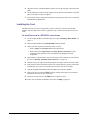
To reload the software
1. Eject the card from the frame.
2. Press and hold the Bootload button, while re-inserting the card into the frame.
3. Release the button.
7–2 • Service Information
•
The STATUS OK LED will flash green while the card is waiting for a new software
load.
•
If a new software load is not sent to the card within 60 seconds, the card will
attempt to restart with its last operational software load.
•
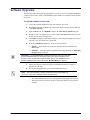
Software loads can be sent to the card via DashBoard.
MUX-6258-A Series User Manual (Iss. 04)