1
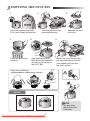
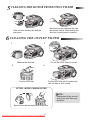
5 CLEANING THE MOTOR PROTECTION FILTER
Remove the motor protection filter from
the vacuum cleaner. Shake and tap the
dust from it and put back in machine.
Take out both the dust bin and the
dust pack.
6 CLEANING THE OUTLET FILTER
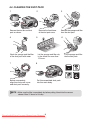
1
2
Remove the dust bin.
3
Pull out the HEPA Filter as shown.
4
Dust the HEPA filter.
Put the HEPA filter into the main body
until you hear a ‘click’ sound.
OPTION - MICRO CARBON FILTER
NOTE :
Replacement filters are available at your local Samsung
distributor.
Remove and replace the blocked outlet filter.
Downloaded From Vacuum-Manual.com Manuals9