1
Services
Your phone features a WAP browser, allowing you to use the phone for
mobile Internet connectivity. You can browse the online services offered
by the network operator or ISP, such as information on financial news,
sports, travel, and entertainment. To use the phone to get online,
necessary UMTS or GPRS configuration, and WAP settings must be
made.
To activate the mobile Internet connectivity, consult your network
operator. In general, the network operator will automatically transmit
the needed settings to your phone. If not, you will need to manually
configure necessary settings. For further details, contact your network
operator.
WAP Browser
Starts up the browser and connects to the homepage.
WAP Messages
Takes you to the WAP messages Inbox.
WAP Settings
Allows you to configure settings for different network operators' WAP
servers, and then select the desired server to get online.
1. Scroll to the desired server and press
(Option) and select Edit to
manually configure the server's settings as follows:
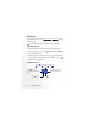
• Homepage
Sets the homepage that the browser will link to when it is started
up.
62
Menus