1
Panel
Controls
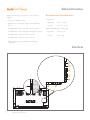
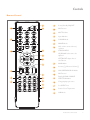
You can control the ActivPanel Touch in two ways:
•
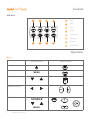
With the buttons on the control panel at the front of the device.
•
With the buttons on the remote control.
You can access basic controls, as well as On-Screen Display (OSD) menus for fine-tuning audio and visual settings.
Control Panel
B
A
MENU
1
1
2
3
4
5
6
2
ActivPanel Touch ON/OFF
Select Main Menu
3
Increase/Decrease
volume
Increase/Decrease
value of selected item
4
Switch to next/
previous program
Select item to be
adjusted
5
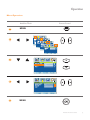
MENU
On Screen Display
Mode (OSD)
Basic Mode
SOURCE
SOURCE
6
Select Signal Source Menu, then select
signal source
Power ON
Standby
10
ActivPanel Touch User Guide