1
Description of functions 8
8
Description of functions
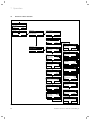
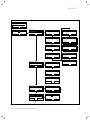
The list entry "Installer level" in selection level 1 of the
menu structure has five sub-entries with further selection levels:
– Service information
– System configuration
– Sensor/ actuator test
– Screed drying function
– Change code
Functions with read-out options and functions with setup options are grouped together here.
The list of the second selection level "System configuration" is structured by components of the heating system:
– System
– Heat generator
– HEATING 1
– Domestic hot water
– Radio communication
The message is switched off if:
– the date is in the future.
– the initial date 01.01.2011 is set.
8.2
System configuration: System
8.2.1
Reading the system status
Menu ¬ Installer level ¬ System configuration
[System ----] ¬ Status
This function allows you to read the status of the heating system. If there is no fault, the message "OK"
appears here. If there is a fault, the status "Fault" is displayed. If you press the right function key, the list of
error messages will be displayed.
Error messages are described in (¬ Section 10.2).
If an expansion module VR 61/2 is connected, also:
– HEATING 2
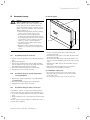
8.2.2 Reading the water pressure of the heating
system
If an expansion module VR 68/2 is connected, also:
– Solar
– Solar cylinder 1
– Solar cylinder 2
– 2nd Difference control
Menu ¬ Installer level ¬ System configuration
[System ----] ¬ Water pressure
With this function, you can read the water pressure of
the heating system, if the boiler provides this information.
8.1
8.2.3 Reading the DHW heating status
8.1.1
Service information
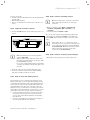
Entering contact details
Menu ¬ Installer level ¬ Service information ¬ Enter
contact details
You can enter your contact details (company name and
phone number) in the controller. When the date of the
next service appointment is reached, the operator can
view the data in the display of the controller.
You must run through each digit of the company name
and telephone number and set them separately.
8.1.2
Menu ¬ Installer level ¬ System configuration
[System ----] ¬ Domestic hot water
This function allows you to read the hot water production status (i.e. Charged, Not charged).
8.2.4 Reading the collector temperature
Only with a connected VR 68/2
Menu ¬ Installer level ¬ System configuration
[System ----] ¬ Collector temp
This function allows you to read the current temperature
at the collector sensor.
Entering the service date
Menu ¬ Installer level ¬ Service information ¬ Service date
In the controller, you can save a date (day, month, year)
for the next regular service.
When the date for the next service appointment is
reached, the message "Service" is displayed in the basic
display of the controller.
If a service appointment is saved in the boiler, the message "Service heat generator" appears on the boiler
when this date is reached.
Installation instructions VRC 470f 0020124645_00
27