1
OneLINK
Overview:
The Vaddio OneLINK for Cisco Precision HD Cameras is built for
use with the Cisco PrecisionHD 1080p 12x and PrecisionHD 720p
high definition PTZ cameras and the Cisco C20, C40, C60 and
C90 codecs (camera and codec not included).
The OneLINK system uses Vaddio’s Super-HSDS™ active high
speed digital bus technology for video, power and control over
Cat-5e, but with one very important difference: OneLINK uses
only One (1) Cat-5e cable for HD digital video, power and control
at distances up to 125’ (38.1m)…it’s remarkable really.
The OneLINK system sends and regulates power to the camera,
provides a bi-directional control channel and transmits/receives
uncompressed HD digital video, up to and including 1080p/60Hz, all
on one (1) Cat-5e cable, hence the name, OneLINK.
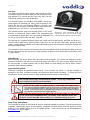
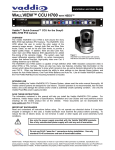
OneLINK for Cisco PrecisionHD 1080p 12x
camera with wall mount and EZIM mounted
behind the camera (camera & codec not included)
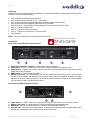
The OneLINK is a complete peripheral system and comes with the Quick-Connect, the EZIM, and three (3) 1’
(30.5cm) native cables at the camera (HDMI, 5.5mm OD x 2.1 mm ID Coax power cable, and RJ-45 patch
cable). A totally awesome camera mount made specifically to mount the PrecisionHD series PTZ cameras and
the EZIM is also included.
The OneLINK for Cisco Precision HD cameras also has many additional features including the ability to forward
RS-232 information from the camera to the codec and auto recognition of the camera when used with the Cisco
C-series codecs.
Intended Use:
Before operating the device, please read the entire manual thoroughly. The system was designed, built and
tested for use indoors, and with the provided power supply and cabling. The use of a power supply other than
the one provided or outdoor operation has not been tested and could damage the device and/or create a
potentially unsafe operating condition.
Important Safeguards:
Read and understand all instructions before using. Do not operate any device if it has been dropped or
damaged. In this case, a Vaddio technician must examine the product before operating. To reduce the risk of
electric shock, do not immerse in water or other liquids and avoid extremely humid conditions.
Use only the power supply provided with the system. Use of any unauthorized
power supply will void any and all warranties.
Please do not use “pass-thru” type RJ-45 connectors. These pass-thru type connectors do not
work well for professional installations and can be the cause of intermittent connections which
can result in the RS-232 control line failing and locking up, and/or compromising the HSDS™
signals. For best results please use standard RJ-45 connectors and test all cables for proper
pin-outs prior to use and connection to Vaddio product.
Do not use the Cisco/TANDBERG cable, part number 116627 DB-9M to RJ-45, with
the Quick-Connect OneLINK camera control port. Unpleasant things may occur.
Save These Instructions:
The information contained in this manual will help you install and operate your product. If these instructions are
misplaced, Vaddio keeps copies of Specifications, Installation and User Guides and most pertinent product
drawings for the Vaddio product line on the Vaddio website. These documents can be downloaded from
www.vaddio.com free of charge.
OneLINK for Cisco Precision HD Cameras - Installation and User Guide 342-0122 Rev. G
Page 3 of 12