1
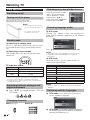
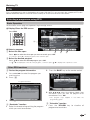
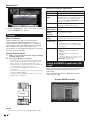
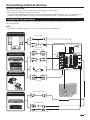
ENGLISH
• The illustrations and the OSD in this operation manual are for explanation purposes and may vary slightly from the actual
operations.
• The examples used throughout this manual are based on the LC-32DH500E and LC-32DH510E models.
• The LC-32DH500E, LC-32DH500S, LC-32DH510E and LC-32DH510S models are compatible with high definition broadcasts,
H.264 compressed (MPEG4 H.264, MPEG4 AVC, MPEG4 AVC/H.264).
ENGLISH
OPERATION MANUAL
Contents
Contents
....................................................................... 1
Introduction
................................................................ 2
Dear SHARP customer ................................................. 2
Important Safety Precautions ....................................... 2
Trademarks .................................................................. 2
Remote Control unit ..................................................... 3
TV (Front view) ............................................................. 4
TV (Top and rear view) .................................................. 4
Preparation ................................................................. 5
Supplied accessories ................................................... 5
How to detach the stand of the TV ............................... 5
Optional accessory ....................................................... 5
Inserting the batteries ................................................... 6
Using the Remote Control unit ..................................... 6
Cautions regarding the remote control unit ................... 6
Quick guide ................................................................. 7
Initial installation overview ............................................. 7
Before turning on the power ......................................... 8
Inserting a CA card ....................................................... 8
Initial Auto Installation ................................................... 9
Checking quality and signal strength ............................ 9
Watching TV ............................................................. 10
Daily operation ........................................................... 10
Switching on/off ......................................................... 10
Switching between analogue and digital broadcasts .. 10
Changing channels ..................................................... 10
Selecting an external video source .............................. 10
Selecting language ..................................................... 10
Selecting subtitle language ......................................... 10
EPG ........................................................................... 11
Selecting a programme using EPG ............................. 11
Teletext ...................................................................... 12
Using MHEG-5 application (UK only) .......................... 12
Connecting external devices ........................... 13
Introduction to connections ........................................ 13
HDMI connection ....................................................... 14
Components connection ............................................ 14
VIDEO connection ...................................................... 14
SCART connection ..................................................... 15
PC connection by HDMI (DVI) ..................................... 15
HDMI connection ....................................................... 15
Speaker/amplifier connection ..................................... 15
Menu Operation
......................................................
What is the menu? .....................................................
Common operations ..................................................
Basic Adjustment ..................................................
Picture adjustments ....................................................
AV MODE ...................................................................
Sound adjustments ....................................................
Channel settings ........................................................
Install channels ...........................................................
Time settings ..............................................................
Option settings ............................................................
Lock settings...............................................................
Useful viewing functions ....................................
Channel list ................................................................
Selecting the channel you want display .....................
Channel information display (DTV only) .......................
Selecting the picture format ........................................
Selecting the picture format manually .........................
Other useful features ...........................................
Setting when using external devices ...........................
Input source settings ..................................................
Connecting a USB device (Media Player function) ......
MEDIA PLAYER FUNCTION .......................................
PHOTO MODE ...........................................................
MUSIC MODE ............................................................
MOVIE MODE ............................................................
TEXT MODE ...............................................................
USB device compatibility ............................................
Power save settings ...................................................
Abbreviation list ..........................................................
Timeshift function .......................................................
Appendix ....................................................................
Troubleshooting ..........................................................
Information on the software license for this product ....
Fixing the TV on a wall.................................................
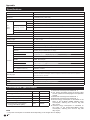
Specifications .............................................................
Environmental Specifications ......................................
Information about EU Eco-Label .................................
End of life disposal .....................................................
16
16
16
17
17
17
17
18
18
18
18
19
20
20
20
20
20
20
21
21
21
21
21
21
22
22
22
23
23
23
24
25
25
25
25
26
26
27
28
1
Introduction
Dear SHARP customer
Thank you for your purchase of the SHARP LCD colour TV product. To ensure safety and many years of troublefree operation of your product, please read the Important Safety Precautions carefully before using this product.
Important Safety Precautions
• Cleaning—Unplug the AC cord from the AC outlet before cleaning the product. Use a damp cloth to clean the product.
Do not use liquid cleaners or aerosol cleaners.
• Use a soft damp cloth to gently wipe the panel when it is dirty. To protect the panel, do not use a chemical cloth to clean
it. Chemicals may cause damage or cracks in the cabient of the TV.
• Water and moisture—Do not use the product near water, such as bathtub, washbasin, kitchen sink,
laundry tub, swimming pool and in a wet basement.
• Do not place vases or any other water-filled containers on this product. The water may spill onto the
product causing fire or electric shock.
• Stand—Do not place the product on an unstable cart, stand, tripod or table. Doing so can cause the
product to fall, resulting in serious personal injuries as well as damage to the product. Use only a cart,
stand, tripod, bracket or table recommended by the manufacturer or sold with the product. When
mounting the product on a wall, be sure to follow the manufacturer’s instructions. Use only the
mounting hardware recommended by the manufacturer.
• When relocating the product placed on a cart, it must be moved with utmost care. Sudden stops,
excessive force and uneven floor surface can cause the product to fall from the cart.
• Ventilation—The vents and other openings in the cabinet are designed for ventilation. Do not cover or
block these vents and openings since insufficient ventilation can cause overheating and/or shorten the
life of the product. Do not place the product on a bed, sofa, rug or other similar surface, since they can
block ventilation openings. This product is not designed for built-in installation; do not place the product in an enclosed
place such as a bookcase or rack, unless proper ventilation is provided or the manufacturer’s instructions are followed.
• The LCD panel used in this product is made of glass. Therefore, it can break when the product is dropped or impact
applied. If the LCD panel is broken, be careful not to be injured by broken glass.
• Heat sources—Keep the product away from heat sources such as radiators, heaters, stoves and other
heat-generating products (including amplifiers).
• Headphones—Do not set the volume at a high level. Hearing experts advise against extended listening at
high volume levels.
• To prevent fire, never place any type of candle or naked flames on the top or near the TV set.
• To prevent fire or shock hazard, do not place the AC cord under the TV set or other heavy items.
• Do not display a still picture for a long time, as this could damage the LCD screen.
• There is power consumption always if main plug is connected.
• Servicing—Do not attempt to service the product yourself. Removing covers can expose you to high
voltage and other dangerous conditions. Request a qualified person to perform servicing.
The LCD panel is a very high technology product, giving you fine picture details.
Due to the very large number of pixels, occasionally a few non-active pixels may appear on the screen as a fixed point of
blue, green or red. This is within product specifications and does not constitute a fault.
Precautions when transporting the TV
When transporting the TV, never carry it by holding onto the speakers. Be sure to always carry the TV by two people holding
it with two hands—one hand on each side of the TV.
Trademarks
• “HDMI, the HDMI logo and High-Definition Multimedia Interface are trademarks or registered trademarks of HDMI Licensing LLC.”
• Manufactured under license from Dolby Laboratories.
• “Dolby” and the double-D symbol are trademarks of Dolby Laboratories.
• The “HD ready” and “HD TV” Logos are trademark of EICTA.
• The DVB logo is the registered trademark of the Digital Video Broadcasting—DVB—project.
• DivX® is a registered trademark of DivX, Inc., and is used under license.
2
Introduction
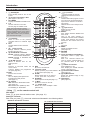
Remote control unit
1
B Standby/On
Enter standby mode or turn on the
power.
p Channel information / EPG
(See pages 11 and 20.)
DTV MENU
Display the MEDIA PLAYER screen.
0–9
Set the channel in TV mode.
Set the page in Teletext mode.
2
3
4
6
7
8
9
10
11
12
A Flashback
Press to return to the previous
selected channel or external input
mode.
DTV
Change between ATV and DTV
mode.
f Picture format
Change between different picture
formats (see page 20.)
Z Sound Mode / Timeshift
DH500: Change between different
sound modes established.
DH510: Activate or deactivate the
Timeshift.
a/b/c/d (Cursor)
Select a desired item on the
setting screen.
OK
Execute a command within the
menu screen.
TV/DTV: Display the programme
list. (See page 20.)
END
Exit the menu screen.
EPG
DTV: To display EPG (Electronic
Programme Guide) screen.
(See page 11.)
m Teletext
ATV: Select the TELETEXT mode
(See page 12.)
DTV: Select DTV (MHEG-5) data
broadcasting or TELETEXT.
When one of the 5 Nordic countries
(Sweden, Norway, Finland, Denmark or
Iceland) is selected in the country setting
of Auto Installation, DTV channels are 4
digits. When another country is selected,
DTV channels are 3 digits.
5
13 ESG
Show the favourite list.
14 3 Freeze / Hold
Freeze a picture (TV) or the Teletext
on the screen (See page 12)
15 SLEEP
Set the sleep timer on (in units of
10 min. up to max. 4 hr) and off.
16 AV MODE
Select a picture mode (See page 17.)
17 e Mute
Switch the sound on and off.
18 2 Audio mode
Select the sound multiplex mode.
(See below.)
19 i (+/-) Volume
i (+) Increase the volume.
i (-) Decrease the volume.
20 P (r/s)
TV/DTV: Select the program or move
up or down the channel list pages.
Input source: Switch to TV or DTV
input mode.
Teletext: Move to the next/previous
page.
21 b Input source
Select an input source.
(See page 10.)
22 RADIO
DTV: Switch between RADIO and
DTV mode.
•Due to the large variation in
transmitted volume levels in RADIO
mode, some stations will produce
distortion if the volume level is set
too high.
23 PC
Not used.
24 MENU
Display the MENU screen.
(See page 16.)
25 RETURN
Not used.
26 Colour (Red/Green/Yellow/Blue)
TELETEXT: Select a page. (See
page 12.)
DTV: The coloured buttons are
used to select correspondingly to
the coloured items in the menu
screen.
27 [ Subtitle for Teletext
ATV: Subtitles on / off.
DTV: Display the subtitle selection
screen. (See page 12.)
28 k Reveal hidden Teletext
(See page 12.)
29 v Top/Bottom/Full
Switch the Teletext image to Top,
Bottom or Full.
30 1 Subpage
(See page 12.)
• Using 2 on the remote control unit
DTV mode:
Press 2 to open the multi audio screen. (See page 10.)
Analogue TV mode:
Each time you press 2, the mode switches as illustrated in the following tables:
NICAM TV broadcasts selection
A2 TV broadcasts selection
Singnal
Selectable items
Singnal
Selectable items
Stereo
NICAM STEREO, MONO
Stereo
STEREO, MONO
Bilingual
NICAM CH A, NICAM CH B, NICAM
CH AB, MONO
Bilingual
CH A, CH B, CH AB
Monoaural
NICAM MONO, MONO
Monoaural
MONO
3
Introduction
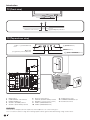
TV (Front view)
B (Standby/On) indicator
Remote control sensor
TV (Top and rear view)
i(k/l) (Volume buttons)
a (Power button)
(MENU button)
P(r/s)
(Programme (channel) buttons)
b (INPUT SOURCE button)
!
%
&
'
!
(
"
"
$
#
USB terminal
COMPONENTS / AV terminals
HEADPHONES jack
SCART 1 (AV/RGB) terminal
SCART 2 (AV/S-VIDEO) terminal
1
2
3
4
5
6
7
8
9
10
Antenna input terminal
OUTPUT (DIGITAL AUDIO) terminal
SERVICE connector (jack 3.5mm)
HDMI 1 (HDMI/AUDIO-DVI)
HDMI 2 (HDMI/AUDIO-DVI)
11 AUDIO input for DVI
12 COMMON INTERFACE slot
13 AC INPUT terminal
WARNING
• Excessive sound pressure from earphones and headphones can cause hearing loss.
• Do not set the volume at a high level. Hearing experts advise against extended listening at high volume levels.
4
Preparation
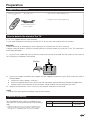
Supplied accessories
Remote control unit
(g1)
• “AA” size zinc-carbon battery (g2)
AC cord (g1)
• Operation manual (This publication)
Product shape varies in
some countries.
How to detach the stand of the TV
• This TV is supplied with the stand attached.
• If you need to detach the stand (e.g. to mount the TV on the wall), read carefully these instructions.
CAUTION
• Before detaching (or attaching) the stand, unplug the AC cord from the AC INPUT terminal.
• Before starting to perform, spread a cushioning over the surface of where you will lay the TV on. This will prevent
it from being damaged.
1 Lay the TV on a table with the way that the stand would stay out of the table and the screen on the surface of
the cushioning as indicated in the drawing.
Cushion
Cojín blando
2
Using a star shaped screwdriver of the proper size (no supplied), remove the screws which fasten the stand as
indicated below:
a.
b.
c.
3
Loosen four screws (Approx. a half-turn)
Unscrew completely three of four screws (two from the bottom area and the other one from the upper area)
Hold the stand in one hand with the way that the it will not fall down on unscrewing the last screw.
Keep the stand and four screws in case you may need to attach them in the future.
NOTE
• To attach the stand, perform the above steps in reverse order.
Optional accessory
The listed optional accessories are available for this
LCD colour TV. Please purchase them at your nearest
shop.
No.
1
Part name
Wall mount bracket
Part number
AN-37AG5
• Additional optional accessories may be available in the
near future. When purchasing, please read the newest
catalogue for compatibility and check the availability.
5
Preparation
Inserting the batteries
Before using the TV for the first time, insert two supplied “AA” size zinc-carbon batteries. When the batteries become
depleted and the remote control unit fails to operate, replace the batteries with new “AA” size batteries.
1
Hold in the tab on the battery cover and pull the cover towards the direction of the arrow.
2
Insert two supplied “AA” size batteries.
• Place batteries with their terminals corresponding to
the (+) and (-) indications in the battery compartment.
3
Close the battery cover.
CAUTION
Improper use of batteries can result in chemical leakage or explosion. Be sure to follow the instructions below.
• Do not mix batteries of different types. Different types of batteries have different characteristics.
• Do not mix old and new batteries. Mixing old and new batteries can shorten the life of new batteries or cause
chemical leakage in old batteries.
• Remove batteries as soon as they have worn out. Chemicals that leak from batteries can cause a rash. If you find
any chemical leakage, wipe thoroughly with a cloth.
• The batteries supplied with this product may have a shorter life expectancy due to storage conditions.
• If you will not be using the remote control unit for an extended period of time, remove the batteries from it.
Note on disposing batteries:
The batteries provided contain no harmful materials such as cadmium, lead or mercury.
Regulations concerning used batteries stipulate that batteries may no longer be thrown out with the household
rubbish. Deposit any used batteries free of charge into the designated collection containers set up at commercial
businesses.
Using the remote control unit
Use the remote control unit by pointing it towards the remote control sensor. Objects between the remote control
unit and sensor may prevent proper operation.
30°
30°
Remote control sensor
Cautions regarding the remote control unit
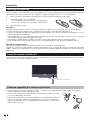
• Do not expose the remote control unit to shock. In addition, do not expose the remote control unit to liquids,
and do not place in an area with high humidity.
• Do not install or place the remote control unit under direct sunlight. The heat
may cause deformation of the unit.
• The remote control unit may not work properly if the remote control sensor of
the TV is under direct sunlight or strong lighting. In such cases, change the
angle of the lighting or the TV, or operate the remote control unit closer to the
remote control sensor.
6
Quick guide
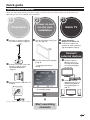
Initial installation overview
Follow the steps below one by one when using the TV for the first time. Some steps may not be necessary
depending on your TV installation and connection.
1
Preparation
n Connect an antenna cable to
the antenna terminal (Page 8).
2
3
Power on and
run the auto
installation
n Turn on the power using a on n Congratulations!
Now you can watch TV.
the TV (Page 10).
o If necessary, adjust the
(
o Run the initial auto installation
o If necessary, insert a CA card
into the CI slot to watch
scrambled broadcasts
(Page 8.)
Watch TV
(Page 9).
9Language and country
setting
antenna to attain maximum
signal reception (Page 9).
Connect
external devices
n Connect external
devices such as a
DVD player/recorder
as instructed (Pages
14 and 15).
o Connect external
p Connect the AC cord to the TV
audio devices such as
speakers/amplifier as
instructed (Pages 14
and 15).
(Page 8).
9TV Location setting
Home
Store
Product shape varies in some countries.
Start searching
channels
7
Quick guide
Before turning on the power
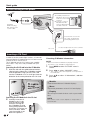
1 Carefully insert the CI
Module in the CI slot
with the contact side
forward.
2 The logo on the CI
Module must be
facing outward from
the rear of the TV.
Standard
DIN45325 plug
(IEC 169-2) 75 q
coaxial cable.
Place the TV close to the
AC outlet, and keep the
power plug within reach.
AC cord
Product shape varies in some countries.
Inserting a CA Card
In order to receive coded digital stations, a Common
Interface Module (CI Module) and a CA Card must be
inserted in the CI slot of the TV.
The CI Module and the CA Card are not supplied
accessories. They are usually available from your
dealers.
Inserting the CA Card into the CI Module
1
With the side with the gold coloured contact
chip facing the side of the CI Module marked
with the provider’s logo, push the CA Card
into the CI Module as far as it will go. Note the
direction of the arrow printed on the CA Card.
Checking CI Module information
NOTE
• Make sure that the CI Module is properly inserted.
• This menu is only available for digital stations.
1
2
Press MENU and the “PICTURE” menu is
shown.
Press c/d to select “CHANNEL” menu.
• The content of this menu depends on the provider of
the CI Module.
3
Press a/b to select “CI information”, and then
press OK.
● Module
General information on CI Module displays.
● Menu
Adjustment parameters of each CA Card displays.
● Enquiry
You can input numerical values such as passwords
here.
Inserting the CI Module in the CI slot
2
Carefully insert the CI
Module in the CI slot
with the contact side
forward. The logo on
the CI Module must be
facing outward from the
rear of the TV. Do not use
excessive force. Make
sure the module is not
bent in the process.
8
NOTE
The content of each screen depends on the provider of
the CI Module.
Quick guide
Initial auto installation
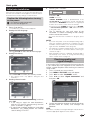
5
Home
When the TV is powered on for the first time after purchase,
the initial auto installation wizard appears. Follow the menus
and make the necessary settings one after another.
•HOME: For home.
•STORE: DYNAMIC mode is predetermined. If the
“Picture Mode” is changed, the TV will automatically
switch back to “DYNAMIC” when there is no signal input
from the TV or remote control unit for 30 minutes.
If you have chosen “STORE” by mistake, go to “OPTION”
→ “Restore Factory Default” → OK, and the TV returns
to the initial screen.
E Is the antenna cable connected?
E Is the AC cord plugged in?
Press a on the TV.
• The initial auto installation wizard appears.
2
Setting the OSD language.
Store
Press ◄/► to select where you will use this TV, and
then press OK.
Confirm the following before turning
on the power
1
Selecting the TV location.
6
The TV searches for, sorts and stores all the
receivable TV stations according to their settings
and the connected antenna.
•To cancel the initial auto installation in progress, press
END.
NOTE
•
•
3
Press a/b/c/d to select the desired language.
Setting the country.
•
If you turn the power on the TV after performing step 4,
initial auto installation wizard does not appear. The auto
installation function allows you to execute the installation
again from the “CHANNEL” menu (Page 18).
The initial auto installation wizard will turn off if your leave
the TV unattended for 30 minutes before searching for
channels in step 4.
After initial Auto Tuning is completed, the default PIN is
automatically set to “1234”. To change the PIN setting,
refer to “LOCK” menu on page 19.
Checking quality and
signal strength
Press ▲/▼/◄/► to select your country or area.
• This setting screen only appears during the first
installation.
4
If you install a DVB-T antenna for the first time of relocate
it, you should adjust the alignment of the antenna to
receive a good reception while checking the antenna
setup screen.
1 Press a channel you want to check.
2 Press MENU. “PICTURE” menu will appear.
3 Press ◄/► to select “CHANNEL” menu.
4 Press ▲/▼ to select “Signal Information” and
then press OK.
Starting channel search.
Press ▲/▼ to select “Channel tuning” and then
press OK.
• If you want to search for more broadcasts,
execute “DTV (or ATV) manual tuning” from the
menu “CHANNEL” (Page 18).
• To watch both analogue broadcasts and digital
broadcasts, you should perform the channel
search setting “DTV+ATV”.
5
Position and align the antenna so that the maximum
possible values for “Quality” and “Strength” are
obtained.
NOTE
The values of “Quality” and “Signal Strength” indicate when to
check the appropriate alignment of the antenna.
9
Watching TV
Daily operation
Selecting an external video source
Switching on/off
Turning on/off the power
Press a on the TV to switch it on.
Switch it off by pressing a on the TV.
Once the connection is made,
press b to display the
“INPUT SOURCE” screen,
and then press a/b to
switch over to the appropriate
external source with OK.
NOTE
(
• When turning off the power using
a on the TV, EPG data will be lost.
* The terminal layout may differ
depending on the model.
Selecting language audio
E DTV mode:
Pressing 2 appear a menu with languages or
audio sources availables depending on the received
broadcast.
Standby mode
E Switching to standby mode
If the TV is switched on (GREEN LED), you can switch
it to standby by pressing B on the remote control
unit.
E Switching on from standby
From standby (RED LED), press B on the remote
control unit.
Press a/b to select the language and press OK.
NOTE
• The audio mode screen disappears in three seconds.
• Selectable items vary depending on the received
broadcasts.
E ATV mode:
Each time you press 2, the mode switches as
shown in the following tables.
TV indicator status
B indicator
Status
Off
Power off
Green
Power on
Red
Standby
NOTE
• If you are not going to use this TV for a long period of time,
be sure to remove the AC cord from the AC outlet.
• A small amount of electric power is still consumed even
when a is turned off.
Switching between analogue and
digital broadcasts
E Press “DTV” to change between ATV and
DTV mode.
NICAM TV broadcasts selection
Signal
Selectable items
Stereo
NICAM STEREO, MONO
Bilingual
NICAM CH A, NICAM CH B, NICAM CH AB, MONO
Monaural
NICAM MONO, MONO
A2 TV broadcasts selection
Signal
Selectable items
Stereo
STEREO, MONO
Bilingual
CH A, CH B, CH AB
Monaural
MONO
NOTE
• When no signal is received, the audio mode will display
“MONO”.
Switching subtitle languages
E DTV mode: Press SUBTITLES [ button to
access “Subtitles Languages”.
Changing channels
With Pr/s:
With 0–9:
E ATV mode: The available subtitles according to
the broadcasting will be enabled or disabled by
pressing the Subtitle key [.
10
Watching TV
EPG
EPG is a programme list that is displayed on the screen. With the EPG, you can check the schedule of DTV, view
detailed information about it, tune to an event currently on-air and set a timer for future events.
Selecting a programme using EPG
Basic Operation
The illustrations on this page are explained using three digit services.
E Display/Close the EPG screen
Press EPG.
1
2
E Select a program
1 Select the time span
5
4
3
Press c/d to select the time span you want to search, press OK.
• Continue to press d to display programs in the next time span.
2 Select the desired program
Press a/b to select the desired program, press OK.
• If a or b are displayed on the left of the programs, continue to press a/b to display next or previous screen.
Other EPG functions
3 Revise the program information
1
Press ▲/▼/◄/► to select the program you
2
want to revise.
Press “p.
2
Press the BLUE key on the remote control.
Program information
3 With ▲/▼/◄/► select Hour, Minute, Mode, Date
and Month which you want the program to be
remembered. Press OK.
• This program stays skipped in red within the
programming guide.
3
Press p to return to EPG.
4 “Reminder” function
1 Select the broadcasting emitting the program
which you want to remember.
5 ”Schedule” function
1 Press the YELLOW key to visualize all
programmed reminders.
11
Watching TV
Buttons for teletext operations
Buttons
Press ▲/▼/◄/► to select a reminder and then
press the RED key to delete it.
2
Teletext
What is Teletext?
Teletext broadcasts pages of information and
entertainment to specially equipped TV. Your TV
receives teletext signals broadcast by a TV network,
and decodes them into graphical format for viewing.
News, weather and sports information, stock
exchange prices and programme previews are among
the many services available.
Turning Teletext on/off
1
2
Select a TV channel or external source providing
a teletext programme.
Press m to display the Teletext.
• Many stations use the TOP operating system, while
some use FLOF (e.g. CNN). Your TV supports both
these systems. The pages are divided into topic
groups and topics. After switching on the teletext, up
to 1.000 pages are stored for fast access.
• Each time you press m, the screen switches as
shown below.
• If you select a programme with no teletext signal, “No
Teletext available” displays.
• The same message displays during other modes if no
teletext signal is available.
Description
Pr/s
Increase or decrease the page number.
Colour (R/G/
Y/B)
Select a group or block of pages
displayed in the coloured brackets at the
bottom of the screen by pressing the
corresponding Colour (R/G/Y/B) on the
remote control unit.
0–9
Directly select any page from 100 to 899
by using the 0–9 numeric buttons.
v (Top/
Bottom/Full)
Switch the teletext image to Top, Bottom
or Full.
k (Reveal
hidden
Teletext)
Reveal or hide hidden information such
as an answer to a quiz.
3 (Freeze/
Hold)
Stop updating teletext pages
automatically or release the hold mode.
[ (Subtitle
for Teletext)
Display the subtitle or exit the subtitle
screen.
• Subtitles will not be displayed when
the service does not contain subtitle
information.
1 (Subpage)
TXT mode: Reveal or hide subpages.
• R button: Move to the previous
subpage.
• G button: Move to the following
subpage.
• These two buttons are shown on the
screen by the symbols “e” and “f”.
TV mode: Display the time.
Using the MHEG-5 application (UK
only)
Some services bring you programmes with the MHEG
application encoded, letting you experience DTV
interactively.
When provided, the MHEG-5 application will start
when you press m.
Sample MHEG-5 screen
Teletext
Teletext
NOTE
• Teletext will not work if the selected signal type is RGB.
12
Connecting external devices
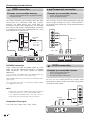
E Before connecting ...
• Be sure to turn off the TV and any devices before making any connections.
• Firmly connect a cable to a terminal or terminals.
• Carefully read the operation manual of each external device for possible connection types. This also helps you
get the best possible audiovisual quality to maximise the potential of the TV and the connected device.
Introduction to connections
The TV is equipped with the terminals as shown below. Find the cable corresponding the TV’s terminal and
connect the device.
NOTE
• The cables illustrated in pages 13, 14 and 15 are commercially available items.
Audio device (Page 15)
Audio cable
O
or
Audio cable
Components cable
Video recording device
(Pages 14 and 15)
Audio cable
SCART cable
Game console or
camcorder (Page 14)
AV cable
HDMI-certified cable
HDMI device (Page 14)
DVI/HDMI Cable
ø 3.5 mm stereo mini jack cable
13
Connecting external devices
HDMI connection
Y
Example of connectable devices
● DVD player/recorder ● Blu-ray player/recorder
● Game console
The HDMI connections permit digital video and audio
transmission via a connection cable from a player/
recorder. The digital picture and sound data are
transmitted without data compression and therefore
lose none of their quality. Analogue/digital conversion
is no longer necessary in the connected devices, which
also would result in quality losses.
PB
PR
(CB)
(CR)
Component connection
Example of connectable devices
● VCR ● DVD player/recorder
● Blu-ray player/recorder
You will enjoy accurate colour reproduction and high
quality images through the INPUT COMPONENTS /
AV terminal when connecting a DVD player/recorder or
other device.
INPUT
COMPONENTS
/AV
Y/
AV
Pb
DVI/HDMI
cable
HDMI-certified
cable
Pr
Components
cable
L
ø 3.5 mm
stereo mini
jack cable
R
AUDIO
AUDIO IN
HDMI (DVI)
Audio cable
2
,
!5$)/
DVI/HDMI conversion
Using a cable DVI/HDMI, the digital signals of a DVD
video, can be also reproduced through a compatible
HDMI connection. The sound should be supplied
additionally.
• On connecting a DVI/HDMI cable to the HDMI terminal, may
be the picture does not become visualized clearly.
• Both HDMI and DVI use the same method of HDCP protection
against copy.
• For connecting a DVI cable, a commercially available adaptor
(not supplied) is necessary.
9
0"
# "
02
# 2
#/-0/.%.4
VIDEO connection
Example of connectable devices
● VCR ● DVD player/recorder
● Blu-ray player/recorder
● Game console ● Camcorder
You can use the COMPONENTS/AV terminal when
connecting to a game console, camcorder, a DVD player
/ recorder or other device.
INPUT
COMPONENTS
/AV
NOTE
Y/
AV
• Depending on the type of HDMI cable used, it may appear
a video noise. Be sure to use a certified HDMI cable.
• On reproducing HDMI picture, the best format is
automatically detected and adjusted for the picture.
Compatible video signal
Pb
Pr
AV cable
L
R
AUDIO
576i, 576p, 480i, 480p, 1080i, 720p, 1080p
14
Connecting external devices
● After connection
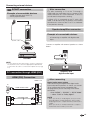
SCART connection
● If after connecting a PC to the TV through a
HDMI cable, the audio does not run, connect a mini
stereo connector of ø 3.5mm between TV and PC
as indicated in the previous drawing.
Example of connectable devices
● VCR ● Decoder (only SCART 1)
● DVD player/recorder
● When a PC is connected to the TV with a DVI
cable, it will be necessary to connect a mini stereo
connector of ø 3.5mm of the TV to PC as indicated
in the previous drawing
SCART 1
(AV / RGB)
Speaker/amplifier connector
Example of connectable devices
● Connecting an amplifier with digital audio
input
SCART cable
Connect an amplifier with external speakers as shown
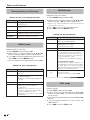
below.
DIGITAL
AUDIO
OUTPUT
SPDIF
Decoder
Audio cable
NOTE
• In cases when the decoder needs to receive a signal from
the TV, make sure to select the appropriate input terminal
to which the decoder is connected in “Input Source” (Page
10).
SPDIF
DIGITAL AUDIO IN
Amplifier with
digital audio input
PC connection through HDMI (DVI)
HDMI (DVI) Connection
HDMI 1 or 2
Digital audio output setting
After connecting an amplifier with digital audio
input and external speakers as shown, you should
set an audio output format compatible with
the programme you are watching or the device
connected.
Go to “MENU” > “SOUND” > “SPDIF Mode”
> select “PCM” or “Dolby Digital”.
0#
HDMI-certified cable
0#
DVI/HDMI Cable
NOTE
AUDIO IN
HDMI (DVI)
ø 3,5 mm stereo mini jack cable
● After connecting
• When you set this to “Dolby Digital”, and you receive
the Dolby Digital or Dolby Digital Plus audio formats,
Dolby Digital audio is output. Otherwise, PCM audio is
output.
When you set this to “PCM”, PCM audio is output no
matter what audio formats you receive.
15
LC-37DH77E_ES.indd 16
2008/12/16 13:50:06
Menu operation
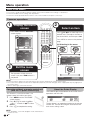
What is the menu?
• You need to call up the OSD to perform settings for the TV. The OSD for the settings is called menu.
• The menu enables various settings and adjustments.
• The menu can be operated with the remote control unit and with the TV panel control keys.
Common operations
1
2
Display the menu
screen
Select an item
Press MENU and the “PICTURE”
screen displays.
Press a/b/c/d to select/adjust the
desired menu, and adjust the item to
the desired level, and then press OK.
PICTURE
Picture mode
Press MENU to return to the previous
page.
User
Backlight
50
Contrast
50
Brightness
50
Colour
50
Sharpness
60
END
MENU
E Selecting in the menu
OK
PICTURE
Tint
50
Colour temperature
Cool
Aspect ratio
Full
Noise reduction
AUTO
Picture mode
User
Picture mode
END
3
MENU
OK
Eco
User
Backlight
50
Contrast
50
E Selecting options
Exit the menu
screen
The operation will exit the menu
screen if you press END before it is
completed.
Backlight
50
NOTE
• The menu options differ in the selected input modes, but the operating procedures are the same.
• The screens in the operation manual are for explanation purposes (some are enlarged, others cropped) and may vary slightly from
the actual screens.
• Items in darker grey cannot be selected.
This function is useful when there is no
remote control unit within your reach.
1 Press MENU and the “PICTURE”
screen displays.
2 Press Pr/s instead of a/b or
ik/l instead of c/d to select
the item.
3 Press b to complete the setting.
(
Operation without a remote control unit
(with the TV panel control keys)
NOTE
• The “PICTURE” screen will disappear if left unattended for
several seconds.
16
About the Guide Display
The Guide Display at the bottom of the screen shows
operations with the OSD.
END
MENU
OK
The bar above is an operational guide for the remote
control unit. The bar will change in accordance with
each menu setting screen.
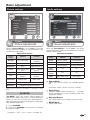
Basic adjustment
Audio settings
Picture settings
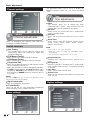
PICTURE
Picture mode
User
Backlight
50
Contrast
50
Brightness
50
Colour
50
Sharpness
60
END
MENU
OK
Sound
Picture
Sound adjustments
Picture adjustments
When the Picture Mode is set to “User”, the picture
can be adjusted according to your preferences. See
the following setting table.
Adjustments options
When the Sound Mode is set to “User”, the sound
can be adjusted according to your preferences. See the
following setting table.
Adjustments options
Selected
setting
◄ Button
► Button
Selected
setting
◄ Button
► Button
Backlight
The screen dims
The screen
brightens
Treble
Reduce trebles
Increase trebles
Bass
Reduce bass
Increase bass
Contrast
Contrast goes down
Contrast goes up
Brightness
Brightness goes
down
Brightness goes up
Colour
Colour intensity goes Colour
intensity
down
goes up
Balance
Increase audio from Increase audio from
the left speaker
the right speaker
Auto
Volume
Off
On
Sharpness
Soften details
Emphasize details
Surround
Sound
Off
On
Tint
Skin tones become
purplish
Skin tones become
greenish
SPDIF
Mode
(PCM) Activates
digital audio output
Dolby Digital
Colour
Temperature
Reddish white
Bluish white
Aspect Ratio
Changes between different picture sizes
Noise
Reduction*
Improves picture quality
(choose among different options)
*This function may be not available in some types of input
signal.
AV MODE
“AV MODE” gives you several viewing options to
choose from to best match your system environment,
which can vary due to factors like room-brightness,
type of programme watched or the type of image input
from external equipment.
● Sound Mode
Select your desired setting. The available options
are:
STANDARD→MUSIC→MOVIE→SPORTS→USER6
● Auto Volume
Reduces sudden volume changes, for
example,
during commercials or when switching from one
channel to another.
● Surround Sound
This function allows you to enjoy surround sound.
● SPDIF Mode
Digital audio output.
1 Press AV MODE.
2 Every time AV MODE is pressed the TV changes
the mode as follows:
STANDARD → SOFT → ECO → USER → DYNAMIC 6
17
Basic adjustment
Channel settings
This adjustment allows you to set or to display the
following functions: Clock, Off / On Timer and Sleep
Timer.
Time
Time adjustments
Channel
Channel adjustments
Allows to reconfigure the channels after initial auto
installation has been completed.
Install channels
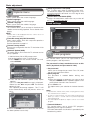
● Auto Tuning
This function allows you to select the country and
automatically adjusts the channels for digital and
analogue individually.
● DTV Manual Tuning
Allows you to tune digital channels manually.
● ATV Manual Tuning
Allows you to tune in analogue channels manually.
● Programme Edit
Allows you to delete channels, to skip channels and to
set up a favourite channels list.
Select the channel you want to reorganize and press
the RED button to delete it, the BLUE button to skip it
(to ignore it), YELLOW button to move it, ESG to mark
it as favourite or GREEN button to rename it (only in
ATV mode.)
NOTE
● Clock
This function allows you to display the clock
information (day / month / hour/ minute). The time
and the date can’t be modified in this option.
● Off Timer
Allows you to set a time when the TV automatically
enters in standby mode.
● On Timer
Allows you to set the time when the TV must switch
on.
● Sleep Timer
Allows you to setup the automatic Switch Off for:
10min., 20min., 30min., 60min., 90min., 120min.,
180min. and 240 min..
NOTE
• Select “Off” to cancel the sleep timer.
• When the time has been set, countdown starts
automatically.
• The last minute is displayed second to second.
● No Operation Off
Switches the TV off when no key is pressed for 3
hours.
● No Signal Off
When this function is activated the TV automatically
enter standby mode if there is no signal input during
10 minutes.
● Time Zone
Allows you to setup the time zone.
● Summer time
Allows you to change automatically to summer time
(auto, off, on.)
If you press ESG when you are not in any adjustment menu,
the favourite channel list will appear.
● Signal Information
Show the signal power and quality.
● CI Information
Allows to see the CA card information (Conditional
Access Module): name, supplier and OSD.
Time settings
18
Option settings
Basic adjustment
Options
Options menu
● OSD Language
Allows you to select the screens language.
● Audio Languages
Allows you to select the audio language.
● Subtitle Language
Allows you to select the subtitles language.
● Hearing Impaired
This function allows you to activate or deactivate the
subtitles for the hearing impaired. These subtitles have
priority.
NOTE
● DivX® registration code (VOD)
This TV allows play video on demand (DivX® VOD).
To activate this option you need to register the TV at
www.divx.com/vod, download the VOD log file and
reproduce it in TV.
● Deactivation code DivX® (VOD)
Displays the deactivation code necessary to write off
this TV at www.divx.com/vod.
Lock settings
Subtitles will not be displayed when the service does not
contain subtitle information.
● Timeshift setup (only DH510 models)
Allows select modes, disk, disk setup and speed test
for Timeshift function.
See the operation on page 24.
● Restore factory default
Recover the configuration that the TV had when it left
the factory.
● Software Update (USB)
This option allows you to have the TV software version
always updated.
1 Add the binary file to USB memory root.
2 Insert the memory in the TV USB socket.
3 Press MENU on the remote control unit and
select OPTION.
Lock
Lock programs
This function allows you to use a password to lock
certain programs and adjustments.
The password is always needed to access to this
menu ( by default, the password is 1234.)
4 Press ▼ until Software Update (USB) option
appears.
• Press OK. Are you sure? message is displayed.
• Select Yes with ◄/► and press OK. The software
update will start.
•The updated percentage appears. The TV will
restart automatically when the process arrives at
100%.
5 Return to OPTION menu to check that the version
has been updated successfully.
● Set password
Allows you to change the password. Press OK, enter
the new password and confirm.
● Block program
The password is needed before locking one
program.
1 Select the program or programs you want to lock
and press GREEN button. A padlock appears next
to the locked channel in the channel list.
2 Press End to exit.
This option enters your selection in a locked channels
list.
NOTE
• To prevent the channel search, when one program is locked,
the channel menu is locked too.
• To view a locked channel, you must enter the password.
When you select a locked channel a password prompt
message pops up.
• You must repeat the previous steps to unlock one locked
program.
● Parental Guidance
This function allows you to restrict DTV programs
depending on the age classification.
The information about classification is provided by the
broadcasting station.
19
Useful viewing functions
Selecting the picture format
Channel list
Selecting the channel
you want to watch
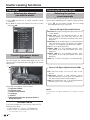
1 Press OK and the list of tuned channels will be
displayed.
2 Use ▲/▼ to select the channel you want to watch
and press OK.
Selecting the picture
format manually
You can select the picture format. The selected picture
format varies depending on the type of signal received.
1 Press f on the remote control unit to change
between different kinds of pictures.
Sizes for SD Signal (Standard Definition)
Channel information display
(DTV only)
Normal 4:3 : Keeps the original aspect ratio in a full
screen display.
Zoom 14:9 : For 14:9 letterbox pictures. A thin
side bar appears on each side, and you may
also see bars on the top and bottom with some
programs.
Panorama: In this mode, picture is stretched toward
each side of the screen. The picture may appear
similar to “Full” depending on broadcast signals.
Full: For 16:9 squeeze pictures.
Cinema 16:9: For 16:9 letterbox pictures. Bars
may appear on the top and bottom with some
programs.
Cinema 14:9: For 14:9 letterbox pictures. Bars
may appear on the top and bottom with some
programs.
Auto: The TV selects the picture size automatically.
You can display the channel information that you are
watching at this moment by pressing p on the remote
control unit.
c
Sizes for HD Signal (High Definition) HDMI
d
Full: Overscan image. Cuts out all sides of the
picture.
Underscan: Displays a high definition picture
adjusted perfectly. Picture noise may appear on
the sides of picture with some programs.
Auto: this mode allows the TV to change between
different picture sizes automatically.
e
f
g
h
Information that appears on the screen:
c Program number
d Program name
e Channel information
f Language
g Teletext
hInformation about the program which is
being broadcast
CLEARING THE PIN
If you lose or forget your PIN, you can clear the PIN
following these steps:
1 Go to «MENU»→«LOCK»→«PASSWORD».
2 Enter “3001” to cancel out the current PIN.
The current PIN is reset to “1234”.
20
NOTE
Some items do not appear depending on the type of received
signal.
Other useful features
Setting when using external
devices
Input source settings
For selecting the input type of external equipment
SCART 1: CVBS, RGB
SCART 2: Y/C, CVBS
• If no (colour) image is displayed, try changing to
another signal type.
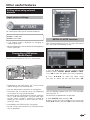
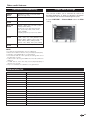
MEDIA PLAYER function
After selecting Media Player, the TV loads USB device
files, and shows the following screen:
• Check the operations manual of the external equipment
for the signal type.
Connecting a USB device
(Media Player)
Connect an USB device to the TV as shown below.
1 Pressing ◄/► buttons you can change between
different modes: PHOTO, MUSIC, MOVIE or TEXT.
Press OK to select the option you want to reproduce.
2 Press ▲/▼/◄/► to select the folder where
you want to search the files and then press OK.
• Depending on the USB device, the TV may not be
able to recognise the contained data.
PHOTO mode
• Use only alphanumeric characters for naming files.
• File names over 80 characters (may vary depending
on character set) may not be displayed.
• Do not disconnect a USB device or memory card from
the TV while transferring files, using the slide show
function, when a screen is switching to another or
before you exit “MEDIA PLAYER” from the “INPUT
SOURCE” menu.
You can reproduce photos with JPG, JPEG and BMP
format on your TV.
Several kinds of reproduction are possible.
1 Select PHOTO mode and press OK.
2 Select the file you want to display on full screen with
▲/▼ /◄/► buttons and press OK to start the viewing.
• Compatibility with USB hard disc connection.
• Do not connect and disconnect a USB device from
the TV repeatedly.
21
Other useful features
MOVIE mode
Viewing photos on full screen
Reproduces films and videos.
Buttons for full screen display operation
Buttons
Description
▲/▼ (Cursor)
Go to the previous/next photo in the
same directory..
◄/► (Cursor)
Select / unselect the photos you want
to see.
END button
Go back to the previous screen.
f button
Zoom: ▲/▼/◄/► allow to move through
the pictures when zoom is activated.
A button
Rotates 90º the photo on screen.
1 Select MOVIE mode and press OK.
2 Select the files you want to reproduce with ▲/▼ /◄/►
buttons and press OK to start the reproduction.
• If there is only one file, the reproduction will start automatically
when this file is selected.
3 Press OK to stop / restart the reproduction.
4 Press END to exit the MOVIE mode.
Buttons for film reproduction
Buttons
Description
▲/▼ (Cursor)
Go to the previous/next file in the same
directory (on MOVIE MENU)
◄/► (Cursor)
• Mark with X the files you want to play.
• Backward / Fast forward
END button
Go back to the previous screen.
RED button
-Movie Menu options:
1 Only reproduces the selected file.
Reproduce the folder files only once.
When the reproduction has finished, go
back to the previous screen.
Ⓐ Reproduce the folder files indefinitely.
MUSIC mode
(on reproduction mode)
Reproduces MP3 music files.
1 Select MUSIC mode and press OK.
2 Select the files you want to reproduce with ▲/▼ /◄/►
buttons and press OK to start the reproduction.
3 Press OK to stop the reproduction of MP3 files and
press END to exit the MUSIC mode.
• You can stop/restart the reproduction pressing OK.
-On reproduction mode:
AB
Allows you to repeat a fragment of a
film indefinitely. The first keystroke defines
A (initial point), the second keystroke
defines B (final point). The third keystroke
restarts the normal reproduction.
Buttons for music reproduction
Buttons
Description
▲/▼ (Cursor)
Go to the previous/next track in the same
directory.
◄/► (Cursor)
•Mark with X the tracks you want to play
BLUE button
y
Allows you to backward or forward until a
point in the movie.
Introduce “hh:mm:ss” and press OK.
(on MUSIC MENU)
•Backward / Fast forward ( on reproduction
mode)
END button
Go back to the previous screen.
RED button
Options:
1Reproduce the selected files
indefinitely.
Reproduce the folder files only once.
When the reproduction has finished, go
back to the previous screen.
ⒶReproduce all the files on the folder
indefinitely.
22
TEXT mode
Displays text files.
1 Select TEXT mode and press OK.
2 Select the file you want to display with ▲/▼ /◄/►
buttons and press OK. The selected file will appear
on full screen.
3 You can move up and down in the file with ▲/▼/◄/►
buttons.
4 You can display the previous or next text file with
◄/► buttons.
5 Press END to exit the TEXT mode.
Other useful features
USB device compatibility
USB 2.0
device
USB Memory, USB card reader, HDD
(Mass Storage class)
File system
FAT / FAT32 / NTFS
Photo file
format
JPEG (*.JPE, *.JPG), BMP, PNG
Music file
format
MPEG1 (*.MP3), AAC / HE AAC (*.AAC,
*.M4A), PCM (*.WAV)
Bitrate: 32k, 40k, 48k, 56k, 64k, 80k,
96k, 112k, 128k, 160k, 192k, 224k,
256k, 320kbps
Sampling frequency: 32k, 44.1k, 48kHz
Video file
format
MPEG1/2 (*.MPG, *.MPE, *.MPEG,
*.VOB, *.DAT, *.TS, *.TRP), MPEG4 (*.AVI,
*.MOV, *.MP4, *.MKV), H.264 (*.AVI, *.TS,
*.TRP, *.MOV, *.MP4, *.MKV), DivX®
(*.DIVX, *.AVI, *.MP4), XviD (*.AVI, *.MKV)
Text file
format
TXT (*.TXT, *.SRT, *.SSA)
Power save settings
This function enables you to automatically reduce the
backlight brightness in order to decrease the power
consumption and increase the backlight life span.
In menu PICTURE → Picture Mode select the ECO
setting.
NOTE
•
•
•
•
Progressive format jpeg files are not supported.
Music files in USB 1.1 devices may not be played properly.
Operation using USB hubs is not guaranteed.
The external hard disc with capacity exceeding 1TB cannot
be detected correctly.
• Cables used to prolong the USB device must be certified as
USB 2.0.
• In USB devices, video files may not be played properly if
speed is not enough.
• Play non-standard encoded files is not guaranteed.
Abbreviation list
Abbreviated term
Stands for
ATV
Analogue TV
CEC
Consumer Electronics Control
DNR
Digital Noise Reduction
DTV
Digital TV
DVB-T
Digital Video Broadcasting-Terrestrial
DVI
Digital Visual Interface
EPG
Electronic Pogramme Guide
HDCP
High-bandwidth Digital Content Protection
HDMI
High-Definition Multimedia Interface
MHEG
Multimedia and Hypermedia Expert Group
OSD
On Screen Display
PCM
Pulse Code Modulation
USB
Universal Serial Bus
WSS
Wide Screen Signalling
DivX®
Digital Video Express
23
Other useful features
Timeshift function (only DH510 models)
Timeshift function allows you to record the current
digital TV programme and watch it later. Timeshift
requires an external USB 2.0 memory, always conected
and previously configured to record the information.
The USB 2.0 memory must be formatted before
first use for Timeshift function.
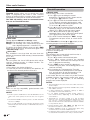
● Start mode
Change between Manual and Always mode.
Manual: The recording starts when user decides.
Always: The recording starts automatically each time
that a digital programme is selected (DTV.)
To confirm the change of mode is necessary press END
button to exit of this menu, and then enter again in the
“Timeshift setup” menu.
● Select disk
Only available in case that there are more than one
partition in the external USB memory (Choose between
C:, D:, etc.).
● Disk setup
You can choose the size of USB device which will be
used for Timeshift function, in 1GByte fractions. The
USB device will be formatted.
ATTENTION:
• All the data in this device will be lost.
• In case that you have a USB device with partitions, all
the data in the selected partition will be lost.
Timeshift operation
● Manual mode
The recording starts when user decides.
1. Press Z to start recording the current
programme. The picture remains frozen and the
TV set shows F symbol on screen.
2. Press Z to resume the recorded broadcast. The
TV set continues recording the broadcast while
you are watching the recorded programme. The
TV set shows I symbol on screen.
3. Press ► key to fast forward. By pressing ► key
repeatedly, allows you to select the fast forward
speed. Press Z to restore the normal speed.
4. Press ◄ key to rewind. By pressing ◄ key
repeatedly, allows you to select the rewind speed.
Press Z to restore the normal speed.
5. To cancel Timeshift mode press ”END”, change
TV programme or input source, or switch-off the
TV set.
While Timeshift is activated, I or F symbols, or the
recording progress bar may be displayed.
I
hh:mm:ss"
!Live hh:mm:ss
•••••••••••••••••
Play hh:mm:ss
26 Min
The bar shows Start, Play and Live markers, and the
maximum recording time.
● Always mode
The recording starts automatically each time that a
digital TV programme is selected.
1. Press ◄ to rewind until the desired point.
2. Press Z to resume or pause the recorded
broadcast. This action does not interrupt the real
time TV programme recording.
3. Press “END” to return to real time broadcast,
without losing any data. The recording process will
continue activated.
4. By changing the TV programe the Timeshift
function will be reset (all the previous data will be
lost), and will return to real time broadcast. The
recording process will continue activated.
In this mode, after the user selects any of the Timeshift
available functions (fast forward, rewind, play, pause,
etc…), the “I” or “F” symbols, or the recording
progress bar can be displayed.
NOTES:
• The Timeshift function does not work for ATV channels or
● Speed test
Allows to see the compatibility grade between USB
memory and the TV set.
NOTES:
• The file system of USB device must be FAT/FAT32. If the
device has other system, the TV set does not recognize
it.
• The minimum USB 2.0 memory size to use with Timeshift
function is 1GByte.
• As a concept, Timeshift can record up to 26 minutes on SD
DTV broadcasts and 7 minutes on HD DTV broadcasts, for
every GByte.
•
•
•
•
•
•
•
24
external inputs.
With Timeshift activated only will be available video, audio
and subtitles services.
If during Timeshift the maximum capacity of USB is
exceeded, the oldest data will be lost.
It can appear displaying troubles during rewind or
fast forward modes, depending on the USB memory
characteristics.
Thimeshift has not been created as a real recording
method, so the recorded data will be deleted each time
you cancel it, change programme or input source, or
switch off the TV. The recorded data will never be available
for any external device.
During timeshift mode, p, “EPG” and m show live
broadcast information, not recorded one.
Keeping “ALWAYS” mode as a permanent option may
shorten the life of the external USB memory.
Programmes which require a PIN to watch them cannot be
recorded with Timeshift function until you enter the PIN.
Appendix
Troubleshooting
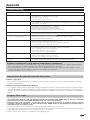
Problem
Possible Solution
• No power.
• Check if you pressed B on the remote control unit.
If the indicator on the TV lights up red, press B.
• Is the AC cord disconnected?
• Check if you pressed a on the TV.
• The TV cannot be operated.
• External influences such as lightning, static electricity, etc., may cause improper operation. In this
case, operate the TV after first turning off the power, or unplugging the AC cord and re-plugging
it in after one or two minutes.
• Remote control unit does not operate.
•
•
•
•
• Picture is cut off.
• Is the image position correct?
• Are screen mode adjustments (Aspect ratio) such as picture size made correctly? (Page 20.)
• Strange colour, light colour, or dark
colour, or colour misalignment.
• Adjust the picture tone.
• Is the room too bright? The picture may look dark in a room that is too bright.
• Check the “PICTURE” setting (Page 17).
• Power is suddenly turned off.
• The TV’s internal temperature has increased.
Remove any objects blocking the vent or clean.
• Is the “Sleep Timer” set? Select “Off” from the “TIME” menu (Page 18).
• Is “No Signal Off” or “No operation Off” activated?
• No picture.
•
•
•
•
•
• No sound.
• Is the volume too low?
• Make sure that headphones are not connected.
• Check if you pressed e on the remote control unit.
• The TV sometimes makes a cracking
sound.
• This is not a malfunction. This happens when the cabinet slightly expands and contracts
according to changes in temperature. This does not affect the TV’s performance.
Are batteries inserted with polarity (e, f) aligned?
Are batteries worn out? (Replace with new batteries.)
Are you using it under strong or fluorescent lighting?
Is a fluorescent light illuminating to the remote control sensor?
Are connections to external equipment correct? (Pages 13, 14 and 15)
Is the input signal type selected correctly after connection? (Page 10)
Is the correct input source selected? (Page 10)
Is the picture adjustment correct? (Pages 17)
Is the antenna connected properly? (Page 8)
Cautions regarding use in high and low temperature environments
• When the TV is used in a low temperature space (e.g. room, office), the picture may leave trails or appear slightly delayed.
This is not a malfunction, and the TV will recover when the temperature returns to normal.
• Do not leave the TV in a hot or cold location. Also, do not leave the TV in a location exposed to direct sunlight or near a
heater, as this may cause the cabinet to deform and the LCD panel to malfunction.
Storage temperature: -20 °C to e60 °C.
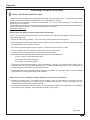
Information on the software license for this product
Software composition
The software included in this product is comprised of various software components whose individual copyrights are held by
SHARP or by third parties.
Software developed by SHARP and/or third part
The copyrights for the software components and various relevant documents included with this product that were developed
or written by SHARP are owned by SHARP and are protected by the Copyright Act, international treaties, and other relevant
laws. This product also makes use of freely distributed software and software components whose copyrights are held by third
parties.
Fixing the TV on a wall
• This TV should be fixed on a wall only with the wall fix bracket available from SHARP (Page 5). The use of other wall
fix brackets may result in an unstable installation and may cause serious injuries.
• Fixing the LCD colour TV requires special skills and should only be performed by qualified service personnel.
Customers should not attempt to do the work themselves. SHARP bears no responsibility for improper fixing or
fixing that results in accident or injury.
• You can ask qualified service personnel about using an optional bracket to fix the TV on a wall.
• To use this TV fixed on a wall, first remove the adhesive tape at the two locations on the rear of the TV, and then use the screws
supplied with the wall fix bracket to secure the bracket to the rear of the TV.
• When you fix the TV on a wall, you should attach the supporting post.
25
Appendix
Specifications
Item
32" LCD COLOUR TV, Model: LC-32DH500E, LC-32DH500S, LC-32DH510E, LC-32DH510S
LCD Panel
32" Advanced Super View & BLACK TFT LCD
Resolution
1,049,680 pixels (1,366 x 768)
Video Colour System
PAL/SECAM/NTSC 3.58/NTSC 4.43/PAL 60
TV Standard
TV
Functions
Receiving Channel
Analogue
CCIR (B/G, I, D/K, L/L’)
Digital
DVB-T (2K/8K OFDM)(H.264)
VHF/UHF
E2–E69 ch, F2–F10 ch, I21–I69 ch, IR A–IR J ch (Digital: IR A ch–E69 ch)
CATV
Hyper-band, S1–S41 ch
TV-Tuning System
Auto Preset 999 ch: non-Nordic / 9999 ch: Nordic (ATV: 99 ch), Auto Label, Auto Sort
STEREO / BILINGUAL
NICAM/A2
Brightness
500 cd/m2
Backlight life
60,000 hours (when “Backlight” is set the STANDARD, the default position)
Viewing angles
H: 176°, V: 176°
Audio Amplifier
10 W x 2
Speaker
(35 mm x 100 mm) x 2
Terminals
TV Antenna
UHF/VHF 75 Ω Din type (Analogue & Digital)
SERVICE
Ø 3.5 mm jack
SCART1
SCART (AV input, RGB input, TV output)
SCART2
SCART (AV input/ monitor output, Y/C input)
COMPONENTS
COMPONENT IN: Y/PB(CB)/PR(CR), RCA pin (AUDIO R/L)
HDMI1
HDMI, Ø 3.5mm jack
HDMI2
HDMI, Ø 3.5mm jack
AV
RCA connector (AV input)
MEDIA PLAYER
USB 2.0 HOST (A type)
DIGITAL AUDIO OUTPUT
S/PDIF digital audio output.
C. I. (Interface Common)
EN50221, R206001
Headphones
Ø 3.5 mm jack (Audio output)
OSD language
Czech, Danish, Dutch, English, Estonian, Finnish, French, German, Greek, Hungarian, Italian,
Latvian, Lithuanian, Norwegian, Polish, Portuguese, Russian, Slovak, Slovene, Spanish,
Swedish, Turkish, Ukrainian
Power Requirement
AC 220–240 V, 50 Hz
Power Consumption (IEC62087 Method)
104W (0.20 W Standby)
Weight
9,4 Kg (Without stand), 11,1 Kg (With stand)
Operating Temperature
0 °C to +40 °C
Environmental Specifications
*1 Measured according to IEC 62087 Ed. 2.
*2 For further information about the Energy Save
function, please see related pages in this operation
*2 Energy-Save-Mode (W)
ECO
65 W
manual.
*3 Standby-Mode (W)
0.20 W
*3 Measured according to IEC 62301 Ed. 1.
*4 Measured according to IEC 62301 Ed. 1.
*4 Off Mode (W)
0.17 W
*5 Annual energy consumption is calculated on the
*5 Annual Energy Consumption (kWh)
119kWh
basis of the On-Mode (HOME MODE) power
consumption, watching TV 4 hours a day, 365
*6 Annual Energy Consumption
ECO
95kWh
days a year.
Energy-Save-Mode (kWh)
*6 Annual energy consumption is calculated on
the basis of the Energy-Save-Mode power
consumption, watching TV 4 hours a day, 365
days a year.
NOTE
• The power consumption of On-Mode varies depending on the images the TV displays.
*1 On-Mode (W) (HOME MODE)
26
81 W
Appendix
Information on the EU Eco-label
Sharp LCD-TV with an EU Eco-label
This product has officially been awarded the Eco-label of the European Union, “The Flower” (for details
see EU Commission Decision 2009/300/EC - OJ L 82/3 dated 28.3.2009).
Sharp is the first company to achieve this Eco-label for TVs thus demonstrating its commitment to
improving our environment.
The Flower is granted only to the products that meet rigorous criteria and demonstrate positive contributions
towards a better environment. Further information can be found at:
http://www.ecolabel.eu
What makes this Sharp product ecologically outstanding?
This TV set uses a Liquid Crystal Display (LCD) instead of the classical Cathode Ray Tube (CRT). Some
of the advantages are:
• Design for high energy efficiency. This cuts energy consumption and saves money.
• Reduced energy consumption during use and stand-by. Energy savings in different modes are possible
(see Appendix in this operation manual.)
• The lifetime of the background light is approx. 2.5 times longer than that of a CRT.
• This TV complies with the chemical requirements of the EU Eco-label.
• A minimum of two year functionality are granted in all EU-states.
• Spare parts will be available after ceasing the production of this model for:
¾ seven years, for electrical components
¾ five years, for mechanical parts
¾ four years, for decorative parts
• This product has been designed for easy disassembly, recovery and recycling and should not be
discarded with your ordinary household waste – for further details please refer to the “Information on
Proper Disposal” mentioned in this operation manual.
• Should repair become necessary, please contact your retailer. You can also contact your local Sharp
approved service centre (see Sharp local website).
What can you do to contribute towards helping to protect the environment?
• Please do not leave your TV in stand-by mode, unplug it when it is not used for a long time. There is
zero energy consumption if you unplug your TV or nearly zero watt if the TV has a hard-off-switch. The
location is described in this operation manual.
• The energy consumption in the on-mode can be reduced by lowering the brightness of the backlight
when the unit is in operation. This will reduce overall running costs.
July 2009
27
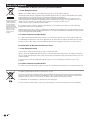
End of life disposal
A. Information on Disposal for Users (private households)
1. In the European Union
Attention: If you want to dispose of this equipment, please do not use the ordinary dust bin!
Attention: Your product
is marked with this
symbol. It means that
used electrical and
electronic products
should not be mixed
with general household
waste. There is a
separate collection
system for these
products.
Used electrical and electronic equipment must be treated separately and in accordance with legislation that requires
proper treatment, recovery and recycling of used electrical and electronic equipment.
Following the implementation by member states, private households within the EU states may return their used
electrical and electronic equipment to designated collection facilities free of charge*. In some countries* your local
retailer may also take back your old product free of charge if you purchase a similar new one.
*) Please contact your local authority for further details.
If your used electrical or electronic equipment has batteries or accumulators, please dispose of these separately
beforehand according to local requirements.
By disposing of this product correctly you will help ensure that the waste undergoes the necessary treatment, recovery
and recycling and thus prevent potential negative effects on the environment and human health which could otherwise
arise due to inappropriate waste handling.
2. In other Countries outside the EU
If you wish to discard this product, please contact your local authorities and ask for the correct method of disposal.
For Switzerland: Used electrical or electronic equipment can be returned free of charge to the dealer, even if you don’t
purchase a new product. Further collection facilities are listed on the homepage of www.swico.ch or www.sens.ch.
B. Information on Disposal for Business Users
1. In the European Union
If the product is used for business purposes and you want to discard it:
Please contact your SHARP dealer who will inform you about the take-back of the product. You might be charged for
the costs arising from take-back and recycling. Small products (and small amounts) might be taken back by your local
collection facilities.
For Spain: Please contact the established collection system or your local authority for take-back of your used
products.
2. In other Countries outside the EU
If you wish to discard of this product, please contact your local authorities and ask for the correct method of disposal.
The battery supplied with this product contains traces of Lead.
For EU: The crossed-out wheeled bin implies that used batteries should not be put to the general household waste!
There is a separate collection system for used batteries, to allow proper treatment and recycling in accordance with
legislation. Please contact your local authority for details on the collection and recycling schemes.
For Switzerland: The used battery is to be returned to the selling point.
For other non-EU countries: Please contact your local authority for correct method of disposal of the used battery.
28