1
TM420.book
Page I
Monday, September 23, 2002 10:27 AM
Acer TravelMate 420 Series
Service Guide
Service guide files and updates are available
on the ACER/CSD web; for more information,
please refer to http://csd.acer.com.tw
PART NO.: VD.T19V5.001
PRINTED IN TAIWAN
Revision History
Please refer to the table below for the updates made on TravelMate 420 service guide.
Date
09/25/2002
Chapter
Chapter 2
Updates
p.52 Update method using diagnostic utilities and testing
items
p.55 Update video (R.G.B) Test; Touchpad and USB mouse
test
01/02/2003
II
Chapter 3
p. 71 Update 27th step on “Disassembling the Main Unit”
and add a note after 27th step.
TM420.book
Page III
Monday, September 23, 2002
10:27 AM
Copyright
Copyright © 2002 by Acer Incorporated. All rights reserved. No part of this publication may be reproduced,
transmitted, transcribed, stored in a retrieval system, or translated into any language or computer language, in
any form or by any means, electronic, mechanical, magnetic, optical, chemical, manual or otherwise, without
the prior written permission of Acer Incorporated.
Disclaimer
The information in this guide is subject to change without notice.
Acer Incorporated makes no representations or warranties, either expressed or implied, with respect to the
contents hereof and specifically disclaims any warranties of merchantability or fitness for any particular
purpose. Any Acer Incorporated software described in this manual is sold or licensed "as is". Should the
programs prove defective following their purchase, the buyer (and not Acer Incorporated, its distributor, or its
dealer) assumes the entire cost of all necessary servicing, repair, and any incidental or consequential
damages resulting from any defect in the software.
Acer is a registered trademark of Acer Corporation.
Intel is a registered trademark of Intel Corporation.
Pentium and Pentium II/III are trademarks of Intel Corporation.
Other brand and product names are trademarks and/or registered trademarks of their respective holders.
III
TM420.book
Page IV
Monday, September 23, 2002
10:27 AM
Conventions
The following conventions are used in this manual:
IV
SCREEN MESSAGES
Denotes actual messages that appear
on screen.
NOTE
Gives bits and pieces of additional
information related to the current
topic.
WARNING
Alerts you to any damage that might
result from doing or not doing specific
actions.
CAUTION
Gives precautionary measures to
avoid possible hardware or software
problems.
IMPORTANT
Reminds you to do specific actions
relevant to the accomplishment of
procedures.
TM420.book
Page V
Monday, September 23, 2002 10:27 AM
Preface
Before using this information and the product it supports, please read the following general information.
1.
This Service Guide provides you with all technical information relating to the BASIC CONFIGURATION
decided for Acer's "global" product offering. To better fit local market requirements and enhance product
competitiveness, your regional office MAY have decided to extend the functionality of a machine (e.g.
add-on card, modem, or extra memory capability). These LOCALIZED FEATURES will NOT be covered
in this generic service guide. In such cases, please contact your regional offices or the responsible
personnel/channel to provide you with further technical details.
2.
Please note WHEN ORDERING FRU PARTS, that you should check the most up-to-date information
available on your regional web or channel. If, for whatever reason, a part number change is made, it will
not be noted in the printed Service Guide. For ACER-AUTHORIZED SERVICE PROVIDERS, your Acer
office may have a DIFFERENT part number code to those given in the FRU list of this printed Service
Guide. You MUST use the list provided by your regional Acer office to order FRU parts for repair and
service of customer machines.
V
TM420.book
VI
Page VI
Monday, September 23, 2002
10:27 AM
Table of Contents
Chapter 1
System Specifications
1
Features. . . . . . . . . . . . . . . . . . . . . . . . . . . . . . . . . . . . . . . . . . . . . . . . . . . . . . . . . . . 1
System Block Diagram . . . . . . . . . . . . . . . . . . . . . . . . . . . . . . . . . . . . . . . . . . . . . . . 3
Board Layout . . . . . . . . . . . . . . . . . . . . . . . . . . . . . . . . . . . . . . . . . . . . . . . . . . . . . . . 4
Top View . . . . . . . . . . . . . . . . . . . . . . . . . . . . . . . . . . . . . . . . . . . . . . . . . . . . . . 4
Bottom View . . . . . . . . . . . . . . . . . . . . . . . . . . . . . . . . . . . . . . . . . . . . . . . . . . . . 5
Outlook View . . . . . . . . . . . . . . . . . . . . . . . . . . . . . . . . . . . . . . . . . . . . . . . . . . . . . . . 6
Front View . . . . . . . . . . . . . . . . . . . . . . . . . . . . . . . . . . . . . . . . . . . . . . . . . . . . . 6
Left Panel. . . . . . . . . . . . . . . . . . . . . . . . . . . . . . . . . . . . . . . . . . . . . . . . . . . . . . 8
Right Panel . . . . . . . . . . . . . . . . . . . . . . . . . . . . . . . . . . . . . . . . . . . . . . . . . . . . 9
Rear Panel . . . . . . . . . . . . . . . . . . . . . . . . . . . . . . . . . . . . . . . . . . . . . . . . . . . . 10
Bottom Panel . . . . . . . . . . . . . . . . . . . . . . . . . . . . . . . . . . . . . . . . . . . . . . . . . 11
Indicators . . . . . . . . . . . . . . . . . . . . . . . . . . . . . . . . . . . . . . . . . . . . . . . . . . . . . . . . . 12
Lock Keys . . . . . . . . . . . . . . . . . . . . . . . . . . . . . . . . . . . . . . . . . . . . . . . . . . . . . . . . 13
Embedded Numeric Keypad . . . . . . . . . . . . . . . . . . . . . . . . . . . . . . . . . . . . . . . . . . 14
Windows Keys . . . . . . . . . . . . . . . . . . . . . . . . . . . . . . . . . . . . . . . . . . . . . . . . . . . . . 15
Hot Keys . . . . . . . . . . . . . . . . . . . . . . . . . . . . . . . . . . . . . . . . . . . . . . . . . . . . . . . . . 16
The Euro Symbol . . . . . . . . . . . . . . . . . . . . . . . . . . . . . . . . . . . . . . . . . . . . . . . . . . . 18
Launch Keys . . . . . . . . . . . . . . . . . . . . . . . . . . . . . . . . . . . . . . . . . . . . . . . . . . . . . . 19
E-Mail Detection . . . . . . . . . . . . . . . . . . . . . . . . . . . . . . . . . . . . . . . . . . . . . . . . . . . 20
Touchpad . . . . . . . . . . . . . . . . . . . . . . . . . . . . . . . . . . . . . . . . . . . . . . . . . . . . . . . . 21
Touchpad Basics . . . . . . . . . . . . . . . . . . . . . . . . . . . . . . . . . . . . . . . . . . . . . . 21
Hardware Specifications and Configurations . . . . . . . . . . . . . . . . . . . . . . . . . . . . . . 23
Chapter 2
System Utilities
39
BIOS Setup Utility . . . . . . . . . . . . . . . . . . . . . . . . . . . . . . . . . . . . . . . . . . . . . . . . . . 39
Navigating the BIOS Utility. . . . . . . . . . . . . . . . . . . . . . . . . . . . . . . . . . . . . . . . 39
Info. . . . . . . . . . . . . . . . . . . . . . . . . . . . . . . . . . . . . . . . . . . . . . . . . . . . . . . . . . 41
Main . . . . . . . . . . . . . . . . . . . . . . . . . . . . . . . . . . . . . . . . . . . . . . . . . . . . . . . . . 43
System Devices . . . . . . . . . . . . . . . . . . . . . . . . . . . . . . . . . . . . . . . . . . . . . . . 45
Security . . . . . . . . . . . . . . . . . . . . . . . . . . . . . . . . . . . . . . . . . . . . . . . . . . . . . . 46
Boot . . . . . . . . . . . . . . . . . . . . . . . . . . . . . . . . . . . . . . . . . . . . . . . . . . . . . . . . . 50
Exit . . . . . . . . . . . . . . . . . . . . . . . . . . . . . . . . . . . . . . . . . . . . . . . . . . . . . . . . . . 51
BIOS Flash Utility . . . . . . . . . . . . . . . . . . . . . . . . . . . . . . . . . . . . . . . . . . . . . . . . . . 52
System Diagnostic Diskette . . . . . . . . . . . . . . . . . . . . . . . . . . . . . . . . . . . . . . . . . . 52
Running Diagnostics Program . . . . . . . . . . . . . . . . . . . . . . . . . . . . . . . . . . . . 54
Chapter 3
Machine Disassembly and Replacement
61
General Information . . . . . . . . . . . . . . . . . . . . . . . . . . . . . . . . . . . . . . . . . . . . . . . . 62
Before You Begin . . . . . . . . . . . . . . . . . . . . . . . . . . . . . . . . . . . . . . . . . . . . . . 62
Disassembly Procedure Flowchart . . . . . . . . . . . . . . . . . . . . . . . . . . . . . . . . . . . . . 63
Removing the Optical Module/HDD Module and Memory . . . . . . . . . . . . . . . . . . . . 66
Removing the Optical Module . . . . . . . . . . . . . . . . . . . . . . . . . . . . . . . . . . . . . 66
Removing the HDD module . . . . . . . . . . . . . . . . . . . . . . . . . . . . . . . . . . . . . . 66
Removing the Memory . . . . . . . . . . . . . . . . . . . . . . . . . . . . . . . . . . . . . . . . . . 66
Removing the Keyboard/ LCD Module and VGA Board . . . . . . . . . . . . . . . . . . . . . 67
Removing the Keyboard . . . . . . . . . . . . . . . . . . . . . . . . . . . . . . . . . . . . . . . . . 67
Removing the LCD module and VGA Board . . . . . . . . . . . . . . . . . . . . . . . . . . 67
Disassembling the Main Unit . . . . . . . . . . . . . . . . . . . . . . . . . . . . . . . . . . . . . . . . . 69
Disassembling the LCD Module . . . . . . . . . . . . . . . . . . . . . . . . . . . . . . . . . . . . . . . 74
Disassembling the External Modules . . . . . . . . . . . . . . . . . . . . . . . . . . . . . . . . . . . 75
Disassembling the HDD Module . . . . . . . . . . . . . . . . . . . . . . . . . . . . . . . . . . . 75
Disassembling the Optical Disk Drive Module/Combo Drive Module . . . . . . . 75
VII
Table of Contents
Chpater 4
Troubleshooting
77
System Check Procedures . . . . . . . . . . . . . . . . . . . . . . . . . . . . . . . . . . . . . . . . . . . 78
External Diskette Drive Check . . . . . . . . . . . . . . . . . . . . . . . . . . . . . . . . . . . . . 78
External CD-ROM/DVD-ROM Drive Check . . . . . . . . . . . . . . . . . . . . . . . . . . . 78
Keyboard or Auxiliary Input Device Check. . . . . . . . . . . . . . . . . . . . . . . . . . . . 79
Memory Check . . . . . . . . . . . . . . . . . . . . . . . . . . . . . . . . . . . . . . . . . . . . . . . . 79
Power System Check . . . . . . . . . . . . . . . . . . . . . . . . . . . . . . . . . . . . . . . . . . . 79
Touchpad Check . . . . . . . . . . . . . . . . . . . . . . . . . . . . . . . . . . . . . . . . . . . . . . . 81
Display Check . . . . . . . . . . . . . . . . . . . . . . . . . . . . . . . . . . . . . . . . . . . . . . . . . 81
Sound Check . . . . . . . . . . . . . . . . . . . . . . . . . . . . . . . . . . . . . . . . . . . . . . . . . 82
Power-On Self-Test (POST) Error Message . . . . . . . . . . . . . . . . . . . . . . . . . . . . . 83
Index of Error Messages . . . . . . . . . . . . . . . . . . . . . . . . . . . . . . . . . . . . . . . . . . . . . 84
Index of Symptom-to-FRU Error Message . . . . . . . . . . . . . . . . . . . . . . . . . . . . . . . 86
Intermittent Problems. . . . . . . . . . . . . . . . . . . . . . . . . . . . . . . . . . . . . . . . . . . . . . . . 89
Undetermined Problems . . . . . . . . . . . . . . . . . . . . . . . . . . . . . . . . . . . . . . . . . . . . . 90
POST Task Routines . . . . . . . . . . . . . . . . . . . . . . . . . . . . . . . . . . . . . . . . . . . . . . . . 91
Index of Flash BIOS Error Message . . . . . . . . . . . . . . . . . . . . . . . . . . . . . . . . . . . . 95
Chapter 5
Jumper and Connector Locations
97
Top View . . . . . . . . . . . . . . . . . . . . . . . . . . . . . . . . . . . . . . . . . . . . . . . . . . . . . . . . .
SW1 Settings (Lid switch) . . . . . . . . . . . . . . . . . . . . . . . . . . . . . . . . . . . . . . . .
SW2 Settings . . . . . . . . . . . . . . . . . . . . . . . . . . . . . . . . . . . . . . . . . . . . . . . . .
Bottom View . . . . . . . . . . . . . . . . . . . . . . . . . . . . . . . . . . . . . . . . . . . . . . . . . . . . . .
97
98
98
99
Chapter 6
FRU (Field Replaceable Unit) List
101
Appendix A
Model Definition and Configuration
118
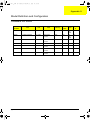
TravelMate 420 Series . . . . . . . . . . . . . . . . . . . . . . . . . . . . . . . . . . . . . . . . . . . . . 118
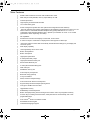
Main Features . . . . . . . . . . . . . . . . . . . . . . . . . . . . . . . . . . . . . . . . . . . . . . . . . . . . 119
Appendix C
Test Compatible Components
121
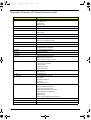
Microsoft® Windows® XP Home Environment Test . . . . . . . . . . . . . . . . . . . . . . . 122
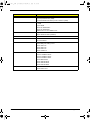
Microsoft® Windows® XP Pro Environment Test . . . . . . . . . . . . . . . . . . . . . . . . . 125
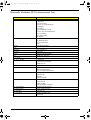
Microsoft® Windows® 2000 Environment Test . . . . . . . . . . . . . . . . . . . . . . . . . . 127
Appendix B
Online Support Information
129
Appendix C
Index
131
VIII
SG_TM420_Ch1.fm
Page 1
Thursday, September 26, 2002
9:23 AM
Chapter 1
System Specifications
Features
This computer was designed with the user in mind. Here are just a few of its many features:
Performance
T
Intel® Pentium®4 Processor with 512KB level 2 cache
T
DDR 226 (O/c2100) SDRAM, memory expandable up to 1GB
T
Internal optical drive
T
High-capacity, Enhanced-IDE hard disk
T
Li-Ion main battery pack
T
Power management system with ACPI (Advanced Configuration Power Interface)
T
Thin-Film Transistor (TFT) liquid-crystal display (LCD) displaying 32-bit high true colour up to 16.7
million colours at 1024X768 eXtended Graphics Array (XGA) resolution for 14.1”/15.0” or
1400x1050 Super eXtended Graphics Array+ (SXGA+) for resolution for some 15.0” models
(specification varies depending on models)
T
3D capabilities
T
Simultaneous LCD and CRT display at 1024x768, 16.7M colours
T
S-video for output to a television or display device that supports S-video input
T
“Automatic LCD dim” feature that automatically decides the best settings for your display and
conserves power
T
Dual display capability
Display
Multimedia
T
18-bit high-fidelity AC’97 stereo audio
T
Built-in dual speakers
T
Built-in microphone
T
High-speed optical drive
T
S-video (NTSC/PAL) output
Connectivity
T
High-speed fax/data modem port
T
Ethernet/Fast Ethernet port
T
3 USB (Universal Serial Bus) ports
T
IEEE 1394 port
T
SD/MMmC memory slot
T
Acer EasyPort port replicator
T
Bluetooth ready (optional)
Human-centric design and ergonomics
T
Chapter 1
4-way scroll button
1
SG_TM420_Ch1.fm
Page 2
Thursday, September 26, 2002
9:23 AM
T
Sleek, smooth and stylish design
T
Acer FinTouch full-sized curved keyboard
T
Ergonomically-centered touchpad pointing device
Expansion
T
One type II CardBus PC Card slots
T
Upgradeable memory
Keyboard and Pointing Device
T
84/85/88-key windows keyboard
T
Built-in touchpad pointing device with ergonomic buttons and 4-way integrated scroll key
T
5 launch keys, including Internet browser, email (with LED for received mail), and 3 userprogammable keys
T
Acer InviLinkTM button for wireless models
T
Embedded numeric keypad
T
International language support
T
One type II CardBus slots
T
One RJ-11 modem jack
T
One RJ-45 network jack
T
One DC-in jack for AC adapter
T
One ECP/EPP-compliant parallel port
T
One external monitor port
T
One headphone/speaker/line-out jack (3.5mm mini jack)
T
One microphone/line-in jack (3.5mm mini jack)
T
One S-video-out (NTSC/PAL) port
T
Three Universal Serial Bus (USB) ports
T
One IEEE 1394 port
T
100-pin port replicator connector for Acer EasyPort
T
One SD/MMC slots
T
One memory stick slot
I/O Ports
2
Chapter 1
SG_TM420_Ch1.fm
Page 3
Thursday, September 26, 2002
9:23 AM
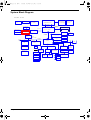
System Block Diagram
File Name : LA-1511
SPR
Conn.
Fan Control
Mobile Northwood
CPU Bypass
& CPUVID
Thermal Sensor
uFCBGA/uFCPGA CPU
System Bus
HA#(3..31)
MAX6654MEE
Clock Generator
W320-04
HD#(0..63)
400MHz
CRT Connector
Brookdale-M
MCH-M
AGP4X(1.5V)
LCD Connector
VGA Board
AGP Conn
845MP
Memory
BUS(DDR)
2.5V 266MHz
SO-DIMM X2
BANK 0, 1, 2, 3
625 BGA
TV-OUT
Connector
LAN interface
LAN
Kinnereth
RJ45
HUB Link
Mini PCI
Conn.
1.8V 266MHz
USB interface
PCI BUS
IDSEL:AD16
(PIRQA#,GNT#0,REQ#0)
TI TSB43AB22
1394
Bluetooth
IDSEL:AD18
(PIRQC#,GNT#1,REQ#1)
IDSEL:AD20
(PIRQA#,GNT#2,REQ#2)
3.3V 33MHz
ICH3-M
3.3V 48MHz
421 BGA
3.3V 24.576MHz
CardBus Controller
USB conn X3
AC-LINK
3.3V ATA100
O2 6912
MDC
3.3V ATA100
LPC BUS
3.3V 33MHz
DC/DC Interface
Suspend
Slot 0
14M_5V
Power Circuit
DC/DC
HDD Connector
EC
NS87591S
Card Reader
W83L518D
SMsC
LPC47N227
Audio DJ
O2 163
AC97
Codec
ALC202
AMP& Phone
Jack
Touch Pad
EC Ext. I/O
MS
CARD
SD/MMC
CARD
LPT Port.
CD-ROM
Connector
FDD
BIOS
FIR
Int.KBD
Chapter 1
3
SG_TM420_Ch1.fm
Page 4
Thursday, September 26, 2002
9:23 AM
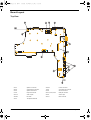
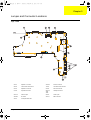
Board Layout
Top View
23-JP1
4
Speaker L connector
39-JP33
Inverter connector
20-JP3
VGA board to B connector
19-JP2
VGA board to B connector
24-JP4
Speaker R connector
22-JP6
SD card connector
21-JP5
Keyboard connector
28-JP12, JP32, JP39
USB port connector
25-JP10
Audio out jack
26-JP9
Audio in jack
30-SW2
BT switch
36-JP11
MDC connector
34-JP7
Touchpad switch PCB
Chapter 1
SG_TM420_Ch1.fm
Page 5
Thursday, September 26, 2002
9:23 AM
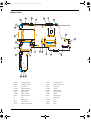
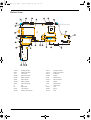
Bottom View
15-JP37
Docking connector
13-JP14
VGA port connector
9-JP21
PCMCIA connector
14-JP15
Printer port connector
1-U41
CPU socket
12-JP13
S video port
16-JP22
Main fan connector
17-PCN1
DC jack
4-PCN4
Battery connector
2-JP25
DDR connector
3-JP28
DDR connector
37-JP23
2nd fan connector
35-JP26
Battery connector
5-JP29
Module
6-JP24
Mini PCI connector
7-JP31
HDD connector
31
FIR
41
Wireless LED
33
Battery LED
27-JP34
RJ11
8-JP30
1394 connector
18-SW3
ME Off
32-JP40
Memory stick connector
10-JP18
RJ45
Chapter 1
5
SG_TM420_Ch1.fm
Page 6
Thursday, September 26, 2002
9:23 AM
Outlook View
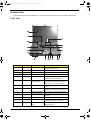
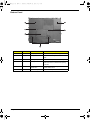
A general introduction of ports allow you to connect peripheral devices, as you would with a desktop PC.
Front View
#
1
6
Icon
Item
Description
Display screen
Also called LCD (liquid-crystal display),
displays computer output.
2
Power Button
Turns on the computer power.
3
Speakers
Outputs sound.
4
Keyboard
Inputs data into your computer
5
Touchpad
Touch-sensitive pointing device which
functions like a computer mouse.
6
Click buttons (left,
center and right)
The left and right buttons function like the
left and right mouse buttons; the center
button serves as a 4-way scroll button.
7
Audio DJ controls
Button and indicators for the Audio DJ
function.
8
Optical drive
Houses an optical drive module (CD-ROM,
DVD-ROM or DVD/CD-RW combo drive).
9
Optical drive indicator
Lights up when the optical drive is active.
10
Emergency eject slot
Ejects the drive tray when the computer is
turned off.
11
Eject button
Eject the drive tray.
12
Infrared port
Interfaces with infrared devices (e.g.,
infrared PDA, IR-aware computer).
13
Wireless networking
button
Enables or disables the wireless
networking feature.
Chapter 1
SG_TM420_Ch1.fm
Page 7
Thursday, September 26, 2002
9:23 AM
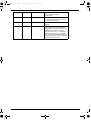
14
Palmrest
Comfortable support area for your hands
when you use the computer.
15
Status indicators
LEDs (light-emitting diode) that turn on and
off to show the status of the computer, its
functions and components.
16
Microphone
Inputs sounds and voice into your
computer.
17
Launch keys
Special keys for launching Internet
browser, E-mail program and frequently
used programs. Located at the top of the
keyboard are five buttons. They are
designated as P1, P2, P3, E-mail button
and Web browser button. P1, P2 and P3
launch user-programmable applications; Email and Web browser launch E-mail and
Internet browser applications.
Outputs sound.
Chapter 1
7
SG_TM420_Ch1.fm
Page 8
Thursday, September 26, 2002
9:23 AM
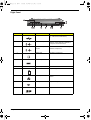
Left Panel
#
Icon
Item
Description
1
Power jack
Connects to an AC adapter.
2
Security keylock
Connects to a Kensington-compatible
computer security lock.
K
8
Chapter 1
SG_TM420_Ch1.fm
Page 9
Thursday, September 26, 2002
9:23 AM
Right Panel
#
Icon
Item
Description
1
USB port
Connects to Universal Serial Bus devices
(e.g., USB mouse, USB camera).
2
Line-in/Mic-in jack
Accepts audio line-in devices (e.g., audio
CD player, stereo walkman). Selection is
through the OS Windows mixer.
3
Speaker/Headphoneout jack
Connects to audio line-out devices (e.g.,
speakers, headphones)
4
Modem jack
Connects to a phone line
5
IEEE 1394 port
Connects to an IEEE 1394 device.
6
PC card eject buttons
Eject the PC Card from the slot.
7
PC card slots
Accepts all Type II PC cards.
8
Network jack
Connects to an Ethernet 10/100-based
network.
9
Memory stick slot
Accepts memory sticks.
10
SD/MMC slot
Accepts SD or MMC cards.
Chapter 1
9
SG_TM420_Ch1.fm
Page 10
Thursday, September 26, 2002
9:23 AM
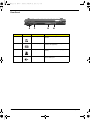
Rear Panel
#
10
Icon
Item
Description
1
Expansion port
I/O replicator or EasyPort expansion
devices.
2
External display port
Connects to a display device (e.g., external
monitor, LCD projector).
3
Parallel port
Connects to a parallel device (e.g., parallel
printer).
4
S-video
Connects t a television or display device
with S-video input.
Chapter 1
SG_TM420_Ch1.fm
Page 11
Thursday, September 26, 2002
9:23 AM
Bottom Panel
#
Icon
Item
Description
1
Battery bay
Houses the computer’s battery pack.
2
Battery release latches Unlatches the battery to remove the battery
pack.
3
Memory compartment
Houses the computer’s main memory.
4
Cooling fan
Helps keep the computer cool.
Note: Don’t cover or obstruct the opening
of the fan.
Chapter 1
5
AcerMedia drive bay
release latch
latches the AcerMedia bay to remove the
optical diskette drive.
6
Hard disk bay
Houses the computer’s hard disk.
11
SG_TM420_Ch1.fm
Page 12
Thursday, September 26, 2002
9:23 AM
Indicators
The computer has seven easy-to-read status icons below the display screen.
The status LCD displays icons that show the status of the computer and its components.
Icon
12
Function
Description
Power
Lights green when the computer is on.
Flashes when the computer is in low
power.
Sleep
Flashes when the computer enters Sleep
mode. Lights when the computer is in
Sleep mode.
Battery charge
Lights green when the battery is being
charged.
Wireless
communication
Lights when the Wireless LAN or Bluetooth
capabilities are enabled.
Caps lock
Lights when Caps Lock is activated.
Num lock
Lights when Num Lock is activated.
Media activity
Lights when the hard disk or AcerMedia
drive is active.
Chapter 1
SG_TM420_Ch1.fm
Page 13
Thursday, September 26, 2002
9:23 AM
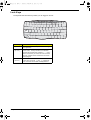
Lock Keys
The keyboard has three lock keys which you can toggle on and off.
Lock Key
Description
Caps Lock
When Caps Lock is on, all alphabetic characters typed
are in uppercase.
Num lock
(Fn-F11)
When Num Lock is on, the embedded keypad is in
numeric mode. The keys function as a calculator
(complete with the arithmetic operators +, -, *, and /).
Use this mode when you need to do a lot of numeric
data entry. A better solution would be to connect an
external keypad.
Scroll lock
(Fn-F12)
When Scroll Lock is on, the screen moves one line up
or down when you press w and y respectively.
Scroll Lock does not work with some applications.
Chapter 1
13
SG_TM420_Ch1.fm
Page 14
Thursday, September 26, 2002
9:23 AM
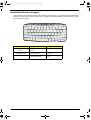
Embedded Numeric Keypad
The embedded numeric keypad functions like a desktop numeric keypad. It is indicated by small characters
located on the upper right corner of the keycaps. To simplify the keyboard legend, cursor-control key symbols
are not printed on the keys.
Desired Access
Number keys on embedded
keypad
Cursor-control keys on
embedded keypad
Main keyboard keys
14
Num Lock On
Num Lock Off
Type numbers in a normal
manner.
Hold j while using
cursor-control keys.
Hold Fn while using cursorcontrol keys.
Hold Fn while typing letters
on embedded keypad.
Type the letters in a normal
manner.
Chapter 1
SG_TM420_Ch1.fm
Page 15
Thursday, September 26, 2002
9:23 AM
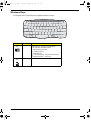
Windows Keys
The keyboard has two keys that perform Windows-specific functions.
Key
Windows logo
key
Icon
Description
Start button. Combinations with this key perform
special functions. Below are a few examples:
+ Tab (Activates next taskbar button)
+ E (Explores My Computer)
+ F (Finds Document)
+ M (Minimizes All)
j + Windows logo key + M (Undoes Minimize All)
+ R (Displays the Run... dialog box)
Application
key
Chapter 1
Opens a context menu (same as a right-click).
15
SG_TM420_Ch1.fm
Page 16
Thursday, September 26, 2002
9:23 AM
Hot Keys
The computer uses hotkey or key combinations to access most of the computer’s controls like sreen
brightness, volume output.
To activate hot keys, press and hold the Fn key before pressing the other key in the hot key combination.
Hot Key
16
Icon
Function
Description
Fn-F1
Hot key help
Displays help on hot keys.
Fn-F2
System Property
Displays the System Property.
Fn-F3
Power Options
Display the Power Options Properties used by the
computer (function available if supported by operating
system).
Fn-F4
Sleep
Puts the computer in Sleep mode.
Fn-F5
Display toggle
Switches display output between the display screen,
external monitor (if connected) and both the display
screen and external monitor.
Fn-F6
Screen blank
Turns the display screen backlight off to save power.
Press any key to return.
Fn-F7
Touchpad toggle
Turns the internal touchpad on and off.
Fn-F8
Speaker toggle
Turns the speakers on and off.
Fn-w
Volume up
Increases the speaker volume.
Chapter 1
SG_TM420_Ch1.fm
Page 17
Hot Key
Thursday, September 26, 2002
Icon
9:23 AM
Function
Description
Fn-y
Volume down
Decreases the speaker volume.
Fn-x
Brightness up
Increases the screen brightness.
Fn-z
Brightness down
Decreases the screen brightness
Chapter 1
17
SG_TM420_Ch1.fm
Page 18
Thursday, September 26, 2002
9:23 AM
The Euro Symbol
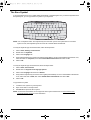
If your keyboard layout is set to United States-International or United Kingdom or if you have a keyboard with a
European layout, you can type the Euro symbol on your keyboard.
NOTE: For US keyboard users: The keyboard layout is set when you first set up Windows. For the Euro
symbol to work, the keyboard layout has to be set to United States-International.
To verify the keyboard type in Windows 2000, follow the steps below:
1.
Click on Start, Settings, Control Panel.
2.
Double-click on Keyboard.
3.
Click on the Language tab.
4.
Verify that keyboard layout used for En English (United States)” is set to United States-International. If not,
select and click on Properties; then select United States-International and click on OK.
5.
Click on OK.
To verify the keyboard type in Windows XP, follow the steps below:
1.
Click on Start, Control Panel.
2.
Double-click on Regional and Language Options.
3.
Click on the Language tab and click on Details.
4.
Verify that the keyboard layout used for "En English (United States)" is set to United States-International.
If not, select and click on ADD; then select United States-International and click on OK.
5.
Click on OK.
To type the Euro symbol:
1.
Locate the Euro symbol on your keyboard.
2.
Open a text editor or word processor.
3. Hold Alt Gr and press the Euro symbol.
NOTE: Some fonts and software do not support the Euro symbol. Please refer to www.microsoft.com/
typography/faq/faq12.htm for more information.
18
Chapter 1
SG_TM420_Ch1.fm
Page 19
Thursday, September 26, 2002
9:23 AM
Launch Keys
Located at the top of keyboard are five buttons. These buttons are called launch keys. They are designated as
P1, P2, P3 Email button and Web browser button.
NOTE: To the left of these five launch keys is the wireless communication button. This wireless
communication button works for model with 802.11b wireless LAN only.
Launch Key
Default application
P1
User-programmable
P2
User-programmable
Email
Email application
Web browser
Internet browser application
Chapter 1
19
SG_TM420_Ch1.fm
Page 20
Thursday, September 26, 2002
9:23 AM
E-Mail Detection
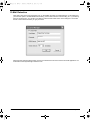
Click right button at the Launch Manager icon on the taskbar and click on E-Mail Detection. In this dialog box,
you have the option to enable/disable mail checking, set the time interval for mail checking, etc. If you already
have an email account, you can fill in User Name, Password and POP3 Server in the dialog box. The POP3
Server is the mail server where you get your email.
Aside from the email checking function, there is a mail button that is used to launch the email application. It is
located above the keyboard right below the LCD.
20
Chapter 1
SG_TM420_Ch1.fm
Page 21
Thursday, September 26, 2002
9:23 AM
Touchpad
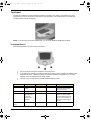
The built-in touchpad is a pointing device that senses movement on its surface. This means the cursor
responds as you move your finger on the surface of the touchpad. The central location on the palmrest
provides optimal comfort and support.
NOTE: If you are using an external USB mouse, you can press Fn-F7 to disable the touchpad.
Touchpad Basics
The following teaches you how to use the touchpad:
T
Move your finger across the touchpad to move the cursor.
T
Press the left (1) and right (3) buttons located on the edge of the touchpad to do selection and
execution functions. These two buttons are similar to the left and right buttons on a mouse.
Tapping on the touchpad produces similar results.
T
Use the 4-way scroll (2) button (top/bottom/left/and right) to scroll.
Function
Left Button
Right Button
Scroll Button
Tap
Execute
Click twice
quickly
Select
Click once
Tap once
Drag
Click and hold,
then use finger
to drag the
cursor on the
touchpad
Tap twice (at the same
speed as double-clicking
a mouse button) then hold
finger to the touchpad on
the second tap to drag the
cursor
Access context
menu
Chapter 1
Tap twice (at the same
speed as double-clicking
the mouse button)
Click once
21
SG_TM420_Ch1.fm
Page 22
Function
Scroll
Thursday, September 26, 2002
Left Button
9:23 AM
Right Button
Scroll Button
Tap
Click and hold
the button in the
desired
direction (up/
down/left/right)
NOTE: Keep your fingers dry and clean when using the touchpad. Also keep the touchpad dry and clean. The
touchpad is sensitive to finger movements. Hence, the lighter the touch, the better the response.
Tapping too hard will not increase the touchpad’s responsiveness.
22
Chapter 1
SG_TM420_Ch1.fm
Page 23
Thursday, September 26, 2002
9:23 AM
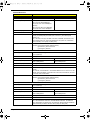
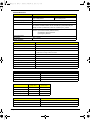
Hardware Specifications and Configurations
Processor
Item
Specification
CPU type
Intel Pentium 4
CPU package
/ µ PGA478 package
CPU core voltage
Depend on CPU VID
CPU I/O voltage
1.2V
BIOS
Item
Specification
BIOS vendor
Phoenix
BIOS Version
PhoenixBIOS 4.0 Release 6.0
BIOS ROM type
Flash ROM
BIOS ROM size
512KB
BIOS package
TSOP
Supported protocols
ACPI 1.0b,PC Card 95, SM BIOS 2.3, EPP/IEEE 1284, ECP/IEEE 1284
1.7 & 1.9, PCI 2.2, PnP 1.0a, DMI 2.0, PS/2 keyboard and mouse, USB,
VGA BIOS, CD-ROM bootable,
BIOS password control
Set by setup manual
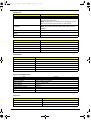
Second Level Cache
Item
Specification
Cache controller
Built-in CPU
Cache size
512KB
1st level cache control
Always enabled
2nd level cache control
Always enabled
Cache scheme control
Fixed in write-through
System Memory
Item
Specification
Memory controller
Memory size
256/512MB
DIMM socket number
1 sockets (2 banks)
Supports memory size per socket
512MB
Supports maximum memory size
1G (by two 512MB SO-DIMM module)
Supports DIMM type
DDR Synchronous DRAM
Supports DIMM Speed
133 MHz
Supports DIMM voltage
2.5V/1.25V
Supports DIMM package
200-pin soDIMM
Memory module combinations
You can install memory modules in any combinations as long as they
match the above specifications.
Chapter 1
23
SG_TM420_Ch1.fm
Page 24
Thursday, September 26, 2002
9:23 AM
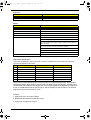
Memory Combinations
Slot 1
Slot 2
Total Memory
256/512MB
0 MB
256MB/512MB
256/512MB
128MB
384MB/640MB
256/512MB
256MB
512MB/768MB
256/512MB
512MB
768MB/1024MB
NOTE: Above table lists some system memory configurations. You may combine DIMMs with various
capacities to form other combinations. .
LAN Interface
Item
Specification
Supports LAN protocol
10/100 Mbps
LAN connector type
RJ45
LAN connector location
Right side
Modem Interface
Item
Specification
Data modem data baud rate (bps)
56K
Supports modem protocol
V.90 MDC or Billionton
Modem connector type
RJ11
Modem connector location
Right side
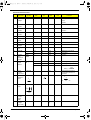
Hard Disk Drive Interface
Item
Specification
Vendor &
Model Name
IBM 20G
IBM 30G
IBM 40G
Toshiba
40G
(MK4018)
Hitachi
20G
DK23DA20F
Hitachi
30G
DK23DA30F
Hitachi
40G
DK23DA40F
Capacity (MB)
20000
30000
40000
40000
20000
30000
40000
Bytes per
sector
512
512
512
512
512
512
512
Data heads
2
3
4
4
2
3
4
Drive Format
Disks
1
2
2
2
1
2
2
Spindle speed
(RPM)
4200 RPM
4200 RPM
4200 RPM
4200 RPM
4200 RPM
4200 RPM
4200 RPM
Performance Specifications
Buffer size
2048KB
2048KB
2048KB
2048
512KB
2048KB
2048KB
Interface
ATA-5
ATA-5
ATA-5
ATA-5
ATA-5
ATA-5
ATA-5
Max. media
transfer rate
(disk-buffer,
Mbytes/s)
130~245
125~241
130~245
156.9~
290.4
149.6~
277.6
149.6~
277.6
149.6~
277.6
Data transfer
rate
(host~buffer,
Mbytes/s)
100 MB/
Sec.
Ultra DMA
mode-5
100 MB/
Sec.
Ultra DMA
mode-5
100 MB/
Sec.
Ultra DMA
mode-5
100 MB/
Sec.
Ultra DMA
mode-5
100 MB/
Sec.
Ultra DMA
mode-5
100 MB/
Sec.
Ultra DMA
mode-5
100 MB/
Sec.
Ultra DMA
mode-5
5V(DC) +/5%
5V(DC) +/5%
5V(DC) +/5%
5V(DC) +/5%
5V(DC) +/5%
5V(DC) +/5%
DC Power Requirements
Voltage
tolerance
24
5V(DC) +/5%
Chapter 1
SG_TM420_Ch1.fm
Page 25
Thursday, September 26, 2002
9:23 AM
DVD-ROM Interface
Item
Specification
Vendor & model name
Toshiba (SR-C2612)
Performance Specification
With CD Diskette
With DVD Diskette
Transfer rate (KB/sec)
(Mode1)
4X-5.7X PCAV 600-855KByte/s
10.3X-24X CAV 1552-3600KByte/s
(Mode2)
4X-5.7X PACV 684.4-975.3KBytes/s
10.3X-24X CAV 1769-4104KByte/s
3.3X-8X CAV 4463-10820KByte/s
Data Buffer Capacity
192 KBytes
Interface
IDE/ATAPI
Applicable disc format
DVD: DVD-ROM (DVD-5, DVD-9, DVD-10, DVD-18),DVD-R (read, single
border), DVD-RW(read) DVD-RAM (read, Version2.1), DVD-RAM (read,
Version 1.0)
CD: CD-Audio, CD+(E)G, CD-MIDI, CD-TEXT, CD-ROM, CD-ROM XA, CD-I,
CD-I Bridge (Photo-CD, Video-CD) Multisession CD (Photo-CD, CD-EXTRA,
CD-R, CD-RW), CD-R (read), CD-RW (read)
Loading mechanism
Load: Manual
Release: (a) Electrical Release (Release Button)
(b) Release by ATAPI command
(c) Emergency Release
Power Requirement
Input Voltage
+5 V +/- 5 % (Operating)
+/- 8 % (Start up)
Vendor & model name
LiteOn (LSD-081)
Performance Specification
With CD Diskette
With DVD Diskette
Transfer rate (KB/sec)
Sustained:
Max 3.6Mbytes/sec
Sustained:
Max 10.8Mbytes/sec
Data Buffer Capacity
256 KBytes
Interface
IDE/ATAPI
Applicable disc format
DVD: DVD-ROM (DVD-5, DVD-9, DVD-10, DVD-18),DVD-R (read, single
border)
CD: CD-DA, CD ROM Mode-1, CD-ROM/XA Mode-2 Form-1 and Form-2, CD-I
Ready, Video-CD (MPEG-1), Karaoke CD, Photo-CD, Enhanced CD, CD extra,
I-Trax CD, UDF, and CD-TEXT
Loading mechanism
Load: Manual
Release: (a) Electrical Release (Release Button)
(b) Release by ATAPI command
(c) Emergency Release
Power Requirement
Input Voltage
+5 V +/- 5 % (Operating)
+/- 8 % (Start up)
Vendor & model name
Hitachi (GDR-8081N)
Performance Specification
With CD Diskette
With DVD Diskette
Transfer rate (KB/sec)
Sustained:
Max 3.6Mbytes/sec
Sustained:
Max 10.8Mbytes/sec
Data Buffer Capacity
512 KBytes
Interface
IDE/ATAPI
Applicable disc format
DVD: DVD-ROM (DVD-5, DVD-9, DVD-10, DVD-18),
CD: CD-ROM Mode-1 data disc, CD-ROM Mode-2 data disc, CD-ROM XA,
CD-I, Multisession CD (Photo-CD), CD-Audio disc, Mixed mode CD-ROM disc
(data and audio) CD-Extra, CD-Text, CD-R (read), CD-RW (read)
Chapter 1
25
SG_TM420_Ch1.fm
Page 26
Thursday, September 26, 2002
9:23 AM
DVD-ROM Interface
Item
Loading mechanism
Specification
Load: Manual
Release: (a) Electrical Release (Release Button)
(b) Release by ATAPI command
(c) Emergency Release
Power Requirement
Input Voltage
+5 V +/- 5 % (Operating)
+/- 8 % (Start up
Vendor & model name
Toshiba (SD2212)
Performance Specification
With CD Diskette
With DVD Diskette
Transfer rate (KB/sec)
(Mode1)
PCAV 600-900KByte/s
CAV 1552-3600KByte/s
(Mode2)
PACV 684.4-1026KBytes/s
CAV 1769-4104KByte/s
CAV 2230-5480 Block/s
Data Buffer Capacity
2Mbytes
Interface
IDE/ATAPI
Applicable disc format
DVD: DVD-ROM (DVD-5, DVD-9, DVD-10, DVD-18),DVD-R (read, Ver 1.0, Ver.
2.0 single border), DVD-RW (read, Ver 1.1), DVD-RAM (read Ver.2.1, Ver. 1.0)
CD: CD-DA, CD+(E)G, CD-MIDI, CD-TEXT, CD-ROM, CD-ROM XA, MIXED
MODE CD, CD-I, CD-I Bridge (Photo-CD, Video-CD) Multisession CD (PhotoCD, CD-EXTRA, CD-R, CD-RW), Portfolio (read), CD-R (read), CD-RW (read)
Loading mechanism
Load: Manual
Release: (a) Electrical Release (Release Button)
(b) Release by ATAPI command
(c) Emergency Release
Power Requirement
Input Voltage
+5 V +/- 5 % (Operating)
+/- 8 % (Start up)
Vendor & model name
QSI (SBW161)
Performance Specification
With CD Diskette
With DVD Diskette
Transfer rate (KB/sec)
Sustained:
Max 3.6Mbytes/sec
Sustained:
Max 10.8Mbytes/sec
Data Buffer Capacity
2MBytes
Interface
IDE/ATAPI
Applicable disc format
DVD: DVD-ROM (DVD-5, DVD-9, DVD-10, DVD-18),DVD-R (read), DVD-RW
(read), DVD+RW (Single Border, without Defect Management.)
CD-read: CD-DA, CD-ROM Mode-1, CD-ROM/XA Mode-2 Form-1 and Mode-2
Form-2, CD-i Ready, Video CD (MPEG-1), Karaoke CD, Photo-CD, Enhanced
CD, CD Plus, CD Extra, i-trax CD, CD-Text, CD-R, and CD-RW
CD-write: CD-DA, CD-ROM Mode-1, CD-ROM/XA Mode-2 Form-1 and Mode-2
Form-2, CD-i, Video-CD, CD-Text
Loading mechanism
Load: Manual
Release: (a) Electrical Release (Release Button)
(b) Release by ATAPI command
(c) Emergency Release
Power Requirement
26
Input Voltage
+5 V +/- 5 % (Operating)
+/- 8 % (Start up)
Vendor & model name
KME (UJDA730)
Performance Specification
With CD Diskette
With DVD Diskette
Chapter 1
SG_TM420_Ch1.fm
Page 27
Thursday, September 26, 2002
9:23 AM
DVD-ROM Interface
Item
Specification
Transfer rate (KB/sec)
Sustained:
Max 3.6Mbytes/sec
Sustained:
Max 10.8Mbytes/sec
Data Buffer Capacity
2MBytes
Interface
IDE/ATAPI
Applicable disc format
DVD: DVD-Video, DVD-ROM, DVD-R (3.9GB, 4.7GB)
CD: CD-DA, CD-ROM, CD-RW, CD-R, CD-ROM XA, (except ADPCM) CD-I
Ready, PhotoCD (muiltiSession) Video CD, Cd-Extra (CD+), CD-text
Loading mechanism
Load: Manual
Release: (a) Electrical Release (Release Button)
(b) Release by ATAPI command
(c) Emergency Release
Power Requirement
Input Voltage
+5 V +/- 0.25V
Audio Interface
Item
Specification
Audio Controller
Realtek ALC202 AC97 Codec
Audio onboard or optional
Built-in
Mono or Stereo
Stereo
Resolution
20 bit stereo Digital to analog converter
18 bit stereo Analog to Ditial converter
Compatibility
Microsoft PC98/PC99, AC97 2.2 & WHQL
Mixed sound source
Line-in, CD
Sampling rate
48 KHz
Internal microphone
Yes
Internal speaker / Quantity
Yes/2
Supports PnP DMA channel
DMA channel 00
Supports PnP IRQ
IRQ3, IRQ5, IRQ7, IRQ9, IRQ10, IRQ11
Video Interface
Item
Specification
Chip vendor
ATI
Chip name
ATI M7-C
Chip voltage
Core/1.25V
Supports ZV (Zoomed Video) port
No
Video Resolutions Mode (for both LCD and CRT)
16 bits
(High color)
Resolution
32 bits
(True color)
1024x768
Yes
Yes
1400x1050 (SXGA)
Yes
Yes
1600x1200 (UXGA)
Yes
Yes
1280x1024 (Monitor)
Yes
Yes
Parallel Port
Item
Specification
Parallel port controller
SMSC LPC47N227
Number of parallel port
1
Location
Rear side
Chapter 1
27
SG_TM420_Ch1.fm
Page 28
Thursday, September 26, 2002
9:23 AM
Parallel Port
Item
Specification
Connector type
25-pin D-type connector, in female type
Parallel port function control
Enable/Disable/Auto (BIOS or operating system chooses
configuration) by BIOS Setup
Note: Depending on your operating system, disabling an unused
device may help free system resources for other devices.
Supports ECP/EPP/Bi-directional (PS/2
compatible)
Yes (set by BIOS setup)
Note: When Mode is selected as EPP mode, “3BCh” will not be
available.
Optional ECP DMA channel (in BIOS Setup)
DMA channel 1
Optional parallel port I/O address (in BIOS
Setup)
378h, 278h
Optional parallel port IRQ (in BIOS Setup)
IRQ7, IRQ5
USB Port
Item
Specification
USB Compliancy Level
1.1
OHCI
USB 1.1
Number of USB port
2
Location
Right side
Serial port function control
Enable/Disable by BIOS Setup
PCMCIA Port
Item
Specification
PCMCIA controller
OZ6912 CardBus controller
Supports card type
Type II
Number of slots
One type-II
Access location
Right panel
Supports ZV (Zoomed Video) port
No ZV support
Supports 32 bit CardBus
Yes (IRQ11)
System Board Major Chips
Item
Controller
System core logic
Brookdale MP+ICH3-M
Super I/O controller
SMsC 47N227, LPC interface
Audio controller
Realtek ALC202 Codec
Video controller
ATI M7-C
Hard disk drive controller
ICH3-M
Keyboard controller
NS 87591
RTC
ICH3-M
Keyboard
Item
28
Specification
Keyboard controller
NS 87591
Keyboard vendor & model name
Acer proprietary keyboard w/o launch button embeded
Total number of keypads
87/88/90 keys with 101/102 key emulation
Chapter 1
SG_TM420_Ch1.fm
Page 29
Thursday, September 26, 2002
9:23 AM
Keyboard
Item
Specification
Windows logo key
Yes
Internal & external keyboard work simultaneously
Yes
Battery
Item
Specification
Vendor & model name
Sanyo/Sony/Panasonic
Battery Type
Li-ion
Pack capacity
69.93Wh
Cell voltage
3.7V/cell
Number of battery cell
9
Package configuration
Pin 1,2: BATT+: Battery positive power pin
Pin 3: Floating pin (3S3P)
Pin 4: B/I: Enable LI-ion battery output, connect to 1k Ω resistor to
GND in system.
Pin 5: TS: connect 10K Ω ohm Thermistor to GND
Pin 6: EC_SMD1: SMbus DATA
Pin 7: EC_SMC1: SMbus CLOCK
Pin 8, 9: GND: battery ground power pin
Package voltage
11.1V
LCD Inverter Specification
This inverter is designed to light up the CCFL of LCD for TravelMate 420 series notebook. It should be
supported the following LCD panels.
No.
Supplier
Model
Type
1
AU
UB141X01
TFT, 14.1” XGA
2
CPT
CLAA141XF01
TFT, 14.1” XGA
3
AU
B150PG01
TFT, 15.0 SXGA+
4
Hitachi
TX38D91VC1FAC
TFT, 15.0” SXGA+
5
AU
B150XG01
TFT, 15.0” XGA
6
IBM
ITSX95C
TFT 15.0” SXGA+
7
Hannstar
HDS150PX14-A
TFT 15.0” XGA
There are two control signals that come form system to control lamp brightness. One signal is
named DAC_BRIG, which limits current to meet LCD lamp current specification. Another one is
named PWM, which adjusts lamp brightness. This inverter brightness is adjusted by PWM burst
mode. The PWM burst mode is that turning on and off the lamp at rate of 150Hz. The effective
brightness is a function of the duty cycle.
Features
1. Wide range 9V to 21V input voltage.
2. Birghtness adjustment by PWM duty mode.
3. Close loop controls lamp current.
Chapter 1
29
SG_TM420_Ch1.fm
Page 30
Thursday, September 26, 2002
9:23 AM
Electrical Characteristics
No
.
1
Parameter
Input
Symbol
NV_PWR
Min.
9
Typ.
14.8
Max.
21
Unit
V
voltage
Comment
7.5V (continuous) can
work
*Note 1
2
Input
Iin
--
0.33
--
A
IL
3.0
--
6.8
mA
current
3
Lamp
current
4
Lamp
DAC=0V
*Note 2
IL
2.7
--
6.3
mA
DAC=1V
* Note 3
current
4
Frequency
F
45
55
65
KHz
5
Output
power
Pout
--
--
4.5
W
6
Efficiency
η
80%
--
--
--
7
Starting
voltage
Vs
1600
--
---
V
8
Starting
time
Tvs
1
--
1.5
Sec
9
Dispoff#
2.8
3.3
3.6
V
Backlight on/off signal
0
0.5
0.8
V
Low level
3.3
V
*Note 2
At 0’C
10
Limited
lamp
maximum
current
DACBRIG
0
11
PWM
signal
*Note 4
INV_PW
M
142
150
158
Hz
PWM signal frequency
3.0
3.3
3.6
V
PWM signal amplitude
30
--
100
%
Ton
Duty = ------------------Period
12
Lamp
current
over-shoot
13
Current
Waveform
factor
I zero-PK
--
--
1.27
10
%
1.56
Multiple
Unbalance
Rate
I−p
2
Ip
I rms
14
Line transient (10.8V to
21V/100us) and turn on
transient
or
-10%
0
+10%
Mulitple
I rms
*10
Ip −I−p
Irms
30
15
Turn off
current
(Hight
side)
IHl
--
--
0
A
PWM=30%
15
Turn off
voltage
(Low side)
Voff
--
--
150Vpp
V
PWM=30%
Chapter 1
SG_TM420_Ch1.fm
Page 31
No
.
Thursday, September 26, 2002
Parameter
Symbol
9:23 AM
Min.
Typ.
Max.
Unit
Comment
16
Voltage
Rise time
(Low side)
Trise
--
--
300us
us
PWM=30%
17
Voltage fall
time (Low
side)
Tfall
--
--
300us
us
PWM=30%
NOTE:
*1. The inverter can work in 7.5V input voltage (continuous), but 7.5V electronic characteristic will
not be care.
*2. Limited lamp maximum current by DAC_BRIC signal:
When DAC_BRIG voltage is 0V and INV_PWM enables (100%), lamp has max. current.
When DAC_BRIG voltage is 3.3V and INV_PWM enables (100%), lamp has min. current.
When add 1V DAC, the 100% Lamp current will decrease 0.5mA.
DAC_BRIG signal comes from system chipset with internal resistance of 3K Ω
*3. Inverter operating frequency should be within specification (45~65kHz) at max. and min.
brightness load.
*4. INV_PWM enable implies INV_PWM signal is High level (On duty cycle is 100%). It is a square
wave of 150Hz to adjust backlight brightness that is a function of PWM duty cycle. Backlight
brightness is maximum value under INV_PWM at 100% and brightness is minimum under
INV_PWM at 30%.
*5.The system interface signals belong to 3.3V.
*6. Please make sure open lamp output voltage should be within starting voltage specification.
*7. Inverter should pass human body safety test.
*8. Inverter should be no smoking by any component open/short test.
*9. Transformer voltage stress should not be over 85% under any condition.
(turn on overshoot transient and line transient.)
*10. Audio noise should be less than 36dB at 10cm distance.
.
Electrical specification
No
.
1
Symbol
V oper*
Min.
--
Typ.
650
Max.
--
Unit
Vrms
Comment
Lamp operating voltage
(650+/-50)
Il
6.2
6.5
6.8
mArms
DAC_BRIG: 0 V, PWM:
100%
Il
3.0
3.3
3.6
mArms
DAC_BRIG: 0 V,
PWM:30%
Il
5.7
6.0
6.3
mArms
DAC_BRIG: 0V,
PWM:100%
Il
2.7
3.0
3.3
mArms
F
45
55
65
kHz
η
80%
--
--
--
DAC_BRIG: 1V,
PWM:30%
Thermal
Chapter 1
31
SG_TM420_Ch1.fm
Page 32
Thursday, September 26, 2002
9:23 AM
All components on inverter board should follow below rules:
1. Component using conditions (component stress) must be within component specification including voltage
rating, current rating, temperature etc.
2. Component temperature should follow below:
∆T <=30 degree C, at 25, 35 degree C.
T
Component temperature should be less than 70 degree C inside system at 35 degree C.
LCD
T
Item
Specification
Vendor & model
name
CPT
CLAA141
XF01
AU
B141XN04
UB141X01
B150XG0
1
B150PG0
1
HANNSTA
R
HSD150P
X14-A
IBM
ITSX95C
HITACHI
TX38D91
VC1FAC
Hannstar
HSD150P
U13-A
Mechanical Specifications
LCD display area
(diagonal, inch)
14.1
14.1/15.0
15.0
15.0
15.0
15.0
Display technology
TFT
TFT
TFT
TFT
TFT
TFT
Resolution
XGA
(1024X
768)
XGA
(1024X
768)
SXGA+
(1400X
1050)
XGA
(1024X
768)
SXGA+
(1400X
1050)
SXGA+
(1400X
1050)
UXGA
(1600X
1200)
Supports colors
262K
262K
262K
262K
262K
262K
Brightness control
keyboard
hotkey
keyboard
hotkey
keyboard
hotkey
keyboard
hotkey
keyboard
hotkey
keyboard
hotkey
Contrast control
No
No
No
No
No
No
Suspend/Standby
control
Yes
Yes
Yes
Yes
Yes
Yes
Supply voltage for
LCD display (V)
3.3
3.3
3.3
3.3
3.3
3.3
Supply voltage for
LCD backlight
(Vrms)
690
690
690
690
690
690
Optical Specification
Electrical Specification
AC Adapter
Item
Vendor & model name
Specification
API API 2AD02-381 90W
Input Requirements
Maximum input current (A,
@100Vac, full load)
32
1.4Amax@100Vac
0.7Amax@ 240Vac
Nominal frequency (Hz)
47 - 63
Frequency variation range (Hz)
47 - 63
Nominal voltages (Vrms)
90 - 264
Inrush current
The maximum inrush current will be less than 50A and 100A when the adapter
is connected to 115Vac(60Hz) and 240Vac(50Hz) respectively.
Efficiency
High efficiency 86% minimum, at 100~240Vac AC input, full load, warm-up
condition.
Chapter 1
SG_TM420_Ch1.fm
Page 33
Thursday, September 26, 2002
9:23 AM
AC Adapter
Item
Specification
Output Ratings (CV mode)
DC output voltage
Offers constant voltage 19.0V output source with 90W max output power
capacity.
Noise + Ripple
300mvp-pmax (20MHz bandwidth) for resistor load
Output current
0 A (min.)
4.74A (max.)
Output Ratings (CC mode)
DC output voltage
19.0
Constant output
3.5A
Dynamic Output Characteristics
Start-up time
3 sec. (@115 Vac and 230Vac full load)
Hold up time
10ms min. (@115 Vac input, full load)
Over Voltage Protection (OVP)
26 V
Short circuit protection
Output can be shorted without damage, and auto recovery
Electrostatic discharge (ESD)
15kV (at air discharge)
8kV (at contact discharge)
Dielectric Withstand Voltage
Primary to secondary
4242 Vdc for 1 second
Leakage current
60uA at 254Vac
Regulatory Requirements
1. FCC class B requirements (USA)
2. VDE class B requirements (German)
3. VCCI classII requirements (Japan)
Power Management
ACPI Mode
Power Management
Mech. Off (G3)
All devices in the system are turned off completely.
Soft Off (G2/S5)
OS initiated shutdown. All devices in the system are turned off
completely.
Working (G0/S0)
Individual devices such as the CPU and hard disk may be power
managed in this state.
Sleeping State (S3)
CPU in Stop Clock state
VGA Suspend
PCMCIA Suspend
Audio Power Down
Hard Disk Power Down
Super I/O Low Power mode
Sleeping State (S4)
Also called Hibernate state. System saves all system states and
data onto the disk prior to power off the whole system.
Environmental Requirements
Item
Specification
Temperature
Operating
+5~+35°C
Non-operating
-20~+65°C
Non-operating
-20~+50°C (storage package)
Humidity
Operating
10% to 90% RH, non-condensing
Non-operating
10% to 90% RH, non-condensing (unpacked)
Chapter 1
33
SG_TM420_Ch1.fm
Page 34
Thursday, September 26, 2002
9:23 AM
Environmental Requirements
Item
Non-operating
Specification
10% to 90% RH, non-condensing (storage package)
Vibration
Operating (unpacked)
5~500Hz: 1.0G
Non-operating (unpacked)
50~500Hz: 2.16G
Mechanical Specification
Item
Specification
Dimensions
327mm (W) x 269mm (D) x 35.9mm (H) for 14.1/15.0 inch model
Weight
6.3lb (2.86kg) for 14.1 inch model
6.6lb (2.99kg) for 15.0 inch model
I/O Ports
One type II CardBus slots, One RJ-11 modem jack,One RJ-45 network jack,
One DC-in jack for AC adapter, One ECP/EPP-compliant parallel port, One
external monitor port, One headphone/speaker/line-out jack (3.5mm mini jack),
One microphone/line-in jack (3.5mm mini jack), One S-video-out (NTSC/PAL)
port, Three Universal Serial Bus (USB) ports, One IEEE 1394 port, 100-pin port
replicator connector for Acer EasyPort, One SD/MMC slots, One memory stick
slot
Drive Bays
two
Material
Recycle plastic PC+ABS 94V0
Indicators
Power, Media activity, Battery charge, Wireless communication, Caps lock, Num
lock and Sleep indicators
Switch
Power switch
Lid switch
Internet switch
Wireless ON/OFF switch
E-mail switch
Memory Address Map
Memory Address
Size
Function
000E0000h-000FFFFFh
128KB
System BIOS
000C0000h-000CFFFFh
64KB
VGA BIOS
000A0000h-000BFFFFh
128KB
Video memory (VRAM)
00000000h-0009FFFFh
640KB
Conventional memory
I/O Address Map
I/O Address
34
Function
0000-001F
Direct memory access controller
0000-0CF7
PCI bus
0020-0021
Programmable interrupt controller
0024-0025
Programmable interrupt controller
0028-0029
Programmable interrupt controller
002C-002D
Programmable interrupt controller
002E-002F
Motherboard resources
0030-0031
Programmable interrupt controller
0034-0035
Programmable interrupt controller
0038-0039
Programmable interrupt controller
003C-003D
Programmable interrupt controller
0040-0043
System timer
Chapter 1
SG_TM420_Ch1.fm
Page 35
Thursday, September 26, 2002
9:23 AM
I/O Address Map
I/O Address
Function
004E-004F
Motherboard resources
0050-0053
System timer
0060-0060
Standard 101/102-Key or Microsoft Natural PS/2 Keyboard
0061-0061
Motherboard resources
0062-0062
Microsoft ACPI-Compliant Embedded Controller
0063-0063
Motherboard resources
0064-0064
Standard 101/102-Key or Microsoft Natural PS/2 Keyboard
0065-0065
Motherboard resources
0066-0066
Microsoft ACPI-Compliant Embedded Controller
0067-0067
Motherboard resources
0070-0077
System CMOS/real time clock
0080-0080
Motherboard resources
0081-008F
Direct memory access controller
0090-0091
Direct memory access controller
0092-0092
Motherboard resources
0093-009F
Direct memory access controller
00A0-00A1
Programmable interrupt controller
00A4-00A5
Programmable interrupt controller
00A8-00A9
Programmable interrupt controller
00AC-00AD
Programmable interrupt controller
00B0-00B1
Programmable interrupt controller
00B4-00B5
Programmable interrupt controller
00B8-00B9
Programmable interrupt controller
00BC-00BD
Programmable interrupt controller
00C0-00DF
Direct memory access controller
00F0-00F0
Numeric data processor
0170-0177
Secondary IDE Channel
01F0-01F7
Primary IDE Channel
0240-0247
Winbond Memory Stick Storage Device Driver(MS)
0248-024F
Winbond Secure Digital Storage (SD/MMC) Device Driver
0274-0277
ISAPNP Read Data Port
0279-0279
ISAPNP Read Data Port
0376-0376
Secondary IDE Channel
0378-037B
ECP Printer Port (LTP1)
03B0-03BB
Intel (R) 82845 Processor to AGP Controller-1A31
03B0-03BB
MOBILITY RADEON 7500
03C0-03DF
Intel (R) 82845 Processor to AGP Controller-1A31
03C0-03DF
MOBILITY RADEON 7500
03F0-03F5
Standard floppy disk controller
03F6-03F6
Primary IDE Channel
03F7-03F7
Standard floppy disk controller
03F8-03FF
Communications Port (COM1)
04D0-04D1
Programmable interrupt controller
0600-060F
Motherboard resources
0700-070F
Motherboard resources
Chapter 1
35
SG_TM420_Ch1.fm
Page 36
Thursday, September 26, 2002
9:23 AM
I/O Address Map
I/O Address
Function
0778-077B
ECP Printer Port (LPT1)
0A79-0A79
ISAPNP Read Data Port
0D00-FFFF
PCI Bus
1000-107F
Motherboard resources
1180-11BF
Motherboard resources
1200-120F
Motherboard resources
1800-181F
Intel (R) 82801 CA/CAM USB Universal Host Controller-2487
1820-182F
Intel (r) 82801 CAM Ultra ATA Storage Controller-248A
1840-185F
Intel (R) 82801 CA/CAM SMBus Controller-2483
1860-187F
Intel (R) 82801 CA/CAM USB Universal Host Controller-2482
1880-18BF
Intel (R) 82801 CA/CAM AC’97 Audio Controller
18C0-18DF
Intel (R) 82801 CA/CAM USB Universal Host Controller-2484
1C00-1CFF
Intel (R) 82801 CA/CAM AC’97 Audio Controller
2000-207F
Conexant SoftK56 Data Fax Modem
2400-24FF
Conexant SoftK56 Data Fax Modem
3000-30FF
MOBILITY RADEON 7500
3000-3FFF
Intel (R) 82845 Processor to AGP Controller -1A31
4000-403F
Intel (R) PRO/100 VE Network Connection #2
FC00-FCFF
O2Micro OZ6912 CardBus Controller
FD00-FDFF
O2Micro OZ6912 CardBus Controller
FE00-FE01
Motherboard resources
IRQ Assignment Map
Interrupt Channel
Function(Hardware)
IRQ00
SystemTimer
IRQ01
Keyboard
IRQ02
Programmable Interrup Controller
IRQ03
Free
IRQ04
Communications Port (COM1)
IRQ05
Winbond Memory Stick Storage (MS) Device Driver
IRQ06
Standard Floppy Disk Controller
IRQ07
ECP Printer Port (LPT1)
IRQ08
System CMOS/real time clock
IRQ09
Conexant SoftK56 Data Fax Modem
Intel (r) 82801 CA/CAM AC’97 Audio Controller
Intel (R) 82801 CA/CAM SMBus Controller-2483
Intel (R) 82801 CA/CAM USB Universal Host Controller-2482
Intel (R) 82801 CA/CAM USB Universal Host Controller-2484
Intel (R) 82801 CA/CAM USB Universal Host Controller-2487
Intel (R) PRO/100 VE Network Connection # 2
Intersil PRISM Wireless LAN PCI Card
MOBILITY RADEON 7500
O2Micro Oz6912 CardBus Controller
Texas Instruments OHCI Compliant IEEE 1394 Host Controller
36
IRQ10
Winbond Secure Digital Storage (SD/MMC) Device Driver
IRQ11
Free
Chapter 1
SG_TM420_Ch1.fm
Page 37
Thursday, September 26, 2002
9:23 AM
IRQ Assignment Map
Interrupt Channel
Function(Hardware)
IRQ12
Alps Pointing-device
IRQ13
Numeric data processor
IRQ14
Primary IDE controller
IRQ15
Secondary IDE controller
DMA Channel Assignment
DMA Channel
Function(Hardware)
1
ECP Printer Port (LPT1)
2
Standard Floppy Disk Controller
4
Direct Memory Access Controller
Chapter 1
37
SG_TM420_Ch1.fm
38
Page 38
Thursday, September 26, 2002
9:23 AM
Chapter 1
SG_TM420_Ch2.fm
Page 39
Thursday, September 26, 2002
9:40 AM
Chapter 2
System Utilities
BIOS Setup Utility
The BIOS Setup Utility is a hardware configuration program built into your computer’s BIOS (Basic Input/
Output System).
Your computer is already properly configured and optimized, and you do not need to run this utility. However, if
you encounter configuration problems, you may need to run Setup. Please also refer to Chapter 4
Troubleshooting when problem arises.
To activate the BIOS Utility, press m during POST (when “Press <F2> to enter Setup” message is prompted
on the bottom of screen).
Press F12 to change boot order.
Press C to boot from CD-ROM.
Navigating the BIOS Utility
There are six menu options: Info. Main, System Devices, Security, Boot and Exit.
Follow these instructions:
T
Chapter 2
To choose a menu, use the cursor left/right keys (zx).
39
SG_TM420_Ch2.fm
Page 40
Thursday, September 26, 2002
9:40 AM
T
To choose a parameter, use the cursor up/down keys ( wy).
T
To change the value of a parameter, press p or q.
T
Press ^ while you are in any of the menu options to go to the Exit menu.
T
In any menu, you can load default settings by pressing t. You can also press u to save any
changes made and exit the BIOS Setup Utility.
NOTE: You can change the value of a parameter if it is enclosed in square brackets. Navigation keys for a
particular menu are shown on the bottom of the screen. Help for parameters are found in the Item
Specific Help part of the screen. Read this carefully when making changes to parameter values.
40
Chapter 2
SG_TM420_Ch2.fm
Page 41
Thursday, September 26, 2002
9:40 AM
Info.
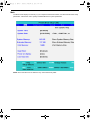
This menu provides you the information of the system.
Parameter
Floppy Drive
Description
The Floppy Drive status is auto detected by the system. The information page would
display “1.44MB, 3 1/2 if floppy drive exists; it would display “Not installed” if floppy drive
does not exist.
IDE1 Model Name
Shows the Model name of HDD installed on Primary IDE master. The system will auto
detect the hard disk model name. “None” means the hard disk drive is not existing or
unknown type.
IDE1 Serial Number
This item displays the Model Name of HDD installed on Primary IDE master. If no hard
disk or other devices are installed on Primary IDE master, this item will display a blank
line.
IDE2 Model Name
Displays the Model Name of Device installed on Secondary IDE master. The hard disk or
CD-ROM model is automatically detected by the system. If the hard disk drive or CD-ROM
is not existing or unknown type, this field would display “None”.
IDE2 Serial Number
This field shows the Serial Number of HDD installed on Secondary IDE master. If no hard
disk drive or other devices are installed on Primary IDE master, it will display a blank line.
System BIOS Version
Displays system BIOS version
VGA BIOS Version
Displays VGA BIOS version
Serial Number
Displays the serial number of the unit.
Chapter 2
41
SG_TM420_Ch2.fm
Page 42
Thursday, September 26, 2002
Parameter
42
9:40 AM
Description
UUID Number
UUID=16bytes. This will be visible only when there is an internal LAN device present.
System Memory
This field reports the memory size of system base memory. The size is fixed to 640KB.
Chapter 2
SG_TM420_Ch2.fm
Page 43
Thursday, September 26, 2002
9:40 AM
Main
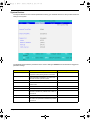
The Main screen displays a summary of your computer hardware information, and also includes basic setup
parameters. It allows the user to specify standard IBM PC AT system parameters.
NOTE: The screen above is for reference only. Actual values may differ.
Chapter 2
43
SG_TM420_Ch2.fm
Page 44
Thursday, September 26, 2002
9:40 AM
The table below describes the parameters in this screen. Settings in boldface are the default and suggested
parameter settings.
Parameter
Description
Format/Option
System Time
Sets the system time.
Format: HH:MM:SS
(hour:minute:second) System Time
System Date
Sets the system date.
Format MM/DD/YYYY (month/day/
year)
System Date
System Memory
This field reports the memory size of system
base memory.
Extended Memory
This field reports the memory size of the
extended memory in the system.
The size is fixed to 640KB.
Extended Memory size=Total memory size-1MB
VGA Memory
VGA Memory size=16MB
Quiet Boot
Control whether Customer Logo and Summary
Screen are displayed or not.
Option: Enabled or Disabled
Power on Display
Auto: During power on process, the system will
detect if any display device is connected on
external video port. If any external display device
is connected, the power on display will be in CRT
(or projector) only mode. Otherwise the system
will be in LCD only mode.
Option: Auto or Both
Both: Simultaneously enable both the integrated
LCD screen and the system’s external video port
(for an external CRT or projector).
LCD Auto Dim
Enabled: LCD brightness will automatically lower
to save more power when AC is not present.
Option: Enabled or Disabled
Disabled: LCD brightness will NOT automatically
lower to save more power when AC is not
present.
NOTE: The sub-items under each device will not be shown if the device control is set to disable or auto. This is
because the user is not allowed to control the settings in these cases.
44
Chapter 2
SG_TM420_Ch2.fm
Page 45
Thursday, September 26, 2002
9:40 AM
System Devices
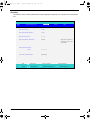
The System Devices screen contains parameters involving your hardware devices. It also provides advanced
settings of the system.
The table below describes the parameters in the screen. Settings in boldface are the default and suggested
parameter settings.
Parameter
Description
Options
Internal TouchPad
Determines whether or not to disable the internal
touchpad of a PS/2 pointing device is connected.
Both or Auto
Infrared Port (FIR)
Sets the interrupt request of the serial port. Please
set the parameter to “Enabled” if you need to use
FIR under Windows operation system.
Disabled/ Enabled/ Auto
Base I/O address/IRQ
Sets the I/O address of the Infrared port.
3F8h/IRQ4; 2F8h/IRQ3; 2E8h/IRQ3
DMA
Sets a DMA channel for the printer to operate in
disabled mode.
DMA1/ DMA3
Parallel Port
Enables, disables or auto detects the parallel port.
Enabled/Disabled/Auto
Mode
Sets the operation mode of the parallel port.
ECP, EPP, Normal or Bi-directional
Base I/O address/
Sets the I/O address of the parallel port. This
parameter is enabled only if Mode is set to ECP or
Bi-directional.
378h, 278h or 3BCh
Interrupt
Sets the interrupt request of the parallel port.
IRQ 7 or IRQ5
DMA Channel
Sets a DMA channel for the printer to operate in
ECP mode. This parameter is enabled only if Mode
is set to ECP.
DMA3 or DMA1
Chapter 2
45
SG_TM420_Ch2.fm
Page 46
Thursday, September 26, 2002
9:40 AM
Security
The Security screen contains parameters that help safeguard and protect your computer from unauthorized
use.
P h o e n ix B IO S S e tu p U tility
M a in
E xit
S ys te m D e vice s
S e c u rity
Boot
In fo .
Ite m s p e c ific H e lp
U s e r P a s s w o rd is
C le a r
A d m in is tra to r P a s s w o rd is
C le a r
S e t U s e r P a s s w o rd
[E n te r]
S e t A d m in is tra to r P a s s w o rd
[E n te r]
S u p e rvis o r P a s s w o rd
c o n tro ls a c c e s s to th e
s e tu p u tility
P a s s w o rd R e q u ire d to :
B o o t:
P ro c e s s o r S e ria l N u m b e r :
F1
Esc
46
H e lp
E x it
↑ ↓ S e le c t Ite m
← → S e le c t M e n u
[E n a b le d ]
[E n a b le d ]
F 5 /F 6 C h a n g e V a lu e s
E n te r
S e le c t 4 S u b -M e n u
F9
S e tu p d e fa u lts
F10
S a ve a n d E x it
Chapter 2
SG_TM420_Ch2.fm
Page 47
Thursday, September 26, 2002
9:40 AM
The table below describes the parameters in this screen. Settings in boldface are the default and suggested
parameter settings.
Parameter
Description
Option
User Password is
Shows the setting of the user password.
Clear or Set
Supervisor Password is
Shows the setting of the Supervisor password
Clear or Set
Set User Password
Press Enter to set the user password. When
set, this password protects the BIOS Setup
Utility from unauthorized access.
Set Supervisor Password
Press Enter to set the administrator password.
When set, this password protects the BIOS
Setup Utility from unauthorized access.
Primary Harddisk Security
This feature is available to user when
Supervisor password is set. Password can be
written on HDD only when Supervisor
password or user password is set and
password on HDD is set to enabled.
Supervisor Password is written to HDD only
when Supervisor password is being set. User
password is written to HDD when both
passwords are set. When both Supervisor and
user password are present, both passwords
can unlock the HDD.
Disabled or Enabled
Password on Boot
Defines whether a password is required or not
while the events defined in this group
happened. The following sub-options are all
requires the Supervisor password for changes
and should be grayed out if the user password
was used to enter setup.
Disabled or Enabled
NOTE: When you are prompted to enter a password, you have three tries before the system halts. Don’t forget
your password. If you forget your password, you may have to return your notebook computer to your
dealer to reset it.
Setting a Password
Follow these steps as you set the user or the administrator password:
1.
Use the w andy keys to highlight the Set Administrator Password parameter and press the e key. The
Set Administrator Password box appears:
2.
Type a password in the Enter new password field. The password length can not exceeds 8 alphanumeric
characters (A-Z, a-z, 0-9, not case sensitive). Retype the password in the Confirm new password field.
IMPORTANT:Be very careful when typing your password because the characters do not appear on the screen.
3.
4.
Press e.
After setting the password, the computer sets the User Password parameter to “Set”.
If desired, you can opt to enable the Password on boot parameter.
5.
When you are done, press u to save the changes and exit the BIOS Setup Utility.
Chapter 2
47
SG_TM420_Ch2.fm
Page 48
Thursday, September 26, 2002
9:40 AM
Removing a Password
Follow these steps:
1.
Use the w and y keys to highlight the Set User Password parameter and press the e key. The Set
Password box appears:
2.
Type the current password in the Enter Current Password field and press e.
3.
Press e twice without typing anything in the Enter New Password and Confirm New Password fields.
The computer then sets the Administrator Password parameter to “Clear”.
4.
When you have changed the settings, press u to save the changes and exit the BIOS Setup Utility.
Changing a Password
48
1.
Use the w and y keys to highlight the Set User Password parameter and press the e key. The Set
Password box appears:
2.
Type the current password in the Enter Current Password field and press e.
3.
Type a password in the Enter New Password field. Retype the password in the Confirm New Password
field.
4.
Press e. After setting the password, the computer sets the User Password parameter to “Set”.
5.
If desired, you can enable the Password on boot parameter.
6.
When you are done, press u to save the changes and exit the BIOS Setup Utility.
Chapter 2
SG_TM420_Ch2.fm
Page 49
Thursday, September 26, 2002
9:40 AM
If the verification is OK, the screen will display as following.
The password setting is complete after the user presses u.
If the current password entered does not match the actual current password, the screen will show you the
Setup Warning.
If the new password and confirm new password strings do not match, the screen will display the following
message.
Chapter 2
49
SG_TM420_Ch2.fm
Page 50
Thursday, September 26, 2002
9:40 AM
Boot
This menu allows the user to decide the order of boot devices to load the operating system. Bootable devices
includes the distette drive in module bay, the onboard hard disk drive and the CD-ROM in module bay.
50
Chapter 2
SG_TM420_Ch2.fm
Page 51
Thursday, September 26, 2002
9:40 AM
Exit
The Exit screen contains parameters that help safeguard and protect your computer from unauthorized use.
The table below describes the parameters in this screen.
Parameter
Description
Exit Saving Changes
Allows the user to save changes to CMOS and reboot the system.
Exit Discarding Changes
Allows the user Discards changes made and exits System Setup.
Load Setup Default
Loads default settings for all parameters (same as t ).
Discard Changes
Allows the user to discard previous changes in CMOS Setup.
Save Changes
Allows the user to save current changes in CMOS Setup.
Chapter 2
51
SG_TM420_Ch2.fm
Page 52
Thursday, September 26, 2002
9:40 AM
BIOS Flash Utility
The BIOS flash memory update is required for the following conditions:
T
New versions of system programs
T
New features or options
T
Restore a BIOS when it becomes corrupted.
Use the Flash utility to update the system BIOS flash ROM.
NOTE: If you do not have a crisis recovery diskette at hand, then you should create a Crisis Recovery
Diskette before you use the Flash utility.
NOTE: Do not install memory-related drivers (XMS, EMS, DPMI) when you use the Flash utilities.
NOTE: Please use the AC adaptor power supply when you run the Flash utility. If the battery pack does not
contain enough power to finish BIOS flash, you may not boot the system because the BIOS is not
completely loaded.
Fellow the steps below to run the Flash.
1.
Prepare a bootable diskette.
2.
Copy the Flash utilities to the bootable diskette.
3.
Then boot the system from the bootable diskette. The Flash utility has auto-execution function.
System Diagnostic Diskette
This diagnostic diskette is for the Acer TravelMate 420 series notebook machine. You can find the utility in
Service CD kit. It provides the following functions:
1.
RTC Function Test
2.
PIO Loop Back Test
3.
CD ROM Function Test
4.
Touchpad and USB Mouse Test
5.
Video Model (R.G.B.) Test
6.
Internal Keyboard Test
7.
Num/Caps/Scroll Key Lock Test
8.
Battery (Charge/Discharge) Test
9.
Audio Test
10. Audio CD Play Function Test
11. Lid Switch Function Test
12. Easy Button Function Test
13. FAN Test
14. CRT Output Function Test
To use the diagnostic programs, and system utilities, please boot the system from this service CD. The
diagnostic programs contain autorun function under DOS. Please select the item you want to test
under DOS mode according to the menu.
IMPORTANT: 1The diagnostics program we use for TravelMate 420 series is not exactly the same as PQA
(Product Quality Assurance), the diagnostic program we used to employ in other model. The system
diagnostic utilities is provided by Acer Headquarters. You can utilize it as a basic diagnostic tool. To
get this program, find it in the TravelMate 420 series service CD kit. To better fit local service
1
52
New added description. Please pay attention to it.
Chapter 2
SG_TM420_Ch2.fm
Page 53
Thursday, September 26, 2002
9:40 AM
requirements, your regional office MAY have other diagnostic program. Please contact your regional
offices or the responsible personnel/channel to provide you with further technical details.
NOTE: For ASSY Function Test Procedure, please prepare the following items for system components test:
PC (with FIR port), 1394 HDD, PS2 mouse, PS2 Ext-KB, CRT monitor, USB mouse, CD-ROM, DVDROM disc (with data and audio track), external speaker, internal CD-ROM module, internal DVD-ROM
module, SD card, MS card, AC adapter (90W), TV.
NOTE: As running the testing utility, please do use the right AC adapter (90W, 19V/4740mA). If you use AC
adapter lower than 90W, it will damage notebook computer power circuit material.
Chapter 2
53
SG_TM420_Ch2.fm
Page 54
Thursday, September 26, 2002
9:40 AM
Running Diagnostics Program
1.
RTC Function Test
Run the RTC Function Test program.
2.
PIO Loop Back Test
Insert PIO loopback fixture to main board PIO connect then run the testing program.
3.
CD-ROM Function Test
Insert a data CD to CD-ROM drive. Then check the CD-ROM drive function with CD-ROM Function Test.
.
54
Chapter 2
SG_TM420_Ch2.fm
4.
Page 55
Thursday, September 26, 2002
9:40 AM
Touchpad and USB Mouse Test
This utility can test touchpad and USB ports.
The three USB ports locate on the right panel. Please insert a USB mouse to USB port 1, port 2 and port 3. As
you run the testing utility, please test port 1 and port 2 first. Move the mouse and click the left and the right
button to test its functions. After USB port 1 and port two have been checked, please insert the mouse to the
third USB port for testing. Move the mouse and click the right and the left button to see if it works fine.
.
USB Port 1
5.
USB Port 2
USB Port 3
Video Model (R. G. B.) Test
Use the utility to test LCD color(red, green, blue, white, black) mode. Please press “Enter” key to continue
each color display.
.
6.
Internal Keyboard Test
Chapter 2
55
SG_TM420_Ch2.fm
Page 56
Thursday, September 26, 2002
9:40 AM
Run the Internal Keyboard Test. Press the key one by one to see if it functions well or not. If suspect a certain
key has problem, please press “B” key to test the key again.
7.
Num/Caps/Scroll Key Lock Test
Press the FN+Num/Caps key. Then check if the FN+Num/Caps media LED is emitting or not.
8.
Battery (Charge/Discharge) Test
Use Battery Test to check AC adapter function and charging LED. Please plug in the AC adapter before you
run the testing utility. If the battery capacity is more than 95%, it will alway pass the test.
IMPORTANT:As running the testing utility, please do use the right AC adapter (90W, 19V/4740mA). If you use
AC adapter lower than 90W, it will damage notebook computer power circuit material.
9.
Audio Test
Use this utility to test audio function. Please test internal speakers first. Then insert the external speakers to
speaker phone jack and see if it functions normally. Listen to the sound emitting from the left and the right
speakers (both internal and external).
56
Chapter 2
SG_TM420_Ch2.fm
Page 57
Thursday, September 26, 2002
9:40 AM
10. Audio CD Play Function Test
Put a music compact disc in CD-ROM drive. Click “Play” button that display on the LCD/or external CRT
monitor to play the music disc. Then click on other function keys to test its functions. Click on “QUIT” to exit the
testing.
11. Lid Switch Function Test
Please use the utility to test the Lid Switch Functioin.
Close the LCD to press “Lid switch” for testing. Then check if the LCD backlight is on or off.
Chapter 2
57
SG_TM420_Ch2.fm
Page 58
Thursday, September 26, 2002
9:40 AM
12. Easy Button Function Test
Please press the launch keys and audio controls respectively to see if they work normally. Launch keys locate
on the middle cover; audio controls locate on the front panel. Once you press any launch key or audio control,
the button displaying on the LCD/CRT monitor will disappear at the same time.
NOTE: Please also note the FIR LED colors. It emits orange for Wireless mode; green for bluetooth mode. If
FIR LED does not light up, it means there is no wireless function.
13. FAN Test
Run FAN test program to check if fan wire and fan function works normally.
14. CRT Output Function Test
58
Chapter 2
SG_TM420_Ch2.fm
Page 59
Thursday, September 26, 2002
9:40 AM
Run CRT output fucntion test to see if CRT displays well. Please plug in CRT cable to monitor connectorFAN
test program to check if fan wire and fan function works normally. Press “Fn+F5” to switch to CRT monitor and
LCD. This utility mainly checks if you can be switch to LCD and CRT monitor on this notebook computer.
Chapter 2
59
SG_TM420_Ch2.fm
60
Page 60
Thursday, September 26, 2002
9:40 AM
Chapter 2
Chapter 3
Machine Disassembly and Replacement
This chapter contains step-by-step procedures on how to disassemble the notebook computer for
maintenance and troubleshooting.
To disassemble the computer, you need the following tools:
T
Wrist grounding strap and conductive mat for preventing electrostatic discharge
T
Flat head screw driver
T
Tweezers
T
Plastic screw driver
T
Nut driver
Philips screw driver
NOTE: The screws for the different components vary in size. During the disassembly process, group the
screws with the corresponding components to avoid mismatch when putting back the components.
When you remove the stripe cover, please be careful not to scrape the cover.
T
Chapter 3
61
General Information
Before You Begin
Before proceeding with the disassembly procedure, make sure that you do the following:
1.
Turn off the power to the system and all peripherals.
2.
Unplug the AC adapter and all power and signal cables from the system.
3. Remove the battery pack.
NOTE: TravelMate 420 series product uses mylar or tape to fasten the FFC/FPC/connectors/cable, you may
need to tear the tape or mylar before you disconnect different FFC/FPC/connectors.
62
Chapter 3
Disassembly Procedure Flowchart
The flowchart on the succeeding page gives you a graphic representation on the entire disassembly sequence
and instructs you on the components that need to be removed during servicing. For example, if you want to
remove the system board, you must first remove the keyboard, then disassemble the inside assembly frame in
that order.
Start
Battery
Ax2
Ax2
RAM Door
Bx2
HDD Module
Fx1
Dx4
Fx4
Keyboard
Memory
HDD
Assembly
HDD
Cover
ODD
Assembly
Hx4
HDD
ODD module
Hinge Caps
HDD
Connector
ODD
Holder
Middle Cover
Bx1
Dx9
Cx5
HDD
Carrier
LCD Module
Main Unit
(See Next
Page)
Ex2
Bx4
VGA
Board
VGA
Shielding
ODD
Drive
ODD PCB
Board
ODD Door
LCD Bezel
Jx1
Bx4
LCD
Panel
Inverter
Board
Inverter
Wire
Jx8
LCD
Coaxial
Cable
Chapter 3
LCD
LCD
brackets
63
Main Unit
Bx1
Dx9
Cx5
Lower Case
Ix2
Ox2
Thermal
Module
Mini PCI
Wireless Card
CPU
Ax2
Main Board
Assembly
Upper Case
Assembly
Fx3
Bx4
Support
Bracket
I/O Bracket
Fx2
Ax2
Main Board
Upper Case
Shielding
Ax2
CD-Player
Button
Assembly
Main Frame
Touchpad
Button Board
Jx2
MDC Card
FFC (Touchpad
Button to
Touchpad)
MDC Cable
Touchpad
Cover
Touchpad
Upper
Case
Fx5
Antenna
Line
Bx2
CD-Player
Button
CD-Player
Board
CD-Player
Support
FFC (CDPlayer Board
to Touchpad
Button Board)
Screw List
Item
A
64
Description
SCREW M2.5X0.45+4A-BNI
B
SAFETY SCREW M2.5X0.45+6FP-ZK(NL)
C
SCREW M2.5X0.45+10FP-ZK(NL)
D
SCREW M2.5X0.45+16FP-ZK (NL)
E
SCREW M2.0X4FP-ZK(H3.5-3.8XT0.6)
F
SCREW M2.5X0.45P+3K-ZK(NL)
G
SCREW M2.0X0.4P+2.3FP-ZK
H
SCREW M3.0X0.8+3K-NL
I
THERMAL SCREW (Front)
J
SCREW M2.0X0.4P+3FP-NI
Chapter 3
Removing the Battery Pack
1.
Slide the battery latch as the picture shows.
2.
Then remove the battery.
Chapter 3
65
Removing the Optical Module/HDD Module and Memory
Removing the Optical Module
1.
Slide the optical drive latch.
2.
Then remove the optical drive.
Removing the HDD module
1.
Unscrew the two screws that secure the hard disk drive door.
2.
Remove the hard disk drive module.
Removing the Memory
66
1.
Remove the two screw that secures the RAM door.
2.
Remove the RAM door.
3.
Prize the retaining clips with fingers. Then remove the memory..
Chapter 3
Removing the Keyboard/ LCD Module and VGA Board
Removing the Keyboard
1.
Remove the two screws holding the hinge caps then remove the hinge caps.
2.
Unscrew the four screws holding the keyboard.
3.
Use a tool to press the keyboard lock latch on the right and the left side.
4.
Turn over the keyboard as the picture shows.
5.
Disconnect keyboard FFC then remove the keyboard.
6.
Then detach the middle cover carefully.
Removing the LCD module and VGA Board
1.
See “Removing the Keyboard” on page 67.
2.
Remove one screw as the picture shows.
3.
Remove the six screws on the rear panel and buttom panel. Three on each side.
4.
Unscrew the four screws holding the VGA board assembly to the main board.
NOTE: Please make sure you have remove the screw that is near the ventilation hole as step 2 shows.
Otherwise, you may damage the VGA board while you need to remove it. That screw secures the VGA
board as well.
5.
Disconnect the LCD inverter connector.
Chapter 3
67
6.
Then disconnect the VGA board connector.
7.
Tilt the LCD module to 90 degree from the main unit.
8.
Remove the LCD module from the main unit.
9.
Detach the mylar that fastens then take the cable out of VGA shielding notch.
10. Disconnect the LCD coaxial cable from the VGA board.
11. Remove the VGA shielding from the VGA board.
68
Chapter 3
Disassembling the Main Unit
1.
See “Removing the Keyboard/ LCD Module and VGA Board” on page 67
2.
Disconnect the left and the right speaker cable.
3.
Disconnect the touchpad FFC.
4.
Remove the 12 screws on the lower case.
5.
Then detach the lower case from the main unit.
6.
Disconnect the antenna line connectors that connects to the mini PCI wireless card.
7.
Release the mini PCI wireless card lock with the fingers then remove it.
8.
Unscrew the four screws that fasten the thremal module.
9.
Remove the thermal module from the main unit.
Chapter 3
69
10. Release the CPU lock.
11. Remove the CPU from the main unit carefully.
12. Tear off the tape that fastens the antenna line to the main board. Then take the antenna line out from the
other side.
13. Remove the screw here.
14. Unscrew the screw as shown here.
15. Then remove the main board assembly from the lower case.
16. Unscrew the four screw nuts that secure the I/O bracket.
17. Remove the screw on the main frame.
18. Disconnect one fan connector.
19. Disconnect another fan connector.
20. Remove the four screws that fasten the I/O bracket to the main frame.
21. Detach the I/O bracket from the main board.
70
Chapter 3
22. Unscrew the two screws holding the main board to the main frame.
23. Remove main board from the main frame.
24. Remove the two screws holding the MDC card.
25. Disconnect the MDC card connector and modem wire. Then remove the MDC card.
26. Insert the pins of the tweezers to the holes as red circles highlight. Press the tweezers inwards as the
yellow arrows show. Then pull out the connector.
27. Then remove the MDC cable.
NOTE: Please see the image below for the tweezers used. You can also use any tweezers as long as it will not
damage MDC cable connector.
Specification: AA120mm
28. Remove the three holding the support bracket.
29. Remove the support bracket.
Chapter 3
71
.
30. Unscrew the three screws that secure the upper case shielding.
31. Then remove the upper case shielding.
32. Disconnect the FFC then remove it.
33. Release the tape that fasten touchpad button board FFC. Then disconnect the FFC connecting to
touchpad button board.
34. Unscrew the two screws that secure the CD player board.
35. Take the CD player board off the lower case.
36. Remove the two screws holding CD-player button and CD-player support.
37. Remove the CD-player button.
38. Press the CD-player support latch.
39. Then remove the CD-player support.
72
Chapter 3
.
40. Disconnect the FFC on the CD-player button.
41. Disconnect the FFC that connects to the touchpad button board.
42. Take the touchpad button board off the upper case.
43. Disconnect the touchpad button board FFC.
44. Release nine locks that secure the touchpad cover.
45. Detach the touchpad cover.
46. Remove the touchpad.
47. Unscrew the four screws holding the antenna line. Two on each side.
48. Remove the antenna line from the upper case.
Chapter 3
73
Disassembling the LCD Module
1.
Remove the four screwpad then unscrew the four screws on the LCD bezel.
2.
Detach the LCD bezel from the lower side of the LCD module carefully..
3.
Unscrew the screw that holds the LCD inverter.
4.
Disconnect the inverter board.
5.
Remove the inverter wire.
6.
Unscrew the four screws that fasten the LCD to LCD panel. Two on each side.
7.
Remove the LCD from the LCD panel.
8.
Remove the four (two on each side) screws holding the two LCD brackets then take the brackets away.
9.
Tear off the mylar that fastens the LCD coaxial cable.
10. Disconnect the LCD coaxial cable.
.
74
Chapter 3
Disassembling the External Modules
Disassembling the HDD Module
1.
Remove the screw holding the HDD cover.
2.
Take the HDD out of the HDD cover.
3.
Remove the four (two on each side) screws on HDD carrier.
4.
Remove the HDD from HDD carrier.
5.
Disconnect the HDD connector.
Disassembling the Optical Disk Drive Module/Combo Drive Module
1.
Unscrew the two screws holding the ODD cover.
2.
Remove another two screws that fasten the ODD cover.
3.
Take the ODD assembly out of the ODD cover.
4.
Remove the two screws that secure the ODD PCB board.
Chapter 3
75
76
5.
Remove the ODD PCB board.
6.
Release the ODD door latch on one side.
7.
Then remove the ODD door carefully.
Chapter 3
TM420.book
Page 77
Monday, September 23, 2002
10:27 AM
Chapter 4
Troubleshooting
Use the following procedure as a guide for computer problems.
NOTE: The diagnostic tests are intended to test this model (TravelMate 420 series). Non-Acer products,
prototype cards, or modified options can give false errors and invalid system responses.
1.
Obtain the failed symptoms in as much detail as possible.
2.
Verify the symptoms by attempting to re-create the failure by running the diagnostic test or by repeating
the same operation.
3.
If any problem occurs, you can perform visual inspection before you fellow this chapter’s instructions. You
can check the following:
power cords are properly connected and secured;
there are no obvious shorts or opens;
there are no obviously burned or heated components;
all components appear normal.
4.
After you perform visual inspection you can also verify the following:
ask the user if a password is registered and, if it is, ask him or her to enter the password.
verify with the customer that Wndows XP is installed on the hard disk. Operating systems that
were not preinstalled by Acer can cause malfunction.
make sure all optional equipment is removed from the computer.
make sure the floppy disk is empty.
5.
Use the following table with the verified symptom to determine which page to go to.
Symptoms (Verified)
Go To
Power failure. (The power indicator does not go
on or stay on.)
“Power System Check” on page 79.
POST does not complete. No beep or error
codes are indicated.
“Power-On Self-Test (POST) Error Message” on
page 83
“Undetermined Problems” on page 90
POST detects an error and displayed messages
on screen.
“Error Message List” on page 84
The diagnostic test detected an error and
displayed a FRU code.
“System Diagnostic Diskette” on page 52
Other symptoms (i.e. LCD display problems or
others).
“Power-On Self-Test (POST) Error Message” on
page 83
Symptoms cannot be re-created (intermittent
problems).
Use the customer-reported symptoms and go to
“Power-On Self-Test (POST) Error Message” on
page 83
“Intermittent Problems” on page 89
“Undetermined Problems” on page 90
Chapter 4
77
TM420.book
Page 78
Monday, September 23, 2002
10:27 AM
System Check Procedures
External Diskette Drive Check
Do the following steps to isolate the problem to a controller, driver, or diskette. A write-enabled, diagnostic
diskette is required.
NOTE: Make sure that the diskette does not have more than one label attached to it. Multiple labels can cause
damage to the drive or cause the drive to fail.
Do the following to select the test device. See “System Diagnostic Diskette” on page 52 for details.
1.
The FDD heads can become dirty over time, affecting their performance. Use an FDD cleaning kit to clean
the heads. If the FDD still does not function properly after cleaning, go to next step.
2.
Boot from diagnostic program (see“System Diagnostic Diskette” on page 52)
3.
If an error occurs with the internal diskette drive, reconnect the diskette connector on the main board.
If the error still remains:
1.
Reconnect the external diskette drive module.
2.
Replace the external diskette drive module.
3.
Replace the main board.
External CD-ROM/DVD-ROM Drive Check
Do the following to isolate the problem to a controller, drive, or CD-ROM/DVD-ROM. Make sure that the CDROM does not have any label attached to it. The label can cause damage to the drive or can cause the drive to
fail.
Do the following to select the test device:
1.
Insert an audio CD into the CD/DVD drive. If the CD/DVD drive can read the data from the audio CD. The
drive does not have problem, then go to next step. If the CD/DVD LED on the front panel does not emit
light as it read the data from the audio CD, then go to next step. However, if the CD/DVD drive can not
read data from the audio CD, you may need to clean the CD/DVD drive with a CD/DVD drive cleaning
disk.
2.
Make sure that the appropriate driver has been installed on the computer for the CD/DVD drive.
3.
Boot from the diagnostics diskette and start the diagnostics program (refer to “System Diagnostic
Diskette” on page 52.)
4.
See if CD-ROM Test is passed when the program runs to CD-ROM/DVD-ROM Test.
5.
Follow the instructions in the message window.
If an error occurs, reconnect the connector on the main board. If the error still remains:
78
1.
Reconnect the CD-ROM/DVD-ROM module.
2.
Replace the CD-ROM/DVD-ROM module.
3.
Replace the main board.
Chapter 4
TM420.book
Page 79
Monday, September 23, 2002
10:27 AM
Keyboard or Auxiliary Input Device Check
Remove the external keyboard if the internal keyboard is to be tested.
If the internal keyboard does not work or an unexpected character appears, make sure that the flexible cable
extending from the keyboard is correctly seated in the connector on the main board.
If the keyboard cable connection is correct, run the Keyboard Test. See “System Diagnostic Diskette” on page
52 for more details.
If the tests detect a keyboard problem, do the following one at a time to correct the problem. Do not replace a
non-defective FRU:
1.
Reconnect the keyboard cables.
2.
Replace the keyboard.
3.
Replace the main board.
The following auxiliary input devices are supported by this computer:
T
Embedded Numeric Keypad
T
External keyboard
If any of these devices do not work, reconnect the cable connector and repeat the failing operation.
Memory Check
Memory errors might stop system operations, show error messages on the screen, or hang the system.
Currently, we do not provide memory test program. However, if you need to check memory but have no testing
program or diagonositc utility at hand, please go to http://www.passmark.com to download the shareware
“BurnIn Test V.3.0”. You may test the memory with this program under Window XP environment.
NOTE: Make sure that the DIMM is fully installed into the connector. A loose connection can cause an error.
Power System Check
To verify the symptom of the problem, power on the computer using each of the following power sources:
1.
Remove the battery pack.
2.
Connect the power adapter and check that power is supplied.
3.
Disconnect the power adapter and install the charged battery pack; then check that power is supplied by
the battery pack.
If you suspect a power problem, see the appropriate power supply check in the following list:
Chapter 4
T
“Check the Power Adapter” on page 80
T
“Check the Battery Pack” on page 81
79
TM420.book
Page 80
Monday, September 23, 2002
10:27 AM
Check the Power Adapter
Unplug the power adapter cable from the computer and measure the output voltage at the plug of the power
adapter cable. See the following figure
Pin 1: 19V
Pin 2: 0V, Ground
1.
If the voltage is not correct, replace the power adapter.
2.
If the voltage is within the range, do the following:
T
Replace the main board.
T
If the problem is not corrected, see “Undetermined Problems” on page 90.
T
If the voltage is not correct, go to the next step.
NOTE: An audible noise from the power adapter does not always indicate a defect.
80
3.
If the DC-IN indicator does not light up, check the power cord of the power adapter for correct continuity
and installation.
4.
If the operational charge does not work, see “Check the Power Adapter” on page 80.
Chapter 4
TM420.book
Page 81
Monday, September 23, 2002
10:27 AM
Check the Battery Pack
To check the battery pack, do the following:
From Software:
1.
Check out the Power Options in control Panel
2.
In Power Meter, confirm that if the parameters shown in the screen for Current Power Source and Total
Battery Power Remaining are correct.
3.
Repeat the steps 1 and 2, for both battery and adapter.
4.
This helps you identify first the problem is on recharging or discharging.
From Hardware:
1.
Power off the computer.
2.
Remove the battery pack and measure the voltage between battery terminals 1(+) and 6(ground).
3.
If the voltage is still less than 7.5 Vdc after recharging, replace the battery.
4.
If the voltage is within the normal range, run the diagnostic program.
To check the battery charge operation, use a discharged battery pack or a battery pack that has less than 50%
of the total power remaining when installed in the computer.
If the battery status indicator does not light up, remove the battery pack and let it return to room temperature.
Re-install the battery pack.
If the charge indicator still does not emit, replace the battery pack. If the charge indicator still does not light up,
replace the DC/DC charger board.
Touchpad Check
If the touchpad doesn’t work, do the following actions one at a time to correct the problem. Do not replace a
non-defective FRU:
1.
After rebooting, run Touch pad/PS2 Mode Driver.
2.
Run utility with the PS/2 mouse function and check if the mouse is working.
3.
If the PS/2 mouse does not work, then check if the main board to switch board FPC is connected well.
4.
If the main board to switch board FPC is connected well, then check if the touch pad FPC connects to the
main board properly.
5.
If there is still an error after you have connected the touch pad FPC to the main board properly, then
replace the touch pad or touch pad FPC. The touch pad or touch pad FPC may be damaged.
6.
Replace switch board.
7.
If the touch pad still does not work, then replace the FPC on Track Pad PCB.
After you use the touchpad, the pointer drifts on the screen for a short time. This self-acting pointer movement
can occur when a slight, steady pressure is applied to the touchpad pointer. This symptom is not a hardware
problem. No service actions are necessary if the pointer movement stops in a short period of time.
Display Check
1.
Connect an external display to the computer’s external monitor port, the boot the computer. The computer
can automatically detect the external display. Press Fn+ p to switch to the external display.
2.
If the external display works fine, the internal LCD may be damaged. Then perform the following steps:
Make sure the DDRRAM module is seated properly. Then run the diplay test again. If the problem
still exists, go to next step.
Replace the inverter board, then run the display test program again. If the problem still occurs, go
on next step.
Replace the LCD module with a new one then run the display test again. If the probelm still
happens, continue next step.
Replace LCD/FL cable with a new one then execute the display diagnostic again. If the problem
Chapter 4
81
TM420.book
Page 82
Monday, September 23, 2002
10:27 AM
still occurs, continue next step.
Replace the CPU with another of the same specifications. If the problems still occurs, go to next
step.
The main board may be damaged. Replace main board.
3.
If the external monitor has the same problem as the internal monitor, the main board may be damaged.
Please insert the diagnostic disk and run the display test program and go through the sub-steps under
step 2.
Sound Check
To determine if the computer’s built-in speakers are functioning properly, perform the following steps. Before
you start the steps below, adjust the speaker volume to an appropriate level.
82
1.
Try different audio sources. For example, employ audio CD and ditital music file to determine whether the
fault is in the speaker system or not. If not all sources have sound problem, the problem is in the source
devices. If all have the same problem, continue next step.
2.
Connect a set of earphone or external speakers. If these devices work fine, go to next step. If not, then the
main board may be defective or damaged. Replace the main board.
3.
Follow the disassembling steps in Chapter 3. Esure the speaker cable is firmly connected to the main
board. If the speaker is still a malfunction, go on next step.
4.
If the speakers do not sound properly, the speakers may be defective or damaged. Replace the speakers.
If the problem still occurs, then replace the main board.
Chapter 4
TM420.book
Page 83
Monday, September 23, 2002
10:27 AM
Power-On Self-Test (POST) Error Message
The POST error message index lists the error message and their possible causes. The most likely cause is
listed first.
NOTE: Perform the FRU replacement or actions in the sequence shown in FRU/Action column, if the FRU
replacement does not solve the problem, put the original part back in the computer. Do not replace a
non-defective FRU.
This index can also help you determine the next possible FRU to be replaced when servicing a computer.
If the symptom is not listed, see “Undetermined Problems” on page 90.
The following lists the error messages that the BIOS displays on the screen and the error symptoms classified
by function.
NOTE: Most of the error messages occur during POST. Some of them display information about a hardware
device, e.g., the amount of memory installed. Others may indicate a problem with a device, such as the
way it has been configured.
NOTE: If the system fails after you make changes in the BIOS Setup Utility menus, reset the computer, enter
Setup and install Setup defaults or correct the error.
Chapter 4
83
TM420.book
Page 84
Monday, September 23, 2002
10:27 AM
Index of Error Messages
Error Message List
Error Messages
0200 Failure Fixed Disk
FRU/Action in Sequence
Hard disk error detected.
Check to see if fixed disk is attached properly.
Enter the BIOS Setup Utility and verify the hard disk is detected.
0210 Stucky Key
A key is stuck during keyboard initial.
Please restart your system without pressing any keys.
0211 Keyboard error
0212 Keyboard Controller Failed
see “Keyboard or Auxiliary Input Device Check” on page 79.
see “Keyboard or Auxiliary Input Device Check” on page 79.
May require replacing the keyboard controller.
0213Keyboard locked - Unlock key switch
Unlock the system to proceed.
0220 Monitor type does not match CMOS - Run
SETUP
Display device mismatch.
0230 System RAM Failed at offset: nnnn
Shadow RAM test failed
Enter the BIOS Setup Utility and verify the parameters (try loading
the default settings); then save and restart the computer.
Main board
0231 Shadow RAM Failed at offset: nnnn
System RAM test failed
Main board
0232 Extended RAM Failed at address line: nnnn Extended RAM test failed
Main board
0250 System battery is dead - Replace and run
SETUP
CMOS clock battery needs to be replaced. Replace the battery and
run BIOS Setup Utility to reconfigure system time, then reboot
system.
0251 System CMOS checksum bad - Default
configuration used
CMOS data lost caused CMOS checksum failed. Default CMOS is
being restored to allow system runs correctly.
Enter Setup to customize the settings.
0252 Password checksum bad- Password
cleared
Password checksum bad caused by CMOS lost. Please enter Setup
to set your Password again.
0260 System timer error
System timer test fiailed, and the main board needs to be repaired.
Run BIOS Setup Utility to reconfigure system time, then reboot
system.
Main board
0270 Real time clock error
RTC battery
Run BIOS Setup Utility to reconfigure system time, then reboot
system.
Main board
0271 Check date and time settings
RTC time lost.
Enter Setup to set the correct date and time.
0280 Previous boot incomplete - Default
configuration used
Previous boot-up was not copleted successfully.
Enter the BIOS Setup Utility and verify the parameters (try loading
the default settings); then save and restart the computer.
RTC battery
Main board
0281 Memory size found by POST differed from
EISA CMOS
02B0 Diskette drive A error
Run “Load Setup Defaults” in BIOS Setup Utility.
Main board
Drive A: is present but fails the BIOS POST diskette tests.
Check the drive is defined with the proper diskette type in BIOS
Setup Utility
Check if the diskette drive is attached correctly.
See “External Diskette Drive Check” on page 78.
84
Chapter 4
TM420.book
Page 85
Monday, September 23, 2002
10:27 AM
Error Message List
Error Messages
02B1 Diskette drive B error
FRU/Action in Sequence
Drive B: is present but fails the BIOS POST diskette tests.
Check the drive is defined with the proper diskette type in BIOS
Setup Utility
Check if the diskette drive is attached correctly.
See “External Diskette Drive Check” on page 78.
02B2 Incorrect Drive A type - run SETUP
Type of floppy drive A: not correctly identified in Setup.
02B2 Incorrect Drive B type - run SETUP
Type of floppy drive B: not correctly identified in Setup.
Main board
Main board
02D0 System cache error - Cache disabled
RAM cache failed and BIOS disabled the cache.
On older boards, check the cache jummpers. You may have to
replace the cache.
Main board
02F0 CPU ID
CPU socket number for Multi-Processor error.
02F4 EISA CMOS not writeable
System unable to write to EISA CMOS.
Main board
Main board
02F5 DMA Test Failed
System unable to write to DMA (Direct Memory Access) registers.
Main board
02F6 Software NMI Failed
System unable to generate software NMI (Non-Maskable Interrupt).
Main board
02F7 Fail-Safe Timer NMI Failed
Fail-Safe Timer takes too long.
Invalid System Configuration Data
Error with NVRAM (CMOS) data.
Main board
Enter the BIOS Setup Utility and verify the parameters (try loading
the default settings); then save and restart your computer.
Main board
Operating system not found
Operating system cannot be found on the boot device.
Enter the BIOS Setup Utility and verify the parameters (try loading
the default settings); then save and restart the computer.
Recover hard disk.
Reinstall the operating system.
Parity Check 1 nnnn
Parity error found on system bus. BIOS attempts to locate the
address and display it on the screen. If it cannot locate the address,
it displays.
Parity Check 2 nnnn
Parity error found on I/O bus. BIOS attempts to locate the address
and display it on the screen. If it cannot locate the address, it
displays .
Chapter 4
85
TM420.book
Page 86
Monday, September 23, 2002
10:27 AM
Index of Symptom-to-FRU Error Message
LCD-Related Symptoms
Symptom / Error
LCD backlight doesn't work
Action in Sequence
LCD is too dark
Enter BIOS Utility to execute “Load Setup Defaults” on Exit screen,
then reboot system.
LCD brightness cannot be adjusted
Reconnect the LCD connectors.
LCD contrast cannot be adjusted
Keyboard (if contrast and brightness function key doesn't work).
LCD cable
LCD inverter
LCD
Main board
Unreadable LCD screen
Reconnect the LCD connector
Missing pels in characters
LCD cable
Abnormal screen
LCD inverter
Wrong color displayed
LCD
Main board
LCD has extra horizontal or vertical lines
displayed.
LCD inverter
LCD cable
LCD
Main board
Indicator-Related Symptoms
Symptom / Error
Indicator incorrectly remains off or on, but system
runs correctly
Action in Sequence
Reconnect the inverter board
Inverter board
Main board
Power-Related Symptoms
Symptom / Error
Power shuts down during operation
Action in Sequence
Power source (battery pack and power adapter). See “Power
System Check” on page 79.
Battery pack
Power adapter
Hard drive & battery connection board
Main board
The system doesn’t power-on.
Power source (battery pack and power adapter). See “Power
System Check” on page 79“.
Battery pack
Power adapter
Hard drive & battery connection board
Main board
The system doesn’t power-off.
Power source (battery pack and power adapter). See “Power
System Check” on page 79.
Hold and press the power switch for more than 4 seconds.
Main board
Battery can’t be charged
See “Check the Power Adapter” on page 80.
Battery pack
Main board
86
Chapter 4
TM420.book
Page 87
Monday, September 23, 2002
10:27 AM
PCMCIA-Related Symptoms
Symptom / Error
System cannot detect the PC Card (PCMCIA)
Action in Sequence
See “System Diagnostic Diskette” on page 52. Please run Sycard 32
Bit test.
PCMCIA slot assembly
Main board
PCMCIA slot pin is damaged.
PCMCIA slot assembly
Memory-Related Symptoms
Symptom / Error
Memory count (size) appears different from
actual size.
Action in Sequence
DIMM
Main board
Speaker-Related Symptoms
Symptom / Error
In Windows, multimedia programs, no sound
comes from the computer.
Action in Sequence
See “Sound Check” on page 82
Audio driver
Speaker
Main board
Internal speakers make noise or emit no sound.
See “Sound Check” on page 82
Speaker
Main board
Power Management-Related Symptoms
Symptom / Error
The system will not enter hibernation
Action in Sequence
Keyboard (if control is from the keyboard)
Hard disk drive
Main board
The system doesn't enter hibernation mode and
four short beeps every minute.
Press Fn+F4 and see if the computer enters hibernation mode.
Touchpad
Keyboard
Hard disk connection board
Hard disk drive
Main board
The system doesn’t enter standby mode after
closing the LCD
LCD cover switch
The system doesn't resume from hibernation
mode.
Hard disk connection board
Main board
Hard disk drive
Main board
The system doesn't resume from standby mode
after opening the LCD.
LCD cover switch
Battery fuel gauge in Windows doesn’t go higher
than 90%.
Remove battery pack and let it cool for 2 hours.
Main board
Refresh battery (continue use battery until power off, then charge
battery).
Battery pack
Main board
System hangs intermittently.
Reconnect hard disk drives.
Hard disk drive connector
Main board
Chapter 4
87
TM420.book
Page 88
Monday, September 23, 2002
10:27 AM
Peripheral-Related Symptoms
Symptom / Error
System configuration does not match the
installed devices.
Action in Sequence
Enter BIOS Setup Utility to execute “Load Setup defaults”, then
reboot system.
Reconnect hard disk/CD-ROM/diskette drives.
External display does not work correctly.
See “System Diagnostic Diskette” on page 52
See if there is an error beep. If there is an erro beep, then change
main board.
Power off. Then check if RAM CPU BIOS are well-connected.
Press Fn+F5 three times slowly
LCD FPC
LCD inverter
LCD
USB does not work correctly
USB device cable is firmly connected into the USB ports. Test one
USB port each time.
USB socket is firmly secured to the main board.
Main board
Print problems.
Ensure the “Parallel Port” in the “System Devices” of BIOS Setup
Utility is set to Enabled.
Onboard Devices Configuration
Run parallel port test
Printer driver
Printer cable
Printer
Main board
Keyboard/Touchpad-Related Symptoms
Symptom / Error
Keyboard (one or more keys) does not work.
Action in Sequence
Reconnect the keyboard cable.
Keyboard
Main board
Touchpad does not work.
Reconnect touch pad cable. Modem port is secured to the main
board
Touch pad FPC
Audio/Touch pad board
Main board
Modem-Related Symptoms
Symptom / Error
Internal modem does not work correctly.
Action in Sequence
Ensure the telephone cable is firmly plugged into the telephone wall
socket and the modem port of the computer.
Modem phone port is secured to the main board.
modem combo board
Main board
NOTE: If you cannot find a symptom or an error in this list and the problem remains, see “Undetermined
Problems” on page 90.
88
Chapter 4
TM420.book
Page 89
Monday, September 23, 2002
10:27 AM
Intermittent Problems
Intermittent system hang problems can be caused by a variety of reasons that have nothing to do with a
hardware defect, such as: cosmic radiation, electrostatic discharge, or software errors. FRU replacement
should be considered only when a recurring problem exists.
When analyzing an intermittent problem, do the following:
1.
Run the diagnostic test for several times to isolate the problem.
2.
If no error is detected, do not replace any FRU.
3.
If any error is detected, replace the FRU. Rerun the test to verify that there are no more errors.
If an error is detected by the main battery test, see “Check the Power Adapter” on page 80
If an error is detected by the display test, see “Index of Symptom-to-FRU Error Message” on page
86 .
If an error is detected by the floppy disk drive test, see “External Diskette Drive Check” on page 78.
If an error is detected by the keyboard test, see “Keyboard or Auxiliary Input Device Check” on
page 79.
Chapter 4
89
TM420.book
Page 90
Monday, September 23, 2002
10:27 AM
Undetermined Problems
The diagnostic problems does not identify which adapter or device failed, which installed devices are incorrect,
whether a short circuit is suspected, or whether the system is inoperative.
Follow these procedures to isolate the failing FRU (do not isolate non-defective FRU).
NOTE: Verify that all attached devices are supported by the computer.
NOTE: Verify that the power supply being used at the time of the failure is operating correctly. (See “Power
System Check” on page 71):
90
1.
Power-off the computer.
2.
Visually check them for damage. If any problems are found, replace the FRU.
3.
Remove or disconnect all of the following devices:
T
Non-Acer devices
T
Printer, mouse, and other external devices
T
Battery pack
T
Hard disk drive
T
DIMM
T
CD-ROM/Diskette drive Module
T
PC Cards
4.
Power-on the computer.
5.
Determine if the problem has changed.
6.
If the problem does not recur, reconnect the removed devices one at a time until you find the failing FRU.
7.
If the problem remains, replace the following FRU one at a time. Do not replace a non-defective FRU:
T
Main board
T
LCD assembly
Chapter 4
TM420.book
Page 91
Monday, September 23, 2002
10:27 AM
POST Task Routines
Code
Beeps
POST Routine Description
02h
Verify Real Mode
03h
Disable Non-Maskable Interrupt (NMI)
04h
Get CPU type
06h
Initialize system hardware
08h
Initialize chipset with initial POST values
09h
Set IN POST flag
0Ah
Initialize CPU registers
0Bh
Enable CPU cache
0Ch
Initialize caches to initial POST values
0Eh
Initialize I/O component
0Fh
Initialize the local bus IDE
10h
Initialize Power Management
11h
Load alternate registers with initial POST
values
12h
Restore CPU control word during warm boot
13h
Initialize PCI Bus Mastering devices
14h
Initialize keyboard controller
16h
1-2-2-3
17h
BIOS ROM checksum
Initialize cache before memory autosize
18h
8254 timer initialization
1Ah
8237 DMA controller initialization
1Ch
Reset Programmable Interrupt Controller
20h
1-3-1-1
22h
1-3-1-3
Test DRAM refresh
Test 8742 Keyboard Controller
24h
Set ES segment register to 4 GB
26h
Enable A20 line
28h
Autosize DRAM
29h
Initialize POST Memory Manager
2Ah
Clear 215 KB base RAM
2Ch
1-3-4-1
RAM failure on address line xxxx
2Eh
1-3-4-3
RAM failure on data bits xxxx of low byte of
memory bus
2Fh
30h
Enable cache before system BIOS shadow
1-4-1-1
RAM failure on data bits xxxx of high byte of
memory bus
32h
Test CPU bus-clock frequency
33h
Initialize Phoenix Dispatch Manager
36h
Warm start shut down
38h
Shadow system BIOS ROM
3Ah
Autosize cache
3Ch
Advanced configuration of chipset registers
3Dh
Load alternate registers with CMOS values
42h
Initialize interrupt vectors
45h
46h
Chapter 4
POST device initialization
2-1-2-3
Check ROM copyright notice
91
TM420.book
Page 92
Monday, September 23, 2002
10:27 AM
Code
POST Routine Description
48h
Check video configuration against CMOS
49h
Initialize PCI bus and devices
4Ah
Initialize all video adapters in system
4Bh
QuietBoot start (optional)
4Ch
Shadow video BIOS ROM
4Eh
Display BIOS copyright notice
50h
Display CPU type and speed
51h
Initialize EISA board
52h
Test keyboard
54h
Set key click if enabled
58h
59h
92
Beeps
2-2-3-1
Test for unexpected interrupts
Initialize POST display service
5Ah
Display prompt “Press F2 to enter SETUP”
5Bh
Disable CPU cache
5Ch
Test RAM between 512 and 640 KB
60h
Test extended memory
62h
Test extended memory address lines
64h
Jump to User Patch1
66h
Configure advanced cache registers
67h
Initialize Multi Processor APIC
68h
Enable external and CPU caches
69h
Setup System Management Mode (SMM) area
6Ah
Display external L2 cache size
6Bh
Load custom defaults (optional)
6Ch
Display shadow-area message
6Eh
Display possible high address for UMB
recovery
70h
Display error messages
72h
Check for configuration errors
76h
Check for keyboard errors
7Ch
Set up hardware interrupt vectors
7Eh
Initialize coprocessor if present
80h
Disable onboard Super I/O ports and IRQs
81h
Late POST device initialization
82h
Detect and install external RS232 ports
83h
Configure non-MCD IDE controllers
84h
Detect and install external parallel ports
85h
Initialize PC-compatible PnP ISA devices
86h
Re-initialize onboard I/O ports
87h
Configure Motherboard Configurable Devices
(optional)
88h
Initialize BIOS Area
89h
Enable Non-Maskable Interrupts (NMIs)
8Ah
Initialize Extended BIOS Data Area
8Bh
Test and initialize PS/2 mouse
8Ch
Initialize floppy controller
Chapter 4
TM420.book
Page 93
Monday, September 23, 2002
Code
10:27 AM
Beeps
POST Routine Description
8Fh
Determine number of ATA drives (optional)
90h
Initialize hard-disk controllers
91h
Initialize local-bus hard-disk controllers
92h
Jump to UserPatch2
93h
Build MPTABLE for multi-processor boards
95h
Install CD ROM for boot
96h
Clear huge ES segment register
97h
Fixup Multi Processor table
98h
1-2
Search for option ROMs. One long, two short
beeps on checksum failure.
99h
Check for SMART drive (optional)
9Ah
Shadow option ROMs
9Ch
Set up Power Management
9Dh
Initialize security engine (optional)
9Eh
Enable hardware interrupts
9Fh
Determine number of ATA and SCSI drives
A0h
Set time of day
A2h
Check key lock
A4h
Initialize Typematic rate
A8h
Erase F2 prompt
AAh
Scan for F2 key stroke
ACh
Enter SETUP
AEh
Clear Boot flag
B0h
Check for errors
B2h
B4h
POST done- prepare to boot operating system
1
One short beep before boot
B5h
Terminate QuietBoot (optional)
B6h
Check password (optional)
B9h
Prepare Boot
BAh
Initialize DMI parameters
BBh
Initialize PnP Option ROMs
BCh
Clear parity checkers
BDh
Display MultiBoot menu
BEh
Clear screen (optional)
BFh
Check virus and backup reminders
C0h
Try to boot with INT 19
C1h
Initialize POST Error Manager (PEM)
C2h
Initialize error logging
C3h
Initialize error display function
C4h
Initialize system error handler
C5h
PnPnd dual CMOS (optional)
C6h
Initialize notebook docking (optional)
C7h
Initialize notebook docking late
C8h
Force check (optional)
C9h
Extended checksum (optional)
D2h
Unknown interrupt
Chapter 4
93
TM420.book
Page 94
Monday, September 23, 2002
Code
Beeps
For Boot Block in Flash ROM
E0h
Initialize the chipset
E1h
Initialize the bridge
E2h
Initialize the CPU
E3h
Initialize the system timer
E4h
Initialize system I/O
E5h
Check force recovery boot
E6h
Checksum BIOS ROM
E7h
Go to BIOS
E8h
Set Huge Segment
E9h
Initialize Multi Processor
EAh
Initialize OEM special code
EBh
Initialize PIC and DMA
ECh
Initialize Memory type
EDh
Initialize Memory size
EEh
Shadow Boot Block
EFh
System memory test
F0h
Initialize interrupt vectors
F1h
Initialize Run Time Clock
F2h
Initialize video
F3h
F4h
94
10:27 AM
Initialize System Management Mode
1
Output one beep before boot
F5h
Boot to Mini DOS
F6h
Clear Huge Segment
F7h
Boot to Full DOS
Chapter 4
TM420.book
Page 95
Monday, September 23, 2002
10:27 AM
Index of Flash BIOS Error Message
Index of flashing BIOS Error Message using PHLASH.EXE.
Error Message
Action in Sequence
BIOS backup not supported in PLATFORM.BIN
Current Platform.bin does not support BIOS backup.
Please contact your vendor for latest platform.bin or
remove BIOS backup
File Open/Read/Close failed on PLATFORM.BIN
Make sure that PLATFOR.BIN files is present and not
damaged. Also check if there is enough space for
rewriting.
Unsupported PLATFORM.BIN file version
Make sure the platform.bin is the correct version.
Device table in PLATFORM.BIN has unsupported flash
type
Current Flash ROM part is not supported in this
platform.bin
Part ID not found in table of supported parts
Current Flash ROM part is not supported in this
platform.bin
Open/Read failed on BIOS ROM image file
Make sure the BIOS ROM image is present, and not
damaged.
File Close failed on BIOS.ROM
Make sure the BIOS ROM image is present, and not
damaged.
Copy BIOS ROM again.
Copy BIOS ROM again.
Cannot flash when Memory Managers (e.g. EMM386) are
present
Please boot to pure DOS without EMM386 is present in
order to flash BIOS.
Attempt to read flash memory ID failed
System cannot read its Flash Part ID, please try again.
If problem appears after second try, please contact your
vendor.
File does not contain the same BIOS part number
Make sure the BIOS ROM is for your platform.
Write/Erase to flash memory failed
During Flashing Process, writing and erasing memory
failed. Make sure the ROM part that you flash is not
damaged.
New DMI string is too large
Please add/mode=3 parameter after phlash.exe to flash
DMI data structures.
Could not find BCPDMI block in BISO ROM file image
Remove d/mode=3 parameter after phlash.exe because
there is no DMI structure present in your BIOS images.
Cannot flash when Memory Managers (e.g. HIMEM) are
present
Please boot to a pure DOS without HIMEM.sys installed
before you flash BIOS.
BIOS ROM file may be corrupt (checksum not zero)
Make sure the BIOS ROM is not damaged.
BIOS ROM file size does not match flash part size
Make sure the BIO ROM is not damaged and its size is the
same as Flash part size.
RTC does not present or does not function- can’t flash
RTC is probably damaged.
Check RTC battery and RTC time.
Chapter 4
95
TM420.book
96
Page 96
Monday, September 23, 2002
10:27 AM
Chapter 4
SG_TM420_Ch5.fm
Page 97
Thursday, September 26, 2002
9:45 AM
Chapter 5
Jumper and Connector Locations
Top View
23-JP1
Speaker L connector
39-JP33
20-JP3
VGA board to B connector
19-JP2
Inverter connector
VGA board to B connector
24-JP4
Speaker R connector
22-JP6
SD card connector
21-JP5
Keyboard connector
28-JP12,
JP32,
JP39
USB port connector
25-JP10
Audio out jack
26-JP9
Audio in jack
30-SW2
BT switch
36-JP11
MDC connector
34-JP7
Touchpad switch PCB
Chapter 5
97
SG_TM420_Ch5.fm
Page 98
Thursday, September 26, 2002
9:45 AM
SW1 Settings (Lid switch)
Setting
Function 1
NONE
Function 2
STAND BY
Function 3
HIBERNATE
SW2 Settings
SW2
POWER BUTTON
Setting
ON:SYSTEM ON
OFF: SYSTEM OFF
98
Chapter 5
SG_TM420_Ch5.fm
Page 99
Thursday, September 26, 2002
9:45 AM
Bottom View
15-JP37
Docking connector
13-JP14
VGA port connector
9-JP21
1-U41
PCMCIA connector
14-JP15
Printer port connector
CPU socket
12-JP13
S video port
16-JP22
Main fan connector
17-PCN1
DC jack
4-PCN4
Battery connector
2-JP25
DDR connector
3-JP28
DDR connector
37-JP23
2nd fan connector
35-JP26
Battery connector
5-JP29
Module
6-JP24
Mini PCI connector
7-JP31
HDD connector
31
FIR
41
Wireless LED
33
Battery LED
27-JP34
RJ11
8-JP30
1394 connector
18-SW3
ME off
32-JP40
Memory stick connector
10-JP18
RJ45
Chapter 5
99
SG_TM420_Ch5.fm
100
Page 100 Thursday, September 26, 2002 9:45 AM
Chapter 5
TM420.book
Page 101
Monday, September 23, 2002
10:27 AM
Chapter 6
FRU (Field Replaceable Unit) List
This chapter gives you the FRU (Field Replaceable Unit) listing in global configurations of TravelMate 420
series products. Refer to this chapter whenever ordering for parts to repair or for RMA (Return Merchandise
Authorization).
Please note that WHEN ORDERING FRU PARTS, you should check the most up-to-date information available
on your regional web or channel. For whatever reasons a part number change is made, it will not be noted on
the printed Service Guide. For ACER AUTHORIZED SERVICE PROVIDERS, your Acer office may have a
DIFFERENT part number code from those given in the FRU list of this printed Service Guide. You MUST use
the local FRU list provided by your regional Acer office to order FRU parts for repair and service of customer
machines.
NOTE: To scrap or to return the defective parts, you should follow the local government ordinance or
regulations on how to dispose it properly, or follow the rules set by your regional Acer office on how to
return it.
Chapter 6
101
TM420.book
Page 102
Monday, September 23, 2002
10:27 AM
Exploded Diagram
THE SYSTEM
102
Chapter 6
TM420.book
Page 103
Monday, September 23, 2002
10:27 AM
LOGIC UP ASSY
Chapter 6
103
TM420.book
Page 104
Monday, September 23, 2002
10:27 AM
LOGIC UP ASSY (Wireless)
104
Chapter 6
TM420.book
Page 105
Monday, September 23, 2002
10:27 AM
LCD 14.1”
LCD 15”
Chapter 6
105
TM420.book
Page 106
Monday, September 23, 2002
10:27 AM
DVD ASSY
CD-ROM ASSY
106
Chapter 6
TM420.book
Page 107
Monday, September 23, 2002
10:27 AM
Combo ASSY
Chapter 6
107
TM420.book
Page 108
Monday, September 23, 2002
Picture
No.
10:27 AM
Partname And Description
Part Number
Adapter
NS
ADAPTER-API 90W (3PIN)/4.74AMP/
AP12AD02-381
AP.T1902.001
ADAPTER - LITEON 90W (3 PIN) / 4.74AMP/PA- AP.T1903.001
1900-05CA
Battery
NS
BATTERY LI-ION 9 CELLS-SANYO (2100mAH/
69.3Wh/ 3UR18650F-3-CPL-BBL)
BT.1903.001
BATTERY LI-ION 9 CELLS-SONY 2100mAH
(2100mAH/69.3Wh/ LIP9100CMPT/TW)
BT.1904.001
BATTERY LI-ION 9 CELLS-PANASONIC
(2100mAH/69.3Wh/ CGR-B/953BE)
BT.1905.001
252-THE
SYSTEM
BOARD-VGA BOARD
55.T19V5.001
252-LOGIC
UP ASSY
AND LOGIC
UP
ASSY(WIRE
LESS)
BOARD-CD PLAYER BOARD
55.T19V5.002
251-LOGIC
UP ASSY
AND LOGIC
UP
ASSY(WIRE
LESS)
BOARD-TOUCHPAD BUTTON BOARD
56.T19V5.001
007-LOGIC
UP ASSY
AND LOGIC
UP
ASSY(WIRE
LESS)
BOARD-TOUCHPAD
56.T19V5.002
NS
BOARD-MDC CARD
54.T19V5.001
NS
BOARD-MINI PCI WIRELESS CARD
54.T19V5.002
Boards
108
Chapter 6
TM420.book
Page 109
Monday, September 23, 2002
Picture
No.
10:27 AM
Partname And Description
Part Number
Cables
006-LOGIC
UP ASSY
AND LOGIC
UP
ASSY(WIRE
LESS)
FFC-MB TO TOUCHPAD BUTTON BOARD
50.T19V5.001
009-LOGIC
UP ASSY
AND LOGIC
UP
ASSY(WIRE
LESS)
FFC-TOUCHPAD BUTTON BOARD TO
TOUCHPAD
50.T19V5.002
005-LOGIC
UP ASSY
AND LOGIC
UP
ASSY(WIRE
LESS)
FFC-TOUCHPAD BUTTON BOARD TO CD
PLAYER BOARD
50.T19V5.003
003-THE
SYSTEM
CABLE-MDC CARD
50.T19V5.004
ANTENNA LINE
003-LOGIC
UP ASSY
(WIRELESS)
NS
50.T19V5.005
POWER CORD US (3Pin)
27.T19V5.001
POWER CORD EC (3Pin)
27.T19V5.002
POWER CORD Aus (3Pin)
27.T19V5.003
POWER CORD UK (3Pin)
27.T19V5.004
POWER CORD SWISS (3Pin)
27.T19V5.005
POWER CORD CHINA (3Pin)
27.T19V5.006
POWER CORD ITALIAN (3Pin)
27.T19V5.007
POWER CORD DEMARK (3Pin)
27.T19V5.008
MIDDLE COVER
42.T19V5.001
Case/Cover/Bracket Assembly
318-THE
SYSTEM
Chapter 6
109
TM420.book
Page 110
Monday, September 23, 2002
Picture
110
No.
10:27 AM
Partname And Description
Part Number
310-THE
SYSTEM
LOWER CASE
60.T19V5.001
305-THE
SYSTEM
DIMM COVER
42.T19V5.002
253-THE
SYSTEM
UPPER CASE (W/SPEAKERS AND HINGE
SADDLE)
60.T19V5.002
302-THE
SYSTEM
I/O BRACKET
33.T19V5.001
001-LOGIC
UP ASSY
AND LOGIC
UP
ASSY(WIRE
LESS)
UPPER CASE SHIELDING
33.T19V5.002
NS
SUPPORT BRACKET
33.T19V5.003
320-THE
SYSTEM
VGA SHIELDING
33.T19V5.004
010-LOGIC
UP ASSY
AND LOGIC
UP
ASSY(WIRE
LESS)
CD-PLAYER BUTTON
42.T19V5.003
Chapter 6
TM420.book
Page 111
Monday, September 23, 2002
Picture
No.
10:27 AM
Partname And Description
Part Number
011-LOGIC
UP ASSY
AND LOGIC
UP
ASSY(WIRE
LESS)
CD-PLAYER SUPPORT
42.T19V5.004
008-LOGIC
UP ASSY
AND LOGIC
UP
ASSY(WIRE
LESS)
TOUCHPAD COVER
42.T19V5.005
309-THE
SYSTEM
HINGE CAP-R
42.T19V5.006
308-THE
SYSTEM
HINGE CAP-L
42.T19V5.007
NS
NORTHWOOD 1.8GHZ/512K/400FSB
01.NORTH.18A
NORTHWOOD 2.0GHZ/512K/400FSB
01.NORTH.2G0
NORTHWOOD 2.2GHZ/512K/400FSB
01.NORTH.2G2
NORTHWOOD 2.4GHZ/512K/400FSB
01.NORTH.2G4
NORTHWOOD 2.5GHZ/512K/400FSB
01.NORTH.2G5
NORTHWOOD 2.6GHZ/512K/400FSB
01.NORTH.2G6
INTEL PENTIUM 4-1.8GHZ/400FSB
01.NORTH.1GC
INTEL PENTIUM 4-1.9GHZ/400FSB
01.NORTH.1GH
INTEL PENTIUM 4-2.0GHZ/400FSB
01.NORTH.2GE
INTEL PENTIUM 4-2.2GHZ/400FSB
01.NORTH.22B
NS
FDD MODULE
KF.T1903.001
NS
FDD DRIVE TM420 BAY FDD, NEC FD3238T207
KF.32303.001
CPU
FDD
Chapter 6
111
TM420.book
Page 112
Monday, September 23, 2002
Picture
10:27 AM
No.
Partname And Description
Part Number
NS
FDD FPC
NS
FDD CASE
NS
FDD MYLAR
NS
FDD BACK COVER
NS
IBM CASCADE HDD 2.5" 20G
IC25N020ATCS04-0 07N8325 4200rpm FW:
A71A/H32687
KH.25202.001
IBM CASCADE HDD 2.5" 30G
IC25N030ATCS04-0 07N8326 4200rpm FW:
A71A/H32687
KH.25302.001
IBM CASCADE HDD 2.5" 40G
IC25N040ATCS04-0 07N8326 4200rpm FW:
A71A/H32687
KH.25402.001
TOSHIBA TITAN HDD 2.5" 20GB MK2018GAP
4200RPM FW: M1.42A
KH.25204.001
TOSHIBA TITAN HDD 2.5" 30GB MK3018GAP
4200RPM FW: M2.01A
KH.25304.001
TOSHIBA TITAN HDD 2.5" 40GB MK4018GAP
4200RPM FW: M0.03A
KH.25404.001
Hitachi Dogwood HDD 2.5" 20G DK23DA-20F
4200RPM FW: A0F2
KH.32005.001
Hitachi Dogwood HDD 2.5" 30G DK23DA-30F
4200RPM FW: A0F2
KH.33005.001
Hitachi Dogwood HDD 2.5" 40G DK23DA-40F
4200RPM FW: A0J0
KH.34005.001
NS
HDD CARRIER
33.T19V7.006
NS
HDD CONNECTOR
22.T19V5.001
HDD/ Hard Disk Drive
112
Chapter 6
TM420.book
Page 113
Monday, September 23, 2002
Picture
No.
NS
10:27 AM
Partname And Description
HDD COVER
Part Number
42.T19V5.008
Keyboard
NS
TM420 KEYBOARD DARFON ARABIC
KB.T1907.010
TM420 KEYBOARD DARFON BELGIUM
KB.T1907.012
TM420 KEYBOARD DARFON BRAZILIAN
PROTUGESE
KB.T1907.019
TM420 KEYBOARD DARFON ACANDAIAN
FRENCH
KB.T1907.020
TM420 KEYBOARD DARFON Traditional Chiese KB.T1907.005
TM420 KEYBOARD DARFON Czech
KB.T1907.014
TM420 KEYBOARD DARFON Danish
KB.T1907.017
TM420 KEYBOARD DARFON French
KB.T1907.006
TM420 KEYBOARD DARFON German
KB.T1907.003
TM420 KEYBOARD DARFPM Hungaian
KB.T1907.015
TM420 KEYBOARD DARFON ITALIAN
KB.T1907.004
TM420 KEYBOARD DARFON Japan
KB.T1907.021
TM420 KEYBOARD DARFON KOREA
KB.T1907.022
TM420 KEYBOARD DARFON NORWAY
KB.T1907.016
TM420 KEYBOARD DARFON PROTUGUESE
KB.T1907.009
TM420 KEYBOARD DARFON RUSSIA
KB.T1907.023
TM420 KEYBOARD DARFON Spanish
KB.T1907.008
TM420 KEYBOARD DARFON SWEDEN
KB.T1907.013
TM420 KEYBOARD DARFON Swiss/G
KB.T1907.007
TM420 KEYBOARD DARFON Thai
KB.T1907.011
TM420 KEYBOARD DARFON Turkish
KB.T1907.018
TM420 KEYBOARD DARFON UK
KB.T1907.002
TM420 KEYBOARD DARFON US-International
KB.T1907.001
LCD
LCD 14.1”
AND LCD
15”
Chapter 6
ASSY LCD MODULE 14.1” XGA CPT
6M.T19V5.011
ASSY LCD MODULE 14.1” XGA AU
6M.T19V5.012
ASSY LCD MODULE 14.1” XGA AU
6M.T19V5.013
ASSY LCD MODULE 15.0” XGA AU
6M.T19V5.014
ASSY LCD MODULE 15.0” XGA HANNSTAR
6M.T19V5.015
ASSY LCD MODULE 15.0” SXGA+ AU
6M.T19V5.016
ASSY LCD MODULE 15.0” SXGA+ IBM
6M.T19V5.017
ASSY LCD MODULE 15.0” SXGA+ HITACHI
6M.T19V5.018
113
TM420.book
Page 114
Monday, September 23, 2002
Picture
No.
001-LCD
14.1” AND
LCD 15”
Partname And Description
Part Number
LCD 14.1" XGA CPT (CLAA141XF01) REV.2
LK.14109.011
LCD 14.1" XGA AU (B141XN04)
LK.14105.002
LCD 14.1" XGA AU (UB141X01)
LK.A0205.003
LCD 15.0" XGA AU (B150XG01)
LK.15005.001
LCD 15.0" XGA HANNSTAR (HSD150PX14-A)
LK.15007.001
LCD 15.0" SXGA AU (B150PG01)
LK.15005.002
LCD 15" SXGA IBM (ITSX95C)
LK.15003.001
LCD 15" SXGA HITACHI (TX38D91VC1FAC)
LK.15004.002
008-LCD
14.1” AND
LCD 15”
LCD INVERTER
19.T19V5.001
007-LCD
14.1” AND
LCD 15”
LCD INVERTER CABLE
50.T19V5.001
005-LCD
14.1” AND
LCD 15”
LCD PANEL WITH LOGO
60.T19V5.003
004-LCD
14.1” AND
LCD 15”
LCD BEZEL-14.1”
60.T19V5.004
LCD BEZEL-15.0”
60.T19V5.005
003-LCD
14.1” AND
LCD 15”
LCD BRACKET L 14" CPT
33.T19V5.007
LCD BRACKET L 14" AU
33.T19V5.009
LCD BRACKET L 15" AU
33.T19V5.011
002-LCD
14.1” AND
LCD 15”
114
10:27 AM
LCD BRACKET L 15" HANNSTAR
33.T19V5.013
LCD BRACKET L 15" SXGA AU
33.T19V5.015
LCD BRACKET L 15" SXGA IBM
33.T19V5.017
LCD BRACKET L 15" HITACHI
33.T19V5.019
LCD BRACKET R 14" CPT
33.T19V5.008
LCD BRACKET R 14" AU
33.T19V5.010
LCD BRACKET R 15" AU
33.T19V5.012
LCD BRACKET R 15" HANNSTAR
33.T19V5.014
LCD BRACKET R 15" SXGA AU
33.T19V5.016
LCD BRACKET R 15" SXGA IBM
33.T19V5.018
LCD BRACKET R 15" HITACHI
33.T19V5.020
Chapter 6
TM420.book
Page 115
Monday, September 23, 2002
Picture
No.
006-LCD
14.1” AND
LCD 15”
10:27 AM
Partname And Description
Part Number
LCD COAXIAL CABLE - 14.1" CPT
50.T19V5.007
LCD COAXIAL CABLE - 14" AU (B141XN04)
50.T19V5.008
LCD COAXIAL CABLE - 14" AU (UB141X01)
50.T19V5.009
LCD COAXIAL CABLE - 15" AU
50.T19V5.010
LCD COAXIAL CABLE - 15" HANNSTAR
50.T19V5.011
LCD COAXIAL CABLE - 15" SXGA AU
50.T19V5.012
LCD COAXIAL CABLE - 15" SXGA IBM
50.T19V5.013
LCD COAXIAL CABLE - 15" SXGA HITACHI
50.T19V5.014
NS
LCD RUBBER-TOP
47.T19V5.001
NS
LCD RUBBER-LOW
47.T19V5.002
251-THE
SYSTEM
MAINBOARD W/ PCMCIA SLOT(W/O CPU
MEMORY)
MB.T1902.001
NS
NANYA 128MB DDR-226 SO-DIMM
NT128D64S88A2GM-7K
KN.12803.002
MICRON 128MB DDR-266 SO-DIMM
MT4VDDT1664HG-265B1
KN.12804.002
NANYA 256MB DDR-266 SO-DIMM
NT256D64S88A2GM-7K
KN.25603.003
INFENION 256MB DDR-266 SO-DIMM
HYS64D32020GDL-7-B
KN.25602.001
MITSUBISHI 256MB DDR-266 SO-DIMM
MH32D64AKS-75G-JE
KN.25608.001
MICRON 256DDR DDR-266 SO-DIMM
MT8VDDT3264HDG-265B1
KN.25604.002
MITSUBISHI 512MB DDR-266 SO-DIMM
MH64D64AKQH-75
KN.51208.001
CD-ROM MODULE 24X TEAC
6M.T19V5.001
DVD-ROM MODULE 8X TOSHIBA
6M.T19V5.002
DVD-ROM MODULE 8X LITEON
6M.T19V5.003
DVD-ROM MODULE 8X HITACHI
6M.T19V5.004
DVD-RW COMBO MODULE 16X TOSHIBA
6M.T19V5.005
DVD-RW COMBO MODULE 16X QSI
6M.T19V5.006
DVD-RW COMBO MODULE 16X KME
6M.T19V5.007
Main Board
Memory
Optical Drive
DVD ASSY,
CD-ROM
ASSY AND
COMBO
ASSY
Chapter 6
115
TM420.book
Page 116
Monday, September 23, 2002
Picture
10:27 AM
No.
001-DVD
ASSY, CDROM ASSY
AND
COMBO
ASSY
003-DVD
ASSY, CDROM ASSY
AND
COMBO
ASSY
Partname And Description
Part Number
CD-ROM DRIVE 24X TEAC (CD-224E-C85)
KD.24X06.002
DVD-ROM DRIVE 8X TOSHIBA (SR-C2612)
KV.08X01.001
DVD-ROM DRIVE 8X LITEON (LSD-081)
KV.08X04.001
DVD-ROM DRIVE 8X HITACHI (GDR-8081N)
KV.08X08.001
DVD/RW COMBO DRIVE 16X TOSHIBA (SDR2212)
KO.16X04.001
DVD/RW COMBO DRIVE 16X QSI (SBW161)
KO.16X07.001
DVD/RW COMBO DRIVE 16X KME ( UJDA730)
KO.16X03.001
CD-ROM DOOR TEAC
42.T19V5.011
DVD-ROM DOOR 8X TOSHIBA
42.T19V5.012
DVD-ROM DOOR 8X LITEON
42.T19V5.013
DVD-ROM DOOR 8X HITACHI
42.T19V5.014
DVD-RW COMBO DOOR 16X TOSHIBA
42.T19V5.015
DVD-RW COMBO DOOR 16X QSI
42.T19V5.016
DVD-RW COMBO DOOR 16X KME
42.T19V5.017
002-DVD
ASSY, CDROM ASSY
AND
COMBO
ASSY
ODD HOLDER
33.T19V5.005
251-DVD
ASSY, CDROM ASSY
AND
COMBO
ASSY
ODD PCB
55.T19V5.003
THE
SYSTEM
SPEAKER R (WITH SHORTER CABLE THNA
THE LEFT SPEAKER)
23.T19V5.001
THE
SYSTEM
SPEAKER L
23.T19V5.002
NS
VGA SHIELDING MYLAR
47.T19V5.003
Others
116
Chapter 6
TM420.book
Page 117
Monday, September 23, 2002
Picture
No.
10:27 AM
Partname And Description
Part Number
301-THE
SYSTEM
MAIN FRAME
6K.T19V5.001
306-THE
SYSTEM
THERMAL MODULE
6K.T19V5.002
315-THE
SYSTEM
SCREW M2.5X0.45+4A-BNI
86.T19V5.002
014-LCD
14.1” and
LCD 15
SAFETY SCREW M2.5X0.45+6FP-ZK(NL)
86.T19V5.003
312-THE
SYSTEM
SCREW M2.5X0.45+10FP-ZK(NL)
86.T19V5.004
311-THE
SYSTEM
SCREW M2.5X0.45+16FP-ZK (NL)
86.T19V5.005
012-CDROM ASSY,
DVD ASSY
and Combo
ASSY
SCREW M2.0X4FP-ZK(H3.5-3.8XT0.6)
86.T19V5.006
Screws
313-THE
SYSTEM”
Chapter 6
SCREW M2.5X0.45P+3K-ZK(NL)
020-LOGIC
UP ASSY
AND LOGIC
UP ASSY
(WIRELESS)
86.T19V5.007
NS
86.T19V5.009
SCREW M2.0X0.4P+2.3FP-ZK
NS
SCREW M3.0X0.8+3K-NL
86.T19V5.010
317-THE
SYSTEM
THERMAL SCREW
86.T19V5.011
321-THE
SYSTEM
SCREW M2.0X0.4P+3FP-NI
86.T19V5.013
NS
SCREW M2X0.4+10FP-NI
86.T19V5.014
NS
SCREW LOCK 4#X40* 1/5-NI (NL)
86.T19V5.015
013-Combo
SCREW TPB-1.7 3.5P-ZK
ASSY (KME)
86.T19V5.016
NS
SCREW M2.0*0.4+7FP(T0.8)
86.T19V5.017
316-THE
SYSTEM
THERMAL SCREW (rear)
86.T19V5.018
NS
SCREW TPB2XM1.7+2.5K-BNI
86.T19V5.019
NS
SCREW M1.7X0.35+2.5P-ZK
86.T19V5.020
011-CDROM ASSY,
DVD ASSY
and Combo
ASSY
SCREW TPB-2.0X4FP-ZK
86.T19V5.021
117
TM420.book
Page 118
Monday, September 23, 2002
10:27 AM
Appendix A
Model Definition and Configuration
TravelMate 420 Series
Model
Number
CPU
LCD
ODD
Memory
HDD
(GB)
FDD
WLA
N
422XV
P4-2000 uPGA478
14.1 XGA
8X DVD
256
30
no/
bay
FDD
no
422XC
P4-2000 uPGA478
14.1 XGA
8/16/10/24
combo
256
20
no/
bay
FDD
no
422LC
P4-2000 uPGA478
15.0 XGA
8/16/10/24
combo
256
30
no
no
426XV
P4-2000 uPGA478
14.1 XGA
8X DVD
256
20
no
no
426XC
P4-2000 uPGA478
14.1 XGA
8/16/10/24
combo
256
30
no
no
426LC
P4-2000 uPGA478
15.0 XGA
8/16/10/24
combo
256
30
no
no
427LC
P4-2000 uPGA478
15.0 XGA
8/16/10/24
combo
512
40
no
no
Appendix A
118
TM420.book
Page 119
Monday, September 23, 2002
10:27 AM
Main Features
119
T
Mobile Intel® Pentium®4 Processor with 512KB level 2 cache
T
DDR 226 (O/c2100) SDRAM, memory expandable up to 1GB
T
Internal optical drive
T
High-capacity, Enhanced-IDE hard disk
T
Li-Ion main battery pack
T
Power management system with ACPI (Advanced Configuration Power Interface)
T
Thin-Film Transistor (TFT) liquid-crystal display (LCD) displaying 32-bit high true colour up to 16.7
million colours at 1024X768 eXtended Graphics Array (XGA) resolution for 14.1”/15.0” or
1400x1050 Super eXtended Graphics Array+ (SXGA+) for resolution for some 15.0” models
(specification varies depending on models)
T
3D capabilities
T
Simultaneous LCD and CRT display at 1024x768, 16.7M colours
T
S-video for output to a television or display device that supports S-video input
T
“Automatic LCD dim” feature that automatically decides the best settings for your display and
conserves power
T
Dual display capability
T
18-bit high-fidelity AC’97 stereo audio
T
Built-in dual speakers
T
Built-in microphone
T
High-speed optical drive
T
S-video (NTSC/PAL) output
T
High-speed fax/data modem port
T
Ethernet/Fast Ethernet port
T
3 USB (Universal Serial Bus) ports
T
IEEE 1394 port
T
SD/MMmC memory slot
T
Acer EasyPort port replicator
T
Bluetooth ready (optional)
T
4-way scroll button
T
Sleek, smooth and stylish design
T
Acer FinTouch full-sized curved keyboard
T
Ergonomically-centered touchpad pointing device
T
One type II CardBus PC Card slots
T
Upgradeable memory
T
84/85/88-key windows keyboard
T
Built-in touchpad pointing device with ergonomic buttons and 4-way integrated scroll key
T
5 launch keys, including Internet browser, email (with LED for received mail), and 3 userprogammable keys
T
Acer InviLinkTM button for wireless models
T
Embedded numeric keypad
T
International language support
Appendix A
TM420.book
Page 120
Appendix A
Monday, September 23, 2002
10:27 AM
120
TM420.book
Page 121
Monday, September 23, 2002
10:27 AM
Appendix B
Test Compatible Components
This computer’s compatibility is tested and verified by Acer’s internal testing department. All of its system
functions are tested under Windows® XP Home, Windows® XP Pro and Windows® 2000 environment.
Refer to the following lists for components, adapter cards, and peripherals which have passed these tests.
Regarding configuration, combination and test procedures, please refer to the TravelMate 420 series
Compatibility Test Report released by the Acer Mobile System Testing Department.
Appendix B
121
TM420.book
Page 122
Monday, September 23, 2002
10:27 AM
Microsoft® Windows® XP Home Environment Test
Item
Display
Specifications
ViewSonic PS775
Philips Brilliance 17”
Compal Model
Multiscan “G200
Ethernet
D-Link DU-E10USB Ethernet Adapter (10Mbps)
Headset
IBM Viavoice 9.x profeesional (US/UK/G/F/I/Spa/Jap/TC/SC)
Speaker
Panasonic EAB-MPC57USB
Philips DSS350
Modem
3Com U.S. Roboties 56K Voic Faxmodem Pro (5606)
HDD
IBM 4.5GHDD
Hub
Belkin Express Bus F5U001
D-Link DU-114 USB HUB (4 ports)
ZIP
IOMEGA ZIP100 (LPT)
USB Net Connector
Skywell Magie Toplan
CD-R/RW ROM
Plextor 6X, 12X
RICOH MP6200S CD-R/CD-RW
DVD-ROM
Sony 5X DVD ROM DDU220E
HDD box
Datafab 2.5” HDD box
I/O Peripheral
I/O-Scanner
Logitech Page Scan US13 (USB)
Mustek Paragon 1200T (SCSI)
Logitech Page Scan Color Pro (LPT)
I/O - printer (parallel)
HP LaserJet 5P
HP LaserJet 2100 PCL6(IR)
HP DeskJet 500C
EPSON Stylus 1000C
Canon DeskJet 930C
I/O-printer (USB)
Canon DeskJet 930C
Stylus color 740
I/O - TV
Sony 29” television
I/O - Keyboard
Microsoft MS Natural Keyboard
IBM keyboard
Dell Quietkey Keyboard
Acer 6312-H
Mitsumi KPQ-E99ZC-12
I/O-Mouse
Microsoft IntelliMouse
Microsoft IntelliMouse Track Ball
Logitech Mouse Man (M-CV46)
Logitech TrackMan Marble FX (T-CJ12)
Logitech TrackMan Live (M-RD37)
Logitech M-S35
Logitech M-C048
Logitech Cordless MouseMan Wheel (C-RA1)
122
I/O-Joystick
Toshiba DA2823UJ
I/O-Tablet
Easy Cat Combo Touchpad
I/O-Camera
SONY DIGITAL VIDEO CAMERA RECORDER (FOR 1394) DCR-TRV10
Appendix B
TM420.book
Page 123
Monday, September 23, 2002
10:27 AM
Item
I/O - USB
Specifications
JAZ 2GB
Iomega ZIP 100
Sony Electronics USB Floppy Drive
Y/E data USB FDD
I/O - USB (Mouse)
Logitech M-UA34
Logitech MouseMan Wheel (M-BA47)
I/O-USB (Keyboard)
Dexim A2U800A
Microsoft Natural Keyboard Pro
I/O - USB (Camera)
Intel PC Camera Pro Pack
Kodak Digital Camera DC-50
I/O - USB (HUB)
BELKIN Express Bus HUB
Com port & PS/2
Logitech M-M35
D-LINK HUB
Logitech Trackman Marble T-CJ12
Logitech Trackman Portable Mouse T-CC3
Logitech MouseMan M-CV46
Logitech Track Man Live (W/L) M-RD37
Microsoft Intellimouse
Microsoft Home Mouse
IEEE 1394
DV
SONY Digital Video TRV20
HDD
Buffalo HDD
MO
Fujitsu DYNA MO640
PCMCIA Card
Ethernet Card
IBM Ethernet
3Com 3C589B 10baseT
Xircom Credit Ethernet 10/100-Ready
TDK LAN Flyer (LAK-CB100AX)
Accton Fast EtherCard-32
CardBust Card
3Com 32bit 10/100 Base-TX(3C575TX)
3Com 10/100 Lan CardBus (3CCFE575BT)
3Com 10/100 Lan CardBus PC Card with XJACK Connector (3CXFE575BT)
Xircom 32-bit CardBus Ethernet 10/10
TDK Network Flyer LAK-CB100AX CardBus
3Com Megahertz 10/100 LAN CardBus (3CCFE575CT)
Xircom 32 bit Xircom CardBus Modem 56 WinGlobal (CBM56WG)
3Com Fast Ethernet 10/100 BASE-TX (3CCFE575CT-D)
Xircom Ethernet 10/100+Modem 56K (RBEM56G-100)
3Com CardBus with XJACK Connector (3CXFE575BT)
Multi-Function Card
3Com 3C562D/3C563D
3Com 10/100LAN+56K Modem (3CCFEM656B)
Xircom CreditCard Ethernet+33.6 Modem
Xircom CardBus Ethernet 10/100+Modem56 (RBEM56G-100)
Modem Card
Xircom RealPort Modem56 (RM56V1)
Action Tec Data Link 56K PC Card Fax Modem (MDV9012-01)
3Com 56K WinModem PC Card with XJACK Connector (3CXM356)
BLASTER Modem 56K Flash56 PCMCIA (D15610)
3Com 56K Winmodem (Model: 3013)
ISDN Card
Appendix B
Megahertz USRobotics 128K ISDN
123
TM420.book
Page 124
Monday, September 23, 2002
10:27 AM
Item
Flash Card
Specifications
Kingston 64MB
Feiya CompactFlash Card (32MB)
Feiya Smart Media Flash Memory Card To PCMCIA (32MB)
ATA Card
Sundisk 2.5MB
HP 10MB
Kingston 64MB
Toshiba 2G MK20001MPL
Toshiba 5G MK5002MPL
IOMEGA Click ! PC Card 40MB C-40T2
SCSI Card
Adaptec SlimSCSI 16bit
IEEE 1394 PC Card
DELL IEEE-1394a PC Card
Wireless LAN Card
3Com 3CRW737A
Adaptec SlimSCSI 1480A (Card Bus)
Cisco AIR-PCM340
Smart Media Card
Toshiba 2MB_5V, 2MB_3.3V
Toshiba 4MB_5VX2, 4MB_3.3VX2
Toshiba 16MB 3.3V
Toshiba 32MB 3.3V
Toshiba 64MB 3.3V
Toshiba 128MB 3.3V
SD Card
Panasonic 8MB RP-SD008
Panasonic 16MB RP-SD016
Panasonic 32MB RP-SD032
Panasonic 64MB RP-SD064
Toshiba 8MB SD-M08
Toshiba 16MB SD-M016
Toshiba 32MB SD-M032
Toshiba 64MB SD-M064
Bluetooth Card
Toshiba PC Card
Toshiba Modem Card
124
Appendix B
TM420.book
Page 125
Monday, September 23, 2002
10:27 AM
Microsoft® Windows® XP Pro Environment Test
Item
Display
Specifications
LCD 14.1” TFT (XGA)-AU UB141X03
CPT CLAA141XF01
LCD15.0” TFT (1024x768 XGA)-AU B150XN01
LG LP150X04
HITACHI TX38D85VC1CAB
LCD 15.0” TFT (1024x768 SXGA+)-CPT CLAA105PA01
LG LP150E01-A2M2
IBM ITSX95C
Video
Viewsonic 17PS
Sony MultiScan G200
DELL Ultra Scan P991
Ext TV
Ethernet
D-Link Ethernet Adapter
Audio
Headphone
General headphone
Microphone
General MIC
Speaker
Panasonic EAB-MPC57USB
FDD
1.44MB floppy disk drive
I/O Peripheral
I/O - printer (parallel)
HP LaserJet 5P
HP LaserJet 2100 PCL6(IR)
EPSON color 740
I/O - TV
Sony KV-W32MX2
I/O - Keyboard
Darfon
Natural USB keyboard Pro
Chicony KU-8933 USB keyboard
I/O - USB
JAZ 2GB
Iomega ZIP 100
USB HDD
MITSUMI USB FDD
I/O - USB (Mouse)
Logitech M-BD58
Logitech M-UA34
Logitech M-UB48
Microsoft IntelliMouse Explorer
I/O - USB (Speaker)
Panasonic EAB-MPC57USB
I/O - USB (Camera)
Intel PC Camera Pro Pack
I/O - USB (ZIP)
Iomega ZIP 100
I/O - USB (HUB)
BELKIN Express Bus HUB
D-LINK HUB
Appendix B
125
TM420.book
Page 126
Monday, September 23, 2002
10:27 AM
Item
Com port & PS/2
Specifications
Logitech M-M35
Logitech Trackman Marble T-CJ12
Logitech Trackman Portable Mouse T-CC3
Logitech MouseMan M-CV46
Logitech Track Man Live (W/L) M-RD37
Microsoft Intellimouse
Microsoft Home Mouse
I/O Adapter
PCMCIA
Xircom 32-bit Card bus 10/100
Com 32-bit Card bus 10/100 BASE-TX (3C575-TX)
Xircom Etherent 10/100+Modem 56K(CBEM56G-100)
Xircom RealPort Card Ethernet 10/100+ Modem56(RBEM56G-100)
Toshiba Type II PCMCIA 2G HDD
3COM Airconnect(3CRWE737A) wireless LAN card
Cisco Aironet 340(AIR-PCM340)wirless LAN card
Iomeage Clik! PC Card 40MB
LEXAR Compact Flash Card (16MB)
RITEK Compact Flash Memory (128MB)
HITACHI CompactFlash Memory (64MB)
DELL IEEE 1394a PC Card
126
Appendix B
TM420.book
Page 127
Monday, September 23, 2002
10:27 AM
Microsoft® Windows® 2000 Environment Test
Item
Display
Specifications
LCD 14.1” TFT (XGA)-AU UB141X03
CPT CLAA141XF01
LCD15.0” TFT (1024x768 XGA)-AU B150XN01
LG LP150X04
HITACHI TX38D85VC1CAB
LCD 15.0” TFT (1024x768 SXGA+)-CPT CLAA105PA01
LG LP150E01-A2M2
IBM ITSX95C
Video
Viewsonic 17PS
Sony MultiScan G200
DELL Ultra Scan P991
Ext TV
Ethernet
D-Link Ethernet Adapter
Audio
Headphone
General headphone
Microphone
General MIC
Speaker
Panasonic EAB-MPC57USB
FDD
1.44MB floppy disk drive
I/O Peripheral
I/O - printer (parallel)
HP LaserJet 5P
HP LaserJet 2100 PCL6(IR)
EPSON color 740
I/O - TV
Sony KV-W32MX2
I/O - Keyboard
Darfon
Natural USB keyboard Pro
Chicony KU-8933 USB keyboard
I/O - USB
JAZ 2GB
Iomega ZIP 100
USB HDD
MITSUMI USB FDD
I/O - USB (Mouse)
Logitech M-BD58
Logitech M-UA34
Logitech M-UB48
Microsoft IntelliMouse Explorer
I/O - USB (Speaker)
Panasonic EAB-MPC57USB
I/O - USB (Camera)
Intel PC Camera Pro Pack
I/O - USB (ZIP)
Iomega ZIP 100
I/O - USB (HUB)
BELKIN Express Bus HUB
D-LINK HUB
Appendix B
127
TM420.book
Page 128
Monday, September 23, 2002
10:27 AM
Item
Com port & PS/2
Specifications
Logitech M-M35
Logitech Trackman Marble T-CJ12
Logitech Trackman Portable Mouse T-CC3
Logitech MouseMan M-CV46
Logitech Track Man Live (W/L) M-RD37
Microsoft Intellimouse
Microsoft Home Mouse
I/O Adapter
PCMCIA
Xircom 32-bit Card bus 10/100
Com 32-bit Card bus 10/100 BASE-TX (3C575-TX)
Xircom Etherent 10/100+Modem 56K(CBEM56G-100)
Xircom RealPort Card Ethernet 10/100+ Modem56(RBEM56G-100)
Toshiba Type II PCMCIA 2G HDD
3COM Airconnect(3CRWE737A) wireless LAN card
Cisco Aironet 340(AIR-PCM340)wirless LAN card
Iomeage Clik! PC Card 40MB
LEXAR Compact Flash Card (16MB)
RITEK Compact Flash Memory (128MB)
HITACHI CompactFlash Memory (64MB)
DELL IEEE 1394a PC Card
128
Appendix B
SG_TM420_AppC.fm
Page 129 Thursday, September 26, 2002
9:52 AM
Appendix C
Online Support Information
This section describes online technical support services available to help you repair your Acer Systems.
If you are a distributor, dealer, ASP or TPM, please refer your technical queries to your local Acer branch
office. Acer Branch Offices may access our website. However some information sources will require a user
i.d. and password. These can be obtained directly from Acer CSD Taiwan.
Acer's Website offers you convenient and valuable support resources whenever you need them.
In the Technical Information section you can download information on all of Acer's Notebook, Desktop and
Server models including:
T
Service guides for all models
T
User's manuals
T
Training materials
T
Bios updates
T
Software utilities
T
Schematics
T
Spare parts lists
T
TABs (Technical Announcement Bulletin)
The service repair section provides you with downloadable information on:
T
Troubleshooting guides
T
Tooling box information
T
Repair instructions for specific models
T
Basic repair guidelines
T
Debug cards for Acer's latest models
For these purposes, we have included an Acrobat File to facilitate the problem-free downloading of our
technical material.
Also contained on this website are:
T
Detailed information on Acer's International Traveler's Warranty (ITW)
T
Returned material authorization procedures
T
An overview of all the support services we offer, accompanied by a list of telephone, fax and email
contacts for all your technical queries.
We are always looking for ways to optimize and improve our services, so if you have any suggestions or
comments, please do not hesitate to communicate these to us.
Appendix C
129
SG_TM420_AppC.fm
130
Page 130 Thursday, September 26, 2002
9:52 AM
Appendix C
TM420.book
Page 131
Monday, September 23, 2002
10:27 AM
Index
A
D
AC Adapter 32
DIMM 23
ACPI 1.0a 23
Combinations 24
external 66
package 23
removing 66
Speed 23
voltage 23
AFLASH Utility 52
Audio 27, 28
B
Disassembly
Battery 29
Battery Pack 64
CD-ROM/DVD-ROM Module 69
Floppy Disk Drive 74
Machine 61
Procedure Flowchart 63
Battery Pack 65
battery pack
charging indicator 12
BIOS 23
package 23
password control 23
ROM size 23
ROM type 23
vendor 23
Version 23
Display 3
DVD-ROM Interface 25
E
Error Symptom-to-Spare Part Index 83
BIOS Setup Utility 39
BIOS Supports protocol 23
BIOS Utility 39
External CD-ROM Drive Check 78
F
Basic System Settings 45
Navigating 39
Onboard Device Configuration 47
Startup Configuration 46
System Information 41
System Security 41, 51
Features 1
features 119
Flash Utility 52
Floppy Disk
removing the 74
Board Layout 4
Bottom View 5
Top View 4
FRU (Field Replaceable Unit) List 101
H
C
Hard disk 24, 28
HDD 24, 28
Cache
controller 23
size 23
Hot Keys 13
I
caps lock
Indicators 12
on indicator 12
Intermittent Problems 89
CardBus 28
computer
J
on indicator 12
Jumper and Connector Locations 97
CPU
core voltage 23
package 23
type 23
Index
Bottom View 99
Top View 97
K
131
TM420.book
Page 132
Monday, September 23, 2002
10:27 AM
Layout 4
Keyboard 28
System Check Procedures 78
Keyboard or Auxiliary Input Device Check 79
System Diagnostic Diskette 52
L
System Memory 23
System Specifications
L2 cache 23
Features 119
LAN/Modem Combo 24
System Utilities 39
M
System Utility Diskette 52
Machine Disassembly 61
media access
T
on indicator 12
Temperature 33
Memory Check 79
Test Compatible Components 121
Model Definition 118
Touchpad Check 81
Modem 24
Troubleshooting 77
Modem Combo Card
external 67
U
Undetermined Problems 90
N
USB 28
utility
num lock
BIOS 39
on indicator 12
O
V
Online Support Information 129
Video 27
Resolutions 27
P
Video controller 28
Panel 6
Bottom 11
left 6
Rear 9
right 9
W
Windows 2000 Environment Test 122
Parallel Port 27
PC Card 12, 28
PCMCIA 28
Pentium III
23
Power System Check
Battery Pack 81
Power Adapter 80, 81
Processor 23
R
RMA 101
RTC 28
S
Second Level Cache 23
Super I/O 28
System
Block Diagram 3
132
Index
www.s-manuals.com