1
Basic Operation (Continued)
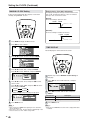
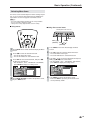
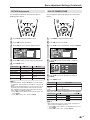
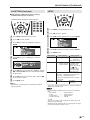
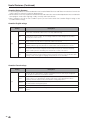
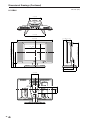
■ Menu setting screens
0
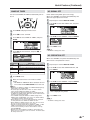
For details on setting each menu item, refer to the page number indicated below.
A
• The illustrations and on-screen displays in this manual are for explanation purposes and may vary slightly from the actual
appearance.
• Depending on the setting condition, such as an input mode, it may not be possible to adjust or set some items. In such cases, a message
will be displayed on the menu setting screen.
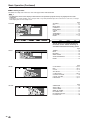
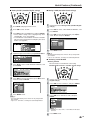
PICTURE
MENU[
PICTURE]
PICTURE S AUDIO
SETUP
OPTION
AV
MODE
[DYNAMIC]
OPC
[OFF]
BACKLIGHT
[ BRIGHT ]
CONTRAST
[
56]
BRIGHTNESS[
0 ]–
COLOR
[+
2]–
TINT
[
0 ]
SHARPNESS
[+
4]–
ADVANCED
RESET
: SELECT
ENTER : ENTER
Page
AV MODE ....................................................... 21
OPC ................................................................ 22
BACKLIGHT ................................................... 22
CONTRAST .................................................... 23
BRIGHTNESS ................................................ 23
COLOR ........................................................... 23
TINT ................................................................ 23
SHARPNESS .................................................. 23
ADVANCED .............................................. 23, 24
RESET ............................................................ 23
+
+
+
RETURN : BACK
MENU : EXIT
: SELECT
ENTER : ENTER
RETURN : BACK
MENU : EXIT
The bar above is an operational guide for
the remote control. The bar will change in
accordance with each menu setting screen.
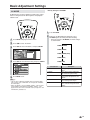
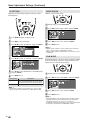
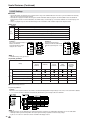
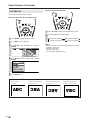
AUDIO
SETUP
OPTION
MENU[
AUDIO]
PICTURE
AUDIO
SETUP
TREBLE
BASS
BALANCE
WIDE
SO
SPEECH
RESET
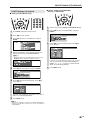
M E N U [ SETUP]
PICTURE
AUDIO
SETUP
CH–
MTS
CLO
AV2
V–C
CLO
COL
LAN
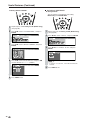
MENU[
OPTION]
PICTURE
AUDIO
SETUP
ED
20
CA
OPTION
[
0]
[
0]
[
0]
UND
EMPHA
–
–
L
+
+
R
SIS
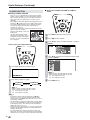
Page
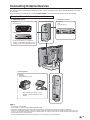
CH-SETTING ............................................ 26, 27
MTS ......................................................... 18, 27
CLOCK ...................................................... 15, 16
AV2 IN/OUT .................................................... 27
V-CHIP BLOCK ......................................... 28-33
CLOSED CAPTION ........................................ 34
COLOR SYSTEM ..................................... 13, 27
LANGUAGE .............................................. 14, 27
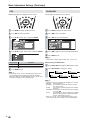
OPTION
SETTING
CK
I
HI
SE
OR
GU
N/OU
P
BL
D
CA
SYS
AGE
OPTION
VIEW
AUDI
SLEE
WAKE
NO
S
NO
O
PICT
O
P
–
I
P
U
T
OCK
PTION
TEM
MO
O
T
UP
GN
ER
RE
DE
NLY
IMER
TIM
AL
O
ATIO
FLI
Page
TREBLE .......................................................... 25
BASS .............................................................. 25
BALANCE ....................................................... 25
WIDE SOUND ................................................ 25
SPEECH EMPHASIS ..................................... 25
RESET ............................................................ 25
ER
FF
N
OFF
P
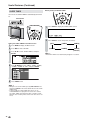
Page
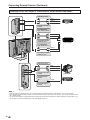
VIEW MODE ................................................... 35
AUDIO ONLY .................................................. 35
SLEEP TIMER ................................................ 36
WAKE-UP TIMER ........................................... 37
NO SIGNAL OFF ............................................ 37
NO OPERATION OFF .................................... 37
PICTURE FLIP ............................................... 38