1
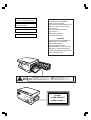
MODEL
AR-120E
DIGITAL LASER COPIER
OPERATION MANUAL
Page
• GETTING STARTED
3
• INSTALLATION
8
• MAKING COPIES
11
• SPECIAL FUNCTIONS
17
• SUPPLIES AND
USER MAINTENANCE
20
• COPIER TROUBLE?
24
• APPENDIX
31
CLASS 1 LASER PRODUCT
LASER KLASSE 1
LUOKAN 1 LASERLAITE
KLASS 1 LASERAPPARAT
VAROITUS!
LAITTEEN KÄYTTÄMINEN
MUULLA KUIN TÄSSÄ
KÄYTTÖOHJEESSA MAINITULLA
TAVALLA SAATTAA ALTISTAA
KÄYTTÄJÄN
TURVALLISUUSLUOKAN 1
YLITTÄVÄLLE
NÄKYMÄTTÖMÄLLE
LASERSÄTEILYLLE.
VARNING
OM APPARATEN ANVÄNDS PÅ
ANNAT SÄTT ÄN I DENNA
BRUKSANVISNING
SPECIFICERATS, KAN
ANVÄNDAREN UTSÄTTAS FÖR
OSYNLIG LASERSTRÅLNING,
SOM ÖVERSKRIDER GRÄNSEN
FÖR LASERKLASS 1.
Laserstrahl
USYNLIG LASERSTR LING N R DEKSEL PNES OG SIKKERHEDSL S BRYTES.
INVISIBLE LASER RADIATION WHEN OPEN AND INTERLOCKS DEFEATED.
CAUTION AVOID
EKSPONERING FOR STR LEN.
ADVERSEL UNNG
EXPOSURE TO BEAM.
LASERSTR LNING N R DENNA DEL R PPNAD OCH SP RRAR R
LASERSTRAHLUNG WENN ABDECKUNG GE FFNET UND
VORSICHT UNSICHTBARE
VARNING OSYNLIG
URKOPPLADE. STR LEN R FARLIG. BETRAKTA EJ STR LEN.
SICHERHEITSVERRIEGELUNG BERER CKT. NICHT DEM STRAHL AUSSETZEN.
JA SUOJALUKITUS OHITETTAESSA OLET ALTTIINA N KYM T NT
LASERSTR LING VED BNING, N R SIKKERHEDSAFBRYDERE ER
ADVARSEL USYNLIG
VARO! AVATTAESSA
LASERS TEILYLLE. L KATSO S TEESEEN.
UDE AF FUNKTION. UNDGA UDSAETTELSE FOR STR LING.
CLASS 1
LASER PRODUCT
LASER KLASSE 1
CONTENTS
1
GETTING STARTED
INTRODUCTION
CAUTIONS
3
4
MAIN FEATURES
PART NAMES
4
6
OPERATION PANEL
2
7
INSTALLATION
COPIER INSTALLATION
8
CAUTIONS ON HANDLING
LOADING COPY PAPER
3
9
10
MAKING COPIES
NORMAL COPYING
–
11
Setting a large original
13
EXPOSURE ADJUSTMENT/PHOTO COPYING
REDUCTION/ENLARGEMENT/ZOOM
14
BYPASS FEED (including special paper)
TWO-SIDED COPYING
4
13
15
15
SPECIAL FUNCTIONS
DESCRIPTION OF SPECIAL FUNCTIONS
HIGH IMAGE QUALITY MODE
17
17
USER PROGRAMS (power save modes, auto clear time)
–
5
Setting the power save modes and auto clear time
18
18
SUPPLIES AND USER MAINTENANCE
TD CARTRIDGE REPLACEMENT
USER MAINTENANCE
20
22
–
Cabinet
22
–
Original table and original cover
–
Transfer charger
–
When copier is not in use
22
22
23
1
CONTENTS
6
COPIER TROUBLE?
MISFEED REMOVAL
24
– A Misfeed in the paper feed area
– B Misfeed in the fusing area
25
– C Misfeed in the transport area
MAINTENANCE REQUIRED
TROUBLESHOOTING
28
STATUS INDICATORS
29
24
26
27
DISPLAYING TOTAL NUMBER OF COPIES
AUTOMATIC EXPOSURE ADJUSTMENT
7
APPENDIX
SPECIFICATIONS
SUPPLIES
31
32
– Types and sizes of copy paper
INDEX
2
32
29
30
1
GETTING STARTED
This chapter provides basic information for using the copier.
1
INTRODUCTION
Getting started
This copier has been designed to provide intuitive operating ease while requiring a minimum
amount of space. To get full use of all copier features, be sure to familiarise yourself with this
manual and the copier.
For quick reference during copier use, keep this manual in a handy location.
Conventions used in this manual
In this manual, the following icons are used to provide the user with information pertinent to the
use of the copier.
Warns the user that injury to the user or damage to the copier may result if
the contents of the warning are not properly followed.
Cautions the user that damage to the copier or one of its components may
result if the contents of the caution are not properly followed.
Notes provide information relevant to the copier regarding specifications,
functions, performance, operation and such, that may be useful to the user.
Indicates a letter displayed in the display.
AB series (metric) and inch series references
When references are made to paper sizes and weights, the inch series values are quoted in
brackets.
For example:
Page 32 --------------------- 56 to 80 g/m2 (15 to 21 lbs.)
A4 (8-1/2” x 11”)
3
CAUTIONS
Follow the cautions below when using this copier.
●
1
The fusing area is hot. Exercise care in this area when removing misfed
paper.
Do not look directly at the light source. Doing so may damage your eyes.
Do not switch the copier rapidly on and off. After turning the copier off, wait 10
to 15 seconds before turning it back on.
● Copier power must be turned off before installing any supplies.
●
●
Getting started
●
Place the copier on a firm, level surface.
●
Do not install the copier in a humid or dusty location.
●
When the copier is not used for long time, for example for consecutive holidays,
turn the power switch off and remove the power cord from the outlet.
●
When moving the copier, be sure to turn the power switch off and remove the
power cord from the outlet.
●
Do not cover the copier with a dust cover, cloth or plastic film while the power
is on. Doing so may prevent heat radiation, damaging the copier.
Use of controls or adjustments or performance of procedures other than those
specified herein may result in hazardous radiation exposure.
Cautions on laser
Wave length
785 nm ±15 nm
Pulse times
(10.7 µs ±4 ns)/7 mm
Output power
0.2 mW - 0.03 mW
MAIN FEATURES
High-speed laser copying
4
●
Since warm-up time is zero, copying can be started immediately after the power switch is
turned on.
●
First-copy time is only 9.6 seconds (normal mode).
●
Copying speed is 12 copies/min. (AR-120E) or 15 copies/min. (AR-150E), which adapts
to business use, allowing improvement of working efficiency.
MAIN FEATURES
High-quality digital image
●
High-quality image copying at 600 dpi can be performed.
●
In addition to the automatic exposure mode, the manual exposure can be adjusted in five
steps.
●
The photo mode copying function allows clear copying of delicate halftone original images
such as monochrome photos and colour photos.
1
Substantial copying functions
Zoom copying from 50% to 200% in 1% increments can be performed.
●
Continuous copying of maximum 99 sheets can also be performed.
●
Toner save mode reduces toner consumption by approximately 10%.
●
User programs allow setting/modification of functions for customer’s needs.
Getting started
●
Scan once/ Print many (AR-150E only)
●
The AR-150E is equipped with a 1-page memory buffer. This memory allows the AR150E to scan an original 1 time only and make up to 99 copies. This feature allows for
improved workflow, reduced operating noise from the copier and reduced wear and tear
on the scanning mechanism. This feature provides for a higher reliability.
Printer feature
●
This copier can be used as a laser printer by installing an optional printer expansion kit.
Environmentally friendly design
●
Paper output tray is housed in the copier for space saving.
●
Preheat mode and auto power shut-off mode are provided to reduce power consumption
in standby mode.
●
This copier does not have an internal calendar or clock.
This copier will not be affected by the year 2000.
●
Some models and options may not be available in some countries.
5
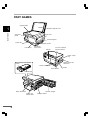
PART NAMES
Original table
1
Original cover
Getting started
Side cover
Operation
panel
Manual bypass
Paper tray
Paper guides
Front cover
Side cover
open button
Handle
Cover for optional
printer interface
Paper output
tray
Paper output tray
extension
TD cartridge lock release
button
Power cord socket
Power switch
TD cartridge
Transfer charger
Paper feed roller
Fusing unit
release lever
6
Charger cleaner
Handle
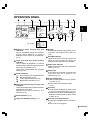
OPERATION PANEL
200%
141%
100%
81%
70%
50%
100%
81/2 x14 81/2 x 11
81/2 x11 51/2 x 81/2
MIN.
Light and dark keys and exposure
indicators
Use to adjust the MANUAL or PHOTO
exposure level. Selected exposure level is
shown by a lit indicator. (p.13)
Use to start and terminate user program
setting. (p. 18)
Alarm indicators
: Drum replacement required indicator
: Misfeed indicator (p. 24)
: Toner required indicator (p. 20)
: Maintenance indicator (p. 27)
Copy ratio selector key and copy ratio
indicators
Use to sequentially select preset reduction/
enlargement copy ratios.
Selected copy ratio is shown by a lit
indicator. (p. 14)
Copy ratio display (%) key (p. 14)
ZOOM
MAX.
51/2 x 81/2 81/2 x11
Exposure mode selector key and
indicators
Use to sequentially select the exposure
modes: AUTO, MANUAL or PHOTO.
Selected mode is shown by a lit indicator.
(p. 13)
Zoom indicator (p. 14)
1
100%
B4 A4
A4 A5
Getting started
Inch system
200%
129%
100%
78%
64%
50%
A5 A4
Display
Displays the specified copy quantity, zoom
copy ratio, user program code, and error
code.
ON LINE indicator
Lights up when the machine is used as a
printer. To use the copier as a printer, an
optional printer expansion kit is needed.
Power save indicator
Lights up when the copier is in a power save
mode. (p. 17,18)
Zoom keys
Use to select any reduction or enlargement
copy ratio from 50 to 200% in 1%
increments. (p. 14)
Copy quantity keys
● Use to select the desired copy quantity
(1 to 99). (p. 12)
● Use to make user program entries.
(p. 18)
Clear key
● Press to clear the display, or press during
a copy run to terminate copying. (p. 12)
● Press and hold down during standby to
display the total number of copies made
to date. (p. 31)
Print key and ready indicator
● Copying is possible when the indicator is
on.
● Use to set a user program.
7
2
INSTALLATION
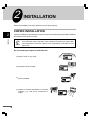
Follow the installation procedure below to use the copier properly.
COPIER INSTALLATION
2
Improper installation may damage the copier. Please note the following during initial installation
and whenever the copier is moved.
Installation
If the copier is moved from a cool place to a warm place, condensation may
form inside the copier. Operation in this condition will cause poor copy quality
and malfunctions. Leave the copier at room temperature for at least 2 hours
before use.
Do not install your copier in areas that are:
8
●
damp, humid, or very dusty
●
exposed to direct sunlight
●
poorly ventilated
●
subject to extreme temperature or humidity
changes, e.g., near an air conditioner or
heater.
COPIER INSTALLATION
Be sure to allow the required space around
the machine for servicing and proper
ventilation.
20 cm (8")
20 cm (8")
10 cm
(4")
10 cm
(4")
2
Installation
CAUTIONS ON HANDLING
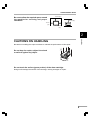
Be careful in handling the copier as follows to maintain the performance of this copier.
Do not drop the copier, subject it to shock
or strike it against any object.
Do not touch the surface (green portion) of the drum cartridge.
Doing so will damage the surface of the cartridge, causing smudges on copies.
9
LOADING COPY PAPER
1
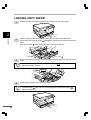
Raise the handle of the paper tray and pull the paper tray out until it stops.
2
Adjust the paper guides on the paper tray to the copy paper width and length.
Squeeze the lever of paper guide
and slide the guide to match with the width of the
paper.
Move paper guide
to the appropriate slot as marked on the tray.
2
Installation
Paper guide B
3
Paper guide A
Fan the copy paper and insert it into the tray. Make sure the edges go under the corner
hooks.
Do not load paper above the maximum height line (
will cause a paper misfeed.
4
). Exceeding the line
Gently push the paper tray back into the copier.
After loading copy paper, to cancel the blinking “P” without restarting copying,
press the clear ( ) key. The “P” in the display will go out and the ready (
)
indicator will light up.
10
3
MAKING COPIES
This chapter describes basic copying functions and some other copying functions using the
manual bypass.
NORMAL COPYING
1
3
3
Making copies
2
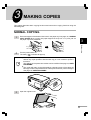
Ensure that paper of the desired size is set in the paper tray. See page 10, LOADING
COPY PAPER. When copying onto paper larger than A4 (8-1/2" x 11") size, pull out
the paper output tray extension.
Turn the power switch on.
The ready (
) indicator will light up.
●
The copier will enter a power save mode once the set time has elapsed
without any copier operation after the last copy of a run is made or power is
turned on.
The settings of the power save modes can be modified. See page 18, USER
PROGRAMS.
●
The copier will return to the initial settings a preset amount of time after the
last copy is made. The preset amount of time (auto clear time) can be changed.
See page 18, USER PROGRAMS.
Open the original cover.
11
NORMAL COPYING
4
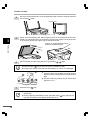
Place the original face down on the original table. Align it with the original scale and
the centring ( ) mark.
Original scale
mark
5
3
Gently close the original cover. When copying a book or an original which has been
folded or a crumpled original, press down the original cover lightly. If the original cover
is not securely closed, the copies may be striped or blurred.
Making copies
A book, an original which has been
folded, a crumpled original
6
Set the number of copies using the two copy quantity (
Press the clear (
●
A single copy can be made with the initial setting, i.e., when “0” is displayed.
Tens digit
12
) keys.
●
) key to clear an entry if a mistake is made.
●
Press the right copy quantity key to set the unit
digit from 0 to 9. This key will not change the tens
digit.
●
Press the left copy quantity key to set the tens
digit from 1 to 9.
ZOOM
7
,
Press the print (
Unit digit
) key.
●
To display the number of copies made in a continuous run, press the left copy
quantity key.
●
To stop copying in the middle of a run, press the clear (
stop and the number in the display will be reset to “0”.
) key. Copying will
NORMAL COPYING
Setting a large original
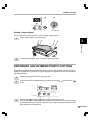
The original cover can be removed to allow copying of bulky objects.
1
Simply lift the original cover straight up.
3
Making copies
2
To reattach the original cover, reverse the above procedure.
EXPOSURE ADJUSTMENT/PHOTO COPYING
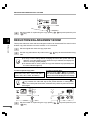
Copy density adjustment is not required for most originals in the automatic exposure mode. To
adjust the copy density manually or to copy photographs, the exposure level can be adjusted in
five steps manually.
1
Set the original and check the copy paper size.
2
Press the exposure mode selector key to select the manual (
mode.
3
Use the light ( ) and dark ( ) keys to adjust the exposure level.
If exposure level 2 is selected, the two left-handmost indicators for that level will light
up simultaneously. Also, if level 4 is selected, the two right-handmost indicators for that
level will light up simultaneously.
) mode or photo (
)
13
EXPOSURE ADJUSTMENT/PHOTO COPYING
4
Set the number of copies using the copy quantity (
(
) key.
,
) keys and press the print
REDUCTION/ENLARGEMENT/ZOOM
3
Making copies
Three preset reduction ratios and two enlargement ratios can be selected. The zoom function
enables copy ratio selection from 50% to 200% in 1% increments.
1
Set the original and check the copy paper size.
2
Use the copy ratio selector key and/or zoom (
ratio.
,
) keys to select the desired copy
●
To verify a zoom setting without changing the zoom ratio, press and hold
down the copy ratio display (%) key. When the key is released, the display will
return to the copy quantity display.
●
To reset the ratio to 100%, press the copy ratio selector key repeatedly until
the 100% indicator lights up.
To select a preset copy ratio:
Preset reduction and enlargement ratios
are: 50%, 70%, 81%, 141%, and 200%
(50%, 64%, 78%, 129%, and 200%)
To select a zoom ratio:
When a zoom (
or
) key is pressed,
the ZOOM indicator will light up and the
zoom ratio will be displayed in the display.
To decrease or increase the zoom ratio rapidly, press and hold down the
or
key. However the value will stop at the preset reduction or enlargement
ratios. To move beyond these ratios, release the key and then press and hold it
down again.
200%
141%
100%
81%
70%
50%
3
14
A5 A4
100%
B4 A4
A4 A5
A5 A4
100%
B4 A4
A4 A5
Set the number of copies using the copy quantity (
(
) key.
ZOOM
,
) keys and press the print
BYPASS FEED (including special paper)
The single-sheet manual bypass can be used to feed standard paper, transparency film, labels,
and other special purpose papers measuring from A6 to A4 (3-1/2" x 5-1/2" to 8-1/2" x 14") and
in the weight range of 52 to 130 g/m2 (14 to 34.5 lbs.). (For paper weighing from 104 to 130 g/m2
(28 to 34.5 lbs.), A4 (8-1/2" x 11") is the maximum size.)
1
Place the original face down on the original table. Align it with the original scale and
close the original cover.
The original image must be smaller than the paper or media for copying.
If the original image is bigger than the paper or media, this may cause smudges
on the edges of the copies.
3
Set the paper guides to the copy paper width. Insert a single sheet of copy paper (print
face down) into the feed slot of the manual bypass.
Copying will begin automatically.
●
Paper must be fed narrow side into the feed slot.
●
When copying onto transparency film, remove each copy promptly. Do not let
copies stack up.
Making copies
2
Print face
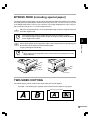
TWO-SIDED COPYING
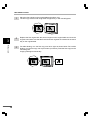
Two-sided copying can be made on this copier using the manual bypass.
Example: The following two originals will be copied onto two sides of copy paper.
Face up or face down
Face up
First original
Face down
Second original
15
TWO-SIDED COPYING
3
Making copies
16
1
Place the first original on the original table and make a copy.
The first copy can be made using either the paper tray or the manual bypass.
2
Replace the first original with the second original on the original table and close the
original cover. Make sure that the first and second originals are oriented in the same
way on the original table.
3
For tablet binding, turn the first copy over left to right as shown below. For booklet
binding, turn the first copy over top to bottom (not shown). Feed the first copy into the
manual bypass.
Copying will begin automatically.
4
SPECIAL FUNCTIONS
This chapter describes the special functions of this copier. Use these functions as needed.
DESCRIPTION OF SPECIAL FUNCTIONS
High image quality mode
This mode improves copy image quality by increasing copy density with a slight increase of
toner consumption.
Power save modes (page 18)
The copier has two power save modes of operation: preheat mode and auto power shut-off
mode.
Preheat mode
When the copier enters the preheat mode, the power save ( ) indicator will light up and
other indicators will remain on or off as before. In this condition, the fuser in the copier is
maintained at a lower heat level, thereby saving power. To copy from the preheat mode, make
desired copier selections and press the print (
) key using the normal copying procedure.
●
Auto power shut-off mode
When the copier enters the auto power shut-off mode, the power save ( ) indicator will light
up and other indicators will go out. The auto power shut-off mode saves more power than the
preheat mode but requires a longer time before starting copying. To copy from the auto
power shut-off mode, press the print (
) key. Then make desired copier selections and
press the print (
) key using the normal copying procedure.
4
Special functions
●
Auto clear (page 18)
The copier returns to the initial settings a preset amount of time after the last copy is made. This
preset amount of time (auto clear time) can be changed.
HIGH IMAGE QUALITY MODE
1
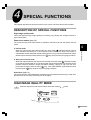
Press the exposure mode selector key to select the manual (
) mode.
17
HIGH IMAGE QUALITY MODE
2
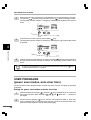
Press and hold down the exposure mode selector key for approximately 5 seconds.
The manual (
) indicator will go out and the photo ( ) indicator will begin to blink.
The exposure indicator marked “1” will light up, indicating the standard toner mode is
active.
3
To enter the toner save mode, press the dark ( ) key.
The exposure indicator marked “5” will light up, indicating the high image quality mode
is selected.
4
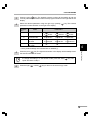
Press the exposure mode selector key twice. The photo ( ) indicator will stop blinking
and the AUTO indicator will light up steadily. The high image quality mode is now
active.
4
Special functions
To return to the standard mode, repeat the procedure but use the light (
to select exposure level “1” in step 3.
) key
USER PROGRAMS
(power save modes, auto clear time)
The user programs allow the parameters of certain functions to be set, changed, or cancelled
as desired.
Setting the power save modes and auto clear time
18
1
Press and hold down the light ( ) and dark ( ) keys simultaneously for more than
5 seconds until all the alarm indicators ( , ,
and ) blink and “– –” appears in
the display.
2
Use the left copy quantity ( ) key to select a user program number (1: auto clear
time, 2: preheat mode, 3: auto power shut-off timer, 5: auto power shut-off mode). The
selected number will blink in the left side of the display.
USER PROGRAMS
3
Press the print (
) key. The entered program number will be steadily lit and the
currently selected parameter number for the program will blink on the right side of the
display.
4
Select the desired parameter using the right copy quantity (
parameter number will blink on the right of the display.
Program
No.
Mode
) key. The entered
Parameters
1
Auto clear time
0
3
OFF
90 sec.
1
4
30 sec. * 2
120 sec. 5
60 sec.
10 sec.
2
Preheat mode
0
30 sec.
1
60 sec. * 2
90 sec.
3
Auto power shutoff timer
0
3
2 min. * 1
30 min.
4
5 min.
60 min.
15 min.
120 min.
5
Auto power shutoff mode
0
OFF
ON
* 1
2
5
4
Factory default settings are indicated with an asterisk (*).
Press the print (
) key. The right-hand number in the display will be steadily lit and
the entered value will be stored.
To change the setting or to set another mode, press the clear (
copier will return to step 2.
6
Special functions
5
Press the light (
) or dark (
) key. The
) key to return to the normal copy mode.
19
5
SUPPLIES AND USER MAINTENANCE
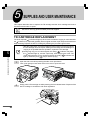
This chapter describes how to replace the TD cartridge and the drum cartridge and how to
check the total number of copies.
Be sure to use only genuine SHARP parts and supplies.
TD CARTRIDGE REPLACEMENT
The toner required ( ) indicator will light up when toner is needed. If copying is continued while
the indicator is lit, copies will gradually become lighter until the copier stops and the indicator
begins blinking. Replace the old TD cartridge by following the procedure given below.
After the copier stops, it may be possible to make a few more copies by taking
the TD cartridge out of the copier, shaking it horizontally, then reinstalling it. If
copying is not possible after this operation, replace the TD cartridge.
● During long copy run of a dark original, the ready (
) indicator may blink,
the
indicator light up, and the copier stop, even though toner is left. The
copier will feed toner up to 2 minutes and then the ready (
) indicator will
light up. Press the print (
) key to restart copying.
●
5
Supplies and user maintenance
1
Open the side cover while pressing the side cover open button.
Then, push gently on both sides of the front cover to open the cover.
2
Gently pull the TD cartridge out while pressing the lock release button. Dispose of the
old TD cartridge in accordance with local regulations.
Lock release button
20
TD CARTRIDGE REPLACEMENT
3
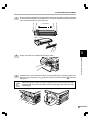
Remove the TD cartridge from the bag. Remove the protective paper. Hold the cartridge
on both sides and shake it horizontally four or five times. Hold the tab of the protective
cover and pull the tab to remove the cover.
4 or 5 times
Gently insert the TD cartridge until it locks in place.
5
Close the front cover and then the side cover by pressing the round projections near
the side cover open button. The
indicator will go out and the ready (
) indicator
will light up.
5
Supplies and user maintenance
4
When closing the covers, be sure to close the front cover securely and then
close the side cover. If the covers are closed in the wrong order, the covers may
be damaged.
21
USER MAINTENANCE
Proper care is essential in order to get clean, sharp copies. Be sure to take a few minutes to
regularly clean the copier.
●
Do not use thinner, benzene or other volatile cleaning agents. Doing so may
cause deformation, discolouration, deterioration or malfunction.
●
Before cleaning, be sure to turn the power switch off and remove the power
cord from the outlet.
Cabinet
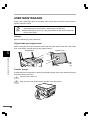
Wipe the cabinet with a soft, clean cloth.
Original table and original cover
Stains on the glass or cover will also be copied. Wipe the glass and the cover with a soft, clean
cloth. If necessary, dampen the cloth with a glass cleaner.
Original table
Original cover
5
Supplies and user maintenance
Transfer charger
If copies start becoming streaky or blotchy, the transfer charger may be dirty. Clean the charger
using the following procedure.
22
1
Turn the power switch off.
2
Open the side cover while pressing the side cover open button.
USER MAINTENANCE
3
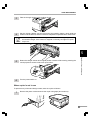
Take the charger cleaner out by holding the tab.
4
Set the charger cleaner onto the right end of the transfer charger, gently slide the
cleaner onto the left end, and then remove it. Repeat this operation two or three times.
Slide the charger cleaner from the right end to the left end along the groove of
the transfer charger. If the cleaner is stopped on the way, smudges on copies
may occur.
5
Return the charger cleaner to its original position. Close the side cover by pressing the
round projections near the side cover open button.
6
Turn the power switch on.
Supplies and user maintenance
5
When copier is not in use
To prevent entry of dust and foreign matter, store the copier as follows.
1
Remove the power cord and secure the copier using tape (two locations).
23
6
COPIER TROUBLE?
This chapter describes misfeed removal and troubleshooting.
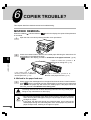
MISFEED REMOVAL
When the misfeed (
of a misfeed.
) indicator blinks or
blinks in the display, the copier will stop because
1
Open the side cover while pressing the side cover open button.
2
Check the misfeed location. Remove the misfed paper following the instructions for
each location in the illustration below.
If
blinks in the display, proceed to “A Misfeed in the paper feed area”. (p. 24)
6
If paper is misfed here, proceed to B
Misfeed in the fusing area . (p. 25)
Copier trouble?
If the misfed paper is seen from
this side, proceed to C Misfeed in
the transport area . (p. 26)
If paper is misfed here, proceed to A
Misfeed in the paper feed area . (p. 24)
A Misfeed in the paper feed area
1
Gently remove the misfed paper from the paper feed area as shown in the illustration.
When
blinks in the display and the misfed paper is not seen from the paper feed
area, pull out the paper tray and remove the misfed paper. If the paper cannot be
removed, proceed to “B Misfeed in the fusing area”.
The fusing unit is hot. Do not touch the fusing unit when removing misfed paper.
Doing so may cause a burn or other injury.
Do not touch the surface of the drum (green portion) of the drum cartridge
when removing the misfed paper. Doing so may damage the drum and cause
smudges on copies.
● If the paper has been fed through the manual bypass, do not remove the
misfed paper through the manual bypass. Toner on the paper may stain the
paper transport area, resulting in smudges on copies.
●
24
MISFEED REMOVAL
2
Close the side cover by pressing the round projections near the side cover open button.
The misfeed ( ) indicator will go out and the ready (
) indicator will light up.
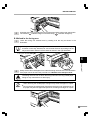
B Misfeed in the fusing area
1
Lower the fusing unit release lever by rotating it all the way as shown in the
illustration.
While you are lowering the fusing unit release lever, it will not move smoothly at
a location on the way. However, be sure to lower the lever by rotating it all the
way to the location where it will not rotate as shown in the right illustration.
Fusing unit release lever
6
Copier trouble?
2
Gently remove the misfed paper from under the fusing unit as shown in the illustration.
If the paper cannot be removed, proceed to “C Misfeed in the transport area”.
The fusing unit is hot. Do not touch the fusing unit when removing misfed paper.
Doing so may cause a burn or other injury.
●
Do not touch the surface of the drum (green portion) of the drum cartridge
when removing the misfed paper. Doing so may cause smudges on copies.
●
Do not remove the misfed paper from above the fusing unit. Unfixed toner on
the paper may stain the paper transport area, resulting in smudges on copies.
25
MISFEED REMOVAL
3
Raise the fusing unit release lever and then close the side cover by pressing the round
projections near the side cover open button. The misfeed ( ) indicator will go out and
the ready (
) indicator will light up.
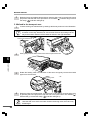
C Misfeed in the transport area
1
Lower the fusing unit release lever by rotating it all the way as shown in the illustration.
While you are lowering the fusing unit release lever, it will not move smoothly at
a location on the way. However, be sure to lower the lever by rotating it all the
way to the location where it will not rotate as shown in the right illustration.
Fusing unit release lever
2
Push gently on both sides of the front cover to open the cover.
3
Rotate the feeding roller in the direction of the arrow and gently remove the misfed
paper from the exit area.
6
Copier trouble?
Feeding roller
4
Raise the fusing unit release lever, close the front cover and then close the side cover
by pressing the round projections near the side cover open button. The misfeed ( )
indicator will go out and the ready (
) indicator will light up.
When closing the covers, be sure to close the front cover securely and then
close the side cover. If the covers are closed in the wrong order, the covers may
be damaged.
26
MAINTENANCE REQUIRED
When
indicator lights up, service by an authorised SHARP service technician is required.
Contact your SHARP dealer as soon as possible.
6
Copier trouble?
27
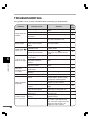
TROUBLESHOOTING
If any problem occurs, check the list below before contacting your SHARP dealer.
Problem
Possible cause
Copier plugged in?
Power switch on?
Side cover closed
securely?
Front cover closed?
Copier does not
operate.
Blank copies
Power save (
indicator on.
)
Is the original placed face
down on the original
table?
Is the copier in the
preheat mode?
Is the copier in the auto
power shut-off mode?
Is original image too dark
or too light?
Is the copier in the
Copies are too
dark or too light. automatic exposure
mode?
Is the copier in the photo
exposure mode?
Original table or original
Dust, dirt,
cover dirty?
smudges appear
Original
smudged or
on copies.
blotchy?
Is transfer charger clean?
Striped copies
Non-standard paper
used?
6
Copier trouble?
Paper misfeeds
frequently.
Images rub off
the copy easily.
28
Paper curled or damp?
Pieces of paper inside
copier?
Paper guides in the paper
tray not set properly?
Too much paper in the
paper tray?
Is the copy paper too
heavy?
Paper damp?
Solution
Plug the copier into a grounded
outlet.
Turn the power switch on.
Gently close the side cover.
Gently close the front cover and
then close the side cover.
Place the original face down on
the original table.
See
page:
_
11
_
_
12
Press any key to cancel the
preheat mode.
Press the print ( ) key to
cancel the auto power shut-off
mode.
Adjust the exposure manually.
17
Adjust the automatic exposure
level.
30
Cancel the photo exposure
mode.
Clean regularly.
13
Use a clean original.
_
Clean the transfer charger.
Use standard paper. If using
special papers, feed the paper
through the manual bypass.
Store copy paper flat in the
wrapper in a dry location.
Remove all pieces of misfed
paper.
Set the guides properly
depending on the paper size.
Remove excessive paper from
the paper tray.
Use copy paper within the
specified range.
Replace with dry copy paper. If
the copier is not used for long
time, remove the paper from the
paper tray and store it in its
wrapper in a dry location.
22
32
17
13
22
_
24
10
10
32
32
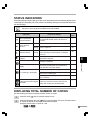
STATUS INDICATORS
When the following indicators light up or blink on the operation panel or the following alphanumeric
codes appear in the display, solve the problem immediately referring to both the table below and
the relevant page.
Be sure to use only genuine SHARP parts and supplies.
Indication
Drum replacement
required indicator
Cause and remedy
Steadily Drum cartridge must be replaced. Service by
an authorised SHARP service technician is
lit
required.
See
page:
_
Steadily Toner will be needed soon.
lit
20
Blinking Toner is required.
20
Misfeed indicator
A misfeed has occurred. Remove the misfed
Blinking paper referring to the description of "Misfeed
removal."
26
Maintenance
indicator
Steadily Service by an authorised SHARP service
lit
technician is required.
27
Toner required
indicator
"CH" is blinking in the display. The TD cartridge is not installed. Check if the
cartridge is installed.
"P" is blinking in the display.
Side cover is open. Close the side cover
securely by pressing the round projections
near the side cover open button.
_
Paper tray is empty. Load copy paper.
10
A misfeed has occurred in the paper tray.
Remove the misfed paper.
24
Paper tray is not securely installed. Push the
tray in securely.
The copier will not function. Turn the power
A letter and a number appear switch off, remove the power cord from the
alternately.
outlet, and contact your SHARP dealer.
Copier trouble?
"CH" is steadily lit in the
display.
6
20
_
_
DISPLAYING TOTAL NUMBER OF COPIES
Use the following procedure to display the total number of copies.
1
Press the clear (
) key to reset the display to zero.
2
Press and hold down the clear ( ) key for approximately 5 seconds. The total number
of copies will appear in two steps, each with three digits.
Example: Total number of copies is 1,234.
29
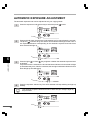
AUTOMATIC EXPOSURE ADJUSTMENT
The automatic exposure level can be adjusted to suit your copying needs.
1
Press the exposure mode selector key to select the photo (
2
Press and hold down the exposure mode selector key for approximately 5 seconds.
The photo ( ) indicator will go out and the AUTO indicator will begin to blink. One or
two exposure indicators corresponding to the automatic exposure level which has
been selected will light up.
3
Press the light ( ) or dark ( ) key to lighten or darken the automatic exposure level
as desired.
If exposure level 2 is selected, the two left-handmost indicators for that level will light
up simultaneously. Also, if level 4 is selected, the two right-handmost indicators for that
level will light up simultaneously.
4
Press the exposure selector key. The AUTO indicator will stop blinking and light up
steadily.
6
) mode.
Copier trouble?
This automatic exposure level will remain in effect until you change it again by
this procedure.
30
7
APPENDIX
SPECIFICATIONS
Type
Copy system
Originals
Original size
Copy sizes
Copy speed
Continuous copying
First-copy time
(Approx.)
Copy ratio
Exposure system
Copy paper feed
Power consumption
Overall dimensions
Weight
Copier dimensions
Operating conditions
Noise level
Variable: 50% to 200% in 1% increments (total 151 steps)
Fixed: 50%, 70%, 81%, 100%, 141%, 200% (50%, 64%, 78%, 100%,
129%, 200%)
Moving optical source, slit exposure (stationary platen) with automatic
exposure
One paper tray with automatic feed (250 sheets); one single-sheet
manual bypass
Heat rollers
Magnetic brush development
Xenon lamp
Scan: 400 dpi
Output: 600 dpi
AR-120E: N/A
AR-150E: 6MB
240V +6%, -10% in 240V power supply regions or local voltage ±10% in
other regions (For this copier’s power supply requirements, see the
name plate located on the back of the unit.)
Max. 1,000 W
607 mm (W) x 445 mm (D) (23.9" (W) x 17.5" (D))
Approx. 18 kg (39.7 lbs.), TD and drum cartridges included
518 mm (W) x 445 mm (D) x 293 mm (H)
(20.4" (W) x 17.5" (D) x 11.5" (H))
Temperature: 10°C to 30°C (50°F to 86°F)
Humidity: 20% to 85%
Sound Power Level LWA
Copying: 66 [dB (A)], Standby: Background noise level
Sound Pressure Level LPA (bystander positions)
Copying: 40 [dB (A)], Standby: Background noise level
Noise emission measurement in accordance with ISO 7779.
7
Appendix
Fusing system
Development system
Light source
Resolution
Memory
Power supply
Digital copying machine, desk-top type
Dry, electrostatic transfer
Sheets, bound documents
Max. B4 (257 mm x 364 mm) (10" x 14")
A6 to A4 (105 mm x 148 mm to 210 mm x 297 mm) (3-1/2" x 5-1/2" to
8-1/2" x 14") (Feed copy paper lengthwise only.)
Image loss: Max. 4 mm (5/32") (leading and trailing edges)
Max. 3 mm (1/8") (either of the other edges)
AR-120E: 12 copies/min.
AR-150E: 15 copies/min.
Max. 99 copies; subtractive counter
9.6 sec. (normal copying mode)
First-copy time may differ depending on operating conditions, such as power-supply voltage and
room temperature.
●
●
As a part of our policy of continuous improvement, SHARP reserves the right to
make design and specification changes for product improvement without prior notice.
The performance specification figures indicated are nominal values of production
units. There may be some deviations from these values in individual units.
Some models and options may not be available in some countries.
31
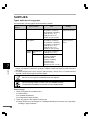
SUPPLIES
Types and sizes of copy paper
For best results, use only paper recommended by SHARP.
Type of paper
feeding
7
Type of media
Size
Weight
Paper tray
Standard paper
A4 (210mm x 297mm)
B5 (182mm x 257mm)
A5 (148.5mm x 210mm)
Letter (8-1/2" x 11")
Legal (8-1/2" x 14")
Invoice (5-1/2" x 8-1/2")
56 to 80 g/m2
(15 lbs. to 21 lbs.)
Manual bypass
Standard paper and
thick paper
A4 (210mm x 297mm)
B5 (182mm x 257mm)
A5 (148.5mm x 210mm)
A6 (105mm x 148.5mm)
Letter (8-1/2" x 11")
Legal (8-1/2" x 14")
Invoice (5-1/2" x 8-1/2")
52 to 130 g/m2
(14 lbs. to 34.5
lbs.)**
Special
media
Transparency
film
A4 (210mm x 297mm)
Letter (8-1/2" x 11")
Envelope*
International DL
(110mm x 220mm)
International C5
(162mm x 229mm)
Commercial 10
(4-1/8" x 9-1/2")
Monarch (3-7/8" x 7-1/2")
Appendix
* Do not use envelopes that have metal clasps, plastic snappers, string closures, windows,
linings, self-adhesive, patches or synthetic materials. These will cause physical damage to
the copier.
** For paper weighing from 104 to 130 g/m2 (28 to 34.5 lbs.), A4 (8-1/2" x 11") is the maximum
size that can be fed through the manual bypass.
Be sure to use only genuine SHARP parts and supplies.
For best copying results, be sure to use only SHARP products.
The package of SHARP toner has the Genuine Supplies label.
Proper storage
1. Store the supplies in a location that is:
● clean and dry,
● at a stable temperature,
● not exposed to direct sunlight.
2. Store copy paper in the wrapper and lying flat.
● Paper stored out of the wrapper or in packages standing on end may curl or get damp,
resulting in paper misfeeds.
32
INDEX
A
Auto clear . . . . . . . . . . . . . . . . . . . . 17, 18
Automatic exposure adjustment . . . . . . . 30
Auto power shut-off mode . . . . . . . . 17, 18
C
Cautions . . . . . . . . . . . . . . . . . . . . . . . . . 4
Cautions on handling . . . . . . . . . . . . . . . . 9
Charger cleaner . . . . . . . . . . . . . . . . . . . 22
Copier trouble? . . . . . . . . . . . . . . . . . . . . 24
Copying
- large original . . . . . . . . . . . . . . . . . . . 13
- normal . . . . . . . . . . . . . . . . . . . . . . . . 11
- reduction/enlargement . . . . . . . . . . . . 14
- through manual bypass . . . . . . . . . . . 15
- two-sided . . . . . . . . . . . . . . . . . . . . . . 15
Copy paper . . . . . . . . . . . . . . . . . . . . . . 32
Copy quantity . . . . . . . . . . . . . . . . . . . . . 12
Copy ratio . . . . . . . . . . . . . . . . . . . . . . . 14
D
Dark key . . . . . . . . . . . . . . . . . . . . . . . . 13
Drum cartridge
- indicator . . . . . . . . . . . . . . . . . . . . . 7, 29
E
Enlargement . . . . . . . . . . . . . . . . . . . . . 14
Exposure adjustment . . . . . . . . . . . . . . . 13
F
Features . . . . . . . . . . . . . . . . . . . . . . . . . 4
Fixed copy ratio . . . . . . . . . . . . . . . . . . . 14
Fusing unit release lever . . . . . . . . . . 6, 25
H
High image quality mode . . . . . . . . . . . . 17
I
Installation
- location . . . . . . . . . . . . . . . . . . . . . . . . 8
L
Light key . . . . . . . . . . . . . . . . . . . . . . . . 13
Loading copy paper . . . . . . . . . . . . . . . . 10
M
Maintenance . . . . . . . . . . . . . . . . . . . . . 22
Manual bypass . . . . . . . . . . . . . . . . . . 6, 15
Manual exposure . . . . . . . . . . . . . . . . . . 13
Manual feeding . . . . . . . . . . . . . . . . . . . . 15
Misfeed removal
- fusing area . . . . . . . . . . . . . . . . . . . . . 25
- paper feed area . . . . . . . . . . . . . . . . . 24
- transport area . . . . . . . . . . . . . . . . . . 26
N
Names
- operation panel . . . . . . . . . . . . . . . . . . 7
- part . . . . . . . . . . . . . . . . . . . . . . . . . . . 6
O
ON LINE indicator . . . . . . . . . . . . . . . . . .
Operation panel
- part names . . . . . . . . . . . . . . . . . . . . .
Original cover . . . . . . . . . . . . . . . . . . . . .
Original table . . . . . . . . . . . . . . . . . . . . . .
7
7
6
6
P
Paper
- loading . . . . . . . . . . . . . . . . . . . . . . . . 10
- special . . . . . . . . . . . . . . . . . . . . . . . . 32
- specifications . . . . . . . . . . . . . . . . . . . 32
Paper feed area . . . . . . . . . . . . . . . . . . . 24
Paper output tray . . . . . . . . . . . . . . . . . . . 6
Paper output tray extension . . . . . . . . 6, 11
Paper size . . . . . . . . . . . . . . . . . . . . . . . 32
Paper transport area . . . . . . . . . . . . . . . . 26
Paper tray . . . . . . . . . . . . . . . . . . . . . . . . 6
Part names . . . . . . . . . . . . . . . . . . . . . . . 6
Photo mode . . . . . . . . . . . . . . . . . . . . 7, 13
Power on . . . . . . . . . . . . . . . . . . . . . . . . 11
Power save modes . . . . . . . . . . . . . . 17, 18
Power switch . . . . . . . . . . . . . . . . . . . 6, 11
Preheat mode . . . . . . . . . . . . . . . . . . 17,18
Print key . . . . . . . . . . . . . . . . . . . . . . 7, 12
INDEX
R
Ready indicator . . . . . . . . . . . . . . . . . . . . 7
Reduction . . . . . . . . . . . . . . . . . . . . . . . 14
Replacement
- drum cartridge . . . . . . . . . . . . . . . . . . 22
- TD cartridge . . . . . . . . . . . . . . . . . . . 20
S
Special paper . . . . . . . . . . . . . . . . . . . . .
Specifications
- copier . . . . . . . . . . . . . . . . . . . . . . . . .
- paper . . . . . . . . . . . . . . . . . . . . . . . . .
Status indicators . . . . . . . . . . . . . . . . . .
Supply
- storage . . . . . . . . . . . . . . . . . . . . . . . .
T
TD cartridge
- replacement . . . . . . . . . . . . . . . . . . . . 20
Toner required indicator . . . . . . . . . . . 7, 29
Total number of copies . . . . . . . . . . . . . . 29
Transfer charger . . . . . . . . . . . . . . . . . 6, 22
Troubleshooting . . . . . . . . . . . . . . . . . . . 28
Two-sided copying . . . . . . . . . . . . . . . . . 15
32
31
32
29
32
U
User maintenance
- cabinet . . . . . . . . . . . . . . . . . . . . . . . .
- original cover . . . . . . . . . . . . . . . . . . .
- original table . . . . . . . . . . . . . . . . . . . .
- transfer charger . . . . . . . . . . . . . . . . .
22
22
22
22
Z
Zoom . . . . . . . . . . . . . . . . . . . . . . . . . . . 14
MEMO
MEMO
In some areas, the “POWER” switch positions are marked “I” and “ ” on the copier
instead of “ON” and “OFF”.
The symbol “ ” denotes the copier is not completely de-energized but in a stand-by
condition at this “POWER” switch position.
If your copier is so marked, please read “I” for “ON” and “ ” for “OFF”.
Caution!
For a complete electrical disconnection, pull out the main plug.
The socket-outlet shall be installed near the equipment and shall be easily
accessible.
The CE mark logo label is affixed on an equipment in case that the directives described in
the above sentence are applicable to the product. (This sentence is not applicable in any
country where the above directives are not required.)
AR-120E/AR-150E
SHARP CORPORATION
PRINTED IN CHINA
99M
KS
TINSE0378QSZZ