1
USER'S MANUAL
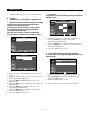
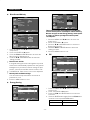
Reset
Picture Options: Colour Tone/Size/
Digital NR/HDMI Black Level
You can return to the factory defaults picture settings.
Picture
Picture Options
Colour Tone
Size
Digital NR
HDMI Black Level
More
Picture Options
Reset
:
Cool
: Normal
Warm1
: Auto
Warm2
: Normal
Move
Move
Enter
Enter
Return
Return
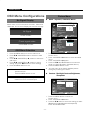
1. Press the MENU button to select the
Picture menu.
2. Press the ENTER or button.
3. Press the / and ENTER button to select the
Reset menu .
4. Press the / button to select "OK" or "Cancel".
Press the ENTER button.
5. Press the MENU button to exit.
Size
16:9
Zoom
4:3
Under Scan
Move
OK
Cancel
:
Enter
In VGA mode,the picture menu will display
resolution information .
Return
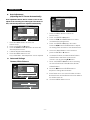
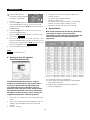
1. Press the MENU button to select the Picture menu.
2. Press the ENTER or button.
3. Press the / and ENTER button to select the
Picture Options menu .
4. There are 4 sub menu:Colour Tone,Size,
Digital NR,HDMI Black Level.
5. Press the ENTER or
button.
Select the mode of Colour Tone:Cool,Normal,Warm1,
Warm2 by pressing / button and ENTER button.
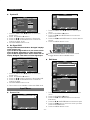
Sound Menu
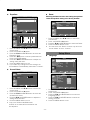
Mode: Standard,Music,Movie,Clear Voice,Custom
Sound
Mode
Equalizer
Sound Select
Reset
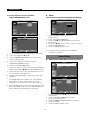
6. Select the Size menu,you can adjust picture in turn
by 16:9,Zoom,4:3,Under Scan.
In VGA and HDMI Mode, "Under Scan" can not be
adjusted.
7. The Digital NR menu includes : Off, Low, Medium,
: Custom
: Main
Move
Enter
Return
Sound
Mode
Equalizer
Sound Select
Reset
High,Auto.Only in the Video mode, the menu
Digital NR can be adjusted. Its default value is Medium.
8. The HDMI Black Level menu includes : Normal, Low.
Only in the HDMI mode, the menu HDMI Black Level
can be adjusted. Its default value is Normal.
Move
: Standard
Music
Movie
: Off
Clear Voice
Custom
Enter
Return
1. Press the MENU and / button to select the
Sound menu.
2. Press the ENTER or button two times
to select the Mode menu.
3. Press the / and ENTER button to select the
setting you want.
4. Press the MENU button to exit.
- 12 -


![Handbuch (deutsch) [PDF ]](http://vs1.manualzilla.com/store/data/006804687_1-349a3aed475e4eaa9b965dce892f30c9-150x150.png)