1
56 Device Basics
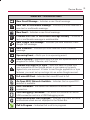
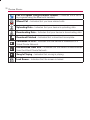
Virgin Mobile Live – Launches Virgin Mobile Live, a music and
entertainment stream.
WHERE – Launches the WHERE application, which is a locationbased application that helps you connect with the people, places,
and things around you.
NOTE: The Email application includes access to both Exchange Server-based email
and other Internet-based email providers such as Yahoo and Gmail.
Customizing Your Home Screen
You can customize your Home screen by doing the following:
sCreating Shortcuts
sAdding and Removing Widgets on the current screen
sRepositioning Widgets
sCreating Folders
sChanging the Background (Wallpaper)
Creating Shortcuts
Shortcuts are different than the current Home screen Widgets
that only launch an application. Shortcuts activate a feature,
action, or launch an application.
To add a shortcut from the Launch screen:
to go to the Home screen.
1. Press
2. Tap
to reveal all your current applications. By default, the
applications are listed in a Grid view.
3. Scroll down through the list and locate your desired
application.
4. Touch and hold the application icon you want to add to your
Home screen. Your Launch screen will close so that you
can place the icon on a Home screen.