1
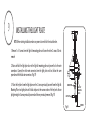
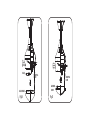
OPERATING THE REMOTE CONTROL/WALL CONTROL
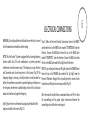
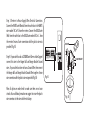
Remote Control only: Install a A23 12 volt battery (included). To prevent damage to transmitter remove the battery if not used for long periods of time.
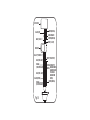
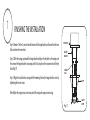
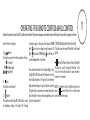
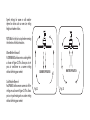
instructions apply to ceiling fans that feature a DOWN D. OFF-ON Slide Button (Wall Control Fans Only)
light ( button) only or ceiling fans that feature an UP This button turns the power Off and On to the Fan and
A.
Buttons:
light ( button) and a DOWN light ( button) that are Light(s).
These buttons are used to set the fan speeds as follows; controlled independent of each other;
E.
Button: (Full Function Remote Control Units Only)
= Low Speed
This button is used to change the direction of the
= Medium Speed
Press and release the button for the desired light to turn
rotation of the blades; forward for warm weather or
= High Speed
the light ON or OFF. Press and hold the button to set the reverse for cool weather.
desired light brightness. The light will cycle between
B. Button:
bright and dim settings as long as the button is pressed. NOTE: If your Remote Control or Wall Control does not
This button turns the fan off.
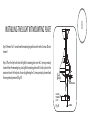
The light key has an automatic auto-resume feature that have a "
" button, Please look for a slide reverse
allows the light to remain at the same brightness as the switch on the motor housing.
C.
Button:
These buttons turn the light ON or OFF and also control last time it was turned off.
the brightness settings of the light. The following
Restore Power to Ceiling Fan.
11