1
unctions
y through a
nction to
Track
or
) buter speed.
mote by
1/2 ➝ Play ➝
8X
8X
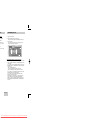
Using the Display Function
When Playing a DVD/VCD/CD
1. During play, press the INFO button on the
remote.
2. Use the UP/DOWN buttons to select the desired
item.
3. Use the LEFT/RIGHT buttons to make the
desired setup and then press ENTER.
• You may use the number buttons of the remote
control to directly access a title, chapter or to
start the playback from the desired time.
4. To make the screen disappear, press the INFO
button again.
ff, you can use
DVD
128X
DVD
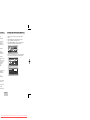
Title
01
Chapter 02
Time
Audio
Subtitle
0 :00 :1 3
ENG 5.1CH
Off
on.
button, it
button, it
e more press
ious chapter.
VCD
VCD
Track 01
Time 0:0 0: 48
e, a VCD 1.1,
he
button,
button, it
more press
ious track.
g a VCD and
5 minutes, in
n, it moves
CD
CD
Track 01
Time 0 :0 0:4 8
oose Menu
ENU
ENG-15
Downloaded From Disc-Player.com Samsung Manuals