1
54 Mbps
Wireless PC Card
User Manual
Introduction
Congratulations for purchasing of the 54Mbps
Wireless PC Card!
1
Your Actiontec 54 Mbps Wireless PC Card provides a single PC Card
solution for connecting to Wireless-B (802.11b) and WIreless-G (802.11-g)
networks. Whichever standard you encounter, your Actiontec 54 Mbps
Wireless PC Card is ready to connect. Just insert it into a CardBus slot
and run the included Setup Wizard. All wireless communications can be
protected by 64- or 128-bit Wired Equivalency Privacy (WEP) for the highest level of security.
Product Features
The following list summarizes the features of your Actiontec 54 Mbps
Wireless PC Card:
• Conforms to IEEE 802.11g and 802.11b standards.
• High-speed wireless 54 Mbps throughput that is nearly 5 times
faster than 802.11b products.
• Backward compatible with 11 Mbps wireless products.
• 64- or 128-bit WEP for the highest level of security.
• 32-bit CardBus performance.
• Supports PC Card hot-swapping with true Plug-and-Play connectivity.
3
Actiontec 54 Mbps Wireless PC Card User Manual
• Low power consumption.
Package Contents
Before you begin the installation of your Actiontec 54 Mbps Wireless PC
Card, make sure you have the following items:
• Actiontec 54 Mbps Wireless PC Card.
• An installation CD-ROM containing drivers.
• This User Manual.
• Program License Agreement.
As you examine these items, look for any physical damage. Retain your
proof of purchase and packing material in the event you need to return
your Actiontec 54 Mbps Wireless PC Card.
Technical Support
Actiontec Electronics prides itself on making high-quality, durable, high-performance products. If you need assistance, the Actiontec Technical Support
Department is available every day from 6 A.M. to 11 P.M. (MST) to provide
professional support.
Actiontec Electronics, Inc.
760 N. Mary Avenue
Sunnyvale, CA 94085
Technical Support
Phone: 888-436-0657
E-mail: [email protected]
Internet: www.actiontec.com/support
4
2
Installation
This chapter describes how to install the Actiontec
54 Mbps Wireless PC Card. Please refer to the appropriate section:
• Microsoft Windows XP users: refer to “Windows XP Installation
Instructions,” below.
• Microsoft Windows 2000 users: refer to “Windows 2000 Installation
Instructions” on page 7.
• Microsoft Windows ME users: refer to “Windows ME Installation
Instructions” on page 12.
• Microsoft Windows 98 and 98SE users: refer to “Windows 98 and
98SE Installation Instructions” on page 14.
Windows XP Installation Instructions
To install the Actiontec 54 Mbps Wireless PC Card on a computer running
Microsoft WIndows XP, use the following procedure:
1. Locate an available Type II or Type III PCMCIA CardBus slot on your
computer.
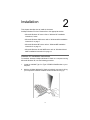
2. Hold the 54 Mbps Wireless PC Card so its 68-pin connector is facing
your computer’s PCMCIA CardBus slot and its label is facing up.
5
Actiontec 54 Mbps Wireless PC Card User Manual
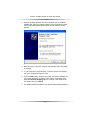
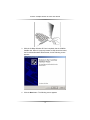
3. Slide the 54 Mbps Wireless PC Card completely into the PCMCIA
CardBus slot. When it is properly inserted, a sound should be heard,
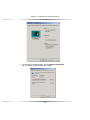
the Found New Hardware Wizard starts, and the following screen
appears.
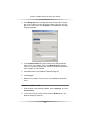
4. Make sure that “Install the software automatically (Recommended)”
is selected.
5. In your computer’s CD-ROM drive, insert the drivers CD supplied
with your 54 Mbps Wireless PC Card.
6. Click the Next button. Windows may notify you that the software has
not passed Windows Logo testing. If this screen does appear, then
press the Continue Anyway button to continue. If this screen does
not appear, then go to Step 8.
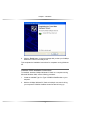
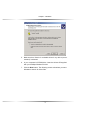
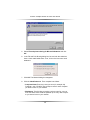
7. The wizard installs the software, then the following message appears.
6
Chapter 2 Installation
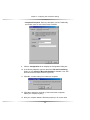
8. Click the Finish button. A pop-up message tells you that your 54 Mbps
Wireless PC Card is now ready to use.
This completes the installation instructions for computers running Windows
XP.
Windows 2000 Installation Instructions
To install the Actiontec 54 Mbps Wireless PC Card on a computer running
Microsoft WIndows 2000, use the following procedure:
1. Locate an available Type II or Type III PCMCIA CardBus slot on your
computer.
2. Hold the 54 Mbps Wireless PC Card so its 68-pin connector is facing
your computer’s PCMCIA CardBus slot and its label is facing up.
7
Actiontec 54 Mbps Wireless PC Card User Manual
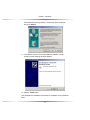
3. Slide the 54 Mbps Wireless PC Card completely into the PCMCIA
CardBus slot. When it is properly inserted, a beep should be heard,
the Found New Hardware Wizard starts, and the following screen
appears.
4. Click the Next button. The following screen appears.
8
Chapter 2 Installation
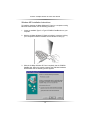
5. Make sure that “Search for a suitable driver for my device (recommended)” is selected.
6. In your computer’s CD-ROM drive, insert the drivers CD supplied
with your 54 Mbps Wireless PC Card.
7. Click the Next button. The following screen asks where you want
Windows to search for driver files.
9
Actiontec 54 Mbps Wireless PC Card User Manual
8. Uncheck Floppy disk drives. Only CD-ROM drives should be
checked.
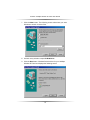
9. Click the Next button. Windows finds the driver for your 54 Mbps
Wireless PC Card and displays the following screen.
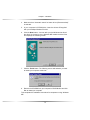
10. Click the Next button. Windows may notify you that the software has
10
Chapter 2 Installation
not passed Windows Logo testing. If this screen does not appear,
then go to Step 12.
11. Click Yes to continue. The wizard installs the software, a beep
sounds, and the following message appears.
12. Click the Finish button.
This completes the installation instructions for computers running Windows
2000.
11
Actiontec 54 Mbps Wireless PC Card User Manual
Windows ME Installation Instructions
To install the Actiontec 54 Mbps Wireless PC Card on a computer running
Microsoft WIndows ME, use the following procedure:
1. Locate an available Type II or Type III PCMCIA CardBus slot on your
computer.
2. Hold the 54 Mbps Wireless PC Card so its 68-pin connector is facing
your computer’s PCMCIA CardBus slot and its label is facing up.
3. Slide the 54 Mbps Wireless PC Card completely into the PCMCIA
CardBus slot. When it is properly inserted, the Add New Hardware
Wizard starts and the following screen appears.
12
Chapter 2 Installation
4. Make sure that “Automatic search for better driver (Recommended)”
is selected.
5. In your computer’s CD-ROM drive, insert the drivers CD supplied
with your 54 Mbps Wireless PC Card.
6. Click the Next button. A screen tells you that Windows has found
the driver for the device, then Windows ME installs the driver files
and displays the following screen.
7. Click the Finish button. The following screen asks whether you want
to restart your computer at this time.
8. Remove the CD-ROM from your computer’s CD-ROM drive and click
Yes to restart your computer.
This completes the installation instructions for computers running WIndows
ME.
13
Actiontec 54 Mbps Wireless PC Card User Manual
Windows 98 and 98SE Installation Instructions
To install the Actiontec 54 Mbps Wireless PC Card on a computer running
Microsoft WIndows 98 or Windows 98SE, use the following procedure:
1. Locate an available Type II or Type III PCMCIA CardBus slot on your
computer.
2. Hold the 54 Mbps Wireless PC Card so its 68-pin connector is facing
your computer’s PCMCIA CardBus slot and its label is facing up.
3. Slide the 54 Mbps Wireless PC Card completely into the PCMCIA
CardBus slot. When it is properly inserted, a beep should be heard,
the Found New Hardware Wizard starts, and the following screen
appears.
14
Chapter 2 Installation
4. Click the Next button. The following screen appears.
5. Make sure that “Search for the best driver for your device
(Recommended)” is selected.
6. In your computer’s CD-ROM drive, insert the drivers CD supplied
with your 54 Mbps Wireless PC Card.
15
Actiontec 54 Mbps Wireless PC Card User Manual
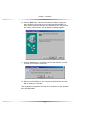
7. Click the Next button. The following screen asks where you want
Windows to search for driver files.
8. Uncheck every selection except CD-ROM drive.
9. Click the Next button. Windows finds the driver for your 54 Mbps
Wireless PC Card and displays the following screen.
16
Chapter 2 Installation
10. Click the Next button. Windows will install the software. During this
step, WIndows may prompt you for the WIndows 98 CD-ROM. If it
does, replace the drivers CD with your Windows 98 CD. After the files
are copied, a beep sounds, and the following message appears.
11. Click the Finish button. The following screen asks whether you want
to restart your computer at this time.
12. Remove the CD-ROM from your computer’s CD-ROM drive and click
Yes to restart your computer.
This completes the installation instructions for computers running WIndows
98 or Windows 98SE.
17
Actiontec 54 Mbps Wireless PC Card User Manual
18
Configuration
This chapter describes how to configure your
Actiontec 54 Mbps Wireless PC Card.
3
Overview
After you install your Actiontec 54 Mbps Wireless PC Card, you are ready
to configure it using the Actiontec configuration utility program. This program was automatically installed on your personal computer when you
installed your 54 Mbps Wireless PC Card.
Using this program, you can:
• View status information about your network connection
• View and change configurations
• Enable or disable encryption
• Perform IBSS channel selection
• View and change domains
Understanding the Actiontec Configuration Utility
When your 54 Mbps Wireless PC Card is inserted into your computer’s
CardBus slot, the Actiontec Client Utility driver loads automatically and a
PC Card status icon appears in your System Tray at the bottom-right corner of your desktop.
The icon uses a series of color-coded vertical bars to show the link status
to the wireless network connection:
Red indicates no or poor quality.
Yellow indicates a usable but weak link.
Green indicates a good or excellent link.
19
Actiontec 54 Mbps Wireless PC Card User Manual
If you hold your mouse pointer over the icon, the transmit and
receive rates appear, along with the name of the current configuration profile. You can also
To configure your 54 Mbps Wireless PC Card, you select the appropriate parameters in the Actiontec Configuration Utility screen. The next
section described how to access this screen.
Accessing the Actiontec Configuration Utility Screen
To access the Actiontec Configuration Utility screen, double-click the
PC Card status icon in your System Tray. The following main screen
appears.
This screen has tabs for selecting various operating parameters.
• Status shows the status of your connection to the wireless network. Also, lets you control the radio-frequency from your 54
Mbps Wireless PC Card and rescan its connection to an Access
Point. See page 22.
• Configuration lets you specify a profile name, network name,
and network type (Access Point or Peer-to-Peer). See page 24.
• Encryption lets you enable or disable your 54 Mbps Wireless PC
20
Chapter 3 Configuration
Card’s encryption security feature. See page 27.
• IBSS lets you select an IBSS channel. See page 29.
• Domain lets you select IEEE 802.11d support and a country or
domain. See page 31.
• About shows version information for the network driver, configuration utility, and 54 Mbps Wireless PC Card firmware.
Another way to access the parameters in the main screen is through a
pop-up menu that appears when you click or right-click the vertical-bar
icon in the System Tray (see the following figure).
This pop-up menu provides commands that let you:
• Turn the wireless radio On or Off
• Remove the PC Card status icon from the System Tray. If you
remove the icon, use the Windows Control Panel to configure
your wireless network or restart the Configuration Utility from the
Start Menu by selecting Programs and PRISM Wireless LAN.
If you click Remove Status Icon, a checkbox lets you remove the
status icon permanently from the System Tray. If you check the
Remove Status Icon Permanently check box, the Configuration
Utility does not run at Windows startup. To start it and restore the
icon at startup, select Programs and PRISM Wireless LAN
Configuration from the Start menu, click the icon to display the
menu, choose Remove Status Icon, and uncheck the Remove
Status Icon Permanently check box.
• View your wireless network status (displays the Status tab in the
21
Actiontec 54 Mbps Wireless PC Card User Manual
main screen)
• View and change advanced configuration parameters (displays
the Configuration tab in the main screen)
• Enables or disables WEP encryption (displays the Encryption tab
in the main screen)
• View and change IBSS channel parameters (displays the IBSS
tab in the main screen)
• View and change country and domain parameters (displays the
Domain tab in the main screen)
• View version information about the utility (displays the About tab
in the main screen)
NOTE: Microsoft Windows XP provides a service called Wireless Zero
Configuration to control wireless network devices. This service duplicates some services provided by the configuration utility. When the
Wireless Zero Configuration service is activated, the Configuration.
Encryption, and IBSS tabs and corresponding commands in the popup menu do not appear. Ending the Wireless Zero Configuration service
reactivates these main screen tabs and pop-up menu commands.
Viewing Status Information (Status Tab)
The Status tab in the main screen shows status information about your
wireless network connection.
22
Chapter 3 Configuration
State
In the Status tab, the State field shows the state of your computer with
the wireless network. Possible values for this field are:
• AdHoc: Your 54 Mbps Wireless PC Card is operating in peer-topeer mode. This field also shows the virtual MAC address used
by computers participating in an AdHoc network.
• Associated: Your 54 Mbps Wireless PC Card is operating in
Infrastructure mode. This field also shows the MAC address of the
Access Point with which you are communicating.
• Listening: Indicates that your 54 Mbps Wireless PC Card is listening on all allowed channels, but has not found a peer-to-peer
or infrastructure network with which to associate.
• Stopped: Your 54 Mbps Wireless PC Card’s radio transmitter has
been stopped by the Disable Radio button.
• Scanning: Your 54 Mbps Wireless PC Card is scanning for transmissions by other wireless adapters on all channels.
• Associating: Your 54 Mbps Wireless PC Card is in the process of
associating with a network
23
Actiontec 54 Mbps Wireless PC Card User Manual
• Not Associated: Your 54 Mbps Wireless PC Card has not found
any network with which to associate.
Current Tx Rate
This field shows the current transmit rate of the current association.
Current Channel
This field shows the channel on which the connection is made. In
Infrastructure mode, this number changes as the radio scans the available channels.
Throughput
This field shows the short term transmit and receive throughput in
bytes/second, and is continuously updated.
Link Quality
The value shown here is based on the quality of the received signal of
the Access Point beacon.
Signal Strength
Signal strength is based on the received signal strength measurement
of the baseband processor of the beacon.
Disable Radio Button
The Disable Radio button is a “toggle” button. If you click this button:
• The State field indicates that your 54 Mbps Wireless PC Card’s
radio has been stopped.
• The remaining fields in this tab display either a zero or Not
Applicable.
• The button changes to Enable Radio.
Clicking the button again turns on your 54 Mbps Wireless PC Card’s radio
and changes the button to Disable Radio.
24
Chapter 3 Configuration
Rescan Button
Click the Rescan button to force your 54 Mbps Wireless PC Card’s radio
to rescan all available channels. If the PC Card’s link quality or signal
strength is poor, rescanning can be used to push the radio off a weak
Access Point and search for a better link with another Access Point.
Viewing and Changing Configuration Information (Configuration Tab)
The Configuration tab lets you select a profile name, network name,
and network type (Access Point or peer-to-peer). This tab appears for
all operating systems except Windows XP.
The Configuration tab provides a Defaults button that lets you return
to the default configuration parameters.
Profile Name
A profile is a named set of operating parameters for your 54 Mbps
Wireless PC Card. Using Profile Name, you can set values for all
parameters by selecting a previously defined profile. Click the down
arrow at the right of this field to display the available profiles for your 54
Mbps Wireless PC Card.
You will always have at least one profile, named Default. Initially, this
profile contains the parameters configured at installation. You can modify this profile at any time after the installation. After changing parame25
Actiontec 54 Mbps Wireless PC Card User Manual
ters, you can save them in the profile named in this field by clicking the
Apply button.
You can also create additional profiles by typing a name in the Profile
Name field. When you change the name in this field and click the
Apply button, the configuration utility uses the current parameters for
your adapter to create a separate profile. You can then switch between
profiles by clicking the down arrow at the right of the Profile Name
field, selecting a profile from the drop-down list, and clicking the Apply
button.
The following example describes a situation in which you would want to
create multiple profiles. Suppose that you use a wireless LAN at work,
but also have a network in your home (with a wireless Access Point) for
sharing an internet connection and a printer between several computers. Also, suppose you have another office within your business that
has WLAN capability, but which is configured differently than your main
office.
In this situation, you can create a different profile for each of these
three environments. Each profile specifies the parameters used on a
single network. Moving from one location to another, you need only
apply the appropriate profile to be able to participate in the local network.
Network Name
Your 54 Mbps Wireless PC Card scans the available channels looking
for an Access Point or another station which has specified this same
SSID. (SSID, or Service Set IDentifier, is used by Access Points and
stations to identify a wireless network.) It then tries to associate with
these Access Points or stations to form a wireless network.
To change the SSID, highlight it, type the new SSID, and click the
Apply button.
In typical Infrastructure applications, a company uses a single SSID for
all Access Points. If the radio is scanning and cannot find a channel
when an Access Point is known to be in range, verify that the Network
Name is set correctly.
Network Type
26
Chapter 3 Configuration
Your 54 Mbps Wireless PC Card operates in one of two types of networks, specified in the Network Type field of the Configuration tab:
Peer-to-Peer and Access Point. Clicking the down arrow at the right of
this field displays the available types.
Peer-to-Peer Mode
Peer-to-Peer IEEE 802.11 defines two modes to handle two separate
needs. The first, called AdHoc (or IBSS) mode, is used when two or
more wirelessly enabled PCs exchange data directly, without an Access
Point. The PCs can establish a peer-to-peer network in which they are
the only members and over which they can exchange data. To
exchange data, each computer participating in the AdHoc network must
specify the same Network Name in this tab.
Peer-to-Peer networks operate on a single communications channel.
You specify the channel on which your adapter communicates in an
IBSS network either in this tab or through either the Bands tab or the
IBSS tab.
IBSS operation is incompatible with the 802.11d standard. If you use
802.11d operation, disable 802.11d support in the Domain tab.
Access Point Mode
The second mode defined by the IEEE 802.11 standard is called
Infrastructure mode. This mode is the primary application for wireless
network operation. In this mode, data on the wireless network is directed to an Access Point, which routes the data to the appropriate wireless
station. The Access Point can also be configured to allow data to be
bridged from the wireless network to wired networks.
To participate in a wireless network in Infrastructure mode, every station
and Access Point must specify the same Network Name. In
Infrastructure mode, all available channels are scanned for traffic. As a
result, there is no need to specify a channel.
Setting Up Encryption (Encryption Tab)
The Encryption tab lets you enable encryption and specify encryption
keys.
27
Actiontec 54 Mbps Wireless PC Card User Manual
To enable encryption, click the down arrow at the right of the
Encryption field, select either 64 bit or 128 bit and click the Apply button. After enabling an encryption method, specify encryption keys, as
described in the following sections.
Creating Encryption Keys Manually
When you specify 64-bit or 128-bit encryption, the configuration utility
selects Create Keys Manually and lets you enter keys as either
28
Chapter 3 Configuration
alphanumeric or hexadecimal characters. When you click one of these
buttons, the cursor appears next to Key 1.
• For 64-bit encryption, type exactly 5 alphanumeric or 10 hexadecimal characters in each of the four key fields.
• For 128-bit encryption, type exactly 13 alphanumeric or 26 hexadecimal characters.
Then click the Apply button to create your encryption keys. After you
click Apply, the configuration utility uses asterisks to mask your keys.
The Use WEP Key field lets you specify which of the four encryption
keys you use to transmit data on your wireless network. You can
change the default key by clicking on the down arrow at the right of this
field, selecting the number of the key you want to use and clicking the
Apply button. As long as the Access Point or station with which you are
communicating has the same key in the same position, you can use any
of the keys as the default.
Creating Encryption Keys Using a Passphrase
To create encryption keys using a passphrase, click Create Key with
Passphrase and type a character string in the Passphrase field. As
you type, the configuration utility displays asterisks to mask your
passphrase and uses an algorithm to generate four keys used for
encryption. Using a passphrase to generate the four keys makes it easy
to set the same keys for all members of your wireless network.
IBSS Channel Selection (IBSS Tab)
When communicating in a peer-to-peer network, you can use the IBSS
tab to specify a channel on which you prefer communications to take
place. Just click on the channel in the IBSS Channel Selection field,
then click the Apply button.
The channel you select is not necessarily the channel on which peer-topeer communications will be established. If the IBSS network names
(SSID) are the same for nodes in the peer-to-peer network, but have
different preferred channels, a network can still be established. In this
case, if it cannot find a network with the specified network name on the
preferred channel, a station will scan other channels until it finds a peerto-peer network with the specified network name on which to communi-
29
Actiontec 54 Mbps Wireless PC Card User Manual
cate.
If you specified Access Point as the network type in the Configuration
tab, selecting a channel in this tab has no effect until you change the
Network Type to Peer-to-Peer.
Selecting a Domain (Domain Tab)
“Domain” refers to a territory where radio frequency transmissions must
conform to the standards set by a single regulatory agency. For example, the frequencies and channels allowed for wireless data communications in the United States are set by the FCC. Every country sets its
own standards, although in practice many countries may use the same
standards.
The IEEE 802.11d standard provides a way for a wireless network
adapter to detect the domain in which it is located and conform its
transmissions to the standards set by the controlling regulatory agency.
30
Chapter 3 Configuration
802.11d Support
The Domain tab lets you specify one of three levels of 802.11d support.
If you specify None, you must choose the county in the
Countries/Domains field that corresponds to your location. Your 54
Mbps Wireless PC Card operates according to the standards set by the
appropriate regulatory agency.
Note: If you specify Peer-to-Peer as the network type, you must specify
None. If you select Strict, your 54 Mbps Wireless PC Card will only
communicate with Access Points that provide 802.11d support. In this
case, the 54 Mbps Wireless PC Card scans all communications channels for an Access Point which provides information on the channels,
frequencies, and power levels permitted in your location. Once it finds
such an Access Point, the 54 Mbps Wireless PC Card conforms its
operations to these standards. The 54 Mbps Wireless PC Card will not
communicate with an Access Point that does not provide this information, nor will it join or create a peer-to-peer network if Strict 802.11d
support is specified in this field.
If you choose Flexible, your 54 Mbps Wireless PC Card can communicate with any Access Point it finds. In this case, you must also choose
the county in the Countries/Domains field which corresponds to your
location. Your 54 Mbps Wireless PC Card searches for an Access Point
31
Actiontec 54 Mbps Wireless PC Card User Manual
that provides information on the channels, frequencies, and power levels permitted in your location. If it finds such an Access Point, the
adapter conforms its operations to these standards.
If it does not find an Access Point that provides this information, it
establishes communications with any Access Point it finds.
32
Configuring File and
Printer Sharing
4
This chapter describes how to establish a network that will allow you to
share files and printers. This is an easy method to set up a network in your
home or small office.
Windows XP
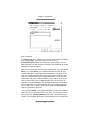
1. Right-click the My Computer icon and click Properties. The System
Properties dialog box appears.
2. Select the Computer Name tab.
3. Click the Change button.
33
Actiontec 54 Mbps Wireless PC Card User Manual
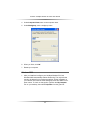
4. Under Computer Name, enter a new computer name.
5. Under Workgroup, enter a workgroup name.
6. When you finish, click OK.
7. Restart your computer.
Windows 2000
1. After you install and configure your 54 Mbps Wireless PC Card,
Windows 2000 automatically enables file sharing. The only item that
needs to be altered is your workgroup settings. All the computers on
your network must have the same workgroup name but different computer names. To check or change this, right-click the My Computer
icon on your desktop, then select Properties from the given list.
34
Chapter 4 Configuring File and Printer Sharing
2. In the System Properties window, click the Network Identification
tab. The System Properties dialog box appears.
35
Actiontec 54 Mbps Wireless PC Card User Manual
3. If the Workgroup name is already the same as all the other computers on your network, you do not need to change it and you can click
OK. If it is not the same, click Properties. The Identification Changes
dialog box appears.
4. In the Computer Name field, type a name that is different than the
other PCs on your network. Then, in the Workgroup field, type the
name you are using to identify your network. This will be the same on
each computer on your network.
5. Click OK to return to the Network Properties dialog box.
6. Click OK again.
7. Restart your computer, even if you are not prompted by Windows to
do so.
Windows 98, 98SE, and ME
1.
Click the Start in the Windows Taskbar, point to Settings, and click
Control Panel.
2. In the Control Panel window, double-click the Network icon. The
Network dialog box appears.
36
Chapter 4 Configuring File and Printer Sharing
3. In the Configuration tab, click the Add button. The Select Network
Component Type dialog box appears.
4. Click Service, then click the Add button. The Select Network Service
dialog box appears.
37
Actiontec 54 Mbps Wireless PC Card User Manual
5. Select File and printer sharing for Microsoft Networks and click
OK.
6. In the File and Print Sharing dialog box, be sure both the selections
have a check mark beside them. If not, click on the box next to each
statement.
7. Click OK. The Network dialog box reappears.
8. Click the Identification tab. Then complete it as follows:
• Computer Name: Enter any name you want. (for example, My
Computer, John, CPU654). Use a unique name for each computer
you want to have on your network.
• Workgroup: This field lets you assign a unique name for your network. The same name must be specified up on every other computer you want to have on your network.
38
Chapter 4 Configuring File and Printer Sharing
• Computer Description: Enter any description you like. Traditionally,
the location name or main user’s name is entered.
9. Click the Configuration tab to redisplay the Configuration dialog box.
10. In the Primary Network Logon box above the File and Print Sharing
button, be sure Client for Microsoft Networks is selected. If not, click
the down arrow and select it from the given list.
11. Click OK. A screen asks you to restart your computer.
12. Click Yes to restart the computer. (If this screen does not appear,
restart your computer anyway.)
13. After your computer restarts, Windows prompts you for a user name
39
Actiontec 54 Mbps Wireless PC Card User Manual
and password. Enter whatever user name and password you would
like, but write them on a sheet of paper, as they will enable you to
access your network.
14. Using Windows Explorer, find a file or drive you want to share. When
you find it, right-click it and select Sharing from the pop-up menu. The
Properties dialog box appears.
15. Click the Sharing tab.
40
Chapter 4 Configuring File and Printer Sharing
16. Click Shared As. This allows other users on your network to see the
file or drive you selected.
17. Select the Access Type:
Read Only: This selection lets other users on your network view
and read the file or drive you selected. They will not be able to modify it in any way. You can further restrict their privileges by entering a
password in the appropriate field.
Full: This selection lets other users on your network read, modify,
move and delete any information in the shared drive or file. You can
further restrict their privileges by entering a user name and password.
Depends on Password: This selection allows you to set both Read
Only and Full access on the shared file or drive. The level of access
will depend on the passwords you enter in the appropriate field.
18. When you are finished click Apply, then OK.
19. To share your printer, click the Start button in the Windows Taskbar,
point to Settings, and click Printers.
20. Right-click the printer you want to share and select Sharing.
41
Actiontec 54 Mbps Wireless PC Card User Manual
A Properties dialog box appears for the printer you selected.
21. In the Share tab, enable the sharing by selecting Shared As. This
automatically inserts a default name for the share name. You can set
a password for the printer at this time if you want to restrict who on the
network can use this resource. You can also set the default printer settings by modifying information on the other tabs of this window.
42
5
LED
Your Actiontec 54 Mbps Wireless PC Card has one
light-emitting diode (LED) indicator. This indicator shows the link status.
• When your 54 Mbps Wireless PC Card is associated with a client,
the LED remains ON.
• If your 54 Mbps Wireless PC Card is not associated with a client and
is scanning, the LED blinks 5 second on and 200 milliseconds off.
43
Actiontec 54 Mbps Wireless PC Card User Manual
44
Troubleshooting
6
In the unlikely event you encounter a problem using
your Actiontec 54 Mbps Wireless PC Card, refer to the troubleshooting
procedures in this chapter to resolve your problem.
1. My computer does not recognize my 54 Mbps Wireless PC Card.
Be sure the 54 Mbps Wireless PC Card is properly inserted into a 32bit CardBus slot. If Windows does not detect the hardware when you
insert the Card, your computer could have a driver for a previous PC
Card installed. Remove the old driver and try again.
2. My 54 Mbps Wireless PC Card does not work properly after the configuration utility is installed.
Reinsert the 54 Mbps Wireless PC Card into the slot. Go to Device
Manager and verify that your 54 Mbps Wireless PC Card appears as a
network node. If you see a yellow exclamation point, there are conflicting resources. In this case, be sure your computer has a free IRQ and
be sure you have installed the configuration utility for your 54 Mbps
Wireless PC Card. If necessary, uninstall your 54 Mbps Wireless PC
Card (see Chapter 8) and then reinstall it,
3. Stations cannot associate in AdHoc mode.
In the Network Name field of the configuration utility’s Configuration
tab, be sure the same SSID is specified for all stations that need to
join the same AdHoc network (see Chapter 3).
4. The station cannot access the Internet in Infrastructure mode.
Be sure the station is associated with and joined an Access Point. If
WEP security is enabled in the configuration utility’s Encryption tab,
the station must have the proper WEP keys specified. Also, be sure
TCP/IP properties are configured appropriately.
45
Actiontec 54 Mbps Wireless PC Card User Manual
46
7
Uninstalling
If you no longer wish to use your Actiontec 54 Mbps
Wireless PC Card, you can uninstall it. Refer to the appropriate section:
Windows XP Instructions
To uninstall the Actiontec 54 Mbps Wireless PC Card on a computer running Microsoft WIndows XP or 2000, use the following procedure:
1. From the computer desktop, right-click My Computer and select
Manage .
2. Select Device Manager from the list on the left.
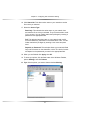
3. Expand the Network Adapters item on the right side of the dialog
box.
4. Right-click Actiontec 802.11b+g Wireless Card and select Uninstall.
Windows ME, 98, and 98SE Instructions
To uninstall the Actiontec 54 Mbps Wireless PC Card on a computer running Microsoft WIndows ME, 98, or 98SE, use the following procedure:
1. From the computer desktop, right-click My Computer and select
Properties.
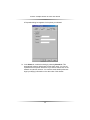
2. Click the Device Manager tab.
3. Click the plus sign next to Network Adapters item to expand it.
4. Right-click Actiontec 802.11b+g Wireless Card and select Remove.
47
Actiontec 54 Mbps Wireless PC Card User Manual
48
Notices
Regulatory Compliance Notices
Class B Equipment
This equipment has been tested and found to comply with the limits for a
Class B digital device, pursuant to Part 15 of the FCC Rules. These limits
are designed to provide reasonable protection against harmful interference
in a residential installation. This equipment generates, uses, and can radiate radio frequency energy and, if not installed and used in accordance
with the instructions, may cause harmful interference to radio communications. However, there is no guarantee that interference will not occur in a
particular installation. If this equipment does cause harmful interference to
radio or television reception, which can be determined by turning the
equipment off and on, the user is encouraged to try to correct the interference by implementing one or more of the following measures:
s
Reorient or relocate the receiving antenna;
s
Increase the separation between the equipment and receiver;
s
Connect the equipment to an outlet on a circuit different from that to
which the receiver is connected;
s
Consult the dealer or an experienced radio or television technician
for help.
Modifications
The FCC requires the user to be notified that any changes or modifications
made to this device that are not expressly approved by Actiontec
Electronics, Inc., may void the user’s authority to operate the equipment.
Declaration of conformity for products marked with the FCC logo – United
States only.
This device complies with Part 15 of the FCC Rules. Operation is subject
to the following two conditions:
49
Actiontec 54 Mbps Wireless PC Card User Manual
1. This device may not cause harmful interference;
2. This device must accept any interference received, including interference that may cause unwanted operation.
To comply with FCC RF exposure compliance
+ Note:
requirements, the antenna used for this transmitter must
be installed to provide a separation distance of at least 20
cm from all persons and must not be co-located or operating in conjunction with any other antenna or transmitter.
For questions regarding your product or the FCC declaration, contact:
Actiontec Electronics, Inc.
760 North Mary Ave.
Sunnyvale, CA 94086
United States
Tel: (408) 752-7700
Fax: (408) 541-9005
50
Limited Warranty
Hardware: Actiontec Electronics, Inc., warrants to the end user
(“Customer”) that this hardware product will be free from defects in workmanship and materials, under normal use and service, for twelve (12)
months from the date of purchase from Actiontec Electronics or its authorized reseller.
Actiontec Electronics’ sole obligation under this express warranty shall be,
at Actiontec’s option and expense, to repair the defective product or part,
deliver to Customer an equivalent product or part to replace the defective
item, or if neither of the two foregoing options is reasonably available,
Actiontec Electronics may, in its sole discretion, refund to Customer the purchase price paid for the defective product. All products that are replaced will
become the property of Actiontec Electronics, Inc. Replacement products
may be new or reconditioned. Actiontec Electronics warrants any replaced
or repaired product or part for ninety (90) days from shipment, or the
remainder of the initial warranty period, whichever is longer.
Software: Actiontec Electronics warrants to Customer that each software
program licensed from it will perform in substantial conformance to its program specifications, for a period of ninety (90) days from the date of purchase from Actiontec Electronics or its authorized reseller. Actiontec
Electronics warrants the media containing software against failure during
the warranty period. The only updates that will be provided are at the sole
discretion of Actiontec Electronics and will only be available for download
at the Actiontec Web site, www.actiontec.com. Actiontec Electronics’ sole
obligation under this express warranty shall be, at Actiontec Electronics’
option and expense, to refund the purchase price paid by Customer for
any defective software product, or to replace any defective media with software which substantially conforms to applicable Actiontec Electronics published specifications. Customer assumes responsibility for the selection of
the appropriate applications program and associated reference materials.
Actiontec Electronics makes no warranty or representation that its software
products will meet Customer’s requirements or work in combination with
any hardware or applications software products provided by third parties,
that the operation of the software products will be uninterrupted or error
free, or that all defects in the software products will be corrected. For any
third-party products listed in the Actiontec Electronics software product
documentation or specifications as being compatible, Actiontec Electronics
will make reasonable efforts to provide compatibility, except where the
51
Actiontec 54 Mbps Wireless PC Card User Manual
non-compatibility is caused by a “bug” or defect in the third party’s product
or from use of the software product not in accordance with Actiontec
Electronics published specifications or user guide.
THIS ACTIONTEC ELECTRONICS PRODUCT MAY INCLUDE OR BE BUNDLED
WITH THIRD-PARTY SOFTWARE, THE USE OF WHICH IS GOVERNED BY A
SEPARATE END-USER LICENSE AGREEMENT.
THIS ACTIONTEC ELECTRONICS WARRANTY DOES NOT APPLY TO SUCH
THIRD-PARTY SOFTWARE. FOR THE APPLICABLE WARRANTY, PLEASE
REFER TO THE END-USER LICENSE AGREEMENT GOVERNING THE USE
OF SUCH SOFTWARE.
Obtaining Warranty Service: Customer may contact Actiontec Electronics
Technical Support Center within the applicable warranty period to obtain
warranty service authorization. Dated proof of purchase from Actiontec
Electronics or its authorized reseller may be required. Products returned to
Actiontec Electronics must be pre-authorized by Actiontec Electronics with
a Return Merchandise Authorization (RMA) number marked on the outside
of the package, and sent prepaid and packaged appropriately for safe
shipment, and it is recommended that they be insured or sent by a method
that provides for tracking of the package. The repaired or replaced item
will be shipped to Customer, at Actiontec Electronics’ expense, not later
than thirty (30) days after Actiontec Electronics receives the defective
product.
Return the product to:
(In the United States)
Actiontec Electronics, Inc.
760 North Mary Avenue
Sunnyvale, CA 94085
Actiontec Electronics shall not be responsible for any software, firmware,
information, memory data, or Customer data contained in, stored on, or
integrated with any products returned to Actiontec Electronics for repair,
whether under warranty or not.
WARRANTIES EXCLUSIVE: IF AN ACTIONTEC ELECTRONICS’ PRODUCT
DOES NOT OPERATE AS WARRANTED ABOVE, CUSTOMER’S SOLE REMEDY FOR BREACH OF THAT WARRANTY SHALL BE REPAIR, REPLACEMENT,
OR REFUND OF THE PURCHASE PRICE PAID, AT ACTIONTEC ELECTRON-
52
Limited Warranty
ICS’ OPTION. TO THE FULL EXTENT ALLOWED BY LAW, THE FOREGOING
WARRANTIES AND REMEDIES ARE EXCLUSIVE AND IN LIEU OF ALL OTHER
WARRANTIES, TERMS OR CONDITIONS, EXPRESS OR IMPLIED, EITHER IN
FACT OR BY OPERATION OF LAW, STATUTORY OR OTHERWISE, INCLUDING WARRANTIES, TERMS OR CONDITIONS OF MERCHANTABILITY, FITNESS FOR A PARTICULAR PURPOSE, SATISFACTORY QUALITY, CORRESPONDENCE WITH DESCRIPTION, AND NON-INFRINGEMENT, ALL OF
WHICH ARE EXPRESSLY DISCLAIMED. ACTIONTEC ELECTRONICS NEITHER
ASSUMES NOR AUTHORIZES ANY OTHER PERSON TO ASSUME FOR IT
ANY OTHER LIABILITY IN CONNECTION WITH THE SALE, INSTALLATION,
MAINTENANCE OR USE OF ITS PRODUCTS.
ACTIONTEC ELECTRONICS SHALL NOT BE LIABLE UNDER THIS WARRANTY IF ITS TESTING AND EXAMINATION DISCLOSE THAT THE ALLEGED
DEFECT OR MALFUNCTION IN THE PRODUCT DOES NOT EXIST OR WAS
CAUSED BY CUSTOMER’S OR ANY THIRD PERSON’S MISUSE, NEGLECT,
IMPROPER INSTALLATION OR TESTING, UNAUTHORIZED ATTEMPT TO
OPEN, REPAIR OR MODIFY THE PRODUCT, OR ANY OTHER CAUSE
BEYOND THE RANGE OF THE INTENDED USE, OR BY ACCIDENT, FIRE,
LIGHTNING, OTHER HAZARDS, OR ACTS OF GOD.
LIMITATION OF LIABILITY: TO THE FULL EXTENT ALLOWED BY LAW,
ACTIONTEC ELECTRONICS ALSO EXCLUDES FOR ITSELF AND ITS SUPPLIERS ANY LIABILITY, WHETHER BASED IN CONTRACT OR TORT (INCLUDING
NEGLIGENCE), FOR INCIDENTAL, CONSEQUENTIAL, INDIRECT, SPECIAL,
OR PUNITIVE DAMAGES OF ANY KIND, OR FOR LOSS OF REVENUE OR
PROFITS, LOSS OF BUSINESS, LOSS OF INFORMATION OR DATA, OR
OTHER FINANCIAL LOSS ARISING OUT OF OR IN CONNECTION WITH THE
SALE, INSTALLATION, MAINTENANCE, USE, PERFORMANCE, FAILURE, OR
INTERRUPTION OF ITS PRODUCT, EVEN IF ACTIONTEC ELECTRONICS OR
ITS AUTHORIZED RESELLER HAS BEEN ADVISED OF THE POSSIBILITY OF
SUCH DAMAGES, AND LIMITS ITS LIABILITY TO REPAIR, REPLACEMENT,OR
REFUND OF THE PURCHASE PRICE PAID, AT ACTIONTEC ELECTRONICS’
OPTION. THIS DISCLAIMER OF LIABILITY FOR DAMAGES WILL NOT BE
AFFECTED IF ANY REMEDY PROVIDED HEREIN SHALL FAIL OF ITS ESSENTIAL PURPOSE.
Disclaimer: Some countries, states or provinces do not allow the exclusion
or limitation of implied warranties or the limitation of incidental or consequential damages for certain products supplied to consumers, or the limita-
53
Actiontec 54 Mbps Wireless PC Card User Manual
tion of liability for personal injury, so the above limitations and exclusions
may be limited in their application to you. When the implied warranties are
not allowed to be excluded in their entirety, they will be limited to the duration of the applicable written warranty. This warranty gives you specific legal
rights which may vary depending on local law.
Dispute Resolution: The customer may contact the Director of Technical
Support in the event the Customer is not satisfied with Actiontec
Electronics’ response to the complaint. In the event that the Customer is
still not satisfied with the response of the Director of Technical Support, the
Customer is instructed to contact the Director of Marketing. In the event
that the Customer is still not satisfied with the response of the Director of
Marketing, the Customer is instructed to contact the Chief Financial Officer
and/or President.
Governing Law: This Limited Warranty shall be governed by the laws of
the State of California, U.S.A., excluding its conflicts of laws and principles,
and excluding the United Nations Convention on Contracts for the
International Sale of Goods.
54