1
SERVSWITCHTM OCTET INSTALLER/USER GUIDE
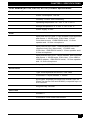
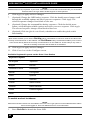
OSD hotkey sequence and then access the OSD by pressing either the left or right Ctrl
key twice. The available OSD hotkey sequences are:
All
Scroll Lock+Scroll Lock
Print Screen
Ctrl+Ctrl (L-R)
Ctrl+Ctrl (L)
Ctrl+Ctrl (R)
Alt+Alt (L-R)
Shift+Shift (L-R)
Shift+Shift (L)
Shift+Shift (R)
For more information, see Console Maintenance in Chapter 5.
Admin
The Admin tab displays options for editing user and server information. Only users with
Administrator rights can access editing screens to configure user and server information for
servers connected to the Octet switching system. Any user can access editing screens for the
local computer.
Users Admin
The Users Admin screen allows the Administrator to add, edit and delete users, assign
rights to each server and force user login. For more information about user administration,
see Chapter 5.
Device Admin
The Device Admin screen allows the Administrator to edit the device name, the keyboard
emulation and layout and the Octet SAM MDM configuration. Changes to the server
name are propagated to the Octet SAM immediately. For more information on device
administration, see Chapter 5.
?
The ? tab provides access to the OSD help and provides the software version and name of
the user station.
4.3 Selecting Servers
Use the Target tab in the OSD main dialog box to connect to servers and to change the
access mode. When you connect to a server, the Octet switch reconfigures the keyboard
and mouse to the appropriate settings for the selected server.
46