1
BD-P1580
Blu-ray Disc Player
user manual
imagine the possibilities
Thank you for purchasing this Samsung product.
To receive a more complete service,
please register your product at
www.samsung.com/register
Downloaded From Disc-Player.com Samsung Manuals
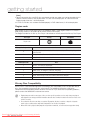
key features of your blu-ray
disc player
Player Features
Supports a Variety of Disc Types
• Blu-ray (BD-ROM, BD-RE, BD-R), DVD Video, DVD-RW/-R (V mode and finalized only) discs and Audio CD.
• CD-RW/CD-R, DVD-RW/-R and USB memory flash stick content such as MP3, JPEG and DivX files.
HDMi (High Definition Multimedia interface)
HDMI reduces picture noise by allowing a pure digital video/audio signal path from the player to your TV.
DivX
DivX® is a digital video format created by DivX, Inc. This player is an official DivX certified device that plays DivX
video.
Blu-ray Disc Features
Blu-ray Discs support the highest quality HD video available in the industry - Large capacity means no compromise
on video quality. Furthermore, a Blu-ray Disc has the same familiar size and look as a DVD.
* The following Blu-ray Disc features are disc dependant and will vary.
Appearance and navigation of features will also vary from disc to disc.
Not all discs will have the features described below.
Video highlights
The BD-ROM format supports three highly advanced video codecs, including AVC, VC-1 and MPEG-2.
HD video resolutions are also available:
• 1920 x 1080 High Definition
• 1280 x 720 High Definition
For High-Definition Playback
To view high-definition contents on a Blu-ray Disc, an HDTV (High Definition Television) is required.
Some Blu-ray Discs may require using the player's HDMI OUT to view high-definition content. The ability to view
high-definition content on Blu-ray Discs may be limited depending on the resolution of your TV.
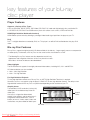
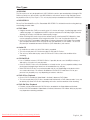
graphic planes
Two individual, full HD resolution (1920x1080)
video layers are available on top of the HD
video layer.
One layer is assigned to video-related
graphics (like subtitles), and the other layer is
assigned to interactive elements, such as
buttons or menus. Various wipes, fades and
scroll effects may be available on both layers.
PLAY MOVIE
LANGUAGES
SCENE SELECTIONS
PREVIEWS
Graphic
Planes
%
3
HD Video
Downloaded
From Disc-Player.com Samsung Manuals
2_ English
4
5
6
7
8
9
10
11
12
13
14
15
Menu graphics
Support full colour resolution graphics and animation, thereby greatly surpassing the capabilities of DVD-Video.
Unlike DVD, Menus can be accessed during video playback.
Menu sounds
When you highlight or select a menu option on a disc, sounds can be heard such as button clicks or a voice-over
explaining the highlighted menu choice.
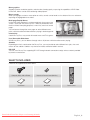
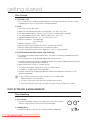
Multi-page/PopUp Menus
Unlike DVD-Video, playback is not interrupted each time a new menu
screen is accessed. Due to Blu-ray Disc's ability to preload data from
the disc without interrupting playback, a menu may consist of several
pages.
You can browse through the menu pages or select different menu
paths, while the audio and video continues playing in the background.
PLAY MOVIE
interactivity
Certain Blu-ray Discs may contain Animated menus and Trivia games.
LANGUAGES
SCENE SELECTIONS
PREVIEWS
%
3
4
5
6
7
8
9
10
11
12
13
14
15
User Browsable Slideshows
With Blu-ray Discs, you can browse through various still pictures while the audio remains playing.
Subtitles
Depending on what is contained on the Blu-ray Disc, you may be able to select different font styles, sizes and
colours for the subtitles. Subtitles may also be animated, scrolled or faded in and out.
BD-LiVE
You can use a Blu-ray Disc supporting BD-LIVE through network connection to enjoy various contents provided
by the disc manufacturer.
WHaT’S inCLUDED
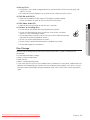
Check for the supplied accessories below.
POWER
AUDIO
TV
POWER
OPEN/CLOSE
SUBTITLE
REPEAT
REPEAT
A-B
1
2
4
5
7
8
CANCEL
3
6
9
TV SOURCE
0
BONUSVIEW PAUSE
STOP
PLAY
TV MUTE
TV VOL
TV CH
RE
NU
Batteries for Remote Control (AAA Size)
TU
RN
ME
Composite (Video), Audio L/R Cable
ENTER
INF
DISC MENU
AK59-00104K
User Manual
Downloaded From Disc-Player.com Samsung Manuals
Quick Guide
EX
IT
O
A
B
C
D
POPUP MENU
TITLE MENU
Remote Control
English _3
safety information
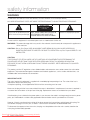
Warning
TO REDUCE THE RISK OF ELECTRIC SHOCK, DO NOT REMOVE THE COVER(OR BACK).
NO USER-SERVICEABLE PARTS ARE INSIDE. REFER SERVICING TO QUALIFIED SERVICE PERSONNEL.
CAUTION
RISK OF ELECTRIC SHOCK
DO NOT OPEN
This symbol indicates “dangerous
CAUTION: TO REDUCE THE RISK OF ELECTRIC
voltage” inside the product that presents SHOCK, DO NOT REMOVE COVER (OR BACK) NO
a risk of electric shock or personal injury. USER SERVICEABLE PARTS INSIDE. REFER
SERVICING TO QUALIFIED SERVICE PERSONNEL.
This symbol indicates important
instructions accompanying the product.
Do not install this equipment in a confined space such as a bookcase or similar unit.
WARNING : T
o prevent damage which may result in fire or electric shock hazard, do not expose this appliance to
rain or moisture.
CAUTION : B
lu-ray Disc Player USES AN INVISIBLE LASER BEAM WHICH CAN CAUSE HAZARDOUS
RADIATION EXPOSURE IF DIRECTED. BE SURE TO OPERATE Blu-ray Disc Player CORRECTLY AS
INSTRUCTED.
CAUTION
THIS PRODUCT UTILIZES A LASER. USE OF CONTROLS OR ADJUSTMENTS OR PERFORMANCE OF
PROCEDURES OTHER THAN THOSE SPECIFIED HEREIN MAY RESULT IN HAZARDOUS RADIATION
EXPOSURE. DO NOT OPEN COVERS AND DO NOT REPAIR YOURSELF. REFER SERVICING TO QUALIFIED
PERSONNEL.
This product satisfies CE regulations when shielded cables and connectors are used to connect the unit to other
equipment. To prevent electromagnetic interference with electric appliances, such as radios and televisions, use
shielded cables and connectors for connections.
IMPORTANT NOTE
The mains lead on this equipment is supplied with a molded plug incorporating a fuse. The value of the fuse is
indicated on the pin face of the plug.
If it requires replacing, a fuse approved to BS1362 of the same rating must be used.
Never use the plug with the fuse cover omitted if the cover is detachable. If a replacement fuse cover is required, it
must be of the same colour as the pin face of the plug. Replacement covers are available from your dealer.
If the fitted plug is not suitable for the power points in your house or the cable is not long enough to reach a power
point, you should obtain a suitable safety approved extension lead or consult your dealer for assistance.
However, if there is no alternative to cutting off the plug, remove the fuse and then safely dispose of the plug. Do
not connect the plug to a mains jack, as there is a risk of shock hazard from the bared flexible cord.
To disconnect the apparatus from the mains, the plug must be pulled out from the mains socket, therefore the
mains plug shall be readily operable.
Downloaded
From information
Disc-Player.com Samsung Manuals
_ safety
The product unit accompanying this user manual is licenced under certain intellectual property rights of certain
third parties. This licence is limited to private non-commercial use by end-user consumers for licenced contents.
No rights are granted for commercial use.
The licence does not cover any product unit other than this product unit and the licence does not extend to any
unlicenced product unit or process conforming to ISO/IEC 11172-3 or ISO/IEC 13818-3 used or sold in
combination with this product unit. The licence only covers the use of this product unit to encode and/or decode
audio files conforming to the ISO/IEC 11172-3 or ISO/IEC 13818-3. No rights are granted under this licence for
product features or functions that do not conform to the ISO/IEC 11172-3 or ISO/IEC 13818-3.
Important Safety Instructions
Read these operating instructions carefully before using the unit. Follow all the safety instructions listed below.
Keep these operating instructions handy for future reference.
1)
Read these instructions.
2)
Keep these instructions.
3)
Heed all warnings.
4)
Follow all instructions.
5)
Do not use this player near water.
6)
Clean only with dry cloth.
7)
Do not block any ventilation openings, install in accordance with the manufacturer's instructions.
8)
Do not install near any heat sources such as radiators, heat registers, or other player (including amplifiers)
that produce heat.
9)
The polarized or the grounding type plug has an important safety purpose. A polarized plug has two blades
with one wider than the other. A grounding type plug has two blades and a third grounding prong. The wide
blade or the third prong is provided for your safety. If the provided plug does not fit into your outlet, consult
an electrician for replacement of the obsolete outlet.
10) Protect the power cord from being deformed or pinched particularly at plugs, convenience receptacles, and
the point where they exit from the player.
11) Only use attachments/accessories specified by the manufacturer.
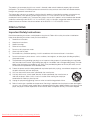
12) Use only with the cart, stand, tripod, bracket, or table specified by the manufacturer, or
sold with the player. When a cart is used, use caution when moving the cart/player
combination to avoid injury from tip-over.
13) Unplug this player during lightning storms or when unused for long periods of time.
14) Refer all servicing to a qualified service personnel. Servicing is required when the player has been damaged in
any way, such as power-supply cord or plug is damaged, liquid has been spilled or objects have fallen into the
player, the player has been exposed to rain or moisture, does not operate normally, or has been dropped.
Downloaded From Disc-Player.com Samsung Manuals
English _
● SAFETY INFORMATION
Precautions
safety information
Handling Cautions
• Before connecting other components to this Blu-ray Disc Player, be sure to turn them all off.
• Do not move the Blu-ray Disc Player while a disc is being played as the disc may be scratched or broken, or the
Blu-ray Disc Player’s internal parts may be damaged.
• Do not put a flower vase filled with water or any small metal objects on the Blu-ray Disc Player.
• Be careful not to put your hand into the disc tray.
• Do not place anything other than the disc in the disc tray.
• Exterior interferences such as lightning and static electricity can affect the normal operation of this Blu-ray Disc
Player. If this occurs, turn the Blu-ray Disc Player off and on again with the POWER button, or disconnect and
then reconnect the AC power cord to the AC power outlet. The Blu-ray Disc Player will operate normally.
• Be sure to remove the disc and turn off the Blu-ray Disc Player after use.
• Disconnect the AC power cord from the AC outlet when you don’t intend to use the Blu-ray Disc Player for long
periods of time.
• To clean a disc, wipe it in a straight line from the inside to the outside of the disc.
• Do not expose the player to any liquid.
• When the AC plug is connected to a wall outlet, the player will still draw power (standby mode) when it is turned
off.
• The player should not be exposed to dripping or splashing of any liquid and no objects filled with liquids, such as
vases, should be placed on the player.
• To disconnect the player from the mains, the plug must be pulled out from the mains socket, therefore the mains
plug shall be easily accessible.
Maintenance of Cabinet
For safety reasons, be sure to disconnect the AC power cord from the AC outlet.
• Do not use benzene, thinner, or other solvents for cleaning.
• Wipe the cabinet with a soft cloth.
Restrictions on Playback
• This player may not respond to all operating commands because some Blu-ray, DVD and CD discs allow
specific or limited operation and features during playback.
Please note that this is not a defect in the player.
• Samsung cannot assure that this player will play every disc bearing the Blu-ray Disc, DVD or CD logo because
disc formats evolve, and problems and errors may occur during the creation of Blu-ray Disc, DVD, CD software
and/or the manufacture of discs.
Please contact the SAMSUNG customer care centre if you have questions or encounter difficulty in playing
Blu-ray Disc, DVD, CD discs in this player. Also, refer to rest of this Manual for additional information on
playback restrictions.
Downloaded
From information
Disc-Player.com Samsung Manuals
_ safety
contents
3
What’s included
safety information
4
5
Warning
Precautions
getting started
10
11
14
Before Using the User’s Manual
Disc Type and Characteristics
Disc Storage & Management
description
16
17
18
Front Panel
Front Panel Display
Rear Panel
remote control
19
20
20
21
Tour of the Remote Control
Setting the Remote Control
Regarding the Battery
Controllable TV Codes
connections
22
Connecting to a TV with an HDMI Cable
(BEST QUALITY)
Connecting to a TV with DVI Cable
(BEST QUALITY)
Connecting to a TV (Component)
(BETTER QUALITY)
Connecting to a TV (Video)
(GOOD QUALITY)
Connecting to an Audio System
(2 Channel Amplifier)
Connecting to an Audio System
(Dolby Digital, DTS Amplifier)
Connecting to an Audio System
(HDMI supported Amplifier)
Connecting to the Network
2
4
10
16
19
22
24
25
26
27
28
29
30
Downloaded From Disc-Player.com Samsung Manuals
● contents
key features of your blu-ray
disc player
English _
contents
basic functions of your
blu-ray disc player
31
32
32
33
33
34
Before Playing
On-Screen Menu Navigation
Playing a Disc
Setting the Sound
Using the Search and Skip Functions
Slow Motion Play/Step Motion Play
system setup
35
Setting the Clock
language setup
36
Setting up the Language Options
audio setup
37
Setting up the Audio Options
display setup
40
Setting up the Display Options
HDMI setup
44
Setting up the HDMI setup options
parental setup
47
Setting up the Parental Lock
network setup
49
Setting up the Network setup options
31
35
36
37
40
44
47
49
Downloaded
From Disc-Player.com Samsung Manuals
_ contents
52
53
53
System Device Management
DivX(R) Registration
DivX(R) Deactivation
system upgrade
54
56
56
Firmware Upgrade
System Information
Firmware upgrade notification
watching a movie
57
58
59
60
60
61
62
62
Using the Display Function
Using the Disc Menu & Popup/Title Menu
Repeat Play
Selecting the Audio Language
Selecting the Subtitle Language
Changing the Camera Angle
BONUSVIEW Settings
BD-LIVE™
listening to music
63
63
64
Buttons on the Remote Control used for
Audio CD (CD-DA)/MP3 playback
Repeat Audio CD(CD-DA)/MP3
Playing an Audio CD(CD-DA)/MP3
playing back a picture
67
Playing a JPEG disc
appendix
68
70
Troubleshooting
Specifications
52
54
57
63
67
68
Downloaded From Disc-Player.com Samsung Manuals
English _
● contents
BD data management
getting started
Before Using the User’s Manual
Make sure to check the following terms before using the user’s manual.
Icons that will be used in this manual
Icon
h
g
f
Z
C
V
Term
BD-ROM
This involves a function available on a BD-ROM.
BD-RE
This involves a function available on a BD-RE.
BD-R
This involves a function available on a BD-R.
DVD-VIDEO
DVD-RW
DVD-R
Audio CD
A
G
D
F
M
Definition
This involves a function available on DVD-Video or DVD-RW/-R discs that have been
recorded and finalized in Video Mode.
This involves a function available on DVD-RW. (V mode and finalized only)
This involves a function available on DVD-R. (V mode and finalized only)
This involves a function available on an audio CD-RW/CD-R (CD-DA format).
MP3
This involves a function available on DVD-RW/-R, CD-RW/CD-R discs and USB memory flash sticks.
JPEG
This involves a function available on DVD-RW/-R, CD-RW/CD-R discs and USB memory flash sticks.
DivX
This involves a function available on DVD-RW/-R, CD-RW/CD-R discs and USB memory flash sticks.
USB memory
flash stick
Note
This involves a function available on USB memory flash stick.
This involves tips or instructions on the page that help each function operate.
About the use of this user’s manual
1) Be sure to be familiar with Safety Instructions before using this product. (See pages 4~6)
2) If a problem occurs, check the Troubleshooting section. (See pages 68~69)
Copyright
©2009 Samsung Electronics Co.,Ltd.
All rights reserved; No part or whole of this user’s manual may be reproduced or copied without the
prior written permission of Samsung Electronics Co.,Ltd.
Downloaded
From Disc-Player.com
Samsung Manuals
10_ getting
started
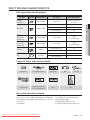
Disc Type and Characteristics
Disc types that can be played
Disc Types
BD-ROM
BD-RE/BD-R
Recorded content
Disc Shape
Max. Playing minute
AUDIO + VIDEO
Single sided
Playing time depends
on the Title
AUDIO + VIDEO
Single sided (12 cm)
240
Double sided (12 cm)
480
Single sided (8 cm)
80
Double sided (8 cm)
160
DVD-RW
(V mode and
finalized only)
AUDIO + VIDEO
12 cm (4.7GB)
480
(EX : Extended Play)
DVD-R
(V mode and
finalized only)
AUDIO + VIDEO
12 cm (4.7GB)
480
(EX : Extended Play)
Single sided (12 cm)
74
Single sided (8 cm)
20
Single sided (12 cm)
-
Single sided (8 cm)
-
AUDIO-CD
DivX
AUDIO
DivX Movie
Logos of Discs that can be played
Blu-ray Disc
DTS-HD Master Audio
Digital Audio
Dolby TrueHD
PAL broadcast System in
U.K., France, Germany, etc.
Stereo
DivX
BD-LIVE
Java
Discs that cannot be played
•
•
•
•
Blu-ray Discs with a region code other than “Region B”.
DVD-Video with a region number other than “2” or “ALL”
HD DVD
DVD-RAM
Downloaded From Disc-Player.com Samsung Manuals
•
•
•
•
3.9 GB DVD-R Disc for Authoring.
DVD-RW(VR mode)
DVD-ROM/PD/MV-Disc, etc
CVD/CD-ROM/CDV/CD-G/CD-I/LD
English _11
● GETTING STARTED
DVD-VIDEO
Disc Logo
getting started
[Note]
• Some commercial discs and DVD discs purchased outside your region may not be playable with this
product. When these discs are played, either “This disc can not be played.” or “Please check the
regional code of the disc.” will be displayed.
• If a DVD-R/-RW disc has not been recorded properly in DVD video format, it will not be playable.
Region code
Both the Blu-ray Disc Player and the discs are coded by region. These regional codes must match in
order to play the disc. If the codes do not match, the disc will not play.
The Region Number for this Blu-ray Disc Player is described on the rear panel of the Blu-ray Disc Player.
Disc Type
Blu-ray
DVD-VIDEO
Region code
B
2
Blu-ray Disc Region Code
Area
A
North America, Central America, South America, Korea, Japan, Taiwan, Hong Kong and
South East Asia.
B
Europe, Greenland, French territories, Middle East, Africa, Australia and New Zealand.
C
India, China, Russia, Central and South Asia.
DVD Region Code
Area
1
The U.S., U.S. territories and Canada
2
Europe, Japan, the Middle East, Egypt, South Africa, Greenland
3
Taiwan, Korea, the Philippines, Indonesia, Hong Kong
4
Mexico, South America, Central America, Australia, New Zealand, Pacific Islands, Caribbean
5
Russia, Eastern Europe, India, most of Africa, North Korea, Mongolia
6
China
Blu-ray Disc Compatibility
Blu-ray Disc is a new and evolving format. Accordingly, disc compatibility issues are possible. Not all
discs are compatible and not every disc will play back. For additional information, refer to the
Compliance and Compatibility Notice section of this Manual. If you encounter compatibility problems,
please contact the SAMSUNG customer care centre.
M
Playback may not work for some types of discs, or when specific operations, such as angle change and aspect
ratio adjustment, are being performed. Information about the discs is written in detail on the disc box. Please refer
to this if necessary.
Do not allow the disc to become dirty or scratched. Fingerprints, dirt, dust, scratches or deposits of cigarette
smoke on the recording surface may make it impossible to use the disc for playback.
When a BD-J title is played, loading may take longer than a normal title, or some functions may perform slowly.
Downloaded
From Disc-Player.com
Samsung Manuals
12_ getting
started
Disc Types
❖ BD-ROM
This Blu-ray disc can only be played back. A BD-ROM disc contains pre-recorded data. Although a BDROM may contain any form of data, most BD-ROM discs will contain movies in High Definition format
for playback on Blu-ray Disc Player's. This unit can play back pre-recorded commercial BD-ROM discs.
❖ BD-RE/BD-R
❖ DVD-Video
• A digital versatile disc (DVD) can contain up to 135-minutes of images, 8 audio languages and 32
subtitle languages. It is equipped with MPEG-2 picture compression and Dolby Digital surround,
allowing you to enjoy vivid and clear theatre quality images.
• When switching from the first layer to the second layer of a dual-layered DVD Video disc, there
may be momentary distortion in the image and sound. This is not a malfunction of the unit.
• Once a DVD-RW/-R recorded in Video Mode is finalized, it becomes DVD-Video. Pre-recorded
(pre-stamped) commercial DVDs with movies are also referred to as DVD-Videos. This unit can
play back pre-recorded commercial DVD discs (DVD-Video discs) with movies.
❖ Audio CD
• An audio disc on which 44.1kHz PCM Audio is recorded.
• This unit can play back CD-DA format audio CD-RW and CD-R discs.
• The unit may not be able to play some CD-RW or CD-R discs due to the condition of the
recording.
❖ CD-RW/CD-R
• Use a 700MB(80 minutes) CD-RW/CD-R disc. If possible, do not use a 800MB(90 minutes) or
above disc, as the disc may not play back.
• If the CD-RW/CD-R disc was not recorded as a closed session, you may experience delays when
playing back the beginning of the disc or all recorded files may not play.
• Some CD-RW/CD-R discs may not be playable with this unit, depending on the device which
was used to burn them. For contents recorded on CD-RW/CD-R media from CDs for your
personal use, playability may vary depending on contents and discs.
❖ DVD-R Disc Playback
• Once a DVD-R recorded in Video Mode is finalized, it becomes DVD-Video.
• This unit can play back DVD-R discs recorded and finalized with a DVD video recorder. It may not
be able to play some DVD-R discs depending on the disc and the condition of the recording.
❖ DVD-RW Disc Playback
• Playback can be performed with DVD-RW discs recorded in the Video Mode and finalized.
• Once a DVD-RW recorded in Video Mode is finalized, it becomes DVD-Video. Ability to play back
may depend on recording conditions.
Downloaded From Disc-Player.com Samsung Manuals
English _13
● GETTING STARTED
Blu-ray Disc Rewritable/Blu-ray Disc Recordable. BD-RE/BD-R is the ideal format for making backups,
or recording personal video.
getting started
Disc Format
❖ DVD-RW/-R (V)
• This is a format that is used for recording data on a DVD-RW or DVD-R disc. The disc can be
played by this Blu-ray Disc Player once it has been finalized.
❖ DivX
•
•
•
•
•
•
•
•
•
•
CD-R/-RW, DVD-R/-RW, USB
Video Files with following extensions can be played. : .avi, .divx, .AVI, .DIVX
DivX Video (Codec) Format : DivX 3.11 DivX 4.x DivX 5.x (without QPEL and GMC)
DivX Audio (Codec) Format : MP3, MPEG1 Audio Layer 2, AC3, DTS
Supported subtitle file formats: .smi, .srt, .sub, .psb, .txt, .ass
Maximum resolution : 720x480@30fps
720x576@25fps
Minimum resolution : 16x16
Maximum frame rate for progressive source : 30 frames per second
Maximum field rate for interlace source : 60 fields per second
You cannot play back the disc that is larger than a 720 x 576 pixel resolution.
❖ AVCHD (Advanced Video Codec High Definition)
• This player can playback AVCHD format discs. These discs are normally recorded and used in
camcorders.
• The AVCHD format is a high definition digital video camera format.
• The MPEG-4 AVC/H.264 format is capable of compressing images at higher efficiency than that
of the conventional image compressing format.
• Some AVCHD discs use the “x.v.Colour” format.
• This player can playback AVCHD discs using “x.v.Colour” format.
• “x.v.Colour” is a trademark of Sony Corporation.
• “AVCHD” and the AVCHD logo are trademarks of Matsushita Electronic Industrial Co., Ltd.
and Sony Corporation.
M
Some AVCHD format discs may not play, depending on the recording condition.
AVCHD format discs need to be finalized.
“x.v.Colour” offers a wider colour range than normal DVD camcorder discs.
Some DivX format discs may not play, depending on the video resolution and frame rate condition.
Disc Storage & Management
Disc Handling
❖ Disc Shape
• Use discs with regular shapes. If an irregular disc (a disc with a special
shape) is used, this Blu-ray Disc Player may be damaged.
❖ Holding discs
• Avoid touching the surface of a disc where recording is performed.
Downloaded
From Disc-Player.com
Samsung Manuals
14_ getting
started
❖ Blu-ray Discs
• If the player is not used for a long period of time, remove the Blu-ray Disc from the player and
store it in its case.
• Be careful not to leave fingerprints or scratches on the surface of the Blu-ray Disc.
❖ DVD-RW and DVD-R
• Clean with an optional PD disc cleaner (LF-K200DCA1 where available).
Do not use cleaners or cloths for CDs to clean DVD-RW/-R discs.
❖ DVD-Video, Audio-CD
● GETTING STARTED
• Wipe off dirt or contamination on the disc with a soft cloth.
❖ Cautions on handling discs
• Do not write on the printed side with a ball-point pen or pencil.
• Do not use record cleaning sprays or antistatic. Also, do not use volatile
chemicals, such as benzene or thinner.
• Do not apply labels or stickers to discs. (Do not use discs fixed with exposed
tape adhesive or leftover peeled-off stickers.)
• Do not use scratch-proof protectors or covers.
• Do not use discs printed with label printers available on the market.
• Do not load warped or cracked discs.
Disc Storage
Be careful not to damage the disc because the data on these discs is highly vulnerable to the
environment.
• Do not keep under direct sunlight.
• Keep in a cool ventilated area.
• Store vertically.
• Keep in a clean protection jacket.
• If you move your Blu-ray Disc Player suddenly from a cold place to a warm place, condensation may
generate on the operating parts and lens and cause abnormal disc playback. If this occurs, wait for
two hours before connecting the plug to the power outlet. Then insert the disc and try to play back
again.
Downloaded From Disc-Player.com Samsung Manuals
English _15
description
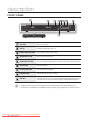
Front Panel
M
DISC TRAY
Opens to accept a disc.
DISPLAY
Displays the playing status, time, etc.
Remote Control Sensor
Detects signals from the remote control.
OPEN/CLOSE BUTTON
Opens and closes the disc tray.
SEARCH/SKIP BUTTONS
Goes to the next title/chapter/track or goes back to the previous title/chapter/track.
STOP BUTTON
Stops disc playback.
PLAY/PAUSE BUTTON
Plays a disc or pauses playback.
POWER BUTTON
Turns the Blu-ray Disc Player on and off.
USB HOST
A USB memory flash stick can be connected here and used as storage when connected
to BD-LIVE. It can also be used for firmware upgrades and MP3/JPEG/DivX playback.
Software upgrades using the USB Host jack must be performed with a USB memory flash stick only.
A USB device consuming more than 500mA requires a separate power supply device for normal operation.
Downloaded
From Disc-Player.com Samsung Manuals
16_ description
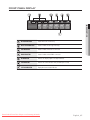
Front Panel Display
● DESCRIPTION
In Disc Indicator
Lights when a disc is in the tray.
Disc Type Indicators
Lights to indicate the disc type in the tray.
USB Indicator
Lights to indicate when USB is connected.
HDMI Indicator
Lights to indicate when HDMI is connected.
HD Indicator
Indicates the display output is HD (High Definition).
24F Indicator
Indicates the current mode is 24Fs (24 frames per second).
STATUS Indicator
Playing time/current status indicator.
Downloaded From Disc-Player.com Samsung Manuals
English _17
description
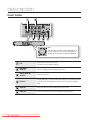
Rear Panel
Fan
The fan always revolves when the power is on.
Ensure a minimum of 10 cm of clear space on
all sides of the fan when installing the product.
LAN
Can be used for connection to BD-LIVE.
It can be also used for firmware upgrades.
COMPONENT
VIDEO OUT
Connects to equipment having Component video input.
DIGITAL AUDIO OUT
(OPTICAL)
Connects to a Receiver.
HDMI OUT
Using an HDMI cable, connect this HDMI output terminal to the HDMI input terminal
on your TV for the best quality picture and to your Receiver for the best quality
sound.
VIDEO OUT
Connects the input of external equipment using a video cable.
AUDIO OUT
Connects to the audio input of external equipment using audio cables.
Downloaded
From Disc-Player.com Samsung Manuals
18_ description
remote control
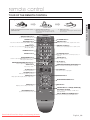
Tour of the Remote Control
Installing batteries in the Remote Control
OPEN/CLOSE Button
To open and close the disc tray.
POWER
TV
POWER
OPEN/CLOSE
TV POWER Button
POWER Button
SUBTITLE Button
Press this to switch the Blu-ray Disc/DVD’s subtitle
language.
AUDIO
SUBTITLE
REPEAT
3.Replace the cover.
Assuming typical TV usage, the batteries last for
about one year.
REPEAT
A-B
REPEAT Button
Allows you to repeat a title, chapter, track or disc.
REPEAT A-B Button
AUDIO Button
Use this to access various audio functions on a disc
(Blu-ray Disc/DVD).
1
2
3
NUMBER Buttons
4
5
6
7
8
CANCEL Button
CANCEL
Use this to turn the BONUSVIEW function on or off
with supported Blu-ray Discs.
9
TV SOURCE Button
TV SOURCE
0
BONUSVIEW Button
Allows you to repeat playback of a certain section.
PAUSE Button
Press to pause a disc.
BONUSVIEW PAUSE
REVERSE/FORWARD SKIP Buttons
STOP
After setup, allows you to set the input source on
your TV.
PLAY Button
PLAY
Press to play a disc.
Press to skip backwards or forwards.
REVERSE/FORWARD SEARCH Buttons
STOP Button
Press to search a disc backwards or forwards.
Press to stop a disc.
TV MUTE
TV VOL Button
TV VOL
TV volume adjustment
TV CH
TV CH Button
RE
RETURN Button
Use this to select a TV program.
TV MUTE Button
ME
N
MENU Button
U
Mutes the speakers of your TV.
Brings up the Blu-ray Disc Player’s setup menu.
TU
RN
ENTER/DIRECTION Buttons
ENTER
IN
INFO Button
A
DISC MENU
EX
IT
FO
Displays current setting or disc status.
B
C
POPUP MENU
DISC MENU Button
Use this to enter the disc menu.
AK59-00104K
EXIT Button
D
TITLE MENU
Colour Buttons : RED(A), GREEN (B),
YELLOW(C), BLUE(D)
Used to access special features on BD-J discs
(disc dependent).
POPUP MENU/TITLE MENU Button
Use this to enter the popup menu/title menu.
Downloaded From Disc-Player.com Samsung Manuals
English _19
● REMOTE CONTROL
1. Lift the cover at the back of the remote control 2.Install two AAA size batteries.
upward as shown.
Make sure to match the “+” and “–” ends
of the batteries with the diagram inside the
compartment.
remote control
SETTing THE rEMOTE COnTrOL
You can control certain functions of your TV with this remote control.
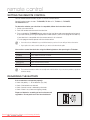
Control function buttons include : TV POWEr, TV CH ,/., TV VOL +/–, TV MUTE,
TV SOUrCE button.
To determine whether your television is compatible, follow the instructions below.
1. Switch your television on.
2. Point the remote control towards the television.
3. Press and hold the TV POWEr button and enter the two-figure code corresponding to the brand
of your television by pressing the appropriate number buttons. (see the next page for the code list).
If your television is compatible with the remote control, it will switch off.
It is now programmed to operate with the remote control.
M
If several codes are indicated for your television brand, try each one in turn until you find one that works.
If you replace the remote control's batteries, you must set the brand code again.
You can then control the television using the following buttons after pressing the TV button.
Button
Function
TV POWER
Used to switch the television on and off.
TV SOURCE
Used to select an external source.
TV VOL (+/–)
Used to adjust the volume of the television.
TV CH (,/.)
Used to select the desired channel.
TV MUTE
Used to toggle the sound on and off.
M
The functions listed above will not necessarily work on all televisions. If you encounter problems, operate the
television directly.
rEgarDing THE BaTTErY
if the remote does not operate properly:
•
•
•
•
Check the polarity +/– of the batteries (Dry-Cell)
Check if the batteries are drained.
Check if remote sensor is blocked by obstacles.
Check if there is any fluorescent lighting nearby.
Dispose of batteries according to local environmental
regulations. Do not put them in the household trash.
Downloaded
From Disc-Player.com
Samsung Manuals
20_ remote
control
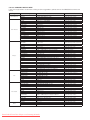
Controllable TV Codes
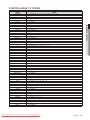
Brand
Code
TV POWER+01, +02, +03, +04, +05, +06, +07, +08, +09
TV POWER+82
TV POWER+10, +11, +12, +13, +14, +15, +16, +17, +18
TV POWER+57
TV POWER+71
TV POWER+73
TV POWER+57
TV POWER+52
TV POWER+75
TV POWER+19, +20, +23, +24, +25, +26, +27, +28, +29, +30, +31, +32, +33, +34
TV POWER+64
TV POWER+73
TV POWER+06, +49, +57
TV POWER+57
TV POWER+84
TV POWER+70
TV POWER+49, +52, +71
TV POWER+60, +72, +73, +75
TV POWER+52
TV POWER+61, +79
TV POWER+06, +19, +20, +21, +22, +78
TV POWER+06, +69
TV POWER+06, +57
TV POWER+40
TV POWER+57
TV POWER+06, +48, +62, +65
TV POWER+52, +77
TV POWER+83
TV POWER+68
TV POWER+66
TV POWER+74
TV POWER+72, +73, +75
TV POWER+53, +54, +74, +75
TV POWER+06, +55, +56, +57
TV POWER+06, +56, +57
TV POWER+58, +59, +73, +74
TV POWER+06, +56
TV POWER+57
TV POWER+45, +46
TV POWER+74
TV POWER+57, +72, +73, +74, +75
TV POWER+74
TV POWER+41, +42, +43, +44, +48
TV POWER+06
TV POWER+74
TV POWER+36, +37, +38, +39, +48
TV POWER+71
TV POWER+57
TV POWER+57
TV POWER+35, +48
TV POWER+73
TV POWER+67, +73, +75, +76
TV POWER+72, +73, +75
TV POWER+80, +81
TV POWER+47, +48, +49, +50, +51, +52
TV POWER+57
TV POWER+06
TV POWER+63
Downloaded From Disc-Player.com Samsung Manuals
● REMOTE CONTROL
SAMSUNG
AIWA
ANAM
BANG & OLUFSEN
BLAUPUNKT
BRANDT
BRIONVEGA
CGE
CONTINENTAL EDISON
DAEWOO
EMERSON
FERGUSON
FINLUX
FORMENTI
FUJITSU
GRADIENTE
GRUNDIG
HITACHI
IMPERIAL
JVC
LG
LOEWE
LOEWE OPTA
MAGNAVOX
METZ
MITSUBISHI
MIVAR
NEC
NEWSAN
NOBLEX
NOKIA
NORDMENDE
PANASONIC
PHILIPS
PHONOLA
PIONEER
RADIOLA
RADIOMARELLI
RCA
REX
SABA
SALORA
SANYO
SCHNEIDER
SELECO
SHARP
SIEMENS
SINGER
SINUDYNE
SONY
TELEAVA
TELEFUNKEN
THOMSON
THOMSON ASIA
TOSHIBA
WEGA
YOKO
ZENITH
English _21
connections
This section involves various methods of connecting the Blu-ray Disc Player to
other external components such as a TV.
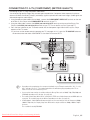
Connecting to a TV with an HDMI Cable (BEST QUALITY)
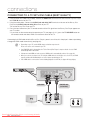
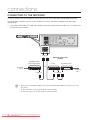
1. Using an HDMI cable (not included), connect the HDMI OUT terminal on the rear of the Blu-ray Disc Player to
the HDMI IN terminal of your TV.
2. Press the input selector on your TV remote control until the HDMI signal from the Blu-ray Disc Player appears
on your TV screen.
• If you have set the remote control to operate your TV (see pages 20~21), press the TV SOURCE button on
the remote control and select HDMI as the external source of the TV.
HDMI cable
(not included)
M
If the HDMI cable is connected or removed during playback of a CD-DA, the player will stop playing.
If the player is connected to your TV in HDMI 1080p output mode, you must use a High speed(category2)
HDMI cable.
Please do not use very thick HDMI cable which lacks flexibility when you are installing this unit.
Downloaded
From Disc-Player.com Samsung Manuals
22_ connections
HDMI Auto Detection Function
The player's video output will automatically change to HDMI output resolution when connecting an
HDMI cable while power is on (see page 42).
M
Depending on your TV, certain HDMI output resolutions may not work.
Please refer to the user's manual of your TV.
If an HDMI cable is connected from the player to a TV, the Blu-ray Disc Player’s output is set to HDMI output
resolution automatically within 10 seconds.
output resolution will automatically be set to the highest provided by the TV.
If you connect a Samsung TV to the Blu-ray Disc Player using an HDMI cable, the player can be easily
operated using the TV remote control. (This is only available with Samsung TVs that support the Anynet+
feature.) (See pages 44~45)
• HDMI (High Definition Multimedia Interface)
HDMI is an interface that enables the digital transmission of video and audio data with just a single
connector.
Using HDMI, the Blu-ray Disc Player transmits a digital video and audio signal and displays a vivid
picture on a TV having an HDMI input jack.
• HDMI connection description
HDMI connector - Supports video and digital audio data (LPCM or Bitstream).
- HDMI outputs only a pure digital signal to the TV.
- If your TV does not support HDCP (High-bandwidth Digital Content Protection), random noise
appears on the screen.
• Why does Samsung use HDMI?
Analog TVs require an analog video/audio signal. However, when playing a Blu-ray Disc/DVD, the
data transmitted to a TV is digital. Therefore either a digital-to-analog converter (in the Blu-ray Disc
Player) or an analog-to-digital converter (in the TV) is required. During this conversion, the picture
quality is degraded due to noise and signal loss. HDMI technology is superior because it requires no
D/A conversion and is a pure digital signal from the player to your TV.
• What is the HDCP?
HDCP (High-band width Digital Content Protection) is a system for protecting Blu-ray Disc/DVD
content outputted via HDMI from being copied. It provides a secure digital link between a video
source (PC, DVD. etc) and a display device (TV, projector. etc). Content is encrypted at the source
device to prevent unauthorized copies from being made.
• What is Anynet+?
Anynet+ is a convenient function that offers linked operation of this unit through Samsung TVs with
the Anynet+ feature.
- If your Samsung TV has an ' logo, then it supports the Anynet+ function.
-If you turn on the player and insert a disc, the player will start playing the disc, and the TV will turn
on automatically and switch to HDMI mode.
- If you turn on the player and press the Play button with a disc already inserted, the TV will
immediately turn on and switch to HDMI mode.
• What is BD Wise?
BD Wise is Samsung's latest inter-connectivity feature.
- When you connect Samsung products with BD-Wise to each other via HDMI, the optimum
resolution will be set automatically.
Downloaded From Disc-Player.com Samsung Manuals
English _23
● CONNECTIONS
If Component and HDMI are both connected, HDMI mode is automatically selected. (See page 42)
When you connect the player to the TV using the HDMI cable for the first time or to a new TV, the HDMI
connections
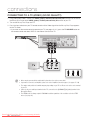
COnnECTing TO a TV WiTH DVi CaBLE (BEST QUaLiTY)
1. Using an HDMI-DVI cable (not included), connect the HDMi OUT terminal on the rear of the Blu-ray Disc Player
to the DVi in terminal of your TV.
2. Using the audio cables, connect the aUDiO (red and white) OUT terminals on the rear of the Blu-ray Disc
Player to the aUDiO (red and white) in terminals of your TV.
Turn on the Blu-ray Disc Player and TV.
3. Press the input selector on your TV remote control until the DVI signal from the Blu-ray Disc Player appears on
your TV screen.
• If you have set the remote control to operate your TV (see pages 20~21), press the TV SOUrCE button on
the remote control and select HDMI as the external source of the TV.
Connecting the HDMI cable while the Blu-ray Disc Player’s power is on will result in the player’s video output being
changed to HDMI mode automatically (see page 42).
M
Depending on your TV, certain HDMI output resolutions may not work.
Please refer to the user's manual of your TV.
If an HDMI-DVI cable is plugged into the TV, the Blu-ray Disc Player’s output resolution is set to HDMI
automatically within 10 seconds.
If Component and HDMI are both connected, HDMI mode is automatically selected. (See page 42)
When you connect the player to the TV using the HDMI cable for the first time or to a new TV, the HDMI
output resolution will automatically be set to the highest provided by the TV
If the HDMI cable is connected or removed during playback of a CD-DA, the player will stop playing.
Audio Cable
HDMI-DVI cable
(not included)
Red
Downloaded
From Disc-Player.com Samsung Manuals
2_ connections
White
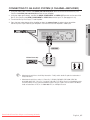
COnnECTing TO a TV (COMPOnEnT) (BETTEr QUaLiTY)
- Connecting to your TV using Component video cables.
- You will enjoy high quality images with accurate colour reproduction. Component video separates the picture
element into black and white(Y), blue(PB) and red(PR) signals to present clear and clean images. (Audio signals are
delivered through the audio output.)
1. Using Component video cables (not included) , connect the COMPOnEnT ViDEO OUT terminals on the rear
of the Blu-ray Disc Player to the COMPOnEnT in terminals of your TV.
3. Press the input selector on your TV remote control until the Component signal from the Blu-ray Disc Player
appears on the TV screen.
• If you have set the remote control to operate your TV (see pages 20~21), press the TV SOUrCE button on
the remote control and select COMPONENT as the external source of the TV.
Audio Cable
Component cable
(not included)
(Audio)Red White
M
Red
Blue
Green
Depending on the manufacturer, the component terminals on your TV may be marked “R-Y, B-Y, Y” or “Cr,
Cb, Y” instead of “PB, PR, Y”. The number and position of terminals may vary depending on the TV set.
Please refer to the user's manual of your TV.
You can select from a variety of resolution settings for Blu-ray Discs such as 1080i, 720p, 576p/480p and
576i/480i, depending on the disc type. (See page 42)
The actual resolution may differ from the setting in the SETUP menu if both Component and HDMI cables are
connected. The resolution may also be different depending on the disc. (See page 42)
In DVD playback, if both HDMI and Component jacks are connected and you select the Component 1080p,
1080i or 720p mode, the Display Setup menu will show the output resolution as 1080p, 1080i or 720p in
the menu.
The resolution is actually 576i/480i.
Downloaded From Disc-Player.com Samsung Manuals
English _2
● COnnECTiOnS
2. Using the audio cables, connect the aUDiO (red and white) OUT terminals on the rear of the Blu-ray Disc
Player to the aUDiO (red and white) in terminals of your TV. Turn on the Blu-ray Disc Player and TV.
connections
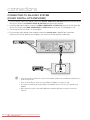
COnnECTing TO a TV (ViDEO) (gOOD QUaLiTY)
1. Using video/audio cables, connect the ViDEO (yellow) / aUDiO (red and white) OUT terminals on the rear of
the Blu-ray Disc Player to the ViDEO (yellow) / aUDiO (red and white) in terminals of your TV.
2. Turn on the Blu-ray Disc Player and TV.
3. Press the input selector on your TV remote control until the Video signal from the Blu-ray Disc Player appears
on the TV screen.
• If you have set the remote control to operate your TV (see pages 20~21), press the TV SOUrCE button on
the remote control and select VIDEO as the external source of the TV.
Red
M
White
Yellow
Noise may be generated if the audio cable is placed too close to the power cable.
If you want to connect to an Amplifier, please refer to the Amplifier connection pages. (See pages 27~29)
The number and position of terminals may vary depending on your TV set. Please refer to the user's manual
of your TV.
If there is only one audio input terminal on the TV, connect it to the [AUDIO OUT][left] (white) terminal of the
Blu-ray Disc Player.
The VIDEO source is always output in 576i/480i resolution regardless of the resolution set in the SETUP
menu. (See page 42)
Downloaded
From Disc-Player.com Samsung Manuals
2_ connections
COnnECTing TO an aUDiO SYSTEM (2 CHannEL aMPLiFiEr)
1. Using the audio cables, connect the aUDiO (red and white) OUT terminals on the rear of the Blu-ray Disc
Player to the aUDiO (red and white) in terminals of your Amplifier.
2. Using the video signal cable(s), connect the HDMi, COMPOnEnT or ViDEO OUT terminals on the rear of the
Blu-ray Disc Player to the HDMi, COMPOnEnT or ViDEO in terminal of your TV. (See pages 22~26)
3. Turn on the Blu-ray Disc Player, TV and Amplifier.
4. Press the input select button of the Amplifier to select the external input in order to hear sound from
the Blu-ray Disc Player. Refer to your Amplifier's user manual to set the Amplifier's audio input.
● COnnECTiOnS
Audio Cable
2-Channel stereo amp
Red
M
White
Manufactured under license from Dolby Laboratories. “Dolby” and the double-D symbol are trademarks of
Dolby Laboratories.
Manufactured under license under U.S. Patent #’s: 5,451,942; 5,956,674; 5,974,380; 5,978,762;
6,226,616; 6,487,535; 7,212,872; 7,333,929; 7,392,195; 7,272,567 & other U.S. and worldwide patents
issued & pending. DTS is a registered trademark and the DTS logos, Symbol, DTS-HD and DTS-HD Master
Audio are trademarks of DTS, Inc. © 1996-2008 DTS, Inc. All Rights Reserved.
Downloaded From Disc-Player.com Samsung Manuals
English _2
connections
Connecting to an Audio System
(Dolby Digital, DTS Amplifier)
1. U
sing an optical cable (not included), connect the DIGITAL AUDIO OUT (OPTICAL) terminal on the rear of the
Blu-ray Disc Player to the DIGITAL AUDIO IN (OPTICAL) terminal of your Amplifier.
2. Using the video signal cable(s), connect the HDMI, COMPONENT or VIDEO OUT terminals on the rear of the
Blu-ray Disc Player to the HDMI, COMPONENT or VIDEO IN terminals of your TV. (see pages 22~26)
3. Turn on the Blu-ray Disc Player, TV, and Amplifier.
4. Press the input select button of the Amplifier to select the external input in order to hear sound from
the Blu-ray Disc Player. Refer to your Amplifier's user manual to set the Amplifier's audio input.
M
Please turn the volume down when you turn on the Amplifier. Sudden loud sound may cause damage to the
speakers and your ears.
Please set the audio in the menu screen according to the Amplifier. (See pages 37~39)
The position of terminals may vary depending on the Amplifier. Please refer to the user's manual of your
Amplifier.
When using this connection, discs with LPCM audio soundtracks will only be heard over the front two
channels.
Downloaded
From Disc-Player.com Samsung Manuals
28_ connections
Connecting to an Audio System
(HDMI supported Amplifier)
1. Using an HDMI cable (not included), connect the HDMI OUT terminal on the rear of the Blu-ray Disc Player to
the HDMI IN terminal of your Amplifier.
2. Using an HDMI cable, connect the HDMI OUT terminal of the Amplifier to the HDMI IN terminal of your TV.
3. Turn on the Blu-ray Disc Player, TV, and Amplifier.
M
Please turn the volume down when you turn on the Amplifier. Sudden loud sound may cause damage to the
speakers and your hearing.
Please set the audio in the menu screen according to the Amplifier. (See pages 37~39)
The position of HDMI terminals may vary depending on the Amplifier. Please refer to the user's manual of
your Amplifier.
Downloaded From Disc-Player.com Samsung Manuals
English _29
● CONNECTIONS
4. Press the input select button of the Amplifier to select the external input in order to hear sound from
the Blu-ray Disc Player. Refer to your Amplifier's user manual to set the Amplifier's audio input.
connections
Connecting to THE NETWORK
To access network service or upgrade the current firmware, you must make one of the following connections.
By connecting to a network, you can access the BD-LIVE services and software upgrades from Samsung’s
update server.
1. Using a direct LAN Cable (UTP cable, not included), connect the LAN terminal of the Blu-ray Disc Player to the
LAN terminal of your modem.
To LAN port
Broadband modem
(with integrated router)
Router
Broadband modem
Or
Broadband
service
To LAN port
M
Connecting using a router
(e.g. DSL)
To LAN port
Broadband
service
Internet access to Samsung’s update server may not be allowed, depending on the router you use or the
ISP’s policy.
For more information, contact your ISP (Internet Service Provider).
For DSL users, please use a router to make a network connection.
Downloaded
From Disc-Player.com Samsung Manuals
30_ connections
basic functions of your
blu-ray disc player
This section introduces basic playback functions and playback by disc type.
• Turn on your TV and set it to the correct Video Input (the input the Blu-ray Disc Player is connected to).
• If you connected an external Audio System, turn on your Audio System and set it to the correct Audio Input.
After plugging in the player, the first time you press the POWEr button, this screen comes up:
If you want to select a language, press a nUMBEr button.
(This screen will only appear when you plug in the player for
the first time.) If the language for the startup screen is not
set, the settings may change whenever you turn the power
on or off. Therefore, make sure that you select the language
you want to use. Once you select a menu language, you
can change it by pressing the SKiP (]) button on the front
panel of the unit for more than 5 seconds with no disc in the
unit. Then the MENU LANGUAGE SELECTION window
appears again where you can reset your preferred
language.
M
MENU LANGUAGE SELECTION
Press 1 for English
Pulsar 2 para Español
Touche 3 pour Français
Drücken Sie 4 für Deutsch
Premere 5 per Italiano
Druk op 6 voor Nederlands
Macrovision: BBSXXX
Discs which can be played on this player (For the following discs, the ability to play back may depend on
recording conditions.)
• BD-ROM
• BD-RE
• BD-R
• DVD-R
• DVD-RW (V mode)
• CD-RW/CD-R
• DivX
• The unit may not play certain CD-RW/CD-R and DVD-R due to the disc type or recording conditions.
Discs which cannot be played on this player.
• HD DVD
• DVD+RW
• DVD-ROM
• DVD-RAM
• CD-ROM
• CVD
• Super Audio CD(except CD layer)
• DVD+R
• CDV
• CD-I
• CDGs play audio only, not graphics.
Blu-ray is a new and evolving format. Accordingly, disc compatibility issues with new and existing format
discs are possible. Not all discs are compatible and not every disc will playback.
For additional information, refer to the Disc Type and Characteristics and Compliance and Compatibility
Notice sections of this Manual. If you encounter compatibility problems, please contact SAMSUNG customer
care centre.
Downloaded From Disc-Player.com Samsung Manuals
English _31
● BaSiC FUnCTiOnS
BEFOrE PLaYing
basic functions of your
blu-ray disc player
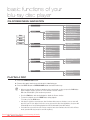
On-Screen Menu Navigation
System
Language
Video
Music
System Information
Audio
Subtitle
DivX Subtitle
Disc Menu
Menu
Photo
Setup
Audio
Display
TV Aspect
Movie Frame (24 Fs)
Resolution
Progressive Mode
Time Zone
Clock Set
Power On/Off sound
Touch Key Sound
BD Data Management
DivX(R) Registration
DivX(R) Deactivation
System Update
Digital Output
PCM Down Sampling
Dynamic Compression
Downmixing mode
Still Mode
Screen Message
Front Display
Anynet+ (HDMI-CEC)
HDMI
Network
Cable Network
Proxy
HDMI Format
BD Wise
NTP Server
Network Connection Test
BD-LIVE Internet Connection
Parental
Parental Lock
Rating Level
New Password
Playing a Disc
1. Press the OPEN/CLOSE button.
2. Place a disc gently into the tray with the disc’s label facing up.
3. Press the PLAY button or OPEN/CLOSE button to close the disc tray.
M
When you stop disc play, the player remembers where you stopped, so when you press the PLAY button
again, it will pick up where you left off. This is called the "Resume" function.
With some BD discs(BD-J), this function may not work.
Press the STOP button twice during playback to disable the Resume function.
To pause the playback, press the PAUSE button during playback.
To resume, press the PLAY button.
If the player is left in the stop mode more than 5 minutes without any user interface, a screen saver will
appear on your TV. If the player is left in the screen saver mode for more than 30 minutes, the power will
automatically turn off except during playback of a CD-DA (Automatic Power-Off Function).
If no buttons are pressed on the unit or remote control for more than 5 minutes when the unit is in Pause
mode, operation will stop (except for some Blu-ray Discs).
Downloaded
From Disc-Player.com
Samsung Manuals
32_ basic
functions
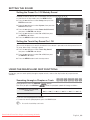
SETTing THE SOUnD
Setting the Power On / Off Melody Sound
A Melody sound can be set so it is heard each time you turn the player on or off.
1. With the unit in Stop mode, press the MEnU button.
System Information
Music
2. Press the $% buttons to select Setup, then press the
EnTEr or + button.
Time Zone
Photo
No disc
Setup
. Press the ▲▼ buttons to select Power On/Off sound,
then press the EnTEr or + button.
Power On/Off sound
: PCM
✓ On
Language
Touch Key Sound
: On Off
Audio
BD Data Management
Display
DivX(R) Registration
HDMI
DivX(R) Deactivation
◄
►
● BaSiC FUnCTiOnS
3. Press the $% buttons to select System, then press the
EnTEr or + button.
Clock Set
System
System Update
Network
Parental
. Press the $% buttons to select On or Off, then press
the EnTEr or + button.
. Press the MEnU button to exit the setup menu.
Setting the Touch Key Sound On / Off
You can set the player so a sound is heard each time a button is pressed on the front panel of the unit.
To setup, follow steps 1 through 3 above.
. Press the $% buttons to select Touch Key Sound,
then press the EnTEr or + button.
Time Zone
Music
Clock Set
Photo
. Press the $% buttons to select On or Off, then press
the EnTEr or + button.
No disc
. Press the MEnU button to exit the setup menu.
Setup
System
◄
Power On/Off sound
: On
Touch Key Sound
: PCM
✓ On
Language
BD Data Management
Audio
DivX(R) Registration
Display
DivX(R) Deactivation
HDMI
System Update
►
Off
Network
Parental
USing THE SEarCH anD SKiP FUnCTiOnS
During play, you can search quickly through a chapter or track, and use the skip function to jump to the next
selection.
Searching through a Chapter or Track
During playback, press the SEarCH (
Each time you press the SEarCH (
BD-ROM, BD-RE, BD-R, DVD-VIDEO,
DVD-RW, DVD-R
DivX
hgfZCVD
) button.
) button, the playback speed will change as follows.
) X 2 ) X 4 ) X 8 ) X 16 ) X 32 ) X 128
( X 2 ( X 4 ( X 8 ( X 16 ( X 32 ( X 128
)X2)X4)X8
~ You can scan the programme in reverse.
• To return to normal speed playback, press the PLaY button.
M
No sound is heard during search mode.
Downloaded From Disc-Player.com Samsung Manuals
English _33
basic functions of your
blu-ray disc player
hgfZCVD
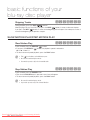
Skipping Tracks
During playback, press the SKIP (
) button.
When playing a Blu-ray Disc/DVD, if you press the SKIP (
) button, it moves to the next chapter.
If you press the SKIP (
) button, it moves to the beginning of the chapter. One more press makes it
move to the beginning of the previous chapter.
Slow Motion Play/Step Motion Play
Slow Motion Play
hgfZCVD
In pause mode, press the SEARCH (
) button.
~ If you press the SEARCH (
) button, the playback speed is reduced to
*1/8 * 1/4 * 1/2
• To return to normal speed playback, press the PLAY button.
M
This ( ) icon indicates an invalid button press.
No sound is heard during slow mode.
Slow motion operates only in the forward direction.
Step Motion Play
hgfZCVD
In pause mode, press the PAUSE button.
• Each time the PAUSE button is pressed a new frame will appear.
• To return to normal speed playback, press the PLAY button.
M
N
o sound is heard during step mode.
Step motion operates only in the forward direction.
Downloaded
From Disc-Player.com
Samsung Manuals
34_ basic
functions
system setup
For your convenience, you can set this player’s features for the best use in your
home environment.
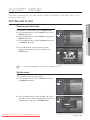
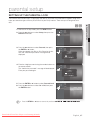
SETTing THE CLOCK
1. With the unit in Stop mode, press the MEnU button.
2. Press the ▲▼ buttons to select Setup, then press the
EnTEr or + button.
Music
Photo
No disc
Setup
3. Press the ▲▼ buttons to select System, then press the
EnTEr or + button.
. Press the ▲▼ buttons to select Time Zone, then press
the EnTEr or + button.
. Use the _ + button to place the cursor to the
appropriate time zone for your area and press the
EnTEr button.
System Information
System
◄
Time Zone
►
Language
Clock Set
Audio
Power On/Off sound
: On
Display
Touch Key Sound
: On
HDMI
BD Data Management
Network
DivX(R) Registration
Parental
DivX(R) Deactivation
Music
Time Zone
Photo
No disc
Setup
◄
System Information
System Setup
◄
Time Zone
►
Language Setup
Clock Set
Audio Setup
Power On/Off sound
: On
Display Setup
Touch Key Sound
: On
HDMI Setup GMT + 00:00BD Data Management
►
NetworkLondon,
Setup Lisbon, Casablanca
System Update
Parental
Setup
s Save
M
r Return
To set the time automatically, set the NTP server to On (see page 51).
Set the clock
To setup, follow steps 1 through 3 above.
. Press the ▲▼ buttons to select Clock Set, then press
the EnTEr or + button.
Music
System Information
Photo
No disc
. Press the _ + buttons to move to “Date”, “hr.” (hour),
and “min.” (minute). Set the date and time by pressing
the ▲▼ buttons, then press the EnTEr button.
Setup
Time Zone
System
◄
: On
Audio
Touch Key Sound
: On
Display
BD Data Management
HDMI
DivX(R) Registration
Network
DivX(R) Deactivation
Parental
System Update
System Information
Photo
Setup
System
Clock Set
LanguageDate
AudioJAN/01/2009
Displa
Thursday
y
Downloaded From Disc-Player.com Samsung Manuals
►
Power On/Off sound
Music
No disc
Clock Set
Language
◄
Time Zone
Clock Set
hr.
min.
Power On/Off sound
01 Key01Sound
Touch
►
: On
: On
BD Data Management
HDMI s Save
Network
DivX(R) Registration
r Return
DivX(R) Deactivation
Parental
System Update
English _3
● SYSTEM SETUP
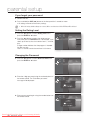
Choose your time zone
language setup
SETTing UP THE LangUagE OPTiOnS
Once you set the audio, subtitle, disc menu and player menu language options, they will be applied automatically
every time you watch a movie.
M
If you want to choose a different audio and subtitle language while playing a disc, you can also use the disc
menu to make the selection.
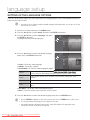
1. With the unit in Stop mode, press the MEnU button.
2. Press the ▲▼ buttons to select Setup, then press the EnTEr or + button.
3. Press the ▲▼ buttons to select Language, then press
the EnTEr or + button.
Language setup menu will be displayed.
Music
No disc
Photo
System
Setup
Language
Audio
: Original
Audio
Subtitle
: Auto
Display
DivX Subtitle
: Western
HDMI
Disc Menu
: English
Network
Menu
: Auto
◄
►
Parental
. Press the ▲▼ buttons to select the desired language
option, press the EnTEr or + button.
Music
No disc
• audio : For the disc audio language.
• Subtitle : For the disc subtitles.
• DivX Subtitle : For the DivX subtitle language by region.
Photo
System
Setup
Language
Audio
: Original
✓ Original
Audio
Subtitle
Display
DivX Subtitle
: AutoEnglish
Français
: Western
HDMI
Disc Menu
Network
Menu
◄
Parental
Deutsch
: English
Español
: Auto
Italiano
Western
Afrikaans, Basque, Catalan, Danish, Dutch, English, Faeroese, Finnish, French, German,
Icelandic, Indonesian, Italian, Malay, Norwegian, Portuguese, Spanish, Swahili, Swedish
Central
English, Albanian, Croatian, Czech, Hungarian, Polish, Romanian, Serbian(Latin), Slovak,
Slovenian
Greek
English, Greek
Cyrillic
English, Azeri, Belarusian, Bulgarian, Kazakh, Macedonian, Russian, Serbian, Tatar, Ukrainian,
Uzbek
• Disc Menu : For the disc menu contained on the disc
• Menu : For the on-screen menu of your Blu-ray Disc Player.
. Press the ▲▼ buttons to select the desired language, then press the EnTEr button.
M
Press the RETURN or _ button to return to the previous menu. Press the MENU button to exit the menu.
The selected language will only appear if it is supported on the disc.
If the subtitle language is displayed in broken fonts, change DivX Subtitle to the appropriate region.
If is still does not work, the format is not supported.
Downloaded
From Disc-Player.com
Samsung Manuals
3_ language
setup
►
audio setup
SETTing UP THE aUDiO OPTiOnS
Allows you to set up the Audio device and sound status depending on the audio system being used with the
player.
1. With the unit in Stop mode, press the MEnU button.
Music
Setup
Language
◄
Audio
►
Display
3. Press the ▲▼ buttons to select audio, then press the
EnTEr or + button.
HDMI
Network
Parental
. Press the ▲▼ buttons to select the desired audio option
from the options described below, then press the
EnTEr or + button.
. Press the ▲▼ buttons to select the desired item, then
press the EnTEr button.
Music
Photo
. Each audio option is described in detail below.
M
System
Photo
No disc
● aUDiO SETUP
2. Press the ▲▼ buttons to select Setup, then press the
EnTEr or + button.
No disc
Setup
Press the RETURN or _ button to return to the previous
menu. Press the MENU button to exit the menu.
System
Language
Digital Output
: PCM
Display
PCM Down Sampling
: On
HDMI
Dynamic Compression : On
Network
Downmixing mode
: Normal stereo
Digital Output
: PCM
✓ PCM
Audio
◄
►
Parental
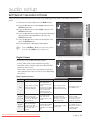
Digital Output
Blu-ray Discs may include three audio streams.
Music
- Primary Audio : Main audio soundtrack of the disc
Photo
- Secondary Audio : Provides audio for the BONUSVIEW
window of a Blu-ray Disc.
No disc
Setup
System
Language
Audio
- Effect Audio : You may hear menu prompt sounds (etc.)
when selecting menu items on a Blu-ray Disc (depending
on the disc).
◄
►
HDMI
: On Bitstream(Re-encode)
Dynamic Compression : On Bitstream(Audiophile)
Network
Downmixing mode
Display
PCM Down Sampling
: Normal stereo
Parental
Digital Output Selections
Setup
PCM
Bitstream
(Re-encode)
Bitstream
(Audiophile)
Definition
Pro
You can enjoy not only
Primary audio but also
Secondary and Effect audio
Decodes Primary, Secondary together.
and Effect audio streams
This unit can decode Dolby
together into PCM audio.
TrueHD and DTS-HD Master
Audio, the output audio
quality will be same with
Bitstream (audiophile) setup.
Decodes Primary, Secondary
You can enjoy not only
and Effect audio streams
Primary audio, but also
together into PCM audio, then
Secondary and Effect audio
re-encodes the PCM audio
together.
into DTS bitstream.
Outputs only the Primary
audio soundtrack (main
soundtrack of the main
feature) so that your receiver
can decode the audio
bitstream.
Con
If you are using an optical
Recommended choice if you
cable, you may not hear
have an HDMI receiver.
multichannel surround audio.
Audio quality may be lower
than PCM or Bitstream
(Audiophile) setups when you
are using a receiver with
HDMI or Optical input.
This unit can decode Dolby
TrueHD and DTS-HD Master
You will not hear Secondary
Audio, the output audio
and Effect audio.
quality will be same with PCM
setup.
Downloaded From Disc-Player.com Samsung Manuals
Recommended use
Recommended choice if you
don’t have an HDMI
supported receiver, but have
a receiver with an Optical
input that can decode DTS.
Recommended choice if you
have an HDMI 1.3 receiver
which has Dolby TrueHD and
DTS-HD Master Audio
decoding capability.
English _3
audio setup
M
Be sure to select the correct Digital Output or you will hear no sound or a loud noise.
If the HDMI device (Receiver, TV) is not compatible with compressed formats (Dolby digital, DTS), the audio
signal outputs as PCM.
Secondary and Effect audio will not be heard with regular DVDs.
Some Blu-ray Discs do not have Secondary and Effect audio.
This Digital Output setup does not effect the analog (L/R) audio or HDMI audio output to your TV. It effects
the optical and HDMI audio output when connected to a receiver.
When the player outputs HD audio bitstream(Dolby TrueHD or DTS-HD Master Audio) from the Optical jack to
an HDMI 1.3 receiver, only 2 channel PCM audio will be heard.
If you play MPEG audio soundtracks, audio signal outputs PCM regardless of Digital Output Selections(PCM
or Bitstream).
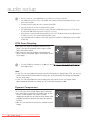
PCM Down Sampling
• On : Select this when the Amplifier connected to the
player is not 96KHz compatible. 96KHz signals will be
down converted to 48KHz
• Off : Select this when the Amplifier connected to the
player is 96KHz compatible. Signals will be output without
any changes.
M
Music
Photo
No disc
Setup
System
Language
Audio
◄
Digital Output
: PCM
PCM Down Sampling
: PCM
✓ On
Display
Dynamic Compression : On Off
HDMI
Downmixing mode
►
: Normal stereo
Network
Parental
Even when PCM Down Sampling is set to Off,, some discs will only output downsampled audio through the
optical digital outputs.
HDMi
• If your TV is not compatible with compressed multi-channel formats (Dolby Digital, DTS), the unit may
output PCM 2ch downmixed audio even though you set Bitstream(either Re-encode or Audiophile)
on your setup menu.
• If your TV is not compatible with PCM sampling rates over 48kHz, the unit may output 48kHz
downsampled PCM audio even though you set "PCM Down Sampling" to Off.
Dynamic Compression
This is only active when a Dolby Digital signal is detected.
• On : When Movie soundtracks are played at low volume
or from smaller speakers, the system can apply
appropriate compression to make low-level content more
intelligible and prevent dramatic passages from getting
too loud.
• Off : You can enjoy the movie with the standard Dynamic
Range.
Downloaded
From Disc-Player.com
Samsung Manuals
3_ audio
setup
Music
Photo
No disc
Setup
System
Language
Audio
Display
HDMI
Network
Parental
◄
Digital Output
: PCM
PCM Down Sampling
: On
Dynamic Compression : PCM
✓ On
Downmixing mode
Off stereo
: Normal
►
Downmixing mode
No disc
Downloaded From Disc-Player.com Samsung Manuals
Digital Output
: PCM
PCM Down Sampling
: On
Dynamic Compression : On
◄
Downmixing mode
►
: Normal
stereo
✓ Normal
stereo
Surround
Compatible
● aUDiO SETUP
This option enable you to compatible with Dolby Pro Logic systems.
• normal stereo : This is for just downmixing into 2ch
Music
System
audio. It is not compatible with Dolby Surround or Dolby
Photo
Language
Surround Pro Logic or Dolby Pro Logic II.
Audio
Setup
• Surround Compatible : The 2/0 Lt/Rt downmix is a
Display
HDMI
twochannel Dolby Surround compatible output that can
Network
be decoded by Dolby Surround (passive), Dolby Surround
Parental
Pro Logic (active) or Dolby Pro Logic II (active) decoders.
This downmix provides backward compatibility with
existing Dolby Surround systems and can be recorded on
two-channel media such as the videotape used by videocassette recorders.
English _3
display setup
SETTing UP THE DiSPLaY OPTiOnS
This function allows you to setup the TV screen settings. This function
depends on the disc or TV type. It may not work with some discs or TVs.
1. With the unit in Stop mode, press the MEnU button.
System
Music
Language
Photo
No disc
Setup
Audio
_
Display
►
HDMI
2. Press the ▲▼ buttons to select Setup, then press the
EnTEr or + button.
Network
Parental
3. Press the ▲▼ buttons to select Display, then press the
EnTEr or + button.
Display setup menu will be displayed.
. Press the ▲▼ buttons to select the desired display option
from the options on the following pages.
. Press the ▲▼ buttons to select the desired sub-menu
item from a video display option, then press the EnTEr
button.
Music
Photo
No disc
Setup
System
Language
Audio
TV Aspect
: 16:9 Normal
HDMI
Movie Frame (24 Fs)
: Off
Network
Resolution
: 1080p
Parental
Progressive Mode
Display
◄
. Each video option is described in detail below.
M
►
: Auto
Still Mode
: Auto
Screen Message
: On
Front Display
: Bright
Press the RETURN or _ button to return to the previous
menu. Press the MENU button to exit the menu.
TV aspect
Depending on the type of television you have, you may want to adjust the screen setting. (aspect ratio)
• 4:3 Letter Box :
Select when you want to see the total
16:9 ratio screen Blu-ray Disc/DVD
supplies, even though you have a TV with
a 4:3 ratio screen. Black bars will appear
at the top and bottom of the screen.
Music
Photo
No disc
Setup
• 4:3 Pan-Scan :
Select when you want to see the 16:9
video supplied by the Blu-ray Disc/DVD
without the black bars on top and bottom,
even though you have a TV with a 4:3
ratio screen(extreme left and right portion
of the movie picture will be cut off).
• 16:9 Wide :
You can view the full 16:9 picture on your widescreen TV.
System
Language
Audio
Display
TV Aspect
: 16:94:3Normal
Letter Box
HDMI
Movie Frame (24 Fs)
: Off 4:3 Pan-Scan
Network
Resolution
16:9 Wide
: 1080p
Parental
Progressive Mode
◄
✓ 16:9 Normal
: Auto
Still Mode
: Auto
Screen Message
: On
Front Display
: Bright
• 16:9 Normal :
Certain movies(4:3 source) will be displayed in 4:3 Pillarbox (black bars on sides of picture)
if 16:9 normal is selected.
M
Depending on the disc type, some aspect ratios may not be available.
If you select an aspect ratio which is different than the aspect ratio of your TV screen, then the picture might
appear to be distorted.
Downloaded
From Disc-Player.com
Samsung Manuals
0_ display
setup
►
Movie Frame (24 Fs)
Movies are usually filmed at 24 frames per second. Some
Blu-ray Discs have the capability of playing back at this
frame rate. Setting the Movie Frame (24Fs) feature to ON
allows you to adjust the Blu-ray Disc Player's HDMI output
to 24 frames per second for improved picture quality.
System
Music
Language
Photo
No disc
Audio
Display
Setup
You can enjoy the Movie Frame (24Fs) feature only on a TV
supporting this frame rate.
◄
TV Aspect
: 16:9 Normal
Movie Frame (24 Fs)
: PCMOn
HDMI
Resolution
✓ Off
: 1080p
Network
Progressive Mode
: Auto
Parental
Still Mode
: Auto
Screen Message
: On
Front Display
: Bright
►
● DiSPLaY SETUP
This menu can only be selected in 1080i or 1080p HDMI
output resolution modes.
Two types of frame rates may be included depending on the disc : Movie material (24 frame) and
Video material (30 frame). When the setting switches between Movie (24 frame) and Video (30 frame),
the screen may blink for a few seconds.
resolution
Sets the output resolution of the Component and HDMI
System
Music
Language
video signal.
Photo
Audio
• The number in 576p/480p, 576i/480i, 720p, 1080p and
Display
Setup
1080i indicates the number of lines of video. The i and p
HDMI
Network
indicate interlace and progressive scan, respectively.
Parental
- BD Wise : Automatically sets the optimal resolution
when connected via HDMI to a TV with the BD Wise
feature.
(The BD Wise menu item appears only if BD Wise is set
to On.)
- 1080p : Outputs 1080 lines of progressive video (HDMI only).
- 1080i : Outputs 1080 lines of interlaced video.
- 720p : Outputs 720 lines of progressive video.
- 576p/480p : Outputs 576/480 lines of progressive video.
- 576i/480i : Outputs 576/480 lines of interlaced video (Component only).
No disc
If the connected TV does not support Movie Frame or the
selected resolution, you will see the following message:
If you select Yes and the resolution is not supported, the
TV's screen will be blank. Please wait for 15 seconds and
the resolution will be reverted to the previous value
automatically.
M
TV Aspect
: 16:9 Normal
Movie Frame (24 Fs)
: Off
Resolution
: PCM
✓ 1080p
Progressive Mode
: Auto1080i
Still Mode
: Auto720p
: On 576p/480p
576i/480i
: Bright
Screen Message
Front Display
►
System
Music
Photo
No disc
◄
Setup
!
Language
TV Aspect
: 16:9 Normal
Audio
Movie Frame (24 Fs)
: Off
If no pictures are shown
after the selection,
◄
Resolution
Display
please wait for 15 seconds. And then,
Progressive Mode
HDMI
Setup will be reverted
the resolution
Still Mode
to the previous value automatically.
Network
Message
Parental
Would you like to make aScreen
selection?
Front Display
Yes
No
: 1080p
►
: Auto
: Auto
: On
: Bright
If the screen is blank, press and hold the SKIP (])) button on the front of the player for more than 5
seconds (no disc inserted). All settings are restored to the factory default. Follow the steps on the previous
page to access each mode and select the Display Setup that your TV will support.
When the factory default settings are restored, all the user data stored in the BD Data will be deleted.
Downloaded From Disc-Player.com Samsung Manuals
English _1
display setup
❖ resolution according to the output mode
• Blu-ray Disc playback
Output
HDMI
Component
(HDMI&Comp. connected / Comp. connected only)
VIDEO
1080p, Movie Frame(24Fs) off
1080p@60F
576i (480i) / 1080i
576i (480i)
1080p/1080i, Movie Frame (24Fs) on
1080p@24F
576i (480i) / 1080i
576i (480i)
1080i, Movie Frame (24Fs) off
1080i
576i (480i) / 1080i
576i (480i)
720p
720p
576i (480i) / 720p
576i (480i)
576p (480p)
576p (480p)
576i (480i) / 576p (480p)
576i (480i)
576i (480i)
576p (480p)
576i (480i)
576i (480i)
HDMI
Component
(HDMI&Comp. connected / Comp. connected only)
VIDEO
1080p
1080p@60F
576i (480i) / 576p (480p)
576i (480i)
1080i
1080i
576i (480i) / 576p (480p)
576i (480i)
Setup
• DVD playback
Output
Setup
M
720p
720p
576i (480i) / 576p (480p)
576i (480i)
576p (480p)
576p (480p)
576i (480i) / 576p (480p)
576i (480i)
576i (480i)
576p (480p)
576i (480i)
576i (480i)
In DVD playback, if both HDMI and Component jacks are connected and you select the Component 1080p,
1080i or 720p mode, the Display Setup menu will show the output resolution as 1080p, 1080i or 720p in
the menu.
The resolution is actually 576i/480i.
This player has the HDMI Auto Detect Feature. When the player is first connected to a TV via HDMI, the
player's output will be set automatically to HDMI.
If the HDMI Auto Detection feature does not work, you can't select the 1080p resolution or Movie Frame
(24Fs).
The Blu-ray Disc must have the 24 frame feature in order to use the Movie Frame (24Fs) mode.
Progressive Mode
The Progressive Mode helps to improve picture quality when viewing 480i resolution DVD discs.
• auto : Select this to have the player automatically set the
System
TV Aspect
: 16:9 Normal
Music
Language
Movie Frame (24 Fs)
: Off
best picture for the DVD you're watching.
Photo
Audio
Resolution
: 1080p
• Video : Select this for the best picture from Concert or TV
Display
Setup
Progressive Mode
: PCM
✓ Auto
show DVDs.
HDMI
Still Mode
: AutoVideo
◄
No disc
Downloaded
From Disc-Player.com
Samsung Manuals
2_ display
setup
Network
Screen Message
: On
Parental
Front Display
: Bright
►
Frame & Field bar
Still Mode
Music
Photo
No disc
Setup
System
Movie Frame (24 Fs)
Language
Resolution
: 1080p
Audio
Progressive Mode
: Off
: Auto
Still Mode
: PCM
✓ Auto
HDMI
Screen Message
Network
Front Display
: On Field
Frame
: Bright
Display
◄
►
Parental
● DiSPLaY SETUP
Set the Auto, Field or Frame setting for the best possible still
picture (pause mode) from a DVD.
• auto : Select this setting to have the player automatically
display the best Still picture depending on the content.
• Field : Select this when pausing a scene with a lot of
action.
• Frame : Select this to increase the resolution of the Still
picture.
Screen Message
• On : Displays messages related to operation mode.
• Off : Does not display messages related to operation
mode.
Music
Photo
No disc
Setup
System
Resolution
: 1080p
Language
Progressive Mode
: Auto
Audio
Still Mode
: Auto
Screen Message
: PCM
✓ On
Front Display
Off
: Bright
Display
◄
HDMI
►
Network
Parental
Front Display
• auto : Display is dim during playback and bright when the
unit is in Stop mode.
• Dim : Select to dim the display window.
• Bright : Select to brighten the display window.
Music
Photo
No disc
Setup
System
Progressive Mode
Language
Still Mode
: Auto
Audio
Screen Message
: On
Front Display
: PCM
Auto
Display
HDMI
Network
◄
: Auto
►
Dim
✓ Bright
Parental
Downloaded From Disc-Player.com Samsung Manuals
English _3
HDMI setup
SETTing UP THE HDMi SETUP OPTiOnS
1. With the unit in Stop mode, press the MEnU button.
2. Press the ▲▼ buttons to select Setup, then press the
EnTEr or + button.
Language
Music
Audio
Photo
No disc
Setup
3. Press the ▲▼ buttons to select HDMi, then press the
EnTEr or + button.
HDMI setup menu will be displayed.
Display
◄
HDMI
►
Network
Parental
. Press the ▲▼ buttons to select the desired display
option, then press the EnTEr or + button.
anynet+ (HDMi-CEC) (Samsung products only)
When HDMI is set to on, you can operate the Anynet+
function.
• On : Anynet+ functions will work.
• Off : Anynet+ function will not work.
Music
Photo
No disc
Setup
Language
Audio
Display
Anynet+ (HDMI-CEC)
: 16:9
Normal
✓ On
Network
HDMI Format
: Off Off
Parental
BD Wise
: On
HDMI
◄
►
What is anynet+?
Anynet+ is a convenient function that offers linked
operations with other Samsung products with the Anynet+
feature.
You can operate this unit using a Samsung TV remote control or power on your Samsung TV and
Home theatre and start disc playback simply by pressing the PLaY button on the TV’s remote.
M
This function is not available if the HDMI cable does not support CEC.
To use anynet+
1. Connect the Blu-ray Disc Player to a Samsung TV with an HDMI cable. (See pages 22~24)
2. Set the Anynet+ (HDMI-CEC) to “On” on your Blu-ray Disc Player.
3. Set the Anynet+ function on your TV. (See the TV instruction manual for more information.)
anynet+ Functions
• One touch play
You can power on your Samsung TV and Home Theatre, and play the disc in this unit simply by
pressing the PLaY button on the TV’s remote.
• One touch watching
Select “Watching Blu-ray Disc Player” or “Connected to Blu-ray Disc Player” (depending on your
TV's menu) in the Anynet+ menu on the TV. The Blu-ray Disc Player will automatically turn on and the
TV will be switched to HDMI mode.
• Remote control Link
You can operate this player with your Samsung TV remote control.
• Available buttons on the Samsung TV remote: These buttons work the same as this Blu-ray Disc
player's remote control.
- Playback control buttons :
- Menu operation button :
- Numeric buttons :
~
- Colour buttons :
Downloaded
From Disc-Player.com
Samsung Manuals
_ HDMI
setup
M
● HDMi SETUP
TV anynet+ Menu
When you press the Anynet+ button on your Samsung TV's
n
remote control, the following On-Screen Display (OSD) will
BD Player
be shown.
View TV
Select Device
• Blu-ray Disc Player Menu
Record
Menu on Device
- When playing a movie : brings up the disc’s menu (same
Device Operation
as DiSC MEnU button on the Blu-ray Disc Player’s
Receiver : Off
remote control)
Setup
>Move
sEnter
- In Stop mode : brings up the SETUP menu (same as the
eExit
MEnU button on the Blu-ray Disc Player’s remote
control.)
• Blu-ray Disc Player Operation Menu
- When playing a DVD VIDEO, DVD-RW/-R, BD-ROM, BD-RE :
shows INFO OSD (same as inFO button on the player's remote control)
These menus may look different depending on your Samsung TV.
HDMi Format
You can optimize the HDMI output for connection to a TV or Monitor.
• TV : Select if connected to a TV via HDMI.
Music
• Monitor : Select if connected to a Monitor via HDMI.
Photo
If the player is connected to a TV, the Monitor option is
Setup
unavailable.
No disc
Language
Audio
Display
HDMI
Network
◄
Anynet+ (HDMI-CEC)
: On
HDMI Format
: PCM
✓ TV
BD Wise
: On Monitor
►
Parental
M
TV or monitor has to be connected to the player before you select this option.
Downloaded From Disc-Player.com Samsung Manuals
English _
HDMI setup
BD Wise (Samsung products only)
BD Wise is Samsung's latest inter-connectivity feature.
When you connect Samsung products with BD-Wise to each other via HDMI, the optimum resolution
will be set automatically.
• On : The original resolution of the BD/DVD disc will be
Language
Music
Anynet+ (HDMI-CEC)
: On
Audio
output to the TV directly.
Photo
HDMI Format
: TV
Display
• Off : The output resolution will be fixed according to the
BD Wise
: PCM
Setup
HDMI
✓ On
Resolution previously set, regardless of the resolution of
Off
Network
Parental
the disc.
No disc
M
◄
If you want to change the resolution in BD Wise, you must set BD Wise to Off in advance.
If you set off the BD Wise, the resolution of the connected TV will be adjusted to its maximum resolution
automatically.
If the player is connected to a device that does not support BD Wise, you can not use BD wise function.
For a proper operation of BD Wise, set each BD Wise menu of the player and the TV to On respectively.
Downloaded
From Disc-Player.com
Samsung Manuals
_ HDMI
setup
►
parental setup
SETTing UP THE ParEnTaL LOCK
The Parental Lock function works in conjunction with Blu-ray Disc/DVDs that have been assigned a rating which
helps you control the types of Blu-ray Disc/DVDs that your family watches. There are up to 8 rating levels on a
disc.
1. With the unit in Stop mode, press the MEnU button.
2. Press the ▲▼ buttons to select Setup, then press the
EnTEr or + button.
3. Press the ▲▼ buttons to select Parental, then press
the EnTEr or + button.
When you operate your Blu-ray Disc Player for the first
time, the “Enter New password.” message will be
displayed.
Display
Music
HDMI
Photo
No disc
No disc
Setup
Network
◄
Parental
Music
Display
Photo
Network
Setup
►
HDMI
Parental Setup
Parental
◄
Enter New password.
- Number
. Enter the 4-digit password using the number buttons on
the remote control.
The “Confirm the password.” message will be displayed.
Enter your password again.
No disc
Music
Display
Photo
Network
Setup
r Return
HDMI
Parental Setup
Parental
◄
Confirm the password.
- Number
. Press the EnTEr or + button to select Parental Lock.
. Press the ▲▼ buttons to select On or Off, then press
the EnTEr button.
Music
Photo
No disc
Setup
r Return
Display
HDMI
Network
Parental
◄
Parental Lock
: Off
Rating Level
: 1(Kids)
►
New Password
M
Press the RETURN or _ button to return to the previous menu. Press the MENU button to exit the menu.
Downloaded From Disc-Player.com Samsung Manuals
English _
● ParEnTaL SETUP
hZ
parental setup
if you forgot your password
1. Remove the disc.
2. Press and hold the SKiP (]) button on the front panel for 5 seconds or more.
• All settings will revert to the factory settings.
M
When the factory default settings are restored, all the user data stored in the BD Data will be deleted.
Setting the rating Level
1. Press the ▲▼ buttons to select rating Level, then
press the EnTEr or + button.
2. Press the ▲▼ buttons to select the rating level you
want, then press the EnTEr button. For example, if you
select up to Level 6, discs that contain Level 7, 8 will not
play.
A larger number indicates that the program is intended
for adult use only.
Level 1 is the most restrictive and Level 8 is the least.
Music
Photo
No disc
Setup
Display
HDMI
Network
Parental
◄
Parental Lock
: Off
Rating Level
: Off
8(Adults)
►
7
New Password
6
5
4
3
2
✓ 1(Kids)
Changing the Password
1. Press the ▲▼ buttons to select new Password, then
press the EnTEr or + button.
Music
Photo
No disc
2. Enter the 4-digit password using the number buttons on
the remote control. The “Enter New password.”
message will be displayed.
Setup
Music
Photo
No disc
Setup
Display
HDMI
Network
Parental
◄
Parental Lock
: Off
Rating Level
: 1(Kids)
New Password
►
Display
HDMI
Parental Lock
Network
Rating Level
Parental Setup
◄
New Password
Parental
: Off
: 1(Kids)
►
Enter New password.
- Number
3. Enter your password again using the number buttons on
the remote control.
Music
Photo
No disc
Setup
r Return
Display
HDMI
Parental Lock
Network
Rating Level
Parental Setup
◄
New Password
Parental
Confirm the password.
- Number
Downloaded
From Disc-Player.com
Samsung Manuals
_ parental
setup
r Return
: Off
: 1(Kids)
►
network setup
SETTing UP THE nETWOrK SETUP OPTiOnS
To obtain information on the proper settings, check the network settings on your computer or contact
your Internet provider.
To set the network of your Blu-ray Disc player, follow the steps below.
Audio
Music
Display
Photo
2. Press the ▲▼ buttons to select Setup, then press the
EnTEr or + button.
Setup
No disc
● nETWOrK SETUP
1. With the unit in Stop mode/No Disc mode, press the
MEnU button.
HDMI
◄
Network
►
Parental
3. Press the ▲▼ buttons to select network, then press
the EnTEr or + button.
. Press the ▲▼ buttons to select the desired network
option from the options described below, then press the
EnTEr or + button.
. Press the ▲▼ buttons to select the desired item, then press the EnTEr button.
Each network option is described in detail below.
Cable network
To setup, follow steps 1~3 on page 49.
. Press the ▲▼ buttons to select Cable network, then
press the EnTEr or + button.
Music
Photo
. Press the ▲▼ buttons to select DHCP, then press the
EnTEr button.
Setup
No disc
Audio
Display
HDMI
Network
Cable Network
◄
Parental
NTP Server
M
►
Proxy
: Off
Network Connection Test
If DHCP is set to On, you can't select IP Address, Subnet
BD-LIVE Internet
Connection
Mask or Gateway.
: Allow (Valid Only)
If DNS is set to Auto, you can’t select Primary/ Secondary
DNS.
Music
Photo
Setup
No disc
Audio
Cable Network
Display
HDMI
DHCP
: On
IP Address
Network
: ◄ 0 Cable
. 0 .Network
0 . 0
Subnet Mask
Parental
Gateway
: 255Proxy
. 255 . 255 . 0
: 0 . 0 . 0 . 0
NTP Server
: Off
: Auto
Network Connection Test
: 0 . 0 . 0 . 0
BD-LIVE
Internet
: Allow (Valid Only)
: 0 . 0 . 0 . 0
Connection
Cancel
DNS
Primary DNS
Secondary DNS
Save
s Select
►
r Return
. Press the ▲▼ buttons to select a desired item, then press the EnTEr button.
• If DHCP is set to Off and, DNS to Manual,
enter your IP Address, Subnet Mask,
Gateway and Primary DNS settings
(Secondary DNS is optional).
Audio
Music
Photo
No disc
Setup
_
Display
Cable Network
DHCP
HDMI
:
:
:
:
:
:
:
IP Address
Network
Subnet Mask
◄
Gateway
DNS
Parental
Primary DNS
Secondary DNS
Save
Off
0 Cable
. 0 .Network
0 . 0
255Proxy
. 255 . 255 . 0
0 NTP
. 0 Server
. 0 . 0
:
Manual
Network Connection Test
0 . 0 . 0 . 0
0 BD-LIVE
. 0 . 0Internet
. 0
BD-LIVE
: (Valid Only)
CancelInternet
Connection
s Select
Downloaded From Disc-Player.com Samsung Manuals
►
Setup available
r Return
English _
network setup
• If DHCP is set to On and, DNS to Manual,
enter your Primary DNS setting
(Secondary DNS is optional).
Audio
Music
Photo
No disc
Setup
_
Display
Cable Network
DHCP
HDMI
:
:
:
:
:
:
:
IP Address
Network
Subnet Mask
◄
Gateway
DNS
Parental
Primary DNS
Secondary DNS
Save
On
0 Cable
. 0 .Network
0 . 0
255Proxy
. 255 . 255 . 0
0 NTP
. 0 Server
. 0 . 0
:
Manual
Network Connection Test
0 . 0 . 0 . 0
0 BD-LIVE
. 0 . 0Internet
. 0
BD-LIVE
: (Valid Only)
CancelInternet
Connection
s Select
• If DHCP is set to On and, DNS to Auto,
you don’t need further or additional
settings.
Audio
Music
Photo
No disc
Setup
_
Cable Network
DHCP
HDMI
:
:
:
:
:
:
:
Save
On
0 Cable
. 0 .Network
0 . 0
255Proxy
. 255 . 255 . 0
0 NTP
. 0 Server
. 0 . 0
:
Auto
Network Connection Test
0 . 0 . 0 . 0
0 BD-LIVE
. 0 . 0Internet
. 0
BD-LIVE
: (Valid Only)
CancelInternet
Connection
s Select
M
Setup not available
Setup available
r Return
Display
IP Address
Network
Subnet Mask
◄
Gateway
DNS
Parental
Primary DNS
Secondary DNS
►
►
Setup not available
r Return
When you select an item, use the number and $%_ + buttons.
If the automatic settings don’t work, contact your ISP.
. When done, use the $% buttons to select Save, then press the EnTEr button.
. If you don’t want to save your work, use the $%_ + buttons to select Cancel, then press the
EnTEr button.
M
The IP address used in this manual is for illustrative purposes only. You must refer to your network settings
for the actual IP address.
To obtain settings for IP address, Subnet mask, Gateway and Primary DNS, check the network settings in
your computer or contact your internet service provider.
Proxy Setting
A proxy server services requests by forwarding them to other servers.
If you are required to configure the proxy setting, enter the settings specified by the ISP.
To setup, follow steps 1~3 on page 49.
. Press the $% buttons to select Proxy, then press the
EnTEr or + button.
• Server
• Port
• User
• Password
Music
Photo
No disc
Setup
Audio
Proxy Cable Network
Display
HDMI
Proxy
: Off Proxy
Server
Network
Port
Parental
User
:◄
Password
Save
s Select
M
For more information, contact your ISP (Internet Service Provider).
Downloaded
From Disc-Player.com
Samsung Manuals
0_ network
setup
NTP Server
:
: 8080Network Connection Test
:
BD-LIVE Internet
: A
:
Connection
Cancel
r Return
►
(Valid Only)
nTP Server (Used to retrieve Time information from nTP Server)
To setup, follow steps 1~3 on page 49.
. Press the ▲▼ buttons to select nTP Server, then press
the EnTEr or + button.
• On : The player automatically connects to the Internet
server in order to adjust the time setting.
• Off : The player does not connect to the Internet
server to adjust the time setting.
Music
Photo
No disc
Setup
Audio
Cable Network
Display
Proxy
HDMI
Network
◄
NTP Server
:
Network Connection Test
Parental
BD-LIVE Internet
Connection
On
►
✓ Off
: Allow (Valid Only)
● nETWOrK SETUP
network Connection Test
Use this menu to check whether your network connection is working or not.
To setup, follow steps 1~3 on page 49.
. Press the ▲▼ buttons to select network Connection
Test, then press the EnTEr or + button.
Music
Photo
No disc
Setup
Cable Network
Audio
Proxy
Display Network Connection
Test
NTP Server
HDMI
✔ MAC Address (00:10:18:00:00:70)
►
◄
Network Connection Test
Network
✔ IP Address.Subnet Mask.Gateway.DNS Server
BD-LIVE Internet
ParentalPing
: Allow (Valid Only)
✔ Gateway
Connection
✔ Internet Service Test
BD-LIVE Internet
Connection
Your network is operating properly
r Return
BD-LiVE internet Connection
The Blu-ray Disc player supports BD-LIVE which enables you to enjoy a variety of interactive service
contents provided by the disc manufacturer through a network connection. To enjoy this feature, you
must first perform the LAN connection (see page 30).
* You must have a minimum 1 GB USB Memory device inserted in one of the USB slots in order to
download content from BD-LIVE.
The Internet connection may be restricted while you are using BD-LIVE contents.
To setup, follow steps 1~3 on page 49.
. Press the ▲▼ buttons to select BD-LiVE internet
Connection, then press the EnTEr or + button.
• allow (all) : The Internet connection will be allowed for
all BD-LIVE contents.
• allow (Valid Only) : The Internet connection will be
allowed only for BD-LIVE contents containing a valid
certificate.
• Prohibit : No Internet connection will be allowed for
any BD-LIVE content.
M
Music
Photo
No disc
Setup
Audio
Proxy
Display
NTP Server
HDMI
Network Connection Test
Network
BD-LIVE Internet
Connection
Parental
◄
: Off
: Cable
Allow (All)
►
✓ Allow (Valid Only)
Prohibit
What is a valid certificate? When the Blu-ray Disc player uses BD-LIVE to send the disc data and request
to the server to certify the disc, the server uses the transferred data to check if the disc is valid and sends
the certificate back to the player.
The Internet connection may be restricted while you are using BD-LIVE contents.
Downloaded From Disc-Player.com Samsung Manuals
English _1
BD data management
BD Data (stored in external USB flash memory) is Blu-ray Disc content such as
trailers and other special features downloaded from the BD-LIVE service or Blu-ray
Discs.
* You must have a minimum 1GB USB Memory device inserted in one of the USB slots in order to download
content from BD-LIVE.
SYSTEM DEViCE ManagEMEnT
You can manage user data stored in BD Data.
1. With the unit in Stop mode, press the MEnU button.
2. Press the ▲▼ buttons to select Setup, then press the
EnTEr or + button.
Photo
No disc
Setup
3. Press the ▲▼ buttons to select System, then press the
EnTEr or + button.
System
◄
Power On/Off sound
: On
Touch Key Sound
: On
BD Data Management
Language
DivX(R) Registration
Audio
DivX(R) Deactivation
Display
System Update
►
HDMI
. Press the ▲▼ buttons to select BD Data Management,
then press the EnTEr or + button.
Network
Parental
- To delete the flash memory 1. Press the EnTEr button to select BD Data Delete.
The message "All BD data will be deleted. Do you want
to continue?" will be displayed.
Clock Set
Music
Photo
No disc
2. Press the _ + button to select Yes, then press the
EnTEr button.
Clock Set
Music
Setup
Description of Device(Storage) information on the
Player
Power On/Off sound
: On
Touch Key Sound
: On
BD Data Management
◄
BD Data Management
System
Current Device : External Flash Memory
Language
DivX(R) Registration
Total Size : 953MB Available Size : 889MB
Audio
DivX(R) Deactivation
BD Data Delete
Display
System Update
r Return
HDMI s Select
Network
Parental
• Total Size : Total size of the Device(Storage).
• Available Size : Available size of the Device(Storage).
M
In the external memory mode, disc playback will be stopped if you disconnect the USB device in the middle
of the playback.
Only those USB devices formatted in FAT file system (DOS 8.3 volume label) are supported, and it is
recommended to use USB devices that support USB 2.0 protocol, 4 MB/sec or faster read/write speed.
The Resume Play function may not work after formatting the storage device.
Downloaded
From
Disc-Player.com
2_ BD
data
managementSamsung Manuals
►
DiVX(r) rEgiSTraTiOn
Please use the Registration code to register this Blu-ray
Disc Player with the DivX(R) Video On Demand format.
For more information, visit www.divx.com/vod
Music
Photo
No disc
Setup
System
Power On/Off sound
: On
Touch Key Sound
: On
BD Data Management
DivX(R) Registration
◄
DivX(R) Registration
►
DivX(R) Video On Demand
Language
DivX(R) Deactivation
Your registration code is : XXXXXXXXXX
Audio
System Update
To learn more visit www.divx.com/vod
Display
HDMI
OK
Network
Parental
● BD DaTa ManagEMEnT
M
This option is not activated if you select the OK. To activate this option, please activate the DivX(R)
Deactivation.
DiVX(r) DEaCTiVaTiOn
If you want to deactivate the registration code on the
website, please select the Yes. Then, you can get a new
registration code.
Touch Key Sound
Music
Photo
No disc
Setup
: On
BD Data Management
DivX(R) Registration
DivX(R) Deactivation
◄
System
DivX(R) Deactivation
►
Language
DivX(R) Video On DemandSystem Update
Do you want to deactivate your device?
Audio
Display
HDMI Yes
No
Network
Parental
M
This function can be operated when DivX(R) Registration function is available.
❖ DivX
ABOUT DIVX VIDEO: DivX® is a digital video format created by DivX, Inc. This is an official DivX
Certified or DivX Ultra Certified device that plays DivX video.
ABOUT DIVX VIDEO-ON-DEMAND: This DivX® Certified device must be registered in order to play
DivX Video-on-Demand (VOD) content. First generate the DivX VOD registration code for your device
and submit it during the registration process. [Important: DivX VOD content is protected by a DivX
DRM (Digital Rights Management) system that restricts playback to registered DivX Certified devices. If
you try to play DivX VOD content not authorized for your device, the message “Authorization Error” will
be displayed and your content will not play.] Learn more at www.divx.com/vod
DivX® is a registered trademark of DivX, Inc., and is used under license
Downloaded From Disc-Player.com Samsung Manuals
English _3
system upgrade
Samsung may offer upgrades to your Blu-ray Disc Player's firmware in the future. To upgrade this firmware you must :
1. Go to samsung.com and refer to the ‘SUPPORT’ page to download the latest firmware.
You can use a CD-R or a USB memory flash stick to perform the firmware upgrade. (Firmware upgrade using a
USB storage is available only when no disc is in the unit.) For more information, see “Upgrade Manual” at the
website mentioned above.
or
2. Connect to the network (see page 30) and follow the steps below.
FirMWarE UPgraDE
1. With the unit in Stop mode/No Disc mode, press the MEnU
button.
2. Press the ▲▼ buttons to select Setup, then press the EnTEr
or + button.
Music
Photo
No disc
Setup
_
System
+
Language
Audio
Display
3. Press the ▲▼ buttons to select System, then press the
EnTEr or + button.
HDMI
Network
Parental
. Press the ▲▼ buttons to select System Update, then press
the EnTEr or + button.
BD Data Management
Music
DivX(R) Registration
Photo
No disc
Setup
DivX(R) Deactivation
_
System
+
System Update
+
Language
Audio
Display
HDMI
Network
Parental
. The player will check the cable or network connection status
automatically. The connection checking window will be
displayed.
BD Data Management
Music
Photo
No disc
Setup
_
DivX(R) Registration
System Update
DivX(R) Deactivation
4 Update
System +1 2 3 System
+
Language
Audio
Display
Now, Checking.
Please wait...
HDMI
Network
Parental
@ If the upgrade is possible : You will see information on the
current and new versions of firmware in a message box.
Photo
No disc
@ If the upgrade is not possible : You will see the following
description in the message box.
• If the cable is not connected :
“Ethernet cable is not connected. Please, check the
Ethernet cable”
• If the network connection has failed :
“This system can not connect to internet for update.
Please, check the network setup”
• If no latest version is released (the latest version has been
already installed) :
"The latest version of the firmware is already installed.
There is no need to update."
Downloaded
From Disc-Player.com
Samsung Manuals
_ system
upgrade
BD Data Management
Music
Setup
_
DivX(R) Registration
System Update
DivX(R) Deactivation
4 Update
System +1 2 3 System
+
Language
The new update data was found.
Audio
Current Version : XXXXX
Display New Version : XXXXX
HDMI
Network
Start
Parental
BD Data Management
Music
Photo
No disc
Setup
Cancel
_
DivX(R) Registration
System Update
DivX(R) Deactivation
4 Update
System +1 2 3 System
Language
This system can not connect
Audio
to internet for update.
Display
Please, check the network setup.
HDMI
Network
Parental
OK
+
• If there is a disc in the player :
"Please maintain "No Disc" state for network update."
This indicates that you must remove all discs from the unit to perform the update.
• If the server service is not available :
“ Update Server is under maintenance. Please try again later.”
. To perform the system upgrade, press the _ + buttons to
select Start and then press the EnTEr button.
BD Data Management
Music
Photo
No disc
Setup
_
DivX(R) Registration
System Update
DivX(R) Deactivation
4 Update
System +1 2 3 System
+
Network
Start
Parental
. The system update gets started.
BD Data Management
Music
Photo
No disc
Setup
Cancel
_
DivX(R) Registration
System Update
DivX(R) Deactivation
4 Update
System +1 2 3 System
+
Language
Downloading update data...
Audio
Please, do not turn off the power.
Display
60%
HDMI
Network
Parental
. If you select Cancel during the download process, you are
prompted to confirm your selection in a message box.
If you want to cancel the download, select Yes and press the
EnTEr button.
BD Data Management
Music
Photo
No disc
Setup
Cancel
_
DivX(R) Registration
System Update
DivX(R) Deactivation
4 Update
System +1 2 3 System
+
Language
Do you want to cancel the update
Audio
operation?
Display
HDMI
Network
Yes
Parental
. Verification will proceed. When download is done, the firmware
update process will begin automatically.
BD Data Management
Music
Photo
No disc
Setup
No
_
DivX(R) Registration
System Update
DivX(R) Deactivation
4 Update
System +1 2 3 System
+
Language
Audio Verifying update data
Please wait.
Display
HDMI
Network
Parental
10. When the installation is done, the player will automatically turn
off in 5 seconds.
All settings will revert to the factory settings the next time you
start the system and you will see the menu language selection
window.
BD Data Management
Music
Photo
No disc
Setup
_
DivX(R) Registration
System Update
DivX(R) Deactivation
4 Update
System +1 2 3 System
+
Language Firmware Update.
Audio Now, Processing...
Please, do not turn off the power.
Display
The power will be off automatically
HDMI after update is finished.
Network
Parental
M
If you want to cancel the upgrade in the process of downloading the upgrade data, press the ENTER button.
You will see a confirmation message.
Selecting Yes will end the upgrade process, and selecting No will continue the upgrade process.
When the system upgrade is done, check the firmware details in the System Upgrade menu.
Do not turn off the player during the System Upgrade, as it may cause the player to not work properly.
Do not use USB devices other than USB Flash Drives to do software upgrades using the USB Host jack.
There should be only one firmware upgrade file in the USB flash drive for the player to properly perform an
upgrade.
Oversized USB drives may not be able to be inserted when a LAN or HDMI cable is connected.
Downloaded From Disc-Player.com Samsung Manuals
English _
● SYSTEM UPgraDE
Language
The new update data was found.
Audio
Current Version : XXXXX
Display New Version : XXXXX
HDMI
system upgrade
SYSTEM inFOrMaTiOn
When the firmware upgrade is done, check the firmware details by following the steps below.
1. With the unit in Stop mode/No Disc mode, press the
MEnU button.
2. Press the ▲▼ buttons to select Setup, then press the
EnTEr or + button.
Music
Photo
No disc
Setup
◄
System
►
Language
Audio
3. Press the ▲▼ buttons to select System, then press the
EnTEr or + button.
Display
HDMI
Network
Parental
. Press the ▲▼ buttons to select System information,
then press the EnTEr or + button.
You can see detailed information about the current
firmware.
Music
Photo
No disc
. Press the EnTEr button to select OK.
System Setup menu will be displayed.
Setup
System
◄
System Information
►
Language
Time Zone
Audio
Clock Set
Display
Power On/Off sound
: On
HDMI
Touch Key Sound
: On
Network
BD Data Management
Parental
DivX(R) Registration
Music
Photo
No disc
Setup
System Information
System Information
System Setup◄
S/W : XXXXXXX Time Zone
Language
Audio Loader : XXXXXXXClock Set
Region : B/2 (BD/DVD)
Power On/Off sound
Display
HDMI
Network
Parental
OK
Touch Key Sound
►
:
:
BD Data Management
DivX(R) Registration
FirMWarE UPgraDE nOTiFiCaTiOn
The popup menu appears when a newer version of the firmware is available from SAMSUNG update server than
that of the Blu-ray Disc Player, if the Blu-ray Disc Player is connected to the network and powered on.
• Yes : Select this to upgrade now.
• no : Select this if you plan to upgrade later.
System Update
New Firmware is available.
Do you want to update now?
Yes
Downloaded
From Disc-Player.com
Samsung Manuals
_ system
upgrade
No
watching a movie
USing THE DiSPLaY FUnCTiOn
hgfZCV
2. Press the ▲▼ buttons to select the desired item.
3. Press the _ + buttons to make the desired setup
change and then press the EnTEr button.
• You may use the number buttons of the remote
control to directly access a title, chapter or to start the
playback from a desired time.
. To make the screen disappear, press the inFO button
again.
BD
Info
Title
: 000/034
Chapter
: 000/002
Playing Time
: 00:00:06
Audio
: 1/1 ENG Multi CH
Subtitle
: NONE
Angle
: 01/01
Picture Mode
: Normal
{ Change
● WaTCHing a MOViE
1. During playback, press the inFO button on the remote
control.
• If the Blu-ray Disc has the BONUSVIEW feature, press
the inFO button in the BONUSVIEW section to display
BONUSVIEW-related information.
s Select
<INFO menu for the BONUSVIEW section>
BD
Info
Title
: 000/034
Chapter
: 000/002
Playing Time
: 00:00:06
Audio
: 1/1 ENG Multi CH
Subtitle
: NONE
Angle
: 01/01
BONUSVIEW Video : 01/01
BONUSVIEW Audio : 1/1 ENG 2CH
Picture Mode
{ Change
M
: Normal
s Select
If you are playing contents from the info menu, some functions may not be enabled depending on the disc.
Title : To access the desired title when there is more than one in the disc. For example, if there is more than
one movie on a Blu-ray Disc/DVD, each movie will be identified as a Title.
Chapter: Most Blu-ray Disc/DVD discs are recorded in chapters so that you can quickly find a specific
chapter.
Playing Time : Allows playback of the film from a desired time. You must enter the starting time
as a reference. The time search function does not operate on some discs.
Audio : Refers to the film's soundtrack language. A Blu-ray Disc can contain up to 32 audio languages and a
DVD up to 8.
Subtitle : Refers to the subtitle languages available in the disc. You will be able to choose the subtitle
languages or, if you prefer, turn them off from the screen. A Blu-ray Disc can contain up to 255 subtitle
languages, and a DVD up to 32.
Angle : When a Blu-ray Disc/DVD contains multiple angles of a particular scene, you can use the ANGLE
function.
BONUSVIEW Video/ BONUSVIEW Audio : You can make BONUSVIEW Video or BONUSVIEW Audio settings if
the current title of a Blu-ray Disc appears in the BONUSVIEW section. The BONUSVIEW Video / BONUSVIEW
Audio options, however, will be disabled with a Blu-ray Disc that does not support the BONUSVIEW feature.
Picture Mode : This function enables you to adjust video quality when you are connected to a TV via HDMI.
- Dynamic : Choose this setting to increase Sharpness.
- Normal : Choose this setting for most viewing applications.
- Movie : This is the best setting for watching movies.
- User : The user can adjust the sharpness and noise reduction function respectively.
Downloaded From Disc-Player.com Samsung Manuals
English _
watching a movie
USing THE DiSC MEnU & POPUP/TiTLE MEnU
hZ
Using the Disc Menu
1. During playback, press the DiSC MEnU button on the
remote control.
PLAY MOVIE
LANGUAGES
SCENE SELECTIONS
PREVIEWS
2. Press the ▲▼_ + buttons to make the desired
selection, then press the + or EnTEr button.
• The Disc menu setup items may vary from disc to disc.
%
3
M
4
5
6
7
8
9
10
11
12
13
14
15
Depending on the disc, the Disc Menu may not be available.
Z
Using the Title Menu
1. During playback, press the TiTLE MEnU button on the remote control.
2. Press the ▲▼_ + buttons to make the desired selection, then press the EnTEr button.
• The Title menu setup options may vary from disc to disc.
M
Depending on the disc, the Title Menu may not be available.
Title Menu will only be displayed if there are at least two titles on the disc.
gf
Playing the Title List
1. With the unit in Stop mode/Playback mode, press the
DiSC MEnU or TiTLE MEnU button.
2. Press the ▲▼ buttons to select an entry you want to
play from Title List, then press the + or EnTEr button.
The selected entry (title) will be played back.
BD
RE
Video
Title 007
00:03:32
Music
Title 008
00:04:36
Photo
Title 009
00:04:17
Setup
Title 010
00:04:11
Title 011
00:04:07
Title 012
00:04:46
_
Title 013
Title 014
00:04:21
00:03:43
Page
- go to Playlist To go to the Playlist, press the rED(a) button.
Downloaded
From Disc-Player.com
Samsung Manuals
_ watching
a movie
h
Using the Popup Menu
1. During playback, press the POPUP MEnU button on
the remote control.
MAIN MENU
AUDIO SET UP
2. Press the ▲▼_ + buttons or EnTEr button to select
the desired menu.
• The Popup menu setup options may vary from disc to
disc.
SCENE SELECTIONS
%
4
5
6
7
8
9
10
11
12
13
14
15
Depending on the disc, the Popup Menu may not be available.
rEPEaT PLaY
Repeat the current chapter or title.
hgfZCV
repeat playback
1. During playback, press the rEPEaT button on the
remote control. Repeat screen appears.
Repeat
Off
2. Press the ▲▼ buttons to select Chapter or Title.
• Blu-ray Disc/DVD repeats play by chapter or title.
3. To return to normal play, press the rEPEaT button
again, then press the ▲▼ buttons to select Off.
M
Depending on the disc, the Repeat function may not be available.
hgfZCV
Using the a-B repeat function
1. Press the rEPEaT a-B button on the remote control
during playback.
2. Press the rEPEaT a-B button at the point where you
want repeat play to start (A).
►
Repeat A-B
00:18:41 / 01:34:37
DVD
3. Press the rEPEaT a-B button at the point where you
want repeat play to stop (B).
. To return to normal play, press the CanCEL button.
REPEAT A
M
B
Off
e Exit
Point B cannot be set until 5 seconds of playback has elapsed from point A.
Depending on the disc, the REPEAT A-B menu may not be available.
Downloaded From Disc-Player.com Samsung Manuals
English _
● WaTCHing a MOViE
3
M
SUBTITLES
watching a movie
SELECTing THE aUDiO LangUagE
hgfZD
You can select a desired audio language quickly and easily with the aUDiO button.
Using the aUDiO button
1. Press the aUDiO button during playback. The Audio
changes when the button is pressed repeatedly.
• The audio languages are represented by abbreviations.
Audio
1/4 ENG Dolby Digital Multi CH
2. To remove the audio bar, press the CanCEL or
rETUrn button.
Using the inFO button
1. During playback, press the inFO button on the remote
control.
2. Press the ▲▼ buttons to select audio.
3. Press the _ + buttons on the remote control to select the desired audio language.
M
This function depends on what audio languages are encoded on the disc and may not be available.
A Blu-ray Disc can contain up to 32 audio languages and a DVD up to 8.
Depending on the disc type, you can use the AUDIO button to change the audio soundtrack as well as the
audio language.
Some Blu-ray Discs may allow you to select either the multi-channel LPCM or Dolby digital audio soundtrack
in English.
Information about the primary / secondary mode will be also displayed if the Blu-ray Disc has a BONUSVIEW
section.
Use the _ + button to switch between primary and secondary audio modes.
The _ + indicator will not be displayed on the screen if the BONUSVIEW section does not contain any
BONUSVIEW audio settings.
SELECTing THE SUBTiTLE LangUagE
You can select a desired subtitle quickly and easily with the SUBTiTLE button.
hZD
Using the SUBTiTLE button
1. Press the SUBTiTLE button. The subtitle changes when
the button is pressed repeatedly. The subtitle languages
are represented by abbreviations.
2. To remove the Subtitle bar, press the CanCEL or
rETUrn button.
Downloaded
From Disc-Player.com
Samsung Manuals
0_ watching
a movie
Subtitle
NONE
Using the inFO button
1. During playback, press the inFO button on the remote control.
2. Press the ▲▼ buttons to select Subtitle.
3. Press the _ + buttons on the remote control to select the desired subtitle language.
M
Depending on the Blu-ray Disc / DVD, you may be able to change the desired subtitle in the Disc Menu.
Press the DISC MENU button.
This function depends on what subtitles are encoded on the disc and may not be available on all Blu-ray
section.
This function changes both the primary and secondary subtitles at the same time.
The total number of subtitles is the sum of the primary and secondary ones.
CHanging THE CaMEra angLE
When a Blu-ray Disc/DVD contains multiple angles of a particular scene, you can use the ANGLE function.
hZ
Using the angLE function
2. Press the ▲▼ buttons to select angle.
3. Press the _ + buttons or you can use the number
buttons on the remote control to select the desired
angle.
BD
: 001/500
Chapter
: 001/001
Playing Time
: 00:00:00
Audio
: 1/5 ENG 2CH
Subtitle
: NONE
Angle
: 01/01
Picture Mode
: Normal
{ Change
M
Info
Title
{
1. During playback, press the inFO button on the remote
control.
Move
If the disc has only one angle, this feature won’t work. Currently, very few discs have this feature.
These functions may not work depending on the disc.
Downloaded From Disc-Player.com Samsung Manuals
English _1
● WaTCHing a MOViE
Discs/DVDs.
A Blu-ray Disc can contain up to 255 subtitle languages and a DVD up to 32.
Information about the primary / secondary mode will be also displayed if the Blu-ray Disc has a BONUSVIEW
watching a movie
BOnUSViEW SETTingS
The BONUSVIEW feature allows you to view additional content (such as commentaries) in a small screen window
while the movie is playing.
Using the BOnUSViEW button
h
1. If the current Blu-ray Disc features the BONUSVIEW
function, you can use the BOnUSViEW button to turn
BONUSVIEW On or Off.
2. Each time you press the BOnUSViEW button, you can
toggle between BONUSVIEW On and BONUSVIEW Off.
M
You can change detailed settings of the BONUSVIEW feature in the INFO menu (see page 57: selection of
secondary audio, video stream and subtitle etc.).
If you switch from BONUSVIEW Video, BONUSVIEW Audio will change automatically in accordance with
BONUSVIEW Video.
If the Blu-ray Disc supports only BONUSVIEW Audio, you can just press the BONUSVIEW button to turn the
secondary audio on or off.
BD-LiVE™
The Blu-ray Disc player supports BD-LIVE which enables you to enjoy a variety of interactive service contents
provided by the disc manufacturer through network connection.
Using the BD-LiVE Disc
1. Connect the network (see page 30) and check the network setup (see pages 49~51).
2. Insert a Blu-ray disc that supports BD-LIVE.
3. Select the contents provided by the disc manufacturer to enjoy the BD-LIVE.
M
The way you use BD-LIVE and the features may differ, depending on the disc.
To use BD-LIVE, you must insert a minimum of 1GB USB memory device into one of the USB slots.
Downloaded
From Disc-Player.com
Samsung Manuals
2_ watching
a movie
listening to music
Buttons on the Remote Control used for
Audio CD (CD-DA)/MP3 playback
1. PAUSE button : Pauses playback.
2. SKIP (
) button : During playback, moves to the next page
in the Music List or moves to the next track in the Playlist.
BONUSVIEW PAUSE
STOP
3. PLAY button : Plays the currently selected track.
PLAY
4. ▲▼ buttons : Selects a track(song) in the Music List or Playlist.
5. Colour buttons
• RED(A) button : Selects the Play Mode(Repeat) during
playback.
• GREEN(B) button : Go to Playlist from Music List.
• YELLOW(C) button : Playlist play.
ME
NU
RE
TU
RN
6. _ + buttons : During the playback, these buttons are not
available.
_ : Returns to the Main menu.
+ : Moves to the track (song) menu.
ENTER
A
EX
IT
IN
FO
B
C
DISC MENU
7. ENTER button : Plays the selected track (song).
D
8. STOP button : Stops a track(song).
POPUP MENU
9. Press the SEARCH (
) buttons : Fast Play.
10. SKIP (
) button : If you press this button after three
seconds of playback, the current track will be replayed from
the beginning. But, if you press this button within three
seconds after playback starts, the previous track will be played.
Alsoused to move to the previous page in the Music List or
Playlist.
Repeat Audio CD(CD-DA)/MP3
During playback, press the REPEAT or RED(A) button repeatedly to select the repeat mode you want.
❖ Audio CD (CD-DA)
➝
➝
➝
➝
➝
❖ MP3
➝
•
•
•
•
•
Normal (Audio CD (CD-DA)/MP3) : Tracks on a disc are played in the order in which they were
recorded on the disc.
Repeat Track (Audio CD (CD-DA)/MP3)
Repeat Folder (MP3)
Random (Audio CD (CD-DA)/MP3) : The random option plays a disc’s track in random order.
Repeat All (Audio CD (CD-DA)) : All tracks are repeated.
- To return to normal playback Press the REPEAT or RED(A) button repeatedly to return to normal playback.
Downloaded From Disc-Player.com Samsung Manuals
English _63
● LISTENING TO MUSIC
0
listening to music
You can select the data source by pressing the $% button in the menu screen.
(CD/DVD/USB memory flash stick)
AF
PLaYing an aUDiO CD(CD-Da)/MP3
1. Insert an Audio CD(CD-DA) or an MP3 Disc into the disc
tray.
• For an Audio CD, the first track will be played
automatically.
• For an MP3 disc, press the ▲▼ buttons to select
Music, then press the EnTEr button.
(You can listen to mp3 files using a USB memory
flash stick)
►
TRACK 001
1/18
00:02:24 / 00:05:57
CD
a Play Mode
2. To move to the Music List, press the STOP or rETUrn
button.
The Music List screen is displayed on your TV.
3. Press the ▲▼ buttons to select the track you want to
play, and then press the EnTEr button.
Video
CD
Music
TRACK 001
00:04:08+
Photo
TRACK 002
00:03:41
Setup
TRACK 003
00:03:17
TRACK 004
00:03:36
TRACK 005
00:03:47
TRACK 006
00:03:50
_
TRACK 007
b Playlist
00:03:54
Page
❖ audio CD(CD-Da)/MP3 Screen Elements
Displays the media type.
►
CD
TRACK 001
1/18
00:02:24 / 00:05:57
Current track (song)
Displays the number or title track currently being
played.
Play Status Bar.
Displays the repeat status.
a Play Mode
Displays the current play index, total track number.
Current /Total Play Time.
Displays available COLOUR buttons.
Downloaded
From Disc-Player.com
Samsung Manuals
_ listening
to music
AF
Playlist
You can create a playlist with up to 99 tracks.
Video
TRACK 001
00:05:57
TRACK 002
00:04:28
TRACK 003
00:04:08
Photo
TRACK 004
00:03:41
Setup
TRACK 005
00:03:17
TRACK 006
00:03:36
TRACK 007
00:03:47
TRACK 008
00:03:50
Music
CD
_
TRACK 009
00:03:54
b Playlist
2. To move to the Music List, press the grEEn(B) or
rETUrn button.
The Music List screen is displayed.
+
Page
Original
Playlist
Video
Music
CD
3. Press the grEEn(B) button to go to the Playlist.
_
TRACK 001
Photo
TRACK 002
Setup
TRACK 003
TRACK 004
TRACK 005
TRACK 006
TRACK 007
b Music List
. Press the ▲▼ buttons to select a track, then press the
EnTEr button to add it to the Playlist. Repeat this
procedure to add additional tracks.
Original
Play
Playlist
TRACK 002
Music
CD
s Add
TRACK 001
Video
. If there is an undesired track in the playlist, press the
+▲▼ button to select that track, and then press the
EnTEr button.
• The selected track will be deleted.
TRACK 003
01.TRACK 001
Photo
TRACK 004
02.TRACK 002
Setup
TRACK 005
03.TRACK 003
_
TRACK 006
TRACK 007
TRACK 008
TRACK 009
b Music List
. Press the YELLOW(C) button to play the selected
tracks.
When the track is finished, the next track will
automatically play.
c Playlist Play
►
CD
TRACK 001
c Playlist Play
s Add
Play
1/3
00:02:17 / 00:05:57
a Play Mode
. To edit the Playlist, press the STOP or rETUrn button.
. To go to the Music List, press the rETUrn button.
Downloaded From Disc-Player.com Samsung Manuals
English _
● LiSTEning TO MUSiC
1. Insert an Audio CD(CD-DA) or an MP3 Disc into the disc
tray.
• For an Audio CD, the first track will be played
automatically.
• For an MP3 disc, press the ▲▼ buttons to select
Music, then press the EnTEr button.
(You can listen to mp3 files using a USB memory
flash stick)
listening to music
AGF
MP3 & JPEg Simultaneous playback
You can enjoy listening to MP3 files while you simultaneously view JPEG files.
1. When you play MP3 file, press the BLUE(D) button.
The slide show speed screen will be displayed.
2. Select the desired slide show speed.
►
a Play Mode
M
001. SONG01.mp3
1/18
00:02:24 / 00:05:57
CD
d Slide Show
To operate this function, you have to select the folder containing both music and photo files.
When you play MP3 and JPEG files simultaneously, audio drop may occur according to bitrate of MP3, size
of JPEG image and method of encoding.
Downloaded
From Disc-Player.com
Samsung Manuals
_ listening
to music
playing back a picture
GF
PLaYing a JPEg DiSC
1. Insert a JPEG disc into the disc tray.
(You can watch the jpeg files using a USB memory
flash stick)
Video
Music
CD
+
Setup
2. Press the ▲▼ buttons to select the Photo, and then
press the EnTEr or + button.
Video
Music
Photo
CD
_
Setup
3. Press the ▲▼ buttons to select the folder you want to
play, and then press the EnTEr button.
..
+
640 jpg
03 JUL 2000
full jpg
03 JUL 2000
Video
Music
Photo
CD
_
Setup
..
+
gun001.jpg
03 JUL 2000
465 KB
gun002.jpg
03 JUL 2000
465 KB
gun003.jpg
03 JUL 2000
465 KB
gun004.jpg
03 JUL 2000
465 KB
gun005.jpg
03 JUL 2000
465 KB
gun006.jpg
03 JUL 2000
465 KB
d Slide Show
-1. Press the BLUE(D) button to start slide show.
#
gun003.jpg
03/100
-2. Press the ▲▼ buttons to select the picture you want to
play, and then press the EnTEr button.
You can operate rotation, zoom and slide show
function.
• rED(a) button : Each time this button is pressed, the
picture rotates 90 degrees counterclockwise.
a 90°
b 90°
c Zoom
d Speed
Slide Show
• grEEn(B) button : Each time this button is pressed,
the picture rotates 90 degrees clockwise.
• YELLOW(C) button : Each time this button is pressed, the picture is enlarged up to 4X (Four
times the normal size).
• BLUE(D) button : Selects slide show speed.
• PLaY button : The picture enters slide show mode.
CD
Downloaded From Disc-Player.com Samsung Manuals
English _
● PLaYing BaCK a PiCTUrE
Photo
_
appendix
troubleshooting
Before requesting service, please check the following.
PROBLEM
No operation can be performed with the
remote control.
SOLUTION
• Check the batteries in the remote control. They may need replacing.
• Operate the remote control at a distance of no more than 6.1m.
• R emove batteries and hold down one or more buttons for several minutes to drain
the microprocessor inside the remote control to reset it. Reinstall batteries and try
to operate the remote control again.
Disc does not play.
• Ensure that the disc is installed with the label side facing up.
• Check the region number of the Blu-ray Disc/ DVD.
Disc Menu does not appear.
• Check if the disc has a Menu.
The
• This icon appears when an invalid button is pressed.
icon appears on the screen.
• The features or action cannot be completed at this time because :
1. The Blu-ray Disc/ DVD’s software restricts it.
2. The Blu-ray Disc/ DVD’s software doesn’t support the feature (e.g., angles)
3. The feature is not available at the moment.
4. You’ve requested a title or chapter number or search time that is out of range.
Play mode differs from the Setup Menu
selection.
• S ome of the functions selected in the Setup Menu may not work properly if the
disc is not encoded with the corresponding function.
The screen ratio cannot be changed.
• The Screen Ratio is fixed on your Blu-ray Disc/ DVDs.
• This is not a problem with the player.
No audio.
• Make sure you have selected the correct Digital Output in the Audio Options Menu.
The screen is blocked
• P ress the SKIP (]) button (on front panel) for more than 5 seconds with no disc
inside. All settings will revert to the factory settings.
• W
hen the factory default settings are restored, all the user data stored in the BD
Data will be deleted.
If the HDMI output is set to a resolution your
TV cannot support (for example, 1080p), you
may not see a picture on your TV.
Forgot password
• P ress the SKIP (]) button (on front panel) for more than 5 seconds with no disc
inside. All settings will revert to the factory settings.
• W
hen the factory default settings are restored, all the user data stored in the BD
Data will be deleted.
• P ress the SKIP (]) button (on front panel) for more than 5 seconds with no disc
inside. All settings including the password will revert to the factory settings.
Don't use this unless absolutely necessary.
• W
hen the factory default settings are restored, all the user data stored in the BD
Data will be deleted.
Downloaded
From Disc-Player.com Samsung Manuals
68_ appendix
PROBLEM
If you experience other problems.
SOLUTION
• G
o to the contents and find the section of the instruction manual that contains the
explanations regarding the current problem, and follow the procedure once again.
• If the problem still cannot be solved, please contact your nearest Samsung
authorized service centre.
The picture is noisy or distorted
• Make sure that the disc is not dirty or scratched.
No HDMI output.
• C heck the connection between the TV and the HDMI jack of the Blu-ray Disc
Player.
• Check if your TV supports 576p/480p/720p/1080i/1080p HDMI input resolution.
Abnormal HDMI output screen.
M
• If random noise appears on the screen, it means that TV does not support HDCP
(High-bandwidth Digital Content Protection).
When the factory default settings are restored, all the user data stored in the BD Data will be deleted.
Downloaded From Disc-Player.com Samsung Manuals
English _69
● APPENDIX
• Clean the disc.
appendix
Specifications
General
Power Requirements
AC 110-240V, 50/60Hz
Power Consumption
30 W
Weight
2.2kg
Dimensions
430(W) × 199(D) × 54 (H) mm
Operating Temperature Range
+5°C to +35°C
Operating Humidity Range
10 % to 75 %
BD (Blu-ray Disc)
Reading Speed : 4.917m/sec
DVD (Digital Versatile Disc)
Disc
CD : 12 cm (COMPACT DISC)
CD : 8 cm (COMPACT DISC)
Composite Video
Reading Speed : 3.49 ~ 4.06 m/sec.
Approx. Play Time (Single Sided, Single Layer Disc) : 135 min.
Reading Speed : 4.8 ~ 5.6 m/sec.
Maximum Play Time : 74 min.
Reading Speed : 4.8 ~ 5.6 m/sec.
Maximum Play Time : 20 min.
1 Channel : 1.0 Vp-p (75 Ω load)
Blu-ray/DVD Disc : 576i/480i
Y : 1.0 Vp-p (75 Ω load)
Video Output
PR : 0.70 Vp-p (75 Ω load)
Component Video
PB : 0.70 Vp-p (75 Ω load)
Blu-ray Disc : 1080i, 720p, 576p/480p, 576i/480i
DVD : 576p/480p, 576i/480i
Video/Audio
Audio Output
HDMI
1080p, 1080i, 720p, 576p/480p
PCM multichannel audio, Bitstream audio
2 Channel
L(1/L), R(2/R)
Digital Audio Output
Optical
*Frequency Response
48 kHz Sampling : 4 Hz to 22 kHz
96 kHz Sampling : 4 Hz to 44 kHz
*S/N Ratio
110 dB
*Dynamic Range
100 dB
*Total Harmonic Distortion
0.003%
*: Nominal specification
- Samsung Electronics Co., Ltd reserves the right to change the specifications without notice.
- Weight and dimensions are approximate.
Downloaded
From Disc-Player.com Samsung Manuals
70_ appendix
COPY PROTECTION
Compliance and Compatibility Notice
NOT ALL discs are compatible
• Subject to the restrictions described below and those noted throughout this Manual, including the Disc Type and
Characteristics section of this Manual, disc types that can be played are: pre-recorded commercial BD-ROM, DVD-Video,
and Audio CD discs; BD-RE, BD-R, DVD-RW/DVD-R discs; and CD-RW/CD-R discs.
• Discs other than the above cannot and/or is not intended to be played by this player. And some of the above discs may not
play due to one or more reasons provided below.
• Samsung cannot assure that this player will play every disc bearing the BD-ROM, BD-RE, BD-R, DVD-Video, DVD-RW/DVD-R
and CD-RW/CD-R logos, and this player may not respond to all operating commands or operate all features of every disc.
These and other disc compatibility and player operation issues with new and existing format discs are possible because:
- Blu-ray is a new and evolving format and this player may not operate all features of Blu-ray Discs because some
features may be optional, additional features may have been added to the Blu-ray Disc format after the production of
this player, and certain available features may be subject to delayed availability;
- not all new and existing disc format versions are supported by this player;
- new and existing disc formats may be revised, changed, updated, improved and/or supplemented;
- some discs are produced in a manner that allows specific or limited operation and feature during playback;
- s ome features may be optional, additional features may have been added after the production of this player or certain available
features may be subject to delayed availability;
- some discs bearing the BD-ROM, BD-RE, BD-R, DVD-Video, DVD-RW/DVD-R and CD-RW/CD-R logos may still be
non-standardised discs;
- some discs may not be played depending on their physical state or recording conditions;
- problems and errors can occur during the creation of Blu-ray Disc, DVD software and/or the manufacture of discs;
- this player operates differently than a standard DVD player or other AV equipment; and/or
- for reasons noted throughout this Manual and for other reason(s) discovered and posted by SAMSUNG customer care centre.
• If you encounter disc compatibility or player operation problems, please contact SAMSUNG customer care centre. You may
also contact SAMSUNG customer care centre for possible updates on this player.
• For additional information on playback restrictions and disc compatibility, refer to the Precautions, Before Reading the User’s
Manual, Disc Types and Characteristics, and Before Playing sections of this Manual.
Downloaded From Disc-Player.com Samsung Manuals
English _71
● APPENDIX
• Because AACS (Advanced Access Content System) is approved as content protection system for Blu-ray Disc format,
similar to use of CSS (Content Scramble System) for DVD format, certain restrictions are imposed on playback, analog
signal output, etc., of AACS protected contents. The operation of this product and restrictions on this product may vary
depending on your time of purchase as those restrictions may be adopted and/or changed by AACS after the
production of this product. Furthermore, BD-ROM Mark and BD+ are additionally used as content protection system for
Blu-ray Disc format, which imposes certain restrictions including playback restrictions for BD-ROM Mark and/or BD+
protected contents. To obtain additional information on AACS, BD-ROM Mark, BD+, or this product, please contact
SAMSUNG customer care centre.
• Many Blu-ray Disc/DVD discs are encoded with copy protection. Because of this, you should only connect your Blu-ray
Disc Player directly to your TV, not to a VCR. Connecting to a VCR results in a distorted picture from copy-protected
Blu-ray Disc/DVD discs.
• This product incorporates copyright protection technology that is protected by methods claims of certain U.S. patents
and other intellectual property rights owned by Macrovision Corporation and other rights owners. Use of this copyright
protection technology must be authorized by Macrovision Corporation and is intended for home and other limited viewing
uses only, unless otherwise authorized by Macrovision Corporation. Reverse engineering or disassembly is prohibited.
• Under the U.S. Copyright laws and Copyright laws of other countries, unauthorized recording, use, display, distribution,
or revision of television programs, videotapes, Blu-ray Discs, DVDs, and other materials may subject you to civil and/or
criminal liability.
• For Blu-ray Disc Players progressive scan output : CONSUMERS SHOULD NOTE THAT NOT ALL HIGH
DEFINITION TELEVISION SETS ARE FULLY COMPATIBLE WITH THIS PRODUCT AND MAY CAUSE ARTIFACTS TO
BE DISPLAYED IN THE PICTURE. IN CASE OF PROGRESSIVE SCAN PICTURE PROBLEMS, IT IS RECOMMENDED
THAT THE USER SWITCH THE CONNECTION TO THE ‘STANDARD DEFINITION’ OUTPUT. IF THERE ARE
QUESTIONS REGARDING OUR TV SET COMPATIBILITY WITH THIS PRODUCT, PLEASE CONTACT OUR
CUSTOMER SERVICE CENTRE.
UNITED KINGDOM
This Samsung product is warranted for the period of
twelve (12) months from the original date of purchase,
against defective materials and workmanship. In the
event that warranty service is required, you should
return the product to the retailer from whom it was
purchased.
However, Samsung Authorised Dealers and Authorised
Service Centres in other EC Countries will comply with
the warranty on the terms issued to purchasers in the
country concerned.
In case of difficulty, details of our Authorised Service
Centres are available from:
Samsung Electronics U.K. Ltd.
Customer Care Centre PO Box 17243 Edinburgh,
EH11 4YB United Kingdom
United Kingdom
Tel : 0845 SAMSUNG (7267864)
Fax : 0845 650 8080
Web : www.samsung.com
EIRE
Tel : 0818 717 100
Fax : +44 (0)131 202 0630
Web : www.samsung.com/ie
@ WARRANTY CONDITIONS
1.The warranty is only valid if, when warranty service is
required, the warranty card is fully and properly
completed and is presented with the original invoice
or sales slip or confirmation, and the serial number on
the product has not been defaced.
2. Samsung’s obligations are limited to the repair or, at
its discretion, replacement of the product or the
defective part.
3. Warranty repairs must be carried out by Authorised
Samsung Dealers or Authorised Service Centres. No
re-imbursement will be made for repairs carried out
by non Samsung Dealers and, any such repair work
and damage to the products caused by such repair
work will not be covered by this warranty.
Downloaded From Disc-Player.com Samsung Manuals
EIRE
4. This product is not considered to be defective in
materials nor workmanship by reason that it requires
adaptation in order to conform to national or local
technical or safety standards in force in any Country
other than the one for which the
product was originally designed and manufactured.
This warranty will not cover, and no re-imbursement
will be made for such adaptation nor any damage
which may result.
5. This warranty covers none of the following:
a) Periodic check ups, maintenance and repair or
replacement of parts due to normal wear and tear.
b) Cost relating to transport, removal or installation of
the product.
c) Misuse, including the faiure to use this product for
its normal purposes or incorrect installation.
d) Damage caused by Lightning, Water, Fire, Acts of
God, War, Public Disturbances, incorrect mains
voltage, improper ventilation or any other cause
beyond the control of Samsung.
6. This warranty is valid for any person who legally
acquired possession of the product during the
warranty period.
7.The consumers statutory rights in any applicable
national legislation whether against the retailer arising
from the purchase contract or otherwise are not
affected by this warranty. Unless there is national
legislation to the contrary, the rights under this
warranty are the consumers sole rights and
Samsung, its subsidiaries and distributors shall not
be liable for indirect or consequential loss or any
damage to records, compact discs, videos or audio
taper or any other related equipment or material.
SAMSUNG ELECTRONICS (U.K.) LTD.
Contact SAMSUNG WORLD WIDE
If you have any questions or comments relating to Samsung products, please contact the SAMSUNG customer care
centre.
Region
North America
Latin America
Europe
CIS
Asia Pacific
Country
1-800-SAMSUNG(726-7864)
01-800-SAMSUNG(726-7864)
1-800-SAMSUNG(726-7864)
0800-333-3733
0800-124-421, 4004-0000
800-SAMSUNG(726-7864)
00-1800-5077267
800-7919267
0-800-507-7267
1-800-10-7267
800-6225
1-800-299-0013
1-800-234-7267
800-7267
1-800-682-3180
1-800-751-2676
1-800-SAMSUNG(726-7864)
0-800-100-5303
01-8000112112
BELGIUM
02 201 2418
CZECH REPUBLIC
DENMARK
FINLAND
FRANCE
GERMANY
HUNGARY
ITALIA
LUXEMBURG
NETHERLANDS
NORWAY
POLAND
PORTUGAL
SLOVAKIA
SPAIN
SWEDEN
U.K
EIRE
AUSTRIA
SWITZERLAND
RUSSIA
KAZAKHSTAN
UZBEKISTAN
KYRGYZSTAN
TADJIKISTAN
UKRAINE
LITHUANIA
LATVIA
ESTONIA
AUSTRALIA
NEW ZEALAND
CHINA
HONG KONG
INDIA
INDONESIA
JAPAN
MALAYSIA
800-SAMSUNG(800-726786)
8-SAMSUNG(7267864)
30-6227 515
01 4863 0000
01805 - SAMSUNG(726-7864 € 0,14/Min)
06-80-SAMSUNG(726-7864)
800-SAMSUNG(726-7864)
02 261 03 710
0900-SAMSUNG (0900-7267864) (€ 0,10/Min)
3-SAMSUNG(7267864)
0 801 1SAMSUNG(172678), 022-607-93-33
80820-SAMSUNG(726-7864)
0800-SAMSUNG(726-7864)
902-1-SAMSUNG (902 172 678)
075-SAMSUNG(726 78 64)
0845 SAMSUNG (7267864)
0818 717 100
0810-SAMSUNG(7267864, € 0.07/min)
0848-SAMSUNG(7267864, CHF 0.08/min)
8-800-555-55-55
8-10-800-500-55-500
8-10-800-500-55-500
00-800-500-55-500
8-10-800-500-55-500
8-800-502-0000
8-800-77777
8000-7267
800-7267
1300 362 603
0800 SAMSUNG (0800 726 786)
800-810-5858, 400-810-5858, 010-6475 1880
3698-4698
3030 8282, 1800 110011, 1-800-3000-8282
0800-112-8888
0120-327-527
1800-88-9999
1-800-10-SAMSUNG(726-7864)
1-800-3-SAMSUNG(726-7864), 02-5805777
1800-SAMSUNG(726-7864)
1800-29-3232, 02-689-3232
0800-329-999
1 800 588 889
444 77 11
0860-SAMSUNG(726-7864)
800-SAMSUNG (726-7864), 8000-4726
PHILIPPINES
Middle East &
Africa
Contact Centre
CANADA
MEXICO
U.S.A
ARGENTINE
BRAZIL
CHILE
NICARAGUA
HONDURAS
COSTA RICA
ECUADOR
EL SALVADOR
GUATEMALA
JAMAICA
PANAMA
PUERTO RICO
REP. DOMINICA
TRINIDAD & TOBAGO
VENEZUELA
COLOMBIA
SINGAPORE
THAILAND
TAIWAN
VIETNAM
TURKEY
SOUTH AFRICA
U.A.E
Downloaded From Disc-Player.com Samsung Manuals
Web Site
www.samsung.com/ca
www.samsung.com/mx
www.samsung.com/us
www.samsung.com/ar
www.samsung.com/br
www.samsung.com/cl
www.samsung.com/latin
www.samsung.com/latin
www.samsung.com/latin
www.samsung.com/latin
www.samsung.com/latin
www.samsung.com/latin
www.samsung.com/latin
www.samsung.com/latin
www.samsung.com/latin
www.samsung.com/latin
www.samsung.com/latin
www.samsung.com/latin
www.samsung.com.co
www.samsung.com/be (Dutch)
www.samsung.com/be_fr (French)
www.samsung.com/cz
www.samsung.com/dk
www.samsung.com/fi
www.samsung.com/fr
www.samsung.de
www.samsung.com/hu
www.samsung.com/it
www.samsung.com/lu
www.samsung.com/nl
www.samsung.com/no
www.samsung.com/pl
www.samsung.com/pt
www.samsung.com/sk
www.samsung.com/es
www.samsung.com/se
www.samsung.com/uk
www.samsung.com/ie
www.samsung.com/at
www.samsung.com/ch
www.samsung.ru
www.samsung.com/kz_ru
www.samsung.com/kz_ru
www.samsung.ua
www.samsung.com/lt
www.samsung.com/lv
www.samsung.com/ee
www.samsung.com/au
www.samsung.com/nz
www.samsung.com/cn
www.samsung.com/hk
www.samsung.com/in
www.samsung.com/id
www.samsung.com/jp
www.samsung.com/my
www.samsung.com/ph
www.samsung.com/sg
www.samsung.com/th
www.samsung.com/tw
www.samsung.com/vn
www.samsung.com/tr
www.samsung.com/za
www.samsung.com/ae
Correct disposal of batteries in this product
(Applicable in the European Union and other European countries with separate battery return systems.)
This marking on the battery, manual or packaging indicates that the batteries in this product should not be disposed
of with other household waste at the end of their working life. Where marked, the chemical symbols Hg, Cd or Pb
indicate that the battery contains mercury, cadmium or lead above the reference levels in EC Directive 2006/66. If
batteries are not properly disposed of, these substances can cause harm to human health or the environment.
To protect natural resources and to promote material reuse, please separate batteries from other types of waste and
recycle them through your local, free battery return system.
Correct Disposal of This Product (Waste Electrical & Electronic Equipment)
(Applicable in the European Union and other European countries with separate collection systems)
This marking on the product, accessories or literature indicates that the product and its electronic accessories (e.g.
charger, headset, USB cable) should not be disposed of with other household waste at the end of their working life.
To prevent possible harm to the environment or human health from uncontrolled waste disposal, please separate
these items from other types of waste and recycle them responsibly to promote the sustainable reuse of material
resources.
Household users should contact either the retailer where they purchased this product, or their local government
office, for details of where and how they can take these items for environmentally safe recycling.
Business users should contact their supplier and check the terms and conditions of the purchase contract. This
product and its electronic accessories should not be mixed with other commercial wastes for disposal.
AK68-01815A
Downloaded From Disc-Player.com Samsung Manuals