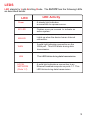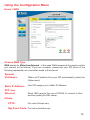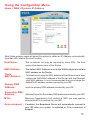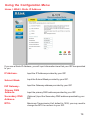
1
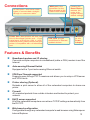
Connections
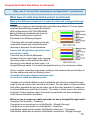
All LAN ports auto-sense cable
types to accomodate straightthrough or cross-over cable.
Printer Port. Most printers will work with
this bi-directional printer port. If you
experience difficulties with a multifunctional printer, please confirm that your
printer is compatible with a bi-directional
port.
WAN port is the
connection for the
Ethernet cable to the
Cable or DSL modem
LAN ports provide
connections to Ethernetenabled devices.
Pressing the
Reset Button
restores the
router to its
original factory
default settings.
Receptor
for the
Power
Adapter
Features & Benefits
Broadband modem and IP sharing
Connects multiple computers to a broadband (cable or DSL) modem to surf the
Internet.
Auto-sensing Ethernet Switch
Equipped with a 7-port auto-sensing Ethernet switch.
VPN Pass-Through supported
Supports pass-through PPTP sessions and allows you to setup a VPN server
and VPN clients.
Printer sharing (Optional)
Embeds a print server to allow all of the networked computers to share one
printer.
Firewall
All unwanted packets from outside intruders are blocked to protect your
network.
DHCP server supported
All of the networked computers can retrieve TCP/IP settings automatically from
the DI-707P.
Web-based configuration
Configurable through any networked computer’s web browser using Netscape or
Internet Explorer.
5