1
Contents
About Your New Label Maker .......................................................5
Product Registration..............................................................................5
Getting Started ...........................................................................5
Connecting the Power ...............................................................................5
Inserting the Tape Cassette .......................................................................6
Using the Label Maker for the First Time .......................................6
Getting to Know the Label Maker .................................................7
Power ........................................................................................................7
LCD Display ................................................................................................8
Settings .....................................................................................................8
CAPS Mode ................................................................................................8
Num Lock ..................................................................................................9
Backspace ..................................................................................................9
Navigation Keys ........................................................................................9
Cancel .......................................................................................................9
Formatting Your Label .................................................................9
Changing the Font Size .............................................................................9
Adding Font Styles ..................................................................................10
Adding a Border or Underline ..................................................................10
Using Symbols and Special Characters ......................................... 11
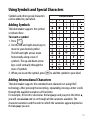
Adding Symbols ......................................................................................11
Adding International Characters .............................................................11
Printing Options ........................................................................ 12
Previewing Your Label ............................................................................12
Adjusting the Print Contrast ....................................................................12
2