1
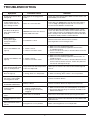
Troubleshooting
Symptom
Possible Cause
Solution
On/Off Power button does
not light up.
Unit might not be plugged into
outlet.
Check the wall outlet for power. Make sure the outlet is not
controlled by a wall switch.
It takes longer than 45
minutes for the water to
pass through the filter.
Some air is still in the filter.
Place filter in an empty bowl, then fill with water, making
sure it is fully submerged. Resoak it for 10–15 minutes,
or until no more bubbles are observed.
Unit does not dispense
water when buttons are
pushed.
Internal water tanks are not completely filled with water.
Review Filling the Internal Tanks on page 4 to be
sure it was done correctly. Make sure the lower water tank
is full. Continue to press and hold push buttons until water
flow is steady. If unit still won’t dispense water or flow does
not become steady, contact Customer Service.
Water continues
flowing from spigot
after push button is
released.
Push button is stuck.
Remove water tanks from the base. Continue
pressing button until it no longer sticks.
HOT water LED does not
light up.
1. P
ower is not on.
2. T
here is no water in tanks.
1. Make sure unit is plugged into outlet.
2. Make sure air has been purged from internal tanks,
as stated on page 4.
3. If there is water in the tanks, it will take about 10 minutes
for the water to heat.
COLD water LED does not
light up.
1. Power is not on.
2. There is no water in tanks.
1. Make sure unit is plugged into outlet.
2. Make sure air has been purged from internal tanks, as
stated on page 4.
3. If there is water in the tanks, it will take about 80 minutes
for the water to chill the first time. It takes only about 30
minutes for subsequent fill-ups.
COLD water LED light
turns off even though cold
water is not dispensed.
Large amount of room temperature
water was dispensed.
Allow up to 30 minutes for water to chill and LED light will
turn on.
Energy Saver mode LED
does not light up.
1. Power is not on.
2. Energy Saver is in Off position
1. Make sure unit is plugged into outlet.
2. Make sure Energy Saver switch is in its On position.
Heater is still working and
hot water is still available
in Energy Saver mode.
Contact Customer Service.
Filter timer does not show
Filtering or Replace.
Battery is dead.
Contact Customer Service for replacement filter timer.
Leakage on the
countertop.
1. Water tanks are not
properly seated on base.
2. Drainage plugs are not fully
engaged.
1. Make sure water tanks are seated properly on the base.
2. Ensure that drainage plugs are correctly installed on the
bottom of the base.
Water leaks from the top
cover.
Water tanks are overfilled.
Drain excess water from tanks by pressing push buttons.
ROOM temperature water
is warm.
HOT temperature water is
not hot.
Allow up to 30 minutes for cold water to chill and blue LED
light to turn on.
Energy Saver is in On position.
Make sure Energy Saver is in its Off position.
7