1
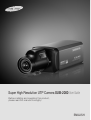
Super High Resolution UTP Camera SUB-2000 User Guide
Before installing and operating this product,
please read this manual thoroughly.
ENGLISH
Before operating the camera, confirm the camera model and correct input power
voltage. To help you understand this manual thoroughly, we'll introduce our
model description.
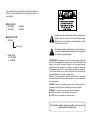
n SUB-2000 SERIES
• NTSC MODEL SUB-2000N • PAL MODEL
SUB-2000P
n MODEL DESCRIPTION
• SUB-2000X_
The lightning flash with an arrowhead symbol, within an equilateral triangle is
intended to alert the user to the presence of uninsulated “dangerous voltage”
within the product's enclosure that may be of sufficient magnitude to constitute
a risk of electric shock to persons.
SIGNAL SYSTEM
• SIGNAL SYSTEM
N → NTSC MODEL
P → PAL MODEL
The exclamation point within an equilateral triangle is intended to alert the user
to the presence of important operating and maintenance (servicing) instructions
in the literature accompanying the appliance.
INFORMATION -This equipment has been tested and found to comply with
limits for a Class A digital device, pursuant to part 15 of the FCC Rules. These
limits are designed to provide reasonable protection against harmful
interference when the equipment is operated in a commercial environment.
This equipment generates, uses, and can radiate radio frequency energy and,
if not installed and used in accordance with the instruction manual, may
cause harmful interference to radio communications.
Operation of this equipment in a residential area is likely to cause harmful
interference in which case the user will be required to correct the interference
at his own expense.
WARNING : Changes or modifications not expressly approved by the
manufacturer could void the user’s authority to operate the equipment.
WARNING : To prevent electric shock and risk of fire hazards:
◆ Do NOT use power sources other than that specified.
◆ Do NOT expose this appliance to rain or moisture.
This installation should be made by a qualified service person and
should conform to all local codes.
Features
Contents
• Features…………………………………………………………………………… 5
• Warnings & Cautions… ……………………………………………………… 6
• Precautions… …………………………………………………………………… 7
• Components and Accessories……………………………………………… 9
• Overview…………………………………………………………………………… 9
• Installation… …………………………………………………………………… 11
■ LENS…………………………………………………………………………………………
■ System Diagram…………………………………………………………………………
■ Using Coaxial Communications………………………………………………………
■ RJ-45 Connector Schematic Diagram………………………………………………
11…
14
15…
17
• Operating your Camera………………………………………………………
■ Menu Configuration………………………………………………………………………
■ Menu Setup… ……………………………………………………………………………
• LENS………………………………………………………………………………………
• EXPOSURE… ……………………………………………………………………………
• WHITE BALANCE… ……………………………………………………………………
• SSDR………………………………………………………………………………………
• BACKLIGHT………………………………………………………………………………
• SSNR3… …………………………………………………………………………………
• DAY/NIGHT… ……………………………………………………………………………
• SPECIAL… ………………………………………………………………………………
• EXIT… ……………………………………………………………………………………
18
SSDR
(Samsung Super Dynamic Range)
High Resolution
For images with high contrast between bright and
dark areas from difficult lighting conditions such as
backlighting, this camera selectively illuminates
darker areas while retaining the same light level for
brighter areas to even out the overall brightness.
By adopting a diagonal 6mm(1/3") 410,000 (NTSC)
pixel, 470,000(PAL) pixel SONY CCD, the camera
produces clear picture quality with a horizontal
resolution of 600 TV lines in color.
Excellent Sensitivity
DIS (Digital Image Stabilizer)
The built-in high sensitivity COLOR CCD produces a
clear image even in 0.05Lux(COLOR), 0.0001Lux
(COLOR, SENS-UP x512) or lower illumination.
The DIS function compensates for any camera
movement, to produce more stable pictures.
SSNR3 (Samsung Super Noise
Reduction) Function
Video/DC Drive Lens Support
You can select Video or DC Drive Lens from the menu.
The high-performance W-V DSP chip effectively
removes low-light gain noise and afterimage to
provide clear images even in dark environments.
Communication
18…
18…
19…
21…
22…
23…
24…
26…
27…
28…
33
• Troubleshooting………………………………………………………………… 34
• Specifications……………………………………………………………………… 35
RS-485 and Coaxial communication methods are
supported.
- RS-485 Communications
: S AMSUNG-T, SAMSUNG-E, PELCO-D, PELCO-P,
BOSCH, HONEYWELL, VICON, PANASONIC.
- Coaxial Communications
: Pelco Coaxitron
Electrical Day&Night
This camera has a function that automatically selects the
mode that is appropriate for daytime or night-time
conditions.
The COLOR mode operates in daytime conditions to
provide optimum colors, and B/W mode operates in nighttime conditions to enhance the definition of the image.
Miscellaneous Functions
Motion Detection
HLC(High Light Compensation), SENS-UP, FLIP (H/
V-REV), D-ZOOM, SHARPNESS and PRIVACY functions
are provided.
Since the camera detects motion without any
additional external sensor, you can monitor activity
more efficient.
OSD
The camera’s OSD is complimented by 18 languages.
- NTSC : English, Korean, Japanese, Spanish, French,
Portuguese, Taiwanese
- PAL : English, Chinese, German, Italian, French,
Spanish, Russian, Czech, Polish, Romanian,
Serbian, Swedish, Danish, Turkish, Portuguese
UTP TX
One UTP cable transmits power for the camera,
video signals and RS-485 data; installation is easy
and clean.(TIA/EIA-568B)
COLOR CCD CAMERA
4
User Guide
COLOR CCD CAMERA
5
User Guide
Samsung Techwin cares for the environment at all product manufacturing
stages to preserve the environment, and is taking a number of steps to provide
customers with more environment-friendly products.The Eco mark represents
Samsung Techwin’s will to create environment-friendly products, and indicates
that the product satisfies the EU RoHS Directive.
Precautions
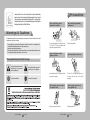
Do not install under extreme
temperature conditions.
Do not install in high humidity
environment.
Warnings & Cautions
This information is provided to ensure your safety and to prevent any losses, financial or otherwise. Please read it
carefully and use the product accordingly.
* For product inquiries, please contact the retail shop where you bought the camera. The use of equipment such as
an aerial ladder while providing after-sales service shall be at your expense.
* Separate the power plug during a thunder storm.
* This product is support equipment for surveillance system. Therefore, we can't compensate for material loss and/or
personal injuries by robbery, fire, natural disaster or other such events.
Use only under temperature conditions between
-10ºC and +50ºC. Provide good ventilation when
using in high temperature conditions.
May lower image quality.
Do not install under unstable
lighting conditions.
Avoid touching the camera lens.
Warning/Attention/Special Mark Messages
Ignoring this information may result in
material loss and / or serious personal
injuries including death.
Ignoring this information may result in
material loss and / or a slight injuries.
Severe lighting changes or flickering may hinder
normal camera operation.
Indicates “Never Allowed.”
Indicates “No Disassembling.”
The lens is the most important component of
the camera. Be careful not to smear it with
fingerprints.
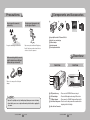
Do not drop the camera or subject
it to physical shock.
May cause a product malfunction.
COLOR CCD CAMERA
6
User Guide
COLOR CCD CAMERA
Never keep the camera face to
strong light directly.
May damage the CCD.
7
User Guide
Precautions
Components and Accessories
Do not expose the camera to
radioactivity.
Do not expose the camera to rain
or other types of liquids.
If exposed to radioactivity, the CCD will fail.
May cause a product malfunction.Wipe dry any
liquids. Liquids may contain minerals that are
corrosive to electronic components.
1
2
3
4
5
1 Super High Resolution UTP Camera SUB-2000
2 Auto iris lens connection plug
3 C-Mount adapter 4 Instruction manual
5 Power input terminal block
Overview
When connecting cables, be sure to
read the instructions carefully and
follow each step as instructed.
Front View
Side View
5
4
3
2
Failure to do so may result in critical system
damage.
1
Notes
• Exposure to a spotlight or an object emitting strong light may cause smear or blooming.
• Ensure that the power source complies with normal specifications before supplying it to
the camera.
COLOR CCD CAMERA
8
User Guide
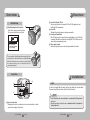
1 CCD protection cap : Please cover the CCD SENSOR when not using it.
2 C-Mount adapter : Please install this adapter when using a C-Mount Lens.
3 CS-Mount adapter : Please remove the C-MOUNT adapter and then attach it.
4 Back Focus clamp screw : Please loosen the clamp screw with a screwdriver before
adjusting the Back Focal length.
5 Auto Iris Lens Connector
COLOR CCD CAMERA
9
User Guide
Overview
Overview
8 P
ower Video Output UTP Port
Bottom View
This port accepts power for the camera (AC 24V or AC 28V), outputs video, and
facilitates RS-485 communication.
9 Power
LED
This lamp is lit when the camera is receiving power normally.
❿ Power
Input Terminal Block
If the UTP cable cannot be connected for power supply (distance over 300m(1000ft),
for example), this cable is used instead for connecting DC 12V / AC 24V power to the
camera using a separate adapter near by .
⓫ V
ideo output terminal
Sends video signal and connects to the video input terminal of the monitor.
6
6 Tripod Mounting Bracket Screw Hole
Used to fix the camera on a bracket or tripod.
The screw sizes for this hole are as follows:
1/4"-20 UNC (20 THREAD)
L:4.5mm±0.2mm (ISO standard),
or 0.197" (ASA standard)
You can separate the Tripod Mounting Bracket and install it on the
top or bottom of the camera. Make sure to use the Tripod Mounting
Bracket when fixing the camera to a bracket or tripod. Otherwise
the camera may not be secure, or the internal circuitry of the
camera may be damaged.
Rear View
Installation
⓫
7
9
LENS
The lens is not supplied with this camera. Purchase a lens suitable for your environment.
This camera accepts the auto iris lens and both C-and CS-mount lens.
8
❿
7 F unction Setup switch
Display the menu on the screen and move the cursor in four directions to confirm
status or after changing a selected item.
COLOR CCD CAMERA
10 User Guide
Notes
• To use the functions of this camera effectively it is recommended that a DC type Auto Iris
lens is used.
• Keep the lens surface clean, if it becomes contaminated with dirt or fingerprints the
picture quality suffers.
COLOR CCD CAMERA
11 User Guide
Installation
When Using Auto Iris Lens
When using a C-Mount lens
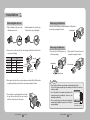
1. S trip the insulation of the auto iris lens
cable 8mm from the end.
2. S trip the insulation of the core of the auto
iris lens cable to expose a 2mm length.
Please take off the CCD protection cap and attach the C-Mount lens to
the camera by screwing it in clockwise.
C-mount adapter
2mm
8mm
When using a CS-Mount lens
3. R
emove the cover of the auto iris lens connector plug and solder the lens cable to the
connector pin of the plug.
Pin No.
No.1 Pin
No.2 Pin
No.3 Pin
No.4 Pin
DC
Damping Damping +
Drive +
Drive -
LENS
VIDEO
Red (power)
NC
White (video signal)
Black (GND)
1. Please take off the CCD protection cap
and C-mount adapter.
2. Please attach the CS-mount lens to the
camera by screwing it in clockwise.
Lens cable
Connector
No.3 Pin
No.1 Pin
C-mount adapter
No.4 Pin
No.2 Pin
4. P lease replace the auto iris lens connection plug cover and take off the CCD protection
cap, and then attach the auto iris lens to the camera by screwing it in clockwise.
CS-mount adapter
CCD protection cap
Notes
• Please use the specified lens connection parts as shown in the picture below.
The use of the wrong sized parts may cause damage to the inside of the camera or
result in poor fitting.
5. P lease insert the connection plug that is connected to
the auto iris lens cable into the auto lens connector,
which is located on the side of the camera.
COLOR CCD CAMERA
12 User Guide
• Use of a lens which is too heavy affects the balance of the
camera and may cause a malfunction. Please use a lens
that weighs less than 450g.
• Please select Av mode if possible when adjusting the
automatic light control(ALC) of an auto lens. Use of PK mode
may cause hunting.
COLOR CCD CAMERA
13 User Guide
C-mount lens : 10 mm or less
CS-mount lens : 5 mm or less
Installation
System Diagram
Notes
UTP Power Supply Link Setup
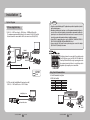
1. S UB-2000 → 4CH Power Supply → 4Ch Receiver → DVR/Monitor/Controller
The maximum power transmission distance for the camera is 300m(1000ft), and the
distance between the camera and the 4ch Receiver cannot exceed 900m(3000ft).
• Using the product with third-party UTP peripherals may result in degradation of product
function and performance.
• Attenuation and distortion in signal may occur if the maximum transmission distance is
exceeded. Please note that depending on the installation environment/condition, the
signal may become attenuated and distorted and cause the camera to function
incorrectly even when the transmission distance is within the maximum.
• If using RS-485 communication, please use the SAMSUNG-T, SAMSUNG-E, PELCO-D,
PELCO-P, BOSCH, HONEYWELL, VICON and PANASONIC Protocol.
• If you are using the 1Ch Passive Receiver system setup, please connect the adapter (AC 24V or DC 12V) directly to the camera.
RS-485
VIDEO
CH1
SPU-400T
CH2
CH3
If the distance between the camera and the Power Supply exceeds
300m(1000ft), please connect an AC 24V or DC 12V adapter to the
Power Input Terminal Block(Accessory). Impressing power when
the maximum transmission distance is exceeded may result in
degradation of picture quality or even camera failure.
CH4
SPU-400R
SCC-3100A
SUB-2000
300m(1000ft) or Less
900m(3000ft) or Less
UTP CABLE
BNC CABLE
RS-485
2. UTP Receiver Link Setup(Additional Power input is needed)
SUB-2000 → 1Ch Passive Receiver → DVR → Monitor
225m(750ft) or Less
Using Coaxial Communications
• Coaxial Communications System
• OSD Control method
CAMERA
SET
UP
DOWN
LEFT
RIGHT
DVR
MENU/ENTER
UP KEY
DOWN KEY
LEFT KEY
RIGHT KEY
CONTROLLER
OSD KEY
JOYSTICK UP
JOYSTICK DOWN
JOYSTICK LEFT
JOYSTICK RIGHT
DVR
DVD
1Ch Passive Receiver
• : BNC
• ----: RS-485
COLOR CCD CAMERA
14 User Guide
COLOR CCD CAMERA
15 User Guide
Installation
• Video Cable
The camera's video output port is connected to the monitor with a BNC coaxial
cable, shown below : If the distance between the camera and the monitor exceeds
the recommended maximum, please use an auxiliary video amp.
Distance
300m
450m
600m
RJ-45 Connector Schematic Diagram
Copper Connector
Recommended Cable Specification
3C2V(RG-59/U)
5C2V(RG-6/U)
7C2V(RG-11/U)
UTP Coating
Notes
• It is recommended that pure copper coax cable is used and not copper coated
steel, as this will cause issues with the communication over the coaxial cable.
UTP CABLE
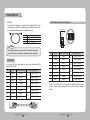
The camera uses UTP cable for transmitting video signals, power and transferring RS-485
control data.(TIA/EIA-568B)
No.
Line Color
Camera to Power Supply
1
White+Orange
VIDEO (+)
2
Orange
VIDEO (-)
3
White+Green
RS485 (+)
4
Blue
POWER (-)
5
White+Blue
POWER (+)
6
Green
RS485 (-)
7
White+Brown
POWER (+)
8
Brown
POWER (-)
Power Supply to Receiver
CH1
CH2
CH3
CH4
VIDEO (+) / RS-485 (+)
VIDEO (-) / RS-485 (-)
VIDEO (+) / RS-485 (+)
VIDEO (-) / RS-485 (-)
VIDEO (+) / RS-485 (+)
VIDEO (-) / RS-485 (-)
Camera to Power Supply
White+Orange
VIDEO (+)
2
Orange
VIDEO (-)
3
White+Green
RS485 (+)
4
Blue
POWER (-)
5
White+Blue
POWER (+)
6
Green
RS485 (-)
7
White+Brown
POWER (+)
8
Brown
POWER (-)
Power Supply to Receiver
CH1
CH2
CH3
CH4
8
1
VIDEO (+) / RS-485 (+)
VIDEO (-) / RS-485 (-)
VIDEO (+) / RS-485 (+)
VIDEO (-) / RS-485 (-)
VIDEO (+) / RS-485 (+)
VIDEO (-) / RS-485 (-)
VIDEO (+) / RS-485 (+)
VIDEO (-) / RS-485 (-)
The SUB-2000 uses UTP cable to receive its power (AC 24V or AC28V) from the Power Supply.
Therefore, a separate adapter is not required. Please refer to the RJ-45 Connector Schematic
Diagram.
VIDEO (-) / RS-485 (-)
8
16 User Guide
Line Color
1
VIDEO (+) / RS-485 (+)
1
COLOR CCD CAMERA
No.
COLOR CCD CAMERA
17 User Guide
Operating Your Camera
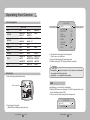
Menu Configuration
Select the function using
the Function Setup switch.
MAIN SETUP
LENS
●DC
●BRIGHTNESS
●SENS-UP
●ATW
●MANUAL
●OFF
●OFF
●ON
●COLOR
●IMAGE ADJ
●SYNC
●COMM ADJ ●SAVE
EXPOSURE
WHITE BAL
SSDR
BACKLIGHT
SSNR3
DAY/NIGHT
SPECIAL
EXIT
●VIDEO
●SHUTTER ●RETURN
●OUTDOOR
●AWC→SET
●ON
●BLC
●OFF
●B/W
●MONITOR
●MOTION DET
●LANGUAGE
●NOT SAVE
●MANUAL
●AGC ●INDOOR
●HLC
●AUTO
●CAM TITLE
●PRIVACY ●RETURN
●RESET
MAIN SETUP
1.LENS DC
2.EXPOSURE 3.WHITE BAL ATW
4.SSDR OFF
5.BACKLIGHT OFF
6.SSNR3 ON
7.DAY/NIGHT COLOR
8.SPECIAL 9.EXIT SAVE
Change the status using
the Function Setup switch.
2. Select a desired function using the Function Setup switch.
• Place the cursor over a desired item.
3. Set up a selected item by using the Function Setup switch.
4. To finish the setting, select ‘EXIT’ and press the Function Setup switch.
Notes
Menu Setup
Use the Function Setup switch within the camera.
• An item with the
icon also has sub menus. To select a sub menu, select an item with
the icon and press the Function Setup switch.
• An item with the --- icon is unavailable due to function settings.
LENS
Function Setup switch
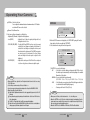
Using this function, you can control the screen brightness.
1. When the SETUP menu screen is displayed, select‘LENS’by using the Function Setup
switch so that the arrow indicates
‘LENS’
.
2. Select
the connected lens type by using the Function Setup switch.
1. Press the Function Setup switch.
• Main SETUP menu is displayed on the monitor screen.
COLOR CCD CAMERA
18 User Guide
MAIN SETUP
1.LENS
2.EXPOSURE
COLOR CCD CAMERA
DC
19 User Guide
Operating Your Camera
DC/Video :Select Auto Iris Lens.
You can adjust the minimum shutter and maximum value of ESC shutter
mode when DC Lens mode is selected.
Manual : Select Manual Lens
3. Each Lens mode has sub menu site as listed below.
- Brightness (DC, Manual) : Adjusts the video brightness.
- Level (VIDEO) : Adjusts the level of video iris signals; the higher the level,
the brighter the video looks.
- FOCUS ADJ (DC, VIDEO) : To adjust the DC and VIDEO lens focus correctly, you must
activate the Focus Settings mode under each lens menu. To
activate the Focus Settings mode, adjust the lens focus, and
then deactivate the settings mode. (The VIDEO lens requires
an extra step: go to the sub menu of the Focus Settings
mode and change the shutter speed to adjust the lens
brightness.)
- IRIS SPEED (DC) : Adjusts the Iris control speed of the DC lens. If the control speed
is too slow or fast, please use this menu to adjust the speed.
Notes
• When using VIDEO lens, adjust the lens VR explained below first and set the focus using
'FOCUS ADJ' menu.
• If color rolling occurs when using a DC lens, set Shutter to ---.
• Some lenses may not work properly, depending on the setting of the BRIGHTNESS LEVEL.
• When Using a Video-Type Auto Iris Lens
❶ Adjust the ALC adjustment terminal on the lens appropriately. In general, set it to AV
(Average).
2 It may not work properly depending on the installed lens. Set the Level VR of the lens
to the optimal value.
3 Set AGC to OFF and adjust the Lens VR to an appropriate brightness.
4 Adjust the Lens VR, adjust the BRIGHTNESS, and then check if the screen brightness
changes properly. Otherwise, adjust the Lens VR again.
COLOR CCD CAMERA
20 User Guide
EXPOSURE
MAIN SETUP
1.LENS
2.EXPOSURE DC
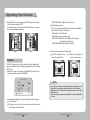
1. When the SETUP menu screen is displayed, select 'EXPOSURE’ by using the Function
Setup switch so that the arrow indicates 'EXPOSURE’.
2. Select a desired mode using the Function Setup switch.
EXPOSURE SETUP
1.BRIGHTNESS
25
2.SHUTTER
ESC
3.AGC
HIGH
4.SENS-UP
OFF
5.RETURN
SHUTTER
: You can select the shutter.
- ESC : Select this to control the shutter speed automatically. If ESC is selected,
the shutter speed is automatically controlled depending on the ambient
illumination of the subject.
- MANUAL: You can control shutter speed manually.
(NTSC MODEL : 1/60sec~1/120,000sec, PAL MODEL : 1/50sec~1/120,000sec)
- A.FLK : Select this when you experience picture flicker, this happen when there
is a clash with the installed lighting frequency.
- --- : Shutter speed is fixed at 1/60sec(1/50sec).
Notes
• When you use a DC lens, set the shutter mode to --- if color rolling occurs.
• When the SHUTTER is set to ESC after selecting the Internal Synchronization Type, the
picture may become unstable if the camera faces a bright fluorescent light. Therefore,
take care when choosing the installation position.
• When the SHUTTER is set to MANUAL or A.FLK mode, SENS-UP will be disabled.
COLOR CCD CAMERA
21 User Guide
Operating Your Camera
AGC(AUTO GAIN CONTROL) : T he higher the gain level, the brighter the screen - but
the greater the noise.
- HIGH : Allows automatic gain control from 5.3dB to 37dB.
- OFF : Deactivates the AGC function.
- LOW : Allows automatic gain control from 5.3dB to 32dB.
SENS-UP : When it is night or dark, the camera automatically detects the light level
and maintains a clear picture if this mode is activated.
- OFF : Deactivates the SENS-UP function.
- AUTO: Activates the SENS-UP function.
Notes
• If you set the Function Setup switch to ‘AUTO’ mode, You can adjust the brightness by
increasing or decreasing the shutter speed. (x2 ~ x512)
• Note that the higher the zoom level, the brighter the screen, but the more likely it is that an
after-image will appear.
• Although Noise, Spots, and Whitish symptoms may occur in SENS-UP operation when the
zoom level is increased, this is normal.
RETURN : Select this to save the changes in the EXPOSURE menu and return to the
SETUP menu.
White Bal (White Balance)
Use the White Balance function to adjust the screen color.
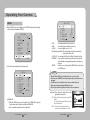
1. When the SETUP menu screen is displayed, select ‘White Bal’ by using the Function
Setup switch so that the arrow indicates ‘White Bal’ .
2. Select a desired mode using the Function Setup switch.
MAIN SETUP
1.LENS
2.EXPOSURE 3.WHITE BAL
COLOR CCD CAMERA
22 User Guide
DC
ATW
※ Select one of the following 5 modes, as appropriate for your purpose.
ATW : Select this when the color temperature is between 1,700˚K and
11,000˚K.
OUTDOOR : Select this when the color temperature is between 1,700˚K and
11,000˚K. (sodium light inclusion)
INDOOR : S elect this when the color temperature is between 4,500˚K and 8,500˚K.
MANUAL : Select this to fine-tune White Balance manually. Set White Balance first by
using the ATW or AWC mode. After that switch to MANUAL mode, finetune the White Balance and the Function Setup switch.
AWC →SET : T o find the optimal luminance level for the current environment, point the
camera towards a sheet of white paper and press the Function Setup switch. If
the environment changes, readjust it.
Notes
• White Balance may not work properly under the following conditions. In this case select
the AWC mode.
❶ When the color temperature of the environment surrounding the subject is out of the
control range (e.g. clear sky or sunset).
2 When the ambient illumination of the subject is dim.
3 If the camera is directed towards a fluorescent light or is installed in a place where
illumination changes dramatically, the White Balance operation may become unstable.
SSDR (Samsung Super Dynamic Range)
SSDR illuminates darker areas of an image while retaining the same light level for brighter
areas to even out the overall brightness of images with high contrast between bright and
dark areas.
MAIN SETUP
1.LENS
2.EXPOSURE 3.WHITE BAL
4.SSDR COLOR CCD CAMERA
DC
ATW
OFF
23 User Guide
Operating Your Camera
1. When the SETUP menu screen is displayed, select ‘SSDR’ by using the Function Setup
switch so that the arrow indicates ‘SSDR’.
2. U
se the Function Setup switch to change the SSDR level in the sub menu according to
the contrast between bright and dark areas.
SSDR ON
SSDR OFF
- TOP/BOTTOM/LEFT/RIGHT : Adjust the area to be enhanced.
HLC (High Light Compensation) : If the scene contains extremely bright light areas such as; from car headlight, the
light can mask out much of the on-screen detail.
- LEVEL : Adjust level of the HLC function.
- LIMIT : Enable to change the operating condition.
- MASK COLOR/TONE : Change the color / brightness of the masking area.
(Black, Red, Blue, Cyan, Magenta)
- TOP/BOTTOM/LEFT/RIGHT : Adjust the area to be enhanced.
3. Select a desired mode using the Function Setup switch.
Select ‘BLC’ to adjust the area to be
HLC : E nable the user to change the level,
enhanced then adjust the level.
limit, mask color/tone and area.
BACKLIGHT
The SUB-2000 is designed so that it delivers a distinctive subject and background at the
same time, even when the subject is in backlight, by adopting a function of the proprietary
W-V DSP chip.
1. When the SETUP menu screen is displayed, select ‘BACKLIGHT’ by using the Function
Setup switch so that the arrow indicates ‘BACKLIGHT’.
MAIN SETUP
1.LENS
2.EXPOSURE 3.WHITE BAL
4.SSDR 5.BACKLIGHT
DC
ATW
OFF
OFF
Notes
• Because there can be a difference in the effectiveness of HLC according to the amount of
light area in the screen, optimize the installation angle for the best HLC performance.
• When dark, the HLC is only activated when a bright light exceeding a specific size. (In
NIGHT ONLY mode).
• The HLC is not activated in day light or when bright light is not present at night. (In NIGHT
ONLY mode).
2. S elect a desired mode using the Function Setup switch depending on the camera purpose.
OFF : Not being used
BLC : Enables
a user to select a desired area on a picture and view that area more clearly.
- LEVEL : Adjust level of the BLC function.
COLOR CCD CAMERA
24 User Guide
COLOR CCD CAMERA
25 User Guide
Operating Your Camera
SSNR3
DAY/NIGHT
This function reduces the background noise in a low luminance environment.
1. When the SETUP menu screen is displayed, select ‘SSNR3’ by using the Function Setup switch
so that the arrow indicates ‘SSNR3’.
MAIN SETUP
1.LENS
2.EXPOSURE 3.WHITE BAL
4.SSDR 5.BACKLIGHT
6.SSNR3
You can display pictures in color or in black and white.
1. When the SETUP menu screen is displayed, select ‘DAY/NIGHT’ by using the Function
Setup switch so that the arrow indicates ‘DAY/NIGHT’.
DC
ATW
OFF
OFF
ON
2. Select a desired mode using the Function Setup switch.
ON : Activates SSNR3 so that noise is reduced.
OFF: Deactivates SSNR3. Noise is not reduced.
3. S et the SSNR3 mode to ‘ON’ and press the Function Setup switch. Then you can adjust the
noise reduction level.
Notes
• You cannot set the SSNR3 to ‘ON’ or ‘OFF’ when the AGC mode of the 'EXPOSURE' menu
is ‘OFF’.
• When adjusting the noise reduction level in the SSNR3 mode, remember that the higher
the level set, the more the noise level will be reduced, as will the brightness of the image.
MAIN SETUP
1.LENS DC
2.EXPOSURE 3.WHITE BAL ATW
4.SSDR OFF
5.BACKLIGHT OFF
6.SSNR3 ON
7.DAY/NIGHT COLOR
2. S elect a desired mode using the Function Setup switch according to the picture display you want.
COLOR : The picture is always displayed in color.
B/W : The picture is always displayed in black and white.
You can turn on or off the burst signal on B/W mode.
AUTO : The mode is switched to ’Color‘ in a normal
environment, but switches to ’B/W‘ mode
when ambient illumination is low. To set up
the switching time for AUTO mode, press the
Function Setup switch.
You can turn on or off the burst signal on
B/W mode.
- DWELL TIME : You can select day/night switching delay
time from. …
→5s, 7s, 10s, 15s, 20s, 30s, 40, 60s
Notes
• When using a Video Auto Iris Lens, if you set the lens level to low, automatic switching
between Color and Black & White may not occur.
• When AGC in the EXPOSURE menu is 'OFF', '---' mode operates as selecting 'AUTO' mode
cannot be selected.
COLOR CCD CAMERA
26 User Guide
COLOR CCD CAMERA
27 User Guide
Operating Your Camera
SPECIAL
1. When the SETUP menu screen is displayed, select ‘SPECIAL’ by using the Function Setup
switch so that the arrow indicates ‘SPECIAL’.
MAIN SETUP
1.LENS DC
2.EXPOSURE 3.WHITE BAL ATW
4.SSDR OFF
5.BACKLIGHT OFF
6.SSNR3 ON
7.DAY/NIGHT COLOR
8.SPECIAL 9.EXIT SAVE
2. Select a desired mode using the Function Setup switch.
1.
2.
3.
4.
5.
6.
7.
8.
9.
SPECIAL
IMAGE ADJ
MONITOR
LCD
CAM TITLE
OFF
SYNC
INT
MOTION DET
OFF
PRIVACY
OFF
COMM ADJ
LANGUAGE
ENGLISH
RETURN
IMAGE ADJ :
1) W
hen the SPECIAL menu screen is displayed, select ‘IMAGE ADJ’ by using the
Function Setup switch so that the arrow indicates ’IMAGE ADJ‘.
2) Select a desired mode using the Function Setup switch.
COLOR CCD CAMERA
28 User Guide
1.
2.
3.
4.
5.
6.
7.
IMAGE SETUP
V-REV
OFF
H-REV
OFF
D-ZOOM
OFF
DIS
OFF
FONT COLOR
WHITE
SHARPNESS
ON
RETURN
• V-REV
: You can flip the picture vertically on the screen.
• H-REV
: You can flip the picture horizontally on the screen.
• D-ZOOM
: You can use a digital zoom of x1 ~ x16.
• DIS (Digital Image Stabilizer) : This function mitigates any picture movement due to
external factors such as wind.
• FONT COLOR : You can change the OSD font color. (White, Yellow, Green, Red, Blue)
• SHARPNESS : As you increase this value, the picture outline becomes stronger and
clearer. Adjust this value appropriately depending on the sharpness of
the picture.
• RETURN
: Select this to save the settings for the IMAGE ADJ menu and to return
to the SPECIAL menu.
Notes
• When the V-REV or H-REV mode is enabled, the text on the screen does not flip.
• If you increase the SHARPNESS level too high, the picture may become distorted or noise
may appear.
• As the DIS function uses the digital zoom, the camera's resolution will decrease.
• DIS doesn’t operate when background illumination is too low.
• DIS doesn’t operate when object pattern is monotonic as like sky or white wall.
Monitor : Please change the settings value of video
appropriate to your monitor.
- LCD: Please select this menu item when using an LCD
monitor.
You can change the gamma, PED level and color
gain in the sub menus.
- USER : P lease use this menu item when using a
monitor other than standard ones. You can
COLOR CCD CAMERA
29 User Guide
Operating Your Camera
change the gamma, PED level and color gain in the sub menus.
- CRT: Please select this menu item when using a CRT monitor. You can change the PED
level, color gain in the sub menus.
C
AM TITLE : If you enter a title, the title will appear on the monitor.
1) If the SPECIAL menu screen is displayed, use the Function Setup switch so that the
arrow indicates ‘CAM TITLE’.
CAMERA TITLE SETUP
2) S et it to ‘ON’ by using the Function Setup
ABCDEFGHIJKLM
switch.
NOPQRSTUVWXYZ
abcdefghijklm
3) Press the Function Setup switch.
nopqrstuvwxyz
4) Use the Function Setup switch to move
-.0123456789
to a desired letter and select the letter by
←→CLR POS END
pressing the Function Setup switch.
Repeat this to enter multiple letters. You
can enter up to 15 letters.
5) Enter a title, move the cursor to ‘POS’
FRONT DOOR
and press the Function Setup switch. The
entered title appears on the screen. Select the
position to display the title on the screen by
using the Function Setup switch and press the
Function Setup switch. When the position is
determined, select ‘END’ and press the Function
Setup switch to return to the SPECIAL menu.
Notes
• When the CAM TITLE menu is ‘OFF’, no title will be displayed on the monitor screen even
if you enter one.
• Only English is available in this mode.
• If you move the cursor to CLR and press the Function Setup switch, all the letters are
deleted. To edit a letter, change the cursor to the bottom left arrow and press the
Function Setup switch. Move the cursor over the letter to be edited, move the cursor to
the letter to be inserted and then press the Function Setup switch.
COLOR CCD CAMERA
30 User Guide
SYNC : In areas where the supply is at 60Hz(NTSC),
50Hz(PAL) frequency, you can synchronize the
output phase of multiple cameras using the
power synchronization function (Line-Lock)
without using a synchronization signal generator.
- INT : Internal Synchronization Type
- L/L : Power Synchronization Type, Line-lock
• Press the Function Setup switch.
• Y ou can select a desired phase from 0 to 359 when select 'phase'.
Notes
• When using AC power at 60Hz(NTSC), 50Hz(PAL) frequency, you can use the L/L type
synchronization.
• When the power is DC 12V, the SYNC menu is fixed to the ‘INT’ mode.
• When using RJ-45 Connector, you can't use the L/L type synchronization.
MOTION DET : This product has a feature that allows you to observe
movement of objects in 8 different areas on the screen,
and the words 'MOTION DETECTED' appear on the
screen when movement is detected.
You can monitor activity more efficient.
1) When the SPECIAL menu screen is displayed, press the Function Setup switch so
that the arrow indicates
‘MOTION DET’
.
2) S et up the mode using the Function Setup switch.
- SENSITIVITY : You can select up to 8 MD areas. When SENSITIVITY number is high,
motion detection sensitivity is increased to recognize even small
movement.
- AREA MODE: Determines whether to use the MD area selected in SENSITIVITY.
- SEL POS
: Determines which of the 4 vertices of each MD area is to be used.
- XPOS
: Determines the coordinate of the horizontal axis for SEL POS.
- YPOS
: Determines the coordinate of the vertical axis for SEL POS.
COLOR CCD CAMERA
31 User Guide
Operating Your Camera
- FILL→SET : Fills in a selected MD area. The color of filling is sequentially selected as
brown, orange, blue, cyan, green, yellow, magenta and red.
- RETURN : Select this to save the MOTION DET menu settings and return to the
SPECIAL menu.
- CAM ID : D
etermines the camera's identification number
(between 0 and 255).
- BAUD RATE : You can select 2400/4800/9600/19200/38
400/57600 bps.
- UART MODE : You can select NONE, EVEN or ODD for
the parity bits.
- RET PKT : Determines whether to send a command back
to the controller device when a communication
control command is sent to the camera.
- DISP ID : Display camera title on top left corner of the screen.
- PROTOCOL : Select the communication PROTOCOL.
(SAMSUNG-T, SAMSUNG-E, PELCO-D, PELCO-P, BOSCH, HONEYWELL, VICON and
PANASONIC)
- RETURN : Select this to save the PRIVACY menu settings and return to the SPECIAL menu.
PRIVACY :Mask an area you want to hide on the screen.
PRIVACY AREA SETUP
1.AREA
AREA1
2.MODE
OFF
3.MASK COLOR
GREEN
4.MASK TONE
1
5.TOP
39
6.BOTTOM
79
7.LEFT
13
8.RIGHT
52
9.RETURN
* Initial value of communication adjustment
Item
Initial value
Camera ID
1
BAUD RATE UART MODE
9600
8-NONE-1
PET PKT
ENABLE
Notes
1) When the SPECIAL menu screen is displayed, press the Function Setup switch so that
the arrow indicates ‘PRIVACY’.
2) Set up the mode using the Function Setup switch.
- AREA
: You can select up to 12 PRIVACY areas.
- MODE
: Determines whether to use the area selected in the AREA.
- MASK COLOR :D
etermine area color. You can select Green, Red, Blue, Black, White, Gray.
- MASK TONE : Adjust the brightness of MASK COLOR.
- TOP/BOTTOM/LEFT/RIGHT : Adjust the size and position of the selected area.
- RETURN : Select this to save the PRIVACY menu settings and return to the SPECIAL
menu.
COMM ADJ (Communication Adjustment) :
This function sets up the camera communication status when controlling the camera
through an external control device.
1) When the SPECIAL menu screen is displayed, press the Function Setup switch so that
the arrow indicates ‘COMM ADJ’.
2) Set up the mode using the Function Setup switch.
COLOR CCD CAMERA
32 User Guide
• As below, the names of protocol have been changed.
- STW(SPD) → SAMSUNG-T
- SEC → SAMSUNG-E
LANGUAGE: You can select the menu language according to your requirements.
RETURN : Select this to save the SPECIAL menu settings and return to the MAIN
SETUP menu.
EXIT
Select a desired EXIT mode using the Function Setup switch depending on the camera
purpose.
- SAVE
: Save the current settings and exit the MAIN SETUP menu.
- NOT SAVE : Do not save the current settings and exit the MAIN SETUP menu.
- RESET : Resets the camera settings to the factory defaults. Communication,
Language and Monitor settings are not initialized.
COLOR CCD CAMERA
33 User Guide
Specifications
Troubleshooting
If you have trouble operating your camera, refer to the following table.
If the guidelines do not enable you to solve the problem, contact an authorized technician.
● Nothing appears on the screen.
▶ Check that the power cord and line connection between the camera and monitor are properly
connected.
▶ Check that you have properly connected UTP cable or BNC cable to the camera. ▶ Check the type of lens.
▶ Check the pin arrangement for the UTP cable.(TIA/EIA-568B)
● The image on the screen is dim.
▶ Is lens stained with dirt? Clean your lens with soft, clean cloth.
▶ Set the monitor to the proper condition.
▶ If the camera is exposed to very strong light, change the camera position.
● The image on the screen is dark.
▶ Adjust the contrast feature of the monitor.
▶ If you have an intermediate device, set the 75Ω / Hi-z properly.
● The camera is not working properly, and the surface of the camera is hot.
▶ Check that you have properly connected the camera to an appropriate power source.
● The SENS-UP function does not work.
▶ Check that AGC of EXPOSURE SETUP menu is ‘OFF’.
▶ Check that SHUTTER of EXPOSURE SETUP menu is ‘A.FLK’ or ‘MANUAL’.
● The Motion Detection function does not work.
▶ Check that MOTION DET of SPECIAL SETUP menu is ‘OFF’.
● Color is not correct.
▶ Check the setting of WHITE BAL SETUP menu .
● The screen flickers continually.
▶ Ensure the camera is not pointing towards the sun.
● When coaxial communication is not available:
▶ Make sure that the camera and monitor are installed within the recommended distance.
▶ U se the video amplifier equivalent to coaxitron if the recommended installation distance is exceeded.
● Picture is distorted.
▶ Check the length of the UTP cable (900m(3000ft) or less).
● The camera does not work, and the video feed from the camera is not being received.
▶ Check the Power Supply to see whether the connection status and pin arrangement for the
camera's UTP cable and the Camera Input UTP cable are normal.
COLOR CCD CAMERA
34 User Guide
SUB-2000N
ELECTRICAL
Input Voltage
Power Consumption
VIDEO
Imaging Device
Total / Effective Pixels
Scanning System
Synchronization
Frequency
Horizontal Resolution
Min. Illumination
S/N (Y Signal)
Video Output
UTP Output
OPERATIONAL
Electronic Shutter Speed
Shutter Mode
On Screen Display
SSDR
Backlight Compensation
Day & Night
Gain Control
White Balance
SENS-UP
Motion Detection
Privacy Masking
SSNRIII
Digital Zoom
DIS
Camera Title
Sharpness
Flip / Mirror
Coaxial Communication
RS-485 Communication
ENVIRONMENTAL
Operating Temperature / Humidity
MECHANICAL
Lens Mount
Back Focus Adjustment
Dimension / Weight
SUB-2000P
AC 24V ±10% / AC 28V ±10% / DC12V±10%
Max 3.5W
1/3 inch, Diagonal 6mm Super HAD CCD
811(H) x 508(V) / 768(H) x 494(V)
795(H) x 596(V) / 752(H) x 582(V)
2:1 Interlace
Internal / Line-Lock
H : 15.734KHz / V : 59.94Hz
H: 15.625KHz / V: 50.00Hz
600TVL
0.05 Lux (50IRE, @F1.2), 0.0001Lux (SENS-UP, x512)
52dB (Weight On, AGC OFF)
CVBS : 1.0Vp-p, 75Ω composite
Built-in UTP TX (Maximum transmission length 900m(3000ft)) : Balanced differential signal 100Ω
1/60sec~1/120ksec
1/50sec ~ 1/120ksec
ESC, MANUAL, A.FLK, FIXED
NTSC : English, Korean, Japanese, Spanish, French, Portuguese, Taiwanese
PAL : English, Chinese, German, Italian, French, Spanish, Russian, Czech, Polish,
Romanian, Serbian, Swedish, Danish, Turkish, Portuguese
ON / OFF (Level adjustable)
BLC / HLC / OFF
COLOR / B/W / AUTO
LOW / HIGH / OFF
ATW / OUTDOOR / INDOOR / MANUAL / AWC (1,700°K ~ 11,000°K)
Auto / OFF (Selectable x2 ~ x512)
ON / OFF (8 Programmable zones)
ON / OFF (12 Programmable zones)
ON / OFF (Level adjustable)
ON / OFF (x1 ~ x16)
ON / OFF
ON / OFF (Display 15 Characters)
ON / OFF (Level adjustable)
ON / OFF
Pelco Coaxitron
SAMSUNG-T, SAMSUNG-E, PELCO-D, PELCO-P, BOSCH, HONEYWELL, VICON, PANASONIC
-10°C ~ +50°C / 30% ~ 80% RH
C / CS Mount
Manual
58(W) x 52(H) x 121(D) / 290g
※ The specification for this product may change without prior notice for product improvement.
※ This specification is based on a transmission distance of 500 meters; in cases of long-distance
transmissions, some degradation in picture quality may occur depending on the operating environment.
COLOR CCD CAMERA
35 User Guide
DECLARATION OF CONFORMITY
Application of Council Directive(s)
2004 / 108 / EC
Manufacturer's Name SAMSUNG TECHWIN CO., LTD
Manufacturer's Address
SAMSUNG TECHWIN CO., LTD
42, SUNGJU-DONG CHANGWON-CITY,
KYUNGNAM, KOREA, 641-716
MEMO
European Representative Name
European Representative Address
Equipment Type/Environment CCTV Camera
Model Name SUB-2000P
Beginning Serial NO. C5436V3Z200001X
Year of Manufacture 2010.02.01
Conformance to EN 55022 : 2006
EN 50130-4 : 2003
We, the undersigned, hereby declare that the equipment specified above conforms
to the above Directive(s).
Manufacturer SAMSUNG TECHWIN CO., LTD Legal Representative in Europe
Signature Signature
Full Name BONJENG GU
Full Name Position QUALITY CONTROL MANAGER Position Place CHANGWON, KOREA
Place
Date 2010.02.01
Date
COLOR CCD CAMERA
36 User Guide
COLOR CCD CAMERA
37 User Guide
MEMO
COLOR CCD CAMERA
38 User Guide
MEMO
COLOR CCD CAMERA
39 User Guide
SALES NETWORK
•
AMSUNG TECHWIN CO., LTD.
S
Samsungtechwin R&D Center, 701, Sampyeong-dong, Bundang-gu, Seongnam-si, Gyeonggi-do, Korea, 463-400
TEL : +82-70-7147-8740~60 FAX : +82-31-8018-3745
•
AMSUNG TECHWIN AMERICA Inc.
S
1480 Charles Willard St, Carson, CA 90746, UNITED STATES
Tol Free : +1-877-213-1222 FAX : +1-310-632-2195
www.samsungcctvusa.com
•
AMSUNG TECHWIN EUROPE LTD.
S
Samsung House, 1000 Hillswood Drive, Hillswood Business
Park Chertsey, Surrey, UNITED KINGDOM KT16 OPS
TEL : +44-1932-45-5300 FAX : +44-1932-45-5325
www.samsungtechwin.com
www.samsungsecurity.com
P/No. : Z6806-1090-02A
VAN 10. 04