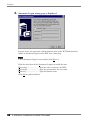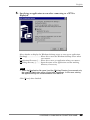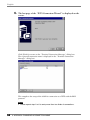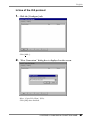
1
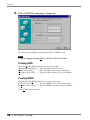
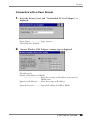
- For Administrators -
For Microsoft Windows CE 2.12
Version J
LCD Monitor integrated
Windows-based Terminal
Please confirm the version of the software built in eClient, and refer to
the suited User's Manual (Refer to the User's Manual Version List on
next page).
This is the manual for the following software version.
* Microsoft Windows CE: 2.12 Rev.1.67 or later
* Microsoft Terminal Server Client: Ver.6.70 or later
* ICA Client: Ver.6.30 [Build 1078] or later
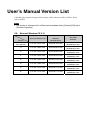
User’s Manual Version List
A handling description changes with versions of the software built in eClient. Please
refer to below.
NOTE
• The version of software built in eClient can be checked with a [System]-[ICA] tab of
[Terminal Properties].
OS:
Microsoft Windows CE 2.12
Software
Microsoft Windows CE
Microsoft
Windows
Terminal Server
ICA Client
Software
J
(This Manual)
2.12 Rev.1.67 or later
Version 6.70 or later
Version 6.30
[Build1078] or later
H
2.12 Rev.1.66 or later
Version 6.60 or later
Version 6.30
[Build1078] or later
G
2.12 Rev.1.64 or later
Version 6.60 or later
Version 6.20
[Build992] or later
F
2.12 Rev.1.62 or later
Version 6.53 or later
Version 6.20
[Build992] or later
E
2.12 Rev.1.58 or later
Version 6.51or later
Version 6.20
[Build992] or later
D
2.12 Rev.1.50 or later
Version 6.28 or later
Version 6.20
[Build992] or later
C
2.12 Rev.1.24 or later
Version 6.24 or later
Version 6.00
[Build923] or later
B
2.12 Rev.1.21 or later
Version 6.21 or later
Version 6.00
[Build923] or later
Manual
SAFETY SYMBOLS
This manual uses the safety symbols below. They denote critical information. Please read them
carefully.
WARNING
Failure to abide by the information in a WARNING may result in serious injury and
can be life threatening.
CAUTION
Failure to abide by the information in a CAUTION may result in moderate injury
and/or property or product damage.
Indicates a prohibited action.
Indicates to ground for safety.
Copyright© 2001-2004 EIZO NANAO CORPORATION All rights reserved. No part of this
manual may be reproduced, stored in a retrieval system, or transmitted, in any form or by any
means, electronic, mechanical, or otherwise, without the prior written permission of EIZO
NANAO CORPORATION.
Eizo Nanao Corporation is under no obligation to hold any submitted material or information
confidential unless prior arrangements are made pursuant to Eizo Nanao Corporation's receipt of
said information. Although every effort has been made to ensure that this manual provides upto-date information, please note that EIZO monitor specifications are subject to change without
notice.
ENERGY STAR is a U.S. registered mark.
Microsoft, Windows, Windows NT and the Windows logo are registered trademarks of Microsoft
Corporation.
Citrix, Independent Computing Architecture (ICA), and MetaFrame are registered trademarks or
trademarks of Citrix Systems, Inc. in the U.S.A. and other countries.
EIZO and eClient are registered trademarks of EIZO NANAO CORPORATION.
As an ENERGY STAR® Partner, Eizo Nanao Corporation has determined that this
product meets the ENERGY STAR guidelines for energy efficiency.
3
TABLE OF CONTENTS
1. INTRODUCTION ..................................................................................... 6
1-1. General Description ......................................................................................6
1-2. Features ........................................................................................................7
1-3. Package Contents..........................................................................................7
1-4. Controls & Connectors ................................................................................8
1-5. Overview ....................................................................................................10
2. CONNECTING THE 630L ..................................................................... 11
2-1. Setting up the 630L.....................................................................................11
2-2. Connecting the 630L ..................................................................................12
3. SETTING UP THE 630L ........................................................................ 14
3-1. WBT Setup Wizard .....................................................................................14
3-2. Connection with a LAN card......................................................................31
3-3. Dial-Up Connection....................................................................................38
4. ADDING & CHANGING A CONNETION NAME................................... 45
4-1. Adding a Connection Name........................................................................45
4-2. Deleting a Connection ................................................................................62
4-3. Editing a Connection ..................................................................................63
4-4. Setting an Autostart Connection .................................................................66
5. LOGON & LOGOFF.............................................................................. 67
5-1. Logon to a WTS / Logoff from a WTS........................................................67
5-2. Opening/Closing a Local Web Browser.......................................................72
6. USING THE TERMINAL PROPERTIES ................................................ 74
6-1. General Information & Reset to Default ....................................................74
6-2. Input Devices Settings .................................................................................76
6-3. Colors & Power Save Settings.....................................................................78
6-4. Network Settings ........................................................................................80
6-5. Printer Settings............................................................................................83
6-6. Browser Settings .........................................................................................86
6-7. Dial-Up (PPP) Connection Settings .............................................................89
6-8. ICA Settings ................................................................................................90
6-9. Device Settings ............................................................................................93
6-10. Product Information, Security, & Updating Software ...............................96
7. PRACTICAL SETUP ........................................................................... 102
8. TROUBLESHOOTING......................................................................... 108
9. CLEANING.......................................................................................... 110
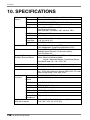
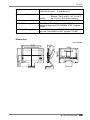
10. SPECIFICATIONS............................................................................. 112
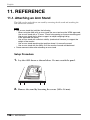
11. REFERENCE..................................................................................... 114
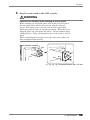
11-1. Attaching an Arm Stand .........................................................................114
4
TABLE OF CONTENTS
INDEX...................................................................................................... 116
TABLE OF CONTENTS
5
English
1. INTRODUCTION
Thank you very much for purchasing the EIZO eClient 630L.
1-1. General Description
The 630L is a terminal which displays applications on a Windows Terminal Server
(WTS) or a web site and conveys input by a keyboard or a mouse to the WTS. To
operate the 630L, please connect it to a WTS with Microsoft Window NT Terminal
Server Edition or Windows 2000 Server / Advanced Server / Datacenter Server.
630L
Windows Terminal Server (WTS)
Output data of
applications
Input data from
keyboard/mouse
· Operation of applications
· Storage of data
6
1. INTRODUCTION
· Display data
· Operation by keyboard/mouse
English
1-2. Features
• Lower TCO*
*TCO (Total Cost of Ownership)
Expense for managing and administrating computer systems.
• Saves Space and Power Consumption
• Less Heat, Less Noise
• Serial Port for Modem/PDA (*Hayes AT compatible modem supported)
• Speakers equipped
• PC card slot for modem card, LAN card, and wireless LAN card
• 2 USB downstream ports for USB HID mouse and keyboard
• Local Web Browser added as a default connection
• Wake on LAN supported
*Wake on LAN
Wake on LAN is a function starting the 630L by another computer on LAN.
1-3. Package Contents
Please contact your local dealer for assistance if any of the listed items are missing or
damaged. Please make sure that all the items listed are in the package.
• 630L
• Mouse
• Power Cord
• Screw (M4 x 12 mm) x 4
• User’s Manual
• Stickers of the Brightness Control Guide
NOTE
• We recommend that you retain the original packing materials in case of future
need.
• A keyboard is not included. It must be purchased separately.
• Brightness can be adjusted by using key combinations on the keyboard (see page
79). Key combinations for an adjustment is presented on the stickers. Please apply
them for your convenience.
Please use the enclosed mouse. Eizo Nanao Corporation will no be held responsible for
accident or damage caused by the use of a mouse manufactured by other companies.
1. INTRODUCTION
7
English
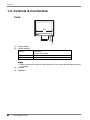
1-4. Controls & Connectors
Front
(4)
(3)
(2)
(1)
(1)
(2)
(3)
(4)
8
Power Switch
Power Indicator
Green
Operation
Screen saver mode
Yellow
Power save mode
Off
Power off (Wake on LAN standby)
NOTE
• When turning off/on the unit, leave the unit off for a few seconds before turning
it on again.
Volume
Speakers
1. INTRODUCTION
English
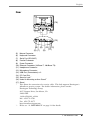
Rear
(16)
(17)
(14)
(15)
(13)
(6) (8) (10) (12)
(5) (7)
(9) (11)
(5)
(6)
(7)
(8)
(9)
(10)
(11)
(12)
(13)
(14)
(15)
(16)
(17)
*1
*2
Mouse Connector
Keyboard Connector
Serial Port (RS-232C)
Parallel Connector
Power Connector
Ethernet Connector (10 Base-T, 100 Base-TX)
Headphone Connector
Microphone Connector
USB Port (Downstream) x 2
PC Card Slot
Security Lock*1
Holes for Mounting an Arm Stand*2
Stand
This allows for connection of a security cable. This lock supports Kensington's
MicroSaver security system. For further information, please consult:
Kensington Technology Group
2855 Campus Drive, San Mateo, CA
94403 USA
1-800-650-4242, x3348
Intl: 650-572-2700
Fax: 650-572-9675
http://www.kensington.com
Please see “11. REFERENCE” on page 114 for details.
1. INTRODUCTION
9
English
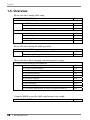
1-5. Overview
Please refer these during 630L setup.
2. CONNECTING THE 630L
p.11
3. SETTING UP THE 630L
3-1. WBT Setup Wizard
p.14
3-2. Connection
p.31
3-3. Dial-Up Connection
p.38
4. ADDING & CHANGING A CONNETION NAME
4-1. Adding a Connection Name
p.45
4-2. Deleting a Connection
p.62
4-3. Editing a Connection
p.63
4-4. Setting an Autostart Connection
p.66
Please refer these during the 630L operation.
5. LOGON & LOGOFF
5-1. Logon to a WTS / Logoff from a WTS
p.67
5-2. Opening/Closing a Local Web Browser
p.72
Please refer these when changing terminal properties settings.
6. USING THE TERMINAL PROPERTIES
6-1. General Information & Reset to Default
p.74
6-2. Input Devices Settings
p.76
6-3. Colors & Power Save Settings
p.78
6-4. Network Settings
p.80
6-5. Printer Settings
p.83
6-6. Browser Settings
p.86
6-7. Dial-Up (PPP) Connection Settings
p.89
6-8. ICA Settings
p.90
6-9. Device Settings
p.93
6-10. Product Information, Security & Updating Software
p.96
Using the DHCP server, the 630L setup becomes very simple.
7. PRACTICAL SETUP
10
1. INTRODUCTION
p.102
English
2. CONNECTING THE 630L
This chapter explains how to connect the 630L to a WTS.
2-1. Setting up the 630L
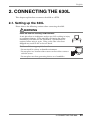
Please observe the following cautions when connecting the 630L.
WARNING
Place the 630L on a strong, stable surface.
A unit placed on an inadequate surface may fall, resulting in injury
or equipment damage. If the unit falls, disconnect the power
immediately and have the unit checked by a qualified service
engineer before using it again. Using a unit after it has been
dropped may result in fire or electric shock.
Set the unit in an appropriate location.
* Do not install in a dusty or humid environment.
* Do not place in a location where steam can have direct contact
with the screen.
* Do not place near heat generating devices or a humidifier.
2. CONNECTING THE 630L
11
English
2-2. Connecting the 630L
NOTE
• Before connecting the 630L, confirm the following:
• The 630L is turned off.
• The WTS is turned on.
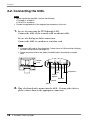
• Connect the peripherals to the appropriate connectors of the unit.
1.
In case of connecting the WTS through LAN:
Connect the 630L to the network with an ethernet cable.
In case of a dial-up or dial-in connection:
Connect the 630L to a modem or a modem card.
NOTE
• If using a LAN card for the connection, Please Insert a LAN card after finishing
the WBT Setup Wizard (see page 31).
• Please remove the lid on the side of the 630L before connecting a modem
card.
Modem
Card
Power
Cord
Headphones
Printer/
Modem
Network
Keyboard
Mouse
2.
12
Plug a keyboard and a mouse into the 630L. If using other devices,
please connect them to the appropriate connectors.
2. CONNECTING THE 630L
English
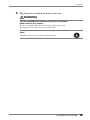
3.
Plug the power cord into the power connector.
WARNING
Use the enclosed power cord and connect to the standard
power outlet of your country.
Be sure to remain within the rated voltage of the power cord.
Not doing so may cause in fire or electric shock.
The equipment must be connected to a grounded main
outlet.
Not doing so may cause in fire or electric shock.
2. CONNECTING THE 630L
13
English
3. SETTING UP THE 630L
This chapter presents how to prepare for a connection with a WTS when the 630L starts
up for the first time.
3-1. WBT Setup Wizard
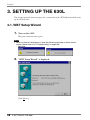
1.
Turn on the 630L.
The power indicator turns green.
NOTE
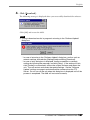
• When no picture is displayed, or when the following message is shown on the
screen, please refer to “8. Troubleshooting” on page 108.
- Message -
2.
“WBT Setup Wizard” is displayed.
Click [Next>].
14
3. SETTING UP THE 630L
English
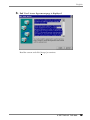
3.
End User License Agreement page is displayed.
Read the content and click [Accept] to continue.
3. SETTING UP THE 630L
15
English
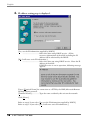
4.
IP address setting page is displayed.
[Yes, use the IP information supplied by DHCP.]
...................................Select this when using DHCP service. All the
necessary information of the 630L including the IP
address will be obtained by the DHCP.
[No, I will enter static IP information.]
...................................Select this when not using DHCP service. Enter the IP
address of the 630L.
If DHCP service is not in operation, following message
appears.
Type a [Terminal Name] for connection to a WTS by the RDP (Microsoft Remote
Desktop Client) protocol.
[Terminal Name] ................Type the name to identify this unit on the network.
Click [Next>].
Refer to step 6 if you select [Yes, use the IP information supplied by DHCP.]
Refer to step 5 if you select [No, I will enter static IP information.]
16
3. SETTING UP THE 630L
English
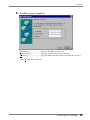
5.
IP address page is displayed.
[IP Address] ........................Type the IP address of the unit.
[Subnet Mask] ....................Type the subnet mask of the network.
[Gateway] ...........................Type IP address of the Gateway machine if necessary.
Click [Next>] when finished.
3. SETTING UP THE 630L
17
English
6.
DNS and WINS setting page is displayed.
This check box should be marked when DNS or WINS is used.
NOTE
• Skip the page by clicking [Next>] if DNS or WINS is not used.
If using DNS
Click the [Enable DNS] check box to activate this box.
[Default Domain Name] .....Type the default domain name.
[Primary Server IP]..............Type the DNS primary Server IP address.
[Secondary Server IP] ..........Type the DNS secondary Server IP address.
If using WINS
Click the [Enable WINS] check box to activate this box.
[Primary Server IP]..............Type the WINS primary Server IP address.
[Secondary Server IP] ..........Type the WINS secondary Server IP address.
Click [Next>] when finished.
18
3. SETTING UP THE 630L
English
7.
Desktop area resolution and color settings page is displayed.
Select the preferable display mode from the two available modes:
· 1024 x 768 (256 colors)
· 1024 x 768 (65,536 colors)
Click [Next>] when finished.
3. SETTING UP THE 630L
19
English
8.
Browser Setup page is displayed.
Select [Yes] if you are setting up a web browser connection.
Click [Next>] when finished.
Refer to step 9 if selecting [Yes].
Refer to step 13 if selecting [No].
20
3. SETTING UP THE 630L
English
9.
Browser URLs page is displayed.
[Home Page:] ......................Type the URL for the page to be displayed when
Internet Explorer starts up or the “Home” button is
clicked.
[Search Page:] .....................Type the URL for the page to be displayed when the
“Search” button is clicked.
Click [Next>] when finished.
3. SETTING UP THE 630L
21
English
10.
Preferences page is displayed.
[When do you want the browser to underline hyperlinks?]
...................................Select when you want the hyperlinks to be underlined.
[What size font do you want to use?]
...................................Select the font size of the web page.
Click [Next>] when finished.
22
3. SETTING UP THE 630L
English
11.
History and Favorites page is displayed.
[Persistent browser cache]...Click the check box if you want the “History” and
“Cookies” portions of the browser cache to persist
across Web sessions.
[Enable Favorites] ...............Click the check box if you want to enable the
“Favorites” feature. (Favorites will persist across Web
sessions.)
Click [Next>] when finished.
3. SETTING UP THE 630L
23
English
12.
Proxy server selection page is displayed.
[Use proxy server] ...............Click the check box if you use proxy server for the
web browser connection.
[Type the name of the computer running the proxy server:]
...................................Type the name of the computer running the proxy
server.
[Port] ..................................Type the port number.
[Bypass proxy server for local (Intranet) addresses.]
...................................Click the check box if you do not use proxy server for
local addresses.
Click [Next>] when finished.
24
3. SETTING UP THE 630L
English
13.
Local Printer Setup page is displayed.
NOTE
• The following must be satisfied to install a local printer;
* When a printer is connected to the printer port or the serial connector of the
630L.
* The RDP protocol for connection to a WTS.
* Microsoft Windows 2000 Server / Advanced Server / Datacenter Server as
the OS for the WTS
• A Local Printer mentioned here is a printer connected directly to the Parallel
Connector of the unit.
Select [Yes] when using a local printer.
Select [No] in the following cases:
* When not using a Local Printer
* When using a ICA protocol for connection to a Server
* When the OS of the Server is Windows NT Server 4.0 Terminal Server
Edition
Click [Next>] when finished.
Refer to step 14 if selecting [Yes].
Refer to step 20 if selecting [No].
3. SETTING UP THE 630L
25
English
14.
Printer port selection page is displayed.
Select the printer port.
The 630L supports only LPT1 and COM1.
Click [Next>].
26
3. SETTING UP THE 630L
English
15.
Printer model selection page is displayed.
Select a manufacturer and model of your printer.
[User Defined].....................Click the check box if your printer is not listed.
Click [Next>] when finished.
Refer to step 16 if clicking [User Defined].
Refer to step 17 if not clicking [User Defined].
16.
Printer model and manufacturer settings page is displayed.
[Model Name] ....................Type a model and manufacturer of your printer.
Click [Next>] when finished.
3. SETTING UP THE 630L
27
English
17.
Printer name setting page is displayed.
Name the printer or use the indicated name. (Some programs do not support the
Server and the printer name combinations of more than 31 characters.)
Click [Next>] when finished.
18.
Default printer setting page is displayed.
Select [Yes] to set this printer as the default printer.
Select [No] not to set this printer as the default printer.
Click [Next>].
28
3. SETTING UP THE 630L
English
19.
Another printer configuration page is displayed.
Select [Yes] to configure another printer.
Select [No] to finish printer settings.
Click [Next>] when finished.
Refer to step 14 if selecting [Yes].
Refer to step 20 if selecting [No].
20.
The last page of the “WBT Setup Wizard” is displayed.
3. SETTING UP THE 630L
29
English
Click [Finish] in the last page to display a “Terminal Settings change” dialog box.
(This dialog box is displayed only when there are changes in the settings.)
Click [Yes] to restart the 630L to activate the changes.
· Click [No] to finish the “WBT Setup Wizard” and display “Terminal Connection
Manager” on the screen. The setting is not activated until the 630L is restarted.
This completes the 630L settings.
The “Terminal Connection Manager” dialog box will be displayed after restarting.
NOTE
• When you are connecting to the WTS with a LAN card, another installation for
a LAN card connection must be completed. Please follow the next page.
• When you are connecting to the WTS with a modem, another installation for a
modem connection (a dial-up connection) must be completed. Please follow
the “3-3. Dial-up Connection”, page 38.
30
3. SETTING UP THE 630L
English
3-2. Connection with a LAN card
The following details the installation of a LANs connection.
NOTE
• Please remove the lid on the side of the 630L before connecting a LAN card, and
then insert a LAN card to the card slot.
• For use of an ethernet cable, a LAN card, or a LUCENT ORINOCO Waveland
wireless LAN card: See page 31.
• For use of a CISCO Aironet wireless LAN card: See page 35.
Connection with a LAN card other than Aironet LAN Card
1.
Press “F2” key in the “Terminal Connection Manager”.
2.
“Terminal Properties” is displayed.
Click the [Network] tab.
3. SETTING UP THE 630L
31
English
3.
The “Network” page is displayed.
Select [Use PPP connection or another network adapter].
Click [Devices] tab.
NOTE
• [Use PPP connection or another network adapter] should be selected for using
a LAN card. Otherwise, the LAN card may not work properly.
32
3. SETTING UP THE 630L
English
4.
The “Devices” page is displayed.
Double-click [Network].
5.
“Network Configuration” is displayed.
Select a network driver for a LAN card.
Click [Properties].
3. SETTING UP THE 630L
33
English
6.
The connected network adapter’s properties are displayed.
[IP Address] tab
[Obtain an IP address via DHCP]
...................................Select this to assign an IP address to the unit by a
DHCP server.
[Specify an IP address] ........Select this to type an IP address.
[Name Server] tab ...............Type an IP address for DNS or WINS.
Click [OK].
(The message below will be displayed. Please follow the message and complete the
settings.)
Click [OK] to return to the “Network Configuration” dialog box.
Click [OK] to return to the “Terminal Properties” dialog box.
NOTE
• If using the ORiNOCO/WaveLAN of the Agere Systems, double-click the [Wireless
Network] icon and set the detailed settings as needed. Refer to the instruction of
the LAN card for details.
34
3. SETTING UP THE 630L
English
Connection with a Cisco Aironet
1.
Insert the Aironet Card, and “Unidentified PC Card Adapter” is
displayed.
Driver Name:......................Type “aironet”.
Click [OK] when finished.
2.
‘Aironet Wireless LAN Adapter’ settings page is displayed.
[IP Address] tab
[Obtain an IP address via DHCP]
...................................Select this to assign an IP address to the unit by a
DHCP server.
[Specify an IP address] ........Select this to type an IP address.
[Name Server] tab...............Type an IP address for DNS or WINS.
3. SETTING UP THE 630L
35
English
Click [OK].
(The message below will be displayed. Please follow the message and complete the
settings.)
Click [OK] to return to the “Terminal Connection Manager” dialog box.
3.
Press “F2” key in the “Terminal Connection Manager”.
4.
“Terminal Properties” is displayed.
Click the [Network] tab.
5.
The “Network” page is displayed.
Select [Use PPP connection or another network adapter].
NOTE
• [Use PPP connection or another network adapter] should be selected for using
a LAN card. Otherwise, the LAN card may not work properly.
36
3. SETTING UP THE 630L
English
NOTE
• Double-click the [CISCO Aironet] icon on the “Devices” tab and set the detailed
utility as needed. Refer to the instruction of the LAN card for details.
Click [OK] to save the settings and close the “Terminal Properties” dialog box.
This completes the LAN card settings.
3. SETTING UP THE 630L
37
English
3-3. Dial-Up Connection
The following details the installation of a dial-up connection for RAS (Remote Access
Service).
No restriction of the protocol is made for the “Dial-up connection”. To use a dial-up
connection requires an RAS server in operation.
[Dial-up Connection]
Telephone
Lines
RAS Server
WTS
630L
WTS
FTP Server
NOTE
• Another type of connection using a modem, a dial-in connection, is available to
connect to the WTS with an ICA protocol. Please see page 51.
[Dial-in Connection]
Telephone
Lines
WTS
630L
1.
38
Press “F2” key in the “Terminal Connection Manager”.
3. SETTING UP THE 630L
English
2.
“Terminal Properties” is displayed.
Click the [Network] tab.
3.
The network setting window is displayed.
Select [Use PPP connection or another network adapter].
Click [PPP] tab when finished.
3. SETTING UP THE 630L
39
English
4.
The dial-up setting window is displayed.
NOTE
• Enter your information in the pertinent fields.
[Connection Name].............Choose a connection name for a dial-up connection.
([None] indicates no connection name chosen.)
[New...]...............................Click the button to create a new dial-up connection
name.
“Create New Dial-Up Connection” dialog box is
displayed.
Enter the name and click [OK].
[Remove] ............................Delete the connection name displayed currently.
[Dialing Settings]
[Select Dial-In Device].........Choose a modem connecting device type.
[Country Code:], [Area Code:], [Phone Number]
...................................Enter a country code, an area code, and a phone
number for the connection name.
[Force long distance] ...........Click here to use the country code, area code, and the
phone number when connecting to the connection
name.
[Force local] ........................Click here to use only the phone number when
connecting to the connection name. (In case the area
code of the connection name is different from the
present area code.)
40
3. SETTING UP THE 630L
English
[Dialing Properties...]
...................................Click the button to set information of the sender.
[When dialing from:] ..........Choose the sender’s location.
[New...]...............................Click this to add a new sender’s location.
“Create New Location” dialog box is displayed.
Enter a new sender’s location and click [OK].
[Remove] ............................Remove the current sender’s location.
[Local Settings are...]
[The local area code is:], [The local country code is:]
...................................Enter the area code and the country code of the
sender’s location.
[Dial using:] ........................Choose your using dial from;
[Tone] / [Pulse]
[Disable call waiting by dialing:]
...................................Check the box and enter the number to disable call
waiting by dialing.
[Dialing Patterns...].............Click the button and use this group box to set your
modem’s dialing patterns.
Click [OK] when finished.
Click [OK] of the [Dialing Properties] when finished.
“Terminal Properties” is displayed.
3. SETTING UP THE 630L
41
English
[Device Configure...]
...................................Click the button the detailed settings of the modem.
(Please refer to the instruction manual of a modem for
settings of the modem.)
[Port Settings] tab
[Manual Dial (user supplies dial strings)]
...................................Click this box to set up for manual dialing.
[Terminals]
[Use terminal window before / after Dialing]
...................................Click this box to record terminal window information
before or after dialing.
[Connection Preferences]
[Baud Rate].........................Set data transmission rate from 110 to 115,200 bps.
[Data Bits]...........................Set data bits.
[Parity]................................Set enabling to check the data's transmission.
[Stop Bits] ...........................Set length of the Stop Bits.
[Flow Control] ....................Set Flow Control.
[Call Option] tab
[Cancel the call if not connected within]
...................................Click the box and set the intervals to the right box
before canceling the connection in case of connection
failure.
[Wait for dial tone before dialing]
...................................Click to dial after dial tone.
[Wait for credit card tone]
...................................Click the box and set the intervals before canceling the
connection in use of a credit card for dialing.
[Extra Settings (Special modem commands may be inserted into the dial strings)]
...................................Enter a special modem command if required.
Click [OK] on [Device Properties] when finished. “Terminal Properties” will be
displayed.
42
3. SETTING UP THE 630L
English
NOTE
• When changing settings in the [Device Properties], click the [Call Option] tab
before clicking [OK] to close the window.
[TCP/IP Settings...]
Click the button to set the TCP/IP settings of the WTS.
[Use server-assigned IP address]
...................................Click the box to use a server-assigned IP address.
[Specify an IP address] ........Enter a provided IP address.
[Use server-assigned DNS or WINS server IP address]
...................................Click the box to use a server-assigned DNS or WINS
server IP address.
[Specify DNS or WINS server IP address]
...................................Enter a DNS or WINS server IP address provided.
3. SETTING UP THE 630L
43
English
[Primary DNS], [Secondary DNS]
...................................Enter IP address of the primary DNS and IP address of
the secondary DNS.
[Primary WINS], [Secondary WINS]
...................................Enter IP address of the primary WINS and IP address
of the secondary WINS.
[Use software compression]
...................................Click to use software compression.
[Use IP header compression]
...................................Click to IP header compression.
[Use default gateway]..........Click to use the default Gateway.
Click [OK] in the [TCP/IP Settings] when finished.
“Terminal Properties” is displayed.
[User’s Name], [Password], [Domain]
...................................Enter your information in the pertinent fields. If you
do not know the information, contact your system
administrator.
[Save the password] ............Click to save the password.
Click [OK] in the “Terminal Properties” when finished.
The “Terminal Properties” saves the settings and close.
This completes the dial-up connection settings.
A small window will be displayed on the right bottom of the window if the settings
are successfully installed.
44
3. SETTING UP THE 630L
English
4. ADDING & CHANGING A
CONNETION NAME
This chapter shows how to add, delete, and modify connection names to a WTS.
All the settings are managed in the “Terminal Connection Manager”.
4-1. Adding a Connection Name
These are settings for the Server connection.
Each protocol has different settings. Please install the appropriate settings.
• In use of the Microsoft Remote Desktop Client (RDP) page 46
• In use of the Citrix ICA Client (ICA)
page 51
NOTE
• Please install Citrix MetaFrame server into the Server when using the ICA protocol.
4. ADDING & CHANGING A CONNETION NAME
45
English
In Use of RDP Protocol
1.
Display [Terminal Connection Manager].
Click the [Configure] tab and [Add...] to set the connection information of the
WTS.
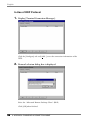
2.
Protocol selection dialog box is displayed.
Select the “Microsoft Remote Desktop Client” (RDP)
Click [OK] when finished.
46
4. ADDING & CHANGING A CONNETION NAME
English
3.
“WTS Connection Wizard” is displayed.
[Name]................................Type the connection name to the Server. Name the
connection to differentiate the Server from others.
[Server] ...............................Type the IP address or the name of the Server, or
WINS setting is necessary when the name is typed.
[Low Speed Connection].....Click the check box when making a low speed
connection. Enable this function when connecting
through a Remote Access Service using a modem that
takes time to receive data from the Server.
Click [Next>] when finished.
4. ADDING & CHANGING A CONNETION NAME
47
English
4.
Automatic Logon setting page is displayed.
Type the name, the password, and the domain name of the WTS beforehand to
enable an Automatic Logon to the WTS after connecting.
NOTE
• If an Automatic Logon is not needed, click [Next>].
Click the check box of the [Automatic Logon] to enable the item.
[Username]..........................Type the name to connect the WTS.
[Password] ..........................Type the password for the user name.
[Domain] ............................Type the domain name.
Click [Next>] when finished.
48
4. ADDING & CHANGING A CONNETION NAME
English
5.
Specifying an application to run after connecting to a WTS is
displayed.
Select whether to display the Windows desktop screen or start up an application.
[Desktop] ............................Select this to start the Windows desktop screen when
you connect.
[Application file name:] .....Select this to start an application when you connect.
[Working directory:] ...........Input the name of the application and the working
directory if necessary.
NOTE
• When the [Application file name:] and the [Working Directory] are named, only
the specified application will be started after logging on. In this case, closing
the application logs off and disconnects from the WTS.
Click [Next>] when finished.
4. ADDING & CHANGING A CONNETION NAME
49
English
6.
The last page of the “WTS Connection Wizard” is displayed on the
screen.
Click [Finish] to return to the “Terminal Connection Manager” dialog box.
The registered connection name is displayed in the “Terminal Connection
Manager” dialog box.
This completes the setup of the 630L for connection to a WTS with the RDP
protocol.
NOTE
• Please repeat step 1 to 6 to entry more than two kinds of connections.
50
4. ADDING & CHANGING A CONNETION NAME
English
In Use of the ICA protocol
1.
Click the [Configure] tab.
Click [Add...].
2.
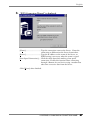
“New Connection” dialog box is displayed on the screen.
Select “Citrix ICA Client” (ICA).
Click [OK] when finished.
4. ADDING & CHANGING A CONNETION NAME
51
English
3.
“Specify Connection Type” dialog box is displayed.
[Network Connection]........Select for network connection.
[Dial-In Connection] ...........Select for dial-in connection.
Click [Next>] when finished.
Go to step 4 when selecting [Network Connection].
Go to step 5 when selecting [Dial-In Connection].
4.
Citrix Server or published application selection page is displayed.
1) Select [Server] (WTS) or [Published Application].
2) Click [Server Location…].
52
4. ADDING & CHANGING A CONNETION NAME
English
[Server Group]................Select the WTS Group to connect. (A WTS Group
consists of [Primary], [Backup 1], and [Backup 2].
The WTS will be searched in order of [Primary],
[Backup 1], and [Backup 2].
[Add]...............................Add another Server address. Type the Server Name
or IP address. (The typed Server Name or IP
address will be shown in the [Address] list.
[Delete]...........................Delete the selected WTS from the [Address] list.
[Default List] ...................Revert the state of the [Address] list to the saved one.
[Address] ........................The added WTS IP address appears.
Click the drop-down list box below [Address]. Select the appropriate WTS
protocol from the list.
[TCP browser] ................Citrix MetaFrame uses UDP protocol to search for the
WTS. Select this when using a UDP protocol.
[TCP + HTTP browser]...Select this when not using a UDP because of the
firewall in your network environment.
[SSL + HTTPS browser]
...................................This is not available with 630L.
Click [OK] to return to the previous page and save the adjustments.
3) Click [Refresh] to refresh the list to the newest information.
4) Select a WTS or a published application from the list.
NOTE
• Published applications are specific application set by a system administrator.
When connected, you are presented with the application itself.
Click [Next>].
4. ADDING & CHANGING A CONNETION NAME
53
English
5.
“Dial-In Devices” dialog box is displayed.
NOTE
• Enter your information in the pertinent fields.
• A dial-in connection is not available during a dial-up connection. Disconnect
the dial-up connection before making dial-in connection.
[Dial-In Device:]..................Select the device name connected to the modem.
[Phone Number] .................Enter a country code, an area code, and a phone
number for the connection.
[Use Tone Dialing] ..............Click to use tone dialing.
[Configure] .........................Click the button the detailed settings of the modem.
(Please refer to the instruction manual of the modem
for details.)
[Port Settings] tab
[Manual Dial (user supplies dial strings)]
...................................Click this box to set up for manual dialing.
[Terminals]
[Use terminal window before dialing]
...................................Click this box to record terminal window information
before dialing.
[Use terminal window after dialing]
...................................Click this box to record terminal window information
after dialing.
54
4. ADDING & CHANGING A CONNETION NAME
English
[Connection Preference]
[Baud Rate].........................Set the data transmission rate from 110 to 115,200.
[Data Bits]...........................Set the data bits.
[Parity]................................Set to check the data’s appropriate transmission.
[Stop Bits] ...........................Set the length of the Stop Bits.
[Flow Control]....................Set Flow Control.
[Call Option] tab
[Cancel the call if not connected within]
...................................Click the box and type the interval to the right box
before canceling the connection in case of connection
failure.
[Wait for dial tone before dialing]
...................................Click to dial after dial tone.
[Wait for credit card tone]
...................................Click to set the intervals before canceling the
connection using a credit card.
[Extra Settings (Special modem commands may be inserted into the dial strings)]
...................................Enter a special modem command if needed.
Click [OK] on [Device Properties] when finished. The dialog box saves the settings
and closes.
• Click the [Close] button to cancel the settings.
NOTE
• When changing settings in the [Device Properties], click the [Call Option] tab
before clicking [OK] to close the window.
Click [Next>].
4. ADDING & CHANGING A CONNETION NAME
55
English
6.
A title for the ICA connection page is displayed.
Type a connection name of the WTS.
Click [Next].
7.
An application selection page is displayed.
Specify the command line and the working directory of an application to operate.
NOTE
• Leave these fields blank and click [Next>] to run a Windows desktop.
[Command Line:]................Type the application name and the path.
[Working Directory:] ..........Type the working directory for the application.
NOTE
• When the [Command Line] and the [Working Directory] are named, only the
specified application will be started after logging on. In this case, closing the
application logs off from the WTS.
Click [Next>] when finished.
56
4. ADDING & CHANGING A CONNETION NAME
English
8.
Automatic logon settings page is displayed.
Type the name, the password, and the domain name of the WTS beforehand to
enable an Automatic logon to the WTS after connecting.
NOTE
• If an Automatic Logon is not needed, click [Next.]
[User Name:].......................Type the name to automatically connect the WTS.
[Password:] .........................Type the password for the user name.
[Domain:] ...........................Type the domain name.
[Allow Smart Card logon]...This is not available with 630L.
Click [Next>] when finished.
9.
Colors selection page is displayed.
Set the colors of the WTS’ screen.
NOTE
• Thousands can be selected only when the color setting of the 630L is 65536
colors.
Click [Next>] when finished.
4. ADDING & CHANGING A CONNETION NAME
57
English
10.
Compression, encryption, and sound settings page is displayed.
[Use Printer Configuration Utility]
...................................Click the check box to install the printer at the [ICA
Client Printer Configurations].
[Compress Data Stream] .....Click the check box to reduce the amount of data
transferred between the WTS and the 630L, which can
increase performance. (If you have sufficient
bandwidth, leave compression off to conserve
processing power on the WTS.)
[Enable Sound:]...................Click the check box to enable sound of 630L.
[Sound Quality:] .................Select the sound quality of the 630L.
High:
Middle:
Low:
Please use this when there is a surplus in the
network bandwidth, and sound quality is the
first priority.
Sound quality becomes rather low, but this is
adequate to most network environment. It is
recommended to use [Middle] for LAN
connection.
This is adequate to limited bandwidth.
Please use this for dial-up connection
[SpeedScreen:] .....................Select the speed at which the keyboard and mouse
perform on the screen.
Select [On] when connecting to the WTS with a
dial-up connection. Select [Off] when connecting to
the WTS with a LAN connection. Select [Auto] to
automatically switch the speed depending on the
network environment.
58
4. ADDING & CHANGING A CONNETION NAME
English
[Encryption Level:] .............Encryption level can be selected from RC5 (128 bit Login Only), basic, RC 5 (40 bit), RC5 (56 bit), RC5
(128 bit). The level becomes higher as the bit gains.
RC5 (128 bit - Login Only) indicates the 128 bit level
security available only at logon.
Click [Next>] when finished.
4. ADDING & CHANGING A CONNETION NAME
59
English
11.
Firewall settings page is displayed.
NOTE
• These settings are effective when connecting to the WTS through internet.
• If no change is made, the settings under the [Firewall settings] of [Global ICA
Client Settings] will be applied (see page 91 for details).
Set the connection to the WTS through the SOCKS proxy server when the SOCKS
proxy server is working to limit the access to the WTS.
[Proxy]
Click the drop-down list box, and select [SOCKS] from the list.
(The [Secure (HTTPS)] setting is not available with eClient.)
[Address of SOCKS proxy to use] / [Port]
...................................Type the IP address of the SOCKS proxy server and
the port number of the proxy server.
[Use alternate address through firewalls]
...................................Click the check box to connect to the WTS through
the Firewall.
[SSL/TLS Relay]
[Address of SSL relay to use] / [Port]
...................................These are not available with eClient.
Click [Finish] when finished.
[Terminal Connection Manager] is displayed.
The registered connection name is displayed in the “Terminal Connection
Manager” dialog box.
60
4. ADDING & CHANGING A CONNETION NAME
English
This completes the setup of the 630L for connection to a Server with the ICA
protocol.
NOTE
• Please repeat the step 1 to 11 when you adding another connection name.
4. ADDING & CHANGING A CONNETION NAME
61
English
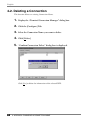
4-2. Deleting a Connection
This function deletes an existing Connection Name.
1.
Display the “Terminal Connection Manager” dialog box.
2.
Click the [Configure] Tab.
3.
Select the Connection Name you want to delete.
4.
Click [Delete].
5.
“Confirm Connection Delete” dialog box is displayed.
Click [Yes] to delete the information of the selected WTS.
62
4. ADDING & CHANGING A CONNETION NAME
English
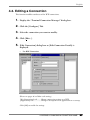
4-3. Editing a Connection
This function modifies attributes of the WTS connections.
1.
Display the “Terminal Connection Manager” dialog box.
2.
Click the [Configure] Tab.
3.
Select the connection you want to modify.
4.
Click [Edit...].
5.
[Edit Connection] dialog box or [Edit Connection Details] is
displayed.
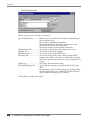
•
For RDP Connection
(Please see pages 46 to 50for each setting.)
[Net Connections] tab........Change connection settings to a WTS.
[Application] tab................Change a description of an application on a startup.
Click [OK] to enable the settings.
4. ADDING & CHANGING A CONNETION NAME
63
English
•
For ICA Connection
(Please see pages 51 to 60 for each setting.)
[Server/Dial-In] tab .............Either Server or Dial-In tab is displayed depending on
the connection type.
[Server] Tab (for LAN connection)
To change the WTS / the public application to use
[Dial-In] Tab (for Dial-In connection)
To change settings of the Dial-In connection
[Application] tab.................To change a description of an application to run
[Logon] tab .........................To set/cancel Automatic Logon
[Windows] tab ....................To set the colors of the WTS screen
[Options] tab ......................To set/cancel the printer after connecting the WTS,
compression of data, the speed at which the keyboard
and mouse perform on the screen, and encryption level
setting.
[Title] tab............................To change the connection name
[Firewall Settings] tab .........To change the settings on the Firewall and the proxy
WTS
If no change is made in this settings, the settings under
the [Firewall settings] of “Global ICA Client Settings”
will be applied (see page 91 for details).
Click [OK] to enable the settings.
64
4. ADDING & CHANGING A CONNETION NAME
English
NOTE
• When changing settings in the Dial-In connection, click and show the [Call
Option] tab of [Device Properties] of the [Dial-In] tab before clicking [OK] to
close the window.
4. ADDING & CHANGING A CONNETION NAME
65
English
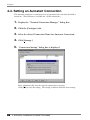
4-4. Setting an Autostart Connection
This function configures a connection to start automatically each time the 630L is
turned on. (This function is available for a LAN connection.)
1.
Display the “Terminal Connection Manager” dialog box.
2.
Click the [Configure] tab.
3.
Select the desired Connection Name for Autostart Connection.
4.
Click [Startup...]
5.
“Connection Startup” dialog box is displayed.
Select [Automatically start the selected connection at startup.]
Click [OK] to save the setting. The setting is effective from the next startup.
66
4. ADDING & CHANGING A CONNETION NAME
English
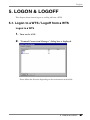
5. LOGON & LOGOFF
This chapter shows how to log on to and log off from a WTS.
5-1. Logon to a WTS / Logoff from a WTS
Logon to a WTS
1.
Turn on the 630L.
2.
“Terminal Connection Manager” dialog box is displayed.
Please follow the direction depending on the environment of the 630L.
5. LOGON & LOGOFF
67
English
(1) To connect and log on to a WTS through local network:
Go to step 3.
(2) To connect and log on to a WTS with dial-up connection:
Click an active button of a small window on the right bottom of the screen.
A dial-up connection is made by clicking the button.
Check the clock’s running, and go to step 3.
(3) To connect and log on to a WTS with dial-in connection:
Go to step 3. (Ask your system administrator for an installation of a dial-up
connection.)
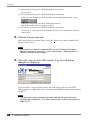
3.
Click the [Connections] tab.
Select the desired Connection Name and click [Connect] (or simply double click
the connection name).
NOTE
• To connect to the default connection WTS set in the “Terminal Connection
Manager” dialog box, press [Ctrl] + [Alt] + [Home] keys. (See page 66 on a
default connection server setting.)
4.
The 630L connects to the WTS and the “Log On to Windows”
dialog box is displayed.
Type your [User name] and [Password], and click [OK] to log on to the WTS.
After logging on, 630L allows you to use Microsoft Windows applications running
on WTS.
NOTE
• If an Automatic Logon connection has been defined, this menu will not be
displayed upon connection. (For details, please refer to [Automatic Logon] on
page 48, 57.)
68
5. LOGON & LOGOFF
English
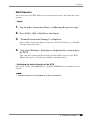
Multi Session
You can log on to the WTS with the several connection names, and switch the active
sessions.
• Logon
1.
Log on with a Connection Name, as following the previous steps.
2.
Press [Ctrl] + [Alt] + [End] keys after logon.
3.
“Terminal Connection Manager” is displayed.
Select another Connection Name to log on to, and click [Connect]. (Or double
click the connection name.)
4.
“Log On to Windows” dialog box is displayed after connecting to
the WTS.
Type your [User name] and [Password], and click [OK] to log on to the WTS.
(Repeat the step 2 to 4 to log on to another connection name.)
• Switching the Active Session of the WTS
Press [Ctrl] + [Alt] + [UP ARROW] key / [DOWN ARROW] key to switch the active
session.
NOTE
• The multi session is not available on a dial-in connection.
5. LOGON & LOGOFF
69
English
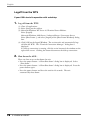
Logoff from the WTS
If your 630L starts its operation with a desktop
1.
Log off from the WTS.
(1) Close all applications.
(2) Select [Start] on the taskbar.
(3) Microsoft Windows NT Server 4.0 Terminal Server Edition:
Select [Logoff].
Microsoft Windows 2000 Server / Advanced Server / Datacenter Server:
Select [Shut Down...] and select [Logoff] of the [Shut Down Windows] dialog
box.
(4) Click [OK] on the Logoff Window. The session ends and automatically logs
off from the WTS. The “Terminal Connection Manager” dialog box is
displayed.
If a dial-up connection is running, click the active button of the window on the
right of the screen. Clicking the button disconnects the dial-up connection.
2.
Shut down the 630L.
There are three ways to shut down the unit.
• Press the power button. “eClient Shut down” dialog box is displayed. Select
“Shut down”.
• Press the power button. “eClient Shut down” dialog box is displayed. Press the
power button again.
• Press the power button and leave the unit for 20 seconds. The unit
automatically shuts down.
70
5. LOGON & LOGOFF
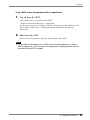
English
If your 630L starts its operation with an application
1.
Log off from the WTS.
Close applications to log off from the WTS.
“Terminal Connection Manager” is displayed.
If a dial-up connection is running, click the active button of the window on the
right bottom of the screen. Clicking the button Disconnects the dial-up
connection.
2.
Shut down the 630L.
(Please refer to the previous page for shutting down the 630L.)
NOTE
• It is possible to Disconnect from a WTS without closing applications in use (or
without logging off). (The last view of the application is displayed when the next
connection to the WTS is made.)
5. LOGON & LOGOFF
71
English
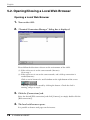
5-2. Opening/Closing a Local Web Browser
Opening a Local Web Browser
1.
Turn on the 630L.
2.
“Terminal Connection Manager” dialog box is displayed.
Please follow the directions relevant on the environment of the 630L.
(1) If the web server is on the same network (Intranet):
Go to step 3.
(2) If the web server is not on the same network, and a dial-up connection is
needed (Internet):
Click an active button of a small window on the right bottom of the screen.
A dial-up connection is made by clicking the button. Check the clock’s
running, and go to step 3.
3.
Click the [Connections] tab.
Select the desired [Web connection] and click [Connect] (or simply double click the
[Web connection]).
4.
The local web browser opens.
It is possible to browse web pages on the internet.
72
5. LOGON & LOGOFF
English
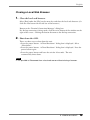
Closing a Local Web Browser
1.
Close the local web browser.
Select [Exit] under the [File] on the menu bar and close the local web browser. (Or
click the close button on the title bar of the browser.)
Return to the “Terminal Connection Manager” dialog box.
If a dial-up connection is being made, click the active button of the window on the
right of the screen. Clicking the button disconnects the dial-up connection.
2.
Shut down the 630L.
There are three ways to shut down the unit.
• Press the power button. “eClient Shut down” dialog box is displayed. Select
“Shut down”.
• Press the power button. “eClient Shut down” dialog box is displayed. Press the
power button again.
• Press the power button and leave the unit for 20 seconds. The unit
automatically shuts down.
NOTE
• It is possible to Disconnect from a local web server without closing a browser.
5. LOGON & LOGOFF
73
English
6. USING THE TERMINAL
PROPERTIES
This chapter presents how to modify all settings of the 630L using the “Terminal
Properties”.
To display the “Terminal Properties” during logging on, press F2 in the “Terminal
Connection Manager” dialog box. (Press Ctrl + Alt + End to display the “Terminal
Connection Manager”.)
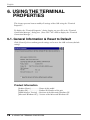
6-1. General Information & Reset to Default
Click [General] tab to confirm general settings and to reset the 630L to factory-default
settings.
Product Information
[Product Name] ..................Name of this model
[Product ID]........................Product ID Number of the unit
[OEM Software Version] ....Revision of the Microsoft Windows CE
[Microsoft Windows CE]....Version of the Microsoft Windows CE
74
6. USING THE TERMINAL PROPERTIES
English
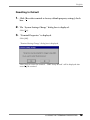
Resetting to Default
1.
Click [Reset the terminal to factory-default property settings] check
box.
2.
The “System Settings Change” dialog box is displayed.
Click [Yes].
3.
“Terminal Properties” is displayed.
Click [OK].
“Terminal Setting Change” dialog box is displayed.
Click [Yes] to restart the terminal. “WBT Setup Wizard” will be displayed after
restarting the terminal.
6. USING THE TERMINAL PROPERTIES
75
English
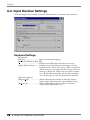
6-2. Input Devices Settings
Click the [Input] tab to modify keyboard, NumLock Key, and mouse characteristics.
Keyboard Settings
[Keyboard]
[Locale]...............................Selects a keyboard language.
[NumLock Enable on Boot UP]
...................................Enables/cancel NumLock function on start-up.
[Check Input Devices].........Enables/cancels checking the connection state of a
keyboard and a mouse on start-up. When a keyboard
and/or mouse are not connected on start-up, the error
message is displayed. When you use neither a mouse
nor a keyboard intentionally and you do not display
an error message on start-up, uncheck this function.
[Character Repeat]
[Repeat delay] ....................Allows adjusting the amount of time that elapses
before begins repeating when you hold down a key.
[Repeat rate] ......................Allows adjusting the speed at which a character
repeats when hold down a key.
76
6. USING THE TERMINAL PROPERTIES
English
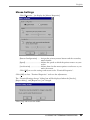
Mouse Settings
Click [Properties...] to display the [Mouse Properties]
[Button Configuration] .......Assigns the primary mouse button and the secondary
mouse button.
[Speed] ................................Adjusts the speed at which the pointer moves on your
screen.
[Acceleration] .....................Adjusts how fast the mouse pointer accelerates as you
move the mouse.
Click [OK] to save the settings and return to the “Terminal Properties”.
Click [OK] to close “Terminal Properties” and save the adjustments.
The “Terminal Settings change” dialog box will be displayed when the [Locale:],
[Repeat delay:], and [Repeat rate:] are changed.
Click [Yes] and restart the 630L.
6. USING THE TERMINAL PROPERTIES
77
English
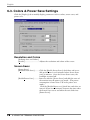
6-3. Colors & Power Save Settings
Click the [Display] tab to modify display parameters such as colors, screen saver, and
power save.
Resolution and Colors
[Desktop Area and Colors]
[Details] ..............................Adjusts the resolution and colors of the screen.
Screen Saver
[Screen Saver]
[Enable Screen Saver] ..........Click the [Enable Screen Saver] check box and set an
idle period from 1 to 60 minutes before Screen Saver
starts in minutes. Once the Screen Saver starts, the
backlight is turned off.
[Enable Power Save] ...........Interacts with the [Screen Saver] and shift the state of
the monitor into the power save mode. (The power
consumption is lower than 5 W in the power save
mode.)
Click the [Enable Power save] check box and select an
interval (from 0 to 60 minutes) between the time when
the Screen Saver starts and when the unit shifts into
[Power Saver].
78
6. USING THE TERMINAL PROPERTIES
English
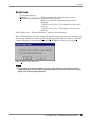
Brightness
[Contrast/Brightness]
[Settings] .............................Enables to adjust the brightness of the screen.
[Enable Contrast/Brightness control from Keyboard]
Enables to adjust the brightness/contrast from a
Keyboard.
• [Alt] key and [+] key: The brightness of the screen
increases.
• [Alt] key and [-] key: The brightness of the screen
decreases.
Click [OK] to close “Terminal Properties” and save the adjustments.
The “Terminal Settings change” dialog box will be displayed to restart the terminal and
activate the adjustments when the [Details], [Wait] period of [Screen Saver], or [Enable
Contrast/Brightness control from Keyboard] of [Brightness/Contrast] is changed.
Click [Yes] to restart the unit.
NOTE
• Do your part to conserve energy, turn off the unit when you are finished using it.
Complete energy use can only be accomplished by disconnecting the unit's power
supply cord from the plug receptacle.
6. USING THE TERMINAL PROPERTIES
79
English
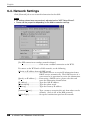
6-4. Network Settings
Click [Network] tab to set network information for the 630L.
NOTE
• All settings shown here are previously adjusted on the “WBT Setup Wizard”.
• Please set the properties depending on the 630L connection settings.
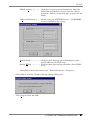
[Use PPP connection or another network adapter]
...................................Click to use a modem connection to the WTS.
To connect to the WTS with a LAN network, set the following.
[Obtain an IP address from a DHCP server]
...................................This allows the user to receive IP information from a
DHCP service automatically. The DHCP service of a
server must be in operation to receive the information.
[Specify an IP address.] .......If not using a DHCP service, please select this and
enter the information shown below.
[IP address] .........................Type the 630L IP address.
[Subnet Mask].....................Type the subnet mask.
[Gateway] ...........................Type the Gateway IP address.
[Terminal Name] ................Type a name to recognize this unit from others on the
network. (Only in use of the RDP protocol)
[Media Type] ......................Set up the transmission speed on the network.
80
6. USING THE TERMINAL PROPERTIES
English
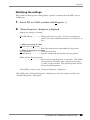
[DHCP Options...]..............Click this to receive essential information about the
630L from the DHCP server every time the 630L is
turned on. Refer to “Practical Setup” on page 102 for
details.
[Advanced Network...] .......Allows setting for DNS/WINS service. A DNS/WINS
server is required for the setting.
[Enable DNS]......................Click the check box and type default domain name
and IP address of the DNS server.
[Enable WINS] ...................Click the check box and type IP address of the WINS
server.
Click [OK] to finish and return to the “Terminal Properties” dialog box.
Click [OK] to show the [Terminal Settings Change] dialog box.
Click [Yes] to restart the 630L.
6. USING THE TERMINAL PROPERTIES
81
English
NOTE
• The [Terminal Settings Change] dialog box will not be displayed when [Terminal
Name], [DHCP Options], and [Advanced Network…] are changed, though the unit
needs to be restarted to set the adjustment effective.
82
6. USING THE TERMINAL PROPERTIES
English
6-5. Printer Settings
Click [Printers] tab
You can add, delete and change the settings of the printer in this section.
NOTE
• The 630L supports a LPT1 port and COM1 port.
• Use a RDP protocol to set the printer's adjustment. If you are using the ICA
protocol, please refer to the instruction manual of the Citrix MetaFrame.
6. USING THE TERMINAL PROPERTIES
83
English
Adding another printer settings
This enables to add a printer when no printer is connected to the LPT1 port and COM1
port.
1.
Select LPT1 or COM1, and then click [Add].
2.
“Printer Properties” dialog box is displayed.
[Friendly Name]..................Name the printer or use the indicated name. (Some
programs do not support server and printer name
combinations of more than 31 characters.)
• When your printer is listed
[Manufactures] / [Printers]
...................................Select the manufacturer and model of your printer.
• When your printer is not listed
[User Defined].....................Click the check box.
[Model Name] ....................Type the model and manufacturer of your printer.
[Make this the default printer]
...................................Click the check box to set the printer as the default
printer.
Click [OK] to return to the “Terminal Properties” dialog box.
Click [OK] to save the settings and close the “Terminal Properties” dialog box.
Deleting a printer settings
This enables to delete printer settings when a printer is connected to the LPT1 port.
1.
Select LPT1 and click [Delete].
2.
“Delete Printer” dialog box is displayed.
Click [Yes] to delete the settings of the printer.
84
6. USING THE TERMINAL PROPERTIES
English
Modifying the settings
This enables to delete printer settings when a printer is connected to the LPT1 port or
COM1 port.
1.
Select LPT1 or COM1, and then click [Properties...].
2.
“Printer Properties” dialog box is displayed.
Change the settings as needed.
[Friendly Name]..................Changes the printer's name. (If you are naming the
printer, the name combination must be 31 character or
less.)
• When your printer is listed
[Manufactures] / [Printers]
...................................Select the manufacturer and model of your printer.
• When your printer is not listed
[User Defined].....................Click the check box.
[Model Name] ....................Type the model and manufacturer of your printer.
[Make this the default printer]
...................................Sets/cancels setting the printer as a default. (The 630L
corresponds to only LPT1 port, and only one printer
at a time can be installed. The installed printer will be
always the default printer.)
Click [OK] to return to the “Terminal Properties” dialog box.
Click [OK] in the “Terminal Properties” dialog box to save the settings and close the
“Terminal Properties” dialog box.
6. USING THE TERMINAL PROPERTIES
85
English
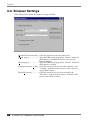
6-6. Browser Settings
Click [Web] tab to adjust the browser settings of 630L.
[Enable Web Connection] ...Click the check box for web connection.
[Home page:] ......................Type the URL for the page when “Home” button of
the browser is clicked or each time you start the
Internet Explore.
[Search page:]......................Type the URL for the page when “Search” button of
the browser is clicked.
[Persistent browser cache]...Click the check box if you want the “History” and
“Cookies” portions of the browser cache to persist
across Web sessions.
[Enable Favorites] ...............Click the check box if you want to enable the
“Favorites” feature of the browser. (Favorites will
persist across Web sessions.)
86
6. USING THE TERMINAL PROPERTIES
English
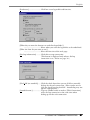
[Preference] .........................Click here to set hyperlink and font size.
[When do you want the browser to underline hyperlinks?]
...................................Select when you want the hyperlinks to be underlined.
[What size font do you want to use?]
...................................Select the font size of the web page.
[Dial-up information] .........Click this to setup connection.
(This button is displayed only when a dial-up
connection is set. Please see page 38.)
[Use LAN (no autodial)] .....Click the check box when you use LAN or manually
dial-up for the web connection. (Please make sure to
click the check box for the 630L. Autodialing may not
operate appropriately.)
[Autodial name:].................Type an autodial name to make a [Web Connection]
and a dial-up connection at the same time when
dialing-up for the web connection.
6. USING THE TERMINAL PROPERTIES
87
English
[Proxy Information] ............Click this for proxy settings.
[Access the Internet using a proxy server]
...................................Click the check box if you use proxy server for the
web browser connection.
[Proxy server name or IP address:]
...................................Type the name of the computer running the proxy
server.
[Port] ..................................Type the port number.
[Bypass proxy server for local (Intranet) addresses.]
...................................Click the check box if you use proxy server for local
addresses.
Click [OK] to return to the “Terminal Properties” dialog box.
Click [OK] of the “Terminal Properties” to close the “Terminal Properties” and save the
settings.
88
6. USING THE TERMINAL PROPERTIES
English
6-7. Dial-Up (PPP) Connection Settings
Click [PPP] tab to adjust the dial-up settings of 630L.
The following details the installation of a dial-up connection to a WTS or a Web Server.
(To use a dial-up connection requires an RAS server in operation.) Please see page 38
for each setting.
6. USING THE TERMINAL PROPERTIES
89
English
6-8. ICA Settings
Click [ICA] tab to confirm information about Citrix ICA Client version and to change
the settings when connecting to the Citrix Server with ICA protocol.
NOTE
• The ICA settings are effective only when the unit is connected to the WTS with ICA
protocol. Also, the settings will affect all the settings with ICA protocol.
Confirming Citrix ICA Client information
[Client Software].................Version of the Citrix ICA Client
90
6. USING THE TERMINAL PROPERTIES
English
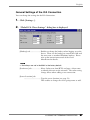
General Settings of the ICA Connection
You can change the settings for the ICA Connection.
1.
Click [Settings...].
2.
“Global ICA Client Settings” dialog box is displayed.
[Hotkeys] tab......................Enables to change the hotkeys when logging on to the
Server. There are the hotkeys to control the 630L and
the ones same as standard Windows hotkeys. Please
refer to the instruction manual of the Citrix
MetaFrame for details.
NOTE
• No hotkeys are set in the 630L in the factory default.
[Preference] tab...................Select Colors sent from WTS, and type a client name
to identify this unit on the network. The color setting
change affects when adding a new connection.
[Server Location] tab
...................................Type the server location (see page 52).
This enables to change the server group name as well.
6. USING THE TERMINAL PROPERTIES
91
English
[Firewall Settings] tab .........Change the settings of Firewall and SOCKS proxy
server (see page 60).
This setting change is displayed when adding a new
connection.
NOTE
• If connecting a WTS through internet, the settings should be completed before
the WTS is selected.
• If you configure a default SOCKS proxy server, you must specify at least one
WTS in the [Server Location] tab for a WTS and published application
browsing to work.
• If the Firewall settings are changed here, it is impossible to cancel the settings
of a specific connection name. To change the Firewall settings, select a
specific connection name and modify them or add a new connection name and
change the settings.
[PNLite] tab ........................
...................................Register a public application name to a Terminal
Connection Manager as a Connection Entry.
Click [OK] to return to the “Terminal Properties” dialog box.
Click [OK] of the “Terminal Properties” to close the “Terminal Properties” and save the
settings.
92
6. USING THE TERMINAL PROPERTIES
English
6-9. Device Settings
Click [Device] tab to confirm and set LAN card properties and speakers of the 630L.
Network Adapter Settings
Configure the properties of the network drivers installed on your device. Please see page
31 for details.
6. USING THE TERMINAL PROPERTIES
93
English
Sound Settings
Configure the sound properties of the 630L.
1.
Double-click the “Volume & Sounds” icon.
2.
“Volume & Sounds Properties” is displayed.
[Volume] tab.......................Click the check boxes to enable sounds for events,
applications, and notifications.
[Sounds] tab........................Select sounds for each cases.
Click [OK] to return to the “Terminal Properties” dialog box.
Click [OK] to save the settings and close the “Terminal Properties” dialog box.
94
6. USING THE TERMINAL PROPERTIES
English
Date/Time Settings
Configure the date/time properties of the 630L.
NOTE
• The settings are referred when the client time zone function of the ICA protocol is
effective.
• Date and time will return to the default settings if the power cord is unplugged.
1.
Double-click the “Date/Time” icon.
2.
“Date/Time Properties” is displayed.
[Date/Time] Tab .................Set date, current time, or time zone. During daylight
saving time, click the [Daylight savings time currently
in effect] check box.
[NTP Server] Tab................Synchronize time with the NTP Server.
Select when to synchronize time with the NTP server
(on every boot up or every time clicking the
[Synchronize] button.)
NOTE
• Synchronizing time at startup is effective when the 630L is connecting
WTS/Web Server using a network connector on the rear.
• Getting the NTP Server information from the DHCP Server needs to satisfy the
following:
* Connect the WTS/Web Server by the network connector on the rear
* Use the DHCP Server to get information such as IP address.
* Set the NTP Server option at the DHCP Server.
Click [OK] to return to the “Terminal Properties” dialog box.
Click [OK] of the “Terminal Properties” to close the “Terminal Properties” and save the
settings.
6. USING THE TERMINAL PROPERTIES
95
English
6-10. Product Information, Security & Updating
Software
Click [System] tab to confirm information about the 630L, to set the security, and to
update firmware.
Product Information
[Software]
[Microsoft Windows CE]
...................................Microsoft Windows CE Version, Revision
[Windows Terminal Server Client]
...................................Window Terminal Server Client Revision
[Boot software] ...................Boot Software Version of the 630L
[Update...]...........................See page 99.
[Hardware]
[Serial Number] ..................Serial Number of the unit
[Ethernet Address] ..............Ethernet address for the unit
[Network] (Information adjusted for the connection to a WTS)
[IP Address] ........................IP address of the unit
[Subnet Mask].....................Subnet mask of the unit
[Gateway] ...........................IP address of the Gateway machine if necessary
96
6. USING THE TERMINAL PROPERTIES
English
Security Settings
This enables settings on network information of the WTS invisible to prevent from
undesirable change. When the security is active, the following settings become.
• “Terminal Connection Manager”
* [Configure] tab
• “Terminal Properties”
* [General] tab... [Reset the terminal to factory - default settings]
* [Network] tab
* [Printers] tab
* [PPP] tab
* [ICA] tab
* [System] tab... [Update...], [Security]
PROCEDURE
1.
Click the [Security Enable] box.
2.
Click [Setting Password...].
3.
“Security Password” dialog box is displayed.
[Password] ..........................Enter the password.
[Confirm password:]...........Enter the same password for confirmation
Click [Ok] to return to the “Terminal Properties” dialog box.
Click [OK] to save the settings and close the “Terminal Properties” dialog box.
6. USING THE TERMINAL PROPERTIES
97
English
CANCELING SETTINGS
1.
Display “Terminal Connection Manager”.
2.
Press [Ctrl], [A], and [F2] at the same time.
3.
“Enter Security Password” dialog box is displayed.
[Password:] .........................Enter the password
Click [OK] on [Enter Security Password] when finished.
4.
All settings in the “Terminal Properties” will be active.
Click the [Security Enable] check box on the [System] tab to remove the check
mark.
Click [OK] on the “Terminal Properties” to save the settings and close the “Terminal
Properties”. Security becomes canceled.
Administration Console
Assign the 630L a server with the Network Administrator, utility software for eClient.
Other servers with the Network Administrator will not be able to control the 630L after
setting the administration console.
[Administration Console]....assign an IP address of a server with the Network
Administrator.
98
6. USING THE TERMINAL PROPERTIES
English
Software Updating
You can update the built-in software.
NOTE
• Before updating, please complete the following:
* Copy the update file (*.bin) to the accessible file folder of the FTP Server.
* If the WTS is connected with LAN, close all the connection to the FTP Server.
* Make a dial-up connection if it is adopted to connect the WTS. Software Updating
is not available if a dial-in is adopted to connect the WTS.
1.
Click the [Update...] of [Software].
The following message appears.
Obey the instruction of the message completely and do not turn off the unit while
updating.
Click [Yes] to continue.
2.
The “Software Update” dialog box appears.
[Server:] .............................Type IP address or full domain name of the FTP
Server.
6. USING THE TERMINAL PROPERTIES
99
English
[User Name:].......................Type the user name to connect the FTP Server.
[Password:] .........................Type the password for the user name to connect the
FTP Server.
[File Name:] ........................Type the folder and copied file name located in the
FTP Server.
<Example>
Type the file name as indicated below if the file is in
the “update folder” in the “software folder”:
\software\update\*.bin
NOTE
• Clicking the "Execute automatic software update." check box will automatically
consult the update file in the location indicated in the "Software Update" dialog
box each time turning on the unit. If the update file consulted is newer, the
software will be updated automatically while displaying the following dialog
box. When updating the software, please set the following;
(This function is not available for a modem connection. Please do not click the
check box.)
* Keep the keyboard and the mouse connected. (Operate with the keyboard
and the mouse if failed to update.)
* Click [Save Settings] to save settings.
• Click [Save Settings] if using the same settings for the next update.
* After inputting information, click [Save Setting] if using the “Automatic
Update" function.
3.
Preventing from update failure, check if the settings are correct and
the network environment is suitable.
Click [Network Test].
If the settings are correct, the following message is displayed.
Click [OK].
100
6. USING THE TERMINAL PROPERTIES
English
4.
Click [Download].
The following message is displayed when you successfully download the software.
Click [OK] and restart the 630L.
NOTE
• Failing to download results in program's returning to the "Software Update"
dialog box.
* In case of returning to the "Software Update" dialog box, confirm such as
network settings and redo the [Settings] before clicking [Download].
* In case of retry dialog box is displayed, confirm connection or network
settings by following the message, and click [Retry]. If the setting still fails,
click [Cancel] to automatically restore the original software and restart the
unit. The unit restarts and resets the update settings. Set the "Software
Update" settings once again and download the software from the FTP
Server. Do not turn off the unit when this dialog box is displayed until all the
process is completed. The 630L will not restart correctly.
6. USING THE TERMINAL PROPERTIES
101
English
7. PRACTICAL SETUP
By utilizing the DHCP Option function of the DHCP Server, necessary information is
supplied by the DHCP Server, and each setting is automatically set every time the unit is
turned on.
The following information can be obtained by the 630L.
• WTS/Web Server Connection Settings
• Automatic Software Update
• Security Settings
• Administration Console Setting
NOTE
• For DHCP Option settings, confirm the following:
* The 630L is connected to the WTS/Web server through built-in LAN.
* A DHCP Server is used for obtaining the IP address.
• If you need to change the following settings from the defaults, please change them
before using the DHCP option function.
(information not given by using the DHCP option)
Items
Default Settings
Input Tab
Display
Tab
102
Locale (Input Language)
English (United States)
NumLock Enable on Boot UP
Enable
Button Configuration
Right-Handed
Desktop area and color
1024 x 768 256 Colors
Enable Screen Saver / Wait
Enable / 5 Minutes
Enable Power Save / Wait
Enable / 1 Minute
Contrast/Brightness
Maximum
[Enable Contrast/Brightness
control from Keyboard]
Enable
Printer
Tab
Printer Settings
No printer connected
Web Tab
Search Page
http://www.msn.com/access/allinone.
htm
Persistent browser cache
Enable
Enable Favorites
Enable
When do you want the browser
to underline hyperlinks?
Never
What size font do you want to
use?
Normal
Access the Internet using a
proxy server.
Disable
7. PRACTICAL SETUP
English
ICA Tab
Device
Tab
Hotkeys
Disable
Colors
256 colors
Client Name
eClient******(Last 6 digits of the
Mac address)
Server Location
Automatically Found
Firewall Settings
Disabled
Volume
Maximum
Enable Sounds for:
Events, Applications, Notifications
Scheme
No Sounds
Date
January 1st, 2001
Time
Start at 00:00:00
Time Zone
(GMT-8:00) Pacific Time (US &
Canada)
NTP Server
Does not Synchronize Time
7. PRACTICAL SETUP
103
English
DHCP Server Settings
Please open DHCP settings to configure each DHCP Option as follows.
[Key] ...................................Set the value as “EIZO”. (The 630L will not accept
any value but “EIZO”.)
[Server] ...............................Type an IP address of the Server installing an update
file and a registry file of the 630L.
[User Name]........................Type the user name to logon to the FTP Server.
[Password] ..........................Type the password for the user name.
[Automatic Update] ............Enable/unable an automatic update.
[File Name] .........................Type the file name to update the software of the 630L.
[Automatic Connection] .....Make a Registry File to connect to a WTS / Web server
(Refer to the NOTE below for the settings).
[Security Setting] .................Enable/unable the security settings.
[Administration Console]....Type the IP address of the Server where Network
Administrator (eClient utility software) is installed.
104
7. PRACTICAL SETUP
English
NOTE
• Making a Registry File to Connect to a WTS/Web Server.
Please refer to the example below, make a registry file, and save it in Unicode
format. Please change the italic bold phrases as necessary.
- ConnectionName
: Type the connection name in the “Terminal Connection Manager”.
- TerminalServerAddress
: Type the IP address or the full domain name of the WTS.
- URL
: Type the URL of the Web Server. (Including “http://”.)
Registry file .....................................................................................
[HKEY_LOCAL_MACHINE\SOFTWARE\Microsoft\WBT] ......
"SetupWizardEnabled"=dword:0 .....................
Value
Specifies whether starting up “WBT
Setup Wizard” or not. (Fixed to
“0”)
(RDP Connection)
Registry file .....................................................................................
Value
[HKEY_LOCAL_MACHINE\SOFTWARE\Microsoft\WBT\Clients\
Registration\RDP\Connections\ConnectionName]
"DeleteCmdLineArgs"="/d ConnectionName" .......... Command argument to delete
connection information
"DeleteExe"="TSConMan" ........................... Fixed – command (an executable
file) to delete connection
information.
"PropertiesCmdLineArgs"="/e ConnectionName" ...... Command argument to change
connection information.
"PropertiesExe"="TSConMan" .......................
Fixed – Command (executable file)
to change connection information
"StartCmdLineArgs"=""ConnectionName"" ............
Command argument to connect to a
WTS
"StartExe"="mstsc.exe" ...........................
Fixed – Command (executable file)
to connect to a WTS
"Description"="ConnectionName" ................... Name displayed on the Connection
Manager
[HKEY_CURRENT_USER\Software\Microsoft\Terminal Server Client\ConnectionName]
"Full Address"="TerminalServerAddress" ........... IP address or full domain name of
the WTS
(ICA Connection)
Registry file .....................................................................................
Value
[HKEY_LOCAL_MACHINE\SOFTWARE\Microsoft\WBT\Clients\ Registration\ICA\Global\WFClient]
"Version"="2" ....................................
Event for use of ICA protocol.
(Fixed to “2”)
[HKEY_LOCAL_MACHINE\SOFTWARE\Microsoft\WBT\Clients\Registration\ICA\Connections\
ConnectionName]
"DeleteCmdLineArgs"="/D:ConnectionName" .......... Command argument to delete
connection information
"DeleteExe"="CEICAMGR" ........................... Fixed – command (an executable
file) to delete connection
information.
"PropertiesCmdLineArgs"="/P:ConnectionName" ...... Command argument to change
connection information.
"PropertiesExe"="CEICAMGR" ....................... Fixed – Command (executable file)
to change connection information
7. PRACTICAL SETUP
105
English
"StartCmdLineArgs"="/L "ConnectionName"" .........
Command argument to connect to a
WTS
"StartExe"="WFICACE" .............................
Fixed – Command (executable file)
to connect to a WTS
"ScreenPercent"="100" ............................
Fixed – Assign the ratio of the
630L screen to the displayed
Window of the WTS.
Name displayed on the Connection
Manager
"Description"="ConnectionName" ...................
"Address"="TerminalServerAddress" ................
IP address or full domain name of
the Meta Frame Server
(Web Connection)
Registry
[HKEY_LOCAL_MACHINE\SOFTWARE\Microsoft\WBT]
"SetupWizardEnabled"=dword:0 .....................
Value
Specifies whether starting up “WBT
Setup Wizard” or not. (0; not
starting up, 1; starting up)
[HKEY_LOCAL_MACHINE\SOFTWARE\Microsoft\WBT\Clients\
Registration\Web\Connections\Web1]
"StartCmdLineArgs"="URL" ......................... Specifies the URL (including
http://) to access.
Registry
[HKEY_LOCAL_MACHINE\SOFTWARE\Microsoft\WBT\Shell]
"EnableAutoConnect"=dword:1 ......................
"ConnectionDefaultKey"="ConnectionName" ..........
"ConnectionDefaultType"="RDP" ....................
Value
Specifies whether to
enable/disable automatic
connection. (0;disable, 1;enable)
Specify connection information
name of the automatic connection.
Specify the type of the automatic
connection. (The type is RDP,
ICA, or Web.)
*1 One entry name can be set at the Administration Console function.
106
7. PRACTICAL SETUP
English
630L Settings
The 630L’s default setting is set to enable DHCP Options. There is no need for extra
settings. After initial setup, confirm the following:
• [Use PPP connection or another network adapter] in the [Network] tab of “Terminal
Properties” is selected.
• Press “DHCP Option” on “Network” tab in the “Terminal Properties”. “DHCP
Options” is displayed.
[Enable DHCP Option] is selected, and code numbers assigned for the DHCP
options.
After completing the above, the 630L will automatically receive information such as an
IP address from the DHCP Server every time the unit is turned on.
NOTE
• If the DHCP Option is used to setup the 630L for the first time, “Terminal Connection
Manager” will appear because the unit automatically receives information from the
DHCP Server. (“WBT Setup Wizard will not be displayed.)
• If the DHCP Option is set once and needs to be canceled, please change the key of
the DHCP Server. Even if changing the DHCP Option in the 630L, the DHCP
Server will overwrite the option next time the unit is restarted, and the changes in
the 630L will not be effective.
7. PRACTICAL SETUP
107
English
8. TROUBLESHOOTING
This page presents problem that can be corrected by the user. If a problem persists even
after applying the suggested remedies, contact an EIZO dealer.
Problems
Points to check with possible solutions
1. No picture is displayed on the screen.
Check if the power is OFF.
Check brightness setting. Minimum settings
will cause screen to be blank.
Try pressing a key on the keyboard, or clicking
the mouse. (The monitor may be in a power
saving mode.)
2. The following messages appear on screen
after the power is on:
Check if the cable of the keyboard or the mouse
is securely connected.
Check if the cable of the keyboard or the mouse
is connected to the proper connector.
Turn off the power, and turn it on a few seconds
later.
(The operation automatically starts
up after the message disappears.)
* “WARNING
No Keyboard Connected”
* “WARNING
No Mouse Connected”
3. Input devices (such as a keyboard or a
mouse) do not work properly.
NOTE
When using neither a mouse nor a keyboard
intentionally, it is made to a setup on which an
error is not displayed (See P.76).
Solution on the mouse or the keyboard
Check if the cable of the keyboard or the mouse
is securely connected.
Check if the cable of the keyboard or the mouse
is connected to the proper connector.
Check if the network cable or the modem is
securely connected. (To make sure the ethernet
cable is connected securely, check if one of the
indicators on the ethernet connector turns
green.)
4. Afterimages appear on the screen.
Do you use the screen saver when displaying the
same image for extended periods of time?
Afterimages are particular to LCD monitors.
Avoid displaying the same image for extended
periods of time.
5. The screen has defective pixels (e.g.
slightly light or dark).
This is due to the characteristics of the panel
itself, and not the failure.
6. Fingerprints appear on the screen.
Leaving the white screen on may solve the
problem.
108
8. TROUBLESHOOTING
English
NOTE
• Please do not connect and disconnect repeatedly a keyboard or a mouse while the
630L is in operation, as the 630L may cause the unit damage.
8. TROUBLESHOOTING
109
English
9. CLEANING
Periodic cleaning is recommended to keep the monitor looking new and to prolong its
operation lifetime.
NOTE
• Never use thinner, benzene, alcohol (ethanol, methanol, or isopropyl alcohol),
abrasive cleaners, or other strong solvents, as these may cause damage to the
cabinet or LCD panel.
Cabinet
To remove stains, wipe the cabinet with a soft, lightly moistened cloth using a mild
detergent. Do not spray wax or cleaner directly onto the cabinet.
LCD Panel
• The LCD surface can be cleaned with a soft cloth, such as cotton or lens paper.
• If necessary, stubborn stains can be removed by moistening part of a cloth with water
to enhance its cleaning power.
110
9. CLEANING
English
Mouse
If you find that the pointer on the screen doesn’t move smoothly, your mouse needs to
be cleaned. Periodically clean the mouse for your operation.
(1) Turn off the 630L.
(2) Turn the mouse upside down and remove the mouse trackball cover. Press the
cover towards “Open” while pulling the other side of the cover.
Press
(3) Remove the trackball.
(4) Wipe the trackball with a soft cloth with neutral detergent.
(5) Clean all the rollers, getting all the lint off of them.
You can use a wet cotton swab to clean the rollers. Turn them to clean the
entire roller.
Rollers
(6) Remove the dust inside of the mouse.
(7) Put the trackball back into the mouse.
(8) Close the mouse trackball cover.
9. CLEANING
111
English
10. SPECIFICATIONS
CPU and
Memory
Display
CPU
Memory
LAN
National Semiconductor Geode GX1, 300 MHz
RAM; 64 MB, ROM; 32 MB
10BASE-T/100 BASE-TX, Wake On LAN supported
Speakers
Output Level:
LCD Panel
38 cm (15 inch) TFT color LCD panel
Anti-Glare Hard Coating
(Viewing Angle: Horizontal; 160°, Vertical; 150°)
Dot Pitch
0.297 mm x 0.297 mm
1 W + 1 W, stereo
Resolution
1024 x 768
Viewable
Image Size
304.1 mm (H) x 228.1 mm (V)
(11.9" (H) x 8.9" (V))
Display Color 256 / 65536 colors
Microsoft Remote Desktop (RDP)
Complying Protocol
Citrix Independent Computing Architecture (ICA)
Software
Microsoft Windows CE Version 2.12
Windows-based Terminal 1.5 Browser Add-on
Citrix ICA Client 6.3
Complying Software for
Windows Terminal Server
Microsoft Windows NT Server 4.0 Terminal Server
Edition, Microsoft Windows 2000
Server / Advanced Server / DataCenter Server,
Citrix MetaFrame 1.8 / 1.8 + FR1 / XP
Mouse
PS/2 2 button Mouse
Power Supply
100-120/200-240 VAC ± 10 %, 50/60 Hz, 0.8/0.5 A
Min: 31 W
Max: 45 W (with Keyboard, Mouse, USB, LAN, PC card)
Power saving mode: Less than 10 W
Power Consumption
Interface
Connector
LAN
10BASE-T/100BASE-TX (RJ-45) x 1
Keyboard,
Mouse
PS/2 (Mini DIN 6 pin) x 2
USB Port:
Down Stream x 2
Parallel
IEEE1284 (D-Sub 25 pin) x 1
Serial Port
RS-232C (D-Sub 9 pin) x 1
PC Card Slot PCMCIA Type II (68 pin) x 1
Line Output
Stereo mini jack x 1
Mini jack x 1
Monaural
Microphone*1
Dimensions
(With the tilt stand)
395 mm (W) x 390 mm (H) x 164 mm (D)
(15.6" (W) x 15.4" (H) x 6.5" (D))
*1 Monaural microphone connector is not available now.
112
10. SPECIFICATIONS
English
Weight
5.2 kg (11.5 lbs.)
(without the tilt stand
Environmental Specifications Temperature
Humidity
4.0 kg (8.8 lbs.))
Operating: 0°C to 35°C (32°F to 95°F)
Storage: -20°C to 60°C (-4°F to 140°F)
30 % to 80 % R.H. Non-condensing
Certifications and Standards
100 -120 VAC range
TÜV/NRTL, c-TÜV, FCC class A, CB, TÜV Rheinland
Ergonomics Approved, EPA ENERGY STAR® program,
TCO'99*2
200-240 VAC range
CE, CB, TÜV Rheinland/GS, TÜV Rheinland/Ergonomic
Approved, EPA ENERGY STAR® program, TCO'99*2
Dimensions
mm (inches)
25˚
59 (2.3)
3 (0.1)
230 (9.1)
160 (6.3)
390 (15.4)
238.5 (9.4)
123.5 (4.9)
78.5 (3.1)
135 (5.3)
75 (3.0)
3(0.1) 75 (3.0)
151.5 (6.0)
395 (15.6)
375 (14.8)
306 (12.0)
34 (1.3)
164 (6.5)
10. SPECIFICATIONS
113
English
11. REFERENCE
11-1. Attaching an Arm Stand
The 630L can be used with an arm stand by removing the tilt stand and attaching the
arm stand to the terminal.
NOTE
• Use an arm stand that satisfies the following.
- When using the 630L with an arm stand, the arm stand must be VESA approved:
Use an arm stand with a 75 mm x 75 mm hole spacing on the arm mounting pad.
Use an arm stand that is able to support an object weighing 8.0 kg.
A GS approved arm stand.
- Use an arm stand with sufficient stability (mechanical firmness) to support the
weight of the monitor.
- Use an arm stand remaining that position where it is manually moved.
- Use an arm stand with the ability to tilt the monitor forward and backward.
• Please connect cables after attaching an arm stand.
Setup Procedure
114
1.
Lay the 630L down as shown below. Do not scratch the panel.
2.
Remove the stand by loosening the screws (M4 x 16 mm).
11. REFERENCE
English
3.
Attach an arm stand to the 630L securely.
WARNING
Install the unit securely when attaching to an arm stand.
When attaching an arm stand, please refer to the user’s manual of
the arm stand and install the unit securely with the enclosed
screws. Not doing so may cause the unit to come unattached,
which may result in injury or equipment damage. When the unit is
dropped, please ask your dealer for advice. Do not continue using
a damaged unit. Using a damaged unit may result in fire or electric
shock.
When reattaching the stand, please use the same screws (M4 x 16
mm) and tighten them securely.
Arm
(1)
(3)
(2)
(4)
(1), (2), (3), (4): Enclosed Screws, M4 x 12 mm
11. REFERENCE
115
English
INDEX
A
G
ADDING & CHANGING A CONNETION
NAME ...................................................45
Administration Console ............................98
Application to Run..............................49, 56
Attaching an Arm Stand ......................... 114
Automatic Logon ................................48, 57
Autostart Connection ...............................66
General Information .................................74
Global ICA Client Settings .......................91
B
Brightness ............................................7, 79
Browser Setup ...................................20, 86
ICA .....................................................45, 51
ICA Connection ........................................64
ICA Settings .............................................90
IP address....................................16, 17, 47
C
K
Citrix Server or Published Application
Selection...............................................52
Cleaning................................................. 110
Client Name .............................................91
Colors.....................................19, 57, 78, 91
Compress Data Stream ...........................58
Connecting the eClient 630L ...................11
Connection Name ..................47, 50, 56, 61
Connection with a LAN Card ...................31
Controls & Connectors...............................8
Keyboard..................................................12
Keyboard Settings....................................76
D
Making a Registry File ...........................105
Mouse ........................................................7
Mouse Settings ........................................77
Multi Session............................................69
Device Settings ........................................93
Devices ....................................................33
DHCP.................................................16, 80
DHCP Options .................................81, 102
Dial-in Connection....................................38
Dial-In Device...........................................54
Dial-up Connection Settings ..............40, 89
Dial-Up Connection settings ....................38
Disconnect ...............................................71
DNS .........................................................18
Domain Name ..........................................18
Hotkeys ....................................................91
I
L
Local Printer Setup ..................................25
Logoff from the WTS................................70
Logon & Logoff.........................................67
Logon to a WTS .......................................67
M
N
Network Adapter Settings ........................93
Network Settings....................32, 36, 39, 80
O
Opening/Closing a Local Web Browser ...72
Overview ..................................................10
P
E
Editing a Connection................................63
Encryption Level ......................................59
F
Firewall Settings.................................60, 92
116
H
INDEX
Package Contents......................................7
Power Indicator ..........................................8
Printer ......................................................12
Printer Configuration Utility ......................58
Printer Settings ........................................83
Product Information .................................96
Program Neighborhood Lite.....................92
Protocol..............................................46, 51
English
R
RAS..........................................................38
RDP ...................................................45, 46
Reference .............................................. 114
Resetting to Default .................................75
Resolution ..........................................19, 78
S
Screen Saver ...........................................78
Security Settings......................................97
Serial Port ..................................................7
Server Location........................................91
Setting up................................................. 11
Software Updating ...................................99
Sound Settings ............................58, 94, 95
Speakers....................................................8
Specifications......................................... 112
Specify an IP Address..............................17
Specify Connection Type .........................52
SpeedScreen ...........................................58
Subnet Mask............................................17
T
TCO ...........................................................7
Terminal Connection Manager...........50, 60
Terminal Name...................................16, 80
Terminal Properties......................34, 41, 74
Title for the ICA Connection .....................56
Troubleshooting......................................108
V
Volume .......................................................8
W
Wake on LAN.............................................7
Windows Terminal Server (WTS)...............6
WINS........................................................18
WTS Connection Wizard .........................47
INDEX
117