1
Appendix
Troubleshooting
Look here for solutions to problems you might encounter
while working with the Xserve and for information about
using Apple Xserve Diagnostics to test the Xserve hardware.
This appendix offers solutions to some problems you might encounter using the
Xserve. It also includes information about Apple Xserve Diagnostics software, which
you can use to test the Xserve hardware.
If You Don’t Find a Solution
If you don’t find a solution to a problem here, check the Apple support website at
www.apple.com/support, the Xserve discussions at discussions.apple.com, and the
late-breaking news topics in Mac OS X Server Help.
Problems and Solutions
If the Xserve doesn’t start up
Try starting up from the Mac OS X Server Install DVD that comes with the Xserve.
For information about startup alternatives, see Chapter 2, “Starting Up the Xserve,” on page 12.
If the Xserve doesn’t start up automatically after a power failure
Choose a startup disk from the Startup Disk pane of System Preferences. Even when
you enable “Restart automatically after a power failure,” the Xserve might not restart
when the enclosure is locked unless you have explicitly chosen a startup disk.
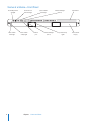
If the Xserve doesn’t start up and all 16 system activity lights flash continuously
A memory DIMM is bad.
If the system identifier light is flashing
The Xserve has detected a problem. To find out what’s wrong, open the Server Monitor
application on the Xserve or a remote administrator computer.
31