1
Operation (manual operation)
Cooking without Con|ctivity 2.0
(manual operation)
A condition of manual operation is that
Con|ctivity 2.0 is not activated.
However, manual operation is
temporarily possible even if Con|ctivity
2.0 is activated (see "Temporarily
leaving automatic operation").
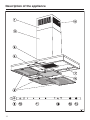
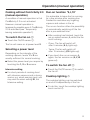
To switch the fan on s
^ Touch the On/Off sensor s.
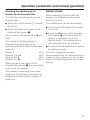
Run-on function "5¢15"
It is advisable to leave the fan running
for a few minutes after cooking has
finished to neutralise any lingering
vapours and odours in the air.
The run-on function offers the possibility
of automatically switching off the fan
after a pre-selected time.
^ After cooking has finished, touch the
run-on option sensor ¢ whilst the fan
is still running:
The fan will come on at power level 2.
– Once: The fan will switch off
after 5 minutes (5 ¢ lights up).
Selecting a power level
– Twice: The fan will switch off
after 15 minutes (¢15 lights up).
Depending on the intensity of the
cooking vapours, levels 1 to 3 are
usually sufficient for normal cooking.
^ Select the power level you require by
touching the 1, 2 or 3 sensors.
Intensive setting
^ For short periods of cooking food
with intensive vapours and a strong
aroma, e.g. when searing meat, you
may wish to select setting IS, the
Intensive setting.
^ If you touch the run-on sensor ¢
again, the fan remains on (5 ¢15
goes out).
To switch the fan off s
^ Touch the On/Off sensor s to switch
the fan off.
Cooktop lighting I
The cooktop lighting can be switched
on and off independently of the fan.
^ To do this, touch the cooktop lighting
touch control I.
21