1
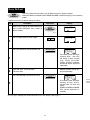
Sequence Cooking
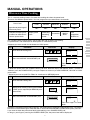
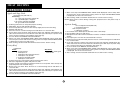
Your oven can be programmed up to 3 automatic cooking sequences, automatically switching from one variable
power setting to the next.
* Suppose you want to cook for 10 minutes on MEDIUM followed by 5 minutes on HIGH.
Step
Procedure
Pad Order
1000
12345678
Enter desired cooking time.
1
2
3
Display
Select desired power level by pressing the
POWER LEVEL pad (for MEDIUM press
three times).
MEDIUM
POWER
LEVEL
x3
500
For second sequence, enter desired time
for cooking time.
If power is not selected the oven will operate
at HIGH power.
Press the INSTANT COOK/START pad.
INSTANT COOK
START
1000
12345678
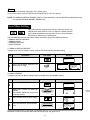
The timer begins to count
down to zero. When it
reaches zero,
4
500
the second sequence will
appear and the timer will
begin counting down to zero
again.
Instant Cook™
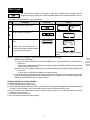
For your convenience Sharp’s Instant Cook allows you to easily cook for one minute on HIGH power.
Step
Procedure
Press the INSTANT COOK/START pad.
1
Pad Order
Display
INSTANT COOK
START
100
12345678
Within 3 minutes of closing the door.
The timer begins to count
down.
Press the INSTANT COOK/ START pad until desired time is displayed.
Each time the pad is pressed, the cooking time is increased by 1 minute.
8