1
Installation
2.
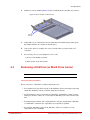
Secure the rails to the front and rear supports of the rack, using the screws and conical
washers included in the kit (Figure 14).
Figure 14. Attach Rails to Rack
Rear Support
Secure Rear Rail
Secure Front Rail
Adjust Rail Length
to Fit Your Rack
Front Support
3.
Ensure that the rails are level on both sides and that both rails are installed at the same
height.
CAUTION !
4.
The enclosure is heavy. To avoid personal injury, have someone help you
lift it.
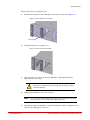
Slide the enclosure onto the rails, then push it all the way back until the rackmount ears
are flush against the vertical supports and the enclosure rests completely on the rails
(Figure 15).
Figure 15. Rackmount Ears
Rackmount Ear Rests
Against Vertical Support
96-00290-001 Rev. A1
DataDirect Networks StorageScaler 2460 User Guide | 12