1
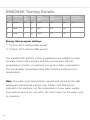
it is necessary to split the load into 2 batches for drying. See the
maximum washing and drying capacities for each programme on
page 17.
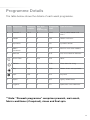
Start / Pause
Press the “Start / Pause” button to start the selected wash programme
running, the indicator light stays on. If this is pressed again while
the machine is running a programme the washer will pause and the
indicator light will flash.
Key lock
The lock function ensures that the programme will not be affected if
any buttons are pressed accidentally.
The lock function should be activated after the wash programme has
been selected together with any extra functions.
To activate the key lock, press and hold “Delay Timer” and “Extra
Rinse” buttons together for three seconds.
To deactivate the key lock, press and hold “Delay Timer” and “Extra
Rinse” buttons together again for three seconds.
Power cuts
• If there is a power cut, when the electricity comes back on the
washing programme will continue to run from where it stopped.
15