1
Getting Started
Setup
Installation of Battery in Handset
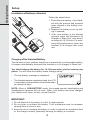
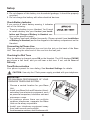
Follow the steps below:
1. Place the new battery in the Handset with the positive and negative
poles aligned in the battery compartment.
2. Replace the battery cover by sliding it upwards.
3. If the new battery is not already
charged, place the Handset in its
Charger or Base Unit, and allow it
to charge for 10-12 hours. For maximum daily performance, return the
handset to its charger after each
use.
Charging of the Handset Battery
The Handset of your cordless telephone is powered by a rechargeable battery.
It charges automatically whenever the Handset is in its charger or Base Unit.
You should charge the battery for 10-12 hours when you first receive your
phone. You will know the battery needs charging when:
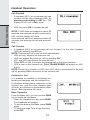
• The low battery message is displayed:
• The Handset seems completely dead, the LCD
is completely clear and does not activate when
you press the keys.
NOTE: When in LOW BATTERY mode, the keypad sounds, backlighting and
speakerphone features will not work. When your battery has been charged,
your features will return to their normal function.
IMPORTANT:
1. Do not dispose of the battery in a fire, it might explode.
2. Do not open or mutilate the battery. Toxic substances may be released,
causing harm to eyes or skin.
3. Exercise care in handling the battery in order to prevent an accidental short
of the charge contacts, potentially causing the battery to overheat.
8