1
HOW TO USE A PRESET WORKOUT
the speed setting for the current segment. At the
end of each segment, a series of tones will sound
and the next segment of the profile will begin to
flash. If a different speed and/or incline settings is
programmed for the next segment, the speed
and/or incline settings will flash in the display to
alert you. The treadmill will automatically adjust to
the new speed and/or incline settings.
1. Insert the key into the console.
See HOW TO TURN ON THE POWER on page 13.
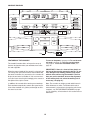
2. Select a preset workout.
To select a preset workout, press the Select
Workout button repeatedly.
The workout will continue in this way until the last
segment of the profile flashes in the display and
the last segment ends. The walking belt will then
slow to a stop.
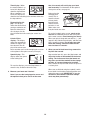
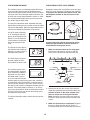
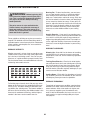
When a preset workout
is selected, the minimum speed setting of
the workout will appear
in the Distance/Incline
display, the maximum
speed setting will appear in the Calories/Pulse display, and the workout
time will appear in the Time display. In addition, a
profile of the speed settings of the workout will
scroll across the matrix.
If the speed or incline setting is too high or too low
at any time during the workout, you can manually
override the setting by pressing the Speed or
Incline buttons; however, when the next segment
of the workout begins, the treadmill will automatically adjust to the speed and incline settings for the next segment.
Note: The calorie goal is an estimate of the
number of calories that you will burn during the
workout. The actual number of calories that
you burn will depend on your weight. In addition, if you manually change the speed or incline of the treadmill during the workout, the
number of calories you burn will be affected.
3. Customize your workout if desired.
You can change the length of the workout, the minimum speed setting of the workout, and/or the
maximum speed setting of the workout before you
begin. To customize your workout, press the Set
Time, the Set Min Speed, and/or the Set Max
Speed increase and decrease buttons. The new
workout settings will appear in the displays.
To stop the workout at any time, press the Stop
button. To restart the workout, press the Start button or the Go button. The walking belt will begin to
move at 2 km/h. When the next segment of the
workout begins, the treadmill will automatically adjust to the speed and incline settings for the next
segment.
4. Start the walking belt.
Press the Start button or the Go button to start the
workout. A moment after you press the button, the
treadmill will automatically adjust to the first speed
and incline settings of the workout. Hold the
handrails and begin walking.
Each workout is divided into 30 one-minute segments, unless you have changed the length of the
program (see step 3). One speed setting and one
incline setting are programmed for each segment.
Note: The same speed setting and/or incline setting may be programmed for consecutive segments.
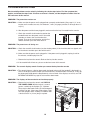
During the workout, the
profile will show your
progress. The flashing
segment of the profile
represents the current
segment of the workout.
The height of the flashing segment indicates
Current Segment
5. Monitor your progress with the matrix and the
displays.
See step 5 on pages 13 and 14.
6. Measure your heart rate if desired.
See step 6 on page 14.
7. When you are finished exercising, remove the
key from the console.
See step 7 on page 14.
15