1
SETTING UP
1/2. Power On/Off switch/AC Power In
Before switching on, make sure Mains boltage
matches your areas Mains boltage specification.
Replace fuse only with the fuse-type marked on
the rear-panel label.
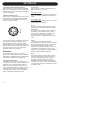
3. Balanced analog Input
Mudio Input is via a female cLR connector. The
Input is electronically balanced with following
connections. The connections are printed on
the rear for easy reference.
0
+
-
If your signal source is unbalanced, usually the
unused pin is connected to ground. This is
normally done inside the connecting cable.
Special adaptors Hnot suppliedI can be bought
that converts Slr input to single ended RCM type
input. For best result use only good Yuality
screened cables and connectors.
Switches
Tn the rear of the monitor you will find 5
switches for setting up the monitor for optimum
performance in different acoustic environments.
Each switch is eSplained in the following.
4. High Pass filter switch
This switch sets the lower cut-off freYuency of
the monitor. It is used to match the monitor to a
subwoofer. \ou can select between 605K or
805K c-over. Flat is used in case you do not
use a subwoofer to assist your monitors. When
used with a subwoofer it is recommended to
use either 605K or 805K filter, thus allowing a
higher undistorted soundpressure level.
6
5. Level trim
Vse this switch to match the sensitivity of the
BM 5M monitor to your source.
5igh-output source
If your source has a high Tutput, set the switch
to the -10 position to reduce the sensitivity by
10dB.
Low-output source
If your source has low output, set to e4 position
to gain 4dB more sensitivity.
6. LF
This switch controls the bass gain level using
shelf-type EQ. The level can be set to e2dB,
0dB or -2dB.
This filter is used to adjust for the proSimity of
boundaries, so if positioned close to wall or
corner, use the -2dB setting. If positioned far
from walls use the e2dB or 0 position,
depending on other eYuipment, and personal
taste.
7. MF
This switch sets a notch filter, used to
compensate for the acoustic effect of a console.
Such placement usually results in a response
peak in lower midrange. The MF switch
activates a bell shaped notch filter, which can
compensate. Vse either the -2 or the -4dB
setting. \ou may eSperiment finding the setting,
which provides the flattest response.
8. HF
This switch controls the Treble level and it is
used to match the high end of the monitor to
your other electronic eYuipment, and your
acoustical environment. Vse the setting
providing the preferred timbre. If the sound is
too brightg try to set to -1dB to reduce treble by
1dB. If too dull sound, use e1dB setting to raise
the treble by 1dB.