1
6: Fitting and Using the Vacuum Table
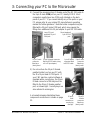
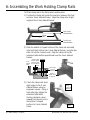
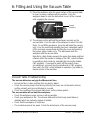
3) Place the workpiece onto the upper surface of the vacuum table,
to cover as many complete cells as possible. Push the
workpiece down to open the ball valves in each of the covered
cells, engaging the vacuum.
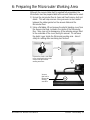
Sample
workpiece.
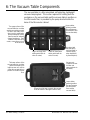
4) The vacuum suction will hold the workpiece securely on the
vacuum table. Push the side of the workpiece to see if it is held
firmly. Do not lift the workpiece, since this will break the vacuum
seal. Once the machining operation has been completed, switch
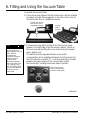
off the (running) vacuum pump by lifting the cover and pressing
the square, green, button once. This will release both the
workpiece and the vacuum table.
Note that a safety feature prevents the pump from being switched
off when either the spindle is rotating or the CNC control software
is operating in Auto mode (ie, automatically running the loaded
CNC program). If you need to switch off the pump in these
circumstances, you must stop the spindle and or CNC program,
then switch the CNC control software to operate in Jog mode (ie,
manual control of the machine).
Vacuum Table Troubleshooting.
The vacuum table does not grip the Microrouter floor:
• Ensure the floor is clean and free from any dust or debris.
• Check the vacuum pump is functioning correctly, the hoses are not blocked or broken
and the exhaust vents are not blocked or covered.
• Check the condition of the vacuum table lower surface rubber gasket.
The vacuum table will not hold the workpiece:
• Check the workpiece covers as many cells as possible.
• Check your workpiece is flat. The vacuum table will not hold rough sawn timber or
materials which are seriously cupped or twisted.
• Check that the workpiece is not porous.
• The created vacuum is too weak. Check the performance of the vacuum pump.
Microrouter CNC Machine User's Manual
Section 6 - Work Holding - 47