1
PROGRAMMING YOUR TARGET EURO 550
(ADDITIONAL SETTINGS)
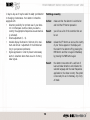
The buttons on top of your detector have the following
functions during programming:
PWR:
confirm and close (the changes are stored)
DRK:
previous
AUD:
selection button
CTY:
next
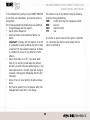
If the standard factory setting on your TARGET EURO 550
do not meet your requirements, you have the option to
change them.
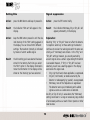
The following programming modifications are permitted:
• Change language (see also page 17)
• Add or remove frequencies
• Select Ka broad or narrow band (Ka Narrow / Ka
Swide)
Important! In Europe, with the exeption of the UK,
it is advisable to select Ka Narrow and then to make
a selection from the available frequencies. Ka Swide
is intended only for use of your detector in North
America.
• Switch Audio mute on or off (if you select audio
mute off, on receiving a radar signal the detector
will warn you with continuous audible signals. If you
select audio mute on, the alert signal will change to
a discreet clicking signal immediately after the first
indication).
• Choice of tone or voice reporting of radar and laser
alerts.
• Set the scroll speed (this is the speed at which text
messages follow each other in the display.
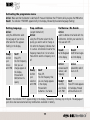
A tick after an option means that the option is switched
on; a horizontal line after an option means that the
option is switched off.
16
TM









![10780-90006 - 10780A Laser Receiver for 5501A [Prefix 1948] (Mar](http://vs1.manualzilla.com/store/data/006009643_1-6e2f54ebb2199ef6df634558ba4c1bb6-150x150.png)