1
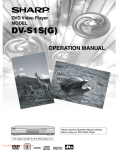
DVD Video Player
MODEL
DV-S1H
OPERATION MANUAL
Please read this Operation Manual carefully
before using your DVD Video Player.
The region number for this DVD player is 2.
2
NTSC/PAL
If you require any advice or assistance regarding your Sharp product, please visit our web-site
www.sharp.co.uk/customersupport. Customers without Internet access may telephone 08705 274277
during office hours(or (01) 6760648 if telephoning from Ireland).
Downloaded From Disc-Player.com Sharp Manuals
SAFETY INFORMATION
This equipment complies with the requirements of
Directives 89/336/EEC and 73/23/EEC as amended by
93/68/EEC.
WARNING:
TO REDUCE THE RISK OF FIRE OR ELECTRIC
SHOCK, DO NOT EXPOSE THIS EQUIPMENT TO
RAIN OR MOISTURE.
Dieses Gerät entspricht den Anforderungen der EGRichtlinien 89/336/EWG und 73/23/EWG mit Änderung
93/68/EWG.
TO REDUCE THE RISK OF FIRE OR ELECTRIC
SHOCK, AND ANNOYING INTERFERENCE, USE
THE RECOMMENDED ACCESSORIES ONLY.
Ce matériel répond aux exigences contenues dans les
directives 89/336/CEE et 73/23/CEE modifiées par la directive 93/68/CEE.
Laser Diode Properties
Material: GaAs
Wave length: DVD: 650nm
CD: 780nm
Emission Duration: Continuous
Laser output: Max. 0.8mW
Dit apparaat voldoet aan de eisen van de richtlijnen
89/336/EEG en 73/23/EEG, gewijzigd door 93/68/EEG.
Dette udstyr overholder kravene i direktiv nr. 89/336/EEC
og 73/23/EEC med tillæg nr. 93/68/EEC.
Power Cord Protection
Quest’ apparecchio è conforme ai requisiti delle direttive
89/336/EEC e 73/23/EEC, come emendata dalla direttiva
93/68/EEC.
Este equipamento obedece às exigências das directivas
89/336/CEE e 73/23/CEE, na sua versão corrigida pela
directiva 93/68/CEE.
Este aparato satisface las exigencias de las Directivas
89/336/CEE y 73/23/CEE, modificadas por medio de la
93/68/CEE.
Denna utrustning uppfyller kraven enligt riktlinjerna
89/336/EEC och 73/23/EEC så som kompletteras av
93/68/EEC.
To avoid any malfunctions of the Player, and to protect
against electric shock, fire or personal injury, please observe
the following.
• Hold the plug firmly when connecting or disconnecting the
AC power cord.
• Keep the AC power cord away from heating appliances.
• Never put any heavy object on the AC power cord.
• Do not attempt to repair or reconstruct the AC power cord
in any way.
•
•
•
This Player is classified as a CLASS 1 LASER product.
The CLASS 1 LASER PRODUCT label is located on the
rear cover.
This product contains a low power laser device. To ensure
continued safety do not remove any cover or attempt to
gain access to the inside of the product. Refer all servicing to qualified personnel.
CLASS 1
LASER PRODUCT
Dette produktet oppfyller betingelsene i direktivene
89/336/EEC og 73/23/EEC i endringen 93/68/EEC.
Tämä laite täyttää direktiivien 89/336/EEC ja 73/23/EEC
vaatimukset, joita on muutettu direktiivillä 93/68/EEC.
Note:
This Player can be used only where the power supply is
AC 220V-240V, 50/60Hz. It cannot be used elsewhere.
AUDIO OUT
DIGITAL
R
VIDEO OUT
L
VIDEO
AV (TV)
S-VIDEO
CAUTION:
USE OF CONTROLS OR ADJUSTMENTS OR
PERFORMANCE OF PROCEDURES OTHER
THAN THOSE SPECIFIED HEREIN MAY RESULT
IN HAZARDOUS RADIATION EXPOSURE.
AS THE LASER BEAM USED IN THIS PLAYER IS
HARMFUL TO THE EYES, DO NOT ATTEMPT TO
DISASSEMBLE THE CABINET. REFER SERVICING TO QUALIFIED PERSONNEL ONLY.
Downloaded From Disc-Player.com Sharp Manuals
CAUTION - VISIBLE LASER
RADIATION WHEN OPEN AND
INTERLOCK DEFEATED.
AVOID EXPOSURE TO BEAM.
SAFETY INFORMATION
Location and Handling
Service
•
Do not attempt to service this Player yourself. Please refer
any service to the nearest service centre approved by
SHARP.
•
•
•
•
Do not place your Player in enclosed spaces or do not
cover it to prevent excessive temperatures inside the
Player.
Do not place the Player in direct sunlight, or near heat
sources.
Keep the Player away from strong magnetic objects.
Do not place any object containing water or other liquids
on the Player. In the event that liquid should enter the
cabinet, unplug the Player immediately and contact the
retailer or service centre approved by SHARP immediately.
Do not remove the Player cabinet. Touching parts inside
the cabinet could result in electric shock and/ or damage
to the Player. For service and adjustment inside the cabinet, call a qualified dealer or service centre approved by
SHARP.
Nonuse Periods
When the Player is not being used, switch the Player to the
Standby mode.
When left unused for a long period of time, the Player should
be unplugged from the household AC outlet.
No Fingers or Other Objects Inside
Do not put any foreign object on the disc tray.
Stacking
Place the Player in a horizontal position, and do not place
anything heavy on it.
Condensation
Moisture may form on the pickup lens in the following conditions:
• immediately after a heater has been turned on.
• in a steamy or very humid room.
• when the Player is suddenly moved from a cold environment to a warm one.
If moisture forms inside this Player, it may not operate properly.
In this case, turn on the power and wait about one hour for
the moisture to evaporate.
Cleaning
Unplug your Player before cleaning. Use a damp cloth for
cleaning. Do not use cleaning fluids or aerosols which could
enter the Player and cause damage, fire, or electrical shock.
These substances may also deteriorate the finish of your
Player.
If there is Noise Interference on the TV While a
Broadcast is being Received
Depending on the reception condition of the TV, interference
may appear on the TV monitor while you watch a TV broadcast and the Player is left on. This is not a malfunction of the
Player or the TV. To watch a TV broadcast, turn off the
Player.
Downloaded From Disc-Player.com Sharp Manuals
Copyright
Recording and playback of any material may require consent. Please refer particularly to the provisions of the copyright Act 1956, the Dramatic and Musical Performers
Protection Act 1958, the Performers Protection Acts 1963
and 1972 and to any subsequent statutory enactments and
orders.
Copy Protection
This Player supports Macrovision copy protection. On DVDs
that include a copy protection code, if the contents of the
DVD are copied using a VCR, the copy protection code prevents the videotape copy from playing normally.
Apparatus Claims of U.S.Patent Nos. 4,631,603,
4,577,216, 4,819,098 and 4,907,093 licensed for limited
viewing uses only.
This product incorporates copyright protection technology
that is protected by method claims of certain U.S. patents
and other intellectual property rights owned by Macrovision
Corporation and other rights owners. Use of this copyright
protection technology must be authorized by Macrovision
Corporation, and is intended for home and other limited
viewing uses only unless otherwise authorized by
Macrovision Corporation. Reverse engineering or disassembly is prohibited.
Recommended Measures for Optimum Picture
Excellence
The Player is a precision device that is constructed using
extremely accurate technology.
Soiling or friction affecting the pickup lens or disc drive can
impair the image quality. At the worst, neither video nor audio
will be played back. To obtain optimum picture quality, the
Player should be checked (cleaning and replacement of
some parts) every 1,000 hours. Note that this period varies
depending on the environment (temperature, humidity, dust,
etc.) in which the Player is used. Contact your authorized
Sharp supplier for details.
Do not attempt to clean the pickup lens yourself.
PRECAUTIONS
SUPPLIED ACCESSORIES
• Remote control
• Two R6 (AA) batteries
• Operation Manual
• Quick Start Guide
SYMBOLS USED IN THIS MANUAL
The following symbols appear below in some headings and
notes in this manual, with the following meanings!
DVD
: Description refers to playback of DVD video discs.
CD
PLAYABLE DISCS
This DVD player conforms to the PAL colour system. Also
you can play discs recorded with the NTSC system via a PAL
system TV set.
•Some discs include region codes as shown below.
2
•The number inside the symbol refers to a region of the
world, and a disc encoded in a specific region format can
only be played back on DVD player with the same region
code.
: Description refers to playback of audio CDs.
MP3
For Customer Use:
: Description refers to playback of MP3 discs.
Read carefully the information located at the bottom of your
DVD player and enter below the Serial No.Retain this information for future reference.
Model No. DVD player
Serial No. __________________________
CONNECTION TO POWER
SPECIAL NOTE FOR USERS IN THE U.K.
The mains lead of this product is fitted with a non-rewireable (moulded) plug incorporating a 3A fuse.
Should the fuse need to be replaced, a BSI or ASTA approved BS 1362 fuse marked or and of
the same rating as above, which is also indicated on the pin face of the plug, must be used.
Always refit the fuse cover after replacing the fuse. Never use the plug without the fuse cover fitted.
In the unlikely event of the socket outlet in your home not being compatible with the plug supplied,
cut-off the mains plug and fit an appropriate type.
DANGER: The fuse from the cut-off plug should be removed and the cut-off plug destroyed
immediately and disposed of in a safe manner.
Under no circumstances should the cut-off plug be inserted elsewhere into a 13A socket
outlet, as a serious electric shock may occur.
To fit an appropriate plug to the mains lead, follow the instructions below:
IMPORTANT: The wires in the mains lead are coloured in accordance with the following code:
Blue: Neutral
Brown: Live
As the colours of the wires in the mains lead of this product may not correspond with the coloured
markings identifying the terminals in your plug, proceed as follows:
-The wire which is coloured blue must be connected to the plug terminal which is marked N or
coloured black.
-The wire which is coloured brown must be connected to the plug terminal which is marked L or
coloured red.
Ensure that neither the brown nor the blue wire is connected to the earth terminal in your three-pin
plug.
Before replacing the plug cover make sure that:
-If the new fitted plug contains a fuse, its value is the same as that removed from the cut-off plug.
-The cord grip is clamped over the sheath of the mains lead and not simply over the lead wires.
IF YOU HAVE ANY DOUBT, CONSULT A QUALIFIED ELECTRICIAN.
Note: A 5A fuse is also acceptable for a non-rewireable (moulded) plug which is used for this product.
Downloaded From Disc-Player.com Sharp Manuals
TABLE OF CONTENTS
SAFETY INFORMATION ....................................2
PRECAUTIONS...................................................4
SUPPLIED ACCESSORIES .....................................4
SYMBOLS USED IN THIS MANUAL .......................4
PLAYABLE DISCS ....................................................4
FUNCTIONAL OVERVIEW .................................6
FRONT PANEL .........................................................6
REAR VIEW..............................................................6
Display Message ......................................................6
REMOTE CONTROL................................................7
Loading the Batteries ...............................................7
SETTING UP YOUR DVD PLAYER ....................8
Connecting a TV with AV OUT SCART socket ........8
If your TV has two SCART sockets ..........................8
Connecting a TV Equipped with S-VIDEO Input or
VIDEO/AUDIO Input Jacks .......................................9
Connecting to Audio Equipment ...............................9
Playing Dolby Digital (5.1 channel), DTS or
MPEG audio ...........................................................10
CONNECTIONS - TV, VCR, DIGITAL SET TOP BOX
- AND DVD PLAYER .........................................11
DVD OPERATION .............................................12
Basic Playback .......................................................12
General Features....................................................12
Disc menus.............................................................12
Title Menu...............................................................12
Pause .....................................................................12
Step by Step playback ...........................................13
Resume ..................................................................13
Fast Forward / Reverse Search..............................13
Slow Motion ............................................................13
Zoom ......................................................................13
Track .......................................................................13
Title/chapter ............................................................14
Time Search ...........................................................14
Downloaded From Disc-Player.com Sharp Manuals
Repeat ....................................................................14
REPEAT TITLE/CHAPTER................................14
REPEAT TRACK................................................14
REPEAT A-B......................................................14
Programme .............................................................14
Random Playback...................................................14
MP3 Playback.........................................................15
On Screen Information ...........................................15
Track Selection .......................................................15
Random Playback .................................................15
Programmed ...........................................................15
Audio Language .....................................................15
Stereo Sound Mode ...............................................15
Subtitle Language...................................................16
Camera Angle.........................................................16
Changing the On-Screen Display ...........................16
Parental Control......................................................16
Parental Level .........................................................17
IF YOU FORGET THE PASSWORD .................16
Marker Setup Screen .............................................17
DVD SETUP ......................................................18
Audio Setting ..........................................................18
Black Level Setting .................................................18
Display Setting........................................................18
Language Setting ...................................................19
TROUBLESHOOTING ......................................20
SPECIFICATIONS .............................................21
MAINTENANCE ................................................21
TERMS OF GUARANTEE ................................22
FUNCTIONAL OVERVIEW
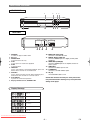
FRONT PANEL
2
3
5
4
OPEN/CLOSE
PLAY
STOP
OPERATE
STILL/PAUSE
STILL/
PAUSE
STANDBY
SKIP
REV
9
1
8 7
FWD
6
REAR VIEW
AUDIO OUT
DIGITAL
10
11
R
12
VIDEO OUT
L
VIDEO
13
1. OPERATE
to switch the player to ON or OFF
2. Disc tray
3. OPEN/CLOSE
to open/close the disc tray
4. PLAY
to start, pause or resume disc playback
5. STOP
to stop playback
6. FWD/SKIP
goes to next chapter or track during playback; press and
hold for three seconds for a forward search
7. SKIP/REV
goes to previous chapter or track during playback; press
and hold for three seconds for a reverse search
8. STILL/PAUSE
to pause the current disk operation
9. Display, Remote Sensor, STANDBY LED
Display Message
Power on
No disc inserted
Tray open
Tray closed
Loading the Disc
Power off
Downloaded From Disc-Player.com Sharp Manuals
AV (TV)
S-VIDEO
14
15
10. MAINS (AC Power Cord)
connect to a standard AC outlet
11. DIGITAL (Digital audio out)
connect to AUDIO inputs of a digital (coaxial) audio
equipment
12. AUDIO OUT (Left/Right)
connect to AUDIO inputs of an amplifier, receiver or
stereo system
13. VIDEO OUT
connect to the Video Input of a TV.
14. S-VIDEO Out
connect to a TV with S-Video inputs
15. AV (TV)
connect SCART cable to a TV
Caution: Do not touch the inner pins of the jacks on the
rear panel. Electrostatic discharge may cause permanent
damage to the player.
FUNCTIONAL OVERVIEW
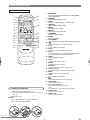
REMOTE CONTROL
1
2
3
4
5
6
7
8
9
10
11
12
13
14
25
OPEN/
OPERATE ON SCREEN DIRECT SKIP CLOSE
24
AUDIO
1
2
3
4
5
6
7
8
9
SUB TITLE
ANGLE
REPEAT
CLEAR
A-B
STILL/PAUSE
0
C
+10
SKIP
PLAY
REV
FWD
STOP
SETUP
23
TITLE
MENU
MODE
ENTER
ZOOM
15
RETURN
22
21
20
19
18
17
16
Loading the Batteries
1. Open the battery compartment cover.
2. Insert two R6 (AA) batteries, with each one oriented
correctly.
3. Close the cover.
NOTES
• Do not mix alkaline and manganese batteries.
• Do not mix old and new batteries.
Downloaded From Disc-Player.com Sharp Manuals
1. ON SCREEN
to access or remove the display screen during DVD or
Audio CD playback
2. OPERATE
switch DVD player ON or OFF
3. AUDIO
to choose audio languages or sound modes
4. SUBTITLE
subtitle language DVD selector
5. ANGLE
select DVD camera angle
6. REPEAT
repeat chapter, track, title, disc
7. A-B REPEAT
repeat a specific segment
8. CLEAR
to reset the setting
9. STILL/PAUSE
pause playback temporarily / frame-by-frame playback
10. h
to view DVD picture in fast reverse motion
11. PLAY
to start a DVD disc playback
12. SETUP
to access or remove the DVD setup menu
13. MODE
to set up programmed or random playback (Audio CD)
to set the black level during DVD playback.
14. ZOOM
enlarge DVD video image
15. TITLE
to display title menu of a disc
16. ENTER
acknowledge menu selection
17. RETURN
to return previous or remove setup menu
18. Arrow(L K B s)
(left/right/up/down) select an item in the menu
19. MENU
to display the menu of the DVD disc
20. STOP
to stop a DVD disc playback
21. g
to view DVD picture in fast forward motion
22. SKIP H,G
to skip chapter/tracks
23. 0-9 numerical key pad
select numbered items in a menu
+10
use this button to enter number 10 and above
24. OPEN/CLOSE
to open/close the disc tray
25. DIRECT SKIP
to locate a desired point
SETTING UP YOUR DVD PLAYER
CAUTION:
•
•
•
•
Be sure to turn off the Player and equipment to be connected before connecting.
Read through the operation manual for the equipment to be connected.
Be sure that the colours of the jacks and plugs match up when using a VIDEO/AUDIO cable.
Be sure to keep the Player connection cables separate from the TV antenna cable when you install the Player, because it
may cause electrical interference when you are watching television programs.
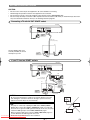
Connecting a TV with AV OUT SCART socket
DVD Player
AUDIO OUT
DIGITAL
R
VIDEO OUT
L
AV (TV)
S-VIDEO
VIDEO
To AV OUT
SCART
SCART Cable
(commercially available)
TV
Use the SCART cable (commercially available) to connect
the Player to your TV.
To SCART
input
If your TV has two SCART sockets
DVD Player
VIDEO OUT
AUDIO OUT
DIGITAL
R
VIDEO
L
AV (TV)
S-VIDEO
To AV OUT
SCART
VCR
SCART OUTPUT
SCART Cable
(commercially available)
TV
To SCART
output
SCART Cable
(commercially available)
To SCART
input
To SCART
input
CAUTION:
•
Do not connect the Player to a VCR. If you view the Picture on your TV
after making the connections shown on the right, a picture noise may
appear. Connect the Player to your TV directly.
DVD
Player
VCR
NOTE:
•
The player is continuously outputting the RGB and the VIDEO (COMPOSEITE) signal. Select either (RGB or COMPOSITE) signal on your TV side.
Some TV can recognize the RGB signal automatically. In this case, the player
outputs the RGB signal prior to the VIDEO (COMPOSITE) signal.
• When you play the VCR, please select the VIDEO (COMPOSITE) signal on
your TV. Otherwise the VCR image will not be seen.
Please refer toSharp
yourManuals
TV’s manual for more infomation.
Downloaded From Disc-Player.com
TV
SETTING UP YOUR DVD PLAYER
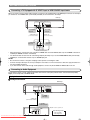
Connecting a TV Equipped with S-VIDEO Input or VIDEO/AUDIO Input Jacks
When you want to achieve a better video image by connecting a TV equipped with an S-VIDEO input connector to the Player,
you should use an S-VIDEO cable (commercially available) to connect the TV to the Player.
DVD Player
VIDEO OUT
AUDIO OUT
DIGITAL
R
VIDEO
L
(Red)
AV (TV)
S-VIDEO
(Yellow)
(White)
To VIDEO/AUDIO
OUT jacks
To S-VIDEO
OUT jack
VIDEO/AUDIO cable
(commercially available)
S-VIDEO cable
(commercially available)
(Red)
(White)
(Yellow)
To S-VIDEO
input jack
To VIDEO/AUDIO
input jacks
L
R
AUDIO
IN
VIDEO
IN
S-VIDEO
INPUT
TV (with external input jacks)
•
•
When the Player is connected to a TV using both a VIDEO cable and an S-VIDEO cable, only the S-VIDEO connection is
enabled (the VIDEO connection is disabled).
You will not be able to hear all of the sound being output by the Player if you use the VIDEO/AUDIO cable (commercially
available) to a monaural TV that has only one AUDIO input jack.
NOTE:
•
•
•
Be sure that the colours of the jacks and plugs match up when connecting the cable.
Connect the Player directly to the TV. If you attempt to view video on a TV connected via a VCR, the copy protection function will scramble the picture.
If you want to listen to the audio through audio equipment, connect only the S-VIDEO or VIDEO cable to the TV.
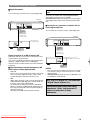
Connecting to Audio Equipment
Connecting the Player to audio equipment provides normal stereo sound plus powerful stereo sound enhanced by Dolby
Digital (5.1 channel), DTS, and MPEG Audio.
Playing 2 channel audio
C Analogue Connection
DVD Player
AUDIO OUT
DIGITAL
R
VIDEO OUT
L
(Red)
VIDEO
AV (TV)
S-VIDEO
(White)
To AUDIO
OUT jacks
AUDIO cable
(commercially available)
To amplifier
audio input jacks
Amplifier of stereo system, etc.
ANALOG INPUT
(White)
L
R
(Red)
Downloaded From Disc-Player.com Sharp Manuals
Jack and Plug Colours
Audio Left: White
Audio Right: Red
SETTING UP YOUR DVD PLAYER
C Digital Connection
You can make this connection using a coaxial digital cable.
DVD Player
AUDIO OUT
DIGITAL
R
VIDEO OUT
L
VIDEO
Playing Dolby Digital (5.1 channel), DTS or MPEG
audio
Connecting an amplifier with a Dolby Digital/DTS/MPEG
Audio digital surround processor or a Dolby
Digital/DTS/MPEG Audio surround processor to your Player’s
coaxial digital jack provides richer and more powerful audio
play.
AV (TV)
C Connection to a processor or amplifier with an
coaxial digital input jack
S-VIDEO
You can make this connection using a coaxial digital cable.
To COAXIAL
DIGITAL OUT
jack
Coaxial digital cable
(commercially available)
DVD Player
VIDEO OUT
AUDIO OUT
AV (TV)
Audio equipment with
coaxial digital input jack
DIGITAL IN
DIGITAL
R
L
VIDEO
S-VIDEO
COAXIAL
To COAXIAL
DIGITAL OUT
jack
To coaxial digital
input jack
Coaxial digital cable
(commercially available)
Digital Connection to an MD to Record a CD
Some Audio CDs have a short silent section between musical tracks. When sound from discs
such as these is digitally recorded by connecting the Player
directly to a digital recorder (such as an MD player),
the music may be recorded continuously and track numbers
may be lost.
C Digital Connection to Audio Equipment or MD
Player without a Dolby Digital Decoder
•
•
Audio CD
Play the disc as you normally would, with the audio mode
set to “L+R”. With a digital connection, audio of a disc
recorded with DTS sounds abnormal in this case.
DVD
With a digital connection, audio cannot be produced from
a DVD recorded in Dolby digital (5.1 channel), Dolby surround (Pro Logic), DTS or MPEG Audio.
You should use an analogue connection to play Dolby
Digital (5.1 channel) and MPEG Audio. (Dolby Surround
(Pro Logic) and DTS audio cannot be produced with an
analogue connection).
Discs with linear PCM audio should play normally.
Downloaded From Disc-Player.com Sharp Manuals
Dolby Digital (5.1 ch)/DTS/
MPEG Audio processor or amplifier
DIGITAL IN
COAXIAL
To coaxial digital
input jack
NOTES:
•
•
This connection is not possible if the processor or amplifier to which you want to connect does not have a coaxial
digital input jack.
ANALOG AUDIO OUT and AV (TV) of the DVD player are
not available on the DTS audio.
“DTS” and “DTS Digital Out” are trademarks
of Digital Theater Systems, Inc.
Manufactured under license from Dolby
Laboratories. “Dolby” and the double-D
symbol are trademarks of Dolby
Laboratories.
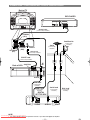
CONNECTIONS - TV, VCR, DIGITAL SET TOP BOX - AND DVD PLAYER
Back of TV
DVD PLAYER
AUDIO OUT
DIGITAL
R
VIDEO OUT
L
VIDEO
AV (TV)
S-VIDEO
SCART Cable
(commercially available)
AV/TERMINAL
(AV-2)
Satellite dish
(commercially
available)
Aerial
AV/TERMINAL
(AV-1)
Euro-SCART
(RGB)
(commercially
available)
Aerial IN
Aerial Lead
(commercially available)
SCART Lead
(commercially available)
Back of VCR
RF
OUT
Audio/Video
Aerial IN
Aerial Lead
(commercially
available)
Aerial Lead
SCART Lead
(commercially
available)
(commercially
available)
DIGITAL
SET TOP BOX
RF OUT
TV SCART
AERIAL IN
DISH IN
NOTE
Downloaded From
Disc-Player.com
Sharprefer
Manuals
• For
further details,
to the operation manual of your VCR and Digital Set Top Box.
Dish Lead
(commercially
available)
DVD OPERATION
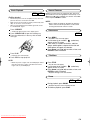
Basic Playback
General Features
DVD
CD
Getting started
•
•
•
Turn on the power of the TV, amplifier and any other components which are connected to the DVD.
Make sure the TV and audio received (commercially available) are set to the correct channel.
When you play NTSC disk, the NTSC signal will convert
to a modified PAL signal.
1 Press OPERATE.
• “P-ON” will appear briefly on the display panel.
2 Press OPEN/CLOSE to open disc loading tray.
3 Place the chosen disc in the tray, with the label
facing up.
DVDs may contain menus to navigate the disc and access
special features. Press the appropriate numerical key or use
Arrow ( L / K / B / s ) to highlight your selection in the DVD
menu and press ENTER to confirm.
NOTE:
• Unless stated, all operations described are based on
remote control use. Some operations can be carried
out using the menu bar on the TV screen.
Disc menus
DVD
1 Press MENU.
• The DVD’s main menu will appear.
2 If a title menu is no available,
symbol may
appear on the TV screen.
3 If disc menu is available on the disc, audio language, subtitle options, chapters for the title and
other options will appear for selection.
4 Press Arrow ( L / K / B / s ) to select an item, and
ENTER to confirm selection.
4 Press PLAY.
• Playback starts automatically.
5 Press STOP to stop playback.
Title Menu
DVD
NOTE:
• DVDs may have a region code. Your DVD player will not
play discs that have a region code different from the
region code of your DVD player.
1 Press TITLE.
• The title menu will appear.
2 If a title menu is no available,
symbol may
appear on the TV screen.
3 Press Arrow ( L / K / B / s ) to select an item, and
ENTER to confirm selection.
• Playback will begin at the selected Title.
Pause
DVD
1 During playback, press PAUSE.
• Playback will pause and sound will be muted.
2 To continue playback, press PLAY.
Downloaded From Disc-Player.com Sharp Manuals
CD
DVD OPERATION
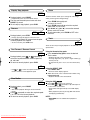
Step by Step playback
Zoom
DVD
1 During playback, press PAUSE.
• Playback will pause and sound will be muted.
2 The disc goes forward by one frame each time
PAUSE is pressed.
3 To exit step by step playback, press PLAY.
DVD
The Zoom function allows you to enlarge the video image
and to pan through the enlarged image.
1 Press ZOOM during playback.
• Playback will continue.
2 Press ZOOM repeatedly to select the required
zoom factor: x2, x4 or OFF.
Resume
3 Use Arrow ( L / K / B / s ) to move the zoomed
picture across the screen.
DVD
CD
1 During playback, press STOP.
• Resume message will appear on the TV screen.
2 Press PLAY, playback will resume from the point
4 To exit zoom mode, press ZOOM to OFF in the
menu bar.
Track
at which playback was stopped.
CD
• To cancel resume, press STOP twice.
There are three ways to begin playback on an Audio CD at a
specific Track.
Fast Forward / Reverse Search
DVD
1 During playback, press g or h repeatedly to
select the required forward or reverse speed: x2,
x8, x30, x60.
2 To return to normal playback, press PLAY.
Using the Numerical key pads
1 Press numerical key pad to enter the desired
Track number.
• Playback will start at the selected track.
• For single digit tracks (1-9), press a single number (eg.
track 3, press 3).
• To play track 26, press +10, 2, 6 on the numerical key
pad.
CD
Using the DIRECT SKIP
• Use g or h to select the required forward or
reverse at x16 the normal playback speed.
1 Press DIRECT SKIP.
• The track search display appears.
2 Within 30 seconds, select a desired track number using
numerical key pad.
• Playback will start at the selected track.
Slow Motion
Using the SKIP H G
DVD
1 During playback, press PAUSE.
2 Press g.
• Slow motion playback will begin and sound will be
muted.
3 Press g repeatedly to select the required speed:
1 Press SKIP G to move to the next track.
2 Press SKIP G or H repeatedly to skip subsequent or
to return of the current tracks.
• Track number will appear briefly on the DVD display
panel.
• When playback is paused, pressing SKIP will start the
track playing automatically.
1/16, 1/8, 1/2 of the normal playback.
4 To return to normal playback, press PLAY.
NOTE:
• SKIP H G are not available when playback is
stopped.
Downloaded From Disc-Player.com Sharp Manuals
DVD OPERATION
Title/chapter
Programme
DVD
1 Press DIRECT SKIP to display the Title/Chapter
Search on the TV screen.
2 Enter the desired title/chapter number using
CD
You may determine the order in which tracks will play.
1 In stop mode, press MODE.
• The programme screen will appear.
numerical key pad.
PROGRAM
TIME
0:00:00
1/1
--
Time Search
DVD
CD
1 During playback, press DIRECT SKIP twice to dis-
play the Time Search on the TV screen.
2 Within 30 seconds, enter a desired disc time using
numerical key pad.
START: PLAY
RANDOM: MODE
DELETE: CLEAR
EXIT: RETURN
2 Enter the desired track numbers using numerical
key pad.
3 Press PLAY to play the programmed tracks.
• Playback will start at the specified time.
3 Press CLEAR to erase the incorrect input.
Random Playback
Repeat
• REPEAT are available only during playback.
CD
REPEAT TITLE/CHAPTER
DVD
•
•
•
To repeat the current chapter, press REPEAT.
REPEAT CHAPTER appears on the TV screen.
To repeat the current title, press REPEAT a second time.
REPEAT TITLE appears on the TV screen.
To exit Repeat mode, press REPEAT a third time.
REPEAT OFF appears on the TV screen.
REPEAT TRACK
CD
•
•
•
To repeat the current track, press REPEAT.
REPEAT TRACK appears on the TV screen.
To repeat the entire disc, press REPEAT a second time.
REPEAT ALL appears on the TV screen.
To exit Repeat mode, press REPEAT a third time.
REPEAT OFF appears on the TV screen.
REPEAT A-B
DVD
CD
1 Press Repeat A-B at your chosen starting point.
REPEAT A- appears briefly on the TV screen, and the TV
screen.
2 Press Repeat A-B again at your chosen end point.
• REPEAT A-B appears briefly on the TV screen, and the
repeat sequence begins.
3 To exit the sequence, press Repeat A-B.
•
Downloaded From Disc-Player.com Sharp Manuals
This shuffles the playing order of tracks instead of playback
in the sequence.
1 In stop mode, press MODE twice.
• RANDOM screen appears.
2 Press PLAY to start random playback.
DVD OPERATION
MP3 Playback
Random Playback
MP3
When a CD with MP3 files in the DVD player, the MP3 menu
will appear on the TV screen.
1 In stop mode, press K or L to select the desired
MP3
1 Press MODE twice during playback is stopped.
2 Press PLAY to play the tracks in random order.
Album or Track.
• To play a choosen track, press PLAY or ENTER.
• To play a choosen album, press K or L to select the
desired track,then press PLAY or ENTER.
• Choose FIRST PLAY to start playback from the beginning of the listed tracks.
• Press TITLE to return to the first item.
2 Press STOP to stop playback.
NOTE:
•
Folders are known as Albums; files are known as Tracks.
Programmed
MP3
1 Press MODE during playback is stopped.
2 Press PLAY to play the tracks in random order.
3 Press K or L to select a track, then press ENTER.
• Press CLEAR to erase the incorrect input.
PROGRAM - ALBUM01
ON SCREEN Information
+ALBUM11
+ALBUM12
TRACK11
TRACK12
TRACK13
1/11
MP3
You can check the MP3 files during playback.
1 Press ON SCREEN.
• The playing track will be highlighted.
2 Press ON SCREEN again to show the elapsed
playing time appear at the top of the display.
•
will be displayed when the repeat play has been
selected.
T - indicates Track repeat
A - indicates Album (folder) repeat
D - indicates Disc repeat
3 Press ON SCREEN again to exit.
Track Selection
MP3
1 Press DIRECT SKIP during playback.
• The SEARCH menu will appear.
• The current track will be highlighted.
START: PLAY
RANDOM: MODE
TRACK11
1/1
DELETE: CLEAR
EXIT: RETURN
4 Press PLAY to start programmed playback.
Audio Language
DVD
The DVD player allows you to select a language during DVD
disc (if multi language available) playback.
1 Press AUDIO during playback.
2 Press AUDIO repeatedly to select your desired
language.
NOTE:
• When a DVD disc with MPEG 5.1CH Audio is
played back, MPEG 6.0CH might appear instead of
MPEG 5.1CH on the screen.
2 Press K or L to select a desired track.
Stereo Sound Mode
ALBUM NAME
CD
+ALBUM01
TRACK11
TRACK12
TRACK13
TRACK14
SELECT:
RETURN:
/
1 Press AUDIO repeatedly during playback to select
1/15
ENTER:
START: PLAY
3 Press PLAY to start playing
4 Press RETURN or DIRECT SKIP to exit.
Downloaded From Disc-Player.com Sharp Manuals
between AUDIO STEREO, AUDIO L-CH or AUDIO
R-CH.
AUDIO STEREO - both right and left channels are active
(stereo)
AUDIO L-CH - only left channel is active
AUDIO R-CH - only right channel is active
DVD OPERATION
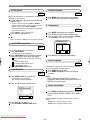
Subtitle Language
Parental Control
DVD
The DVD player allows you to select a language for subtitle
during DVD disc (if available) playback.
1 Press SUBTITLE during playback.
2 Press SUBTITLE repeatedly to select your desired
subtitle language.
• The available languages appears on the right of the
subtitle display.
DVD
Password
Parental Control limits the disc viewing that exceed your settings with a password or playback will stop.
The ‘Parental Control’ feature allows you to prevent discs
from being played by your children or to have certain discs
played with alternative scenes.
1 Press SETUP during playback is stopped.
3 To turn off subtitles, press s / B or SUBTITLE
SET-UP
repeated until OFF appears.
1.LANGUAGE
2.DISPLAY
3.AUDIO
4.PARENTAL
SELECT:
EXIT:
/
SETUP
SET:
ENTER
CANCEL: RETURN
Camera Angle
DVD
2 Press K or L to select PARENTAL, then press
ENTER.
Some DVD discs contain scenes which have been shot
simultaneously from various angles.
SET-UP
PARENTAL CONTROLS
PASSWORD
1 Press ANGLE during playback.
2 Press ANGLE repeatedly to select your desired
Please enter a 4-digit password.
----
different angle appears on the right of the angle
display.
EXIT: SETUP
Changing the On-Screen Display
DVD
You can check information about the current disc by pressing
the ON SCREEN on the remote control.
1 Press ON SCREEN during playback to show cur-
CANCEL: RETURN
3 Enter your four-digit password.
• If for the first time, enter any four digits, then press
ENTER.
• To change the password, press K or L to select
CHANGE, then press ENTER. Enter the four-digit password, then press ENTER.
4 Press SETUP to exit.
rent Chapter.
• The elapsed and remaining playing time of the current
chapter will be displayed.
2 Press ON SCREEN again to show current Title.
• The elapsed and remaining playing time of the current
title will be displayed.
3 Press ON SCREEN the third time.
• The BIT RATE, layer number (if available) and the current repeat setting will be displayed.
4 Press ON SCREEN the fourth time to remove the
display.
CD
1 Press ON SCREEN during playback, the current
Track will be displayed on the TV screen.
• The elapsed and remaining playing time of the current
title will be displayed.
2 Press ON SCREEN again to show current Total
Track.
• The elapsed and remaining playing time of the current
total track will be displayed.
3 Press ON SCREEN the third time to remove the
Downloaded From Disc-Player.com
Sharp Manuals
display.
IF YOU FORGET THE PASSWORD
1 Press SETUP during playback is stopped.
2 Press K or L to select PARENTAL, then press
ENTER.
3 Enter the 4, 7, 3, 7.
• Password will be cleared and parental level will be set
ALL.
4 Press SETUP to exit.
DVD OPERATION
Parental Level
Marker Setup Screen
DVD
Parental Level allows you to set the rating level of your DVD
discs. Playback will stop if the disc’s ratings exceed the level
you set.
1 Press SETUP during playback is stopped.
2 Press K or L to select PARENTAL, then press
ENTER.
3 Enter your four-digit password.
4 Press K or L to select PARENTAL LEVEL, then
press ENTER.
SET-UP
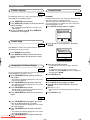
PARENTAL CONTROLS
1.PARENTAL LEVEL
2.CHANGE
ALL
DVD
CD
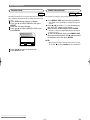
Use markers to memorise your favourite places on a disc.
1 Press DIRECT SKIP three times during playback.
• The display screen and Markers will appear on the TV
screen.
2 Press s or B to select 1, 2, 3, 4 or 5 and ensure
that “NOT SET” appears in the display.
3 When reaches the desired point, press ENTER.
• The Title or Track and elapsed playing time will appear
in the TV screen.
4 To return to the Marker later, press DIRECT SKIP
three times during playback and s or B to choose
the desired marker, then press ENTER.
NOTE:
SELECT:
EXIT:
/
SETUP
SET:
ENTER
CANCEL: RETURN
5 Press K or L to select the desired level.
6 Press SETUP to exit.
Downloaded From Disc-Player.com Sharp Manuals
• Opening the disc tray or turning off the power or select
AC at step 2 and press ENTER will erase all Markers.
DVD SETUP
Audio Setting
Choose the appropriate Audio settings for your equipment as
it only affect during the playback of DVD discs of the DVD
player.
NOTE:
•
These audio settings are effective only when using a digital connection. Although you may change the settings from
the on-screen display, these audio settings do not actually
affect the sound when using an analogue connection.
1 Press SETUP during playback is stopped.
2 Press K or L to select AUDIO, then press ENTER.
3 Press K or L to choose the below items and press
ENTER repeatedly to turn the setting ON or OFF.
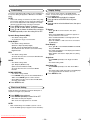
Dynamic Range Control (DRC):
• The default setting is OFF.
• To compress the range of sound volume.
Dolby Digital :
• The default setting is Bitstream.
(Bitstream : Output by Dolby Digital)
(DPCM : Convert the Dolby Digital to D-PCM)
Set to Bitstream when the unit is connected to Dolby
Digital Decoder.
DTS:
• The default setting is OFF.
Set to On when the unit is connected to DTS Decoder.
(On: Output by DTS)
MPEG:
• The default setting is OFF.
(On : Output by MPEG sound)
(OFF: Convert the MPEG to PCM)
Set to On when the unit is connected to MPEG
Decoder.
DOWN SAMPLING:
• The default setting is AUTO.
• Press ENTER, then K or L to select AUTO, 48kHz or
96kHz. Press ENTER again to confirm selection.
• Select 96kHz if the disc was recorded in PCM 96kHz,
otherwise select 48kHz.
4 Press SETUP to exit.
Black Level Setting
Adjust the Black Level Settings to make the black parts of
the picture as bright as you preferred.
1 Press MODE during playback.
2 Press ENTER repeatedly to select ON or OFF.
ON: makes the dark parts brighter.
OFF: shows the original picture as recorded.
NOTE:
•
Black Level Setting is not available if your TV is set to
receive the RGB signal (see page 8 for more infomation).
Downloaded From Disc-Player.com Sharp Manuals
Display Setting
You can change certain aspects of the DVD’s display
screens, on-screen messages and the display panel on the
front of the DVD player.
1 Press SETUP during playback is stopped.
2 Press K or L to select DISPLAY, then press
ENTER.
3 Press K or L to select the below items, then press
ENTER.
TV Aspect:
• Press K or L for an item selection, then press
ENTER.
• Select 4:3 LETTER BOX for a black bars appears on
the top and bottom of the screen.
• Select 4:3 PAN & SCAN for a full height picture with
both sides trimmed.
• Select 16:9 WIDE if a wide-screen TV is connected to
the DVD player.
Panel Display:
• Press K or L to select BRIGHT, DIMMER and AUTO,
then press ENTER.
• This adjust the brightness of the display panel with the
factory default BRIGHT.
• When AUTO is selected, the display dims only during
playback.
Angle Icon:
• Press ENTER repeatedly to turn Angle icon ON or
OFF.
• The default setting is ON.
Auto Power Off:
• Press ENTER repeatedly to turn Auto Power ON or
OFF.
• The default setting is ON and it will turn the DVD player
to off automatically after 35 minutes of no use.
4 Press SETUP to exit.
DVD SETUP
Language Setting
Language options are not available is all discs.
1 Press SETUP during playback is stopped.
2 Press K or L to select LANGUAGE, then ENTER
to confirm.
• The setup screen will be displayed.
SET-UP
LANGUAGE CONTROLS
1.AUDIO
2.SUBTITLE
3.DISC MENU
4.PLAYER MENU
SELECT: /
EXIT: SETUP
ORIGINAL
OFF
ORIGINAL
ENGLISH
SET:
ENTER
CANCEL: RETURN
3 Press K or L to select AUDIO, SUBTITLE, DISC
MENU or PLAYER MENU, then ENTER to confirm.
4 Press K or L to select a setting, then press
ENTER.
• If OTHER is selected in the AUDIO, SUBTITLE or DISC
MENU screen, press four-digit number to enter the
code for the desired language.
• You can only select other languages if its available on
the disc.
5 Press SETUP to exit.
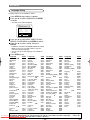
Language
Code
A-B
Abkhazian
Afar
Afrikaans
Albanian
Amharic
Arabic
Armenian
Assamese
Aymara
Azerbaijani
Bashkir
Basque
Bengali;Bangla
Bhutani
Bihari
Bislama
Breton
Bulgarian
Burmese
Byelorussian
C-E
Cambodian
Catalan
Chinese [CHI]
Corsican
Croatian
Czech
Danish [DAN]
Dutch [DUT]
English [ENG]
Esperanto
Estonian
F-H
Faroese
Fiji
Finnish [FIN]
4748
4747
4752
6563
4759
4764
5471
4765
4771
4772
4847
5167
4860
5072
4854
4855
4864
4853
5971
4851
5759
4947
7254
4961
5464
4965
5047
6058
5160
5161
5166
5261
5256
5255
Language
French [FRE]
Frisian
Galician
Georgian
German [GER]
Greek [GRE]
Greenlandic
Guarani
Gujarati
Hausa
Hebrew
Hindi
Hungarian [HUN]
I-K
Icelandic [ICE]
Indonesian
Interlingua
Interlingue
Inupiak
Irish [IRI]
Italian [ITA]
Japanese [JPN]
Javanese
Kannada
Kashmiri
Kazakh
Kinyarwanda
Kirghiz
Kirundi
Korean [KOR]
Kurdish
L-N
Laothian
Latin
Latvian;Lettish
Lingala
Lithuanian
Code
5264
5271
5358
5747
5051
5158
5758
5360
5367
5447
5569
5455
5467
5565
5560
5547
5551
5557
5347
5566
5647
5669
5760
5765
5757
6469
5771
6460
5761
5767
5861
5847
5868
5860
5866
Language
Macedonian
Malagasy
Malay
Malayalam
Maltese
Maori
Marathi
Moldavian
Mongolian
Nauru
Nepali
Norwegian [NOR]
O-R
Occitan
Oriya
Oromo(Afan)
Panjabi
Pashto;Pushto
Persian
Polish
Portuguese [POR]
Quechua
Rhaeto-Romance
Romanian [RUM]
Russian [RUS]
S
Samoan
Sangho
Sanskrit
Scots Gaelic
Serbian
Serbo-Croatian
Sesotho
Setswana
Shona
Sindhi
Singhalese
Code
5957
5953
5965
5958
5966
5955
5964
5961
5960
6047
6051
6061
6149
6164
6159
6247
6265
5247
6258
6266
6367
6459
6461
6467
6559
6553
6547
5350
6564
6554
6566
6660
6560
6550
6555
Language
Siswat
Slovak
Slovenian
Somali
Spanish [SPA]
Sundanese
Swahili
Swedish [SWE]
T
Tagalog
Tajik
Tamil
Tatar
Telugu
Thai
Tibetan
Tigrinya
Tonga
Tsonga
Turkish [TUR]
Turkmen
Twi
U-Z
Ukrainian
Urdu
Uzbek
Vietnamese
Volapuk
Welsh
Wolof
Xhosa
Yiddish
Yoruba
Zulu
Code
6565
6557
6558
6561
5165
6567
6569
6568
6658
6653
6647
6666
6651
6654
4861
6655
6661
6665
6664
6657
6669
6757
6764
6772
6855
6861
4971
6961
7054
5655
7161
7267
If you choose a Language that has a 3 letter language code, the code will be displayed everytime you change
the Audio or Subtitle language setting on pages 15 and 16. If you choose any other languages, ‘---’ will be disDownloaded From Disc-Player.com Sharp Manuals
played instead. (3 letter language code is written in bracket.)
TROUBLESHOOTING
The following conditions do not always denote trouble. Therefore, perform the checks described below before calling for
service. If the problem cannot be corrected by the use of this guide, remove the main plugs from the wall socket, and contact the dealer or supplier from whom the unit was purchased in order to obtain service. Where this is not possible please
visit our web-site www.sharp.co.uk/customersupport.
Customers without Internet access may telephone 08705 274277 during office hours (or (01) 6760648 if telephoning from
Ireland),
Certain replacement parts and accessories may be obtained from our main parts distributor, who can be contacted on the
following numbers:
WILLOW VALE ELECTRONICS LTD.:
0121 766 5414
In the unlikely event of this equipment requiring repair during the guarantee period, you will need to provide proof of the
date of purchase to the repairing company. Please keep your invoice or receipt, which is supplied at the time of purchase.
WARNING
Under no circumstances should you try to repair the system yourself, as this will invalidate the warranty. Do not open the
system as there is a risk of electric shock.
If a fault occurs, first check the points listed below before taking the system for repair.
Problem
Solution
No power
No picture
–Check if the AC power cord is properly connected.
–Check if the TV is switched on.
–Check the video connection
–Sometimes a small amount of picture distortion may appear .This is
not a malfunction.
–Connect DVD player directly to the TV.
–Make sure the disc is compatible with the DVD player.
–Adjust the volume.
–Check that the speakers are connected correctly.
–Check the digital connections.
–Check if the audio format of the selected audio language matches
your receiver capabilities.
–Use a DIGITAL AUDIO OUT jack when outputting the DTS audio.
–Check that the SCART cable is connected to the correct device
(See Connecting to a TV)
–Check the disc for fingerprints/scratches and
clean with a soft cloth wiping from centre to edge.
–Ensure the disc label is facing up.
–Check if the disc is defective by trying another disc.
–Reset the player by switching the player off, then on
again.
–Aim the remote control directly at the sensor on
the front of the player.
–Reduce the distance to the player.
–Replace the batteries in the remote control.
–Re-insert the batteries with their polarities (+/– signs) as indicated.
–To completely reset the player, unplug the AC
cord from the AC outlet for 5-10 seconds.
–Operations may not be permitted by the disc.
Refer to the instructions of the disc.
–Use a commonly available cleaning CD/DVD to
clean the lens before sending the DVD player for repair.
Distorted picture
Completely distorted picture or
black/white picture with DVD
No sound or distorted sound
No audio at digital output
No DTS audio at analog output
No sound and picture
Picture freezes momentarily
during playback
Disc can’t be played
No return to start-up screen when
disc is removed
The player does not respond to
the remote control
Buttons do not work or player stops
responding
Player does not respond to some
operating commands during playback.
DVD player cannot read
CDs/DVDs
If you are unable to remedy a problem by following these hints, consult your dealer or service centre.
Downloaded From Disc-Player.com Sharp Manuals
SPECIFICATIONS
PRODUCT TYPE
DVD Player
DISCS
DVD video
Audio CD
CD-R
CD-RW
CONNECTIONS
AUDIO/VIDEO
21 pin scart socket x 1
Video output x 1
S-Video output
Mini DIN 4-pin jack (75 ohm)
Analog audio output
Two RCA connectors (one left
channel, one right channel)
2 Vrms (47 kilo-ohm)
Coaxial digital audio output One pin jack, 500mVpp (75 ohm)
OUTPUT SIGNAL FORMAT
PAL colour
POWER SOURCE
220-240 V ~ +/- 10%, 50 Hz +/- 0.5%
FREQUENCY RESPONSE
DVD (linear sound) : 20 Hz to 20 kHz (sample rate: 48 kHz)
20 Hz to 44 kHz (sample rate: 96 kHz)
CD :
20 Hz to 20 kHz
POWER CONSUMPTION
14 W (standby: 2.8W)
SIGNAL-TO-NOISE RATIO (S/N RATIO)
CD :
110 dB (JEITA)
DYNAMIC RANGE
DVD (linear sound) : 95 dB
CD :
94 dB (JEITA)
TOTAL DISTORTION FACTOR
CD :
0.005% (JEITA)
WOW AND FLUTTER
Below the measurement limitation (+/-0.001% W PEAK)
(JEITA)
OPERATING TEMPERATURE
5°C to 40°C
DIMENSIONS
W 435mm
H 75mm
D 211mm
WEIGHT
Approx 2.1kg
• Designs and specifications are subject to change
without notice.
MAINTENANCE
Cleaning the Cabinet
• Use a soft cloth slightly moistened with a mild detergent solution. Do not use a solution containing alcohol, spirits,
ammonia or abrasives.
Cleaning Discs
• When a disc becomes dirty, clean it with a cleaning cloth. Wipe the disc from the centre out. Do not wipe in a circular
motion.
• Do not use solvents such as benzine, thinner, commercially available cleaners, or antistatic spray intended for analogue
records.
Cleaning the disc lens
• After prolonged use, dirt or dust may accumulate at the disc lens. To ensure good playback quality, clean the disc lens
with CD Lens Cleaner or any commercially available cleaner. Follow the instructions supplied with the cleaner.
Make your contribution to the environment!!!
• Spent batteries do not belong in the dustbin.
• You can dispose of them at a collection point for spent batteries or special waste.
Contact your council for details.
Downloaded From Disc-Player.com Sharp Manuals
TERMS OF GUARANTEE
TERMS OF GUARANTEE
Sharp Electronics (UK) Ltd. (“Sharp”) guarantees to provide for the repair, or at its option the
replacement, of this product subject to the conditions listed below:1. This guarantee shall only apply to faults which are due to inferior workmanship or materials. It does
not cover faults or damage caused by accident, misuse, fair wear and tear, neglect, tampering
with the product, or repair other than by a Service Facility appointed by Sharp.
2. As this product is intended for private domestic use only, the guarantee will not apply if the product
is used in the course of a business, trade or profession.
3. To benefit from this guarantee, any fault which occurs must be notified to Sharp, or its appointed
Service Facility within one year from the date this product was purchased. Proof of purchase must
be provided.
4. The guarantee does not cover carriage costs.
5. In the unlikely event of this product requiring repair, please contact the supplier from whom it was
purchased. Where this is not possible, please contact the Sharp Customer Information Centre on
the telephone number given below.
6. No person has any authority to vary the terms or conditions of this guarantee.
7. This guarantee is offered as an additional benefit to your statutory rights, and does not affect these
rights in any way.
If you have any difficulty operating this product, or would like information on other Sharp products,
please telephone the Sharp Customer Information Centre on the number given below.
Sharp Customer Information Centre - Telephone 08705 274277
(or (01) 676 0648 if telephoning from Ireland)
0201
Downloaded From Disc-Player.com Sharp Manuals
MEMO
Downloaded From Disc-Player.com Sharp Manuals
SHARP CORPORATION
Osaka, Japan
SHARP ELECTRONICS (U.K.) LTD.
Sharp house, Thorp Road, Newton Heath
Manchester M40 5BE
Downloaded From Disc-Player.com Sharp Manuals
0VMN03256A