1
Welcome to Telstra Business Broadband
Equipment – Cisco® 877W and 1812 1 Router
You have purchased Telstra Business Broadband Equipment Extras – Cisco® Customer
premises equipment. The Cisco user guide will help you to configure and setup your
new router, so you can get more out of your Telstra Business Broadband service.
1. A bout this User Guide – about Security Device Manager (SDM)
03
2. Things to note before you start
03
3. Minimum Systems Requirements
04
4. Security Device Manager
06
5. Ways to access the SDM off CD or GUI
06
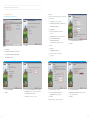
6. Installing the Security Device Manager (SDM version 2.5)
07
7. Launching SDM
09
8. Installing Cisco VPN Client
11
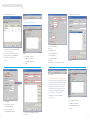
9. Configuring your Router using SDM
21
10. commonly requested features for Business Broadband Equipment Extras – Cisco CPE
23
11. “How to” for each feature
25
12. Glossary
37
13. Need additional help?
37
ADSL Customers
If you have purchased our Telstra
Broadband Equipment Extras with Cisco
ADSL Customer Premises Equipment (CPE),
your included router is the Cisco 877W–K9.
It has wireless capability.
Ethernet customers
The Cisco 1812–K9 router does not have built-in wireless
capability. If you require wireless capability, please
consult your IT specialist or contact 1800 655 744 for
information on our range of IT support options,
available through Telstra Business Support Extras .
02