1
Software Manual
• Transfer: To view the duration of the current connection, uploaded/downloaded
speed and data of the current connection
• Statistics: To view the last reset time, daily/monthly/yearly uploaded and
downloaded data
Note:
The statistical data of the traffic is only for your reference. The actual traffic
information is accounted on the basis of the traffic data collected by the operator.
Resetting the Statistics Information
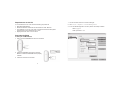
To reset the statistics information, do as follows:
1. In the navigation tree, right-click a tab
2. Choose Reset Statistics
3. In the Confirm dialog box, click Yes
4